Category: Products and Projects

  • The AI Governance Checklist for IT Leaders in 2026 Before Your Next Deployment

    The AI Governance Checklist for IT Leaders in 2026 Before Your Next Deployment

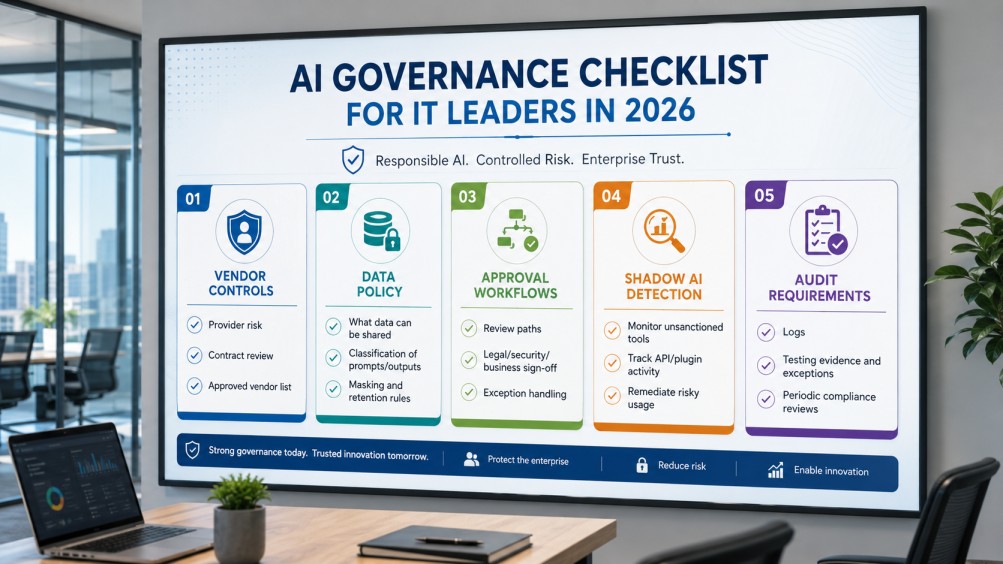
    Most AI governance policies fail within six months because they focus on principles instead of practical controls. By the time you discover shadow AI usage or a vendor compliance gap, you’re managing a crisis instead of preventing one. The gap isn’t philosophical. It’s operational. Your policy document says “responsible AI use,” but nobody defined what happens when an employee pastes customer data into ChatGPT or a vendor refuses to log the prompts your compliance team will need during an audit. This AI governance checklist for IT leaders in 2026 covers the specific controls that prevent those problems before they require incident response. You’ll know what to verify before approving internal AI use, what contract terms stop vendor problems at signing, how to detect shadow AI without dedicated tooling, and what audit trail your first compliance review will demand.

    Internal Use Controls Before the First Model Goes Live

    Run through these five items before you approve general employee access to any AI tool. Missing even one creates a compliance gap your audit team will find six months later.

    Acceptable use policy specific to AI
    Your existing acceptable use policy doesn’t cover generative AI. You need explicit language defining what constitutes approved use, prohibited data types, and consequences. Don’t repurpose your social media policy.

    Data classification training refresher
    Employees need to know which data types they can’t submit to AI tools. If your data classification system hasn’t been reviewed in 18 months, half your team won’t remember what qualifies as sensitive.

    Approved tool list published and enforced
    Saying “use approved tools only” without publishing the list guarantees shadow AI. Name the specific tools, include version numbers if relevant, and update it quarterly.

    Incident reporting path for AI-related concerns
    Your team needs to know where to report an accidental data exposure or a problematic AI output. If the path isn’t clear, they won’t report until the problem escalates.

    Access tied to training completion
    Make AI tool access conditional on completing a 15-minute training module. It’s not foolproof, but it eliminates the “I didn’t know” defense and creates an audit trail proving due diligence.

    Vendor AI Controls That Stop Problems at Contract Stage

    The vendor will not volunteer these terms. You need to require them before the contract is signed, because retrofitting compliance language after deployment costs six figures in legal fees and re-negotiation leverage you no longer have.

    Your vendor contract must specify where your data goes, how long it’s retained, whether it’s used for model training, and who can access it. Most vendor agreements are silent on training data usage or bury consent in a clause your legal team will object to nine months later. Get written confirmation that your inputs and outputs are excluded from training datasets. Require the vendor to specify data residency if you operate under jurisdiction-specific privacy laws.

    The second gap: audit rights and incident notification. Your contract needs explicit language granting you the right to audit AI usage logs and requiring the vendor to notify you within 24 hours of a data incident involving your inputs. Vendor SLAs typically cover uptime, not compliance incidents.

    What to require in every vendor AI agreement:

    • Explicit prohibition on using your data for model training or improvement
    • Data residency specification that matches your regulatory requirements
    • Audit rights covering access logs, prompt history, and data handling
    • 24-hour incident notification for breaches involving your data

    RED FLAG: VENDOR CONTRACT GAP

    The liability clause doesn’t cover AI-generated outputs.

    Standard software liability clauses cover defects and downtime. They don’t cover the risk of the AI generating content that violates copyright, defames someone, or breaches a regulation. If your contract is silent on output liability, you’re assuming all downstream risk from anything the model produces using your data. Require explicit vendor liability for outputs that violate law or regulation when used as directed.


    Data Governance Items Your Legal Team Needs Documented

    Your existing data governance policy needs AI-specific amendments. The controls that worked for traditional software don’t translate cleanly when employees can submit unstructured data to a model and receive outputs you can’t predict in advance.

    Sensitive data submission prohibition
    Define which data classifications are prohibited from AI tool input. If “confidential” and “restricted” are banned but “internal use” is allowed, document it explicitly and train to it.

    Output handling requirements
    AI-generated content needs a classification rule. Does it inherit the classification of the input data? Does it default to a specific tier? Your data handling policy must cover outputs, or you’ll discover inconsistent practices during your first audit.

    Cross-border data flow documentation
    If your vendor’s AI processes data outside your operating jurisdiction, document it. Most privacy regulations require notice and sometimes consent when data crosses borders. API calls to a U.S.-based LLM from your EU office trigger this requirement.

    Third-party data restrictions
    If you handle customer or partner data under contractual terms, verify those terms permit AI processing. Your customer agreement may prohibit third-party processing or require specific safeguards that your AI vendor doesn’t meet.

    Retention and deletion alignment
    Your AI vendor’s data retention period must align with your own data retention and deletion policies. If you’re required to delete customer data on request, but your AI vendor retains prompts for two years, you’re out of compliance the moment a deletion request arrives.

    Approval Workflows That Don’t Slow Down Every Request

    A governance process that requires CIO sign-off for every AI use case will be bypassed within a month. You need tiered approval based on actual risk, not bureaucratic caution. The goal is to make low-risk use fast and high-risk use visible.

    Tier your approval structure into three levels. Low-risk use cases operate under general authorization with no per-use approval. An employee using an approved tool on non-sensitive data for internal work doesn’t need a ticket. Medium-risk use cases require department head approval and a brief risk assessment. Processing internal data that’s confidential but not regulated, or generating content for external use, fits here. High-risk use cases require cross-functional review involving IT, legal, and compliance before any deployment.

    The risk factors that determine tier: data sensitivity, external visibility of outputs, automated decision-making, and whether the use case involves personal data under privacy regulation. If any single factor is high, the entire use case is high-risk. Don’t average risk scores.

    Approval tiers that work in practice:

    • General authorization: Approved tools, non-sensitive data, internal use only, human review of all outputs
    • Department head approval: Confidential data, external-facing outputs, or workflow automation with human oversight
    • Cross-functional review: Personal data under GDPR/CCPA, fully automated decisions, or any use case that could create legal or regulatory exposure
    • Ongoing monitoring requirement: All medium and high-risk use cases require quarterly usage review to verify they’re operating within approved parameters
    • Emergency provisional approval: IT head can grant 30-day provisional access for urgent business need, but full review must complete before the provisional period ends

    Shadow AI Detection Before It Becomes a Compliance Problem

    Shadow AI happens when employees adopt unapproved tools because your approved options are too slow, too restrictive, or non-existent. You won’t eliminate it entirely, but you can detect it early enough to remediate instead of investigate.

    Unusual outbound traffic patterns to known AI services
    Your firewall logs show traffic to OpenAI, Anthropic, Google AI, and similar domains. Baseline normal traffic, then flag anomalies. A 300% spike in one department over two weeks is a signal.

    Expense report line items for AI subscriptions
    Employees expense ChatGPT Plus, Jasper, or Midjourney subscriptions. Your finance team sees these. Flag any AI-related expense that isn’t tied to an approved tool list.

    Browser extension audits
    AI writing assistants and productivity tools run as browser extensions. Your endpoint management platform can inventory installed extensions. Run quarterly audits and cross-reference against approved tools.

    Department-level data export volume changes
    If a department’s data export volume doubles without a project explanation, someone may be feeding data to an external tool. Correlate export spikes with known AI adoption timelines.

    Employee surveys that ask directly
    Twice a year, survey employees about which tools they use to get work done. Make it anonymous, frame it as process improvement, and you’ll get honest answers. The goal is visibility, not punishment, and employees will tell you if you ask correctly.


    RED FLAG: SHADOW AI USAGE PATTERN

    Approved tools exist, but shadow AI usage is growing anyway.

    Your detection system works. You’re finding unapproved tools in regular use. But employees keep adopting new ones despite having approved alternatives. That’s not a compliance problem. That’s a signal your approved tools are too restrictive, too slow, or missing critical capabilities. If shadow AI persists after you’ve published an approved list and trained everyone, the problem is your tool selection, not your users. Fix the tool gap before you tighten enforcement, or you’ll drive usage further underground and lose visibility entirely.


    Model Governance When You’re Training or Fine-Tuning

    Most teams don’t need model governance yet. If you’re only using vendor APIs and pre-built models, skip this section. Model governance becomes mandatory when you start training models on your own data, fine-tuning vendor models with proprietary datasets, or deploying models that make decisions without human review.

    The threshold: if the model’s behavior can change based on data you control, you need model governance. That includes fine-tuning a vendor LLM on your support tickets, retraining an open-source model on your transaction history, or adjusting weights in a classifier you’re running internally. Once you cross that line, you’re responsible for model behavior in ways you aren’t when you’re just calling someone else’s API.

    Model governance requires tracking which data went into training, who approved the training run, what the model’s intended use case is, and how you’ll monitor for drift or bias after deployment. Document model versioning so you can reproduce outputs or roll back to a previous version when something goes wrong. Establish a review cadence: models trained on your data need quarterly performance reviews at minimum, more often if they’re making automated decisions that affect customers or employees.

    Model governance requirements once you cross the training threshold:

    • Training data provenance documentation: source, date range, cleaning steps, any exclusions
    • Model card or equivalent: intended use case, known limitations, performance benchmarks, and decisions the model should not make
    • Version control for model artifacts: every deployed version tagged, stored, and reproducible
    • Monitoring plan for drift and fairness: defined metrics, review cadence, and escalation path if metrics degrade

    AI Audit Trail Requirements Before Your First External Review

    Your first compliance audit will ask for logs proving who used AI on what data and when. If you can’t produce that documentation, the audit fails regardless of whether your actual usage was compliant. Audit trail requirements aren’t optional once you’re operating under privacy regulation, industry-specific compliance frameworks, or contractual obligations to customers.

    The table below defines what your AI audit trail must include, why each item matters for compliance, and the red flag that signals your vendor or internal system won’t meet the requirement when you need it.

    Checklist Item Why It Matters Red Flag If Missing
    User prompt logging Required for most AI compliance frameworks and breach investigation Vendor claims prompts are ephemeral or not accessible
    Model version tracking Reproducing outputs or rolling back requires knowing which model version ran Vendor API doesn’t expose model version in response metadata
    Access audit trail Determines who used AI on what data and when Logging is user-configurable instead of mandatory
    Data lineage for training Proves training data provenance for regulatory review Vendor won’t document data sources in contract
    Retention policy alignment AI logs must match your existing data retention schedule Default retention is shorter than your compliance requirement

    The biggest audit trail failure happens when your vendor’s logging doesn’t meet your retention requirements. Standard SaaS logging often retains data for 90 days, but privacy regulations typically require 12 to 24 months. If your vendor’s logs expire before your retention policy allows, you can’t produce documentation during an audit that covers a date range more than 90 days old. Verify retention alignment before signing, because extending vendor log retention after the fact usually requires an enterprise tier upgrade and costs more than negotiating it into the original contract.

    Your internal systems need logging too. If employees access AI through an internal portal or wrapper, that system must log user actions, timestamps, and data accessed. Treat AI logging with the same rigor you apply to database access logs or privileged account activity. The standard is the same: every action that touches sensitive data or produces an output with compliance implications must be logged, tamper-evident, and retained per policy.

    Conclusion

    The AI governance checklist for IT leaders in 2026 works when it stops problems at contract signing, policy publication, and first deployment, not after the compliance team finds a gap nine months later. If you’re operating under privacy regulation, handling customer data under contract, or facing an audit in the next 12 months, your approval workflows and vendor contracts are the highest-priority items on this list. If shadow AI is already widespread, your detection plan needs to run within the next 30 days, not next quarter. Before your next vendor call or internal AI pilot, verify every item in Section 2 and Section 7. Those are the gaps that create liability, and they’re the easiest to close before you sign anything.

    Related reading

  • Auth0 vs Okta for SaaS: Which IAM Platform Fits Modern Applications

    Auth0 vs Okta for SaaS: Which IAM Platform Fits Modern Applications

    Choosing between Auth0 vs Okta for SaaS often feels like walking into a dealership where both salespeople swear their car can win Formula 1. The brochures look identical. Authentication, SSO, federation, MFA. Check, check, check. Everything looks enterprise-ready and battle-tested.

    Then the engineering team actually tries to build the product.

    This is where the polite marketing symmetry starts to fall apart. One platform was designed with developers in mind. APIs first, authentication flows you can bend, and enough flexibility to survive the strange login logic SaaS products inevitably accumulate. The other grew up solving a very different problem: keeping corporate employees from accidentally accessing things they should not.

    That difference matters more than most buyers expect.

    SaaS companies frequently assume identity platforms are interchangeable infrastructure. Something you plug in and forget. Reality is messier. Login flows evolve, customers demand federation, enterprise deals bring strange SAML requirements, and suddenly, authentication becomes one of the most sensitive systems in the entire product.

    By that point, switching identity platforms is about as fun as replacing the engine of a moving car.

    This is why the Auth0 vs Okta for SaaS decision deserves more scrutiny than most teams give it. And once the architecture differences become clear, the direction most product teams take starts to make a lot more sense.

    Auth0 vs Okta for SaaS: The Core Identity Architecture Difference

    In the Auth0 vs Okta for SaaS discussion, the real difference is architectural.

    Auth0 was built for product authentication. Applications call identity through APIs. Developers control login flows, tokens, and authorization logic. Authentication becomes part of the application stack.

    Okta was built for workforce identity. The platform centralizes user access across corporate systems. Administrators define policies, manage directories, and control application access from a central console.

    This difference becomes visible quickly in SaaS environments.

    SaaS products rarely have simple login requirements. Tenants, organizations, partners, customer SSO, and role models appear early. Authentication logic evolves as the product grows.

    Auth0 assumes that flexibility is required. Developers can customize authentication flows, integrate identity into application logic, and extend behavior using rules or actions.

    Okta assumes identity is centrally governed. Policies, directories, and administrative controls dominate the architecture. This model works well for enterprise workforce access, but is less comfortable when authentication behavior must evolve with product features.

    The implication is practical.

    If identity is embedded in the SaaS product itself, Auth0 aligns more naturally with that architecture.

    If identity is primarily a centralized control system for enterprise applications, Okta fits better.

    Also Read: Best IAM Solutions for Mid-Size Enterprise: What Actually Works After 500 Employees

    Auth0 vs Okta Feature Comparison for SaaS Platforms

    Most Auth0 vs Okta for SaaS comparisons obsess over features. 

    That is the wrong lens. 

    Both platforms can authenticate users. 

    The real decision appears when identity becomes part of the product architecture.

    Operational AreaAuth0 RealityOkta Reality
    Initial implementationFast for developersSlower, more configuration-driven
    Product authentication designVery flexibleOften constrained by the policy model
    Enterprise customer SSOSupported but configuration-heavyVery strong and mature
    Identity governanceLimited without extra toolingBuilt into the enterprise model
    Pricing scaling pressureMAU growth increases the cost quicklyLicensing and add-ons increase cost
    Debugging authentication issuesOften inside custom rules and actionsUsually policy or directory related
    Admin vs developer ownershipEngineering drivenIT/security driven
    Platform complexity over timeCustom logic accumulatesAdministrative policy sprawl

    Identity platforms rarely fail because they lack features. They become painful when operational complexity starts building up. 

    For SaaS companies, pressure often appears in authentication customization and MAU-driven pricing. 

    For enterprise environments, the friction usually appears in policy management and directory integration.

    Auth0 vs Okta Pricing: Where Costs Start Escalating

    Auth0 and Okta become expensive in different ways.

    Auth0 cost grows with your product. Pricing is usually tied to Monthly Active Users. That sounds reasonable until the SaaS platform scales.

    1. 10K users → fine
    2. 100K users → noticeable
    3. 1M users → identity becomes a real infrastructure cost

    Additional pressure appears from enterprise features. SSO connections, advanced security options, and higher log limits often sit behind higher pricing tiers. As enterprise customers arrive, those upgrades become unavoidable.

    Okta pricing behaves differently. It follows an enterprise licensing model. The cost usually comes from seat licenses and add-on modules rather than raw usage.

    Typical expansion points include:

    • advanced MFA
    • lifecycle management
    • identity governance
    • premium support tiers

    For workforce identity deployments, this structure works well. For SaaS customer identity, it can feel heavy.

    The pattern most SaaS companies see is simple.

    Auth0 becomes expensive when users scale.

    Okta becomes expensive when enterprise features accumulate.

    Also read: Azure AD Pricing vs Okta: The IAM Cost Model Most Buyers Miscalculate

    Developer Control vs Enterprise Governance: Where the Platforms Diverge

    The most important difference between Auth0 and Okta appears in who controls identity behavior.

    Auth0 puts developers in charge. Authentication flows, token logic, and login behavior are controlled through APIs and application logic. Engineers can shape how identity behaves inside the product.

    This matters because SaaS authentication rarely stays simple.

    Products add:

    • Organization switching
    • Tenant-level roles
    • Partner access
    • Enterprise federation
    • Custom onboarding flows

    Auth0 allows these behaviors to be implemented directly inside the application.

    Okta assumes identity should be governed centrally. 

    Policies, access rules, and integrations are managed through administrative configuration. This works extremely well in corporate environments where IT teams control application access.

    The tension appears when identity becomes a product feature.

    Product teams prefer identity systems that behave like developer tools. Enterprise security teams prefer identity systems that behave like policy engines.

    Auth0 aligns with developer ownership.

    Okta aligns with administrative governance.

    That difference is the reason SaaS platforms usually lean toward Auth0, while large enterprises managing workforce identity tend to standardize on Okta.

    What Breaks First at Scale

    Identity systems rarely fail because of missing features. The real pressure appears when SaaS products start selling to enterprise customers.

    The first breakpoint is usually enterprise SSO.

    SaaS platforms begin with simple authentication. Things change when enterprise buyers demand SAML federation with their corporate identity provider. 

    Each enterprise tenant introduces a new identity connection that must be configured, tested, and maintained.

    Auth0 supports this well, but managing many enterprise connections becomes operational work.

    Okta handles federation more naturally because enterprise directory integration is its original design focus.

    The second breakpoint appears when authorization models grow.

    SaaS platforms eventually add organizations, tenant-level roles, partner access, and admin layers. When identity systems are not designed around application authorization, the logic spreads into application code.

    The third breakpoint is enterprise security scrutiny.

    Large customers ask about governance, audit trails, and policy enforcement during procurement. Platforms designed for enterprise identity answer those questions more comfortably.

    The practical implication is simple.

    Auth0 scales well for product authentication.

    Okta scales better for enterprise identity governance.

    Procurement and Contract Reality Enterprise Buyers Encounter

    Identity vendors rarely lose deals during technical evaluation. The real surprises appear in procurement.

    Auth0 procurement pattern

    • Pricing tied to Monthly Active Users
    • Costs rise automatically as your product user base grows
    • Enterprise SSO often pushes you into higher pricing tiers
    • Log retention and security features may require upgrades
    • Early-stage pricing looks inexpensive because usage is still small

    Okta procurement pattern

    • Pricing tied to licensed identities or seats
    • Enterprise modules are frequently sold separately
    • Lifecycle management, governance, and advanced MFA often become add-ons
    • Premium support tiers are pushed for large deployments
    • Multi-year contracts are required for meaningful discounts

    When Auth0 Is the Right Identity Platform for SaaS Products

    Auth0 is the better choice when identity sits inside the product, not outside it.

    Choose Auth0 if your SaaS business needs:

    • customer login as a core product feature
    • flexible signup and onboarding flows
    • tenant-aware authentication
    • custom authorization behavior
    • developer ownership of identity logic
    • faster iteration on login and access flows

    It fits especially well when the product team expects authentication to keep changing. That is normal in SaaS. New customer types arrive. 

    Enterprise buyers ask for SSO. 

    Partner access appears. 

    Permission models grow uglier over time.

    Auth0 handles that reality better because it behaves like a product platform.

    It is also the stronger fit when engineering, not central IT, owns the identity roadmap. Developers can build around it, extend it, and change behavior without forcing every decision through an admin-heavy control model.

    The practical rule is simple.

    If identity is part of the user experience, Auth0 usually makes more sense.

    Alternatives to Both Auth0 and Okta

    If neither Auth0 nor Okta fits, the gap is usually one of four things: enterprise readiness, SaaS admin experience, cost control, or implementation speed.

    WorkOS enters the picture when your sales team keeps hearing the same enterprise asks: SSO, directory sync, audit logs, maybe SCIM, and the product team does not want to spend the next quarter building plumbing for one procurement checklist after another. 

    It is less of a general identity platform and more of an enterprise-deal unblocking layer.

    Frontegg is a different animal. 

    This is for SaaS teams that do not just need authentication. They need the surrounding mess too: tenant-aware user management, admin controls, roles, permissions, customer-facing account administration.

    It sits closer to the product than Okta does, and feels less like a pure auth engine than Auth0.

    SuperTokens is what shows up when the pricing conversation starts to irritate people.

    Some teams do not want identity spend rising in lockstep with growth, and they are willing to take on more engineering ownership in exchange. That is the bargain here. More control, less vendor dependence, more work.

    Clerk is what people choose when they want to ship, not hold three architecture workshops about identity. 

    The developer experience is clean, fast, and modern. But once the conversation turns toward heavy enterprise governance, it stops looking like the obvious answer.

    Conclusion

    For SaaS products, this is usually not a close fight. Okta is stronger when identity is treated as an enterprise control problem. Auth0 is stronger when identity sits inside the product and needs to move with engineering. That is why most SaaS teams lean toward Auth0. The better question is not which vendor has more features. It is which one matches the kind of pain your business is actually going to have.

  • Slack vs Microsoft Teams: Where Control, Compliance and Cost Collide

    Slack vs Microsoft Teams: Where Control, Compliance and Cost Collide

    Most collaboration decisions are sold as productivity upgrades. In reality, they behave like plumbing. Invisible when aligned, catastrophic when misrouted. Nobody gets promoted for picking the right pipes. But when something leaks, the CIO and security lead are suddenly in the room explaining why guest access, retention, and licensing spiraled out of control.

    Slack vs Microsoft Teams looks like a chat debate. It is not. It is a control architecture decision with cost consequences that compound quietly. One model centralizes identity and policy inside a dominant enterprise stack. The other optimizes flexibility across a wider SaaS surface. Both introduce governance friction. Both can create duplicate spend.

    What teams usually discover is that the tool choice is easy. The enforcement model is not. This is a governance and cost breakdown. 

    Where do control fractures occur first? 

    Where does bundling distort decisions? 

    And at what point standardizing either platform is the wrong move entirely?

    Slack vs Microsoft Teams is a Governance Decision Disguised as a Chat Comparison

    Most teams evaluate collaboration tools by adoption speed and interface comfort. Senior IT inherits the enforcement model. That is the inversion that creates long-term friction.

    In practice, the first question is not which interface users prefer. It is where identity, policy, and data controls anchor. 

    Microsoft Teams pulls collaboration inside the Microsoft 365 control plane. 

    Slack operates as a layer across multiple systems. 

    One centralizes governance. The other distributes it. 

    The architectural posture is different before a single message is sent.

    What breaks first depends on that posture. In a Microsoft-heavy environment, introducing Slack creates duplicate policy surfaces and additional audit paths. 

    In a heterogeneous SaaS environment, forcing Teams can create shadow tooling because integration friction shows up immediately in product and engineering workflows.

    The decisive question is simple:
    Are you optimizing for consolidated control or cross-stack flexibility?

    If governance consolidation is strategic, the answer leans one way. If tool diversity drives business velocity, it leans the other way. Anything in between usually ends in dual-tool sprawl.

    Identity and External Access: Keep It in One System or Manage Two

    If your company runs everything on Microsoft 365 and Entra ID, Teams keeps chat, meetings, and files inside the same system that already controls email and access. One admin model. One audit trail. One place to shut someone off.

    Slack works fine with SSO. But it is still another system to manage. Another place to check when someone leaves. Another place where guest access can expand quietly.

    What breaks first in real environments:

    • Someone leaves, and Slack access stays active.
    • A contractor is added to multiple shared channels and no one reviews it.
    • Security needs an access report and has to pull data from two systems.
    • Finance realizes licenses exist in both platforms.

    If your identity discipline is weak, adding another collaboration platform makes it worse.

    If your identity discipline is strong and automated, the risk difference narrows.

    Decision rule:

    If you want fewer moving parts, keep collaboration inside your primary identity stack.

    If you are comfortable governing multiple SaaS systems, Slack does not introduce new concepts, only another surface.

    Simple choice. Fewer systems or more flexibility.

    Data Governance Under Pressure: Retention, eDiscovery, and DLP Reality

    Below is the governance comparison that actually matters in audits and regulatory reviews.

    AreaMicrosoft TeamsSlack
    Retention policiesCentralized within Microsoft 365 retention and Purview policiesConfigurable retention policies per workspace or Enterprise Grid
    eDiscoveryIntegrated with Microsoft 365 eDiscovery tools across mail, files, and TeamsAvailable in Enterprise plans with separate admin workflows
    DLP enforcementNative DLP policies extend across email, SharePoint, OneDrive, and TeamsDLP is available but requires configuration within the Slack environment
    Legal holdUnified legal hold across Microsoft 365 workloadsLegal hold is supported in Enterprise tiers
    Data residencyGoverned within Microsoft 365 regional controlsAvailable depending on plan and configuration

    Interpretation:

    If your compliance model is built around Microsoft 365, Teams keeps retention, eDiscovery, and DLP inside one governance system. Slack can meet requirements, but it runs as a parallel compliance track. The risk is not missing features. It is configuration drift and audit complexity.

    License Bundling vs Operational Drag: The Real Cost Equation

    Per-user pricing is the wrong place to start. The real cost variable is duplication.

    Teams Economics

    Pros:

    • Already bundled in many Microsoft 365 E3 or E5 agreements
    • No additional vendor contract in Microsoft-heavy environments
    • Shared compliance and admin tooling reduces overlap

    Cons:

    • Forced adoption can reduce productivity in engineering-heavy teams
    • Migration from Slack introduces a change management cost
    • Parallel usage often continues unofficially

    Slack Economics

    Pros:

    • Strong adoption in product and engineering functions
    • No dependency on Microsoft licensing strategy
    • Works cleanly in heterogeneous SaaS stacks

    Cons:

    • Incremental license spend on top of Microsoft 365
    • Separate admin, compliance, and support overhead
    • Dual-platform reality often emerges in large enterprises

    In practice, what finance eventually flags is not the monthly rate. It is overlapping licenses and support burden.

    If both platforms exist in different departments and no one owns a consolidation strategy, cost creep is already happening.

    At 500+ Users, Admin Overhead Becomes the Deciding Factor

    At 500 users, collaboration stops being a tool and starts being work for IT.

    Not strategy work. Maintenance work.

    This is where you begin to see the real cost of your decision.

    Someone joins. Someone leaves. Someone changes teams – every week. If access removal takes even one extra manual step, you feel it. Not in theory. In tickets.

    If you are already running Microsoft 365 cleanly, Teams usually slides in without adding a second governance model. Same groups. Same identity logic. Same audit expectations. That matters more than features.

    If Slack is layered on top in that environment, you now have two places to check when someone leaves. Two places to verify guest access. Two places to configure retention. That does not sound dramatic. It becomes dramatic at scale.

    Now flip it.

    If product and engineering teams are deeply wired into Slack, and automation around it is mature, forcing Teams rarely reduces complexity. It just shifts it. You get duplicate usage. Informal Slack workspaces reappear. Adoption becomes performative.

    At 500+ users, the failure mode is not a security breach. It is operational drag.

    Admin teams spend more time reconciling:

    • Who has access where
    • Which integrations are approved
    • Which retention rule applies
    • Why finance sees overlapping licenses

    None of this is visible in vendor demos.

    The real question at this size is simple: Do you want one collaboration control surface or two?

    If identity hygiene is strong and ownership is clear, either can work.

    If identity hygiene is inconsistent and no one owns collaboration as a platform, adding complexity will expose that weakness fast.

    At 500 users, admin overhead becomes visible.

    At 1,000, it becomes political.

    Integrations: Freedom or Headache?

    At a small scale, integrations feel like productivity boosters. At 5000+ users, they become governance problems.

    Slack makes it easy to connect tools. Jira, GitHub, CI pipelines, CRM alerts, ticketing systems. That flexibility is one of its biggest strengths. It also means dozens, sometimes hundreds, of apps end up connected across workspaces.

    Every integration carries:

    • Permissions
    • Data exposure paths
    • Token management
    • Audit implications

    If no one is actively reviewing installed apps, sprawl happens quietly.

    Teams is more controlled by default. Deep integration with Microsoft-native services comes first. External integrations exist, but the ecosystem pressure is lower compared to Slack’s marketplace model.

    That containment reduces some risk. It can also frustrate teams that rely on non-Microsoft tools.

    What usually breaks first is not the integration itself. It is visibility.

    Security asks:

    • Which third-party apps can read message data?
    • Which bots can access files?
    • Who approved them?

    If the answer requires manual discovery, governance is reactive.

    Decision rule:

    If your environment values experimentation and rapid tooling changes, Slack supports that model, but you must accept higher review overhead.

    If your priority is containment and predictable policy enforcement, a tighter integration surface reduces the number of moving parts.

    Freedom scales. So does oversight.

    Also read: FinOps Tool for Cloud Cost Optimization: How to Evaluate and Use Them Without Wasting 6 Months

    Why Forced Standardization Often Creates Shadow IT

    When leadership replaces Slack with Microsoft Teams to reduce cost, the expectation is simple: one platform, lower spend, tighter governance.

    What usually happens is different.

    Teams becomes the official channel for company-wide communication. Slack continues in smaller, unofficial groups because workflows, integrations, and habits are already built there.

    Now you have:

    • Microsoft Teams licenses are fully paid
    • Slack workspaces are still active
    • Governance is concentrated in one system
    • Actual work is happening in another

    Cost does not drop. Control does not improve.

    The reverse also occurs.

    If an organization standardizes on Slack for flexibility, but compliance teams rely on Microsoft 365 retention and audit tools, reporting becomes fragmented. Security exports logs from Slack separately. Legal processes diverge. Audit preparation takes longer.

    Slack vs Microsoft Teams becomes a coordination problem.

    With 500+ users, you cannot rely on policy memos to change behavior. People default to the platform where their integrations and peers already live.

    When Slack vs Microsoft Teams Is the Wrong Architectural Model

    Sometimes the real answer is neither.

    Not because Slack or Microsoft Teams are weak. But because your operating model does not match their assumptions.

    Here are three lesser-known platforms built on different assumptions.

    Zulip

    Zulip is structured around topic-based threads. Conversations must live inside defined streams and subjects.

    What this changes:

    • Noise drops
    • Async discipline increases
    • Long-running discussions stay organized

    This works well in engineering-heavy environments where written clarity matters.

    What breaks first is cultural fit. Teams used to fast chat can find the structure rigid. Integration depth is also narrower than Slack’s ecosystem.

    If your problem is chaos and channel overload, Zulip challenges the default chat model.

    Element

    Element is built on the Matrix protocol and leans heavily into decentralization and encryption.

    This matters in:

    • Sovereignty-focused environments
    • Security-sensitive sectors
    • Organizations wary of vendor lock-in

    Control shifts closer to infrastructure. You can self-host or federate.

    What breaks first is operational simplicity. Running or federating secure messaging is not lightweight. It requires internal capability.

    If your priority is control over convenience, this model fits better than Slack or Teams.

    Fleep

    Fleep is lighter and built around persistent conversations rather than heavy channel hierarchies.

    It works in smaller distributed teams that collaborate across companies frequently.

    What breaks first is enterprise governance depth. It is not built to mirror Microsoft 365-scale compliance frameworks.

    If your organization does not need enterprise-grade governance layers, Slack vs Microsoft Teams may be over-architected.

    The point of these alternatives is not feature comparison.

    It is architectural clarity.

    Slack assumes flexible, integration-heavy, SaaS-centric collaboration. Microsoft Teams assumes Microsoft ecosystem gravity and centralized governance.

    If your organization rejects both assumptions, forcing either platform creates friction.

    When NOT to Standardize on Either Platform

    Standardization makes sense only when governance, workflow gravity, and cost structure align. If they do not, consolidation creates drag.

    Do not standardize if:

    1. If deprovisioning is inconsistent and access reviews are irregular, adding or replacing a collaboration platform will not fix the problem. It will expose it. Fix IAM first.
    2. If engineering is deeply embedded in Slack and enterprise communication runs through Microsoft Teams, forcing a single platform without workflow redesign will produce shadow usage.
    3. If legal, security, and IT do not agree on retention, eDiscovery, and DLP ownership, moving platforms only shifts configuration complexity. It does not reduce risk.
    4. If the business case assumes “everyone will fully migrate in 60 days,” expect overlap for a year or more. License reduction rarely happens as fast as forecasted.
    5. At 5000+ users, collaboration is not an app. It is a platform. Without clear ownership, policy drift is inevitable.

    The decision rule:

    Standardize only when the chosen platform reduces control surfaces and aligns with how critical teams actually work. If consolidation increases friction or introduces parallel governance paths, delay the decision.

    The Slack vs Microsoft Teams debate is not about preference. It is about reducing operational complexity without sacrificing velocity.

    Conclusion

    Slack vs Microsoft Teams reflects your control strategy. Pick the platform that reduces admin surfaces, aligns with identity governance, and eliminates duplicate costs. When control and workflow align, collaboration scales cleanly.

  • Requirements Gathering Process: 30 Questions IT Leaders Must Answer Before Talking to Vendors

    Requirements Gathering Process: 30 Questions IT Leaders Must Answer Before Talking to Vendors

    Procurement rarely fails in the vendor meeting. It fails weeks earlier inside the requirements gathering process. By the time a CIO or IT head sits in a demo, the scope is already distorted by half-formed business requests, political pressure, and undocumented constraints. Vendors sense the gaps immediately. They fill them with their narrative.

    What teams usually discover too late is that a weak requirements gathering process shifts power to the vendor. The evaluation process becomes a feature theater instead of a decision discipline. Security reviews become reactive. Integration risk shows up after contract signature. Finance sees cost escalation only when change requests appear.

    This is not about volume. It is about converting business asks into testable requirements and non-negotiables. Do that first and vendor evaluation becomes scoring. Skip it and vendor evaluation becomes negotiation. What follows is a 30-question framework you can run before the first demo.

    Most Vendor Chaos Starts Before the RFP Exists

    The requirements gathering process usually breaks before procurement even formalizes the scope. A department sends a request: “We need automation.” Or “We need better reporting.” IT translates it into a feature list. 

    No one documents operational constraints, integration boundaries, data ownership, or regulatory impact. By the time vendors are invited, the real problem is still undefined.

    In practice, what breaks first is alignment between business intent and system behavior. 

    Marketing describes outcomes. 

    Production describes pain. 

    IT writes functional statements. 

    None of them specifies load thresholds, data sensitivity, workflow exceptions, or system dependencies. The vendor evaluation framework then scores vendors against incomplete inputs. 

    The highest-scoring vendor is often the one best at interpretation, not execution.

    Once the RFP is out, correction becomes expensive. Every clarification meeting extends the cycle. Every “assumption” turns into a contractual gray area. 

    If your requirements gathering process has not identified constraints, edge cases, and non-negotiables before vendor engagement, you are not evaluating vendors. You are outsourcing problem definition.

    The 30 Questions That Force Clarity Before Vendor Engagement

    A requirements gathering process fails when it captures features but ignores constraints. The goal of these questions is not completeness. It is elimination. Each answer should either narrow vendor eligibility or expose internal ambiguity before the first demo.

    Run this internally. If you cannot answer a question in one sentence without debate, you are not ready for vendor evaluation.

    Business Outcome and Scope

    1. What specific process changes if this system succeeds?
    2. What manual step must disappear?
    3. What measurable bottleneck triggered this request?
    4. Which team owns the outcome after go-live?
    5. What is explicitly out of scope for Phase 1?

    Workflow and Edge Conditions

    1. What happens when the primary workflow fails?
    2. What are the three most common exceptions?
    3. Where does human override exist?
    4. Which role can approve or reject transactions?
    5. What downstream process breaks if this system is unavailable?

    Data and Integration

    1. Which systems are systems of record?
    2. Is this system allowed to modify master data?
    3. What APIs must exist on day one?
    4. What authentication method is non-negotiable?
    5. What data cannot leave your region?

    Load and Operational Constraints

    1. What is the expected concurrent usage pattern?
    2. What is the peak scenario?
    3. What is the maximum acceptable downtime window?
    4. Who monitors the system after hours?
    5. What reporting latency is acceptable?

    Security and Governance

    1. What audit trail must be available?
    2. What retention policy applies?
    3. Which compliance standard affects this use case?
    4. Who can export data?
    5. What triggers a security review?

    Commercial and Exit Logic

    1. What contract length is acceptable?
    2. What usage variable drives cost?
    3. What is the exit plan if performance fails?
    4. What data must be extractable at termination?
    5. What internal budget assumption cannot change?

    If more than five of these answers start with “we will decide later,” delay vendor outreach. 

    Vendors charge for uncertainty. So, clarifying internally is cheaper than negotiating amendments.

    When these questions are answered, your requirements gathering process produces constraints, not aspirations. That changes how the vendor evaluation framework behaves. Vendors either meet the boundaries or disqualify themselves.

    Translate Business Requests Into Testable Statements

    A requirements gathering process fails when it records intent instead of behavior. “Improve reporting” and “increase automation” are not requirements. They are expectations. Vendors will interpret them most favorably to their product.

    Do these before you engage anyone.

    Step 1: Replace adjectives with actions.
    If the request says “faster approvals,” rewrite it as: “Approval workflow must complete within X hours under normal load.” 

    If you do not know X, identify who owns defining it. Without a threshold, the requirement cannot eliminate vendors.

    Step 2: Define system responsibility boundaries.
    State what the system must do and what remains manual. Example: “System generates draft invoice. Finance validates and releases.”

    Ambiguity here creates post-implementation conflict between teams.

    Step 3: Attach observable evidence.
    Every requirement should produce a visible artifact. 

    • Audit log entry. 
    • Status change. 
    • API response. 
    • Notification event.

    If you cannot point to an observable output, the requirement is conceptual.

    Step 4: Separate configuration from customization.
    Ask whether the requirement can be achieved through configuration only. If it requires code changes, treat it as higher risk in the vendor evaluation framework. 

    Custom logic changes upgrade paths and support models.

    Step 5: Declare non-negotiables explicitly.
    Security standard. Integration method. Data residency constraint. Do not bury these inside appendices. Vendors must see constraints before demo scripting begins.

    What teams usually discover is that half their initial list collapses under this conversion. That is useful. 

    A shorter list of testable statements improves vendor comparison and reduces demo theater. If a requirement cannot be tested or observed, it should not influence vendor scoring.

    Where Requirements Gathering Breaks Under Political Pressure

    A requirements gathering process rarely fails because teams lack intelligence. It fails because incentives conflict. Marketing wants speed. Production wants stability. Finance wants predictability. IT becomes the translator and absorbs ambiguity.

    When pressure builds, teams skip clarification and move to vendor outreach. The logic sounds practical: “Let vendors show us what is possible.” In practice, this reverses ownership. The vendor shapes the scope through demos. Internal disagreements stay unresolved until implementation.

    Red flags inside the intake phase

    • Two stakeholders describe different success outcomes for the same system.
    • Scope includes future features, “so we do not have to reopen the contract.”
    • Non-functional requirements are marked “TBD,” but the RFP timeline is fixed.
    • No single owner is accountable for defining measurable acceptance criteria.
    • Integration teams are informed after business sign-off.
    • The budget is approved before operational constraints are documented.
    • Security review is scheduled after vendor shortlisting.
    • Edge cases are dismissed as “rare.”

    These signals indicate that the requirements gathering process is serving momentum, not clarity. Under these conditions, a vendor evaluation framework becomes cosmetic. You score vendors against unstable inputs.

     If stakeholders insist on issuing the RFP before resolving internal disagreements, you are formalizing conflict into a contract.

    Vendor selection should narrow uncertainty. When political pressure shortcuts requirements for discipline, uncertainty increases. That is not a vendor problem. It is a governance problem.

    What a Vendor Evaluation Framework Should Actually Score

    Most vendor evaluation frameworks overweight features and underweight constraints. That distorts selection. Features are easy to demonstrate. Constraints are hard to satisfy.

    CategoryWhat to ScoreWhy It Changes the Decision
    Functional FitThe degree to which core workflows match documented requirements without customizationReduces implementation risk and upgrade friction
    Integration ReadinessNative support for required APIs, authentication, and system of record alignmentDetermines whether architecture remains stable post deployment
    Non-Functional ComplianceAbility to meet uptime windows, audit trail, data residency, and security constraintsEliminates vendors before contract negotiation
    Operational ModelMonitoring, logging, role management, and support structureAffects long-term ownership cost
    Commercial StructurePricing drivers, scaling thresholds, and exit provisionsExposes hidden cost variables
    Customization DependencyPercentage of requirements requiring code changesDirect indicator of timeline and support complexity

    In practice, what breaks first after selection is not feature coverage. It is integration assumptions and non-functional gaps. If your scoring model treats those as secondary, the highest-scoring vendor may still be the highest-risk vendor.

    A vendor evaluation framework should penalize ambiguity and customization dependency. 

    If a requirement needs interpretation, reduce its weight. 

    If a vendor depends on custom code for core workflows, increase scrutiny.

    Non-Functional Requirements Decide the Vendor, Not Features

    Demos are almost always fine. That is not where vendor selection falls apart.

    It falls apart when your system hits real conditions: someone cannot log in with your SSO setup, roles do not map cleanly to job functions, audit wants to know who changed what last Tuesday, integration needs write-back rules that nobody agreed on, and uptime expectations quietly turn into escalation calls at 2 AM.

    Availability is the obvious one. If the business can live with planned downtime, you can look at a wider set of vendors. If this system cannot go down without operational damage, most vendors are suddenly “not a fit,” even if their feature list looks perfect.

    Then there is identity and access. “We support SSO” is easy to say. The real test is whether you can express your roles without bending the product into strange workarounds. If you can’t, you end up with admin sprawl and exceptions that nobody owns.

    Audit and traceability are where weak products get exposed slowly. Not because they have zero logs, but because the logs are thin, not searchable, or not retained long enough to matter when compliance or investigations show up.

    Integrations are the quiet killer. If you have not locked system of record and who is allowed to write back where, the project turns into a series of debates disguised as technical meetings. Vendors will offer custom glue. It works. Then you own it forever.

    And finally, data control. If you cannot pull your data out cleanly, in a usable format, on your schedule, you lose leverage after go-live. That is not a theory. That is how renewal conversations get ugly after twelve months.

    Also read: Chatbots vs AI Agents: An Efficiency Audit for Real Operations

    When NOT to Start Vendor Conversations

    • The “requirement” is still an outcome sentence like “better visibility” with no process change defined.
    • No single owner can sign off acceptance criteria. Everyone is a reviewer; nobody is accountable.
    • Non-negotiables are not written: SSO model, audit needs, data residency, downtime tolerance, security gates.
    • System of record is undecided for shared data. Two systems think they own the truth.
    • Integration teams are not in the room yet, but vendors are already being shortlisted.
    • You cannot describe peak load and usage pattern even as a range.
    • The current process is undocumented, so vendors are forced to reverse-engineer it from interviews.
    • Budget is approved, but commercial drivers are unknown: per user, per transaction, per site, per API call.
    • The org is expecting the vendor to “help define requirements.” That means you are outsourcing ownership.
    • You have no exit requirement: export format, frequency, deletion behavior, and who validates extraction.

    How to Lock the Requirements Gathering Process Before RFP Release

    A requirements gathering process is “locked” when the vendor cannot redefine the scope through demos, and you do not need internal debates to answer basic questions. 

    Locked does not mean perfect. 

    It means stable enough that a vendor evaluation framework can score reality, not interpretation.

    Use this as a gate. If you cannot tick an item, pause outreach. Fixing it later will cost more than delaying procurement now.

    1. Scope for Phase 1 is written in plain language and includes explicit out-of-scope items.
    2. Each core workflow has acceptance criteria that can be tested in a POC or UAT.
    3. Non-negotiables are stated: identity, roles, audit trail, data residency, downtime tolerance, and retention.
    4. The system of record is defined for key entities and fields, including write-back rules.
    5. The integration list is finalized with the method, owner, and dependency order.
    6. Data classification is agreed: what is sensitive, who can export, and where data may be stored.
    7. Reporting expectations are defined as latency and access rules, not “better dashboards.”
    8. Operational ownership is named: monitoring, incident response, after-hours escalation, and admin model.
    9. Commercial drivers are known: what scales cost, what triggers overage, and what is included.
    10. Exit requirements are written: export format, export frequency, deletion behavior, and validation steps.
    11. The scoring model exists and weights constraints higher than nice-to-have features.
    12. Stakeholders agree that new asks after this point are change requests, not clarifications.

    Decision rule: if you cannot meet these gates, do not start vendor demos. You will end up buying Discovery and paying for it twice.

    Conclusion

    A clean requirements gathering process turns vendor selection into a controlled decision instead of a prolonged negotiation. When scope, non-negotiables, systems of record, and acceptance criteria are locked before demos, your vendor evaluation framework starts eliminating risk early. You get fewer shortlists, shorter cycles, cleaner POCs, and contracts that match reality instead of assumptions.

    Additional reading: RFP Definition, Steps & Template for Requests for Proposals

  • A Practical Playbook for Evaluating Free Business Intelligence Tools

    A Practical Playbook for Evaluating Free Business Intelligence Tools

    Most teams start looking at free business intelligence tools for a simple reason: they need faster answers than spreadsheets can give, without adding another paid platform line item. The risk is that “free” pushes you into the wrong compromise, like building dashboards on top of messy definitions, limited refresh, or sharing that breaks the moment a second team joins.

    That is where the hidden cost shows up. Not in license fees, but in analyst time, duplicated reports, metric disputes, and decisions made on stale or incomplete data. If the tool cannot reliably connect to your sources, refresh on schedule, and enforce basic access control, you end up with a dashboard that looks official but behaves like a fragile prototype.

    So, let’s shortlist free business intelligence tools and pick a setup that stays usable as your data and audience grow. Once we do, you can make clear decisions on deployment model, evaluation steps, and guardrails so “free” does not turn into rework.

    What “Free” Really Means in Free Business Intelligence Tools

    Most free business intelligence tools fall into one of three buckets: open source you host, “free desktop” products that are powerful but awkward to share, and SaaS tools with a free tier that is really a trial with hard limits. The right bucket depends less on features and more on what you are trying to operationalize: a personal analysis workflow, a team dashboard, or a governed reporting layer.

    The practical definition of “free” is this: you are not paying money, but you are paying in constraints. 

    The constraint might be row limits, refresh limits, connector limits, user limits, or export and embedding restrictions. Sometimes the constraint is indirect, like being forced into manual refresh, local files, or workarounds that create a second source of truth.

    The decision you should make early is whether you are optimizing for learning or for durability. If your goal is to explore data and validate metrics, free can be a great fit. If your goal is to publish numbers that others will act on, treat “free” as a pilot tier and set a trigger for when you move to a paid plan or a more controlled open-source setup.

    Your first decision: desktop BI vs web BI vs self-hosted BI

    Desktop BI (local-first)

    • Pros: Fast to start, great modeling and visuals, works even with messy files and exports.
    • Cons: Sharing becomes a project, refreshes are often manual, and “one person owns the file” becomes a bottleneck.

    Web BI (SaaS-first)

    • Pros: Easy sharing, browser access, collaboration, and smoother distribution across teams.
    • Cons: Free tiers usually cap users, refresh, storage, or connectors; governance may be limited unless you pay; some orgs hit security constraints quickly.

    Self-hosted BI (open source you run)

    • Pros: More control over data access, hosting, and extensibility; avoids “free tier cliffs” if you have stable infra.
    • Cons: You own uptime, upgrades, backups, and security hardening; small teams can underestimate the ops load.

    Decision rule: If more than 5 people need consistent dashboards, avoid desktop-only as your primary path. Choose web BI if you can live within the free-tier limits, or self-hosted if security and control are a priority and you can handle basic operations.

     Business Intelligence Tools by Use Case

    Tool/OptionBest-fit use caseLimits and “hidden costs” to watch
    Looker Studio (free)Quick, shareable reports, especially for Google ecosystem dataNon-Google connectors often mean paid third-party connectors; governance features are limited unless you move up-market.
    Power BI Desktop (free)Strong local modeling and reporting for one analyst or a small podSharing typically needs Pro/PPU or a Premium capacity plan; “free” can trap you in file-based distribution.
    Metabase (open source)Self-serve analytics for mixed technical and non-technical usersHosting, upgrades, and permission design are on you; performance depends on how you manage queries and caching. (GitHub)
    Apache Superset (open source)SQL-first exploration + flexible dashboards at scaleYou must standardize metric definitions and permissions; ops work is non-trivial for a small team.
    Preset Cloud (free tier)“Superset without ops” for small teams that want web BI fastFree tier has plan limits (users/workspaces/usage); you still need to govern metrics to avoid dashboard sprawl.
    Redash (open source)Developer-friendly querying + dashboards across many data sourcesGreat for SQL users, weaker for governed semantic modeling; you own security hardening and scaling.
    Grafana (open source)“BI-adjacent” dashboards for ops, logs, and time-series metricsBusiness reporting workflows can feel forced; keep it for operational metrics, not finance-style reporting.
    Lightdash (open source)dbt-centric BI where metrics must be defined once and reusedAssumes you can run dbt and manage a modern data stack; requires discipline around metric modeling.
    Rill (open source)Fast “BI-as-code” dashboards for data lake style workflowsBest when you can treat dashboards as code; business users may still need enablement and conventions.
    Evidence (open source, BI-as-code)Repeatable reporting sites using SQL + markdown (great for governed narratives)Requires a code workflow (PRs, deployments); not a drag-and-drop experience.
    Chartbrew (open source)Lightweight dashboards from databases and APIs, plus embeddingYou still need a clean data contract for APIs; permissions and sharing need deliberate setup. (GitHub)
    Querybook (open source)Collaborative SQL notebooks (“DataDocs”) for discovery and team analysisStrong for analysis workflows, not a classic governed BI layer; you must manage access and compute cost.
    ReportServer Community (open source)Enterprise-style reporting hub (pixel-perfect, office exports, OLAP)Setup and maintenance can be heavy; best when you truly need scheduled reports and distribution.
    Jaspersoft Community (free)Pixel-perfect operational reporting and embedded reporting in appsMore “reporting platform” than modern BI; expect developer involvement and template maintenance.
    Eclipse BIRT (open source)Java-embedded reporting when you need control over report renderingOlder ecosystem and more engineering-led; great for embedded reports, not self-serve BI.
    Seal Report (open source)Scheduled report generation for .NET shops, simple deployment mindsetWindows/.NET leaning; treat it as reporting automation, not a broad BI platform.
    OpenSearch Dashboards (open source)Visual analytics on OpenSearch data (logs, security, operational search)It is search/observability-first; not ideal for cross-domain business metrics unless your data lives there.
    DataEaze (open source)Drag-and-drop BI experience that is less mainstream than the usual suspectsValidate community maturity, localization, and long-term maintenance fit before standardizing on it.
    Tableau Public (free)Public-facing dashboards and portfolio work with non-sensitive dataAnything published is public; avoid for internal or confidential reporting.

    Architecture Choices That Matter More Than the Tool

    If you want free business intelligence tools to stay useful, you need a basic architecture decision: will dashboards read directly from operational systems, or from a curated analytics layer. Direct-to-prod connections feel fast, but they usually become slow and risky. Queries compete with production workloads, schemas change without warning, and nobody is sure which dashboard is “right” when numbers drift.

    A more durable setup is a thin analytics layer even if you keep it lean. That can be as simple as: one warehouse or database schema for reporting, a small set of governed tables/views, and a clear owner for metric definitions. It is not “enterprise data governance.” It is a practical way to prevent five versions of revenue, churn, or outage counts from spreading across teams.

    Make one decision now and you will save months later: define where truth lives. If you cannot create an analytics layer yet, at least create stable views, name them like products (v_customer_daily, v_sales_mtd), and lock down who can edit them. Then your BI tool becomes a visualization layer, not a second data pipeline.

    Also Read: 7 Fail-proof Ways to Use AI for Business Planning That Actually Work

    The Non-Negotiable Trade-offs in “Free” BI

    Scenario: One analyst, a few stakeholders, and everything starts in Excel.
    Action: Use a desktop-first tool or a lightweight web tool for speed, but set a rule that “published metrics” must come from a shared dataset or database view, not someone’s local file.

    Scenario: You need internal sharing, but you cannot risk broad data exposure.
    Action: Pick a tool path only if you can enforce access control cleanly (at minimum: database permissions; ideally: group-based access through your identity provider). If the free tier cannot do this, do not ship “official” dashboards on it.

    Scenario: Your data is spread across SaaS apps and operational databases.
    Action: Treat connectors as the bottleneck, not charts. If you cannot extract or model the data reliably, pick a tool that plays well with a small staging layer (even a single reporting schema) instead of trying to connect to everything live.

    Scenario: You expect more teams to build dashboards next quarter.
    Action: Make metric definitions a first-class asset. Choose an approach that supports a shared semantic layer (or at least shared governed views), otherwise, your “free” rollout turns into metric drift and constant reconciliation.

    Scenario: Leadership wants scheduled, pixel-perfect reports, not exploration.
    Action: Do not force a modern dashboard tool to behave like a reporting engine. Use a reporting-oriented option (or a reporting module) and keep BI tools focused on interactive analysis where they actually win.

    Free business intelligence tools

    Do This First: A 7-Step Evaluation Sequence

    1. Pick two real questions the business asks weekly.
    2. List the exact sources for those answers (systems, tables, exports).
    3. Decide “live query” vs “extract” per source.
    4. Define 8–12 metrics, with one-line definitions.
    5. Build one dashboard and one scheduled report.
    6. Test sharing: access control, links, exports, mobile view.
    7. Set trigger thresholds: when free stops working.

    Mini Playbook: Scenarios and the Best Free BI Move

    Free business intelligence tools usually succeed when you standardize the “input shape” before you obsess over dashboards. That means one reporting schema (or at least a small set of curated views) and a short list of metrics with stable definitions. If you do only one thing, do that. It prevents the common failure where every dashboard becomes its own transformation pipeline.

    Next, design for how work actually happens in lean teams. Pick one primary authoring path, define who can publish “official” dashboards, and keep everything else as sandbox work. If publishing is open-ended from day one, you will get duplicate dashboards, metric drift, and constant debates about whose numbers are correct.

    Finally, treat “free” as a controlled stage with upgrade triggers. Decide upfront what forces a change: more than X viewers, refresh more than Y times a day, sensitive data requiring stronger access control, or cross-team reporting that needs a shared semantic layer. When you hit a trigger, you either move to a paid tier or shift to a more controlled self-hosted approach. That is how free stays cheap.

    Pitfalls That Make Free BI Expensive

    Free business intelligence tools rarely fail because charts are weak. They fail because the workflow around the charts is unmanaged. If five people can publish dashboards with five different definitions of the same metric, you will spend more time reconciling numbers than acting on them. The second failure mode is refresh and reliability: dashboards that look fine in a demo but quietly go stale, break after schema changes, or require manual babysitting.

    Avoid these predictable traps:

    • Treating spreadsheets as your long-term “data model”
    • Letting dashboards contain transformation logic nobody reviews
    • No single owner for metric definitions and “official” reports
    • Live-querying production systems for routine reporting
    • Sharing via exports and screenshots instead of controlled access
    • Ignoring permission design until after dashboards spread
    • Assuming “free tier” limits will not matter as usage grows

    A simple guardrail set fixes this: one curated reporting layer (even small), one metric dictionary, and one publishing rule (who can mark dashboards as official). Do that, and free business intelligence tools can stay useful instead of becoming a high-friction side project.

    Checklist: Go/No-Go Criteria Before You Commit

    Data fit

    ✅ Connects cleanly to your main database
    ✅ Handles CSV/Excel inputs without hacks
    ❌ Weekly manual prep is required
    ❌ Core SaaS connectors are blocked or paid-only for your needs

    Refresh and reliability

    ✅ Scheduled refresh works at the required cadence
    ✅ Failures are visible and owned
    ❌ Manual refresh is the process
    ❌ Live queries slow production systems

    Sharing and access control

    ✅ Group/role-based access is supported
    ✅ “Official” dashboards can be separated from drafts
    ❌ Sharing depends on exports/screenshots
    ❌ Sensitive data cannot be restricted reliably

    Metrics and consistency

    ✅ Shared definitions are possible (views/models)
    ✅ Metric ownership is explicit
    ❌ Each dashboard defines its own logic
    ❌ Numbers disagree across teams with no arbitration

    Limits and exit plan

    ✅ You know the first free-tier limit you will hit
    ✅ Upgrade/migration path avoids rebuild
    ❌ The likely next step is “rebuild everything”
    ❌ Free-tier limits block real adoption (users/refresh/connectors)

    FAQs

    Is it actually worth the massive headache to move?

    If your cloud bill is flat and predictable, you are basically throwing money at a landlord for no reason. I am seeing companies reclaim 40% of their margins just by owning their own “iron.” It is a massive project, but so is paying for a “luxury” rental when you have the cash to buy the house.

    What happens if a server physically breaks at 3 AM?

    You do not drive to the data center in your pajamas. You use a Colocation provider with a “Remote Hands” agreement. They are your feet on the ground. With a proper high-availability setup, one dead server is a non-event that gets fixed during business hours, not an emergency that kills your weekend.

    Are we going to get stuck with “old” technology?

    Only if you buy junk. In the cloud, you pay for the newest chips whether your Python script needs them or not. On-premises, you buy exactly what you need. A two-year-old processor handles 90% of enterprise workloads perfectly fine at a fraction of the cost. It is about being a smart buyer, not a tech hoarder.

    Will my “Cloud-only” team quit in a panic?

    They might get nervous because they forgot how a Linux kernel actually works. But the truth is, if they can run Kubernetes in AWS, they can run it on-prem. It is the same software; the only difference is that the “off” switch is now in your hands, not someone else’s.

    Can the cloud providers stop us from leaving?

    They will try to “tax” you on the way out with egress fees. It is basically a ransom for your own data. The trick is not to move everything over the internet. You load your data onto physical drives and ship them. It sounds old-school, but a truck full of hard drives is still the fastest bandwidth for a clean break.

    Conclusion

    Free business intelligence tools can be a smart move if you treat them like a controlled rollout, not a forever platform by default. Pick a tool that matches your sharing model, lock down where “truth” lives (views or a small reporting layer), and set upgrade triggers before adoption spreads. Do that and you get speed without chaos, dashboards people trust, and a clear path when usage outgrows “free.”

  • 5 Things No One Talks About Human Capital Management Software (But You Learn the Hard Way)

    5 Things No One Talks About Human Capital Management Software (But You Learn the Hard Way)

    Do you need Human Capital Management Software? Duh! Every company claims its people are its biggest asset, and they are managed all by themselves!

    Cool. Then why does HR still look like a drunk group project where everyone is forwarding PDFs, digging through Excel sheets named “final_v12_last_version_real_final.xlsx”, and praying payroll doesn’t blow up again?

    Let’s be honest, ok? Most businesses don’t manage people.

    They manage chaos that involves people.

    Interviews get lost in email threads.

    Attendance records look like they were tracked by a blindfolded intern.

    Half the performance reviews feel like they were copy-pasted from last year.

    And onboarding?

    That’s just a ritual where new employees sign 27 forms and hope someone remembers to create their laptop request.

    HR teams aren’t lazy. They’re drowning.

    Drowning in admin.

    Drowning in compliance.

    Drowning in “Can you resend that document?”

    Drowning in bosses who want numbers but refuse to give systems.

    This is exactly why human capital management exists, not the fluffy, brochure version.

    The real reason:

    Because running HR manually in 2026 is like trying to run a marathon in flip-flops. You’ll survive, but you’ll look stupid doing it all through it.

    And that’s where things get interesting.

    What HCM Actually Means When You Remove the Corporate Packaging

    Most HR tools promise to “streamline people operations,” which is a fancy way of saying: we will stop your HR team from losing their mind every Monday morning.

    Human capital management software is basically the central nervous system of your organisation. It keeps your people data clean, your processes predictable, and your managers a little less dramatic.

    At its core, it replaces the ten different tools, five different spreadsheets, and two WhatsApp groups you currently use to run HR.

    Attendance, payroll, hiring, onboarding, performance reviews, exits; everything sits in one place, so HR doesn’t spend half their life asking, “Who updated this file?”

    And here’s the truth nobody likes to say out loud: When companies grow, chaos grows faster. Human capital management software slows that chaos down.

    It gives you visibility, control, compliance, and a single version of the truth: something most businesses desperately need but rarely admit.

    The Everyday HR Problems That HCM Quietly Solves

    Most companies don’t realise how much money, morale, and time they burn until they finally switch to a proper system. These are the everyday fires human capital management software quietly puts out:

    • Scattered employee data: IDs in one folder, resumes in another, leave history in emails, performance notes in someone’s notebook. HCM centralises everything, so HR stops playing detective.
    • Payroll mistakes: Miscalculations, wrong deductions, late salaries, compliance slip-ups. A modern HCM keeps payroll predictable and audit-ready.
    • Broken onboarding: New hires wandering around because nobody knows who should give them what. Automated workflows turn Day 1 into a real welcome, not a treasure hunt.
    • Attendance chaos: Missing logs, buddy punching, rejected leave requests that nobody saw. HCM adds transparency and accountability.
      Messy performance reviews: Managers filling forms 10 minutes before the appraisal cycle. HCM forces structure, reminders, and continuous feedback.
    • Compliance anxiety: Labour laws, PF/ESI, overtime rules, contract staff records; HCM helps you stay clean and avoid legal surprises.
    • Zero workforce visibility: Leadership has no clue who’s doing what, where the bottlenecks are, or who’s burning out. HCM dashboards give real-time clarity.

    If these feel too real, it’s because they happen everywhere, from startups with 20 employees to enterprises pretending Excel is immortal.

    The Core Modules You Should Expect in Modern Human Capital Management Software

    ModuleWhat It Actually DoesWhy It Matters
    Core HR RecordsCentralised employee data, documents, and contractsReduces admin mess and avoids compliance disasters
    Payroll & ComplianceSalary processing, tax handling, statutory updatesPrevents errors that cost money and reputation
    Time & AttendanceTracks hours, shifts, remote work, overtimeHelps managers plan realistically and pay accurately
    Recruitment & OnboardingHiring pipeline, offer letters, and onboarding tasksSaves weeks in hiring and avoids “who’s doing what?” chaos
    Performance & GoalsReviews, KPIs, feedback loopsBuilds transparency and reduces bias in evaluations
    Learning & DevelopmentCourses, skill journeys, certificationsMakes upskilling a habit, not an afterthought
    Workforce AnalyticsInsights on attrition, productivity, hiring gapsHelps leadership make decisions with clarity
    Employee Self-ServiceMobile-first updates, leave, requestsCuts HR workload and improves employee satisfaction

    Where AI Starts to Make HR Smarter in 2026

    Artificial intelligence stopped being a “future HR dream” the moment companies realised people problems cost real money. Hiring delays, poor performance reviews, biased decisions, broken onboarding, and exit chaos; all of these eat into the bottom line. And that’s where modern human capital management software quietly slips in and fixes the mess without shouting about it.

    Every company sits on mountains of employee data, but uses maybe 5% of it. AI flips that equation. It reads patterns, behaviours, timelines, and activity logs that humans simply don’t have time to analyse. It doesn’t replace HR; it stops HR from drowning in repetitive admin so they can focus on actual humans instead of Excel sheets that resemble crime scene files.

    The real magic isn’t that AI “automates tasks.” The real magic is that AI makes people’s decisions predictable. Attrition flags. Skills gaps. Team-level behavioural risks. Hiring funnel leaks. Performance inconsistencies. These are things managers used to sense intuitively when they weren’t buried in emails. AI brings that intuition back, but with data.

    And because AI sits inside HCM tools instead of being bolted on as a gimmick, companies finally get something HR leaders have begged for since 2014: one view of the entire employee lifecycle. One source of truth. One system that says, “Here is what’s happening, why it’s happening, and what you should fix first.”

    AI Capabilities You’ll Find in Modern HCM Tools

    • Predictive attrition scoring
    • Skills-matching for internal mobility
    • AI-assisted hiring (screening, JD creation, candidate scoring)
    • Behaviour analytics for early intervention
    • Automated onboarding journeys
    • Payroll anomaly detection
    • Performance review sentiment analysis
    • AI-guided learning path recommendations

    Also read: AI-powered CRM to make the difference in 2026

    Top HCM Platforms Worth Considering in 2026

    1. Rippling

    Rippling is that loud, overachieving kid in class who wants to do everything at once. It combines HR, IT and finance in one cloud platform, so you can hire someone, issue their laptop, assign apps, run payroll and manage benefits from the same place. It treats human capital management software as a full employee lifecycle engine, not just HR paperwork. Great fit if you are scaling, love automation and do not want ten different tools stitched together with duct tape. 

    2. BambooHR

    BambooHR is the “let us clean up your mess” option for small and mid-sized businesses. It focuses on the basics and does them well: employee records, time off, simple onboarding, light performance, and clean reporting. The idea is simple: pull all people data, payroll info, time, and benefits into one place so HR is not living inside spreadsheets with names like HR_backup_final_new.xlsx. If you want a platform that your HR team and managers actually use without weeks of training, this is a good starting point. 

    3. HiBob (Bob)

    HiBob feels like an HCM built for companies where people actually talk on Slack and do not wear suits. It is a modern HRIS and HCM layer that focuses on engagement, visibility and flexible workflows. You still get core HR, time off and people data, but with a more social, “people first” interface that works nicely for younger or distributed teams. If your culture is modern but your HR stack still looks like 2008, Bob is worth a serious look. 

    4. Workday HCM

    Workday is the big, serious gun in the room. This is full-scale enterprise human capital management software that also plays nicely with finance and planning. It is built for global orgs that care about skills, workforce planning, talent, compliance and analytics at serious volume. You do not buy Workday to clean up a few spreadsheets. You buy Workday when your org chart looks like a spider web and you still want one clean view of people, roles and costs. 

    5. Oracle Fusion Cloud HCM

    Oracle Cloud HCM is for companies that want everything connected and configured their way. It is a full-stack cloud suite that covers recruiting, core HR, payroll, talent, learning and workforce management. The pitch is one data model, one UX and one system for the entire employee journey, from hire to retire. If you already live in the Oracle ecosystem or have very complex structures and policies, this is a natural contender. 

    6. SAP SuccessFactors

    SuccessFactors is SAP’s cloud HCM play and is built to handle the full lifecycle: recruiting, onboarding, performance, compensation, learning and more. The emphasis is on a unified, AI-supported view of people and skills, plus strong integration with the rest of the SAP world. If your backbone runs on SAP and you want human capital management software that respects that landscape, SuccessFactors usually lands on the shortlist. 

    7. UKG (Pro / Ready)

    UKG targets organisations that treat workforce management as serious business, not a side feature. It focuses on time, attendance, scheduling, and complex people operations alongside HR and payroll. If you have shift workers, frontline teams or multi-location operations where labour compliance and rostering can kill your margins, UKG is worth checking. It sits nicely in that space where HR, operations, and compliance all overlap. 

    8. Deel

    Deel exists for the world where your designer sits in Lisbon, your data engineer in Bengaluru and your PM in Toronto. It focuses on global hiring, payroll, compliance and contractor management across more than a hundred countries. You get HR and performance features on top, but its real power is in making remote and distributed teams legally safe and operationally smooth. If your talent strategy is “hire the best anywhere” instead of “hire only in our city”, Deel deserves a hard look. 

    9. Dayforce

    Dayforce (earlier Ceridian) is a mature HCM platform that takes an all-in-one view of HR: payroll, tax, benefits, core HR, recruiting, and workforce management in a single cloud suite. It has a strong reputation in payroll-heavy environments and industries where compliance is painful. Recent investor interest and acquisitions around Dayforce show it is a serious long-term player in the HCM space, not a side project. 

    10. ADP Workforce Now

    ADP has been doing HR and payroll long before “SaaS” was a buzzword, and Workforce Now is its cloud HCM stack for mid-sized and larger organisations. It brings payroll, time, benefits, HR management and talent features into one platform, wrapped with ADP’s long-standing compliance and tax expertise. If your biggest risk is getting payroll, tax, and regulations wrong, Workforce Now is a very safe, very grown-up choice.

    human capital management software

    Implementation Mistakes Companies Keep Repeating (And How to Avoid Them)

    Most companies treat implementation like a software install instead of a behaviour change. They sign up for a powerful human capital management software suite and then dump everything on HR with no cross-department ownership. The result is predictable. Half-configured features. Broken approval chains. Managers who still prefer Excel because no one has trained them properly. The problem is never the tool. It is the lack of planning around people, process and adoption.

    The second mistake is racing to switch everything on at once. Core HR, payroll, attendance, performance, recruitment, learning, analytics. All are activated on day zero. Nobody knows who owns what and the system becomes a Frankenstein of partial configurations. The right approach is phased. Start with core HR and attendance. Stabilise. Then expand into performance and recruitment. When the foundation is clean, every other module behaves as it should.

    The final mistake is treating data migration as an afterthought. Dirty employee records, duplicated IDs, outdated designations and broken reporting lines will choke even the best human capital management software. If the base data is wrong, analytics will lie, payroll will break and workflows will misfire. The fix is simple. Clean the data before migration. Define naming conventions. Lock ownership. Once the input is trusted, the system becomes a true source of truth instead of a digital filing cabinet with prettier screens.

    Conclusion

    At the end of the day, a company is just people trying to do their best work without drowning in chaos. Systems matter because they protect that effort. And whether you’re a ten-person shop or a thousand-person operation, human capital management software is the difference between managing your workforce with intention and managing it with luck. The companies that grow in 2026 will be the ones that take their people engine seriously and build it on clean data, predictable workflows, and honest visibility. The ones who don’t will stay stuck, firefighting the same problems every quarter. Choose your side.

  • AI-powered CRM will bring the depraved leaders back on track in 2026.

    AI-powered CRM will bring the depraved leaders back on track in 2026.

    Before we start talking about AI-powered CRM, let’s take to flashback.

    The last few years were not kind to the CRM giants. Everyone pretended things were fine, but the numbers told a very different story. The industry was slowing down, customers were restless, and the old promise of “digital transformation through CRM” was getting stale.

    Take SAP. Revenue went up, but profits collapsed; net income dropped by 68% in 2022. When a company starts cutting thousands of jobs and slimming down its CRM and CX units, it’s not a strategic refinement. It’s a sign that the machine wasn’t running smoothly.

    Salesforce, the poster child of cloud CRM, also hit a dull patch. The company that once grew like a rocket suddenly slipped into its slowest growth era. A few quarters of weak revenue forecasts and nervous investors made it clear: the momentum was gone.

    Even Oracle felt the drag. Their cloud growth dipped from the 30% range to the mid-20s, and analysts openly called the results “disappointing.” And if the giants felt it, the market felt it too; CRM cloud growth slid from 11.7% in 2022 to 10.8% in 2023.

    Flashback done.

    Now the stage is set for the comeback story.

    Why AI Matters in CRM

    A traditional CRM can only record what your team types into it. It stores activities, logs emails, and displays the pipeline, but it cannot interpret intent or guide decisions. This is why so many companies are shifting to an AI-powered CRM model. In a market where customers move fast and signals are scattered across channels, the old CRM approach simply cannot keep up.

    What AI actually fixes

    • Detects warm leads by analysing behaviour and micro signals
    • Scores opportunities with higher accuracy and reduces wasted effort
    • Automates follow-ups, email drafts, and repetitive sales admin
    • Predicts deal timelines instead of letting teams guess every quarter
    • Routes support tickets intelligently to cut response time
    • Keeps CRM data clean without manual cleaning or updates
    • Surfaces insights that sales teams would never notice on their own

    This is the real shift. An AI-powered CRM does not wait for humans to update it. It works alongside them, guides actions, highlights who to talk to, and removes the noise that slows teams down. It transforms CRM from a storage tool into a decision engine. This is the upgrade the industry needed much earlier.

    ai-powered crm

    Top AI-powered CRM Platforms

    Zoho CRM
    Zoho uses Zia as its built-in intelligence layer. Zia predicts deal success, spots unusual activity in the pipeline, and reads email sentiment to understand buyer mood. For users, this means faster qualification, fewer dead leads, and a clearer idea of which deals deserve attention first. In an AI-powered CRM setup, Zia acts like a small analytical assistant that constantly nudges teams toward the right action.

    HubSpot CRM
    HubSpot’s intelligence comes through HubSpot AI. It offers predictive scoring, automated content suggestions, and smart routing that adjusts to real-time behaviour. For users, this translates into better-timed outreach, cleaner segmentation, and less manual effort in deciding who to contact. The CRM becomes more proactive by telling teams which leads are warming up and what message fits the moment.

    Pipedrive
    Pipedrive uses the AI Sales Assistant to review deal health, calculate win probability, and flag stalled opportunities. It benefits users by cutting guesswork and helping them focus on deals with real potential. Instead of scanning the entire pipeline, reps get simple cues about what to close, what to follow up, and what to drop.

    Freshsales
    Freshsales brings intelligence through Freddy AI. Freddy scores leads, forecasts revenue, and generates quick replies across channels. Users benefit from faster responses and better prioritisation, especially when managing a growing lead pool. It fits naturally into an AI-powered CRM flow, guiding teams toward the leads most likely to convert.

    Salesforce Sales Cloud
    Salesforce integrates Einstein and its conversational assistant Copilot to analyse pipeline health, automate data entry, and forecast revenue. For users, this means fewer manual updates and more reliable predictions about the quarter. The system highlights next steps, suggests actions, and surfaces insights teams would normally miss until it is too late.

    Oracle CX
    Oracle adds intelligence through its Adaptive Intelligent Apps. These tools score opportunities, interpret buying signals, and recommend the next step for complex enterprise deals. Users benefit from sharper qualification and better visibility into which accounts are actually interested instead of just polite. It is built for long sales cycles where small signals make a big difference.

    SAP Sales Cloud
    SAP uses AI-enabled Sales Intelligence to improve forecasting, strengthen account insights, and prompt users with recommended actions. It benefits teams that handle structured enterprise sales by keeping them ahead of delays and identifying priority accounts early. SAP’s AI helps reduce surprises in long pipelines and gives managers a clearer view of what is truly moving.

    Read On: How Conversational AI Assistants can help building business relationships

    Comparison of AI-Powered CRM – Key Features

    CRM PlatformPredictive Lead ScoringDeal / Win ProbabilityEmail & Content IntelligenceAutomated Follow-up & WorkflowForecasting & Pipeline Insights
    Zoho CRM (Zia)YesYesSentiment analysis + suggestionsYesYes
    HubSpot CRM (HubSpot AI)YesPartial (engagement-based)Strong content generationYesYes
    Pipedrive (AI Sales Assistant)YesStrong win probability scoringBasic suggestionsYesDeal progress alerts
    Freshsales (Freddy AI)YesYesAuto replies + intent signalsYesRevenue forecasting
    Salesforce Sales Cloud (Einstein)YesAdvancedStrong NL insights & recommendationsYesAdvanced predictive forecasting
    Oracle CX (AI Apps)YesYesAccount intelligenceSuggested next actionsPipeline risk alerts
    SAP Sales Cloud (AI Sales Intelligence)YesYesAccount insights (less content)Recommended actionsForecast health indicators

    How to Choose the Right AI-Powered CRM

    Choosing an AI-powered CRM is less about brand names and more about how well the system fits the rhythm of your daily work. The right tool should cut noise, guide actions, and make every sales or support task lighter. If the CRM feels like a burden today, the AI layer will not magically fix it tomorrow.

    What you should check

    • Match the CRM to your team size so you do not pay for features that sit unused.
    • Confirm the AI layer can learn from your current data instead of depending on heavy manual updates.
    • Ensure it integrates with your core tools like email, WhatsApp, calendars, landing pages, and support systems.
    • Look for a clean interface because complicated CRMs always end up ignored by busy teams.
    • Check how quickly the AI can surface the next best action, not just display information.
    • See if the CRM can auto-fill activities, so reps stop wasting time on data entry.
    • Test the quality of predictions such as lead score, deal probability, and churn alerts.
    • Make sure the CRM can personalise outreach without sounding mechanical
    • Verify mobile usability because many teams work on the go
    • Look at automation depth for follow-ups, handovers, and reminders
    • Ensure the system can scale as your lead volume increases
    • Confirm reporting quality so managers get clear insights without exporting sheets
    • Check whether onboarding is simple because complex rollouts usually fail
    • Evaluate cost vs. adoption because expensive tools are useless if the team avoids them
    • Review how often the vendor updates AI features, so you do not get stuck with outdated intelligence

    A good AI-powered CRM should guide you toward the right leads, auto-update the boring parts, and give you confidence in your pipeline. When the CRM starts helping instead of demanding, that is when you know you have chosen the right one.

    Conclusion

    The CRM market needed a reset. The last few years showed us what happens when systems grow, but intelligence does not. Deals slow down, teams feel the drag, and companies start questioning the value of their tools. An AI-powered CRM changes that rhythm completely. It removes clutter, reads intent, automates the boring parts, and brings clarity back into the pipeline.

    This new wave of intelligence is not optional anymore. It is the difference between a team that reacts and a team that leads. With AI taking over the heavy lifting, CRM finally becomes the partner it was always supposed to be. And 2026 is shaping up to be the year where this shift becomes visible in performance, revenue and customer experience. This is not just an upgrade. It is the comeback story the entire CRM world needed.

  • 10 AI Marketing Content Tools That Turn the Painstaking Process Into a Smooth Workflow

    10 AI Marketing Content Tools That Turn the Painstaking Process Into a Smooth Workflow

    AI marketing content concepts are reshaping how brands approach personalization at scale. Audiences now expect tailored messaging, but producing individualized content across channels has long been a high-cost, high-effort challenge. Traditional pipelines such as manual copywriting, design cycles, and endless revisions can’t keep up with the demand for relevance. The result? Generic campaigns that underperform. With AI marketing content, lean teams can now generate, adapt, and distribute campaign assets rapidly, affordably, and with greater contextual fit. What was once a luxury for enterprise-scale budgets is now accessible to smaller teams through intelligent tools built for automation, variation, and delivery.

    Building a Scalable Stack for AI Marketing Content Delivery

    AI marketing content only works when there’s a system behind it. Teams that succeed don’t just use automation tools; they also utilize them effectively. They build a flow where user data informs the content, variations happen quickly, and feedback improves results. Most setups follow four working layers of planning.

    Audience Intelligence

    It begins with thorough business planning and a detailed understanding of your audience. That means more than just demographics. You need behavior patterns, purchase history, preferences, and even timing signals. CRM data, browsing habits, and campaign responses all feed into this layer.

    Clearer inputs lead to more relevant content. Without this foundation, even the most intelligent AI will fall short of its potential.

    Content Intelligence

    This is where content gets generated. The AI marketing content platform transforms briefs and audience data into usable marketing assets, including text, visuals, or a combination of both. But it’s not just about output. The system must understand tone, purpose, and format.

    You don’t want generic text. You want a product description tailored to a specific buyer or a headline that aligns with their intent. This layer does that work.

    Variation and Adaptation

    One campaign should never mean one version. At this stage, the AI marketing content system adapts the base content to different users, platforms, or regions. The headline changes for social media, the CTA shifts for returning users, and the visuals align with local preferences.

    Instead of creating something from scratch each time, you build upon what already works.

    Delivery and Feedback

    Once the content is ready, it must be delivered through the appropriate channels. Email, web, ads – each platform has its context. This layer handles that, while also collecting performance data. If a message performs well, it gets reused or scaled. If not, the system adjusts. The goal is steady improvement with minimal manual effort.

    AI marketing content

    15 Tools Powering Scalable Marketing Content

    Phrasee
    Phrasee utilizes AI to craft email subject lines and copy that align with your brand voice and consistently perform better over time. It analyzes past campaign data to suggest phrasing that improves open rates and clicks. Large email teams benefit the most, especially those running frequent or automated campaigns. This AI marketing content tool reduces the guesswork in A/B testing and helps standardize quality at scale.
    Pricing: Custom enterprise pricing. Expect mid-five figures annually for full-scale usage.

    Persado
    Persado specializes in crafting emotionally resonant marketing language. It doesn’t just generate copy; it selects words and tones based on what historically drives action for each audience. It’s often used by retail, finance, and telecom brands for high-volume campaigns where conversion uplift justifies the investment. The platform maps content to emotional triggers, including urgency, trust, and curiosity.
    Pricing: Enterprise-only. Reports suggest contracts starting at $ 100,000 per year for full access.

    Read our post covering Authoritative Guidelies on Digital Transformation using AI

    Creatopy
    Creatopy is a creative automation tool designed for fast ad production. You set up a design template once, input your product data or messaging, and generate multiple ad sizes or variants in just minutes. It’s useful for marketing teams that need consistent, brand-aligned visuals across campaigns, regions, or products.
    Pricing: Starts at $36/month for individuals. Business plans starting at $290/month, including automation features.

    Rephrase.ai
    Rephrase.ai turns your script into a personalized video using photorealistic AI avatars. You can insert names, locations, or products into each video to make it feel personal. This AI marketing content tool is ideal for product introductions, direct outreach, or festive greetings on a large scale, especially when traditional video production is not feasible.
    Pricing: Paid plans start from approx. $25 per video. Custom pricing for enterprise-level personalization.

    Movio
    Movio helps create short AI videos using avatar presenters and voiceovers. It focuses on quick, simple outputs rather than realism. Marketers use it for explainers, promo intros, or social content when speed and consistency matter more than production polish.
    Pricing: Free plan available. Paid plans start from $30/month for 10 video credits.

    Smartly.io
    Smartly.io helps manage and scale paid advertising across platforms like Facebook, Instagram, TikTok, and Pinterest. It automates the creation and testing of ad variations using dynamic templates and live product feeds. This is especially useful for e-commerce brands and agencies that run high-volume campaigns across multiple markets.
    Pricing: Not public. Typically used by larger teams or agencies with monthly ad spends in the five- to six-figure range.

    Bynder
    Bynder is a digital asset management (DAM) platform that helps organize, version, and distribute brand-approved content. Its creative automation features enable teams to generate new visuals based on pre-approved templates, ensuring consistency while accelerating production. It’s ideal for companies managing multi-brand or multi-region content libraries.
    Pricing: Custom enterprise pricing. Generally starts at $450/month for small teams, with higher rates for advanced automation.

    Pencil
    Pencil generates ad creatives using AI trained on your previous campaigns. It learns from past successes and suggests new combinations of headlines, visuals, and formats to test. The tool is designed for performance marketers who want to iterate fast without sacrificing creative quality.
    Pricing: Starts at $79/month for basic plans. Higher-tier pricing includes more creative volume and integrations.

    Mailmodo
    Mailmodo is an email platform that supports interactive AMP emails and AI-powered content generation. It enables marketers to create dynamic elements within emails, such as forms or surveys, without requiring coding. AI features can also assist with crafting subject lines, creating content blocks, and personalizing content to enhance user engagement.
    Pricing: Free plan available. Paid plans start at $39/month with AMP support and automation features.

    Mutiny
    Mutiny personalizes website content in real time based on visitor profile, industry, or behavior. Marketing teams use it to tailor headlines, CTAs, or entire landing pages without involving developers. It’s designed for B2B companies looking to improve conversion rates through targeted messaging.
    Pricing: Not listed publicly and typically geared toward mid- to large-sized B2B teams with dedicated growth roles.

    Mistakes to Avoid When Scaling with AI

    • AI writes fast, but not always smart. If you’re publishing without reviewing, expect weird tone, off-brand lines, or flat messaging.
    • No segments, no signals, no structure? Then don’t expect the AI to produce anything worthwhile. You still need to do the groundwork.
    • Personalization works when it adds meaning. Dropping names or cities into every message doesn’t create real relevance; it just feels forced.
    • Trying to automate everything at once is a recipe for confusion. Start with one campaign or workflow, learn from it, and then expand your efforts.
    • Five tools with no connection slow you down more than they help. If your content, targeting, and delivery tools can’t talk to each other, you’re stuck patching gaps manually.
    • If your brand tone disappears in AI-generated content, it’s a problem. Always feed the system some guardrails, or the voice won’t sound like you.
    • Scaling without tracking is just noise. If you’re not watching what performs and feeding that back into the process, you’re wasting the most significant advantage AI gives you.

    Conclusion

    AI marketing content isn’t just about saving time. It’s about creating more innovative, faster campaigns that still feel personal without overspending. With the right tools, lean teams can now produce at the scale and quality that previously required large creative setups. The tech is ready. What matters is how you build your stack and what you do with it.

  • Virtual Customer Assistants: No. 1 Fail-Proof Way To Top-Class Support

    Virtual Customer Assistants: No. 1 Fail-Proof Way To Top-Class Support

    Imagine working late on a critical project, and you’re navigating through your CRM to pull essential data for a meeting the next morning. Suddenly, you hit a snag—something isn’t working as expected. Typically, at this hour, you’d brace yourself for a message saying, “Agents are not available.” But instead, a virtual assistant embedded in the CRM steps in. It quickly identifies the issue, guides you through the solution, and you’re back on track within minutes, no downtime, and no frustration.

    Enter the VCA. These AI-driven assistants are not just tools; they’re becoming indispensable allies in maintaining business continuity. By providing immediate, real-time support, VCAs ensure that critical operations can continue without a hitch, no matter the hour. In this blog, we’ll explore how VCAs are reshaping customer service, the challenges they overcome, and the future possibilities they unlock for businesses everywhere.

    Key Advantages of Virtual Customer Assistants

    AI-powered virtual customer assistants offer a transformative approach to how businesses interact with customers. These AI-powered systems provide multiple benefits, from offering round-the-clock availability to delivering personalized experiences at scale. The key advantages of AI customer support tools are:

    • VCAs ensure customer support is accessible at any time, across all time zones, without interruptions.
    • They can manage a large volume of inquiries simultaneously, efficiently handling peak times without compromising service quality.
    • Providing uniform and precise responses, VCAs eliminate the variability found in human interactions.
    • By automating routine tasks, VCAs help businesses reduce operational costs.
    • Leveraging customer data, they tailor responses to individual needs, enhancing overall customer satisfaction.
    • These systems collect and analyze customer interaction data, offering valuable insights to refine business strategies.
    • With instant processing, VCAs significantly reduce wait times, resolving customer issues more quickly.

    Exploring Different Types of Virtual Assistants

    Virtual customer assistants come in various forms, each designed to cater to specific needs and enhance customer interactions across different platforms. These AI customer support tools vary in complexity, functionality, and the mediums they operate within. Understanding the different types can help businesses choose the best solution for their customer support needs:

    • Chatbots: Text-based assistants that engage with users via websites, apps, or messaging platforms.
    • Voice Assistants: AI-powered tools integrated with devices like smart speakers, offering hands-free customer support.
    • Hybrid Assistants: Combine automated responses with human intervention for more complex customer queries.
    • Specialized Assistants: Tailored to specific industries or tasks, providing highly relevant and contextual support.
    • Conversational AI Platforms: Advanced systems capable of understanding and responding to more nuanced customer inquiries, often deployed in enterprise environments.
    • Social Media Assistants: Engage with customers directly through social media platforms, handling inquiries, comments, and messages.
    • Transactional Assistants: Focus on completing specific tasks such as booking appointments, processing orders, or managing reservations.
    • Customer Self-Service Assistants: Empower customers to find answers on their own by guiding them through FAQs, knowledge bases, or troubleshooting steps.

    Multilingual Assistants: Provide support in multiple languages, catering to diverse customer bases and overcoming language barriers.

    Industry Applications of AI Customer Support

    AI-powered customer support is making a significant impact across various industries, transforming how businesses interact with their customers by enhancing efficiency, personalizing experiences, and ensuring 24/7 availability. These applications are tailored to meet the unique demands of each industry, driving better customer satisfaction and operational effectiveness:

    • E-commerce: Automating customer inquiries, managing order tracking, and providing personalized product recommendations.
    • Banking and Finance: Assisting with routine transactions, answering queries about account balances, and offering fraud detection alerts.
    • Healthcare: Scheduling appointments, providing medication reminders, and offering preliminary diagnostic advice.
    • Telecommunications: Managing service requests, handling billing inquiries, and providing technical support.
    • Travel and Hospitality: Booking reservations, answering questions about travel itineraries, and offering personalized travel suggestions.
    • Retail: Enhancing the shopping experience with personalized product suggestions, handling returns, and providing real-time inventory updates.
    • Utilities and Energy: Managing service outages, providing billing information, and offering energy-saving tips.
    • Education: Assisting with course selection, providing student support services, and managing admissions inquiries.
    • Real Estate: Scheduling property viewings, answering inquiries about listings, and providing mortgage information.
    • Insurance: Handling claims processing, providing policy information, and offering quotes for potential customers.

    Read: 7 Free AI tool for business: Explosive features to fast-track daily jobs

    Best Practices for Implementing AI-powered Customer Support Tool

    Successfully implementing an AI customer support system requires thoughtful planning and strategic execution to ensure they deliver the desired outcomes for both businesses and customers. By following best practices, companies can maximize the effectiveness of these AI tools, providing a seamless and valuable customer experience:

    • Define specific goals and outcomes you want the AI assistant to achieve, such as improving response times or increasing customer satisfaction.
    • Select an AI platform that aligns with your business needs, considering factors like scalability, integration capabilities, and customization options.
    • Integrate the AI assistant smoothly with your existing systems, such as CRM platforms and customer databases, to provide consistent and accurate responses.
    • Design the AI assistant with the end-user in mind, ensuring it is easy to use, intuitive, and capable of handling common customer queries effectively.
    • Continuously train the AI with relevant data and feedback to improve its performance and adapt to changing customer needs.
    • While AI can handle routine tasks, ensure that human agents are available for complex or sensitive issues, providing a balanced approach to customer support.
    • Track key performance indicators (KPIs) such as resolution time, customer satisfaction scores, and engagement levels to assess the AI assistant’s effectiveness.
    • Implement strong data protection measures and ensure the AI assistant complies with relevant regulations to safeguard customer information.
    • Regularly test the AI assistant in real-world scenarios, gather feedback, and make necessary adjustments to enhance its functionality.
    • Inform customers about the presence of the AI assistant and its capabilities, setting expectations for what it can and cannot do.

    Virtual Customer Assistants Service Provider List

    As the demand for AI-driven customer support solutions continues to rise, several innovative startups have emerged, offering cutting-edge virtual customer assistants (VCAs). These companies are at the forefront of integrating advanced AI technologies into customer service platforms, enabling businesses to enhance customer engagement, improve response times, and streamline operations. Below is a list of 20 startups that are leading the way in providing VCAs, each with a unique approach to revolutionizing customer interactions:

    Ada: An AI-powered platform that helps businesses automate customer service interactions across multiple channels. (https://www.ada.cx)

    Kore.ai: A conversational AI platform allowing enterprises to build virtual assistants for customer support across various channels. (https://www.kore.ai)

    Haptik: Conversational AI solutions that automate customer support across chat, voice, and email channels. (https://www.haptik.ai)

    Inbenta: AI-powered chatbots and virtual assistants leveraging natural language processing to provide accurate and relevant customer support. (https://www.inbenta.com)

    Intercom: A customer messaging platform providing AI-powered chatbots and automation tools for enhanced customer engagement. (https://www.intercom.com)

    Drift: Conversational marketing and sales platform offering chatbots that engage with customers in real time. (https://www.drift.com)

    Rasa: An open-source platform for building AI-powered conversational agents, offering flexibility and control over the development of virtual assistants. (https://rasa.com)

    Tars: A platform that enables businesses to create chatbots for automating customer service interactions. (https://hellotars.com)

    Clinc: Conversational AI startup providing virtual assistants capable of understanding and responding to complex queries, particularly in financial services. (https://www.clinc.com)

    Avaamo: AI-driven conversational interfaces for enterprises, integrating with various backend systems for seamless operations. (https://www.avaamo.ai)

    Meya: A platform for building and managing advanced AI chatbots and virtual assistants that can be embedded into websites and apps. (https://www.meya.ai)

    Aivo: Conversational AI solutions helping companies deliver automated customer service across multiple channels. (https://aivo.co)

    Pypestream: An AI-powered messaging platform combining chatbots and virtual assistants to automate customer engagement and support. (https://www.pypestream.com)

    Boost.ai: Creating virtual assistants that help businesses automate customer interactions and improve service delivery. (https://www.boost.ai)

    SnatchBot: A free platform for building AI chatbots and virtual assistants that can be deployed across multiple messaging channels. (https://snatchbot.me)

    Conversica: AI-driven sales and customer success assistants that help businesses engage with customers and leads effectively. (https://www.conversica.com)

    Kasisto: Conversational AI solutions for the financial services industry, handling complex banking and financial queries. (https://kasisto.com)

    Spixii: Virtual assistants focused on automating customer service tasks within the insurance sector. (https://spixii.com)

    Dashbot: Analytics and tools for optimizing chatbot and virtual assistant performance, enhancing conversational AI strategies. (https://www.dashbot.io)Yellow.ai: A conversational AI platform enabling businesses to build virtual assistants for customer support, sales, and engagement. (https://yellow.ai)

    Conclusion

    The rise of virtual customer assistants (VCAs) is a testament to how rapidly AI technology is transforming customer service across industries. By offering 24/7 availability, scalability, and personalized support, VCAs are not just enhancing customer interactions but also driving significant operational efficiencies for businesses. For businesses looking to stay competitive in an increasingly digital world, investing in VCAs is no longer a luxury—it’s a necessity.

    By choosing the right VCA solution and following best practices for implementation, companies can not only meet but exceed the ever-evolving expectations of their customers. Whether you’re a small business or a large enterprise, now is the time to explore how virtual customer assistants can transform your approach to customer support and help you build stronger, more lasting relationships with your customers.

    Courtesy:

    Image by freepik

    Poe.com (Playground-v2.5)

  • 7 Free AI tool for business: Explosive features to fast-track daily jobs

    7 Free AI tool for business: Explosive features to fast-track daily jobs

    Just 6 hours ago, I bought “The Chaos Agent” – the latest Gray Man book by Mike Greaney which, of all topics, is on artificial intelligence. I haven’t even started chapter 1 of the book and it has, obviously, nothing to do with this blog topic on free AI tools for business. However what intrigued me is the line written on page 2 of the book. It’s a quote by Albert Einstein which says, “It has become appallingly obvious that our technology has exceeded our humanity”. One of the greatest minds amongst all known human beings saw this coming some eighty years ago. Now twenty years down the line technology will be well-past the exceeding point; it will ‘control’ humanity.

    Well, until that happens, we can safely explore the AI tools and specifically the free ones available for us.

    ChatGPT: The Top Free AI tool for business

    Now, who hasn’t heard ChatGPT? It is the most popular generative AI model today that has a widespread use starting from writing a sales pitch for a product to ReactJS code. People find innovative ways to use ChatGPT and a significantly big portion is for business purposes. 

    • ChatGPT Version 3.5 is free
    • Version 4.0 is for $20/Month

    A word of caution: Content pundits (including the great Neil Patel) says that all-AI content is likely to be punishable by Google. So, till the time your content written through ChatGPT doesn’t go out on the internet as a blog or web-page, you are absolutely fine with this free AI tools for business. Whenever you use ChatGPT, make sure you ‘infuse’ your own words too!

    Read our post on Deep Learning Techniques

    Grammarly

    Grammarly has been there for almost 15 years and proved to be one of the best tools developed for English language assistance. Over the years it has remarkably improved and now they have an AI version that makes writing even better in terms of grammar and conciseness. The free version with its browser and MS-Word extensions are good enough for any business use. It can find logically correct ‘mistakes’ in a seemingly well-written piece of content and help you to make it crisper and more readable.

    • Grammarly Free: 100 AI prompts
    • Premium: $12 (Rewrite full sentences, Write fluently, accidental plagiarism, 1,000 AI prompts)
    • Business: $15 (Enterprise features)
    Plus AI

    Plus AI is a handy presentation enhancer tool. This free AI tool for business has features like prompt to presentation, document to presentation, AI in slides etc – all of which in some way or the other can help you to fasttrack your presentation making task. It also has generative AI based Google Docs extensions that can assist in writing business content in a much faster way. In fact, you can generate and edit the whole piece of content on the same screen with additional translation features. No wonder they have a 4.6 rating on Google.

    • Basic: $10 (free trial)
    • Pro: $20 (free trial)
    • Enterprise: Contact for details
    Otter.ai

    Otter.ai uses AI to turn spoken words into written text in real-time. It recognizes who is speaking and lets users add notes and make changes to the text together. This free AI tool for business is very useful for meetings, classes, and interviews. Otter.ai can be used with platforms like Google Meet, Zoom and Microsoft Teams and equally useful for personal use, business and educational purposes. Otter.ai has four different plans as of now starting with a free one and differentiate majorly in terms of transaction minutes which is equivalent to the number of minutes you are online.

    • Basic: Free
    • Pro: $10
    • Business: $20
    • Enterprise: Contact for details
    Lumen5

    Your business promotions are incomplete without good videos. From showcasing the features of your products or narrating the services you are offering, you need the videos out there on your website and social media. Lumen5 is the tool that makes video making really simple and equally interesting. It has an AI-enabled scripting tool that can create a script out of your blog. They have something called talking-head video which is a collection of well-thought features for creating reels, products videos, explainers etc. The free plan is good enough to create nice videos with, of course, Lumen5 watermark.

    • Basic: $19
    • Starter: $59
    • Professional: $149
    • Enterprise: Custom
    ClickUp

    Being a project manager, I prefer to go by ease-of-use rather than a bagful full of features in my project management tool. For any Small Business project manager, the foremost task is to track and collaborate.  Well, if I compare with Jira, Asana, Trello and other big guns of project management, ClickUp may not stand out, but this free AI tool for business has two things that any project manager wants on any given day – easily manageable and the right set of features to manage tasks. Coupled with its AI-powered features to generate standup, plans, ideas, notes and task summaries, ClickUp probably is now one of the most competent AI-based project management tools in the market today.

    • Personal: Free
    • Unlimited: $7
    • Business: $12
    • Enterprise: Contact sales
    Descript

    Descript is a multimedia editing tool that simplifies video and audio editing, making it as easy as editing a text document. It offers a range of features including multitrack audio editing for podcasts, accurate and fast transcription services, and the ability to create realistic AI voice clones. The free AI tool for business also supports remote recording for clear audio and video collaborations, and provides tools for quick screen recording and editing. This tool is ideal for podcasters, videographers, and content creators who need a straightforward solution for their editing needs.

    • Free: $0
    • Creator: $12
    • Pro: $24
    • Enterprise: Custom

    Next I will cover the following:

    • Eightify
    • Looka
    • NotionAI
    • Pictory
    • Playground AI
    • QuillBot
    • Synthesia
    • Zoho Creator
    • Flick
    • Sniper AI
    • ContentStudio
    • Crayon AI