Category: Startups

  • Startup IT Budget Planning: What Changes Between 10 and 100 Employees

    The first IT invoice at 10 employees runs about $5,000 a month and feels manageable. At 60 employees, you’re spending $45,000 and wondering where the budget went. The problem isn’t that you’re buying more things. It’s that the cost structure changes in ways the first round of vendor conversations never mentioned. SaaS tools that cost $12 per seat at 10 employees jump to $35 per seat at 50, not because you’re using more features but because that’s how the vendor tiers the contract. Your AWS bill triples between months seven and nine even though traffic only doubled. Security tooling that wasn’t a line item at 30 people becomes a six-figure investment the moment a customer asks for SOC 2.

    Most founders budget IT spend as a linear function of headcount. That works until it doesn’t. Somewhere between 25 and 50 employees, the math breaks. The per-seat model stops being predictable, cloud usage diverges from your projections, and compliance requirements land all at once.

    Here’s what startup IT budget planning actually looks like across devices, SaaS, cloud infrastructure, security, and the admin time nobody remembers to count. You’ll know what to expect at 25, 50, and 100 employees before the renewal notice arrives.

    At 10 Employees, Everything Looks Affordable

    You can run a 10-person startup on $400 to $600 per employee per month and cover the basics: laptops, Google Workspace or Microsoft 365, Slack, a project management tool, GitHub, and AWS or equivalent cloud hosting. If everyone gets a MacBook Air, you’re spending $1,200 per person upfront and replacing on a three-year cycle. SaaS subscriptions sit in the starter or small-team tier where per-seat pricing still feels reasonable. Cloud hosting runs $800 to $2,000 a month because your production environment fits on two or three instances and you haven’t spun up separate staging, logging, or analytics infrastructure yet.

    The reason this number feels sustainable is that it is. At 10 people, you’re not managing complexity. One person handles IT administration as 10% of their job. You’re still under the thresholds that trigger expensive vendor tiers. Security is a checkbox on your application stack, not a separate budget line. Nobody’s asking for SOC 2. Your biggest IT decision is whether to buy monitors.

    This baseline becomes the mental model for the next two years. That’s the problem. The cost structure that works at 10 people has almost nothing to do with what you’ll be managing at 50.

    The Per-Seat Model Breaks Down Between 25 and 50 Employees

    Per-seat SaaS pricing looks predictable until you cross a vendor’s tier threshold. Most tools price in bands: 1 to 10 seats, 11 to 25, 26 to 50, 51 to 100. Inside a band, adding headcount is linear. Crossing into the next band resets the price per seat, sometimes doubling it. A tool that cost $15 per user per month at 24 people jumps to $29 per user at 26, and the increase applies to all 26 seats, not just the last two.

    Between 25 and 50 employees, you cross multiple tier thresholds in the same quarter. You’re not just paying more per new hire. You’re retroactively paying more for everyone already on the platform. Four tools crossing tier boundaries in one renewal cycle can add $1,500 to $3,000 per month without a single new feature or seat. The SaaS budget that grew predictably for 18 months suddenly jumps 35% quarter-over-quarter.

    The other break point happens when your usage triggers feature limits the starter tier wasn’t built to handle:

    • API rate limits that block integrations you’ve been running for six months
    • Storage caps that force an upgrade even though seat count is still inside the band
    • Admin and permissioning features you didn’t need at 15 people but can’t function without at 40
    • Support SLAs that make the cheaper tier unworkable once a tool is in your critical path

    You’re not choosing to upgrade. The platform is forcing the move because your usage pattern no longer fits the pricing tier you signed up for.


    BUYER’S REALITY: The 40-Employee Wall

    Most SaaS vendors tier pricing at 25, 50, and 100 seats. You hit the first jump at 25 employees. The second jump at 50 hurts worse because it coincides with compliance requirements that weren’t optional at 30 people. Budget the SaaS tier upgrade and the security tooling in the same quarter, not consecutively.


    Device Costs: The Only Category That Gets Cheaper

    Hardware is the one place economies of scale work in your favor. At 10 employees, you’re buying laptops one or two at a time at retail or close to it. At 50 employees, you’re placing bulk orders with a reseller and negotiating terms. Per-unit cost drops 8% to 12%, and you can push for net-30 payment terms instead of paying upfront. If you’re buying 30 MacBook Pros in one order, you have leverage. Use it.

    Warranty and support pricing also compresses at volume. AppleCare or Dell ProSupport that costs $280 per device when you’re buying five units drops to $210 per device on orders over 25. Replacement cycles become more efficient because you’re retiring and replacing in batches instead of managing one-off failures. The administrative cost of procurement falls on a per-device basis once you’re working with a dedicated account rep instead of calling a general sales line.

    The tradeoff is that you lose flexibility. At 10 people, you can let employees pick between Mac and Windows or buy higher-spec machines for specific roles without much friction. At 75 people, standardization saves enough money that exceptions stop making financial sense. You pick two or three configurations, buy in volume, and anyone who needs something different has to make a case for why the budget should absorb the premium.

    SaaS Budget Explodes: Not from Adding Tools, from Adding Tiers

    Tool sprawl gets blamed for SaaS budget growth, but the bigger driver is tier inflation. You’re not adding five new subscriptions between 30 and 60 employees. You’re upgrading six existing tools from mid-tier to enterprise pricing because the features you need to operate at 60 people don’t exist in the plan you bought at 30. The per-seat price doubles, and because it’s retroactive across all seats, the monthly cost more than triples.

    Tool Category 10-Person Tier (per seat/month) 50-Person Tier (per seat/month) 100-Person Tier (per seat/month) What Triggers the Jump
    Collaboration (Slack, Teams) $8 $12.50 $15 Message history limits, SSO requirement
    Project Management (Asana, Monday) $10 $24 $30 Custom workflows, admin controls
    CRM (HubSpot, Pipedrive) $45 per seat $120 per seat $150+ per seat Reporting, automation, API limits
    Dev Tools (GitHub, GitLab) $4 per user $19 per user $29 per user Advanced security, compliance features
    Cloud Storage (Dropbox, Box) $15 per user $25 per user $35 per user Admin console, audit logs, data residency

    Buyer interpretation: The SaaS line on your P&L will grow faster than headcount between 40 and 70 employees. Budget 50% more than linear extrapolation suggests. The real cost isn’t the new tools you add. It’s the platforms you’re already running that force you into enterprise tiers because the mid-market plan doesn’t support SSO, lacks audit logs, or caps API calls below what your integrations now require. Track renewal dates and tier thresholds in the same spreadsheet. When three tools cross pricing bands in the same quarter, that’s a $4,000 to $7,000 monthly jump that won’t show up in a per-seat headcount model.


    RED FLAG: When Your AWS Bill Doubles in One Month

    If cloud spend jumps more than 40% month-over-month without a corresponding product launch or traffic event, your logging or analytics pipeline is misconfigured. The most common culprit: verbose application logs being ingested into a managed service with per-GB pricing. Audit before the next billing cycle closes.


    Cloud Costs: Where Usage Assumptions Fall Apart

    Your first AWS bill at 10 employees runs $1,200 to $2,500 per month because your infrastructure is simple: a handful of EC2 instances, an RDS database, S3 storage for assets, and maybe CloudFront for content delivery. Costs track predictably with traffic. Then you hit 40 employees, your product starts seeing real usage, and the bill jumps to $8,000 in one month without warning.

    What changed isn’t traffic volume. It’s infrastructure complexity. You added a separate staging environment. Your developer team spun up logging infrastructure that writes every application event to CloudWatch or an equivalent service. You turned on automated backups with point-in-time recovery. Someone implemented a data pipeline that runs analytics queries every hour. All of those decisions were correct. None of them were budgeted.

    The five cloud cost drivers that accelerate fastest between 30 and 70 employees:

    • Log ingestion and retention: Verbose application logs can generate 40GB to 80GB per day once you’re in production with real user load. Managed logging platforms charge $0.50 to $2.50 per GB ingested. Your logging bill goes from $300 to $4,000 per month.
    • Data transfer and egress fees: AWS charges for data leaving the cloud. As traffic grows, egress costs scale. If you’re serving video or large assets, this becomes your second-biggest line item.
    • Database instance sizing: The RDS instance that handled 10,000 queries per day at 20 employees starts throwing latency errors at 50,000 queries per day. Upgrading from db.t3.medium to db.m5.xlarge triples your database cost overnight.
    • Non-production environments: Staging, QA, and dev environments that mirror production add 40% to 80% on top of your production infrastructure cost. You need them. They’re rarely in the initial budget.
    • Managed services that bill on usage: Lambda invocations, API Gateway requests, SQS messages. Each one is cheap per unit. At scale, they add up faster than instance costs because they’re harder to predict.

    Your cloud bill at 60 employees will run $12,000 to $25,000 per month depending on product complexity. That’s $200 to $400 per employee, double the per-person rate you saw at 10 people.

    Security and Compliance: The Budget Line That Appears at 50 Employees

    Security at 10 employees is a developer responsibility. You’re running basic endpoint protection, maybe a password manager, and relying on your platform’s default configuration. Total cost: $300 to $600 per month. At 50 employees, a customer asks if you’re SOC 2 compliant, and the answer determines whether you win the deal. Security stops being something IT handles in the background and becomes a dedicated budget line.

    SOC 2 isn’t just an audit. It’s the forcing function that makes you buy tools and implement controls you’ve been deferring. Endpoint detection and response platforms cost $8 to $15 per seat per month. Log aggregation and SIEM tools that meet compliance requirements run $1,500 to $4,000 per month depending on data volume. Vulnerability scanning and patch management add another $1,200 to $2,000 per month. You’ll spend 60 to 100 internal hours documenting policies, fixing gaps, and responding to auditor requests. The audit itself costs $15,000 to $30,000 depending on scope.

    Real-world cost to get SOC 2 certified for the first time at 50 employees: $60,000 to $120,000 in year one when you account for tooling, audit fees, and internal labor. After that, annual recertification runs $25,000 to $40,000 plus the ongoing cost of the security stack you implemented to pass the first audit.

    If you’re selling to enterprise customers or handling sensitive data, this isn’t optional. The budget impact happens fast. One inbound deal requiring SOC 2 can trigger $80,000 in unplanned spend across two quarters. Plan for it before the sales team closes a deal that depends on a certification you don’t have.


    BUYER’S REALITY: SOC 2 Adds $60K to $120K in Year One

    The audit fee is the small part. Real cost sits in tooling (endpoint protection, log aggregation, vulnerability scanning) and the internal time to document controls and remediate gaps. If a customer is asking for SOC 2 and you’re at 45 people, budget six months and at least $80,000 before you get the report.


    The Hidden Cost: Internal Admin Time Scales Faster Than Headcount

    At 10 employees, IT administration is something the founder or CTO does for two hours a week: onboard new hires, troubleshoot a laptop, add someone to Slack. At 50 employees, that doesn’t work anymore. Onboarding alone takes four to six hours per new hire when you’re provisioning access to eight SaaS tools, configuring device management, setting up VPN and SSO, and walking someone through security policies. If you’re hiring eight people a quarter, that’s 50 hours of admin work before you count ongoing support requests, vendor management, and troubleshooting.

    The breaking point happens between 40 and 60 employees. The person who was handling IT as 10% of their job is now spending 50% of their time on it, and critical work in their primary role is slipping. You have three options: hire a dedicated IT admin, outsource to a managed service provider, or let the problem get worse until something breaks in a way that costs more than either of the first two options.

    A full-time IT admin or manager costs $70,000 to $95,000 in salary plus benefits. Managed IT services that handle onboarding, device management, and tier-one support run $120 to $180 per employee per month, or $6,000 to $9,000 per month at 50 people. Both options feel expensive until you calculate the opportunity cost of your highest-paid technical employees spending 15 hours a week on IT administration instead of building product.

    The cost is real whether you budget for it or not. The only question is whether you’re paying a dedicated person to do it efficiently or bleeding time from people whose hourly cost is two to three times higher.

    Total Cost of Ownership: What This Actually Looks Like from 10 to 100

    Cost Category 10 Employees (per employee/month) 50 Employees (per employee/month) 100 Employees (per employee/month) What Drives the Change
    Devices (amortized over 3 years) $35 $30 $28 Volume pricing, better terms
    SaaS Subscriptions $180 $320 $380 Tier upgrades, enterprise features
    Cloud Infrastructure $150 $280 $240 Non-production environments, then efficiency gains
    Security & Compliance $8 $85 $110 SOC 2, endpoint protection, logging
    Internal Admin (FTE cost allocated per employee) $0 $120 $85 Dedicated IT hire or managed service
    Total per Employee per Month $373 $835 $843

    Buyer interpretation: Your per-employee IT cost more than doubles between 10 and 50 employees, then stabilizes. The biggest jump happens between 30 and 60 people when SaaS tools force tier upgrades, security tooling becomes mandatory, and you can’t defer hiring IT support anymore. At 10 employees, you’re spending $45,000 per year on IT. At 50 employees, that number is $500,000 to $550,000. At 100 employees, you’re at $1 million annually, but the per-person cost flattens because you’ve already absorbed the tier upgrades and compliance requirements that caused the steepest growth. The line item most founders underestimate: internal admin time. If you’re past 40 people and still trying to manage IT as a side responsibility, you’re losing $40,000 to $60,000 per year in opportunity cost from people doing work that a $75,000 hire should own.

    Your IT budget will grow faster than headcount between 25 and 60 employees. After 60, the growth rate slows because you’ve crossed the major pricing thresholds and built the infrastructure you need to operate. Budget 18 months ahead, not six. Track SaaS renewal dates and vendor tier thresholds in the same place you track hiring plans. When a enterprise customer asks for SOC 2 and you’re at 45 people, the answer is yes but the cost is $80,000 and six months. Know that before the sales conversation happens. The alternative is signing a deal you can’t fulfill on the timeline the contract requires, and that costs more than any line item in this breakdown.


    Also read: NIST Small Business Cybersecurity

    Related reading

  • Negotiate SaaS Contracts: How to Avoid Multi-Year Lock-In While Securing Real Discounts

    Negotiate SaaS Contracts: How to Avoid Multi-Year Lock-In While Securing Real Discounts

    Most SaaS negotiations fail for a boring reason. The team celebrates a discount, signs the contract, and moves on. Twelve months later, the tool no longer fits the product direction, the org chart has changed, or usage has collapsed. The invoices keep coming anyway.

    That is the contradiction at the center of how teams negotiate SaaS contracts today. Discounts are framed as savings, but the real objective of most enterprise SaaS pricing is revenue certainty for the vendor. Multi-year commitments, seat minimums, and auto-renewals are not incentives. They are risk transfers.

    This matters more for startups and fast-moving teams than for large enterprises. Your roadmap is not fixed. Your headcount is not stable. Your tooling stack is provisional. Locking yourself into a three-year agreement assumes a level of predictability you probably do not have.

    This post is not about squeezing vendors or playing games. It is about deciding when a discount is real, when it is a liability, and how to negotiate SaaS contracts in a way that preserves the right to change your mind without paying for it later.

    Why SaaS Discounts Are Designed Around Lock-In

    SaaS vendors do not discount to be generous. They discount to pull future revenue into the present. A multi-year deal improves cash predictability, reduces churn risk, and looks good to investors. From the vendor’s side, a 10 to 20 percent haircut is often cheaper than uncertainty. When you negotiate SaaS contracts, you are not debating price. You are negotiating who carries the risk of change.

    For the customer, the risk profile is inverted. Your product roadmap can shift. Your GTM model can change. Headcount can go up or down within a quarter. A contract that assumes stable usage over three years ignores how most technology teams actually operate. The discount compensates the vendor for locking you in. It does not compensate you for being wrong about the future.

    This is why many SaaS “savings” show up later as waste. Unused seats, dormant modules, tools kept alive only because terminating them is expensive. The core mistake is treating discounts as value instead of as a financing mechanism. Before optimizing for price, you need to decide whether your business can safely absorb long-term contractual rigidity.

    Why Multi-Year SaaS Contracts Clash With How Startups Actually Operate

    When you negotiate SaaS contracts for three years, you are committing to a forecast: how many people will use the tool, which teams will own the workflow, what integrations will exist, and whether the product direction stays stable. Mature enterprises can hold those variables steady. Startups usually cannot, because change is not an exception. It is the plan.

    The common failure mode is simple. You pick a tool that fits the current workflow. Six to twelve months later, the workflow changes. The contract does not. At that point the discount is noise. You are paying for a past version of the company.

    What typically breaks multi-year assumptions in real teams:

    • Hiring slows, roles change, or teams merge, and you end up paying for seats that no longer map to active users.
    • The “standard” tool gets replaced as security, data, or integration needs harden, or as you consolidate vendors.
    • A pivot changes the ICP or delivery model, and a tool that was core becomes optional or irrelevant
    • A stopgap SaaS tool is meant to buy time, but the contract prevents you from retiring it once you have enough signal to build or simplify.

    Long commitments are not automatically wrong. They are wrong when the contract assumes stability you have not earned yet.

    If you cannot describe your org structure and core workflows 18 months from now, do not sign a 36-month SaaS commitment. Keep the exit cheap.

    Contract Clauses That Quietly Remove Your Exit Options

    Lock-in rarely comes from contract length alone. It comes from clauses that make leaving slow, expensive, or operationally risky even when the software no longer fits. These terms are standard in SaaS contracts and are often glossed over while discounts are being negotiated. If you negotiate SaaS contracts without pressure-testing these clauses, the cost shows up later.

    What to watch for, and why it matters:

    Auto-renewal notice periods
    Many agreements require written notice 60 to 90 days before renewal. Miss the window and the contract rolls over automatically, often at list price. Teams miss these deadlines because owners change, priorities shift, or procurement is not tracking dates closely.

    Minimum seat or minimum spend commitments
    Discounted pricing is usually tied to a usage floor. If headcount drops or adoption falls, you still pay the committed amount. At that point the software behaves like a fixed cost, not a flexible service.

    Usage spikes that reset your baseline
    Some contracts allow vendors to bill later if usage temporarily exceeds agreed limits. That short-term spike then becomes the new committed baseline for the next period, even if usage drops soon after. One hiring burst or one migration can permanently raise your cost.

    Bundled modules with shared pricing
    Vendors frequently bundle adjacent products into a single commercial unit. Dropping one module can trigger repricing of the entire agreement. This makes partial exits financially unattractive, even when parts of the product are no longer needed.

    Early termination penalties
    Exit may be allowed on paper, but penalties often recover most of the remaining contract value. Leaving is technically possible, but economically irrational.

    If leaving early requires paying most of the remaining contract value, the contract does not offer flexibility. It just delays the lock-in.


    When a 15% SaaS Discount Becomes a Long-Term Liability

    Instead of arguing theory, put the discount under stress. The question is not whether the price went down. The question is whether your total exposure went up.

    What the discount optimizesWhat actually increasesWhat you are really committing to
    Lower per-seat priceFixed spend regardless of usagePaying for headcount assumptions you may abandon
    Multi-year rate protectionLonger financial exposure windowFunding a tool through a pivot
    Bundled pricingHigher switching frictionKeeping unused modules alive
    “Predictable” billingReduced exit flexibilityAccepting sunk cost as strategy

    Here is the uncomfortable math most teams skip. A 15 percent discount only matters if the tool remains valuable for the full contract term. The moment usage drops, seats go unused, or the workflow changes, the discount becomes irrelevant. You are no longer optimizing cost. You are minimizing regret.

    Also read: The Dirty Truth About MVP Development for Startups: It’s Not Features, It’s Execution Debt

    This is why experienced operators evaluate SaaS deals on maximum downside, not advertised savings. The real number to assess is not annual price. It is how expensive it becomes to admit the tool is no longer right.

    How to Negotiate SaaS Contracts Without Extending Commitment Length

    If a vendor says discounts require a multi-year deal, that is usually a preference, not a constraint. Most pricing models have room to move if you negotiate around risk instead of duration. The goal is to reduce cost without giving up the right to change your stack.

    Do this first, in order:

    1. Ask for annual contracts with price holds
      Instead of a three-year term, push for a one-year agreement with a committed price ceiling for the next renewal. Vendors still get predictability on unit economics. You keep the ability to exit.
    2. Tie pricing to ramped usage, not day-one assumptions
      Negotiate seat or usage ramps that reflect hiring or rollout reality. Commit to growth in phases rather than upfront. This reduces the cost of being wrong early.
    3. Decouple modules commercially
      Insist on separate pricing and exit rights for each module. If one part of the product stops delivering value, you should be able to drop it without repricing everything else.
    4. Negotiate opt-out points, not penalties
      Push for termination rights at defined checkpoints, for example after 12 months, without punitive fees. This reframes commitment as earned, not enforced.
    5. Make renewal an explicit decision, not an automatic one
      Shorten auto-renewal notice periods or remove auto-renew entirely. Renewals should require intent, not calendar discipline.

    These levers do not make the deal adversarial. They align incentives. Vendors still get growth if the product works. You avoid paying for confidence you do not yet have.

    What to Trade Instead of Contract Duration

    When you negotiate SaaS contracts, vendors push for term because it is clean revenue. Your counter is to trade things that help them sell or de-risk delivery, without locking you into years of spend.

    Offer commercial certainty without time certainty. Commit to a defined rollout plan, a clear usage milestone, or a structured evaluation period that converts only if outcomes are met. Vendors get a path to expansion. You keep the option to exit if adoption stalls.

    Trade seller-friendly assets only when they are earned and reversible. A reference call after successful deployment, a case study after measurable outcomes, or participation in a design partner program can justify a discount. Do not give these upfront. Tie them to delivery, uptime, support response, and adoption. If they want your logo, make them buy it with contract terms that protect you.

    Now the decisive rule: if the only thing they will discount is duration, the product is not priced for your risk profile. Take annual pricing with strong exit terms, or walk.

    When Multi-Year SaaS Contracts Actually Make Sense

    A multi-year SaaS contract is rational when your risk is already low. Not when a vendor promises it will be. If you negotiate SaaS contracts for three years while your workflows are still moving, you are buying a discount and selling away optionality.

    Situations where multi-year terms can make sense:

    • The tool is tied to a stable, non-negotiable workload (billing, identity, endpoint security, core monitoring).
    • Switching cost is lower than the remaining contract exposure, and you have validated the exit path.
    • Usage is predictable (not tied to uncertain headcount plans or experimental rollouts).
    • The vendor is willing to contractually protect you: ramp pricing, module-level exits, service credits, and renewal controls.
    • You have already completed one annual cycle and the tool has proven adoption, operational fit, and support quality.

    The decision rule is blunt. Multi-year is fine when you are confident the tool will remain boring. If you expect change, negotiate flexibility first. Discounts come after.

    Decision Rule: Negotiating Contracts for Optionality, Not Price

    Question to askIf the answer is YESIf the answer is NO
    Will this tool still be critical if our org or roadmap changes?Consider limited multi-year with exit checkpointsStay annual. Do not trade duration
    Can we reduce seats or usage without penalties or repricing?Exposure stays variableYou are buying a fixed cost
    Can we drop a module without repricing the entire bundle?Partial exits are realBundling will trap you
    Is there a clean export path for our data and configurations?Switching is operationally possibleMigration risk becomes lock-in
    Do we own admin access, audit logs, and integrations end to end?You control operationsYou are dependent on the vendor to run basics
    Are SLAs, support response times, and escalation paths contractually defined?You can enforce serviceYou will get “best effort” when it hurts
    Is auto-renew removed, or is the notice window short and trackable?Renewal becomes a choiceRenewal becomes a calendar trap
    Can we terminate for convenience at a checkpoint without paying most of the remaining value?Exit is viableTerm is effectively non-cancellable
    Is pricing protected from surprise increases on renewal (rate card or cap)?Future cost is boundedYou will renegotiate under pressure
    Is our usage stable and not tied to uncertain headcount or experimental rollout?Multi-year math can holdYou are forecasting noise
    Have we run this tool through one full annual cycle with real adoption data?You have evidenceYou are signing based on demos
    Do we have a named internal owner who will track utilization and renewal dates?Governance existsWaste and missed renewals are likely

    If you cannot confidently answer most of these “YES,” do not chase the discount. Negotiate SaaS contracts to keep exits cheap, scope separable, and renewals intentional.

    Conclusion

    Discounts are not the win. Control is. When you negotiate SaaS contracts, treat every percent off as a trade: what risk are you accepting in exchange, and how expensive will it be to reverse the decision when your company changes.

    A good SaaS deal is one you can exit cleanly, resize without penalties, and renew on purpose. If a vendor only offers savings in return for multi-year lock-in, it is a signal that the pricing is built for their certainty, not your reality. Optimize for optionality first. Price comes after.

    Additional reading: What is SaaS? What You Need to Know for Future Success

  • The Dirty Truth About MVP Development for Startups: It’s Not Features, It’s Execution Debt

    The Dirty Truth About MVP Development for Startups: It’s Not Features, It’s Execution Debt

    Back in 2018, I learned the fastest way to kill an MVP: announce a launch date before the product is ready.

    It was a fintech build. The in-house dev team had just been hired. We were still doing the unglamorous work that makes software real: deciding on the core flow, setting up environments, and agreeing on what “done” means. Then the founder went public. He picked a date, sent out invitations, and turned a work-in-progress into a promise.

    After that, the product stopped being an MVP and became a countdown timer. Every day brought a new “mandatory” feature. Not because users asked for it, but because someone in the room feared looking incomplete. Payments needed more flow. KYC needed more exceptions. Risk wanted more rules. Nights became normal. The backlog became a battlefield.

    We did launch. It was feature-heavy and brittle. Then came the slow bleed: production updates were issued three times a month, with half fixes and half new ideas, but there was no clear signal on what users actually did, as instrumentation was weak. The product didn’t die from lack of effort. It died from execution debt.

    MVP Development for Startups Starts With a Scope Lock

    Here’s the uncomfortable truth. Scope does not “creep.” Scope gets invited in because nobody gave it a door policy.

    In MVP development for startups, the first scope failure is always the same: the MVP is treated like a wishlist, not a contract. The founder wants speed, stakeholders want completeness, and the dev team gets stuck translating opinions into tickets. If you do not lock the scope, you do not have a plan. You have motion.

    After that, everything becomes predictable in the worst way. Every “small” request arrives with urgency and zero trade-off. The sprint fills up with exceptions, edge flows, and “we’ll need this later.” Engineering time shifts from building the core path to stitching compromises.

    A scope lock is not a long document. It is three hard controls: one success metric, one end-to-end core flow, and a rule that any addition must remove something of equal effort. If the replacement rule is missing, your MVP will inflate before it stabilizes, and the release cycle will turn into weekly firefighting.

    The Requirements You Didn’t Write Are the Bugs You Will Pay For

    In MVP development for startups, missing requirements do not stay “missing.” They get decided by the dev team in the moment. Later, those decisions come back as UAT failures, production defects, and CR churn that block releases.

    You do not need a long PRD. You need a minimum spec pack that makes the core flow testable in SIT and UAT. If a requirement cannot be verified with clear pass or fail criteria, it will return as a defect or a last-minute change.

    Minimum spec pack that prevents rework:

    • Define the core flow end-to-end, and write the entry condition and exit condition in plain language.
    • Specify what the user sees in success, validation failure, system failure, and timeout scenarios.
    • Lock field rules for every critical input, including mandatory fields, format rules, and duplicate handling.
    • Write failure behavior for key steps, including retry rules, timeout rules, and double-submit handling.
    • Document roles and access control, including who can approve, reverse, and perform break-glass actions.
    • Add acceptance criteria that QA can test and the business can sign off in UAT without interpretation.

    Three blind spots that create repeat production defects are back-office actions, OTP flows, and audit basics. Back-office actions need explicit rules for overrides, refunds, reversals, and audit logging. OTP and transactional messaging needs expiry rules, resend limits, and a fallback behavior when the provider fails.

    If QA cannot test it in SIT, it is not a requirement yet. It is a future defect with a different name.

    Founder Availability Is the Real Critical Path

    The most expensive resource in a startup is not the senior developer or the cloud infrastructure. It is the time the development team spends waiting for a decision. Every hour a founder is unavailable to clarify a requirement, the project’s burn rate remains constant while the output drops to zero. This delay is a hidden tax on your margins.

    When you are not present to steer the ship, the team will either stop working or, more dangerously, make assumptions to stay busy. These assumptions often lead to features that do not align with the business goal. 

    The lack of availability of the founder forces teams into “re-work cycles” where code is built, rejected, and then rebuilt. 

    This effectively doubles the cost of the MVP. For a startup business owner, your primary job during the build is to be the final word on every trade-off. If you are not in the room to make the hard calls, the project will drift off course and exhaust your budget before you launch.

    Integration and Operations Are Where MVPs Go to Die

    Your code works on a developer’s laptop. That is worth nothing to your bottom line. Most MVPs fail because the team ignored the boring parts of the infrastructure. I am focused on the hidden costs that appear the moment you go live.

    • If it takes three people and a full afternoon to push a small update, your burn rate is too high.
    • Without a central logging system, users encounter bugs and just leave. You never hear about it. You lose customers and have no data to fix the problem.
    • If you have to manually restart servers because of memory leaks, you do not have a software company. You have a high-tech babysitting service.

    40% of your MVP budget belongs in the plumbing.

     If the pipes are weak, the features do not matter. You must build for reliability or you are just building an expensive prototype that will never scale.

    Also read: 7 Hard Truths About AI-Based Startups Nobody Puts in Pitch Decks

    You cannot Improve What You Didn’t Instrument

    1. Decide the single question the MVP must answer
      Write it as a decision, not a metric. Example: “Do users reach the first value in the first session?”
    2. Define “first value” like an SLA
      Name the exact action that counts. If it is vague, every review meeting becomes an opinion.
    3. Write a one-page measurement spec
      List the 8 to 12 actions you will track. For each action, define the exact trigger and what “success” means. This prevents dashboard arguments later.
    4. Instrument only the core flow and its top failures
      Track the happy path events plus the failure outcomes. Do not instrument everything. Over-logging is noise and cost.
    5. Add production-grade visibility, not just analytics
      Enable crash reporting for the app. Enable exception tracking for APIs. Add a correlation ID so one user action can be traced across services.
    6. Log outcomes with failure reasons
      For each critical step, capture success or failure and a reason code. “Failed” is not a reason. Timeout, validation error, provider down, and unauthorized are reasons.
    7. Build one dashboard that matches the funnel
      Daily counts per step. Drop-off between steps. Top failure reasons. That is enough for an MVP to drive decisions.
    8. Tag every release and link behavior to versions
      Track app version and backend release version. Otherwise, you cannot tell whether a conversion drop was caused by product changes.
    9. Close the loop between support and engineering
      Every support ticket must map to a log trail or a tracked step. If it cannot, you have observability gaps, not “user issues.”

    Pro Tip: No instrumentation, no learning. You are shipping guesses.

    Integration and Operations Are Where MVPs Go to Die

    Most MVPs look fine in isolation. They fail the moment they touch the outside world. Payments, OTP, email, KYC providers, CRM, accounting, analytics. Each integration introduces latency, failure modes, retries, and cost. None of this shows up in a feature list, but all of it shows up in production incidents.

    The operational pain starts small. An OTP is delayed. A payment callback is missed. A webhook retries twice and then drops. Support cannot tell whether the user failed or the system did. The team patches around it. Then traffic grows slightly, and the patches start colliding. What looked like “just integration work” becomes the main source of downtime and user churn.

    Operations is where MVP shortcuts compound. No idempotency, so duplicate requests create inconsistent data. No retry strategy, so transient failures become user-visible errors. No audit trail, so support cannot safely intervene. The product does not fail loudly. It degrades quietly, one edge case at a time.

    The hard rule for MVP development for startups is this: if a flow depends on an external system, its failure behavior must be designed before launch. What happens when the provider is slow? What happens when it is down? What the user sees. What the system retries. What support can safely fix? If those answers are missing, the MVP will survive demos and die in real usage.

    Also Read: AI for Startups: 6 Authoritative Guidelines on Digital Transformation

    Quality Is Not a Phase, It’s a Gate

    Here’s the trap in MVP development for startups: teams treat quality as something they will “do later” once the core build is done. In reality, quality is a release gate. If you do not enforce gates, you do not ship faster. You ship more production defects, then spend the next sprint doing hotfixes and recovery.

    Pros:

    • Fewer production defects, fewer emergency releases, and less context switching.
    • Cleaner UAT. Stakeholders test the product instead of fighting basic failures.
    • Predictable release cadence because “done” has a definition.

    Cons:

    • You will ship fewer features per sprint because gates force discipline.
    • QA and dev effort increases early, which feels slow when the team is under pressure.
    • Some requests will get rejected because they do not meet the acceptance criteria.

    Minimum gates that actually work for an MVP:

    • One staging environment that mirrors production configs for core services.
    • A release checklist that includes smoke tests for the happy path and top failure path.
    • Bug severity rules. Sev-1 blocks release. Sev-2 can ship only with an agreed workaround.
    • A rollback plan. If the release breaks onboarding, you revert first, analyze later.
    • Versioning discipline. Every deployment is tagged and traceable.

    If the team is releasing “fix builds” every few days, quality is not improving. You are just moving defects between users and developers.

    When NOT to Build an MVP

    Sometimes building an MVP is the fastest way to set your money on fire. If you are entering a mature market with established players, a “minimum” product is just a “bad” product. You cannot bring a knife to a laser-pointer fight and expect to win.

    There are specific scenarios where the “lean” approach actually creates more risk than it solves. For example, if you are entering the “Me Too” trap, an MVP is a death sentence. If you are just building a cheaper version of an existing tool, users will not leave a polished, stable ecosystem for a buggy prototype just to save three dollars a month. 

    In a crowded market, the “minimum” bar is much higher than most founders realize.

    Mission-critical stakes are another red flag. If your software handles medical data, high-frequency financial trades, or critical infrastructure, there is no such thing as “minimum.” One glitch and you are in a courtroom rather than a boardroom. Quality in these sectors is not a feature you can add in version two; it is the entry fee. 

    If you cannot afford to build the product with 100% reliability from day one, you should not build it at all.

    You should also consider the “Trust Gap.” If your brand relies on a premium reputation, a clunky MVP will do permanent damage. You only get one chance to make a first impression, and a broken login screen or a lagging interface is a terrible hello. Finally, consider your audience’s technical literacy. 

    If your target users hate technology, they will not give you constructive feedback. They will just stop using the tool and tell their peers it does not work. 

    If you cannot offer a “Minimum Lovable Product” that provides immediate, frictionless value, you are better off waiting until you have the resources to do it right.

    A Founder-Grade MVP Delivery Model You Can Actually Run

    Most MVPs do not slip because the team cannot build. They slip because delivery has no operating model. Decisions arrive late. Scope changes arrive daily. Releases happen when someone shouts loud enough. A founder-grade model fixes that with three controls: cadence, scope gates, and measurable acceptance.

    Run the MVP like this:

    • A fixed 60 to 90 minutes for approvals, trade-offs, and scope swaps. No ad hoc decisions outside it.
    • Show working software on a predictable day, even if the scope is smaller.
    • Anything new must replace something committed. No replacement means it goes to Post-MVP.
    • A feature is done only when it passes UAT criteria and produces usable logs or events.
    • One planned release window. Emergency hotfix only for Sev-1 production defects.
    • One person owns product decisions, one owns delivery and one owns QA sign-off.

    This is not bureaucracy. It is what prevents the pattern you already know: late decisions, scope inflation, production defects, and “three builds a month” that feel like progress but are actually churn. 

    A founder-grade model keeps the MVP small, testable, and observable so the first launch produces learning instead of a rebuild.

    Conclusion

    If you want the MVP to survive first contact with real users, stop treating it like a feature race. Treat it like a controlled experiment with gates. Scope lock, minimum spec, instrumentation, and release discipline are not “process.” They are the only defense against UAT churn, production defects, and the endless rewrite that kills morale and runway. MVP development for startups works when the team can say no, ship a stable core, observe behavior, and iterate with evidence, not anxiety.

    Additional read: Full Guide on How to Build an MVP

  • Top AI Startups in Healthcare: What Works Beyond the Demo

    Top AI Startups in Healthcare: What Works Beyond the Demo

    When people talk about top AI startups in healthcare, most of what gets celebrated would collapse the moment it touches a real hospital, lab, or pharma IT environment. Accuracy charts, flashy demos, and funding headlines mean very little once you’re dealing with legacy systems, regulatory landmines, pissed-off clinicians, and IT teams who already have enough fires to fight.

    Healthcare AI doesn’t fail because the models are dumb. It fails because it ignores how healthcare actually runs. The stack is old, layered, political, and brutally unforgiving. You don’t “move fast and break things” inside an EHR. You don’t casually rewrite lab workflows governed by accreditation bodies. You don’t drop an opaque model into a GxP setup and hope compliance sorts itself out later. Anyone who has tried knows how fast that fantasy dies.

    Vendors sell intelligence. IT teams buy survivability. 

    They care about what systems are touched, what data is read or written, who signs off, what gets logged, and how much damage is done when something goes wrong at 2 a.m. on a Sunday. The real separation between useful AI and expensive noise happens long before outcomes or ROI decks enter the conversation.

    So instead of ranking healthcare AI by buzzwords or clinical promises, this piece looks at it the way IT decision-makers actually do: by where AI plugs into the stack, how deep it goes, and how much trouble it causes when reality shows up. And there’s no better place to start that conversation than diagnostic workflows.

    LIS and LIMS: Where AI Meets Diagnostic Workflows

    Among top AI startups pitching into healthcare, diagnostic labs are often treated as an easy win. The reality is the opposite. LIS and LIMS environments expose weaknesses in healthcare AI startups faster than almost any other system because lab workflows are deterministic, regulated, and relentlessly audited.

    For IT leaders, the first practical question is not what the AI does, but where it sits. In most successful deployments, AI never replaces LIS or LIMS logic. 

    It operates alongside it. Read-only access is the default. Outputs are flags, prioritisation cues, or secondary interpretations that technicians and pathologists explicitly approve. If a healthcare AI startup requires direct write access to test results, it should trigger immediate escalation and architectural review.

    Integration effort is the real differentiator here. Healthcare AI startups that succeed in LIS and LIMS environments usually demonstrate three things early. First, clean handling of sample identifiers across instruments and reruns. Second, explicit traceability of AI output to sample ID, run ID, and model version. Third, a clear answer to how amended reports are handled without corrupting audit trails. If any of these answers are vague, the deployment cost will surface later in compliance reviews or accreditation audits.

    Validation expectations further separate deployable vendors from demo-only ones. In regulated labs and pharma-adjacent settings, AI models are treated as controlled components. 

    Versioning is mandatory. 

    Retraining is not continuous by default. Change control is documented. Healthcare AI startups that approach LIS and LIMS with a consumer software mindset often underestimate this effort and stall after the pilot phase.

    From an IT decision-making perspective, LIS and LIMS are not innovation sandboxes. 

    They are enforcement layers. 

    They force healthcare AI startups to prove operational maturity, not just technical capability. The vendors that pass this stage tend to scale quietly and sustainably. The ones that do not usually pivot away from diagnostics or remain stuck offering offline analytics that never touch production workflows.

    This is why diagnostic platforms remain one of the most reliable filters when evaluating top AI startups in healthcare. If an AI product can coexist with LIS and LIMS without weakening lineage, traceability, or validation discipline, it is far more likely to survive deeper integration elsewhere in the stack.

    RIS and PACS: Imaging-Centric AI Deployments

    Among all clinical systems, imaging is where healthcare AI startups have had the least resistance, and for very practical IT reasons. RIS and PACS environments are already built for high-volume data ingestion, parallel reads, and secondary interpretation. For a hospital or imaging network, AI here usually enters as an additional consumer of images, not a system that rewires workflows. 

    That distinction matters. 

    A healthcare AI startup that understands radiology IT does not try to become the reporting system or the system of record. It focuses on augmenting throughput, prioritisation, and review efficiency without disturbing radiologist ownership or PACS integrity. This is why imaging AI has quietly moved into production faster than most other AI categories, even when clinical impact is modest.

    • Most deployments rely on DICOM-compatible ingestion directly from PACS without changing existing routing rules
    • AI outputs are typically attached as overlays, structured findings, or secondary reports rather than primary interpretations
    • Radiologist sign-off remains mandatory, which keeps clinical governance intact and reduces IT escalation risk
    • Latency expectations are strict, especially for emergency workflows, forcing AI vendors to optimise inference pipelines early
    • PACS vendor compatibility often matters more than model accuracy when scaling across sites
    • Storage, bandwidth, and image retention policies quickly surface hidden infrastructure costs
    • Successful healthcare AI startups design for partial adoption, allowing hospitals to enable AI only for specific modalities or studies

    For IT teams, imaging AI works when it behaves like infrastructure-friendly software rather than a clinical authority. 

    The top AI startups in this space survive not by claiming diagnostic superiority, but by fitting cleanly into RIS and PACS ecosystems that were never designed to be disrupted.

    top ai startups

    EHR Touchpoints: Read, Write, and Governance Boundaries

    Among all healthcare AI deployments, imaging is where most IT teams first see real traction from top AI startups in healthcare. That is not because imaging is easy, but because RIS and PACS environments are structurally more tolerant of AI when handled correctly. Images are immutable, workflows are well defined, and responsibility is already split between acquisition, interpretation, and reporting. 

    Healthcare AI startups that succeed here understand one thing clearly: do not interfere with the image, the radiologist, or the system of record.

    For IT leaders, the value of imaging AI is not diagnostic brilliance. It is operational control. Faster triage, workload prioritisation, consistency checks, and structured reporting assistance without destabilising PACS or triggering governance escalations. 

    Most failures in this space happen when vendors overreach, underestimate PACS vendor constraints, or quietly assume access patterns that will never be approved in production.

    What IT teams actually evaluate in RIS and PACS-based AI deployments:

    • How DICOM ingestion is handled without altering original studies
    • Whether inference runs inline or asynchronously and its impact on reporting latency
    • How AI outputs are attached to studies without becoming part of the image record
    • Whether the radiologist signs off remains mandatory and traceable
    • How model outputs are versioned against reports and timestamps
    • PACS vendor compatibility and limits around proprietary extensions
    • Storage, compute, and egress cost visibility at scale
    • Failure behaviour when AI services are unavailable

    Healthcare AI startups that respect these boundaries move into production faster. Those who push for deeper control get stuck in approvals, exceptions, and endless pilot extensions. In imaging, AI earns adoption not by being smarter, but by being predictable, reversible, and boring enough to trust.

    Data Lakes and EDW: Analytics-First AI Architectures

    For many IT leaders evaluating top AI startups in healthcare, data lakes and EDW environments are where AI feels safest. A healthcare data lake or an Enterprise Data Warehouse (EDW) sits outside frontline clinical execution. It consumes data from LIS, EHR, RIS, billing systems, and devices without interfering with how care is delivered. That separation matters. It allows healthcare AI startups to operate on governed datasets while keeping operational systems untouched.

    Technically, this model works because data movement is controlled and predictable. Extracts flow through ETL or ELT pipelines, land in structured or semi-structured storage, and are processed under clear governance rules. 

    AI models run on historical and near-real-time data, not live transactions. Feature generation, inference, and reporting happen downstream, which means failures do not interrupt lab results, imaging workflows, or clinician order entry. For IT teams, this dramatically reduces blast radius and approval friction.

    The trade-off is speed and proximity to action. Analytics-first architectures are excellent for population health insights, trial analytics, operational forecasting, and retrospective decision support. They are weaker when real-time intervention is required. Still, this is why many healthcare AI startups deliberately position themselves around data lakes and Enterprise Data Warehouses. It gives them scale, auditability, and survivability. 

    For IT decision-makers, this architecture often represents the lowest-risk entry point for deploying healthcare AI at enterprise scale.

    Also read: AI Compliance Becomes a Profit Center in 2026

    Pharma IT Environments: ELN, CDMS, and QMS Constraints

    Pharma IT is a different world altogether. Speed matters, but evidence matters more. AI adoption here is dictated less by shiny architecture and more by how calmly a system can survive audits, inspections, and uncomfortable questions months after a decision was made. This is where many top AI startups in healthcare slow down, not because the models fail, but because their operational discipline does.

    Unlike hospitals or labs, pharma systems live under permanent regulatory scrutiny. Every data point, transformation, and output must be defensible. AI cannot behave like a constantly evolving black box. It must behave like a controlled, versioned system that produces the same result today and six months later, unless a documented change says otherwise. 

    For IT teams, this shifts the conversation from innovation to containment. The question becomes whether an AI system can be governed without creating compliance debt.

    Pharma IT teams evaluate healthcare AI through system boundaries rather than focusing on specific use cases. 

    ELN, CDMS, and QMS each impose different expectations, and startups that blur those lines usually pay for it during validation.

    ELN (Electronic Lab Notebook)

    • AI is typically allowed in research workflows first
    • Outputs are exploratory, not submission-grade
    • Versioning matters, but validation is lighter
    • Problems begin when research AI quietly drifts into regulated data

    CDMS (Clinical Data Management System)

    • Data integrity is non-negotiable
    • Traceability from source to output is mandatory
    • AI is tolerated only when transformations are explainable
    • Any model-driven inference must be reproducible on demand

    QMS (Quality Management System)

    • This is where AI faces the highest resistance
    • Decisions impact deviations, CAPAs, and compliance posture
    • Audit trails must be immutable and exportable
    • Black-box behavior is a deal-breaker, regardless of accuracy

    The pharma takeaway is simple. AI succeeds here only when it behaves like regulated software, not experimental intelligence. Many healthcare AI startups underestimate this shift and position themselves as fast-moving platforms, only to discover that the pharmaceutical industry rewards restraint, documentation, and predictability far more than speed.

    Also read: AI for Financial Analysis in 2026: 10 Breakthrough Ways Finance Leaders Can Use

    Why Some AI Solutions Deliberately Avoid Core Clinical Systems

    Here’s something most healthcare IT folks realise only after getting burned once: not every AI solution is supposed to touch your core systems. In fact, the smarter ones intentionally stay away. Not because they are weak, but because they want to get deployed, stay deployed, and not become tomorrow’s rollback incident.

    Core clinical systems like EHRs, HIS, or lab systems are slow to change for good reasons. Every small modification needs approvals, testing, clinical sign-off, and often weeks of coordination. When an AI tool plugs directly into these systems, it inherits all that friction. So many healthcare AI startups choose a safer route. They work alongside the core systems, read data from governed sources, and deliver value without forcing IT teams into endless change cycles.

    For IT decision-makers, this approach has clear benefits. Faster deployment. Lower risk. Fewer stakeholders yelling when something breaks. These AI solutions still help with planning, prioritisation, insights, or decision support, but they do it without asking for deep access or control. That is often the difference between an AI project that quietly delivers value and one that dies in committee meetings.

    How a Healthcare AI Startup Fits into Enterprise IT

    Here’s the uncomfortable truth most vendors won’t say out loud. Healthcare IT does not adopt AI because it is impressive. It adopts AI because it fits. For IT heads evaluating top AI startups in healthcare, the first question is never about the model. It is about effort. How much integration pain, how many approvals, how many things can go wrong if this goes to production?

    In practice, healthcare AI startups that succeed tend to follow a few predictable patterns that make life easier for IT teams.

    • They integrate around existing systems, not through them
    • They work with read-only access wherever possible
    • They do not demand real-time writes into EHR or core clinical systems
    • They accept existing identity, access control, and audit mechanisms
    • They can be isolated, monitored, and switched off without drama

    A healthcare AI startup that understands IT constraints gets deployed faster, reviewed less aggressively, and trusted sooner. One that ignores them may win pilots but rarely reaches scale. For decision-makers, this difference matters more than accuracy percentages or roadmap promises, because it determines whether AI becomes a quiet operational asset or just another stalled initiative.

    Also read: 7 Hard Truths About AI-Based Startups Nobody Puts in Pitch Decks

    Top AI Startups Worth Evaluating for Real-World Deployment

    Qure.ai
    Imaging-focused AI is deployed alongside PACS, typically read-only with clear clinical sign-off workflows.

    Oxipit
    Radiology triage and reporting automation designed to reduce workload without replacing radiologist authority.

    Deep Bio
    Digital pathology AI that fits into existing lab workflows without interfering with LIS systems of record.

    Ibex Medical Analytics
    Narrow pathology use cases with controlled deployment models and strong clinician-in-the-loop positioning.

    Aignostics
    Computational pathology focused on secondary analysis and research-adjacent deployments.

    Corti
    Real-time voice and decision support for clinical conversations, with minimal dependency on core clinical systems.

    Pieces Technologies
    Clinical insights platform designed to sit next to EHRs without deep write-back dependency.

    Unlearn.ai
    Pharma-focused AI enabling synthetic control arms, typically deployed within regulated analytics environments.

    Saama
    Clinical trial analytics operating across CDMS and data platforms with validation-aware operating models.

    Niramai
    Non-invasive diagnostic AI that integrates at the screening layer without deep hospital IT dependencies.

    SigTuple
    AI-assisted diagnostics for pathology and radiology, typically deployed as adjunct systems rather than replacements.

    Conclusion

    When people search for top AI startups in healthcare, what they usually get are loud names and louder promises. What actually helps IT decision-makers is clarity on fit, friction, and fallout. This post wasn’t about who is smartest or most funded, but about which AI solutions can realistically live inside existing healthcare IT without breaking workflows, audits, or teams. If there’s one takeaway, it’s this: in healthcare, AI succeeds less by being clever and more by being compatible. The startups worth backing, buying, or piloting are the ones that respect the stack you already run and the constraints you cannot wish away.

  • 7 Hard Truths About AI-Based Startups Nobody Puts in Pitch Decks

    7 Hard Truths About AI-Based Startups Nobody Puts in Pitch Decks

    Most of startups today claim that they are “AI-based startups”.

    Most of them are not.

    Some are clever wrappers around APIs. Some are automation tools wearing an AI costume. Some are just hoping the word “AI” buys them time, funding, and forgiveness.

    AI-based startups are not magic. They are harder, more expensive, more fragile, and far less forgiving than normal software companies. The upside is massive, yes. But so is the number of founders quietly panicking after the demo applause fades.

    Let’s talk honestly. No buzzwords. No worship. Just reality.

    What Actually Qualifies as an AI-Based Startups

    Let’s get this out of the way.

    Using ChatGPT APIs does not magically turn your startup into an AI company. Neither does adding “AI-powered” on the homepage or sprinkling a few prompts inside your product.

    An AI-based startup is one where artificial intelligence is not a feature but the core mechanism. 

    If you remove the AI layer and the product collapses, congratulations, you qualify. If the product still works fine without it, you’re just a regular SaaS wearing an AI costume.

    At its core, an AI-based startup uses models to learn, adapt, predict, and make decisions at scale. This could mean recommendation engines that improve with usage, systems that automate judgment-heavy tasks, models that spot patterns humans miss, or agents that act with limited autonomy. The intelligence must compound over time, not stay static.

    Another key qualifier is data gravity. Real AI-based startups are obsessed with data pipelines, feedback loops, training quality and inference costs. They worry less about UI polish and more about whether the model is drifting, hallucinating, or learning the wrong behaviour. If your biggest headache is prompt quality and model behaviour, you’re probably building something real.

    Finally, AI-based startups solve problems that were either impossible or wildly inefficient before AI matured. They compress time, reduce human dependency, or unlock scale without linear hiring. If your pitch sounds like “the same thing, but faster,” you might be missing the point. AI startups usually change who does the work, not just how fast it gets done.

    The Illusion of “We Use AI” vs Real AI Products

    Saying “we use AI” has become the startup version of saying “we are scalable.” It sounds impressive. It means almost nothing. A rules engine with a few if-else conditions wrapped inside a shiny dashboard is not AI. Calling an API from OpenAI does not magically turn your product into one of those serious AI-based startups people actually bet on.

    Here’s the uncomfortable truth. Many products slap the word AI on top because investors expect it, customers ask for it, and pitch decks look cooler that way. Under the hood, it is basic automation, static logic, or at best some analytics with thresholds. Useful, yes. Intelligent, no. And that gap becomes apparent very quickly once the product faces real-world complexity.

    AI-based startups

    Real AI products behave differently. They learn from data. They improve over time.

    They deal with uncertainty, not just predefined flows. A genuine AI-based system makes probabilistic decisions, adapts to patterns, and sometimes even surprises its creators. That is why real AI-based startups invest more in data pipelines, model training, evaluation loops, and monitoring than they do in landing pages.

    If your product stops working the moment rules change, or needs constant human tweaking to stay relevant, it is not AI-led. It is just well-packaged software. The difference matters because markets are getting smarter, buyers are asking sharper questions, and the “AI sticker” trick is wearing thin fast.

    Also Read: AI for Startups: 6 Authoritative Guidelines on Digital Transformation

    Where AI Startups Are Truly Creating Value

    AI-based startups captured an unprecedented share of global venture capital. The real value of AI startups is not in sounding intelligent. It is in doing something boring, expensive, or painful better than humans ever could. Most successful AI-based startups are not chasing buzzwords. They are quietly replacing fragile processes that break at scale.

    The strongest signal of real value is simple. If you remove the AI, the product collapses. If you can remove the AI and still sell the product, then AI was never the core.

    Here is where genuine value is actually being created.

    • End-to-end task ownership, not assistance
      The best AI startups do not “help” a human do the work. They take full responsibility for the task. Screening resumes. Categorizing support tickets. Reconciling invoices. Flagging fraud. Humans step in only for exceptions, not routine decisions.
    • Process compression
      Real AI reduces a five-step workflow into one decision. Not faster screens. Fewer screens. Not dashboards. Fewer meetings. If the product still needs heavy hand-holding, AI is decorative.
    • Decision-making under uncertainty
      Valuable AI startups operate where rules break down. Ambiguous data. Incomplete signals. Changing patterns. This is where static automation fails and learning systems earn their keep.
    • Operational scale without linear hiring
      When a startup claims AI value, ask one question. Can revenue grow without growing headcount at the same rate? If the answer is no, the AI is cosmetic.
    • Learning from live data, not static models
      Strong products improve quietly in the background. Models retrain. Thresholds adjust. Outcomes get better month after month without manual tuning.

    Some areas where this value shows up clearly today:

    • Customer support triage and resolution
    • Fraud detection and risk scoring
    • Sales qualification and lead prioritization
    • Content moderation and compliance checks
    • Demand forecasting and pricing optimization

    And some areas where “AI value” is usually exaggerated:

    AreaReality
    AI dashboardsLooks impressive, but teams rarely act on insights due to missing ownership and workflows
    Chatbots bolted onto appsAdds another interface without fixing root process or customer experience issues
    Predictive insights with no executionPredictions exist, but no system triggers actions or accountability downstream
    Generic copilotsProduces text and suggestions without measurable impact on real business outcomes
    AI alerts and notificationsToo many alerts fired, most ignored after initial excitement fades
    AI-powered recommendationsSuggestions are generic because models lack deep context and operational authority
    AI analytics for leadershipReports are consumed in reviews, then forgotten until the next quarterly meeting
    AI features sold as differentiationSounds advanced in sales decks, but delivers marginal value in daily operations

    The Tech Stack Most AI Startups Quietly Depend On

    Behind the flashy demos and confident pitch decks, most AI-based startups rely on a surprisingly similar technical backbone. Very few are inventing brand-new algorithms from scratch. The real work happens in stitching together proven cloud infrastructure, mature ML frameworks, scalable data pipelines, and deployment layers that can survive real users. What separates serious AI startups from hobby projects is not the model alone, but how reliably this entire stack works together under load, cost pressure, and imperfect data.

    Common building blocks you’ll find under the hood:

    • Cloud infrastructure (AWS, GCP, Azure): Used for elastic compute, managed storage, GPUs, and rapid scaling without owning hardware.
    • Model frameworks (PyTorch, TensorFlow, JAX): Core libraries for training, fine-tuning, and experimenting with machine-learning models.
    • Pretrained and foundation models: Startups rarely train from zero. They fine-tune large language models, vision models, or speech models for narrow, high-value tasks.
    • Data pipelines and storage layers:  Tools like object storage, data warehouses, and stream processors move raw data into usable training and inference formats.
    • Vector databases and embeddings: Used to power semantic search, recommendations, retrieval-augmented generation, and similarity matching.
    • Inference and serving layers: APIs, microservices, and model servers that handle real-time predictions with latency and cost controls.
    • Monitoring, logging, and evaluation tools: Track model drift, performance degradation, hallucinations, and unexpected behavior in production.
    • Security and access control
      Authentication, data isolation, and auditability become critical once enterprise customers are involved.

    This stack is not glamorous, but it is where most AI startups either become dependable businesses or quietly fall apart.

    Why Many AI Startups Will Die Young

    AI-based startups are being born at an absurd pace. Decks look sharp, demos feel magical, and everyone claims proprietary intelligence. But beneath the surface, most of these companies are fragile. Not because AI is hard, but because building a real business on AI is harder than wiring an API.

    Many startups confuse using AI with owning differentiation. If your core value disappears the moment an LLM API changes pricing or capabilities, you are not a company. You are a temporary wrapper. That fragility shows up the moment costs spike or competitors replicate features in weeks.

    Secondly, data reality hits late and hard. Models don’t improve without clean, relevant, continuously flowing data. AI-based startups realize too late that customer data is sparse, noisy, or legally unusable. Training stalls, insights plateau, and the “learning system” quietly stops learning.

    Thirdly, unit economics kill the romance. Inference costs, cloud bills, vector databases, and monitoring stacks add up fast. Many AI startups scale usage before fixing margins. Growth feels exciting until revenue cannot outrun infrastructure burn.

    Finally, execution discipline is missing. AI cannot compensate for weak distribution, unclear ICPs, or messy workflows. When hype fades, only startups with operational clarity survive.

    Revenue Models That Actually Work for AI-Based Startups

    Most AI-based startups don’t fail because the tech is weak. They fail because the revenue model is a fantasy. Founders love talking about models, parameters, and benchmarks. Customers care about outcomes, pricing clarity, and whether the thing actually saves money or makes money. Real revenue in AI is boring, repeatable, and tightly coupled to business value. Anything else is noise.

    • Usage-based pricing tied directly to transactions, documents, calls, or decisions processed.
    • Per-seat licensing only when AI replaces a real human role, not when it just “assists”.
    • Revenue share models where AI directly impacts sales, recovery, or cost reduction.
    • API-based pricing for AI embedded inside customer workflows and systems
    • Tiered SaaS plans with strict caps, limits, and enforcement to avoid runaway compute costs.
    • Enterprise contracts focused on outcomes, SLAs, and measurable efficiency gains.
    • Platform fees combined with professional services for onboarding, tuning, and integration.

    The AI-based startups that survive are brutally honest about what customers will pay for. They price outcomes, not intelligence. They align cost with value, avoid vague promises, and build models that scale without bleeding cash. Fancy demos don’t pay salaries. Predictable revenue does.

    Enterprise vs Consumer AI Startups

    Enterprise and consumer AI startups may use similar underlying technology, but they live in completely different business realities. Enterprise AI is sold into slow, political, risk-averse organizations where trust, compliance, integrations, and ROI matter more than slick demos. 

    Consumer AI lives in a fast, brutal market where adoption is emotional, switching costs are low, and users leave the moment the product stops feeling magical. 

    One side optimizes for contracts, stability, and long-term value. The other survives on retention, habit, and scale. Confusing these two worlds is one of the fastest ways AI-based startups burn money without ever finding traction.

    AspectEnterprise AI StartupsConsumer AI Startups
    Primary buyerCIO, CTO, operations or business headsIndividual users or small teams
    Sales cycleLong, complex, approval-heavyShort, impulse-driven
    Revenue modelHigh-value contracts, annual subscriptionsLow-cost subscriptions or freemium
    Product depthDeep workflow integration, customization requiredSimple, fast, feature-focused
    Switching costVery high once embeddedVery low, users churn easily
    Growth patternSlower but more predictableFast spikes, equally fast drop-offs
    Support expectationDedicated support, SLAs, complianceMinimal support tolerance
    Survival riskDies slowly if the product failsDies quickly if traction drops

    Conclusion

    Most AI-based startups will not fail because the tech was weak. They will fail because they mistook demos for products, pilots for revenue, and attention for adoption. The ones that survive are brutally clear about the problem they replace, the workflow they live inside, and the money they earn without storytelling gymnastics. AI is no longer a differentiator. Execution is. If your startup cannot prove real value without saying “AI-powered” in every second sentence, the market will do the filtering for you.

  • 7 Cheapest Cloud Storage Providers We Recommend and How to Choose the Right One

    7 Cheapest Cloud Storage Providers We Recommend and How to Choose the Right One

    Why is everyone after the cheapest cloud storage? The search volume has increased tremendously in Bing and Google Search (well, that’s why I am writing it). Cloud storage used to feel optional. Like something only big companies worry about. Not anymore. 

    Today, it’s where your invoices live, your client files live, your backups live; basically, everything lives there except your peace of mind when the bill arrives.

    And that’s exactly why people search for inexpensive cloud storage. Not because they love comparing plans, but because they’re tired of paying extra for things they don’t even use. Half the time you’re charged for “premium features” you never asked for and probably never will.

    The funny part? What looks cheap on the surface often turns expensive the moment you start actually using it. Some platforms limit downloads, some cap devices, some hide upgrade nudges so cleverly you don’t even notice you’ve clicked “upgrade.” It’s chaos, disguised as cloud.

    Before You Pick a Plan: The Basics You Must Understand

    Choosing the cheapest cloud storage isn’t just about chasing the lowest price tag. It’s about understanding how you actually use your files so you don’t end up paying for things you don’t need. A little clarity upfront saves you from surprise charges, annoying limits, and those “why is my bill suddenly higher?” moments.

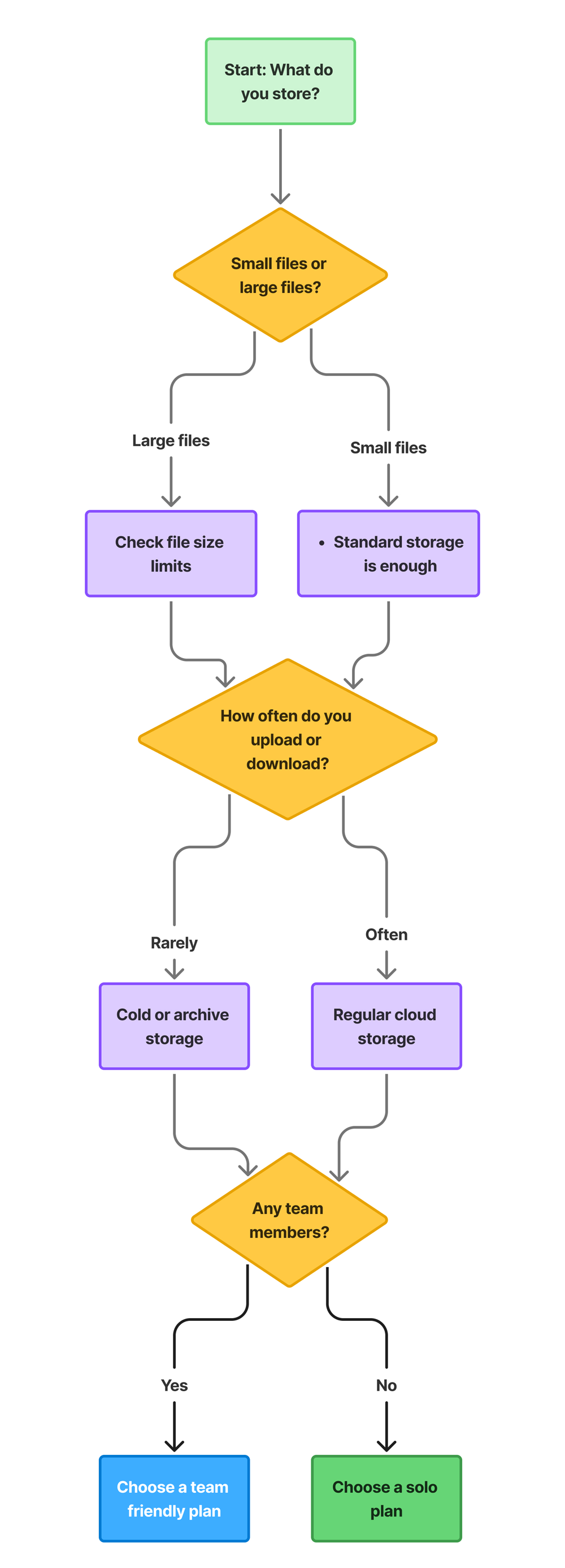
    • Know how much data you store today and how fast it’s growing.
    • Check how often you upload or download files.
    • Separate daily-use storage from long-term backup needs.
    • Count how many users genuinely need access.
    • Verify device limits to avoid one-device traps.
    • Check file-size caps, especially if you work with big media files.
    • Look for hidden charges on downloads, sharing, or upgrades.
    • Make sure you can export or migrate your data without pain.

    Now, where will you get all these details in one place? Of course, the comparison sites. However, most comparison sites pretend every provider is amazing (they have the affiliate links, you know), but let’s be honest: half the “popular” platforms become expensive the moment you start using them properly. That’s why finding the most affordable cloud storage is less about brand hype and more about understanding your own habits. If you know what you upload, how often you share, and how many people touch your files, you’ll immediately spot which plans are genuinely cheap and which ones are waiting to ambush your wallet later.

    What Makes The Cheapest Cloud Storage (It’s Not Just Price Per GB)

    When people talk about the Cheapest Cloud Storage, they usually mean the service with the smallest monthly price on the pricing page. That number is only the teaser. Real affordability becomes visible once you start using the storage in your natural, messy way. Random uploads, rushed client folders, weekend backups and everyday sync activity all reveal the true cost. The lowest price tag does not matter if everything else around it quietly chips away at your budget.

    Another thing no one mentions is that cheap depends on how you work. If you upload once a week and mostly store documents, your ideal plan looks very different from someone who handles videos, design files, or heavy media assets. That is where inexpensive cloud storage becomes a personalised choice. A service that works beautifully for one business can feel painful for another simply because of file-size limits, device caps, or slow sharing options. These small restrictions have a very real impact.

    There is also the ecosystem trick. Some platforms look generous on day one, but then hide basic features behind paid upgrades. You try to share a link and suddenly a pop-up tells you to upgrade. You add one more device and the system will gently suggest that you upgrade again. It feels like buying a budget phone and realising the charger is sold separately. What looked like the Cheapest Cloud Storage slowly becomes a plan that constantly asks for a little more money.

    So when you look for truly inexpensive cloud storage, think beyond the headline price. Look at how many people touch your files, how often you download data, and how quickly your storage grows. Cheap storage stays cheap only when the plan fits your behaviour. If it does not, the monthly bill becomes your reminder that choosing on price alone was a bad idea.

    The Factors That Influence Your Actual Monthly Cost

    Your real cloud storage bill rarely matches the number you saw on the pricing page. The cost depends on how you actually use the service, not on the headline price. Even the Cheapest Cloud Storage can become expensive if these factors are ignored.

    • How often do you upload or download files?
    • How many users do you add to your workspace?
    • Whether clients frequently access shared links
    • How quickly does your total storage size grow?
    • Extra charges for higher speeds or priority sync
    • Limits that force you into paid upgrades sooner than expected

    If you keep these in mind, you can choose genuinely inexpensive cloud storage that stays affordable as your data grows, instead of getting surprised by hidden costs or forced upgrades.

    Quick Self-Assessment: What Type of Storage User Are You?

    Before comparing prices in search for the most affordable cloud storage, it helps to understand your own behaviour. This one step saves you from picking the wrong plan and getting forced into upgrades later. Your needs fall into a simple pattern based on how often you upload files, how many people access them and how fast your storage grows. Use this quick flow to understand where you stand.

    cheapest cloud storage

    Hidden Fees That Can Inflate Your Bill

    Most people choose the Cheapest Cloud Storage based on the upfront price, but the real shock comes later when the hidden charges start showing up. Some services quietly bill you for extra downloads, shared links that get too much traffic, faster sync speeds, or even basic collaboration features. These are never highlighted during sign-up, which is why so many users think they got a great deal until the first “unexpected activity charge” lands in their inbox.

    The trick is simple. Every platform makes money from what you do most. If you frequently download files, expect usage fees. If your clients open shared links often, expect traffic charges. If your storage grows quickly, expect auto-upgrades. What looked like inexpensive cloud storage becomes a layered, unpredictable cost. Understanding these hidden fees early means you can choose the services that are transparent and won’t surprise you later.

    Cheapest Cloud Storage Services in 2026

    1. Google Drive / Google One

    Perfect for anyone already using Gmail, Docs, and Photos. Simple, familiar, and smooth for everyday storage and sharing without any learning curve. Around $1.99/month for 100 GB and $9.99/month for 2 TB.

    Pros:

    • Very easy to use and integrate into daily work
    • Great for sharing and collaborating through Docs/Sheets
    • Decent free 15 GB starter space

    Cons:

    • Storage is shared with Gmail and Photos, so it fills faster
    • Not privacy-focused
    • Not ideal for very large media files long-term

    2. Microsoft OneDrive

    Best value for anyone using Word, Excel, Outlook or Windows. Storage feels “built-in” and works flawlessly across devices. Microsoft 365 Family gives 1 TB per person (up to 6 users) for a single monthly fee.

    Pros:

    • Excellent value if you already rely on Microsoft tools
    • Smooth sync on Windows and across devices
    • Reliable for teams using Office apps regularly

    Cons:

    • Storage tied to user accounts, not generic buckets
    • Less attractive if you don’t use Office apps
    • Collaboration is Office-heavy compared to Google

    3. Dropbox

    Known for rock-solid syncing and sharing. Great for creative teams, media-heavy work and constant file exchanges. Around $9.99/month for 2 TB on individual plans. Team plans start higher.

    Pros:

    • Best-in-class sync reliability
    • Excellent for daily sharing and teamwork
    • Strong integrations with third-party tools

    Cons:

    • Typically more expensive per TB
    • Business plans require multiple users
    • Not ideal for pure long-term backup

    4. pCloud

    Ideal for people who want to avoid monthly fees. Lifetime plans make pCloud one of the most cost-effective long-term options. Roughly $4.99/month for 500 GB or $9.99/month for 2 TB. Lifetime plans available.

    Pros:

    • Huge savings with a lifetime one-time payment
    • Optional client-side encryption
    • Great cross-platform support

    Cons:

    • Lifetime plans require a high upfront cost
    • Less mainstream brand recognition
    • Collaboration tools are basic

    5. IDrive

    Fantastic for backing up multiple devices, servers or NAS systems in one account. Designed more for backup than daily collaboration. Around $69–$79 per year for 5 TB (first-year discounts common).

    Pros:

    • Very strong backup features
    • Great value for multi-device protection
    • Large storage options at a low cost

    Cons:

    • Old-school interface
    • Not ideal for day-to-day team sharing
    • Better for backup than everyday file access

    6. Sync.com

    A privacy-first cloud storage option with end-to-end encryption. Great for sensitive documents and compliance-heavy industries. Team plans start around $6/user/month for 1 TB per user (annual billing).

    Pros:

    • Strong encryption and zero-knowledge privacy
    • Good sharing controls and version history
    • Affordable for secure cloud storage

    Cons:

    • Annual billing required for best rates
    • Fewer integrations than Google or Dropbox
    • Less known outside privacy-focused users

    7. Backblaze B2

    Super-cheap bulk storage for backups and archives. Ideal when you store a lot and don’t need fancy collaboration features. About $6 per TB per month for raw storage.

    Pros:

    • Cheapest per-TB pricing in the market
    • Great for large archives and long-term data
    • Simple predictable pricing

    Cons:

    • Not beginner-friendly
    • No “drive-like” interface
    • Not suitable for daily file collaboration or sharing
    • Comparison Snapshot: Pricing, Limits, and Key Features

    Disclaimer:

    Prices may change. Please check the official websites of the above-mentioned service providers for the latest rates. Infogion is not responsible for any pricing updates or variations.

    When to Choose Archive Storage Over Regular Storage

    Archive storage makes sense when you have files that are important but rarely used. Old client deliveries, project folders you are done with, raw footage, past-year financials or bulky media dumps do not belong in your everyday workspace. Keeping these inside regular plans is wasteful when inexpensive cloud storage options exist specifically for long-term parking.

    It also helps you control costs more effectively. Regular storage charges you for convenience, speed, and frequent access. Archive storage removes those premiums and gives you far lower pricing for the same data. If you access these files only a few times a year, choosing the cheapest cloud storage tier designed for archival use can cut your costs dramatically.

    Archive storage is also the best choice when your priority is simply retention. Compliance documents, contracts, backups, audit files, and old creative assets can live safely in an archive tier without slowing down your main storage. This keeps your active workspace clean and efficient while your historical data stays protected at a fraction of the cost.

    Also Read: infogion’s Guidelines on using AI for Startups

    How to Avoid Vendor Lock-In

    Vendor lock-in usually happens when all your files, sharing habits, and workflows get tied so tightly to one provider that moving out feels painful. The goal is to keep your data portable so you can switch to the cheapest cloud storage or any other service whenever you need, without chaos.

    • Keep your files in standard formats like PDF, MP4, CSV, JPG
    • Avoid features that only work inside one provider’s ecosystem
    • Maintain a periodic export or backup of all critical folders
    • Use third-party sync tools instead of provider-only utilities
    • Keep team workflows flexible instead of being tied to one platform’s automation
    • Review your storage size every quarter, so migration never becomes overwhelming

    Practical Tips to Keep Your Storage Bill Low

    Start by cleaning your storage every month. Delete duplicates, old drafts and files you know you will never touch again. Most people pay for extra space simply because they never organise their folders. A quick 10-minute cleanup can delay an upgrade for months.

    Next, push non-essential files into archive tiers or cheaper buckets. Regular storage is for active work, not for forgotten backups or last year’s client videos. Moving the dead weight out of your main drive is the simplest DIY trick to stay within the inexpensive cloud storage plans.

    Keep an eye on sharing habits. Large shared folders, auto-sync from every device and random uploads from apps quietly eat space. 

    Turn off anything you do not use, limit auto-backups to essentials and review your shared links once in a while. Small fixes make a big difference.

    Final Recommendation Framework (Choose in 30 Seconds)

    No overthinking. No spreadsheets. Just pick what matches your style and move on.

    • If you want the cheapest cloud storage with zero learning curve → choose Google Drive.
    • If your entire workflow runs on Word, Excel or Outlook → choose OneDrive.
    • If you need rock-solid syncing and constant file sharing → choose Dropbox.
    • If you want long-term savings with one upfront payment → choose pCloud.
    • If your goal is pure backup across many devices → choose IDrive.
    • If privacy and encryption matter more than anything → choose Sync.com.
    • If you need bulk storage for huge archives → choose Backblaze B2.

    Done. Pick the one that matches your behaviour and forget the rest.

    Conclusion

    Cloud storage is only expensive when you choose it blindly. Once you understand your habits and match them with the right plan, finding the cheapest cloud storage becomes simple. Keep your active files in regular storage, move old stuff to archive tiers, avoid hidden upgrades and pick a service that fits the way you work. Do that, and your storage stays affordable, predictable and quietly efficient in the background while you focus on running your business.

  • AI for Startups: 6 Authoritative Guidelines on Digital Transformation

    AI for Startups: 6 Authoritative Guidelines on Digital Transformation

    1. AI for Startups in Product Development
    2. Scaling with AI
    3. AI for Resource Optimization in Startups
    4. AI in Building Resilient Business Models
    5. AI for process automation
    6. AI for Personalization at Scale
    7. Conclusion

    When you’re running a startup, every day feels like a race. Whether it’s meeting customer demands, juggling resources, or staying ahead of the competition, the pressure is real. The edge you need could come from Artificial Intelligence (AI), especially the innovations happening around AI for startups. It’s no longer a luxury only available to the tech giants—startups are using AI to transform the way they operate, innovate, and grow.

    AI is not just about automating processes; it’s about making smart investments that help your business scale efficiently. From personalized customer experiences to streamlined resource management, integrating AI into your budget and strategic plan can open up new opportunities. 

    Let’s find out key details about a few typical AI digital transformation use cases.

    AI for Startups in Product Development

    Artificial Intelligence is transforming the way startups approach product development. By using AI, startups can innovate faster, reduce development costs, and make logical decisions throughout the product lifecycle. This helps them deliver products that align more closely with market needs, all while staying agile and competitive.

    Key benefits of AI in product development:

    • Build a prototype and test multiple versions of a product, helping them identify the best solution in less time.
    • Insights that inform continuous product enhancements based on real-time user feedback.
    • Create more intuitive user experience designs by analyzing user behaviour patterns and preferences.
    • Forecast demand more accurately, ensuring they are prepared to meet customer needs without overproducing.
    • Find potential product issues and address them before launch, improving product reliability and performance.
    • Collaborate more effectively with AI for startup platforms that streamline communication, task management, and data sharing.
    • Prioritize which product features will have the greatest impact on customer satisfaction and business growth.

    Several AI ventures offer affordable product development services for startups. Cognitivescale focuses on providing AI-driven insights to speed up product innovation. Fictiv offers AI-based manufacturing solutions that streamline prototyping and production. Falkonry delivers AI tools that help startups analyze and improve their product development processes in real time. 

    Read our post on AI for Small Business here

    Scaling with AI

    As your startup grows, AI becomes a valuable partner in managing increased workloads and complexity. AI for startups can automate routine tasks, streamline customer interactions, and optimize internal processes, allowing your team to focus on strategic goals.

    From AI-powered chatbots handling customer support to machine learning improving supply chain efficiency, AI ensures smooth growth without overburdening your resources.

    AI digital transformation evolves with your business needs, offering advanced tools like predictive analytics to forecast trends and personalized marketing at scale. Startups can expand rapidly while maintaining control, as AI seamlessly manages growth challenges with minimal manual effort. With AI, you don’t just scale—you scale intelligently and efficiently.

    AI for Resource Optimization in Startups

    Startups often operate with limited resources, making it crucial to allocate them wisely. AI digital transformation helps optimize resources across the board by analyzing data patterns, predicting future needs, and automating processes. Whether it’s managing inventory, improving workforce productivity, or maximizing marketing spend, AI ensures that every resource is utilized efficiently and effectively.

    Key benefits of AI for startups in resource optimization:

    • Forecast demand accurately, preventing overstocking or understocking of inventory
    • Analyze historical data to create more precise budgets and predict financial trends
    • Optimize workforce management by aligning tasks with employee performance and availability
    • Refine marketing campaigns by focusing ad spending on the most effective channels
    • Streamline supplier and vendor management to improve negotiation and reduce costs
    • Manage energy usage or equipment maintenance through predictive analytics, reducing waste and downtime
    • Gain insights into customer behaviour, allowing resource allocation towards high-return products or services

    AI in Building Resilient Business Models

    In today’s unpredictable market, resilience is key to long-term success. AI plays a crucial role in helping startups build business models that can adapt and thrive, no matter the challenges. By providing real-time data analysis and predictive insights, AI helps startups make more informed decisions, anticipate market shifts, and mitigate risks before they become issues.

    Several companies are already leveraging AI to build more resilient business models. For example, Zebra Medical Vision uses AI to transform healthcare by offering predictive analytics that can identify medical risks early. This capability not only improves patient outcomes but also enables healthcare businesses to adjust their services based on predictive data. Similarly, UiPath, a leader in robotic process automation (RPA), helps businesses automate complex workflows, ensuring that operations run smoothly even during disruptions.

    AI for startups also allows businesses to respond faster to market changes. Whether it’s optimizing supply chains, adjusting product offerings, or automating key processes, AI ensures that startups remain agile. This level of adaptability helps businesses not only survive but grow, even when faced with unexpected challenges.

    AI for process automation

    In a startup, every minute counts. AI helps by handling the repetitive tasks that usually slow you down—whether it’s responding to customer inquiries, processing data, or managing routine workflows. It takes the busywork off your plate, so you and your team can focus on what matters: driving growth, building better products, and keeping your business moving forward.

    Key benefits of AI for process automation:

    • Automate customer support using AI-driven chatbots, ensuring 24/7 availability
    • Simplify data entry and record-keeping by automating repetitive tasks
    • Streamline workflow management, enabling teams to collaborate more effectively
    • Automate invoicing and payment processing, reducing delays and manual errors using AI for startup tools
    • Implement AI-powered marketing automation for personalized and efficient campaigns
    • Enhance supply chain management by automating order tracking and stock updates
    • Reduce human errors and increase consistency across business operations

    AI for Personalization at Scale

    In today’s competitive market, offering personalized experiences is no longer optional—it’s essential. AI enables startups to deliver these personalised interactions at scale, something that would be impossible to achieve manually. From targeted product recommendations to personalized email campaigns, AI customizes experiences based on individual customer preferences, behaviours, and past interactions.

    Companies like Spotify and Netflix are prime examples of using AI for personalisation at scale. Spotify’s recommendation engine curates personalised playlists based on listening habits, while Netflix suggests shows and movies that align with a user’s preferences. For startups, AI offers similar possibilities, allowing businesses to deliver a highly customized customer experience, no matter how large the user base becomes.

    By adopting AI, startups can not only engage customers more effectively but also build stronger relationships that lead to increased loyalty and sales. Whether it’s through personalized marketing, content recommendations, or product customisations, AI makes delivering bespoke experiences efficient and impactful, as your business grows.

    Conclusion

  • 7 AI for Small Businesses Use-cases for Whopping Success

    7 AI for Small Businesses Use-cases for Whopping Success

    Artificial Intelligence (AI) isn’t just for the big players anymore. Ai for Small businesses is quietly doing more with less and making operations run smoother than ever—without needing a tech genius on the payroll. From handling customer service to managing inventory, AI is taking care of the heavy lifting, so business owners can focus on what they do best.

    With AI tools now more affordable and easier to implement, even the local bakery or neighborhood shop can benefit. Instead of spending hours on manual tasks, business owners can now focus on what really matters—growing their business and serving their customers better.

    Automating Customer Service for Local Shops

    For local shops, customer service is everything. Whether it’s a bakery, a boutique, or a small repair shop, every interaction with a customer counts. But let’s be honest—answering the same basic questions all day can get old fast. That’s where AI comes in. By implementing AI-driven chatbots or virtual assistants, local businesses can provide instant, round-the-clock customer support without hiring extra staff.

    Picture a small bakery: instead of someone having to answer “What are your delivery hours?” for the hundredth time, a chatbot can handle that. 

    Not only can the bot answer questions, but it can also take orders, recommend products, and send reminders to customers about upcoming specials or events. It doesn’t stop there—AI can integrate with online ordering systems to manage reservations and send real-time updates about purchases. This frees up the owner and their team to focus on baking the best croissants in town, while the AI ensures customer service runs smoothly, even during the busiest times. For a small business, that kind of automation can be a real game-changer.

    Here’s a list of AI companies that offer tools for automating customer service (bakeries included!):

    Tidio: An AI for small businesses chatbot that integrates with websites and helps small businesses manage customer queries and automate communication.

    LivePerson: Specializes in AI-driven conversational platforms for real-time customer engagement.

    Drift: Offers conversational AI and live chat solutions, designed to automate and personalize customer service.

    Zendesk: Provides AI and machine learning capabilities to enhance customer support with automated responses and ticket handling.

    Freshchat (by Freshworks): A tool that uses AI to automate customer conversations and offers multi-channel communication support.

    Ada: An AI platform that automates customer service with personalized responses and self-service solutions.

    Intercom: Provides AI chatbots and live chat for small businesses, automating common customer interactions.

    Inventory and Supply Chain Management for Small Retailers

    For small retailers, inventory management can feel like walking a tightrope. One wrong step—either overstocking or running out of products at a critical time—and profits take a nosedive. But AI business automation has entered the scene, turning that tightrope into a more manageable path by providing predictive insights and automating the heavy lifting.

    Take TradeGecko (now part of QuickBooks Commerce), for example. This platform allows small retailers to keep track of inventory in real-time, so you’re always in the know about which products are flying off the shelves and which are gathering dust. But the real magic happens with AI-driven reordering, which kicks in before you even realize you’re running low, preventing stockouts and keeping your customers happy. Zoho Inventory goes a step further by integrating AI into purchase order management and shipment tracking. Now, with AI for small businesses, retailers don’t have to constantly monitor stock levels—the system anticipates demand and automates the rest.

    But it’s not just inventory that’s getting smarter. AI is also streamlining the entire supply chain. 

    ShipHero connects inventory management with order fulfillment, optimizing everything from warehouse storage to shipping times. Meanwhile, Llamasoft helps small businesses predict demand, pinpoint the best times to restock, and optimize supplier relationships—all using complex algorithms to keep things running smoothly without the guesswork.

    For a small retailer, this kind of automation is like having a full team of logistics experts on call 24/7—but without the full-team price tag. AI eliminates the chaos, reduces waste, and makes sure you have exactly what you need, when you need it.

    Personalized Marketing for Niche Online Stores

    In a crowded marketplace, niche online stores thrive on their ability to offer something unique. But having a one-of-a-kind product isn’t enough if you’re not reaching the right audience. This is where AI business automation marketing tools steps in, allowing small, niche businesses to target customers with precision. By analyzing browsing habits, purchase history, and preferences, AI for small businesses tools can create custom marketing campaigns that resonate with each custom

    You can use an AI tool to send personalized emails, product recommendations, and even special offers that feel curated just for the recipient customer.

    For example, AI platforms can help a small boutique send highly targeted promotions based on what customers are likely to buy next. Whether it’s suggesting complementary items or offering a discount on a previously viewed product, personalized marketing turns casual browsers into loyal buyers. With AI handling the heavy lifting, small online stores can make a big impact without investing in large marketing teams.

    AI for Small Businesses Companies Offering Personalized Marketing Tools

    Dynamic Yield: Offers AI-driven personalization solutions for tailoring customer experiences across web, mobile, email, and kiosks.

    Emarsys: Provides AI-powered marketing automation tools to create personalized customer journeys across multiple channels.

    Optimizely: Uses AI for website optimization and personalized customer experiences based on behavior.

    Bloomreach: An AI-powered platform that personalizes marketing campaigns by analyzing customer behavior and preferences.

    Segment: A customer data platform that uses AI to gather insights and create personalized marketing strategies.

    HubSpot: Provides AI-driven tools for email marketing, personalized content, and marketing automation for small businesses.

    AI-Powered Accounting for Freelancers

    Freelancers often juggle multiple roles, from managing clients to meeting deadlines, leaving little time to deal with finances. AI business automation based accounting tools simplifies the financial side of things by automating essential tasks like invoicing and expense tracking. These tools automatically categorize transactions and prepare tax reports, making it easy for freelancers to stay on top of their finances without the usual headaches. 

    Key Features of AI-Powered Accounting Tools for Freelancers:

    • AI generates and sends professional invoices, tracks payment deadlines, and even sends reminders for overdue payments (e.g., FreshBooks).
    • Automatically sorts and categorizes expenses, making it easier to track spending and ensure nothing is missed for tax purposes (e.g., QuickBooks).
    • AI tools calculate tax obligations and prepare freelancers for tax season by generating reports based on local tax laws (e.g., Xero).
    • Provides up-to-the-minute insights on income, expenses, and cash flow, allowing freelancers to make informed business decisions (e.g., Wave).
    • AI can scan and extract data from receipts, automatically recording expenses without manual data entry (e.g., Zoho Books).

    AI in Localized Ad Campaigns

    Running a localized ad campaign is no longer about throwing a dart and hoping it hits the mark. AI for small businesses has transformed how businesses approach local marketing, offering laser-focused insights that help target the right audience, at the right time, with the right message. By analyzing location-based data, browsing habits, and even local events, AI can craft highly personalized campaigns that resonate with the community you’re trying to reach.

    Tools like AdEspresso, allow businesses to create and manage localized ad campaigns across Facebook and Google. With AI, the platform can automatically optimize ads, tweaking them based on engagement to ensure you’re getting the best return on investment. 

    WordStream, which uses AI to help businesses fine-tune their ad spending by analyzing local search data and refining ad placements. 

    Revealbot takes advantage of AI to automate ad management, allowing businesses to launch geo-targeted ads that dynamically adjust based on performance.

    Whether it’s a restaurant vying to reach nearby customers or a boutique trying to engage locals with special offers, AI can make a big impact. It helps businesses stretch their ad budgets further by ensuring ads are optimized for the local audience. Each campaign becomes relevant, timely, and customized to the specific audience-block they’re targeting.

    Read our post on Free AI tool for business

    AI for Sales Forecasting in Retail

    Predicting sales can make all the difference for retailers, especially when it comes down to managing stock, planning promotions, and setting budgets. AI-powered sales forecasting tools take the guesswork out of this process by analyzing historical data, customer behavior, and even factors like weather. 

    With AI, retailers can accurately anticipate demand, helping them avoid overstocking or running out of items in demand. 

    AI doesn’t just predict when sales will peak – it can also flag slower periods when a promotion might give the business a boost. These insights are crucial for pricing strategies, inventory planning, and even marketing efforts. Moreover, automating the forecasting process saves time and allows retailers to make smarter, data-driven decisions that reduce risks and boost profit.

    AI Product Developers Offering Tools for Sales Forecasting:

    Anaplan: Sales forecasting tools that help retailers predict demand and plan for future growth.

    Skubana: Provides demand forecasting to optimize inventory and reduce stock outs for eCommerce businesses.

    Brightpearl: Predict sales trends and help retailers automate inventory and order management.

    ClearDemand: Specializes in AI-driven retail solutions for sales forecasting and pricing optimization.

    FuturMaster: Platform for sales forecasting, inventory planning, and demand management.

    AI for small businesses to assist in recruitment

    Hiring the right talent is often one of the biggest challenges for growing small businesses. With limited time and resources, sorting through resumes and finding the right candidate can be overwhelming for a team of just a recruiter or two. AI-powered recruitment tools make the process easier by screening resumes, matching candidates to job descriptions, and even predicting which applicants would fit well with the job role or culture. 

    AI also helps reduce bias in hiring by focusing solely on a candidate’s skills, experience, and qualifications, making the process more fair and objective. 

    A few examples:

    • HireVue offers video interviewing software that uses AI to analyze candidate responses and body language, helping businesses make more informed decisions without spending hours in interviews. 
    • Pymetrics takes a different approach, using neuroscience-based AI assessments to evaluate candidates’ cognitive and emotional traits, ensuring they’re the right fit for the role and company culture. 
    • Recruitee streamlines the hiring process by automating everything from job postings to candidate evaluations, all while providing valuable data to help businesses make the best possible hires.
    Conclusion

    While AI brings remarkable benefits to small businesses—enhancing efficiency, saving time, and refining decision-making—it’s essential to maintain balance. Over-reliance on AI could lead to missed opportunities for personal connections and the nuanced judgment that only human insight can provide. The key lies in blending AI with human expertise, ensuring businesses harness its potential while preserving the value of human intuition.

  • Best AI companies: Captivating Technologies Shaping our Tomorrow

    Best AI companies: Captivating Technologies Shaping our Tomorrow


    Stepping into the world of artificial intelligence, it’s clear that the best AI companies are pushing the envelope far beyond the ordinary. They’re not just using AI; they’re crafting the future with it—enhancing how we interact with technology, streamlining complex processes, and even foreseeing health challenges before they arise. These pioneers are at the forefront, embedding AI into the fabric of our daily existence and driving innovation across various sectors. From creating incredibly intuitive chatbots to developing predictive technologies that could save lives, their impact is profound. Let’s uncover the standout firms leading this AI revolution, transforming our world one algorithm at a time.

    OpenAI – One of the best AI companies

    OpenAI is an AI research lab and one of the best AI companies that specializes in creating advanced AI technologies aimed at benefiting humanity. Key developments include the GPT series, known for its capabilities in natural language processing, enabling a wide range of applications from task automation to creative content generation.

    • Focuses on safe and beneficial AI development.
    • Provides tools such as ChatGPT and DALL·E for various applications.

    Benefits include increased efficiency in business operations and creative industries.

    OpenAI offers tutorials and documentation for users on its website. The pricing model is usage-based, catering to individual developers and enterprises.

    DeepMind

    DeepMind, an artificial intelligence company, focuses on advancing AI research to solve complex problems and enhance various sectors, including healthcare and energy. Its work in AI, particularly in algorithms and machine learning, aims to create systems that can learn and make decisions, potentially revolutionizing how businesses operate by optimizing processes, improving decision-making, and innovating products and services.

    • Engages in AI research for ethical and practical applications.
    • Impact spans healthcare for predictive diagnostics to energy for reducing consumption.
    • Aims to drive efficiency and innovation in business and beyond.

    DeepMind’s approach to AI research not only pushes the boundaries of what AI can achieve but also offers practical applications that benefit society and industries. Like other best AI companies, developing advanced AI technologies, DeepMind demonstrates the potential of AI to contribute to significant advancements in various fields.

    NVIDIA

    NVIDIA, widely recognized for its graphics processing units (GPUs), has significantly expanded into artificial intelligence (AI), becoming a key player in the AI technology space. NVIDIA’s AI focuses on accelerating AI research and applications across various sectors, including gaming, automotive, healthcare, and more. By developing advanced GPU technology and AI platforms like CUDA for parallel computing and its comprehensive AI framework, NVIDIA enables faster and more efficient processing of complex AI algorithms and deep learning models.

    • Pioneers in GPU technology for AI and deep learning acceleration.
    • Offers platforms and tools for AI research, development, and deployment.
    • Facilitates advancements in autonomous vehicles, healthcare imaging, and more.

    NVIDIA’s contributions to AI are not just about hardware but also encompass software and platforms that support the AI ecosystem, making AI more accessible and scalable for researchers, developers, and enterprises. Their technology underpins some of the most advanced AI systems, driving innovations that can analyze vast datasets, enhance computer vision, and support real-time decision-making processes and thus, making it one of the best AI companies in the world.

    Google AI

    Google AI, undoubtedly one of the best AI companies, is Google’s dedicated branch for artificial intelligence, plays a pivotal role in shaping how businesses leverage technology. It focuses on enhancing Google’s suite of products with AI-driven capabilities, offering powerful tools for businesses in areas like data analytics, cloud computing, and automated customer service.

    Key aspects for businesses include:

    • Improving business operations through AI-enhanced Google products such as Google Cloud Platform and Google Analytics, which provide advanced data processing and insights.
    • Offering AI solutions that aid in automating and optimizing customer interactions, marketing strategies, and internal processes.
    • Providing cutting-edge AI research and tools that businesses can leverage for innovation, like TensorFlow for machine learning applications.

    Google AI’s commitment to ethical and accessible AI development means businesses can integrate these technologies confidently, knowing they are built on principles of transparency and responsibility. For business leaders and developers looking to explore Google AI’s offerings, their website provides detailed information on available tools, platforms, and case studies illustrating practical applications in various industries.

    Microsoft

    Microsoft’s AI strategies are seamlessly woven into its broad array of offerings, aiming to equip enterprises with smart solutions across different industries. Azure AI stands out by delivering an extensive range of AI services and tools, enabling companies to streamline workflows, extract valuable insights from data, and improve decision-making processes. This suite includes Azure Machine Learning for efficient model development and deployment, Azure Cognitive Services for integrating AI capabilities such as image and speech recognition into applications, and Azure Bot Services for crafting advanced AI-driven conversational interfaces.

    In terms of practical applications:

    • Enhanced Data Analysis: Microsoft’s AI solutions transform complex data sets into clear, actionable insights, helping businesses optimize operations and customize consumer interactions.
    • Leveraging Cloud Computing: With Azure AI, enterprises can deploy scalable AI functionalities effortlessly, bypassing the need for substantial infrastructure investment.
    • Boosting Productivity through Automation: Microsoft AI facilitates the automation of mundane tasks, ranging from handling customer service via AI bots to automating manufacturing processes, thereby cutting operational costs and elevating productivity.
    • Driving Product and Service Innovation: Microsoft encourages enterprises to innovate by providing the necessary AI tools for creating novel AI-integrated products and services, potentially unlocking new market opportunities and enhancing market competitiveness.

    With a commitment to ethical AI, Microsoft ensures the development and application of these technologies are conducted with responsibility, aligning with both corporate ethics and societal standards. By embedding AI into its platforms, Microsoft not only revolutionizes how businesses operate but also paves the way for the future interaction between enterprises, technology, and data.

    Read about: Free opensource AI tools

    IBM Watson

    IBM Watson is another from our list of best AI companies that embodies IBM’s forefront in AI, offering businesses tailored solutions that drive innovation, efficiency, and smarter decision-making. Watson’s suite, including AI-powered applications and data analysis tools, integrates seamlessly across various sectors such as healthcare, finance, and customer service. Its notable features, like natural language processing and machine learning, enable companies to automate complex processes, derive deep insights from data, and enhance customer interactions through conversational AI.

    Practically, IBM Watson helps businesses:

    • Automate customer support with AI chatbots, reducing response times and improving customer satisfaction.
    • Analyze vast datasets quickly, uncovering trends and patterns that inform strategic decisions.
    • Enhance operational efficiencies by predicting and preempting potential disruptions.

    IBM’s emphasis on trust and transparency in AI ensures Watson’s solutions are developed with ethical considerations, making it a reliable choice for businesses aiming to incorporate AI responsibly. Watson’s capabilities demonstrate IBM’s commitment to transforming enterprise operations through advanced AI.

    Amazon Web Services (AWS)

    Amazon Web Services (AWS) offers a robust suite of artificial intelligence (AI) services designed to empower businesses to innovate and scale their AI applications. With services like Amazon SageMaker, AWS simplifies the process of building, training, and deploying machine learning models, making it accessible for developers and data scientists to bring AI-driven solutions to market faster.

    Key AI services from AWS include:

    • Amazon SageMaker: A complete machine learning service to build, train, and deploy models quickly.
    • Amazon Lex: Powers conversational interfaces with the same deep learning technologies as Alexa.
    • Amazon Polly: Turns text into lifelike speech, allowing you to create applications that talk.
    • Amazon Rekognition: Provides deep learning-based image and video analysis for applications.
    • Amazon Textract: Automatically extracts text and data from scanned documents.
    • Amazon Comprehend: A natural language processing (NLP) service to uncover insights and relationships in text.
    • Amazon Translate: Enables language translation to produce more natural and accurate language in applications.
    • Amazon Personalize: Allows the creation of personalized recommendations for customers using machine learning.

    AWS AI services are designed for scalability, security, and ease of use, supporting a wide range of applications, from personalized recommendations to predictive analytics. By leveraging AWS’s AI services, businesses can accelerate their AI initiatives, improve operational efficiencies, and create more personalized customer experiences. AWS’s commitment to making AI more accessible and efficient positions it as a valuable platform for companies looking to harness the power of AI.

  • 5 Exclusive Free open-source AI tools for small businesses to automate tasks

    5 Exclusive Free open-source AI tools for small businesses to automate tasks

    Small businesses today face numerous challenges, ranging from staying competitive to efficiently managing everyday tasks. In this scenario, Artificial Intelligence (AI) emerges as a key ally. Imagine AI as an always-on, efficient assistant that helps streamline mundane activities, offers insightful data analysis, and enhances customer interactions. The good part is using AI doesn’t have to strain your budget. There’s a variety of free open-source AI tools for small businesses available that are both cost-effective and incredibly beneficial for any business, regardless of size. 

    This post will introduce you to five such tools: TensorFlow, Apache OpenNLP, Scikit-learn, Rasa, and KNIME. Each offers unique ways to simplify aspects of your business operations without any financial investment.

    TensorFlow by Google

    TensorFlow is a powerful, open-source software library developed by Google for Artificial Intelligence (AI) and machine learning applications. It’s designed to be accessible and user-friendly, making it an ideal choice for both beginners and experienced developers in the field of AI. The flexibility of TensorFlow allows for easy adaptation to a wide range of tasks, from simple experiments to complex machine learning and deep learning models.

    What sets TensorFlow apart is its capacity for efficient data processing, which is vital for small businesses venturing into AI. It offers robust support for various programming languages, notably Python, enhancing its usability. Whether it’s for image recognition, voice-enabled applications, or predictive analytics, TensorFlow provides a comprehensive toolkit. Additionally, its strong community support and extensive documentation aid users in troubleshooting and expanding their AI capabilities.

    How to use TensorFlow:

    1. Installation and Setup: Begin by installing TensorFlow via pip (pip install tensorflow). Set up your coding environment using tools like Jupyter notebooks, Python scripts, or IDEs like PyCharm.
    2. Understand Core Concepts: Familiarize yourself with TensorFlow’s fundamental concepts, including tensors, dataflow graphs, and the Keras API for high-level operations.
    3. Building Your First Model: Start by creating a simple model such as linear regression or a basic neural network. Use TensorFlow’s Keras API to define the model layers and choose appropriate activation functions.
    4. Data Preprocessing: Import and preprocess your data. TensorFlow provides tools for data normalization, manipulation, and batching, which are essential for training models effectively.
    5. Model Training and Evaluation: Train your model using the fit method, and adjust the number of epochs and batch size as needed. Evaluate your model’s performance on test data, and utilize techniques like cross-validation and hyperparameter tuning for optimization.
    6. Model Improvement and Debugging: Enhance your model’s accuracy with advanced techniques like dropout, regularization, or different optimizers. Utilize TensorFlow’s debugging tools to identify and fix issues in your model.
    7. Deployment: Once the model is well-tuned and tested, deploy it in real-world applications or web servers. TensorFlow models can be integrated into various platforms and services.
    8. Continuous Learning and Updating: The field of AI and TensorFlow itself are continually evolving. Stay updated with the latest TensorFlow versions, features, and best practices in the community.

    For detailed guidance, tutorials, and resources, the TensorFlow official website is an invaluable resource: https://www.tensorflow.org/docs

    Apache OpenNLP

    Apache OpenNLP is one of the free open-source AI tools and is a machine learning-based toolkit for processing natural language text. It’s part of the Apache Software Foundation and is widely used for tasks involving natural language understanding, such as tokenization, sentence segmentation, part-of-speech tagging, named entity recognition, and parsing. Here’s an overview of how to use Apache OpenNLP:

    1. Installation: Apache OpenNLP can be downloaded from its official website. It requires Java to run, so ensure that Java is installed on your system.
    2. Familiarize with the Tools: OpenNLP provides various command-line tools for different language processing tasks. Understanding these tools and their functions is crucial for effective use.
    3. Training Models: While OpenNLP comes with pre-trained models, you can also train your models using your datasets. This is particularly useful for tasks like named entity recognition and part-of-speech tagging.
    4. Integration into Applications: Apache OpenNLP can be integrated into Java applications. You can use it to add text processing capabilities to your software.
    5. Experiment with Different Features: Explore various features like the document categorizer, tokenizer, name finder, and parts-of-speech tagger to understand their applications in different contexts.
    6. Stay Updated and Involved: As with any open-source project, staying updated with the latest developments and being involved in the community can be very beneficial.

    For more detailed information and resources, you can visit Apache OpenNLP’s official documentation: https://opennlp.apache.org/docs/

    Scikit-learn – Machine Learning Library

    Like Apache OpenNLP, Scikit-learn is another free open-source AI tool machine learning library for the Python programming language. Renowned for its simplicity and ease of use, it’s particularly favored for statistical modeling and data mining tasks. Scikit-learn offers a range of supervised and unsupervised learning algorithms through a consistent interface.

    How to Use Scikit-learn:

    1. Installation: Install scikit-learn by using pip, Python’s package manager, with the command pip install scikit-learn. Ensure that Python and pip are already installed on your system.
    2. Explore the Library: Scikit-learn provides a variety of machine learning tools such as classification, regression, clustering, and dimensionality reduction, along with utilities for model selection, preprocessing, and evaluation.
    3. Data Preprocessing: Before applying any machine learning algorithms, preprocess your data. Scikit-learn includes functions for scaling, transforming, and cleaning data to make it suitable for feeding into models.
    4. Model Selection: Choose a model that best fits your data and task. Scikit-learn includes many options, from simple linear regression to complex neural networks.
    5. Train and Test the Model: Use your data to train the model, and then test its performance. Scikit-learn provides functions to divide your dataset into a training set and a test set, fit your model on the training set, and then evaluate it on the test set.
    6. Model Tuning: Utilize scikit-learn’s tools for hyperparameter tuning and cross-validation to improve your model’s performance and prevent issues like overfitting.
    7. Documentation and Community: For comprehensive guides, examples, and API documentation, refer to the scikit-learn documentation. Additionally, the active community is a great resource for getting help and discussing best practices.

    The Scikit-learn documentation can be found at Scikit-learn Documentation: https://scikit-learn.org/stable/documentation.html

    Rasa – Free open-source AI tool to Build Chatbots

    Rasa is another free open-source AI tool designed for building chatbots and voice assistants. It stands out for its ability to create bots that understand context, making conversations more natural. Unlike many other platforms, Rasa gives you complete control over your chatbot, meaning you can customize it exactly to your needs. This makes Rasa ideal for businesses wanting to offer a unique customer interaction experience.

    How to Use Rasa:

    1. Installation: Rasa can be installed using Python’s pip package manager. Simply run the command pip install rasa in your terminal. Ensure Python is installed on your system.
    2. Understand Rasa Components: Rasa consists of two primary components: Rasa NLU for understanding user messages and Rasa Core for managing the conversation flow. Familiarize yourself with these components.
    3. Create a Project: Start a new project by running rasa init in your command line. This creates a new Rasa project with example training data, a sample model, and configuration files.
    4. Train Your Model: Customize the training data for NLU and the stories for Core according to your application’s needs. Use the command rasa train to train your chatbot model on this data.
    5. Testing and Interacting: Test your bot in the command line using rasa shell. This allows you to interact with your bot and provide further training data based on the conversations.
    6. Integrate with Channels: Rasa allows integration with various channels like web, Slack, Facebook Messenger, etc., for wider accessibility.
    7. Continuous Improvement: Regularly update your training data and retrain your model to improve the chatbot’s performance based on user interactions.

    For detailed guides, tutorials, and API documentation, visit the Rasa official docs: https://rasa.com/docs/ 

    A must-read: IT for Small Business: 7 Eye-Opening Aspects

    KNIME – Free open-source AI tool for Data Analytics

    KNIME, short for Konstanz Information Miner, is a free open-source AI tool for data science, reporting, and integration platform. It allows users to visually create data flows, selectively execute some or all analysis steps, and later inspect the results through interactive views and models. KNIME is especially popular for its user-friendly interface, which makes it accessible even to those who are not coding experts. It’s widely used for tasks such as data preprocessing, modeling, data mining, and machine learning.

    KNIME’s approach to data analysis is modular and graphical – it uses nodes to represent data processes, which can be connected to form a workflow. This visual programming method makes it easier to understand and manipulate complex data processes. KNIME supports various data types and formats, making it versatile for different data analysis needs.

    How to Use KNIME:

    1. Installation: Download and install KNIME from its official website. It’s straightforward and does not require extensive setup.
    2. Explore the KNIME Workbench: Familiarize yourself with the KNIME Analytics Platform interface, including its nodes and workflows. The workbench is where you’ll build and execute your data analysis projects.
    3. Create Workflows: Use the drag-and-drop interface to create your workflows. Each node represents a data operation, and you can connect these nodes to form a process flow.
    4. Data Import and Processing: Import data from various sources and use nodes to preprocess, clean, and transform the data as needed.
    5. Data Analysis and Modeling: Apply data analysis techniques and models. KNIME supports a range of machine learning algorithms and statistical methods for in-depth data analysis.
    6. Visualization and Reporting: Use KNIME’s visualization nodes to create charts and reports. This helps in understanding the data and communicating insights effectively.
    7. Deployment and Sharing: Share your workflows with others or deploy your models and analyses for production use.

    For a comprehensive guide on using KNIME, you can refer to the official KNIME documentation: https://docs.knime.com/

    Conclusion

    As we wrap up on free open-source AI tool, it’s clear that the world of AI and machine learning offers a wealth of tools that can transform how small businesses operate and compete. From TensorFlow’s deep learning prowess to Apache OpenNLP’s natural language processing, Scikit-learn’s user-friendly machine learning, Rasa’s conversational AI capabilities, and KNIME’s powerful data analytics, these open-source tools provide small businesses with the resources to innovate and excel, all without breaking the bank. By embracing these technologies, small businesses can not only streamline their operations but also unlock new levels of efficiency and insights, carving out a competitive edge in the market. 

    So, whether you’re looking to optimize your operations, engage with your customers more effectively, or explore new data-driven strategies, these tools offer a starting point into the dynamic world of AI. The future of small business is bright, and it’s powered by the intelligence and accessibility of these groundbreaking free open-source AI tool.

    Image by: DALL-E