Tag: best practices

  • Beyond the Demo: A Software POC Checklist for Real-World Conditions

    The vendor’s demo runs perfectly because it’s designed to. Clean data, ideal conditions, their infrastructure, their support engineer driving. A proof of concept should tell you what happens when that engineer leaves and your team is managing the platform on Tuesday morning with real users, messy data, and three legacy systems the sales deck never mentioned. Most POCs test whether the software works in theory. What you need to know is whether it works in your environment, with your constraints, after the vendor stops paying attention. Budget for the POC phase matters less than knowing what to test during it. This checklist covers what to verify before you sign anything.

    What the POC Must Test That the Demo Skipped

    Vendor demos run on curated datasets with pre-configured workflows. Your environment has none of that. The POC window is your only chance to test the platform against the conditions it will face every day after you sign: incomplete data, users who skip steps, integrations that fail halfway through, and edge cases the product team never designed for.

    The gap between demo performance and production reality isn’t a configuration issue. Most platforms are built to handle the mainstream use case. Your business runs on exceptions. The POC must surface where those exceptions break the platform’s assumptions, because that’s where your team will spend most of their time in month four.

    What to validate during the POC that the demo won’t show you:

    • Data migration accuracy: Run a sample migration with real records, not the vendor’s clean dataset, and measure how many fail or require manual cleanup
    • Workflow exceptions: Test the five scenarios that don’t fit the standard process and verify the platform can handle them without custom development
    • Performance under real load: Simulate actual user counts and transaction volumes during peak usage, not the vendor’s single-user walkthrough
    • Error handling: Introduce bad data and incomplete records intentionally to see how the system fails and whether your team can diagnose it

    The vendor will offer to run the POC for you. Decline. If your team can’t operate the platform during the test period, they won’t be able to operate it after you sign.

    Performance and Scale Testing Under Your Actual Load

    Sales decks quote performance benchmarks that assume optimized configurations and controlled datasets. Your production environment will have neither. The POC must validate whether the platform performs acceptably under the data volumes, user counts, and workflow complexity you’ll face in year one, not the conditions the vendor tested in their lab.

    Testing checklist for performance and scale:

    Load your actual user count, not a subset. If you’re buying seats for 300 users, test with 300 concurrent users during normal business hours. Platforms that work fine with 50 test users often degrade noticeably at scale. Measure page load times, query response times, and how long standard workflows take to complete.

    Use your real data volume from day one. Import the full dataset you’ll migrate, not a sample. Performance problems compound with database size. A platform that searches 10,000 records in two seconds might take 30 seconds to search two million. If search is part of your team’s daily workflow, that degradation makes the platform unusable.

    Test during your peak usage window. Run the POC during the same hours your team will use the platform in production. If everyone logs in between 8 and 10 a.m., test then. Platforms perform differently under concurrent load than they do during off-hours testing.

    Identify your performance floor before signing. Define the slowest acceptable response time for your most common workflows and verify the platform stays above that threshold consistently. If it doesn’t, get the vendor to commit to performance improvements in writing or walk away.

    Validate reporting and export speed with production volumes. Most platforms slow down significantly when generating reports or exporting large datasets. If your team runs weekly reports on 500,000 records, test that exact scenario and time it.


    RED FLAG: Synthetic Data Hides Real Problems

    If the vendor provides sample data for the POC instead of letting you test with your actual records, you’re testing their environment, not yours. Real data includes duplicates, formatting inconsistencies, incomplete records, and edge cases that break most integrations. Insist on testing with a production data subset or the POC results mean nothing.


    Integration Testing Beyond the Happy Path

    The vendor’s integration demo connects two clean systems in 20 minutes. Your environment has three identity providers, two legacy databases, and a firewall configuration nobody documented. Integration work is where most POCs lie by omission. The vendor shows you the best case. You need to test the worst case, because that’s what your IT team will be managing in month three.

    The platform’s API documentation might be complete, but that doesn’t mean it handles your specific integration requirements. Most integration failures happen at the edge: authentication timeouts, data format mismatches, rate limiting under real transaction volumes, and error states the API returns but the documentation doesn’t explain.

    What to test during integration validation:

    • Authentication with your actual identity provider: Connect the platform to your SSO, directory service, or identity management system and verify it handles your user provisioning rules, group memberships, and permission inheritance without manual mapping
    • Bi-directional data sync under load: If the platform needs to sync data with your CRM, ERP, or database, test continuous sync with realistic transaction volumes and verify data consistency after network interruptions or failed sync attempts
    • Error handling when upstream systems go down: Disable one of your integrated systems temporarily and verify the platform degrades gracefully instead of failing completely or corrupting data
    • Legacy system compatibility: If you’re integrating with systems more than five years old, test thoroughly, most modern platforms assume recent API standards and fail silently with older endpoints
    • Rate limits and throttling: Push integration volume above normal levels and identify where the platform starts rejecting requests or slowing down, because that ceiling will determine your scaling headroom

    If the vendor’s integration engineer needs to be on the call every time something breaks, you don’t have a working integration. You have a dependency.

    User Acceptance Testing With the People Who Will Actually Use It

    Your IT team can figure out any interface with enough training. The question is whether your actual end users will adopt it without constant support tickets. User acceptance testing during the POC must involve the people who will use the platform daily, not the people evaluating it.

    Most adoption failures happen because the platform’s workflow assumptions don’t match how your team actually works. The vendor designed the interface for their ideal user. Your users have different priorities, less time, and no patience for extra steps.

    Test with real users under real conditions:

    Assign daily tasks to end users, not admins. Pick five to seven people who represent your actual user base and have them complete their normal workflows using only the platform’s documentation and interface. No IT support, no vendor engineer on standby. Time how long tasks take and count how many times they ask for help.

    Measure adoption friction in the first 48 hours. The POC period is long enough to see whether users return to the platform voluntarily or revert to old tools and workarounds. If they’re still asking basic navigation questions three days in, adoption will fail at scale.

    Test the mobile experience if your users work remotely. Platforms that work well on desktop often have limited or frustrating mobile interfaces. If 30% of your users work from phones or tablets regularly, test every critical workflow on mobile during the POC.

    Identify training requirements before you sign. Track every question users ask during testing and estimate how many hours of training each user type will need. Multiply that by your user count. If the training cost exceeds 20% of the annual license cost, factor that into your total cost of ownership before signing.

    If your end users don’t adopt the platform during the POC when they have support and motivation to try, they won’t adopt it in production when it’s mandatory and nobody’s watching.

    Support and Vendor Responsiveness During the POC Window

    The POC period is the only time you’ll see how the vendor responds to problems before you’re locked into a contract. Most vendors assign solution engineers or sales engineers to POCs. Those people disappear the day you sign. What you’re testing isn’t whether they can solve your problems. It’s whether the support team you’ll actually work with can solve them without escalation.

    Track vendor responsiveness throughout the POC as a proxy for post-sale support quality. Time to first response, time to resolution, and whether they solve problems or deflect them matters more than whether the platform works perfectly.

    Vendor behavior to evaluate during the POC:

    • Response time to support requests: Submit tickets for real issues you encounter and measure how long it takes to get a substantive response, not an automated acknowledgment, if it’s longer than four hours during business hours, expect worse after you sign
    • Escalation requirements: Track how often the vendor’s first-line support can solve problems versus how often they escalate to engineering or solution architects, high escalation rates mean your team will spend more time waiting for answers
    • Transparency about known issues: Ask directly whether any open bugs or limitations affect the workflows you’re testing, and verify their answers against user forums and support communities, vendors who hide known issues during POCs will hide them during production too
    • Documentation quality: Attempt to solve problems using only the vendor’s public documentation and knowledge base before contacting support, if the docs don’t cover common issues your team will face, budget for extended support contracts

    Ask the vendor to introduce you to the post-sale support team during the POC. If they deflect or delay, that tells you everything you need to know about the transition from sales to customer success.


    RED FLAG: Support Goes Cold After You Sign

    Most vendors staff POCs with solution engineers who disappear the day you become a customer. If your POC contact won’t commit to post-sale involvement or introduce you to the actual support team you’ll work with, assume response times and expertise drop significantly after the contract is signed. Test support now or regret it later.


    What the POC Contract Must Include Before You Start

    The POC phase is a contract in itself. Most vendors position it as a no-risk evaluation period, but without explicit terms, you’re committing resources with no protection if the vendor changes scope, extends timelines, or applies pressure tactics when you try to walk away.

    Before you start the POC, get these terms in writing:

    Fixed duration with a defined end date. POCs that drag on for months become de facto implementations without the vendor delivering a final decision point. Set a hard end date, typically 30 to 45 days, and require the vendor to deliver all promised functionality within that window. Extensions should require written approval and a clear reason.

    Success criteria defined by you, not the vendor. Write down the specific workflows, performance benchmarks, and integration requirements the platform must meet for the POC to pass. Make the vendor sign off on those criteria before you start. If they push back on any item, that’s a signal they don’t expect the platform to meet it.

    Exit terms that don’t require justification. The POC contract must allow you to end the evaluation and walk away without penalty, without providing a reason, and without sitting through a retention call. If the vendor requires a post-POC debrief or executive conversation as a condition of exit, you’re in a sales trap, not an evaluation.

    Data return and deletion terms. Specify how your data will be returned at the end of the POC, in what format, and the timeline for complete deletion from the vendor’s systems if you don’t proceed. Vendors who resist clear data return terms often make offboarding difficult for paying customers too.

    Resource and cost commitments from the vendor. Define exactly what support, engineering time, and configuration assistance the vendor will provide during the POC at no cost. If they expect your team to do the majority of setup and configuration work, that’s a preview of post-sale support levels.

    If the vendor won’t put these terms in writing before the POC starts, they’re planning to control the evaluation process instead of letting you run it.

    When to Walk Away, Even If the POC Works

    A successful POC proves the platform can work in your environment. That’s not the same as proving you should buy it. Some of the most expensive software decisions come from signing contracts after technically successful POCs that didn’t surface deal-breakers the platform can’t solve.

    Walk away if any of these conditions appear during or after the POC, regardless of technical performance:

    • The vendor won’t commit to roadmap items you need within 12 months: If critical functionality you need is “on the roadmap” but the vendor won’t include delivery timelines or penalties in the contract, you’re buying a promise, not a platform, most roadmap commitments slip or disappear entirely after the sale closes
    • Customization or professional services costs exceed 40% of the annual license: When the platform requires heavy customization to meet your requirements, you’re paying twice, once for the license and again to make it work, and every future upgrade will break your customizations, creating permanent professional services dependency
    • Your team identifies adoption friction that training won’t solve: If end users struggle with core workflows after a week of testing and the vendor’s answer is more training, the interface design is wrong for your users, training doesn’t fix bad UX, and adoption will fail at scale

    The sunk cost of the POC is a few weeks of your team’s time. The cost of signing anyway is three years of license fees, implementation work, and the switching cost when you finally admit it’s not working. A successful POC that reveals a bad fit is still a success. It stopped you from signing.

    Conclusion

    The platform either works in your environment with your data and your users, or it doesn’t. A POC that tests real conditions instead of recreating the vendor’s demo will tell you which before you sign. Test performance under actual load, integration with the systems you can’t replace, and adoption by the users who have to live with it daily. If the vendor resists any of those tests or won’t commit to clear POC terms, that’s your answer. Walk away and test a different platform. If the POC succeeds but reveals deal-breakers the platform can’t solve, that’s also your answer. Before your next vendor call, define your success criteria from Section 6 in writing and make the vendor agree to them before the POC starts.


    Also read: CISA Secure by Design

    Related reading

  • Run a SaaS Spend Audit Before Renewals Start Hitting Your Budget

    Most renewal invoices process automatically because vendors know exactly when your team is too buried in budget planning to audit what you’re actually using. By the time finance flags the charge, you’ve already paid for another year of licenses nobody touched since Q2. The gap between what you bought and what your teams actually use sits somewhere between 30% and 40% at most mid-market companies, but it only becomes visible when someone forces the issue before the renewal date hits.

    IT and finance both own pieces of this problem. IT knows which tools are deployed but rarely tracks who logs in after onboarding. Finance sees the invoices but has no view into usage data until someone from IT pulls the reports. The result is predictable: you renew everything by default, optimize nothing, and the SaaS budget grows 15% year over year while headcount stays flat.

    A proper SaaS spend audit catches three things vendors hope you miss: unused licenses still being billed, duplicate tools bought by different departments, and auto-renewals timed to process during your budget freeze. Here is exactly how to run that audit in time to act before the next renewal cycle starts.

    Pull Every Active Subscription Before You Do Anything Else

    You can’t audit what you can’t see, and most companies don’t have a single system that shows every active SaaS subscription. Finance has the invoices. IT has the SSO integrations. Department heads have the credit card charges that never hit the procurement process. Your first job is to force all three lists into one place.

    Start with your financial system. Export every software-related vendor charge from the last 12 months. Tag anything that repeats monthly or annually. You’re looking for subscriptions, not one-time purchases. Cross-reference that list against your SSO provider. If you run Okta, Azure AD, or a similar identity platform, pull the full application list. Every tool integrated through SSO is a tool someone on your team thought was worth deploying.

    The third source is the painful one: ask department heads to self-report what they’re paying for outside the approved vendor list. You’ll find project management tools bought on a team credit card, analytics platforms that never got added to the IT inventory, and collaboration software that three people use because the company standard didn’t fit their workflow. This isn’t about blame. It’s about making the invisible spend visible before it renews again. Combine all three lists into a single spreadsheet with vendor name, contract owner, renewal date, and monthly cost. That’s your baseline.

    Map Usage Data Against What You’re Paying For

    Now you know what you’re paying for. The next step is figuring out who’s actually using it. Most SaaS platforms give you a usage dashboard, but the default view hides the problem. Vendors show active users in the last 30 days because it makes the numbers look better. If someone logged in once in January and it’s now March, they won’t appear as inactive unless you extend the reporting window.

    Pull 90-day trailing login data for every platform on your list. You need three columns: total licenses purchased, users who logged in at least once in 90 days, users who logged in more than five times. The gap between column one and column two is your unused seat cost. The gap between column two and column three tells you how many people tried the tool once during onboarding and never came back.

    Start with your highest-cost subscriptions. A collaboration platform billing $50,000 a year with 40% login rates means you’re spending $20,000 on licenses that aren’t being used. If the vendor contract requires a minimum seat count, note that separately. You may not be able to drop below the floor, but you can stop adding seats in the next renewal negotiation. For platforms without built-in reporting, ask your CSM for an activity export. If they won’t provide it, that’s useful information. It usually means the numbers are worse than you think.

    Some tools don’t track logins in a useful way. Security platforms, monitoring tools, and backend infrastructure software may show “active” because the system is running, not because a human is using it. For those, the better question is: what breaks if we turn this off? If the answer is nothing or nobody notices for three weeks, you’ve found a candidate for elimination.


    RED FLAG: Most login data is 60 days stale

    Usage dashboards from vendors show the last 30 to 60 days by default. If someone hasn’t logged in since January and you run the report in March, they look active. Pull 90-day trailing data or you’ll miss half the inactive seats.


    Find the Duplicate Tools Hiding in Different Departments

    The single biggest source of hidden waste isn’t unused licenses. It’s three departments paying for three different tools that solve the same problem because nobody checked what was already deployed. Sales buys a CRM. Marketing buys a customer data platform. Support buys a ticketing system with its own contact database. All three tools store customer records, send emails, and generate reports. You’re paying for the same capability three times.

    Run a category audit. Group every tool on your subscription list by function: communication, project management, data analytics, file storage, customer engagement. If you see more than two tools in the same category, someone made a buying decision without checking what already existed. The usual explanation is that the existing tool didn’t fit their workflow. The reality is often that nobody wanted to wait for IT to configure access or train them on the standard platform.

    Pull the contract owners into a room. Show them the overlap. Ask which one stays if you had to pick one per category. You’ll get pushback. The design team will insist their project management tool is different from the one engineering uses. They’re both right and wrong. The tools are different, but the cost of running both is almost never justified unless the teams are large enough that separate instances make sense.

    For teams under 200 people, you should have one tool per category with very few exceptions. At enterprise scale, some duplication is unavoidable because the cost of forcing a single platform across business units often exceeds the cost of running two. The break point is usually around 500 users. Below that threshold, consolidation almost always wins. Above it, you’re trading subscription cost for political cost, and the math gets harder.

    Calculate What You’re Actually Spending Per Active User

    License cost is the number vendors lead with, but it’s not the number you should be managing to. The real cost of any SaaS tool includes the license, the implementation work, the ongoing admin overhead, the integration maintenance, and the support load it creates for your IT team. A $15 per month seat that requires two hours of IT time per quarter to manage access, handle exceptions, and troubleshoot login issues costs closer to $40 per month when you factor in fully loaded labor.

    Start with the simple math. Take the annual subscription cost and divide it by the number of users who logged in more than five times in the last 90 days. That’s your cost per active user. If you’re paying $60,000 a year for 200 licenses but only 120 people are using it, your per-user cost just jumped from $300 to $500. That changes the ROI calculation and the renewal decision.

    Subscription Tier Licenses Purchased Active Users (90 days) Annual Cost Cost Per Active User Hidden Carry Cost
    Collaboration Platform 200 120 $60,000 $500 +$180/user/year (admin time)
    Analytics Tool 50 12 $18,000 $1,500 +$90/user/year (integration maintenance)
    Project Management 100 85 $24,000 $282 +$40/user/year (support load)

    The second and third columns tell you where the waste is. The fifth column tells you whether the tool is worth keeping even after you optimize the seat count. A $1,500 per-user cost for an analytics platform that only 12 people touch is a strong signal to either expand usage or kill the subscription. The collaboration platform at $500 per active user might still make sense if those 120 users depend on it daily, but you’re definitely not buying more seats until utilization improves.

    Track the hidden carry cost separately. For every SaaS tool your team manages, estimate the hours per quarter your IT staff spends on access requests, password resets, permission changes, integration fixes, and vendor support calls. Multiply by your fully loaded hourly IT labor rate. Add that to the license cost. That’s the number you should be using to decide what stays and what goes.


    BUYER’S REALITY: The cost isn’t just the license

    Every SaaS tool you keep carries admin overhead, integration maintenance, and support load. A $15/month seat that requires two hours of IT time per quarter to manage exceptions costs closer to $40/month when you factor in labor. Budget for the full carry cost before deciding what stays.


    Identify Which Renewals Are About to Hit and When

    You’ve mapped what you have, who’s using it, and what it actually costs. The next step is timing. SaaS vendors structure renewal dates to coincide with budget planning season because they know you’re less likely to scrutinize a charge when you’re buried in annual forecasts. If your fiscal year ends in December, expect a cluster of renewals in November and early December. That’s not a coincidence.

    Pull the renewal date for every subscription on your list. Flag anything renewing in the next 90 days. That’s your action window. Anything renewing in 60 days or fewer needs a decision this week, because most vendors require 30 to 45 days’ notice to cancel or renegotiate without auto-renewal kicking in. Check your contracts. The notice period is usually buried in section seven or eight, right after the pricing table. If you can’t find it, assume 30 days and work backward from there.

    Sort your flagged renewals by annual cost, highest to lowest. Start at the top. A $100,000 annual subscription renewing in 60 days with 50% utilization is worth two hours of your time this week. A $3,000 tool renewing in 75 days can wait until you’ve handled the big ones. You’re not going to renegotiate everything. You’re going to renegotiate the things where the math is ugly enough that the vendor will move or you’ll walk.

    Build a simple tracker: vendor name, renewal date, annual cost, active user percentage, notice period, decision owner. Update it weekly. This is the document you’ll hand to procurement or finance when it’s time to execute. The worst possible outcome is doing all this work and then missing the notice deadline because nobody owned the follow-through.

    Run the Conversation With Department Owners Before Finance Does

    Finance can tell a department head they’re spending too much. IT can tell them the tool isn’t being used. Neither conversation goes well if it’s the first time the department head is hearing about the problem. You need to frame this as an optimization exercise, not a budget cut, and you need to do it before the renewal is 15 days out and everyone’s defensive.

    Start the conversation 75 to 90 days before renewal. Walk in with data, not an accusation. Show them the login numbers. Show them the cost per active user. Ask if they knew the utilization was that low. Most of the time, they didn’t. The tool was deployed 18 months ago, three of the five people who requested it have moved to other roles, and nobody’s checked usage since the kickoff meeting.

    Give them two options. Option one: expand usage to justify the cost. If you’re paying for 50 seats and 15 people are logging in, they have 60 days to get 35 more people trained and actively using the platform, or you’re cutting the renewal to 20 seats. Option two: kill it and move the budget somewhere else. Most department heads will pick option one, commit to driving adoption, and then do nothing. Follow up 30 days later. If the numbers haven’t moved, make the call for them.

    The conversation that breaks down is the one where finance sends an email two weeks before renewal saying “we’re cutting your budget line.” The department head escalates to their VP, the VP escalates to the CIO, and the renewal processes anyway because nobody wants the political fight. If you surface this 75 days out and frame it as a joint problem to solve, you’ll get cooperation. If you surface it 15 days out, you’ll get territorial pushback and no change.


    RED FLAG: Department heads will claim every seat is critical

    The conversation changes the week before renewal when budget has to move. If you surface unused licenses 75 days before the renewal date, you get cooperation. If you surface them 15 days out, you get territorial pushback and the renewal processes anyway.


    Decide What to Kill, What to Renegotiate, and What to Leave Alone

    Not every finding from the audit requires action. Some tools have low utilization because they’re only needed by a small team, and that’s fine. Others are costing more than they should but still worth keeping. Your job is to sort the list into three buckets: kill, renegotiate, leave alone.

    Kill if:

    • Utilization is below 25% and hasn’t improved after 60 days of trying
    • You found a duplicate tool with better adoption in another department
    • The cost per active user exceeds what you’d pay to build the capability in-house or switch to a cheaper alternative

    Renegotiate if:

    • Utilization is between 40% and 70%, meaning the tool is useful but oversized
    • Your contract includes a seat minimum you’ve outgrown or never needed
    • The vendor’s pricing has dropped since you signed and you’re still on the old rate structure

    Leave alone if:

    • Utilization is above 75% and the tool is mission-critical
    • The cost per active user is in line with category benchmarks and your team depends on it daily
    • Switching costs (migration, retraining, reintegration) exceed two years of savings

    The math is straightforward. If you’re paying $40,000 a year for a tool with 30% utilization, killing it saves $40,000. Renegotiating it down to 50 seats instead of 150 might save $25,000. Leaving it alone costs you $40,000 in waste annually. Run that calculation for every subscription flagged in your audit, then stack-rank by savings potential. Focus on the top 10. That’s where 80% of your recovery sits.

    What Most Teams Miss: The Handoff to Procurement That Actually Sticks

    You’ve run the audit, surfaced the waste, and gotten department heads on board. The last failure point is the handoff. Most audits produce a great spreadsheet that sits in someone’s inbox until the renewal processes and nothing changes. The gap is almost always between the person who did the analysis and the person authorized to cancel or renegotiate the contract.

    Build the handoff document before you loop in procurement. You need four things: the vendor name, the renewal date, the specific action (cancel, renegotiate to X seats, hold), and the name of the person who agreed to that action. Procurement can’t execute on “we should probably look at this.” They can execute on “cancel the Acme Analytics renewal per Jane in Marketing, confirmed via email on March 10.”

    Set a checkpoint meeting two weeks before the notice deadline. Invite procurement, IT, and the department owner. Walk through the decision one more time. Confirm the action. Get explicit sign-off in the meeting. Then hand it to procurement to execute, and follow up 48 hours later to confirm the cancellation notice or renegotiation request was actually sent. Vendors will sometimes claim they never received it. You need proof it went out.

    If procurement pushes back or delays, escalate immediately. The cost of missing the deadline is another year of paying for something you don’t need. A $30,000 renewal that auto-processes because procurement didn’t send the notice on time is a $30,000 mistake that didn’t need to happen. Make it clear that missing the deadline is not an option, and track it like you’d track any other project with a hard cutoff.

    Conclusion

    The license you’re paying for and the license someone’s actually using are two different numbers, and the gap costs you more every year you wait to close it. Running a SaaS spend audit before renewal season starts gives you the leverage to renegotiate, the justification to cancel, and the time to act before auto-renewal locks you in for another year. If your next renewal cluster is 90 days out, start pulling subscription data this week. If it’s 30 days out, you’ve already lost most of your negotiation window, but you can still cancel if you move now.


    Also read: FinOps Open Cost & Usage Specification

    Related reading

  • Evaluating AI Agent Orchestration Platforms: What Production Reality Looks Like After the Demo

    Most teams evaluate AI agent orchestration platforms during a proof-of-concept phase when everything still works. The vendor’s demo handles three agents beautifully. The sample workflows execute cleanly. The dashboard shows exactly what you’d want to see. Then you move to production with your actual infrastructure, your legacy identity systems, and your real error conditions, and the platform that looked production-ready in week two becomes a six-month integration project your team didn’t budget for.

    The gap isn’t the platform’s fault. It’s that orchestration platforms solve a specific class of problems, most buyers evaluate them before they’ve actually felt those problems in production, and the vendor has no incentive to tell you which parts of the orchestration layer you’re still going to build yourself.

    You’re not buying a complete solution. You’re buying infrastructure that assumes you already know how to coordinate multiple AI agents at scale, that you’ve already designed your error-handling logic, and that your team has the engineering capacity to maintain the orchestration rules the platform won’t write for you. If those assumptions don’t describe your situation, the platform will create more work than it saves.

    Here’s how to make this call clearly, before the vendor deadline forces it for you.

    The Demo Runs on Their Infrastructure, Not Yours

    The vendor demo runs clean because it’s running in a controlled environment where every dependency is already configured. Their sample agents call APIs that return data in the exact format the orchestration logic expects. Their identity layer has one authentication method. Their error conditions are the three scenarios they designed the platform to handle gracefully.

    Your environment has four authentication providers left over from two acquisitions. Your agents call internal APIs that sometimes return XML, sometimes JSON, and sometimes error messages that don’t follow any standard format. Your error conditions include scenarios the vendor has never seen because they’re specific to your compliance requirements and your legacy data pipeline.

    The integration work that takes 20 minutes in the demo will take your team six weeks once you account for the adapter code you’ll write to translate between your systems and what the platform expects. That’s not a failure of the platform. That’s the cost of integrating any new infrastructure layer into an environment that wasn’t designed around it.

    Most of the “quick start” timelines vendors publish assume you’re starting with a greenfield environment or that you’ve already standardized your API contracts and authentication flows. If you haven’t, the clock starts when you begin that standardization work, not when you install the platform.

    The real tell is how the vendor responds when you ask what happens when an agent calls an API that returns an unexpected error. If the answer is “the platform logs it and moves to the next step,” that’s fine. If the answer is “you’ll configure the error-handling rules in our workflow editor,” what they mean is you’re going to write and maintain the logic that decides what happens next. Budget for that before you commit.


    BUYER’S REALITY

    You’re paying for the platform and building the logic.

    Most orchestration platforms handle routing and state persistence. The business rules that decide which agent runs when, what happens on failure, and how exceptions route back to humans? That’s still your code. Budget engineering time accordingly.


    What “Agent Coordination” Actually Means in Your Environment

    Agent orchestration platforms solve three problems: routing requests to the right agent, managing state across multi-step workflows, and handling failures when one agent can’t complete its task. What they don’t solve is the business logic that defines “right agent,” “complete,” and “failure” in your specific use case.

    The platform will route a request to Agent B after Agent A finishes. You still write the rule that says Agent A is “finished” when it returns a confidence score above 0.85, or when it’s made three attempts, or when a human approves its output. The platform will persist state between steps. You still define what state matters, how long to keep it, and what triggers a state reset.

    Most platforms call this “configuration,” but configuration is code. It’s logic your team writes, tests, and maintains. The difference between a low-code workflow editor and a Python script is syntax, not ownership.

    What the platform handles:

    • Request routing based on rules you define
    • State persistence across workflow steps
    • Retry logic for transient failures
    • API-level communication between agents

    What your team handles:

    • The business rules that determine which agent runs when
    • Error classification (transient vs. permanent, retry vs. escalate)
    • Human-in-the-loop trigger conditions
    • Agent output validation and quality thresholds

    The value proposition is real if you’re already running multi-agent workflows and spending engineering time on the infrastructure those four bullets represent. The value proposition falls apart if you’re not yet at that scale, because you’ll spend your first year building the logic the platform needs to make intelligent decisions on your behalf.

    The clearest signal that you’re ready for orchestration tooling is that your team is already maintaining homegrown state management and retry logic, and that code is becoming a maintenance burden. If you haven’t written that code yet, you’re not buying a solution to a problem you have. You’re buying a framework you’ll spend six months learning to configure.

    The Agent Monitoring Gap Most Platforms Won’t Close

    Monitoring a single AI model is straightforward. You track latency, token usage, error rate, and output quality. Monitoring a workflow that chains five agents together is harder because the failure modes multiply. Agent A succeeds but returns low-confidence output. Agent B times out. Agent C produces valid output that violates a business rule Agent A should have caught. The workflow completes successfully but takes 90 seconds instead of 12.

    Most orchestration platforms give you high-level dashboard metrics: workflow success rate, average completion time, agent-level error counts. What they don’t give you is the tooling to debug why a specific workflow failed, which agent introduced the bad data, or how often agents are succeeding technically but failing to produce useful output.

    The gap shows up in production when your success rate is 94% but your business stakeholders are escalating failures daily. The platform reports success because every agent returned a response and the workflow reached its end state. Your users report failure because the output was unusable. The platform can’t see that gap because it doesn’t know what “usable” means in your context.

    You’ll close that gap one of two ways. You either instrument your own logging and monitoring around the platform, tracking the metrics the platform doesn’t surface, or you accept that 6% of workflows will fail invisibly and you’ll find out when users complain.

    The vendor will tell you their logging captures everything you need. What they mean is it captures everything the platform does. It doesn’t capture the quality signals, business rule violations, or semantic failures that matter to your users. Logging that Agent C returned a response in 140 milliseconds is useful. Logging that Agent C’s response failed your internal data quality threshold is more useful, and that’s yours to build.

    If your team already has observability tooling and engineering capacity to extend it, this is a solvable problem. If you don’t, the monitoring gap becomes an operational risk you’ll spend the first year working around.

    Framework Lock-In Costs More Than the License

    Most agent orchestration platforms are built on top of, or tightly integrated with, a specific agent framework. That’s not inherently bad. The problem is that once you’ve built your workflows in that framework, migrating to a different platform means rewriting not just the orchestration logic but the agent implementations themselves.

    The lock-in cost isn’t the workflow definitions you’ll rewrite. It’s the integration code, the error-handling rules, the state management logic, and the monitoring instrumentation you’ve built around the platform’s specific SDK and API contracts. After 12 months in production, that code is worth more than the license fee you’re paying, and switching platforms means throwing most of it away.

    Vendor pricing reflects this. Year-one pricing is often reasonable because they’re buying your lock-in. Year-three pricing assumes you’re not leaving because the switching cost is prohibitive. That’s not unique to orchestration platforms, but the cost curve is steeper here because the integration surface area is larger.

    Four signals that lock-in risk is higher than the vendor is representing:

    • Workflow definitions are stored in a proprietary format, not as code you can version-control independently.
    • Agent implementations require platform-specific decorators, base classes, or SDKs that don’t map cleanly to other frameworks.
    • State management is handled by the platform’s internal database with no export or migration path.
    • Monitoring and logging are tightly coupled to the platform’s observability stack, not your existing tools.

    The cleaner the separation between your agent logic and the platform’s orchestration layer, the lower your switching cost. If the platform positions itself as “the only tool you’ll need,” that’s usually a signal that extraction will be expensive.

    Portability has a cost too. Platforms that prioritize interoperability and open standards often lag on features compared to vertically integrated alternatives. The decision isn’t “avoid lock-in at all costs.” It’s “know what you’re committing to, and price the exit before you sign.”

    Buying Decision Table: When This Makes Sense and When It Doesn’t

    Your Situation What It Means for This Decision Buy Now / Wait / Skip
    Team size under 10, no dedicated platform engineering You’ll spend more time managing the platform than building agents Skip
    Running 3+ agents in production, homegrown state management becoming a maintenance burden The platform solves a problem you’re already paying to solve poorly Buy now
    Budget available but no multi-agent use case live yet You’ll pay for a year of tooling while you’re still figuring out the workflows Wait
    50 to 200 users, compliance or auditability driving the decision Orchestration platforms with built-in audit trails close a real gap Buy now
    Greenfield implementation, no legacy identity or API constraints Integration costs will be lower than average, value realization faster Buy now if engineering capacity exists
    Multi-cloud or hybrid environment, agents calling services across cloud providers Orchestration complexity is high; platform ROI depends on cross-cloud state management working reliably Buy now, but vendor-test cross-cloud scenarios in proof-of-concept
    Current tooling is a workflow engine (Airflow, Temporal) being adapted for agent orchestration Migration cost to a purpose-built platform may not justify the capability gain Wait until current tooling breaks
    Fewer than 10 agents planned, workflows mostly linear (agent A, then B, then C) Orchestration overhead is overkill; simpler pipeline tooling will cost less Skip

    The row that describes most buyers who regret the purchase is “budget available but no multi-agent use case live yet.” Orchestration platforms solve coordination problems you only understand after running agents in production for three to six months. Buying the platform first means you’ll misconfigure it, underuse it, and spend your first year paying for infrastructure you’re not ready to leverage. The vendors who push hardest for early commitment are the ones who know that once you’ve lived the pain, you’ll evaluate alternatives more carefully.


    RED FLAG

    If you don’t have a multi-agent use case in production yet, wait.

    Platforms solve coordination problems you only understand after running agents in production for three to six months. Buying orchestration tooling before you’ve felt that pain means you’ll spend the first year misconfiguring a system you don’t yet need.


    The Internal Resource Cost Nobody Budgets For

    The license cost is the easy part. Most of the real cost sits in the engineering and admin work your team absorbs in months two through six, and again every time you add a new agent or modify an existing workflow.

    Orchestration platforms don’t run themselves. Someone on your team owns the platform configuration, writes and maintains the workflow definitions, manages the integration between the platform and your existing observability stack, and debugs the failures that the platform logs but doesn’t resolve. For most teams, that’s 0.3 to 0.5 FTE in steady state, more during initial rollout.

    If you don’t have engineering capacity to own that work, the platform becomes shelfware. You’ll use it for the two or three workflows you configured during onboarding, and everything else will route around it because modifying the platform configuration is slower than writing a script.

    The resource cost scales with workflow complexity, not agent count. A workflow that chains three agents linearly is low-overhead. A workflow with conditional branching, parallel agent execution, and human-in-the-loop checkpoints requires ongoing engineering attention every time a business rule changes or a new edge case surfaces.

    The way to budget correctly is to ask the vendor for a reference customer at your scale and ask that customer how much time their team spends on platform maintenance per month. Vendor estimates are always optimistic. Customer reality is usually double.

    What Goes Wrong 12 Months In

    The orchestration platform works. The agents run. The workflows complete. But the operational load is higher than you expected, and the system is more brittle than the proof-of-concept suggested. These are the four failure modes that show up after the initial rollout success:

    The platform becomes a single point of failure. When orchestration is centralized, an outage in the platform stops every agent workflow. Your agents are still running, your APIs are still up, but nothing executes because the orchestration layer is down. If the platform’s uptime SLA is lower than your agents’ SLA, you’ve introduced a reliability regression.

    Configuration drift makes workflows unmaintainable. Six engineers modify workflow definitions over eight months. No one documents the changes. The workflow that was simple in month one is now a nested set of conditionals that only one person understands, and that person just left. The platform has version control, but your team didn’t enforce a review process, so every change went straight to production.

    Error-handling logic doesn’t scale. The retry rules you configured in month two made sense for three agents and four workflows. Now you’re running 18 agents and 40 workflows, and the error-handling logic that worked at small scale is creating retry storms that consume your API rate limits and slow down every workflow.

    The platform’s framework falls behind the state of the art. The agent framework the platform is built on was current when you signed. Twelve months later, new frameworks have better performance, lower token costs, or capabilities the platform doesn’t support. Migrating your agents to the new framework means rewriting every integration with the orchestration platform, or waiting for the vendor to add support, which may not happen.

    None of these are inevitable, but all of them are common. The buyers who avoid them are the ones who treat the platform as critical infrastructure from day one: they enforce change management, they monitor the platform’s own performance separately from agent performance, and they design workflows with failure isolation in mind.


    BUYER’S REALITY

    Switching costs hit six figures after year one.

    Once you’ve embedded workflow logic, monitoring dependencies, and agent state into a proprietary orchestration layer, migrating to another platform means rewriting every integration and re-testing every failure path. Plan for a three-year commitment before you sign.


    Who This Is NOT For

    This is the wrong purchase if you check two or more of these conditions:

    • [ ] Your team is fewer than five people, and no one has “platform engineering” anywhere in their job description.
    • [ ] You’re running one or two agents in production, and both of them operate independently without needing to share state or coordinate execution.
    • [ ] Your current agent workflows are handled by scripts or simple API chaining, and no one on your team has complained about the maintenance burden yet.
    • [ ] You don’t have observability tooling already in place for your existing infrastructure, and you’re expecting the orchestration platform to be your first monitoring solution.
    • [ ] The business case for agent orchestration depends on headcount reduction, but you haven’t modeled the FTE cost of owning the platform itself.
    • [ ] You’re evaluating this because a vendor pitched it, not because your team surfaced it as a solution to a production problem they’re already managing manually.

    If your IT team is under three people, the admin overhead alone will consume any efficiency gain in year one. The platform expects someone to own it, configure it, and maintain it. If that responsibility lands on the same person who’s building the agents, writing the business logic, and managing your infrastructure, you’ve added a task without adding capacity.

    The other disqualifying condition is subtler: if your agents don’t need to coordinate, orchestration is overhead. A platform that routes requests, manages shared state, and handles multi-step workflows is solving a problem you don’t have. Two agents that run independently and return results to different systems don’t need orchestration. They need API management and monitoring, which you probably already have.

    The Alternative: Build Lightweight Orchestration In-House

    The platform purchase makes sense when the cost of building and maintaining orchestration logic in-house exceeds the cost of licensing and operating a commercial platform. For many teams, especially in the first 12 months of running multi-agent workflows, that math doesn’t work out.

    What a platform gives you:

    • Pre-built routing, state persistence, and retry logic that works out of the box
    • A UI for defining workflows without writing code (value depends on whether your team prefers UIs or code)
    • Vendor support when something breaks
    • Faster time-to-production if the platform’s assumptions match your environment

    What lightweight in-house orchestration gives you:

    • Full control over the orchestration logic, no framework lock-in
    • Lower operational cost (no license fee, no platform maintenance)
    • Simpler architecture (fewer dependencies, less surface area for failures)
    • Tight integration with your existing tooling (observability, CI/CD, identity management)

    The in-house path works when your workflows are simple, your team is comfortable writing and maintaining orchestration code, and your agent framework (LangGraph, for example) already includes lightweight state management. You’re trading vendor support and pre-built tooling for control and cost savings.

    The platform path works when your workflows are complex enough that building orchestration logic in-house would consume significant engineering time, when you need auditability and governance features the platform provides, or when your team doesn’t have the capacity to maintain custom infrastructure.

    Most teams that regret the platform purchase are teams that bought it before they knew which path made sense for them. The teams that get value from orchestration platforms are the ones who spent three to six months running agents in production with lightweight tooling, hit the limits of that tooling, and then bought a platform to solve the specific problems they’d already felt.

    Conclusion

    The core trade-off is this: orchestration platforms solve real production problems for teams running multiple agents at scale, but only after those teams have already felt the pain of managing state, retries, and workflow complexity manually. Buying the platform makes sense when you’re already spending engineering time on those problems and the platform’s cost is lower than continuing to solve them in-house. Buying the platform doesn’t make sense when you’re still figuring out your multi-agent workflows, when your team is too small to own another piece of infrastructure, or when your agents don’t actually need to coordinate.

    If you’re running three or more agents in production, if homegrown orchestration is already a maintenance burden, and if your team has the capacity to own the platform, this is the right time to buy. If you’re evaluating this because it sounds like the next logical step but you haven’t hit the operational pain yet, wait six months and revisit when you know what problem you’re solving.

    Your next step in the next 48 hours: ask your team how much time they spent last month managing agent state, debugging multi-step failures, or writing retry logic. If the answer is more than 20 hours, request demos and price three vendors. If the answer is less than 10 hours, defer the purchase and put that budget toward the agent work itself.


    Also read: Anthropic engineering blog on agent design

    Related reading

  • IT Budget Planning Template for SaaS Companies: Cost Categories Your Spreadsheet Is Missing

    The IT budget you build in Q4 assumes rational spending, predictable growth, and tools that do what the demo promised. Your actual spend assumes none of those things. Most SaaS companies under 100 employees treat the software line as the entire IT budget, then watch Q2 variances blow up when integration contractors, forgotten seat licenses, and unplanned security requirements hit departments that were never supposed to own technology costs.

    The gap isn’t in your forecasting. It’s in the allocation model. You’re budgeting for licenses when the real cost sits in implementation work, admin overhead, and the cleanup required every time someone signs a contract without looping you in. Your CFO will approve a clean spreadsheet in December. They’ll ask much harder questions in April when three budget owners are all explaining why IT costs showed up in their variance reports.

    Here is how to build an IT budget planning template for SaaS companies that shows the real cost before you commit, allocates to categories that match how money actually gets spent, and survives contact with your actual hiring plan.

    The Budget You Present in January Is Not the Budget You’ll Defend in July

    Your Q4 budget submission shows software licenses, cloud hosting, and security tooling. It’s clean, it maps to vendor contracts, and it gets approved because every line has a renewal date attached. That budget dies the first time your product team needs an integration you didn’t plan for, or your third duplicate Zoom account surfaces in the expense report, or your compliance requirement changes and the security tool you bought in February doesn’t cover the certification you need in May.

    The budget you’ll actually defend in July has contractor time billed to four different departments, SaaS seat licenses split across three cost centers, and a cloud infrastructure line that grew 40% because two teams started new projects without telling you. None of that spend was unauthorized. It just wasn’t in the IT budget, so it showed up everywhere else.

    This happens because most IT budget templates are built for companies with procurement processes, not SaaS companies where every department head has a corporate card and the authority to sign a $10K annual contract without review. You need a model that assumes distributed buying, treats software as only part of the story, and allocates budget to the categories where cost actually surfaces: implementation, administration, redundancy cleanup, and the work required to make the tools you already bought function together.

    The template that works is built around cost buckets, not vendor names. It funds the work that happens after the contract is signed, not just the contract itself. It treats headcount growth as the primary cost driver and ties every allocation to the hiring plan your CEO actually approved, not the one you hoped would stay stable.

    The Five Cost Buckets That Cover What Actually Happens

    Your IT spend breaks into five categories, regardless of how your chart of accounts is structured. Software and licenses cover SaaS contracts, per-seat tools, and renewals. Integration and implementation cover the contractor time, internal engineering work, and configuration required to make any new tool functional. Administration and overhead cover the hours your team spends managing seats, handling support escalations, and fixing authentication issues that weren’t supposed to be your problem.

    Infrastructure and hosting cover cloud environments, CDN costs, and the storage that grows faster than anyone predicts. Security and compliance cover tooling, audits, pen tests, and the incremental cost of meeting a certification requirement that wasn’t on the roadmap when you built the budget.

    At companies under 50 employees, software typically absorbs 35% to 45% of total IT spend. Integration and implementation take another 20% to 25%, most of it invisible until you track contractor hours and engineering time spent on tool setup. Administration sits between 10% and 15%, almost entirely labor cost. Infrastructure ranges from 15% to 25% depending on whether you’re running heavy compute workloads or just hosting a web app and database. Security runs 10% to 15%, spiking in any year where you pursue SOC 2 or ISO 27001.

    The percentages shift as you grow. Below 20 employees, software often hits 50% because you’re not staffed to do implementation work internally. Between 50 and 100 employees, infrastructure and security costs grow faster than software costs because compute needs scale with product complexity and compliance requirements become unavoidable. Use these ranges as a calibration check, not a target. If your software line is 70% of your total IT budget and you’re at 40 employees, you’re either under-investing in integration and security, or you’re about to discover that half your software spend is hiding in department budgets you don’t control.


    BUYER’S REALITY: Your CFO Will Ask Where the Other 60% Went

    The software line is clean. The integration work, duplicate seats you forgot to cancel, and the contractor who spent four weeks fixing SSO show up in three different budget owners’ variance reports. If you don’t consolidate them into IT spend upfront, you’ll be explaining them individually every quarter.


    Software Licenses Are Only 40% of Your Real SaaS Spend

    The license cost is the number in the vendor’s quote. The real cost includes onboarding, the integration work required to connect it to your identity provider and data sources, the admin time to manage seat assignments and permission changes, and the redundancy cleanup when you discover you’re now paying for three tools that do the same thing.

    What works:

    • Budgeting 50% to 60% on top of the license price for any tool that requires integration, custom workflows, or more than basic user provisioning
    • Allocating a standing line for SaaS sprawl cleanup, typically $15K to $30K annually for companies between 30 and 80 employees
    • Treating the first year cost of any new platform as double the recurring license price, then normalizing to license plus 20% for ongoing admin overhead in year two

    What doesn’t:

    • Assuming implementation is covered by the vendor’s “free onboarding” when that onboarding doesn’t include SSO setup, API configuration, or migration from your existing tool
    • Budgeting seat licenses based on current headcount when your hiring plan adds 30% more employees in the first half of the year
    • Skipping the redundancy line because you believe you’ve already eliminated duplicate tools. You haven’t. Someone in marketing is paying for a second analytics platform, and you’ll find it in Q3.

    The integration cost everyone underestimates is identity and access management. Every SaaS tool you add requires provisioning, deprovisioning when employees leave, and permission adjustments when people change roles. If you’re under 25 employees and handling this manually, budget 15 to 20 hours per quarter. If you’re over 50 employees without an identity platform, budget the identity platform. The labor cost of managing access manually will exceed the cost of Okta or JumpCloud by the time you hit 60 people.

    Onboarding costs show up as internal time, not vendor invoices, which is why they disappear from IT budgets. For any tool used by more than 10 people, assume 40 to 60 hours of configuration, testing, and user training. That’s contractor cost if you outsource it, or engineering opportunity cost if your team owns it. Both belong in your IT budget, not in product development variance.

    Security and Compliance: Budget the Requirement, Not the Tool

    Most IT budgets allocate security by tool: endpoint protection, SIEM, vulnerability scanner. That model breaks the first time your compliance requirement changes. You budget for the security tools you need today. Six months later, a customer asks for SOC 2, and your CFO wants to know why you need $40K in unplanned spending for pen tests, audit prep, and tooling gaps your current stack doesn’t cover.

    Budget security as a functional category tied to the compliance posture your business model requires. If you’re selling to enterprise customers or handling regulated data, assume SOC 2 or ISO 27001 is coming within 18 months. Allocate budget for certification before the deal that requires it shows up, because the sales cycle won’t wait for you to spin up a compliance program.

    For companies under 30 employees with no compliance requirement yet, security spend runs $12K to $20K annually: endpoint protection, password management, basic logging, and annual pen testing. Between 30 and 100 employees, budget $40K to $70K if you’re pursuing SOC 2, more if your product handles healthcare or payment data. That range covers tooling, external audit costs, gap remediation, and the contractor or fractional CISO who will manage the process because your internal team doesn’t have compliance expertise.

    The mistake most SaaS companies make is budgeting for security tools without budgeting for the work required to use them correctly. You buy a SIEM. You don’t budget the 60 hours required to configure log ingestion, set up alerting rules, and train someone to respond when an alert fires. The tool sits unused, you fail the SOC 2 readiness assessment, and you’re back in the market for a managed service that costs three times what you originally allocated.

    Treat security budget as the cost of meeting a requirement, not the cost of owning a tool. If the requirement is SOC 2, the cost includes audit fees, remediation work, and tooling gaps. If the requirement is “don’t get breached,” the cost includes detection capability, response planning, and the time to investigate every alert that isn’t a false positive. Both are higher than the software line alone.

    Cloud Infrastructure: When to Split Hosting from Application Spend

    Your Setup Budget Structure Why
    Under 15 employees, single product, one AWS account Combined cloud line: infrastructure and SaaS application costs together Splitting them creates admin overhead that costs more than the visibility you gain
    15 to 50 employees, multiple environments, two to three teams deploying independently Split infrastructure from application spend, track by environment You need to see which team is driving cost growth and whether staging environments are consuming production-level resources
    50 to 100 employees, multiple products, infrastructure managed by platform or DevOps team Separate infrastructure budget, allocate application costs to product teams Infrastructure becomes a shared service. If product teams don’t see their incremental cost, cloud spend will grow faster than revenue.
    Any size, processing heavy workloads (data pipelines, ML training, video encoding) Split compute and storage from application hosting, model cost per job or pipeline run Workload-driven costs don’t scale with headcount. If you budget them as a percentage of last year’s spend, you’ll miss the growth curve by 40% or more.

    Most SaaS companies should split infrastructure from application spend once they hit 30 employees or $15K in monthly cloud costs, whichever comes first. Below that threshold, tracking and allocating separately burns more finance time than it saves.

    The cost category that catches everyone is non-production environments. Your staging and development environments will consume 30% to 50% of your production infrastructure cost if you’re not aggressively shutting down resources. Budget for it, or implement auto-scaling policies that spin down non-production environments outside working hours. The savings show up in month two.

    Cloud cost grows faster than headcount after you hit product-market fit. If your budget assumes infrastructure scales linearly with employees, you’re underestimating. Model cloud spend against usage metrics: API calls, database queries, storage growth, active users. Your hiring plan tells you how many seats to budget. Your product growth metrics tell you how much infrastructure to fund.


    RED FLAG: If You Can’t Name Your Largest Cloud Vendor, Your Budget Is Already Wrong

    When four teams are spinning up infrastructure independently, your AWS bill will double before anyone notices. If no single person reviews cloud spend monthly, your budget assumption is fiction. Fix visibility before you allocate the line.


    Tool Consolidation Costs Money Before It Saves Any

    Every SaaS company under 100 employees is paying for duplicate tools. You have two project management platforms, three analytics tools, and four ways to schedule meetings. Consolidation makes sense. It also costs real money in the first six months, and most IT budgets don’t account for it.

    Migrating from one tool to another requires data export, transformation, import, user retraining, and workflow reconfiguration. For a tool used by 20 to 40 people, budget 40 to 80 hours of internal time plus any contractor support required for custom integrations or data cleanup. That’s $4K to $12K in loaded labor cost, and it happens before you see the first dollar of savings from canceling the old contract.

    The savings are real, but they’re back-end loaded. If you’re consolidating three tools into one, you’ll pay for overlapping licenses during the migration period, which typically runs two to four months. Your Q1 software spend will be higher than Q4, not lower. The savings hit in Q2 after you’ve fully migrated and canceled the legacy contracts.

    Budget tool consolidation as a dedicated project line, not as an offset against software spend. Allocate $20K to $40K annually for companies between 40 and 100 employees who are serious about reducing SaaS sprawl. The work includes vendor evaluation, migration execution, and user enablement. If you treat consolidation as “free” because it’s savings-funded, it won’t happen. Your team is already underwater, and unfunded projects don’t get prioritized.

    The biggest consolidation cost isn’t technical. It’s political. The team that chose the tool you’re retiring will resist the change, slow-walk the migration, or keep using the old platform until you forcibly revoke access. Plan for that. Budget the change management time, not just the technical work. If consolidation is a finance directive without user buy-in, your timeline will double and half the organization will still be using the old tool six months after you thought the project was done.

    Headcount Assumptions Drive Everything Else

    Your IT budget is a function of your hiring plan, not your current team size. Every per-seat SaaS license, every onboarding workflow, every support load calculation, and every identity management task scales with how many people you’re adding, not how many you have.

    If your budget assumes 60 employees in December and your hiring plan adds 25 people by June, every seat-based cost is underfunded by 40%. Slack, Google Workspace, your security stack, your HR tools, and every other per-user license will hit the higher pricing tier or require a mid-year true-up. That cost doesn’t wait for your next budget cycle.

    Tie your IT budget model to the hiring plan your finance team actually approved, not the conservative version you hope stays accurate. Get the monthly hiring curve: how many people start in Q1, Q2, Q3, Q4. Front-load your software budget to match. If you’re hiring 15 people in Q2 and five people in Q4, your seat license costs aren’t evenly distributed across the year.

    Headcount also drives:

    • Onboarding load: budget 3 to 5 hours of IT time per new hire for account setup, hardware provisioning, and access configuration
    • Support volume: every 20 employees adds roughly 5 to 8 hours per month in user support and troubleshooting
    • Tool adoption thresholds: the collaboration tool that worked for 25 people stops working at 60, forcing a migration you didn’t plan for

    The compounding factor everyone misses is turnover. If you budget for 70 employees by year-end and you hire 25 people but 10 leave, you hit 70 total but you’ve onboarded and offboarded 35 accounts. Deprovisioning is work. Every departure requires access revocation across 8 to 12 systems, equipment return, and license reallocation. Budget 2 to 3 hours of IT time per departure. At 15% annual turnover in a 60-person company, that’s 27 offboarding events and 80+ hours of unplanned work.

    Build your IT budget in a spreadsheet with hiring velocity as the primary input variable. When your CEO changes the hiring plan in March, your IT budget should automatically recalculate seat costs, onboarding load, and infrastructure scaling. If it doesn’t, you’re managing variances manually every month instead of managing the business.


    BUYER’S REALITY: Hiring Velocity Kills More IT Budgets Than Tool Costs

    Your budget assumes 12 new hires spread evenly across the year. Your CEO just approved 18 hires, ten of them starting in Q2. Every per-seat license, every onboarding workflow, every support tier just became underfunded. Tie your IT model to the hiring plan, not last year’s headcount curve.


    CapEx vs OpEx Doesn’t Matter Until Your CFO Says It Does

    Most SaaS spending is operating expense: subscription software, cloud hosting, and managed services. You expense it in the period you incur it, and it doesn’t hit your balance sheet. That’s fine until your CFO tells you the board wants to see lower OpEx as a percentage of revenue, or your finance team decides they want to capitalize software development costs and suddenly the line between product engineering work and IT infrastructure work matters for accounting treatment.

    For most SaaS companies under 100 employees, CapEx/OpEx classification is irrelevant to how you plan IT budget. You’re not buying servers or perpetual licenses. Everything is subscription-based, everything is OpEx, and your CFO is fine with that. The exception is when you’re building internal tools or platforms that have a multi-year useful life and your finance team wants to capitalize the development cost.

    If your company capitalizes software development, the IT work that supports product engineering may get split: infrastructure tooling used by the product team might be capitalized, while IT support tools remain OpEx. That split creates a tracking problem. You need to allocate cloud costs, developer tooling, and CI/CD infrastructure between capitalized product work and expensed IT operations. Most early-stage SaaS companies don’t bother. If your finance team is asking for it, budget the accounting overhead required to track and defend the allocation, because your CFO will audit it.

    The other time CapEx/OpEx matters is when you’re making a build vs. buy decision on something large enough to move the needle. If you’re evaluating a $100K platform purchase vs. building it internally, the accounting treatment affects how the cost hits your P&L. A SaaS subscription is fully expensed in year one. Internal development might be capitalized and amortized over three years, making the year-one P&L impact lower even if the total cash cost is higher. That decision belongs to your CFO, not to you, but you need to surface it before you finalize the budget.

    For everyone else, treat IT budget as OpEx, model it as a percentage of revenue or headcount, and don’t optimize for accounting aesthetics. Your job is to fund what the business needs and show the CFO where the money is going. The classification is their problem.

    Who This Budget Model Works For and Who Needs Something Heavier

    This allocation model works if:

    • [ ] You’re under 100 employees and don’t have a dedicated finance systems team
    • [ ] IT buying is distributed: department heads can sign contracts under $25K without procurement review
    • [ ] You’re trying to get visibility into total technology spending, not just IT-owned costs
    • [ ] Your CFO approves budget at the category level and trusts you to manage vendor decisions within that envelope
    • [ ] Hiring plans change quarterly and your budget needs to flex without a full reforecast

    You need a heavier model if:

    • [ ] You’re over 100 employees or managing IT for multiple entities, subsidiaries, or geographic regions
    • [ ] You have CapEx approval thresholds that require board-level review for purchases over $50K
    • [ ] IT spend is allocated back to business units and you need precise cost attribution per department, product line, or customer segment
    • [ ] You’re preparing for an audit, acquisition, or IPO and need vendor spend tracked to the contract and PO level
    • [ ] Your finance team uses a formal budgeting platform and expects IT to submit at the GL account level, not the category level

    The template described here prioritizes speed and flexibility over precision. It’s designed for companies where the IT leader is also the person implementing the tools, managing the vendors, and answering to a CFO who wants to understand total cost but doesn’t need sub-ledger detail. If your finance team is asking for more granularity than cost buckets and percentage allocations, you’ve outgrown this model. Move to a vendor-level budget with contract tracking, multi-year commitment schedules, and department chargebacks.

    If you’re under 50 employees, this is probably more structure than you need today. Use it anyway. The budget you build at 30 employees sets the allocation logic you’ll defend at 70 employees. If you start with a clean model that separates software from implementation costs and ties spend to hiring velocity, you won’t need to rebuild it from scratch when your CFO asks why IT costs grew faster than headcount.

    The failure mode for most SaaS IT budgets isn’t technical. It’s political. You present a number in Q4, the business changes in Q1, and you spend the rest of the year explaining variances that weren’t your fault but are definitely your problem. Build a model that assumes the business will change, ties costs to the variables that actually drive spend, and makes it easy to show your CFO exactly where the money went. That’s the budget that survives.

    Conclusion

    The IT budget that works isn’t the one with the most detail. It’s the one that allocates to the categories where cost actually shows up, ties every line to a driver you can track, and builds in enough flex to survive the hiring plan your CEO will change twice before June. If you’re treating software licenses as the whole story, you’re budgeting for 40% of your real spend and setting yourself up to explain the other 60% in variance reviews you didn’t plan to have. Allocate for integration, admin overhead, and tool cleanup before the invoice arrives, tie your model to headcount velocity instead of static snapshots, and give your CFO a structure they can approve once instead of questioning every quarter. Next step: take your current IT spend from the last three months, break it into the five cost buckets, calculate what percentage each one represents, and compare that to the allocation in your approved budget. The gap between those two numbers is the variance you’ll be defending in 90 days unless you reforecast now.


    Related reading

  • Cybersecurity Best Practices That Actually Reduce Risk in 90 Days

    Cybersecurity Best Practices That Actually Reduce Risk in 90 Days

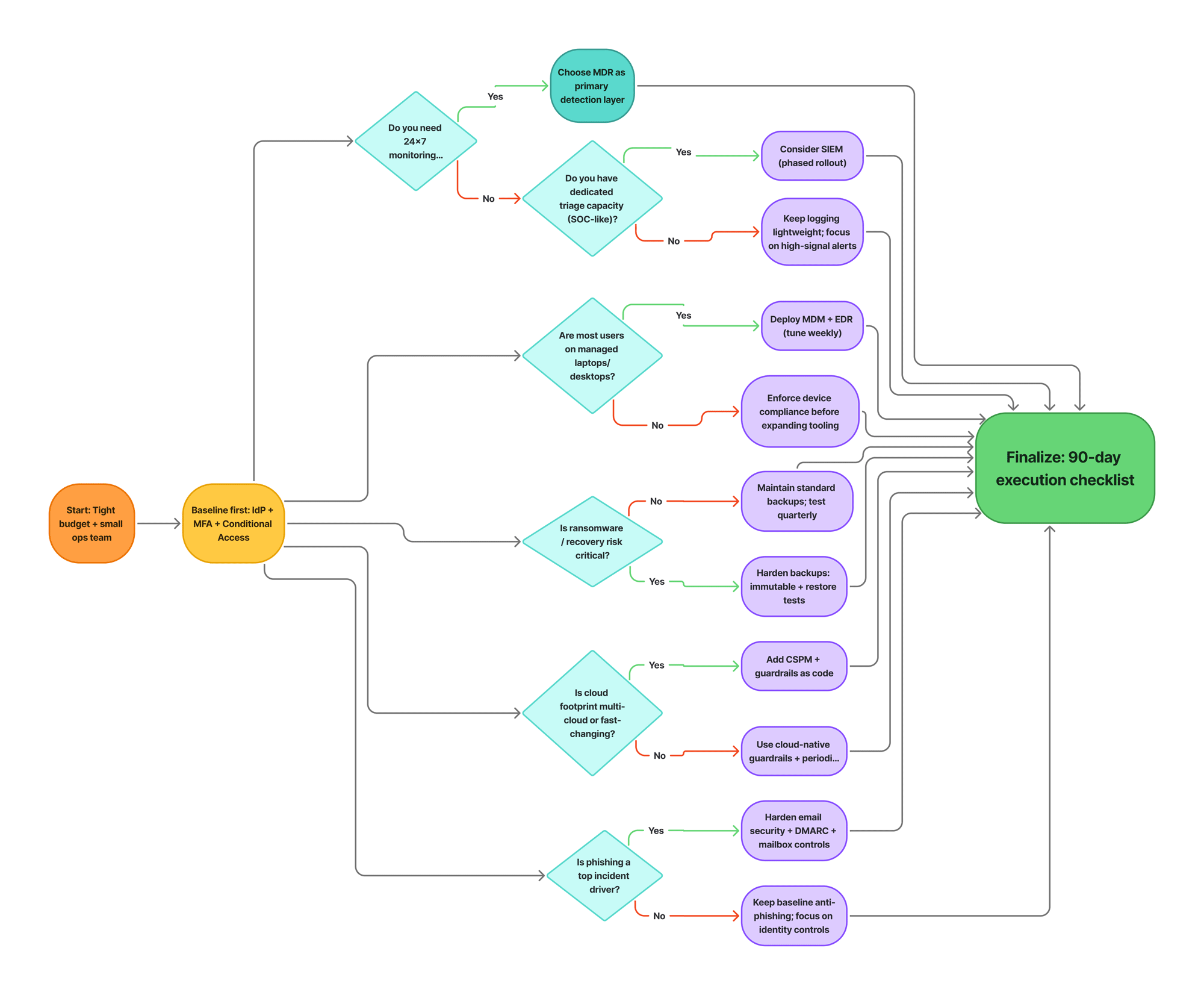
    Cybersecurity best practices sound easy on paper, but most organizations do not get safer after adopting them. The reason is simple: controls get added without sequence, ownership, or operational capacity. So the same gaps keep reopening, especially when you have a tight budget, a small ops team, and workloads spread across multiple clouds. In that setup, “do everything” quickly becomes “do nothing well.”

    What makes this worse is that attackers do not need a “big” weakness. They win through small, common misses: one over-permissioned admin account, one unpatched laptop, one cloud storage policy left public, one alert rule that nobody watches. These are not rare edge cases. They are the default failure points in most environments.

    This post breaks cybersecurity best practices into a practical order of execution. Let’s find out what to do first, what to standardize across clouds, what to avoid and how to shortlist tools that improve security without adding operational load.

    The 5 failure patterns that make best practices useless

    Most cybersecurity best practices fail for a boring reason: they are adopted as a list, not as an operating model (ref: NIST Cybersecurity Guideline). Teams implement controls in silos, measure activity instead of risk reduction, and slowly create a security stack that looks impressive but does not change outcomes.

    In lean environments, the gap becomes visible quickly. You add tools, alerts increase, tickets pile up, and the team starts ignoring noise. Meanwhile the real exposures stay open because nobody owns the basics end-to-end.

    What to do

    • Identify your top 5 business-critical systems and data paths
    • Map who owns identity, endpoints, cloud, and incident response
    • List the controls you run today, plus who operates each one
    • Track repeat incidents and their root causes for 90 days
    • Remove or tune anything creating noise without detection value

    How to do it

    1. Run a 60-minute workshop: systems, data flows, and current controls.
    2. Tag each control as prevent, detect, respond, or report.
    3. Mark every control with a clear operator and a weekly time cost.
    4. Find the “orphan controls” with no owner or no maintenance routine.
    5. Pick 3 gaps that repeat and align next steps to those gaps.

    What to avoid

    • Buying a new tool to compensate for missing ownership
    • Treating compliance checkboxes as real security progress
    • Running alerting without a triage routine and escalation path

    Quick decision rule: If a control has no owner and no weekly routine, it does not exist.

    Establish a minimum security baseline (what “good enough” looks like)

    A baseline is the set of controls you can run consistently, even when the team is busy. Without it, security becomes a series of reactions: you harden one system after an incident, then drift back because there is no enforced standard. In multi-cloud, baseline gaps multiply because every platform has its own defaults and policy layers.

    A “good enough” baseline is not perfection. It is a small set of non-negotiables that reduce the most common breach paths and are measurable. The goal is consistency across users, devices, workloads, and cloud accounts.

    What to do

    • Define baseline controls for identity, endpoints, cloud, and logging
    • Standardize configuration via policy, not manual settings
    • Set minimum patch timelines by severity and exposure
    • Enforce baseline on new assets before they go live
    • Measure baseline compliance weekly, not quarterly

    How to do it

    1. Write a one-page baseline: identity, endpoints, cloud, logging, backups.
    2. Convert baseline to enforceable policies (IdP, MDM, CSPM, IaC).
    3. Create exceptions with expiry dates and business justification.
    4. Roll out in phases: admins first, then privileged apps, then everyone.
    5. Publish three metrics: MFA coverage, patch SLA, critical mis-configs.

    What to avoid

    • Baselines that require constant manual policing
    • Exceptions that never expire and become permanent holes
    • Treating “we have a tool” as the same as “we enforce policy”

    Decision rule: If you cannot measure it weekly, it is not part of your baseline.

    Identity is the new perimeter (MFA, PAM, least privilege, service accounts)

    Most real-world breaches still start with identity. Not always through fancy exploits, but through stolen credentials, reused passwords, session theft, phishing, and over-permissioned accounts. In multi-cloud, identity risk expands because access is spread across cloud consoles, SaaS admin panels, CI/CD pipelines, and service accounts that nobody reviews after setup.

    If you fix only one area in the next quarter, fix identity. It reduces the highest number of common attack paths and makes every other control easier to operate. (please refer: OWASP Top 10:2025 to know the top risks)

    What to do

    • Enforce MFA everywhere, especially for admin and remote access
    • Remove standing admin access; use just-in-time elevation
    • Implement least privilege with role-based access and periodic reviews
    • Control service accounts and API keys like privileged identities
    • Centralize identity in one IdP with consistent conditional access

    How to do it

    1. Start with privileged users: admins, finance, production access, DevOps.
    2. Turn on phishing-resistant MFA where possible for privileged access.
    3. Replace shared admin accounts with named accounts and audit trails.
    4. Implement PAM for elevation, session recording, and approval flows.
    5. Inventory service accounts, rotate keys, and restrict scopes and lifetimes.

    What to avoid

    • MFA only for VPN but not for cloud and SaaS admin consoles
    • Keeping “break glass” accounts without strict controls and monitoring
    • Long-lived API keys and service accounts with broad permissions

    Quick decision rule: If an identity can access production without MFA and approval, it is a priority risk.

    Secure endpoints without turning IT into a ticket factory

    One of the most ignored cybersecurity best practices is endpoint discipline. Endpoints are where security becomes real or imaginary. One unmanaged laptop, one browser running outdated plugins, one user with local admin “temporarily,” and suddenly your cloud controls do not matter. Attackers do not need sophistication if endpoints give them persistence.

    For cyber security for business, the objective is not perfect endpoint hardening. It is an endpoint baseline that runs with minimal human effort, produces low-noise signals, and blocks the most common lateral-move behaviors.

    Also read: Affordable Cybersecurity for Startups: 9 Essential Tips

    What to standardize (minimum baseline)

    • No local admin by default; use time-bound elevation
    • Full-disk encryption, auto-lock, and device compliance checks
    • Patch SLAs for OS, browser, and office/PDF tools
    • EDR installed and reporting healthy, with tamper protection enabled
    • Application control for high-risk binaries where feasible

    A rollout that does not break your team

    Use two rings:

    • Ring 1 (highest risk): Admin devices, DevOps machines, finance, VPN-heavy users
    • Ring 2: Everyone else

    Enforce in this sequence:

    1. Require MDM enrollment for email and core apps.
    2. Remove standing privileges; introduce approved elevation.
    3. Automate patching and define reboot windows.
    4. Tune EDR so you only alert on what you can respond to.
    5. Add behavior blocks gradually: macros, risky scripting, unknown USB.

    What to avoid

    • Hard blocks without an exception workflow
    • “Installed EDR” with no health monitoring and policy tuning
    • Unmanaged BYOD access to SaaS without conditional access
    • Patch “best effort” instead of a time-bound SLA

    Quick decision rule: If you cannot enforce device compliance, you do not have endpoint security, you have endpoint hope.

    Multi-cloud security essentials (what to standardize vs what to localize)

    In multi-cloud, cybersecurity best practices fail when security becomes “cloud-specific.” Teams end up with different identities, different logging, different network patterns, and different policy styles across AWS, Azure, and GCP. That drift creates blind spots, and attackers love blind spots because detection and response get slower.

    For cyber security for business, you do not need identical tooling in every cloud, but you do need consistent guardrails. Standardize the controls that reduce risk across all clouds, then localize only where a cloud has a unique native advantage or a hard requirement.

    The practical approach is simple: standardize identity, baseline policies, and logging first, then standardize how you deploy and review cloud changes. Once those are stable, decide whether a single cross-cloud tool is worth it or whether you will rely on each cloud’s native security stack with a common operating model.

    What to do

    • Standardize identity and access patterns across all clouds
    • Enforce baseline guardrails: public exposure, encryption, key rotation
    • Centralize logs and normalize events for detection and reporting
    • Run cloud security policies as code, not console settings
    • Define one approval path for high-risk cloud changes

    How to do it

    1. Choose one IdP model and enforce consistent role design in each cloud.
    2. Deploy policy guardrails: block public storage, restrict open inbound ports.
    3. Centralize cloud audit logs into one detection pipeline.
    4. Use IaC with review gates for network, IAM, and data services.
    5. Schedule weekly drift checks and monthly privilege reviews.

    What to avoid

    • Separate IAM models per cloud with no unified review
    • Relying on manual console changes for production guardrails
    • Logging everything but investigating nothing due to alert overload

    Quick decision rule: If you cannot explain who can access what across clouds in one view, standardize identity and policy first.

    Logging and detection that you will actually use

    Most cybersecurity best practices guides advice around logging sounds like: collect everything. In real life, that turns into alert fatigue, ignored dashboards, and a security posture that looks busy but is blind. If your team is small, detection has to be designed around one question: what can we realistically investigate and close?

    Think of logging as a product you operate, not a dump you store. For cyber security for business, you need a small set of high-signal events, a clear triage routine, and an escalation path that does not depend on heroics.

    Build detection in layers. Start with identity and admin activity, then endpoints, then cloud control-plane events, then data access anomalies. Each layer should have a response playbook, even if the playbook is “disable account, isolate device, rotate keys, open incident ticket.”

    What to do (minimum viable detection)

    • Pick 12–15 high-signal detections you will respond to every time
    • Create one triage queue with severity rules and owner rotation
    • Make identity events non-negotiable (login anomalies, admin role changes)
    • Define “containment first” actions for account and endpoint incidents
    • Report weekly on two numbers: true incidents and time-to-contain

    How to do it (operable routine)

    1. Define your top 5 incident types (identity compromise, ransomware, cloud exposure, data leak, endpoint malware).
      For each, write a 10-line playbook: detect, confirm, contain, recover, learn.
    2. Reduce noise: disable low-value alerts until you have bandwidth.
    3. Ensure logs are complete: IdP, EDR, cloud audit logs, DNS, email security.
    4. Run a weekly 30-minute review: what fired, what was real, what to tune.

    What to avoid

    • Logging everything without a triage owner and closure discipline
    • Alerting on “interesting” events that you cannot act on
    • Depending on one person to interpret every security signal

    Decision rule: If an alert does not have a defined containment action, it is not a detection, it is a distraction.

    Security stack options for cybersecurity for business

    Option to evaluateBest fit scenarioDecision note (what matters most)
    IdP + MFA + conditional accessAny organization, fastest risk reductionEnforce MFA for privileged users first. Policy quality matters more than brand.
    Endpoint management + EDRLaptop-heavy teams, remote workforceChoose what your team can tune weekly. Healthy telemetry beats “more alerts.”
    CSPM (cloud posture)Multi-cloud or fast cloud growthWorks only with ownership for remediation. Otherwise it becomes a dashboard.
    Vulnerability managementMixed infra, compliance or audit pressureAsset inventory is the start. Without it, scanning is theatre.
    MDR (managed detection and response)Small ops team needing 24×7 coverageClarify response authority. Define what the vendor can contain without approvals.
    SIEM (central logging)Regulated orgs, mature security operationsDo it only with triage capacity. Otherwise cost grows faster than value.
    Email security + anti-phishingFrequent phishing, executive targetingEnforce DMARC and mailbox controls. Training alone will not fix phishing.
    Backup + recovery hardeningRansomware risk, business continuity priorityTest restores. Immutable backups and clear RTO/RPO are non-negotiable.

    Decision matrix: how to choose tools under a tight budget + small ops

    cybersecurity best practices

    Checklist: 90-day plan to implement cybersecurity best practices

    Use this as a working checklist for cyber security for business when budget and ops capacity are limited.

    Identity and access hardening

    ✅ MFA enforced for all privileged and remote access
    ✅ Conditional access policies set for risky sign-ins and unknown devices
    ✅ Standing admin access removed or tightly restricted
    ✅ Privileged access approvals and audit trails enabled
    ✅ Service accounts and API keys inventoried, scoped, and rotated

    Endpoint and device baseline

    ✅ MDM enrollment required for email and core SaaS access
    ✅ Local admin removed for standard users with time-bound elevation
    ✅ Disk encryption and screen lock enforced across managed devices
    ✅ Patch SLAs defined and monitored for OS, browser, office/PDF tools

    Cloud configuration and guardrails

    ✅ Cloud accounts/subscriptions organized with clear ownership and tagging
    ✅ Public exposure guardrails enforced (storage, ports, load balancers)
    ✅ Encryption enforced for data at rest and in transit, with key controls
    ✅ IAM roles standardized and reviewed monthly across clouds
    ✅ Infrastructure changes routed through IaC with review gates

    Logging, detection, and response basics

    ✅ Audit logs enabled for IdP, endpoints, and each cloud control plane
    ✅ High-signal detections selected (identity changes, admin actions, risky sign-ins)
    ✅ One triage queue defined with severity rules and escalation path
    ✅ Containment playbooks written for account compromise and endpoint infection

    Governance, vendor controls, and measurable reporting

    ✅ Asset inventory is accurate enough to drive patching and scanning
    ✅ Vendor access reviewed, least privilege enforced, and logged
    ✅ Backup restore tests scheduled and tracked, not assumed
    ✅ Weekly scorecard published (MFA coverage, patch compliance, critical misconfigs, incidents)

    Conclusion

    If you approach cybersecurity best practices as an execution plan, not a checklist, you can improve security posture quickly even with a small team and a tight budget. Start with identity, enforce a clean endpoint baseline, standardize multi-cloud guardrails, and keep detection focused on signals you will act on. That sequence turns cyber security for business into steady, measurable risk reduction without tool sprawl or burnout.