Tag: business intelligence

  • The AI Governance Checklist for IT Leaders in 2026 Before Your Next Deployment

    The AI Governance Checklist for IT Leaders in 2026 Before Your Next Deployment

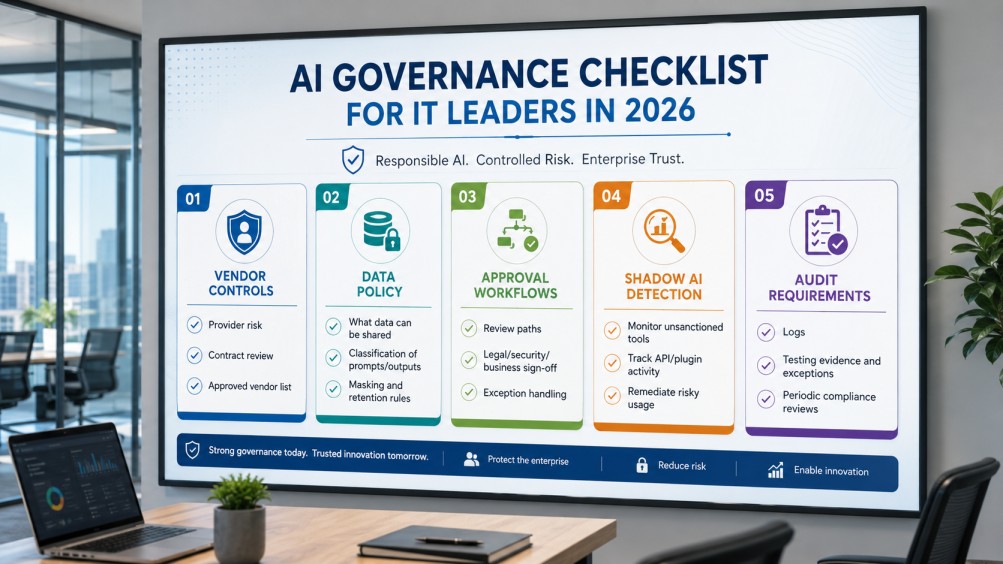
    Most AI governance policies fail within six months because they focus on principles instead of practical controls. By the time you discover shadow AI usage or a vendor compliance gap, you’re managing a crisis instead of preventing one. The gap isn’t philosophical. It’s operational. Your policy document says “responsible AI use,” but nobody defined what happens when an employee pastes customer data into ChatGPT or a vendor refuses to log the prompts your compliance team will need during an audit. This AI governance checklist for IT leaders in 2026 covers the specific controls that prevent those problems before they require incident response. You’ll know what to verify before approving internal AI use, what contract terms stop vendor problems at signing, how to detect shadow AI without dedicated tooling, and what audit trail your first compliance review will demand.

    Internal Use Controls Before the First Model Goes Live

    Run through these five items before you approve general employee access to any AI tool. Missing even one creates a compliance gap your audit team will find six months later.

    Acceptable use policy specific to AI
    Your existing acceptable use policy doesn’t cover generative AI. You need explicit language defining what constitutes approved use, prohibited data types, and consequences. Don’t repurpose your social media policy.

    Data classification training refresher
    Employees need to know which data types they can’t submit to AI tools. If your data classification system hasn’t been reviewed in 18 months, half your team won’t remember what qualifies as sensitive.

    Approved tool list published and enforced
    Saying “use approved tools only” without publishing the list guarantees shadow AI. Name the specific tools, include version numbers if relevant, and update it quarterly.

    Incident reporting path for AI-related concerns
    Your team needs to know where to report an accidental data exposure or a problematic AI output. If the path isn’t clear, they won’t report until the problem escalates.

    Access tied to training completion
    Make AI tool access conditional on completing a 15-minute training module. It’s not foolproof, but it eliminates the “I didn’t know” defense and creates an audit trail proving due diligence.

    Vendor AI Controls That Stop Problems at Contract Stage

    The vendor will not volunteer these terms. You need to require them before the contract is signed, because retrofitting compliance language after deployment costs six figures in legal fees and re-negotiation leverage you no longer have.

    Your vendor contract must specify where your data goes, how long it’s retained, whether it’s used for model training, and who can access it. Most vendor agreements are silent on training data usage or bury consent in a clause your legal team will object to nine months later. Get written confirmation that your inputs and outputs are excluded from training datasets. Require the vendor to specify data residency if you operate under jurisdiction-specific privacy laws.

    The second gap: audit rights and incident notification. Your contract needs explicit language granting you the right to audit AI usage logs and requiring the vendor to notify you within 24 hours of a data incident involving your inputs. Vendor SLAs typically cover uptime, not compliance incidents.

    What to require in every vendor AI agreement:

    • Explicit prohibition on using your data for model training or improvement
    • Data residency specification that matches your regulatory requirements
    • Audit rights covering access logs, prompt history, and data handling
    • 24-hour incident notification for breaches involving your data

    RED FLAG: VENDOR CONTRACT GAP

    The liability clause doesn’t cover AI-generated outputs.

    Standard software liability clauses cover defects and downtime. They don’t cover the risk of the AI generating content that violates copyright, defames someone, or breaches a regulation. If your contract is silent on output liability, you’re assuming all downstream risk from anything the model produces using your data. Require explicit vendor liability for outputs that violate law or regulation when used as directed.


    Data Governance Items Your Legal Team Needs Documented

    Your existing data governance policy needs AI-specific amendments. The controls that worked for traditional software don’t translate cleanly when employees can submit unstructured data to a model and receive outputs you can’t predict in advance.

    Sensitive data submission prohibition
    Define which data classifications are prohibited from AI tool input. If “confidential” and “restricted” are banned but “internal use” is allowed, document it explicitly and train to it.

    Output handling requirements
    AI-generated content needs a classification rule. Does it inherit the classification of the input data? Does it default to a specific tier? Your data handling policy must cover outputs, or you’ll discover inconsistent practices during your first audit.

    Cross-border data flow documentation
    If your vendor’s AI processes data outside your operating jurisdiction, document it. Most privacy regulations require notice and sometimes consent when data crosses borders. API calls to a U.S.-based LLM from your EU office trigger this requirement.

    Third-party data restrictions
    If you handle customer or partner data under contractual terms, verify those terms permit AI processing. Your customer agreement may prohibit third-party processing or require specific safeguards that your AI vendor doesn’t meet.

    Retention and deletion alignment
    Your AI vendor’s data retention period must align with your own data retention and deletion policies. If you’re required to delete customer data on request, but your AI vendor retains prompts for two years, you’re out of compliance the moment a deletion request arrives.

    Approval Workflows That Don’t Slow Down Every Request

    A governance process that requires CIO sign-off for every AI use case will be bypassed within a month. You need tiered approval based on actual risk, not bureaucratic caution. The goal is to make low-risk use fast and high-risk use visible.

    Tier your approval structure into three levels. Low-risk use cases operate under general authorization with no per-use approval. An employee using an approved tool on non-sensitive data for internal work doesn’t need a ticket. Medium-risk use cases require department head approval and a brief risk assessment. Processing internal data that’s confidential but not regulated, or generating content for external use, fits here. High-risk use cases require cross-functional review involving IT, legal, and compliance before any deployment.

    The risk factors that determine tier: data sensitivity, external visibility of outputs, automated decision-making, and whether the use case involves personal data under privacy regulation. If any single factor is high, the entire use case is high-risk. Don’t average risk scores.

    Approval tiers that work in practice:

    • General authorization: Approved tools, non-sensitive data, internal use only, human review of all outputs
    • Department head approval: Confidential data, external-facing outputs, or workflow automation with human oversight
    • Cross-functional review: Personal data under GDPR/CCPA, fully automated decisions, or any use case that could create legal or regulatory exposure
    • Ongoing monitoring requirement: All medium and high-risk use cases require quarterly usage review to verify they’re operating within approved parameters
    • Emergency provisional approval: IT head can grant 30-day provisional access for urgent business need, but full review must complete before the provisional period ends

    Shadow AI Detection Before It Becomes a Compliance Problem

    Shadow AI happens when employees adopt unapproved tools because your approved options are too slow, too restrictive, or non-existent. You won’t eliminate it entirely, but you can detect it early enough to remediate instead of investigate.

    Unusual outbound traffic patterns to known AI services
    Your firewall logs show traffic to OpenAI, Anthropic, Google AI, and similar domains. Baseline normal traffic, then flag anomalies. A 300% spike in one department over two weeks is a signal.

    Expense report line items for AI subscriptions
    Employees expense ChatGPT Plus, Jasper, or Midjourney subscriptions. Your finance team sees these. Flag any AI-related expense that isn’t tied to an approved tool list.

    Browser extension audits
    AI writing assistants and productivity tools run as browser extensions. Your endpoint management platform can inventory installed extensions. Run quarterly audits and cross-reference against approved tools.

    Department-level data export volume changes
    If a department’s data export volume doubles without a project explanation, someone may be feeding data to an external tool. Correlate export spikes with known AI adoption timelines.

    Employee surveys that ask directly
    Twice a year, survey employees about which tools they use to get work done. Make it anonymous, frame it as process improvement, and you’ll get honest answers. The goal is visibility, not punishment, and employees will tell you if you ask correctly.


    RED FLAG: SHADOW AI USAGE PATTERN

    Approved tools exist, but shadow AI usage is growing anyway.

    Your detection system works. You’re finding unapproved tools in regular use. But employees keep adopting new ones despite having approved alternatives. That’s not a compliance problem. That’s a signal your approved tools are too restrictive, too slow, or missing critical capabilities. If shadow AI persists after you’ve published an approved list and trained everyone, the problem is your tool selection, not your users. Fix the tool gap before you tighten enforcement, or you’ll drive usage further underground and lose visibility entirely.


    Model Governance When You’re Training or Fine-Tuning

    Most teams don’t need model governance yet. If you’re only using vendor APIs and pre-built models, skip this section. Model governance becomes mandatory when you start training models on your own data, fine-tuning vendor models with proprietary datasets, or deploying models that make decisions without human review.

    The threshold: if the model’s behavior can change based on data you control, you need model governance. That includes fine-tuning a vendor LLM on your support tickets, retraining an open-source model on your transaction history, or adjusting weights in a classifier you’re running internally. Once you cross that line, you’re responsible for model behavior in ways you aren’t when you’re just calling someone else’s API.

    Model governance requires tracking which data went into training, who approved the training run, what the model’s intended use case is, and how you’ll monitor for drift or bias after deployment. Document model versioning so you can reproduce outputs or roll back to a previous version when something goes wrong. Establish a review cadence: models trained on your data need quarterly performance reviews at minimum, more often if they’re making automated decisions that affect customers or employees.

    Model governance requirements once you cross the training threshold:

    • Training data provenance documentation: source, date range, cleaning steps, any exclusions
    • Model card or equivalent: intended use case, known limitations, performance benchmarks, and decisions the model should not make
    • Version control for model artifacts: every deployed version tagged, stored, and reproducible
    • Monitoring plan for drift and fairness: defined metrics, review cadence, and escalation path if metrics degrade

    AI Audit Trail Requirements Before Your First External Review

    Your first compliance audit will ask for logs proving who used AI on what data and when. If you can’t produce that documentation, the audit fails regardless of whether your actual usage was compliant. Audit trail requirements aren’t optional once you’re operating under privacy regulation, industry-specific compliance frameworks, or contractual obligations to customers.

    The table below defines what your AI audit trail must include, why each item matters for compliance, and the red flag that signals your vendor or internal system won’t meet the requirement when you need it.

    Checklist Item Why It Matters Red Flag If Missing
    User prompt logging Required for most AI compliance frameworks and breach investigation Vendor claims prompts are ephemeral or not accessible
    Model version tracking Reproducing outputs or rolling back requires knowing which model version ran Vendor API doesn’t expose model version in response metadata
    Access audit trail Determines who used AI on what data and when Logging is user-configurable instead of mandatory
    Data lineage for training Proves training data provenance for regulatory review Vendor won’t document data sources in contract
    Retention policy alignment AI logs must match your existing data retention schedule Default retention is shorter than your compliance requirement

    The biggest audit trail failure happens when your vendor’s logging doesn’t meet your retention requirements. Standard SaaS logging often retains data for 90 days, but privacy regulations typically require 12 to 24 months. If your vendor’s logs expire before your retention policy allows, you can’t produce documentation during an audit that covers a date range more than 90 days old. Verify retention alignment before signing, because extending vendor log retention after the fact usually requires an enterprise tier upgrade and costs more than negotiating it into the original contract.

    Your internal systems need logging too. If employees access AI through an internal portal or wrapper, that system must log user actions, timestamps, and data accessed. Treat AI logging with the same rigor you apply to database access logs or privileged account activity. The standard is the same: every action that touches sensitive data or produces an output with compliance implications must be logged, tamper-evident, and retained per policy.

    Conclusion

    The AI governance checklist for IT leaders in 2026 works when it stops problems at contract signing, policy publication, and first deployment, not after the compliance team finds a gap nine months later. If you’re operating under privacy regulation, handling customer data under contract, or facing an audit in the next 12 months, your approval workflows and vendor contracts are the highest-priority items on this list. If shadow AI is already widespread, your detection plan needs to run within the next 30 days, not next quarter. Before your next vendor call or internal AI pilot, verify every item in Section 2 and Section 7. Those are the gaps that create liability, and they’re the easiest to close before you sign anything.

    Related reading

  • A Practical Playbook for Evaluating Free Business Intelligence Tools

    A Practical Playbook for Evaluating Free Business Intelligence Tools

    Most teams start looking at free business intelligence tools for a simple reason: they need faster answers than spreadsheets can give, without adding another paid platform line item. The risk is that “free” pushes you into the wrong compromise, like building dashboards on top of messy definitions, limited refresh, or sharing that breaks the moment a second team joins.

    That is where the hidden cost shows up. Not in license fees, but in analyst time, duplicated reports, metric disputes, and decisions made on stale or incomplete data. If the tool cannot reliably connect to your sources, refresh on schedule, and enforce basic access control, you end up with a dashboard that looks official but behaves like a fragile prototype.

    So, let’s shortlist free business intelligence tools and pick a setup that stays usable as your data and audience grow. Once we do, you can make clear decisions on deployment model, evaluation steps, and guardrails so “free” does not turn into rework.

    What “Free” Really Means in Free Business Intelligence Tools

    Most free business intelligence tools fall into one of three buckets: open source you host, “free desktop” products that are powerful but awkward to share, and SaaS tools with a free tier that is really a trial with hard limits. The right bucket depends less on features and more on what you are trying to operationalize: a personal analysis workflow, a team dashboard, or a governed reporting layer.

    The practical definition of “free” is this: you are not paying money, but you are paying in constraints. 

    The constraint might be row limits, refresh limits, connector limits, user limits, or export and embedding restrictions. Sometimes the constraint is indirect, like being forced into manual refresh, local files, or workarounds that create a second source of truth.

    The decision you should make early is whether you are optimizing for learning or for durability. If your goal is to explore data and validate metrics, free can be a great fit. If your goal is to publish numbers that others will act on, treat “free” as a pilot tier and set a trigger for when you move to a paid plan or a more controlled open-source setup.

    Your first decision: desktop BI vs web BI vs self-hosted BI

    Desktop BI (local-first)

    • Pros: Fast to start, great modeling and visuals, works even with messy files and exports.
    • Cons: Sharing becomes a project, refreshes are often manual, and “one person owns the file” becomes a bottleneck.

    Web BI (SaaS-first)

    • Pros: Easy sharing, browser access, collaboration, and smoother distribution across teams.
    • Cons: Free tiers usually cap users, refresh, storage, or connectors; governance may be limited unless you pay; some orgs hit security constraints quickly.

    Self-hosted BI (open source you run)

    • Pros: More control over data access, hosting, and extensibility; avoids “free tier cliffs” if you have stable infra.
    • Cons: You own uptime, upgrades, backups, and security hardening; small teams can underestimate the ops load.

    Decision rule: If more than 5 people need consistent dashboards, avoid desktop-only as your primary path. Choose web BI if you can live within the free-tier limits, or self-hosted if security and control are a priority and you can handle basic operations.

     Business Intelligence Tools by Use Case

    Tool/OptionBest-fit use caseLimits and “hidden costs” to watch
    Looker Studio (free)Quick, shareable reports, especially for Google ecosystem dataNon-Google connectors often mean paid third-party connectors; governance features are limited unless you move up-market.
    Power BI Desktop (free)Strong local modeling and reporting for one analyst or a small podSharing typically needs Pro/PPU or a Premium capacity plan; “free” can trap you in file-based distribution.
    Metabase (open source)Self-serve analytics for mixed technical and non-technical usersHosting, upgrades, and permission design are on you; performance depends on how you manage queries and caching. (GitHub)
    Apache Superset (open source)SQL-first exploration + flexible dashboards at scaleYou must standardize metric definitions and permissions; ops work is non-trivial for a small team.
    Preset Cloud (free tier)“Superset without ops” for small teams that want web BI fastFree tier has plan limits (users/workspaces/usage); you still need to govern metrics to avoid dashboard sprawl.
    Redash (open source)Developer-friendly querying + dashboards across many data sourcesGreat for SQL users, weaker for governed semantic modeling; you own security hardening and scaling.
    Grafana (open source)“BI-adjacent” dashboards for ops, logs, and time-series metricsBusiness reporting workflows can feel forced; keep it for operational metrics, not finance-style reporting.
    Lightdash (open source)dbt-centric BI where metrics must be defined once and reusedAssumes you can run dbt and manage a modern data stack; requires discipline around metric modeling.
    Rill (open source)Fast “BI-as-code” dashboards for data lake style workflowsBest when you can treat dashboards as code; business users may still need enablement and conventions.
    Evidence (open source, BI-as-code)Repeatable reporting sites using SQL + markdown (great for governed narratives)Requires a code workflow (PRs, deployments); not a drag-and-drop experience.
    Chartbrew (open source)Lightweight dashboards from databases and APIs, plus embeddingYou still need a clean data contract for APIs; permissions and sharing need deliberate setup. (GitHub)
    Querybook (open source)Collaborative SQL notebooks (“DataDocs”) for discovery and team analysisStrong for analysis workflows, not a classic governed BI layer; you must manage access and compute cost.
    ReportServer Community (open source)Enterprise-style reporting hub (pixel-perfect, office exports, OLAP)Setup and maintenance can be heavy; best when you truly need scheduled reports and distribution.
    Jaspersoft Community (free)Pixel-perfect operational reporting and embedded reporting in appsMore “reporting platform” than modern BI; expect developer involvement and template maintenance.
    Eclipse BIRT (open source)Java-embedded reporting when you need control over report renderingOlder ecosystem and more engineering-led; great for embedded reports, not self-serve BI.
    Seal Report (open source)Scheduled report generation for .NET shops, simple deployment mindsetWindows/.NET leaning; treat it as reporting automation, not a broad BI platform.
    OpenSearch Dashboards (open source)Visual analytics on OpenSearch data (logs, security, operational search)It is search/observability-first; not ideal for cross-domain business metrics unless your data lives there.
    DataEaze (open source)Drag-and-drop BI experience that is less mainstream than the usual suspectsValidate community maturity, localization, and long-term maintenance fit before standardizing on it.
    Tableau Public (free)Public-facing dashboards and portfolio work with non-sensitive dataAnything published is public; avoid for internal or confidential reporting.

    Architecture Choices That Matter More Than the Tool

    If you want free business intelligence tools to stay useful, you need a basic architecture decision: will dashboards read directly from operational systems, or from a curated analytics layer. Direct-to-prod connections feel fast, but they usually become slow and risky. Queries compete with production workloads, schemas change without warning, and nobody is sure which dashboard is “right” when numbers drift.

    A more durable setup is a thin analytics layer even if you keep it lean. That can be as simple as: one warehouse or database schema for reporting, a small set of governed tables/views, and a clear owner for metric definitions. It is not “enterprise data governance.” It is a practical way to prevent five versions of revenue, churn, or outage counts from spreading across teams.

    Make one decision now and you will save months later: define where truth lives. If you cannot create an analytics layer yet, at least create stable views, name them like products (v_customer_daily, v_sales_mtd), and lock down who can edit them. Then your BI tool becomes a visualization layer, not a second data pipeline.

    Also Read: 7 Fail-proof Ways to Use AI for Business Planning That Actually Work

    The Non-Negotiable Trade-offs in “Free” BI

    Scenario: One analyst, a few stakeholders, and everything starts in Excel.
    Action: Use a desktop-first tool or a lightweight web tool for speed, but set a rule that “published metrics” must come from a shared dataset or database view, not someone’s local file.

    Scenario: You need internal sharing, but you cannot risk broad data exposure.
    Action: Pick a tool path only if you can enforce access control cleanly (at minimum: database permissions; ideally: group-based access through your identity provider). If the free tier cannot do this, do not ship “official” dashboards on it.

    Scenario: Your data is spread across SaaS apps and operational databases.
    Action: Treat connectors as the bottleneck, not charts. If you cannot extract or model the data reliably, pick a tool that plays well with a small staging layer (even a single reporting schema) instead of trying to connect to everything live.

    Scenario: You expect more teams to build dashboards next quarter.
    Action: Make metric definitions a first-class asset. Choose an approach that supports a shared semantic layer (or at least shared governed views), otherwise, your “free” rollout turns into metric drift and constant reconciliation.

    Scenario: Leadership wants scheduled, pixel-perfect reports, not exploration.
    Action: Do not force a modern dashboard tool to behave like a reporting engine. Use a reporting-oriented option (or a reporting module) and keep BI tools focused on interactive analysis where they actually win.

    Free business intelligence tools

    Do This First: A 7-Step Evaluation Sequence

    1. Pick two real questions the business asks weekly.
    2. List the exact sources for those answers (systems, tables, exports).
    3. Decide “live query” vs “extract” per source.
    4. Define 8–12 metrics, with one-line definitions.
    5. Build one dashboard and one scheduled report.
    6. Test sharing: access control, links, exports, mobile view.
    7. Set trigger thresholds: when free stops working.

    Mini Playbook: Scenarios and the Best Free BI Move

    Free business intelligence tools usually succeed when you standardize the “input shape” before you obsess over dashboards. That means one reporting schema (or at least a small set of curated views) and a short list of metrics with stable definitions. If you do only one thing, do that. It prevents the common failure where every dashboard becomes its own transformation pipeline.

    Next, design for how work actually happens in lean teams. Pick one primary authoring path, define who can publish “official” dashboards, and keep everything else as sandbox work. If publishing is open-ended from day one, you will get duplicate dashboards, metric drift, and constant debates about whose numbers are correct.

    Finally, treat “free” as a controlled stage with upgrade triggers. Decide upfront what forces a change: more than X viewers, refresh more than Y times a day, sensitive data requiring stronger access control, or cross-team reporting that needs a shared semantic layer. When you hit a trigger, you either move to a paid tier or shift to a more controlled self-hosted approach. That is how free stays cheap.

    Pitfalls That Make Free BI Expensive

    Free business intelligence tools rarely fail because charts are weak. They fail because the workflow around the charts is unmanaged. If five people can publish dashboards with five different definitions of the same metric, you will spend more time reconciling numbers than acting on them. The second failure mode is refresh and reliability: dashboards that look fine in a demo but quietly go stale, break after schema changes, or require manual babysitting.

    Avoid these predictable traps:

    • Treating spreadsheets as your long-term “data model”
    • Letting dashboards contain transformation logic nobody reviews
    • No single owner for metric definitions and “official” reports
    • Live-querying production systems for routine reporting
    • Sharing via exports and screenshots instead of controlled access
    • Ignoring permission design until after dashboards spread
    • Assuming “free tier” limits will not matter as usage grows

    A simple guardrail set fixes this: one curated reporting layer (even small), one metric dictionary, and one publishing rule (who can mark dashboards as official). Do that, and free business intelligence tools can stay useful instead of becoming a high-friction side project.

    Checklist: Go/No-Go Criteria Before You Commit

    Data fit

    ✅ Connects cleanly to your main database
    ✅ Handles CSV/Excel inputs without hacks
    ❌ Weekly manual prep is required
    ❌ Core SaaS connectors are blocked or paid-only for your needs

    Refresh and reliability

    ✅ Scheduled refresh works at the required cadence
    ✅ Failures are visible and owned
    ❌ Manual refresh is the process
    ❌ Live queries slow production systems

    Sharing and access control

    ✅ Group/role-based access is supported
    ✅ “Official” dashboards can be separated from drafts
    ❌ Sharing depends on exports/screenshots
    ❌ Sensitive data cannot be restricted reliably

    Metrics and consistency

    ✅ Shared definitions are possible (views/models)
    ✅ Metric ownership is explicit
    ❌ Each dashboard defines its own logic
    ❌ Numbers disagree across teams with no arbitration

    Limits and exit plan

    ✅ You know the first free-tier limit you will hit
    ✅ Upgrade/migration path avoids rebuild
    ❌ The likely next step is “rebuild everything”
    ❌ Free-tier limits block real adoption (users/refresh/connectors)

    FAQs

    Is it actually worth the massive headache to move?

    If your cloud bill is flat and predictable, you are basically throwing money at a landlord for no reason. I am seeing companies reclaim 40% of their margins just by owning their own “iron.” It is a massive project, but so is paying for a “luxury” rental when you have the cash to buy the house.

    What happens if a server physically breaks at 3 AM?

    You do not drive to the data center in your pajamas. You use a Colocation provider with a “Remote Hands” agreement. They are your feet on the ground. With a proper high-availability setup, one dead server is a non-event that gets fixed during business hours, not an emergency that kills your weekend.

    Are we going to get stuck with “old” technology?

    Only if you buy junk. In the cloud, you pay for the newest chips whether your Python script needs them or not. On-premises, you buy exactly what you need. A two-year-old processor handles 90% of enterprise workloads perfectly fine at a fraction of the cost. It is about being a smart buyer, not a tech hoarder.

    Will my “Cloud-only” team quit in a panic?

    They might get nervous because they forgot how a Linux kernel actually works. But the truth is, if they can run Kubernetes in AWS, they can run it on-prem. It is the same software; the only difference is that the “off” switch is now in your hands, not someone else’s.

    Can the cloud providers stop us from leaving?

    They will try to “tax” you on the way out with egress fees. It is basically a ransom for your own data. The trick is not to move everything over the internet. You load your data onto physical drives and ship them. It sounds old-school, but a truck full of hard drives is still the fastest bandwidth for a clean break.

    Conclusion

    Free business intelligence tools can be a smart move if you treat them like a controlled rollout, not a forever platform by default. Pick a tool that matches your sharing model, lock down where “truth” lives (views or a small reporting layer), and set upgrade triggers before adoption spreads. Do that and you get speed without chaos, dashboards people trust, and a clear path when usage outgrows “free.”