Tag: Team Building

  • Why Cross-functional Team Alignment Paralyzed Even After Endless Meetings: 5 Reasons

    Why Cross-functional Team Alignment Paralyzed Even After Endless Meetings: 5 Reasons

    Cross-functional team alignment sounds good in theory, but it’s a different story when you see it in practice.

    Sales rolls their eyes at Product. Product complains about Engineering. Engineering quietly builds what it thinks is best because no one else seems to understand it.

    It’s the same dance in every tech-driven company.

    Different rooms. Same friction.

    Each team is convinced they’re the adult in the room. The ones with the objective perspective. The others? Distracted. Overreaching. Unreasonable.

    So we create meetings. Cross-functional working groups. Alignment decks.

    And what do we get?

    Fatigue.

    Everyone’s calendar gets bloated. Decisions take weeks. Progress slows. And ironically, the very thing we wanted – alignment, starts to feel like overhead.

    But here’s the uncomfortable truth: You don’t need more collaboration. You need better clarity.

    And a system that lets Product, Tech, and Sales move without tripping over each other.

    Let’s talk about how that happens.

    The Real Cost of Poor Cross-Functional Team Alignment

    Cross-functional alignment failures rarely show up all at once. They begin as soft friction, slipped deadlines, confusing handovers, and strategy calls that sound out of sync. Everyone is working, but not necessarily together. Priorities shift mid-sprint. Product specs evolve after development starts. Sales pitches get ahead of releases. And soon, no one’s sure where the source of truth is.

    Now put that in numbers. Take a 25-member team working on a mid-sized digital product that includes product managers, engineers, QA, designers, Sales, Pre-Sales, and others. If each person loses just 5 hours a week to misaligned work, back-and-forths, or unnecessary meetings, that’s over 500 hours per month gone. That’s a complete sprint cycle lost to confusion and coordination debt.

    And the cost isn’t just time. It’s output, momentum, and morale. With a blended team cost of $2,500 to $4,000 per person per month (including salaries, overhead, and tools), that’s a monthly burn of $60,000 to $100,000 for a 25-member team. Even a modest 15% productivity leak due to poor alignment equals $9,000 to $15,000 lost every month, with no value shipped.

    Misalignment isn’t a workflow issue. It’s a business risk hiding in plain sight.

    Shared Objectives Beat Shared Calendars

    Cross-functional Team Alignment doesn’t mean syncing schedules. It means syncing priorities. Cross-functional teams don’t need more Zoom or Teams calls; they need a shared definition of success. Here’s how to do it.

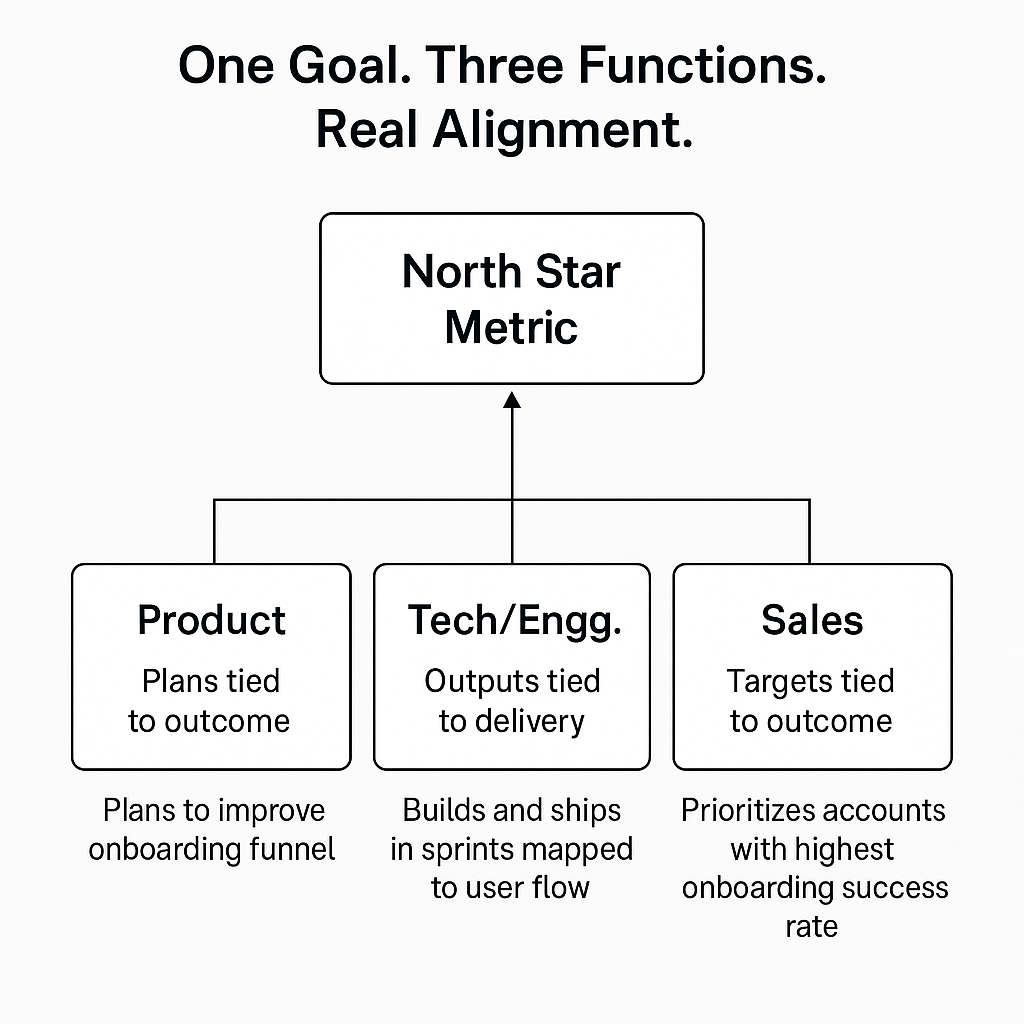
    Anchor all teams to the same North Star metric.

    Whether it’s activation rate, time-to-value, or revenue per seat, pick a metric that reflects real business value and make it visible to everyone.

    Define success for each function in terms of that shared goal.

    The product focuses on adoption, Engineering optimizes for delivery velocity, and Sales drives segment fit, all in service of the same outcome.

    Use lightweight OKRs or thematic goals instead of feature lists.

    Replace “ship feature X” with “increase onboarding completion by 20%.” It gives teams room to innovate while staying aligned.

    Make tradeoffs transparent.

    When two functions have different objectives, tie them back to the shared purpose. If it doesn’t move the needle, it doesn’t move forward.

    Kill vanity metrics at the edges.

    If Sales celebrates leads that churn in 10 days, or Engineering hits ticket velocity while shipping unused features, alignment is already broken.

    Structure the Handoffs, Not the Meetings

    A lack of meetings doesn’t cause most coordination problems; poorly defined handoffs are the primary cause. When Product tosses specs over the wall to Engineering without shared understanding, or when Tech completes delivery but Sales doesn’t know how to position the release, things break. Not immediately, but soon enough.

    What’s missing is a precise operating rhythm. Every stage of a cross-functional workflow should include: what is being handed off, who owns it next, and what “done” means at that point. Is the feature doc just a bullet list, or does it include user flows? Does the tech team flag readiness with a code freeze or a QA-approved staging release? If that language isn’t consistent across teams, misalignment creeps in.

    Instead of recurring syncs, define structured checkpoints. Create handoff playbooks: Product to Tech → MVP approval. Tech to Sales → Release documentation and internal demo. These are the real bridges. Build them once, and meetings become backup, not the backbone.

    Asynchronous Rituals Keep Teams in Sync

    Synchronous updates are useful until they become a hindrance. When your team grows or stretches across time zones, real-time alignment becomes a bottleneck. Async rituals fix that. They reduce interruptions, improve clarity, and scale decision-making without burning hours on Zoom.

    Here’s how async Cross-functional Team Alignment works:

    • Product teams can record feature walkthroughs once. Tech and Sales can review them at their convenience, without needing to schedule a call.
    • Use tools like JIRA, Trello, or ClickUp to give everyone real-time visibility into what’s moving, what’s blocked, and what’s next.
    • Designate specific channels for Product, Tech, and Sales syncs. Use pinned formats for updates (e.g., “What we shipped / What’s coming / Blockers”).
    • Encourage team members to post short demo videos every week; schedule optional office hours instead of mandatory reviews.
    • Hook dashboards to Slack or Teams so significant state changes (MVP tagged, feature shipped, doc ready) notify the right people, instantly.

    The most effective asynchronous rituals are those that are boring and repetitive. That’s the point. They free up your team to do the real work of building, closing, and shipping without waiting on the next invite.

    Respect Autonomy While Staying Aligned

    Cross-functional Team Alignment often breaks down not because teams avoid collaboration, but because they’re pulled into multiple tasks simultaneously. That’s not alignment. That’s micromanagement masquerading as teamwork.

    Once goals and handoffs are clear, each function should execute independently. The product team doesn’t need to approve every design. Engineering shouldn’t have to defend every line of code. Sales doesn’t need a nod before pitching. What matters is that constraints are known, outcomes are defined, and responsibilities are understood.

    The best teams work within guardrails, not approval loops. Product owns the what and why, Tech owns the how, and Sales owns the impact. Everyone stays informed, but no one waits for permission. That’s what absolute autonomy looks like.

    Centralize Context, Decentralize Execution

    In most teams, work slows down not because people lack direction, but because they lack access to context. Key decisions are buried in emails. Requirements are scattered across tools. Customer insights sit with Sales. As a result, meetings become the primary means of staying aligned.

    That’s avoidable. Create a single source where the product vision, specifications, customer feedback, and go-to-market assets are all documented and easily accessible. When context is shared and up to date, teams don’t need to check in constantly. Product can plan, Engineering can build, and Sales can engage customers without waiting for answers. Alignment becomes part of how the team operates, not something you stop to do.

    Cross-functional team alignment

    Read this excellent article on Cross-functional team alignment by Atlassian, creator of Jira.

    Use Review Forums, Not Update Calls

    Most cross-functional teams spend too much time talking about the work and not enough time making decisions. Daily syncs, update calls, and check-ins become routine but offer little value beyond what a dashboard already shows. The real fix is to replace passive updates with structured review forums that drive decisions and move things forward.

    • Replace update meetings with weekly review forums that focus on shipped work, blockers, and decisions. Nothing more.
    • Limit attendance to one representative per function to keep meetings tight and focused.
    • Focus on metrics that matter, not effort logs or activity summaries.
    • Use a consistent format across teams: what shipped, what it impacted, what’s next.
    • Decide live. Every discussion concludes with an explicit action or next step.
    Cross-functional team alignment

    Build Cross-Functional Empathy by Design

    Most Cross-functional Team Alignment issues aren’t technical. They’re relational. Teams work next to each other without understanding what the others are solving, optimizing, or avoiding. Assumptions take the place of insight. Friction follows. The best way to fix this isn’t with more process, it’s with exposure.

    • Rotate engineers into recorded sales calls to hear real objections and customer language.
    • Let sales teams observe product roadmap walkthroughs to understand what’s feasible and why.
    • Share design reviews and usability test clips across teams so everyone sees the product through the user’s eyes.
    • Celebrate launches as a cross-team milestone, not a single-function win.
    • Create informal spaces for product, tech, and sales to talk without an agenda.
    • Encourage people to write, not just talk. Shared notes, Looms, and briefs help teams see each other’s thinking.

    Empathy is built in the details when one team understands how another works, the alignment problems start to fix themselves.

    Read these guidelines for Digital Transformation using AI.

    Conclusion

    The most effective teams aren’t the ones with the most meetings or the fanciest tools. They’re the ones who understand how to move together without getting in each other’s way. With shared goals, clear handoffs, and just the right amount of structure, alignment becomes a benefit rather than a burden. It becomes momentum. That’s the shift modern product companies need to make, and the ones that do it well move faster than everyone else.


  • Virtual Customer Assistants: No. 1 Fail-Proof Way To Top-Class Support

    Virtual Customer Assistants: No. 1 Fail-Proof Way To Top-Class Support

    Imagine working late on a critical project, and you’re navigating through your CRM to pull essential data for a meeting the next morning. Suddenly, you hit a snag—something isn’t working as expected. Typically, at this hour, you’d brace yourself for a message saying, “Agents are not available.” But instead, a virtual assistant embedded in the CRM steps in. It quickly identifies the issue, guides you through the solution, and you’re back on track within minutes, no downtime, and no frustration.

    Enter the VCA. These AI-driven assistants are not just tools; they’re becoming indispensable allies in maintaining business continuity. By providing immediate, real-time support, VCAs ensure that critical operations can continue without a hitch, no matter the hour. In this blog, we’ll explore how VCAs are reshaping customer service, the challenges they overcome, and the future possibilities they unlock for businesses everywhere.

    Key Advantages of Virtual Customer Assistants

    AI-powered virtual customer assistants offer a transformative approach to how businesses interact with customers. These AI-powered systems provide multiple benefits, from offering round-the-clock availability to delivering personalized experiences at scale. The key advantages of AI customer support tools are:

    • VCAs ensure customer support is accessible at any time, across all time zones, without interruptions.
    • They can manage a large volume of inquiries simultaneously, efficiently handling peak times without compromising service quality.
    • Providing uniform and precise responses, VCAs eliminate the variability found in human interactions.
    • By automating routine tasks, VCAs help businesses reduce operational costs.
    • Leveraging customer data, they tailor responses to individual needs, enhancing overall customer satisfaction.
    • These systems collect and analyze customer interaction data, offering valuable insights to refine business strategies.
    • With instant processing, VCAs significantly reduce wait times, resolving customer issues more quickly.

    Exploring Different Types of Virtual Assistants

    Virtual customer assistants come in various forms, each designed to cater to specific needs and enhance customer interactions across different platforms. These AI customer support tools vary in complexity, functionality, and the mediums they operate within. Understanding the different types can help businesses choose the best solution for their customer support needs:

    • Chatbots: Text-based assistants that engage with users via websites, apps, or messaging platforms.
    • Voice Assistants: AI-powered tools integrated with devices like smart speakers, offering hands-free customer support.
    • Hybrid Assistants: Combine automated responses with human intervention for more complex customer queries.
    • Specialized Assistants: Tailored to specific industries or tasks, providing highly relevant and contextual support.
    • Conversational AI Platforms: Advanced systems capable of understanding and responding to more nuanced customer inquiries, often deployed in enterprise environments.
    • Social Media Assistants: Engage with customers directly through social media platforms, handling inquiries, comments, and messages.
    • Transactional Assistants: Focus on completing specific tasks such as booking appointments, processing orders, or managing reservations.
    • Customer Self-Service Assistants: Empower customers to find answers on their own by guiding them through FAQs, knowledge bases, or troubleshooting steps.

    Multilingual Assistants: Provide support in multiple languages, catering to diverse customer bases and overcoming language barriers.

    Industry Applications of AI Customer Support

    AI-powered customer support is making a significant impact across various industries, transforming how businesses interact with their customers by enhancing efficiency, personalizing experiences, and ensuring 24/7 availability. These applications are tailored to meet the unique demands of each industry, driving better customer satisfaction and operational effectiveness:

    • E-commerce: Automating customer inquiries, managing order tracking, and providing personalized product recommendations.
    • Banking and Finance: Assisting with routine transactions, answering queries about account balances, and offering fraud detection alerts.
    • Healthcare: Scheduling appointments, providing medication reminders, and offering preliminary diagnostic advice.
    • Telecommunications: Managing service requests, handling billing inquiries, and providing technical support.
    • Travel and Hospitality: Booking reservations, answering questions about travel itineraries, and offering personalized travel suggestions.
    • Retail: Enhancing the shopping experience with personalized product suggestions, handling returns, and providing real-time inventory updates.
    • Utilities and Energy: Managing service outages, providing billing information, and offering energy-saving tips.
    • Education: Assisting with course selection, providing student support services, and managing admissions inquiries.
    • Real Estate: Scheduling property viewings, answering inquiries about listings, and providing mortgage information.
    • Insurance: Handling claims processing, providing policy information, and offering quotes for potential customers.

    Read: 7 Free AI tool for business: Explosive features to fast-track daily jobs

    Best Practices for Implementing AI-powered Customer Support Tool

    Successfully implementing an AI customer support system requires thoughtful planning and strategic execution to ensure they deliver the desired outcomes for both businesses and customers. By following best practices, companies can maximize the effectiveness of these AI tools, providing a seamless and valuable customer experience:

    • Define specific goals and outcomes you want the AI assistant to achieve, such as improving response times or increasing customer satisfaction.
    • Select an AI platform that aligns with your business needs, considering factors like scalability, integration capabilities, and customization options.
    • Integrate the AI assistant smoothly with your existing systems, such as CRM platforms and customer databases, to provide consistent and accurate responses.
    • Design the AI assistant with the end-user in mind, ensuring it is easy to use, intuitive, and capable of handling common customer queries effectively.
    • Continuously train the AI with relevant data and feedback to improve its performance and adapt to changing customer needs.
    • While AI can handle routine tasks, ensure that human agents are available for complex or sensitive issues, providing a balanced approach to customer support.
    • Track key performance indicators (KPIs) such as resolution time, customer satisfaction scores, and engagement levels to assess the AI assistant’s effectiveness.
    • Implement strong data protection measures and ensure the AI assistant complies with relevant regulations to safeguard customer information.
    • Regularly test the AI assistant in real-world scenarios, gather feedback, and make necessary adjustments to enhance its functionality.
    • Inform customers about the presence of the AI assistant and its capabilities, setting expectations for what it can and cannot do.

    Virtual Customer Assistants Service Provider List

    As the demand for AI-driven customer support solutions continues to rise, several innovative startups have emerged, offering cutting-edge virtual customer assistants (VCAs). These companies are at the forefront of integrating advanced AI technologies into customer service platforms, enabling businesses to enhance customer engagement, improve response times, and streamline operations. Below is a list of 20 startups that are leading the way in providing VCAs, each with a unique approach to revolutionizing customer interactions:

    Ada: An AI-powered platform that helps businesses automate customer service interactions across multiple channels. (https://www.ada.cx)

    Kore.ai: A conversational AI platform allowing enterprises to build virtual assistants for customer support across various channels. (https://www.kore.ai)

    Haptik: Conversational AI solutions that automate customer support across chat, voice, and email channels. (https://www.haptik.ai)

    Inbenta: AI-powered chatbots and virtual assistants leveraging natural language processing to provide accurate and relevant customer support. (https://www.inbenta.com)

    Intercom: A customer messaging platform providing AI-powered chatbots and automation tools for enhanced customer engagement. (https://www.intercom.com)

    Drift: Conversational marketing and sales platform offering chatbots that engage with customers in real time. (https://www.drift.com)

    Rasa: An open-source platform for building AI-powered conversational agents, offering flexibility and control over the development of virtual assistants. (https://rasa.com)

    Tars: A platform that enables businesses to create chatbots for automating customer service interactions. (https://hellotars.com)

    Clinc: Conversational AI startup providing virtual assistants capable of understanding and responding to complex queries, particularly in financial services. (https://www.clinc.com)

    Avaamo: AI-driven conversational interfaces for enterprises, integrating with various backend systems for seamless operations. (https://www.avaamo.ai)

    Meya: A platform for building and managing advanced AI chatbots and virtual assistants that can be embedded into websites and apps. (https://www.meya.ai)

    Aivo: Conversational AI solutions helping companies deliver automated customer service across multiple channels. (https://aivo.co)

    Pypestream: An AI-powered messaging platform combining chatbots and virtual assistants to automate customer engagement and support. (https://www.pypestream.com)

    Boost.ai: Creating virtual assistants that help businesses automate customer interactions and improve service delivery. (https://www.boost.ai)

    SnatchBot: A free platform for building AI chatbots and virtual assistants that can be deployed across multiple messaging channels. (https://snatchbot.me)

    Conversica: AI-driven sales and customer success assistants that help businesses engage with customers and leads effectively. (https://www.conversica.com)

    Kasisto: Conversational AI solutions for the financial services industry, handling complex banking and financial queries. (https://kasisto.com)

    Spixii: Virtual assistants focused on automating customer service tasks within the insurance sector. (https://spixii.com)

    Dashbot: Analytics and tools for optimizing chatbot and virtual assistant performance, enhancing conversational AI strategies. (https://www.dashbot.io)Yellow.ai: A conversational AI platform enabling businesses to build virtual assistants for customer support, sales, and engagement. (https://yellow.ai)

    Conclusion

    The rise of virtual customer assistants (VCAs) is a testament to how rapidly AI technology is transforming customer service across industries. By offering 24/7 availability, scalability, and personalized support, VCAs are not just enhancing customer interactions but also driving significant operational efficiencies for businesses. For businesses looking to stay competitive in an increasingly digital world, investing in VCAs is no longer a luxury—it’s a necessity.

    By choosing the right VCA solution and following best practices for implementation, companies can not only meet but exceed the ever-evolving expectations of their customers. Whether you’re a small business or a large enterprise, now is the time to explore how virtual customer assistants can transform your approach to customer support and help you build stronger, more lasting relationships with your customers.

    Courtesy:

    Image by freepik

    Poe.com (Playground-v2.5)