Category: Strategy and Leadership

  • Beyond the Demo: A Software POC Checklist for Real-World Conditions

    The vendor’s demo runs perfectly because it’s designed to. Clean data, ideal conditions, their infrastructure, their support engineer driving. A proof of concept should tell you what happens when that engineer leaves and your team is managing the platform on Tuesday morning with real users, messy data, and three legacy systems the sales deck never mentioned. Most POCs test whether the software works in theory. What you need to know is whether it works in your environment, with your constraints, after the vendor stops paying attention. Budget for the POC phase matters less than knowing what to test during it. This checklist covers what to verify before you sign anything.

    What the POC Must Test That the Demo Skipped

    Vendor demos run on curated datasets with pre-configured workflows. Your environment has none of that. The POC window is your only chance to test the platform against the conditions it will face every day after you sign: incomplete data, users who skip steps, integrations that fail halfway through, and edge cases the product team never designed for.

    The gap between demo performance and production reality isn’t a configuration issue. Most platforms are built to handle the mainstream use case. Your business runs on exceptions. The POC must surface where those exceptions break the platform’s assumptions, because that’s where your team will spend most of their time in month four.

    What to validate during the POC that the demo won’t show you:

    • Data migration accuracy: Run a sample migration with real records, not the vendor’s clean dataset, and measure how many fail or require manual cleanup
    • Workflow exceptions: Test the five scenarios that don’t fit the standard process and verify the platform can handle them without custom development
    • Performance under real load: Simulate actual user counts and transaction volumes during peak usage, not the vendor’s single-user walkthrough
    • Error handling: Introduce bad data and incomplete records intentionally to see how the system fails and whether your team can diagnose it

    The vendor will offer to run the POC for you. Decline. If your team can’t operate the platform during the test period, they won’t be able to operate it after you sign.

    Performance and Scale Testing Under Your Actual Load

    Sales decks quote performance benchmarks that assume optimized configurations and controlled datasets. Your production environment will have neither. The POC must validate whether the platform performs acceptably under the data volumes, user counts, and workflow complexity you’ll face in year one, not the conditions the vendor tested in their lab.

    Testing checklist for performance and scale:

    Load your actual user count, not a subset. If you’re buying seats for 300 users, test with 300 concurrent users during normal business hours. Platforms that work fine with 50 test users often degrade noticeably at scale. Measure page load times, query response times, and how long standard workflows take to complete.

    Use your real data volume from day one. Import the full dataset you’ll migrate, not a sample. Performance problems compound with database size. A platform that searches 10,000 records in two seconds might take 30 seconds to search two million. If search is part of your team’s daily workflow, that degradation makes the platform unusable.

    Test during your peak usage window. Run the POC during the same hours your team will use the platform in production. If everyone logs in between 8 and 10 a.m., test then. Platforms perform differently under concurrent load than they do during off-hours testing.

    Identify your performance floor before signing. Define the slowest acceptable response time for your most common workflows and verify the platform stays above that threshold consistently. If it doesn’t, get the vendor to commit to performance improvements in writing or walk away.

    Validate reporting and export speed with production volumes. Most platforms slow down significantly when generating reports or exporting large datasets. If your team runs weekly reports on 500,000 records, test that exact scenario and time it.


    RED FLAG: Synthetic Data Hides Real Problems

    If the vendor provides sample data for the POC instead of letting you test with your actual records, you’re testing their environment, not yours. Real data includes duplicates, formatting inconsistencies, incomplete records, and edge cases that break most integrations. Insist on testing with a production data subset or the POC results mean nothing.


    Integration Testing Beyond the Happy Path

    The vendor’s integration demo connects two clean systems in 20 minutes. Your environment has three identity providers, two legacy databases, and a firewall configuration nobody documented. Integration work is where most POCs lie by omission. The vendor shows you the best case. You need to test the worst case, because that’s what your IT team will be managing in month three.

    The platform’s API documentation might be complete, but that doesn’t mean it handles your specific integration requirements. Most integration failures happen at the edge: authentication timeouts, data format mismatches, rate limiting under real transaction volumes, and error states the API returns but the documentation doesn’t explain.

    What to test during integration validation:

    • Authentication with your actual identity provider: Connect the platform to your SSO, directory service, or identity management system and verify it handles your user provisioning rules, group memberships, and permission inheritance without manual mapping
    • Bi-directional data sync under load: If the platform needs to sync data with your CRM, ERP, or database, test continuous sync with realistic transaction volumes and verify data consistency after network interruptions or failed sync attempts
    • Error handling when upstream systems go down: Disable one of your integrated systems temporarily and verify the platform degrades gracefully instead of failing completely or corrupting data
    • Legacy system compatibility: If you’re integrating with systems more than five years old, test thoroughly, most modern platforms assume recent API standards and fail silently with older endpoints
    • Rate limits and throttling: Push integration volume above normal levels and identify where the platform starts rejecting requests or slowing down, because that ceiling will determine your scaling headroom

    If the vendor’s integration engineer needs to be on the call every time something breaks, you don’t have a working integration. You have a dependency.

    User Acceptance Testing With the People Who Will Actually Use It

    Your IT team can figure out any interface with enough training. The question is whether your actual end users will adopt it without constant support tickets. User acceptance testing during the POC must involve the people who will use the platform daily, not the people evaluating it.

    Most adoption failures happen because the platform’s workflow assumptions don’t match how your team actually works. The vendor designed the interface for their ideal user. Your users have different priorities, less time, and no patience for extra steps.

    Test with real users under real conditions:

    Assign daily tasks to end users, not admins. Pick five to seven people who represent your actual user base and have them complete their normal workflows using only the platform’s documentation and interface. No IT support, no vendor engineer on standby. Time how long tasks take and count how many times they ask for help.

    Measure adoption friction in the first 48 hours. The POC period is long enough to see whether users return to the platform voluntarily or revert to old tools and workarounds. If they’re still asking basic navigation questions three days in, adoption will fail at scale.

    Test the mobile experience if your users work remotely. Platforms that work well on desktop often have limited or frustrating mobile interfaces. If 30% of your users work from phones or tablets regularly, test every critical workflow on mobile during the POC.

    Identify training requirements before you sign. Track every question users ask during testing and estimate how many hours of training each user type will need. Multiply that by your user count. If the training cost exceeds 20% of the annual license cost, factor that into your total cost of ownership before signing.

    If your end users don’t adopt the platform during the POC when they have support and motivation to try, they won’t adopt it in production when it’s mandatory and nobody’s watching.

    Support and Vendor Responsiveness During the POC Window

    The POC period is the only time you’ll see how the vendor responds to problems before you’re locked into a contract. Most vendors assign solution engineers or sales engineers to POCs. Those people disappear the day you sign. What you’re testing isn’t whether they can solve your problems. It’s whether the support team you’ll actually work with can solve them without escalation.

    Track vendor responsiveness throughout the POC as a proxy for post-sale support quality. Time to first response, time to resolution, and whether they solve problems or deflect them matters more than whether the platform works perfectly.

    Vendor behavior to evaluate during the POC:

    • Response time to support requests: Submit tickets for real issues you encounter and measure how long it takes to get a substantive response, not an automated acknowledgment, if it’s longer than four hours during business hours, expect worse after you sign
    • Escalation requirements: Track how often the vendor’s first-line support can solve problems versus how often they escalate to engineering or solution architects, high escalation rates mean your team will spend more time waiting for answers
    • Transparency about known issues: Ask directly whether any open bugs or limitations affect the workflows you’re testing, and verify their answers against user forums and support communities, vendors who hide known issues during POCs will hide them during production too
    • Documentation quality: Attempt to solve problems using only the vendor’s public documentation and knowledge base before contacting support, if the docs don’t cover common issues your team will face, budget for extended support contracts

    Ask the vendor to introduce you to the post-sale support team during the POC. If they deflect or delay, that tells you everything you need to know about the transition from sales to customer success.


    RED FLAG: Support Goes Cold After You Sign

    Most vendors staff POCs with solution engineers who disappear the day you become a customer. If your POC contact won’t commit to post-sale involvement or introduce you to the actual support team you’ll work with, assume response times and expertise drop significantly after the contract is signed. Test support now or regret it later.


    What the POC Contract Must Include Before You Start

    The POC phase is a contract in itself. Most vendors position it as a no-risk evaluation period, but without explicit terms, you’re committing resources with no protection if the vendor changes scope, extends timelines, or applies pressure tactics when you try to walk away.

    Before you start the POC, get these terms in writing:

    Fixed duration with a defined end date. POCs that drag on for months become de facto implementations without the vendor delivering a final decision point. Set a hard end date, typically 30 to 45 days, and require the vendor to deliver all promised functionality within that window. Extensions should require written approval and a clear reason.

    Success criteria defined by you, not the vendor. Write down the specific workflows, performance benchmarks, and integration requirements the platform must meet for the POC to pass. Make the vendor sign off on those criteria before you start. If they push back on any item, that’s a signal they don’t expect the platform to meet it.

    Exit terms that don’t require justification. The POC contract must allow you to end the evaluation and walk away without penalty, without providing a reason, and without sitting through a retention call. If the vendor requires a post-POC debrief or executive conversation as a condition of exit, you’re in a sales trap, not an evaluation.

    Data return and deletion terms. Specify how your data will be returned at the end of the POC, in what format, and the timeline for complete deletion from the vendor’s systems if you don’t proceed. Vendors who resist clear data return terms often make offboarding difficult for paying customers too.

    Resource and cost commitments from the vendor. Define exactly what support, engineering time, and configuration assistance the vendor will provide during the POC at no cost. If they expect your team to do the majority of setup and configuration work, that’s a preview of post-sale support levels.

    If the vendor won’t put these terms in writing before the POC starts, they’re planning to control the evaluation process instead of letting you run it.

    When to Walk Away, Even If the POC Works

    A successful POC proves the platform can work in your environment. That’s not the same as proving you should buy it. Some of the most expensive software decisions come from signing contracts after technically successful POCs that didn’t surface deal-breakers the platform can’t solve.

    Walk away if any of these conditions appear during or after the POC, regardless of technical performance:

    • The vendor won’t commit to roadmap items you need within 12 months: If critical functionality you need is “on the roadmap” but the vendor won’t include delivery timelines or penalties in the contract, you’re buying a promise, not a platform, most roadmap commitments slip or disappear entirely after the sale closes
    • Customization or professional services costs exceed 40% of the annual license: When the platform requires heavy customization to meet your requirements, you’re paying twice, once for the license and again to make it work, and every future upgrade will break your customizations, creating permanent professional services dependency
    • Your team identifies adoption friction that training won’t solve: If end users struggle with core workflows after a week of testing and the vendor’s answer is more training, the interface design is wrong for your users, training doesn’t fix bad UX, and adoption will fail at scale

    The sunk cost of the POC is a few weeks of your team’s time. The cost of signing anyway is three years of license fees, implementation work, and the switching cost when you finally admit it’s not working. A successful POC that reveals a bad fit is still a success. It stopped you from signing.

    Conclusion

    The platform either works in your environment with your data and your users, or it doesn’t. A POC that tests real conditions instead of recreating the vendor’s demo will tell you which before you sign. Test performance under actual load, integration with the systems you can’t replace, and adoption by the users who have to live with it daily. If the vendor resists any of those tests or won’t commit to clear POC terms, that’s your answer. Walk away and test a different platform. If the POC succeeds but reveals deal-breakers the platform can’t solve, that’s also your answer. Before your next vendor call, define your success criteria from Section 6 in writing and make the vendor agree to them before the POC starts.


    Also read: CISA Secure by Design
    Related reading

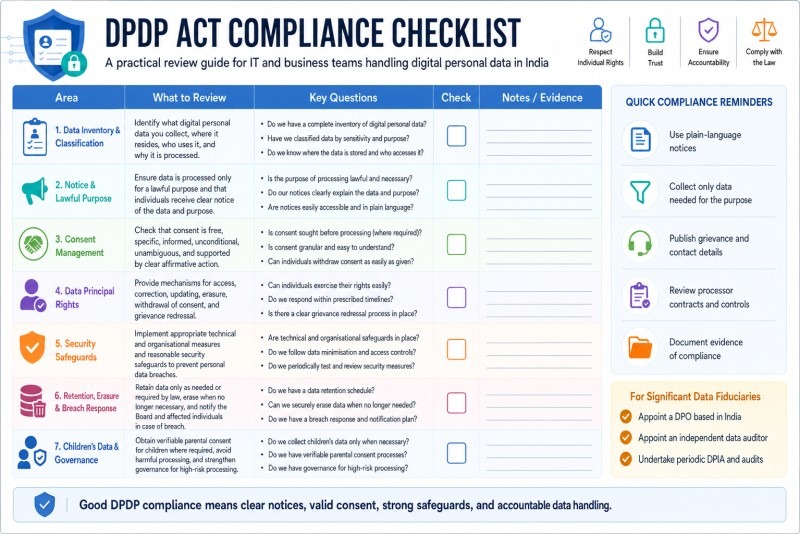
  • DPDP Act Compliance Checklist: The Items Indian IT Leaders Can’t Afford to Miss

    DPDP Act Compliance Checklist: The Items Indian IT Leaders Can’t Afford to Miss

    The Digital Personal Data Protection Act isn’t a legal formality you can delegate to your compliance team. When enforcement begins, the first penalties won’t target your privacy policy language. They’ll target the consent flow that doesn’t actually capture valid consent, the vendor contract that doesn’t define data processing boundaries, and the breach notification process that takes four days when the law gives you 72 hours. Every one of those gaps sits in systems your IT, security and product teams control right now. The statute gives you specific technical requirements, most of which your current architecture wasn’t built to meet. This checklist covers what to verify before you sign anything telling leadership you’re compliant.

    Consent Collection: What Your Current Flows Are Missing

    Walk through every touchpoint where you collect personal data and verify these items. Missing even one creates liability the moment enforcement starts.

    Checklist items:

    • Free consent mechanism exists at collection point. If the user can’t proceed without consenting to non-essential data collection, that’s not free consent under DPDP. Your signup flows that bundle essential and marketing consent into one checkbox fail this test.
    • Clear notice in English and one scheduled language. The law requires notice in English plus at least one language from the Eighth Schedule. If your consent forms only exist in English, you’re non-compliant for any user base outside metro markets.
    • Verifiable consent for users under 18. You need explicit parental or guardian consent with a verification mechanism. If your age gate is just a dropdown with no verification backend, you have no defensible consent for minor users.
    • Withdrawal mechanism as easy as granting consent. If users can sign up in two clicks but need to email support to withdraw consent, the asymmetry violates DPDP requirements. Audit how many steps each direction takes.
    • Purpose limitation stated at collection. Generic language like “to improve our services” won’t hold up. The stated purpose must be specific enough that a user knows exactly what you’re doing with their data.

    Most teams discover their product signup flows, marketing forms and mobile app permissions all fail at least two of these checks. Budget time to rebuild consent UI, not just update privacy policy text.

    Personal Data Inventory: The Audit Your Security Team Needs to Run Now

    You can’t demonstrate compliance without knowing where personal data actually lives. The exercise isn’t a documentation review, it’s a technical audit of every system that touches user data.

    Start with your documented data flows and then verify reality. In three out of four cases, the inventory surfaces:

    • Data exports sitting in shared drives or S3 buckets that nobody classified as personal data stores
    • Analytics and monitoring tools ingesting PII your architecture diagrams don’t acknowledge
    • Development and staging environments running on production data clones with weaker access controls
    • Legacy systems still operational but no longer in your data map
    • Third-party SDKs embedded in mobile apps that send personal data to vendors you didn’t contract directly

    Your security team needs to run this audit at the infrastructure level, not rely on application teams to self-report. The question isn’t what systems should have personal data based on design docs. It’s what systems do have personal data when you actually scan databases, logs, backups and API traffic.

    For SaaS-heavy teams, verify that every vendor integration in production appears in your vendor registry. Check your CDN logs, your error tracking service, your session replay tools. Most collect personal data by default and most IT teams never classified them as data processors requiring DPDP-compliant agreements.


    RED FLAG

    If developers can access personal data in staging or test systems without the same controls that govern production, you’re processing data outside stated purposes. DPDP requires equivalent protection regardless of environment. Enforcement will care that the data exists in multiple places, not that one instance is labeled “non-production.”

    DPDP Act Compliance Checklist: The Request Workflows You Don’t Have Built Yet

    The Act gives users specific rights with defined timelines. Verify you can actually fulfill each request type within the statutory window.

    Rights fulfillment checklist:

    • Access request response in less than 30 days. Can you aggregate all personal data for a single user across every system, format it as readable output, and deliver it securely? Time how long this takes with your current process. If it requires manual work from three teams, you won’t meet the deadline at scale.
    • Correction workflow that propagates everywhere. When a user updates personal data, does the change flow to every system, including backups, analytics warehouses and vendor systems? If not, you’re storing inaccurate data, which DPDP explicitly prohibits.
    • Erasure that actually deletes, not just flags. Soft deletes and retention flags don’t satisfy erasure rights. The data must be deleted or anonymized such that you can’t re-identify the individual. Verify your database schemas can hard-delete without breaking referential integrity.
    • Grievance redressal officer contact published. DPDP requires you to designate and publish contact details for a grievance officer. If your privacy policy just lists a generic support email, you’re missing a statutory requirement.
    • Nomination mechanism for deceased user data. Users can nominate someone to exercise rights on their behalf after death. You need a technical workflow to handle this, not just a legal acknowledgment that the right exists.

    Run a test request through each workflow before you claim compliance. In most cases, fulfilling a single erasure request requires manual intervention from engineering. That doesn’t scale when enforcement starts and users realize they can force you to delete their data.

    Vendor Contracts: The Clauses Your Legal Team Missed

    Every vendor processing personal data on your behalf needs a DPDP-compliant data processing agreement. Most SaaS contracts signed before 2023 don’t include the required clauses.

    What to verify in every vendor contract:

    • Explicit “data processor” definition and scope. The contract must define the vendor as a data processor, specify what personal data they process, and limit processing to your documented instructions. Generic MSAs and Terms of Service don’t satisfy this.
    • Sub-processor notification and consent rights. If your vendor uses sub-processors (most SaaS platforms do), the contract must give you notification rights and the ability to object. If you’re just discovering from a vendor’s trust center that your data lives on AWS, Azure and three analytics vendors, your contract is deficient.
    • Data localization commitments if data stays in India. If your architecture requires India-resident data for performance or compliance reasons, the contract must explicitly commit to India-only storage and processing. Verify this matches the vendor’s actual infrastructure, not just contract language.
    • Breach notification timeline of 72 hours or less. DPDP gives you 72 hours to notify the Data Protection Board after becoming aware of a breach. If your vendor’s SLA is five business days, you have no way to meet the statutory deadline.

    Audit your top 15 vendors by data volume. Most mid-market teams discover that fewer than half have compliant agreements in place. Renegotiation takes weeks, and some vendors won’t agree to DPDP-specific terms until October gets closer.

    Cross-Border Transfers: What Changes If Your Data Leaves India

    DPDP allows cross-border transfers to countries the government approves, but no approval list exists yet. If your current architecture sends personal data outside India, verify these conditions.

    Cross-border transfer checklist:

    • Documented transfer mechanisms for every data export. You need to know which systems send data abroad, to which jurisdictions, under what legal mechanism. If your answer is “probably AWS Singapore but we’re not sure,” you can’t demonstrate compliance.
    • Contract clauses with foreign vendors that mirror DPDP obligations. Transferring data abroad doesn’t eliminate your compliance obligations. The receiving vendor must commit to equivalent data protection standards in writing.
    • Government approval pathway if data includes sensitive categories. The Act empowers the government to restrict certain cross-border transfers. If you process financial, health or children’s data and store it outside India, verify you have a plan to repatriate if restrictions get announced.
    • Fallback architecture that supports India-only processing. If the government restricts transfers before your preferred cloud region gets approved, can you reroute processing to India-resident infrastructure within 90 days? Most teams relying entirely on global SaaS platforms have no viable fallback.

    The enforcement risk isn’t theoretical. Financial services regulators already demonstrated willingness to mandate data localization with only months of notice. If your entire stack depends on data leaving India, you’re carrying concentration risk most boards haven’t formally accepted.


    RED FLAG

    Your SaaS vendors process Indian user data in US or EU regions.

    DPDP allows transfers to approved countries, but that approval list doesn’t exist yet and may never include every jurisdiction your vendors use. If rearchitecting for India-resident processing would take longer than six months, you have a compliance gap with no technical mitigation ready. Enforcement won’t care that “everyone uses the same vendors.”

    Breach Notification: The 72-Hour Window Your Incident Response Plan Ignores

    DPDP requires notification to the Data Protection Board within 72 hours of becoming aware of a breach likely to harm users. Most incident response plans weren’t built for that timeline.

    Breach readiness verification:

    • Detection tools that surface personal data exposure specifically. Generic security monitoring won’t tell you if the compromised system contained personal data or how many users are affected. You need tooling that tags personal data stores and alerts on exposure, not just intrusion.
    • Escalation path from detection to legal notification in under 24 hours. The 72-hour clock starts when you become aware of the breach, not when you finish investigating. If your process requires incident confirmation, impact assessment, and legal review before anyone considers external notification, you’ll miss the deadline.
    • Defined harm threshold that triggers mandatory reporting. Not every data incident requires Board notification, only breaches likely to harm users. Your legal and security teams need a pre-agreed definition of that threshold so incident responders know when to escalate.

    Time your last incident response exercise against the DPDP notification timeline. Most teams discover their current process assumes five to seven days for investigation before external communication, which puts them in automatic violation if a reportable breach occurs.

    Readiness Check: What to Verify Before You Tell Leadership You’re Compliant

    Run through this final validation before signing off on DPDP compliance status.

    Compliance Item Why It Matters Red Flag If Missing
    Consent audit completed across all user touchpoints First enforcement actions will target invalid consent, not policy language No documented review of signup flows, mobile permissions, marketing opt-ins
    Personal data inventory includes all environments You can’t demonstrate compliance for data you don’t know exists Inventory only covers production, skips dev/test/analytics
    Data Principal rights tested with real requests Statutory timelines start the day a user submits a request No test requests processed end-to-end through current workflows
    Vendor agreements reviewed and non-compliant contracts flagged You’re liable for vendor violations if agreements don’t establish processor obligations No systematic contract review completed, relying on vendor trust centers
    Breach notification runbook updated with 72-hour timeline Missing the notification deadline creates automatic liability Current incident response plan has no external notification trigger defined

    Interpretation for buyers: This matrix is what your compliance status report to the board should cover. If any item in column three describes your current state, you’re not compliant regardless of what your privacy policy says. The law cares about operational reality, not documentation completeness. Before October, verify that every item in column one is demonstrably true, meaning you can show evidence on request, not just assert that it’s handled.

    The teams that clear this readiness check before enforcement starts will have rebuilt consent flows, renegotiated vendor contracts, and retooled incident response processes. The ones that don’t will discover their gaps when the first Data Principal request arrives with a 30-day deadline attached.

    Before your next leadership update on DPDP readiness, run through Section 3 and verify you can fulfill every Data Principal right within statutory timelines. That’s the compliance item most likely to surface publicly when enforcement begins.


    Also read: MeitY DPDP Act

    Related reading

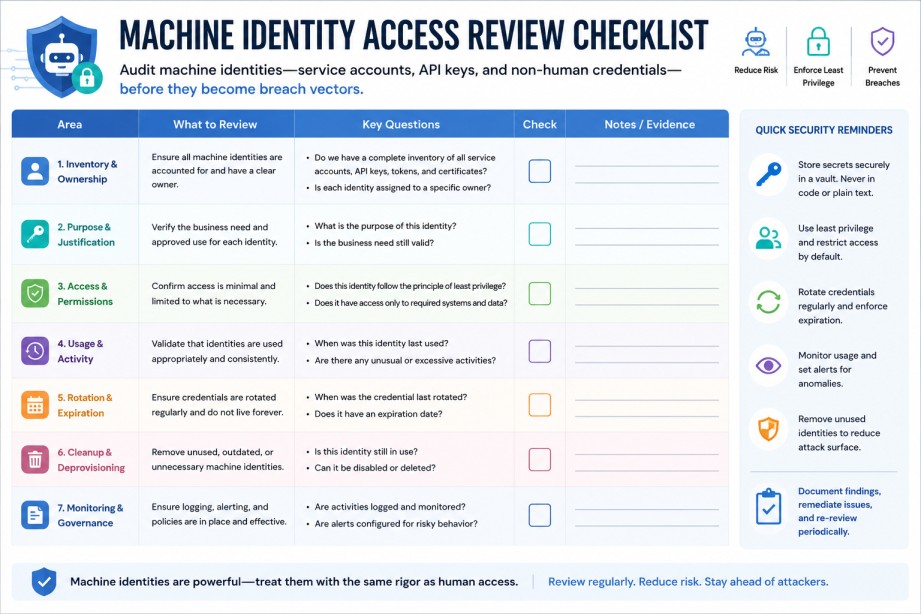
  • Machine Identity Access Review: The Audit Process Most IT Teams Never Run

    Machine Identity Access Review: The Audit Process Most IT Teams Never Run

    Your IT team probably runs quarterly access reviews for every employee who joins, moves, or leaves. You have a process for contractors. You might even review admin accounts monthly. What you don’t have is a recurring audit process for the service accounts, API keys, and bot credentials that outnumber your employees three to one and hold more privilege than most of your engineering team.

    These machine identities don’t show up in your identity provider’s user list. They don’t trigger deprovisioning workflows when someone leaves. They were created by a developer who needed to ship something fast, granted admin rights “temporarily,” and never reviewed again. Some of them are older than your current CTO’s tenure.

    The breach vector isn’t the phishing attack that compromises a user account. It’s the three-year-old API key with full database access that’s hardcoded in a script nobody remembers writing. This checklist covers what to verify before that credential becomes your incident response call at 2 a.m.

    Inventory: What Machine Identities Exist Right Now

    You can’t review what you can’t see. Most organizations discover their full machine identity footprint only after a breach forces the investigation. Start with a complete credential census before attempting any governance work.

    What to document for every machine identity:

    • Service accounts in Active Directory, LDAP, or cloud IAM systems
    • API keys and access tokens across all SaaS platforms and internal applications
    • SSH keys on servers, containers, and CI/CD pipelines
    • Database credentials used by applications and automation scripts
    • Certificate-based authentication for system-to-system communication

    Pull logs from your identity systems, cloud provider consoles, and application configs. Check your secrets management tools if you have them. Check environment variables, config files, and deployment scripts if you don’t. The credentials your security team doesn’t know about are the ones your developers created last quarter to unblock a release.

    For teams under 200 employees, expect to find 300 to 500 machine identities. At enterprise scale, the ratio hits 10:1 or worse.

    Ownership: Who’s Responsible When a Service Account Is Compromised

    Every service account was created by someone. Most of them are now owned by nobody. The developer who spun up that automation bot left the company 18 months ago. The team that built the integration was reorganized. The project that needed those credentials was deprecated, but the credentials weren’t.

    When that orphaned service account gets compromised, your incident response team will spend the first six hours just figuring out what it has access to and who might know why it exists.

    Assign explicit ownership for every credential type:

    • Application service accounts: The team that owns the application in production
    • CI/CD pipeline credentials: The platform engineering or DevOps lead
    • Infrastructure automation: Whoever manages your IaC and configuration management
    • Integration API keys: The business owner of the integration, not just the developer who built it

    If you can’t name an owner, the credential is orphaned. Orphaned credentials get disabled immediately or assigned to a designated cleanup owner with a 30-day review deadline. No exceptions.


    RED FLAG: Nobody owns the service account

    If the original creator left the company or moved teams and no one was formally assigned ownership, you’re managing a credential nobody understands. Disable it and wait for something to break. What breaks will tell you what it was actually used for.


    Access Level: What Privileges These Identities Actually Hold

    Service accounts follow a predictable lifecycle. They’re created with elevated permissions to solve an immediate problem. The problem gets solved. The permissions never get reduced. Six months later, you have a CI/CD service account with full production database access because someone needed to run a one-time migration script.

    Your user access reviews catch privilege creep in human accounts. Nobody’s checking whether the automation bot that posts Slack notifications also has admin rights to your billing system.

    Risk-rank every machine identity by privilege level:

    • Full admin or root access to any system
    • Write access to production databases or customer data stores
    • Ability to provision infrastructure or modify IAM policies
    • Cross-environment access (service accounts that work in both dev and prod)
    • Credentials with no scope limits or expiration dates

    Start with the highest-risk tier. If a credential has admin rights and you can’t immediately explain why, that’s your first rotation candidate. For most organizations, 60% to 70% of service accounts are over-privileged. The credentials with the broadest access are usually the oldest ones that were created before your team had a formal provisioning process.

    Usage Pattern: Which Credentials Are Active, Dormant, or Orphaned

    A service account that hasn’t authenticated in 90 days is either dormant or broken. If it’s dormant, it’s a ghost credential waiting for someone to rediscover it. If it’s broken, something in your environment is failing silently and nobody noticed.

    Pull authentication logs for every machine identity in your inventory. Most IAM systems track last-used timestamps. Cloud providers surface this in their access analyzers. If your environment doesn’t log machine identity usage, that’s the infrastructure gap to fix before attempting a review process.

    Categorize credentials by activity pattern:

    • Active: Authenticated within the past 30 days
    • Stale: Last used 30 to 90 days ago, requires owner verification
    • Dormant: No activity for 90+ days, candidate for immediate disabling

    Disable dormant credentials first and monitor for breakage. What doesn’t break in 72 hours wasn’t critical. What does break gets documented, right-sized for privilege level, and assigned to an active owner. For stale credentials, contact the assigned owner and give them one week to confirm it’s still needed. No response means it gets disabled.

    At mid-market scale, expect 20% to 30% of your machine identities to be dormant. At enterprise scale, that number climbs to 40% or higher if you’ve never run this audit before.


    RED FLAG: Secrets older than your compliance window

    If your compliance framework mandates 90-day password rotation and you’re sitting on API keys that haven’t changed in 18 months, you’re out of policy. Auditors will find this. Fix it before they do, or budget for the finding and the remediation timeline it triggers.


    Rotation Status: When These Credentials Were Last Changed

    Most organizations have a password policy that forces users to rotate every 60 or 90 days. Almost none of them apply that policy to service accounts. The API key your team created three years ago has never been rotated. The database password embedded in your application config was set during the initial deployment and hasn’t changed since.

    Credential age is the single best predictor of whether a machine identity will become a breach vector. The older the credential, the more places it’s been copied, the more people have seen it, and the higher the chance it’s been exposed in a way nobody documented.

    Credential Type Recommended Rotation Why It Matters Red Flag If Missing
    API keys 90 days Keys get logged, cached, and copied into documentation No rotation policy or keys older than 12 months
    Service account passwords 90 days Older passwords often predate your current security baseline Passwords set before your last major security initiative
    SSH keys 180 days Keys accumulate on servers and in admin home directories Keys with no expiration date or passwordless private keys
    Database credentials 90 days Application configs are the most common source of credential exposure Credentials embedded in source code or config files in version control
    TLS/SSL certificates Before expiration Expired certificates cause outages; old ones often use deprecated crypto Certificates using SHA-1 or RSA keys under 2048 bits

    Your rotation policy needs to account for the operational cost of rotating credentials that are embedded in application configs, CI/CD pipelines, and infrastructure code. For teams without secrets management, that cost is high enough that rotation doesn’t happen. If manual rotation is blocking your policy, budget for a secrets manager before you document a rotation cadence you won’t enforce.

    Deprovisioning Process: What Happens When a Service or Project Ends

    Applications get deprecated. Integrations get replaced. Projects get cancelled. The service accounts created for those initiatives don’t get cleaned up. They sit in your environment with whatever access level they were granted, waiting for someone to remember they exist.

    Your user offboarding process disables accounts within 24 hours of an employee’s departure. Your machine identity lifecycle has no equivalent trigger. When a project ends, the credentials live on unless someone manually remembers to revoke them.

    Build deprovisioning triggers into your standard workflows:

    • Application decommissioning checklist must include service account inventory and revocation
    • Project closure requires credential cleanup sign-off from the infrastructure owner
    • Integration deprecation triggers API key revocation at both ends of the connection
    • Quarterly reviews flag service accounts associated with projects marked complete or cancelled

    For every machine identity, document what it supports. When that application, service, or integration is retired, the credential gets disabled immediately. If disabling it breaks something unexpected, you’ve just discovered an undocumented dependency that needs to be mapped before the credential can be safely removed.

    The cleanup backlog grows faster than most teams expect. Budget 2 to 4 hours per quarter for a dedicated credential cleanup sprint where someone goes through the stale and dormant lists and disables everything that doesn’t have an active owner confirmation.

    Review Cadence: How Often This Audit Needs to Run

    User access reviews happen quarterly because regulatory frameworks require it and because user turnover creates obvious risk. Machine identity reviews don’t happen because there’s no compliance driver and no one’s job depends on keeping the list current.

    Set a review cadence based on your organization’s size and rate of change. For startups shipping fast, machine identities proliferate quickly. For enterprises with stable infrastructure, the inventory changes more slowly but the volume is higher.

    Sustainable review intervals by organization size:

    • Under 50 employees: Quarterly full inventory and ownership review
    • 50 to 500 employees: Monthly review of new credentials, quarterly full audit
    • Enterprise scale: Continuous monitoring with monthly high-risk reviews and quarterly full reconciliation

    The first audit will take the longest. Expect 8 to 12 hours of work for a mid-market IT team to complete the initial inventory, assign ownership, and establish the baseline. After that, recurring reviews take 2 to 3 hours per cycle if you’re staying on top of it.

    If your team is under three people, the admin overhead will compete with every other priority you’re managing. Start with a six-month cycle and focus only on credentials with admin-level access. Expanding to full coverage can wait until you have the staffing to support it.


    The license cost for a privileged access management system is easy to justify once you’ve spent 40 hours manually inventorying service accounts and realized you’ll need to do it again next quarter. Most security tools show you what’s happening after credentials get compromised. This checklist finds the exposure before that happens. Before your next security roadmap conversation, run through the access level and rotation sections and count how many credentials fail both checks. That number is your business case.


    Also read: NIST SP 800-63B digital identity guidelines

    Related reading

  • Run a SaaS Spend Audit Before Renewals Start Hitting Your Budget

    Most renewal invoices process automatically because vendors know exactly when your team is too buried in budget planning to audit what you’re actually using. By the time finance flags the charge, you’ve already paid for another year of licenses nobody touched since Q2. The gap between what you bought and what your teams actually use sits somewhere between 30% and 40% at most mid-market companies, but it only becomes visible when someone forces the issue before the renewal date hits.

    IT and finance both own pieces of this problem. IT knows which tools are deployed but rarely tracks who logs in after onboarding. Finance sees the invoices but has no view into usage data until someone from IT pulls the reports. The result is predictable: you renew everything by default, optimize nothing, and the SaaS budget grows 15% year over year while headcount stays flat.

    A proper SaaS spend audit catches three things vendors hope you miss: unused licenses still being billed, duplicate tools bought by different departments, and auto-renewals timed to process during your budget freeze. Here is exactly how to run that audit in time to act before the next renewal cycle starts.

    Pull Every Active Subscription Before You Do Anything Else

    You can’t audit what you can’t see, and most companies don’t have a single system that shows every active SaaS subscription. Finance has the invoices. IT has the SSO integrations. Department heads have the credit card charges that never hit the procurement process. Your first job is to force all three lists into one place.

    Start with your financial system. Export every software-related vendor charge from the last 12 months. Tag anything that repeats monthly or annually. You’re looking for subscriptions, not one-time purchases. Cross-reference that list against your SSO provider. If you run Okta, Azure AD, or a similar identity platform, pull the full application list. Every tool integrated through SSO is a tool someone on your team thought was worth deploying.

    The third source is the painful one: ask department heads to self-report what they’re paying for outside the approved vendor list. You’ll find project management tools bought on a team credit card, analytics platforms that never got added to the IT inventory, and collaboration software that three people use because the company standard didn’t fit their workflow. This isn’t about blame. It’s about making the invisible spend visible before it renews again. Combine all three lists into a single spreadsheet with vendor name, contract owner, renewal date, and monthly cost. That’s your baseline.

    Map Usage Data Against What You’re Paying For

    Now you know what you’re paying for. The next step is figuring out who’s actually using it. Most SaaS platforms give you a usage dashboard, but the default view hides the problem. Vendors show active users in the last 30 days because it makes the numbers look better. If someone logged in once in January and it’s now March, they won’t appear as inactive unless you extend the reporting window.

    Pull 90-day trailing login data for every platform on your list. You need three columns: total licenses purchased, users who logged in at least once in 90 days, users who logged in more than five times. The gap between column one and column two is your unused seat cost. The gap between column two and column three tells you how many people tried the tool once during onboarding and never came back.

    Start with your highest-cost subscriptions. A collaboration platform billing $50,000 a year with 40% login rates means you’re spending $20,000 on licenses that aren’t being used. If the vendor contract requires a minimum seat count, note that separately. You may not be able to drop below the floor, but you can stop adding seats in the next renewal negotiation. For platforms without built-in reporting, ask your CSM for an activity export. If they won’t provide it, that’s useful information. It usually means the numbers are worse than you think.

    Some tools don’t track logins in a useful way. Security platforms, monitoring tools, and backend infrastructure software may show “active” because the system is running, not because a human is using it. For those, the better question is: what breaks if we turn this off? If the answer is nothing or nobody notices for three weeks, you’ve found a candidate for elimination.


    RED FLAG: Most login data is 60 days stale

    Usage dashboards from vendors show the last 30 to 60 days by default. If someone hasn’t logged in since January and you run the report in March, they look active. Pull 90-day trailing data or you’ll miss half the inactive seats.


    Find the Duplicate Tools Hiding in Different Departments

    The single biggest source of hidden waste isn’t unused licenses. It’s three departments paying for three different tools that solve the same problem because nobody checked what was already deployed. Sales buys a CRM. Marketing buys a customer data platform. Support buys a ticketing system with its own contact database. All three tools store customer records, send emails, and generate reports. You’re paying for the same capability three times.

    Run a category audit. Group every tool on your subscription list by function: communication, project management, data analytics, file storage, customer engagement. If you see more than two tools in the same category, someone made a buying decision without checking what already existed. The usual explanation is that the existing tool didn’t fit their workflow. The reality is often that nobody wanted to wait for IT to configure access or train them on the standard platform.

    Pull the contract owners into a room. Show them the overlap. Ask which one stays if you had to pick one per category. You’ll get pushback. The design team will insist their project management tool is different from the one engineering uses. They’re both right and wrong. The tools are different, but the cost of running both is almost never justified unless the teams are large enough that separate instances make sense.

    For teams under 200 people, you should have one tool per category with very few exceptions. At enterprise scale, some duplication is unavoidable because the cost of forcing a single platform across business units often exceeds the cost of running two. The break point is usually around 500 users. Below that threshold, consolidation almost always wins. Above it, you’re trading subscription cost for political cost, and the math gets harder.

    Calculate What You’re Actually Spending Per Active User

    License cost is the number vendors lead with, but it’s not the number you should be managing to. The real cost of any SaaS tool includes the license, the implementation work, the ongoing admin overhead, the integration maintenance, and the support load it creates for your IT team. A $15 per month seat that requires two hours of IT time per quarter to manage access, handle exceptions, and troubleshoot login issues costs closer to $40 per month when you factor in fully loaded labor.

    Start with the simple math. Take the annual subscription cost and divide it by the number of users who logged in more than five times in the last 90 days. That’s your cost per active user. If you’re paying $60,000 a year for 200 licenses but only 120 people are using it, your per-user cost just jumped from $300 to $500. That changes the ROI calculation and the renewal decision.

    Subscription Tier Licenses Purchased Active Users (90 days) Annual Cost Cost Per Active User Hidden Carry Cost
    Collaboration Platform 200 120 $60,000 $500 +$180/user/year (admin time)
    Analytics Tool 50 12 $18,000 $1,500 +$90/user/year (integration maintenance)
    Project Management 100 85 $24,000 $282 +$40/user/year (support load)

    The second and third columns tell you where the waste is. The fifth column tells you whether the tool is worth keeping even after you optimize the seat count. A $1,500 per-user cost for an analytics platform that only 12 people touch is a strong signal to either expand usage or kill the subscription. The collaboration platform at $500 per active user might still make sense if those 120 users depend on it daily, but you’re definitely not buying more seats until utilization improves.

    Track the hidden carry cost separately. For every SaaS tool your team manages, estimate the hours per quarter your IT staff spends on access requests, password resets, permission changes, integration fixes, and vendor support calls. Multiply by your fully loaded hourly IT labor rate. Add that to the license cost. That’s the number you should be using to decide what stays and what goes.


    BUYER’S REALITY: The cost isn’t just the license

    Every SaaS tool you keep carries admin overhead, integration maintenance, and support load. A $15/month seat that requires two hours of IT time per quarter to manage exceptions costs closer to $40/month when you factor in labor. Budget for the full carry cost before deciding what stays.


    Identify Which Renewals Are About to Hit and When

    You’ve mapped what you have, who’s using it, and what it actually costs. The next step is timing. SaaS vendors structure renewal dates to coincide with budget planning season because they know you’re less likely to scrutinize a charge when you’re buried in annual forecasts. If your fiscal year ends in December, expect a cluster of renewals in November and early December. That’s not a coincidence.

    Pull the renewal date for every subscription on your list. Flag anything renewing in the next 90 days. That’s your action window. Anything renewing in 60 days or fewer needs a decision this week, because most vendors require 30 to 45 days’ notice to cancel or renegotiate without auto-renewal kicking in. Check your contracts. The notice period is usually buried in section seven or eight, right after the pricing table. If you can’t find it, assume 30 days and work backward from there.

    Sort your flagged renewals by annual cost, highest to lowest. Start at the top. A $100,000 annual subscription renewing in 60 days with 50% utilization is worth two hours of your time this week. A $3,000 tool renewing in 75 days can wait until you’ve handled the big ones. You’re not going to renegotiate everything. You’re going to renegotiate the things where the math is ugly enough that the vendor will move or you’ll walk.

    Build a simple tracker: vendor name, renewal date, annual cost, active user percentage, notice period, decision owner. Update it weekly. This is the document you’ll hand to procurement or finance when it’s time to execute. The worst possible outcome is doing all this work and then missing the notice deadline because nobody owned the follow-through.

    Run the Conversation With Department Owners Before Finance Does

    Finance can tell a department head they’re spending too much. IT can tell them the tool isn’t being used. Neither conversation goes well if it’s the first time the department head is hearing about the problem. You need to frame this as an optimization exercise, not a budget cut, and you need to do it before the renewal is 15 days out and everyone’s defensive.

    Start the conversation 75 to 90 days before renewal. Walk in with data, not an accusation. Show them the login numbers. Show them the cost per active user. Ask if they knew the utilization was that low. Most of the time, they didn’t. The tool was deployed 18 months ago, three of the five people who requested it have moved to other roles, and nobody’s checked usage since the kickoff meeting.

    Give them two options. Option one: expand usage to justify the cost. If you’re paying for 50 seats and 15 people are logging in, they have 60 days to get 35 more people trained and actively using the platform, or you’re cutting the renewal to 20 seats. Option two: kill it and move the budget somewhere else. Most department heads will pick option one, commit to driving adoption, and then do nothing. Follow up 30 days later. If the numbers haven’t moved, make the call for them.

    The conversation that breaks down is the one where finance sends an email two weeks before renewal saying “we’re cutting your budget line.” The department head escalates to their VP, the VP escalates to the CIO, and the renewal processes anyway because nobody wants the political fight. If you surface this 75 days out and frame it as a joint problem to solve, you’ll get cooperation. If you surface it 15 days out, you’ll get territorial pushback and no change.


    RED FLAG: Department heads will claim every seat is critical

    The conversation changes the week before renewal when budget has to move. If you surface unused licenses 75 days before the renewal date, you get cooperation. If you surface them 15 days out, you get territorial pushback and the renewal processes anyway.


    Decide What to Kill, What to Renegotiate, and What to Leave Alone

    Not every finding from the audit requires action. Some tools have low utilization because they’re only needed by a small team, and that’s fine. Others are costing more than they should but still worth keeping. Your job is to sort the list into three buckets: kill, renegotiate, leave alone.

    Kill if:

    • Utilization is below 25% and hasn’t improved after 60 days of trying
    • You found a duplicate tool with better adoption in another department
    • The cost per active user exceeds what you’d pay to build the capability in-house or switch to a cheaper alternative

    Renegotiate if:

    • Utilization is between 40% and 70%, meaning the tool is useful but oversized
    • Your contract includes a seat minimum you’ve outgrown or never needed
    • The vendor’s pricing has dropped since you signed and you’re still on the old rate structure

    Leave alone if:

    • Utilization is above 75% and the tool is mission-critical
    • The cost per active user is in line with category benchmarks and your team depends on it daily
    • Switching costs (migration, retraining, reintegration) exceed two years of savings

    The math is straightforward. If you’re paying $40,000 a year for a tool with 30% utilization, killing it saves $40,000. Renegotiating it down to 50 seats instead of 150 might save $25,000. Leaving it alone costs you $40,000 in waste annually. Run that calculation for every subscription flagged in your audit, then stack-rank by savings potential. Focus on the top 10. That’s where 80% of your recovery sits.

    What Most Teams Miss: The Handoff to Procurement That Actually Sticks

    You’ve run the audit, surfaced the waste, and gotten department heads on board. The last failure point is the handoff. Most audits produce a great spreadsheet that sits in someone’s inbox until the renewal processes and nothing changes. The gap is almost always between the person who did the analysis and the person authorized to cancel or renegotiate the contract.

    Build the handoff document before you loop in procurement. You need four things: the vendor name, the renewal date, the specific action (cancel, renegotiate to X seats, hold), and the name of the person who agreed to that action. Procurement can’t execute on “we should probably look at this.” They can execute on “cancel the Acme Analytics renewal per Jane in Marketing, confirmed via email on March 10.”

    Set a checkpoint meeting two weeks before the notice deadline. Invite procurement, IT, and the department owner. Walk through the decision one more time. Confirm the action. Get explicit sign-off in the meeting. Then hand it to procurement to execute, and follow up 48 hours later to confirm the cancellation notice or renegotiation request was actually sent. Vendors will sometimes claim they never received it. You need proof it went out.

    If procurement pushes back or delays, escalate immediately. The cost of missing the deadline is another year of paying for something you don’t need. A $30,000 renewal that auto-processes because procurement didn’t send the notice on time is a $30,000 mistake that didn’t need to happen. Make it clear that missing the deadline is not an option, and track it like you’d track any other project with a hard cutoff.

    Conclusion

    The license you’re paying for and the license someone’s actually using are two different numbers, and the gap costs you more every year you wait to close it. Running a SaaS spend audit before renewal season starts gives you the leverage to renegotiate, the justification to cancel, and the time to act before auto-renewal locks you in for another year. If your next renewal cluster is 90 days out, start pulling subscription data this week. If it’s 30 days out, you’ve already lost most of your negotiation window, but you can still cancel if you move now.


    Also read: FinOps Open Cost & Usage Specification

    Related reading

  • Evaluating AI Agent Orchestration Platforms: What Production Reality Looks Like After the Demo

    Most teams evaluate AI agent orchestration platforms during a proof-of-concept phase when everything still works. The vendor’s demo handles three agents beautifully. The sample workflows execute cleanly. The dashboard shows exactly what you’d want to see. Then you move to production with your actual infrastructure, your legacy identity systems, and your real error conditions, and the platform that looked production-ready in week two becomes a six-month integration project your team didn’t budget for.

    The gap isn’t the platform’s fault. It’s that orchestration platforms solve a specific class of problems, most buyers evaluate them before they’ve actually felt those problems in production, and the vendor has no incentive to tell you which parts of the orchestration layer you’re still going to build yourself.

    You’re not buying a complete solution. You’re buying infrastructure that assumes you already know how to coordinate multiple AI agents at scale, that you’ve already designed your error-handling logic, and that your team has the engineering capacity to maintain the orchestration rules the platform won’t write for you. If those assumptions don’t describe your situation, the platform will create more work than it saves.

    Here’s how to make this call clearly, before the vendor deadline forces it for you.

    The Demo Runs on Their Infrastructure, Not Yours

    The vendor demo runs clean because it’s running in a controlled environment where every dependency is already configured. Their sample agents call APIs that return data in the exact format the orchestration logic expects. Their identity layer has one authentication method. Their error conditions are the three scenarios they designed the platform to handle gracefully.

    Your environment has four authentication providers left over from two acquisitions. Your agents call internal APIs that sometimes return XML, sometimes JSON, and sometimes error messages that don’t follow any standard format. Your error conditions include scenarios the vendor has never seen because they’re specific to your compliance requirements and your legacy data pipeline.

    The integration work that takes 20 minutes in the demo will take your team six weeks once you account for the adapter code you’ll write to translate between your systems and what the platform expects. That’s not a failure of the platform. That’s the cost of integrating any new infrastructure layer into an environment that wasn’t designed around it.

    Most of the “quick start” timelines vendors publish assume you’re starting with a greenfield environment or that you’ve already standardized your API contracts and authentication flows. If you haven’t, the clock starts when you begin that standardization work, not when you install the platform.

    The real tell is how the vendor responds when you ask what happens when an agent calls an API that returns an unexpected error. If the answer is “the platform logs it and moves to the next step,” that’s fine. If the answer is “you’ll configure the error-handling rules in our workflow editor,” what they mean is you’re going to write and maintain the logic that decides what happens next. Budget for that before you commit.


    BUYER’S REALITY

    You’re paying for the platform and building the logic.

    Most orchestration platforms handle routing and state persistence. The business rules that decide which agent runs when, what happens on failure, and how exceptions route back to humans? That’s still your code. Budget engineering time accordingly.


    What “Agent Coordination” Actually Means in Your Environment

    Agent orchestration platforms solve three problems: routing requests to the right agent, managing state across multi-step workflows, and handling failures when one agent can’t complete its task. What they don’t solve is the business logic that defines “right agent,” “complete,” and “failure” in your specific use case.

    The platform will route a request to Agent B after Agent A finishes. You still write the rule that says Agent A is “finished” when it returns a confidence score above 0.85, or when it’s made three attempts, or when a human approves its output. The platform will persist state between steps. You still define what state matters, how long to keep it, and what triggers a state reset.

    Most platforms call this “configuration,” but configuration is code. It’s logic your team writes, tests, and maintains. The difference between a low-code workflow editor and a Python script is syntax, not ownership.

    What the platform handles:

    • Request routing based on rules you define
    • State persistence across workflow steps
    • Retry logic for transient failures
    • API-level communication between agents

    What your team handles:

    • The business rules that determine which agent runs when
    • Error classification (transient vs. permanent, retry vs. escalate)
    • Human-in-the-loop trigger conditions
    • Agent output validation and quality thresholds

    The value proposition is real if you’re already running multi-agent workflows and spending engineering time on the infrastructure those four bullets represent. The value proposition falls apart if you’re not yet at that scale, because you’ll spend your first year building the logic the platform needs to make intelligent decisions on your behalf.

    The clearest signal that you’re ready for orchestration tooling is that your team is already maintaining homegrown state management and retry logic, and that code is becoming a maintenance burden. If you haven’t written that code yet, you’re not buying a solution to a problem you have. You’re buying a framework you’ll spend six months learning to configure.

    The Agent Monitoring Gap Most Platforms Won’t Close

    Monitoring a single AI model is straightforward. You track latency, token usage, error rate, and output quality. Monitoring a workflow that chains five agents together is harder because the failure modes multiply. Agent A succeeds but returns low-confidence output. Agent B times out. Agent C produces valid output that violates a business rule Agent A should have caught. The workflow completes successfully but takes 90 seconds instead of 12.

    Most orchestration platforms give you high-level dashboard metrics: workflow success rate, average completion time, agent-level error counts. What they don’t give you is the tooling to debug why a specific workflow failed, which agent introduced the bad data, or how often agents are succeeding technically but failing to produce useful output.

    The gap shows up in production when your success rate is 94% but your business stakeholders are escalating failures daily. The platform reports success because every agent returned a response and the workflow reached its end state. Your users report failure because the output was unusable. The platform can’t see that gap because it doesn’t know what “usable” means in your context.

    You’ll close that gap one of two ways. You either instrument your own logging and monitoring around the platform, tracking the metrics the platform doesn’t surface, or you accept that 6% of workflows will fail invisibly and you’ll find out when users complain.

    The vendor will tell you their logging captures everything you need. What they mean is it captures everything the platform does. It doesn’t capture the quality signals, business rule violations, or semantic failures that matter to your users. Logging that Agent C returned a response in 140 milliseconds is useful. Logging that Agent C’s response failed your internal data quality threshold is more useful, and that’s yours to build.

    If your team already has observability tooling and engineering capacity to extend it, this is a solvable problem. If you don’t, the monitoring gap becomes an operational risk you’ll spend the first year working around.

    Framework Lock-In Costs More Than the License

    Most agent orchestration platforms are built on top of, or tightly integrated with, a specific agent framework. That’s not inherently bad. The problem is that once you’ve built your workflows in that framework, migrating to a different platform means rewriting not just the orchestration logic but the agent implementations themselves.

    The lock-in cost isn’t the workflow definitions you’ll rewrite. It’s the integration code, the error-handling rules, the state management logic, and the monitoring instrumentation you’ve built around the platform’s specific SDK and API contracts. After 12 months in production, that code is worth more than the license fee you’re paying, and switching platforms means throwing most of it away.

    Vendor pricing reflects this. Year-one pricing is often reasonable because they’re buying your lock-in. Year-three pricing assumes you’re not leaving because the switching cost is prohibitive. That’s not unique to orchestration platforms, but the cost curve is steeper here because the integration surface area is larger.

    Four signals that lock-in risk is higher than the vendor is representing:

    • Workflow definitions are stored in a proprietary format, not as code you can version-control independently.
    • Agent implementations require platform-specific decorators, base classes, or SDKs that don’t map cleanly to other frameworks.
    • State management is handled by the platform’s internal database with no export or migration path.
    • Monitoring and logging are tightly coupled to the platform’s observability stack, not your existing tools.

    The cleaner the separation between your agent logic and the platform’s orchestration layer, the lower your switching cost. If the platform positions itself as “the only tool you’ll need,” that’s usually a signal that extraction will be expensive.

    Portability has a cost too. Platforms that prioritize interoperability and open standards often lag on features compared to vertically integrated alternatives. The decision isn’t “avoid lock-in at all costs.” It’s “know what you’re committing to, and price the exit before you sign.”

    Buying Decision Table: When This Makes Sense and When It Doesn’t

    Your Situation What It Means for This Decision Buy Now / Wait / Skip
    Team size under 10, no dedicated platform engineering You’ll spend more time managing the platform than building agents Skip
    Running 3+ agents in production, homegrown state management becoming a maintenance burden The platform solves a problem you’re already paying to solve poorly Buy now
    Budget available but no multi-agent use case live yet You’ll pay for a year of tooling while you’re still figuring out the workflows Wait
    50 to 200 users, compliance or auditability driving the decision Orchestration platforms with built-in audit trails close a real gap Buy now
    Greenfield implementation, no legacy identity or API constraints Integration costs will be lower than average, value realization faster Buy now if engineering capacity exists
    Multi-cloud or hybrid environment, agents calling services across cloud providers Orchestration complexity is high; platform ROI depends on cross-cloud state management working reliably Buy now, but vendor-test cross-cloud scenarios in proof-of-concept
    Current tooling is a workflow engine (Airflow, Temporal) being adapted for agent orchestration Migration cost to a purpose-built platform may not justify the capability gain Wait until current tooling breaks
    Fewer than 10 agents planned, workflows mostly linear (agent A, then B, then C) Orchestration overhead is overkill; simpler pipeline tooling will cost less Skip

    The row that describes most buyers who regret the purchase is “budget available but no multi-agent use case live yet.” Orchestration platforms solve coordination problems you only understand after running agents in production for three to six months. Buying the platform first means you’ll misconfigure it, underuse it, and spend your first year paying for infrastructure you’re not ready to leverage. The vendors who push hardest for early commitment are the ones who know that once you’ve lived the pain, you’ll evaluate alternatives more carefully.


    RED FLAG

    If you don’t have a multi-agent use case in production yet, wait.

    Platforms solve coordination problems you only understand after running agents in production for three to six months. Buying orchestration tooling before you’ve felt that pain means you’ll spend the first year misconfiguring a system you don’t yet need.


    The Internal Resource Cost Nobody Budgets For

    The license cost is the easy part. Most of the real cost sits in the engineering and admin work your team absorbs in months two through six, and again every time you add a new agent or modify an existing workflow.

    Orchestration platforms don’t run themselves. Someone on your team owns the platform configuration, writes and maintains the workflow definitions, manages the integration between the platform and your existing observability stack, and debugs the failures that the platform logs but doesn’t resolve. For most teams, that’s 0.3 to 0.5 FTE in steady state, more during initial rollout.

    If you don’t have engineering capacity to own that work, the platform becomes shelfware. You’ll use it for the two or three workflows you configured during onboarding, and everything else will route around it because modifying the platform configuration is slower than writing a script.

    The resource cost scales with workflow complexity, not agent count. A workflow that chains three agents linearly is low-overhead. A workflow with conditional branching, parallel agent execution, and human-in-the-loop checkpoints requires ongoing engineering attention every time a business rule changes or a new edge case surfaces.

    The way to budget correctly is to ask the vendor for a reference customer at your scale and ask that customer how much time their team spends on platform maintenance per month. Vendor estimates are always optimistic. Customer reality is usually double.

    What Goes Wrong 12 Months In

    The orchestration platform works. The agents run. The workflows complete. But the operational load is higher than you expected, and the system is more brittle than the proof-of-concept suggested. These are the four failure modes that show up after the initial rollout success:

    The platform becomes a single point of failure. When orchestration is centralized, an outage in the platform stops every agent workflow. Your agents are still running, your APIs are still up, but nothing executes because the orchestration layer is down. If the platform’s uptime SLA is lower than your agents’ SLA, you’ve introduced a reliability regression.

    Configuration drift makes workflows unmaintainable. Six engineers modify workflow definitions over eight months. No one documents the changes. The workflow that was simple in month one is now a nested set of conditionals that only one person understands, and that person just left. The platform has version control, but your team didn’t enforce a review process, so every change went straight to production.

    Error-handling logic doesn’t scale. The retry rules you configured in month two made sense for three agents and four workflows. Now you’re running 18 agents and 40 workflows, and the error-handling logic that worked at small scale is creating retry storms that consume your API rate limits and slow down every workflow.

    The platform’s framework falls behind the state of the art. The agent framework the platform is built on was current when you signed. Twelve months later, new frameworks have better performance, lower token costs, or capabilities the platform doesn’t support. Migrating your agents to the new framework means rewriting every integration with the orchestration platform, or waiting for the vendor to add support, which may not happen.

    None of these are inevitable, but all of them are common. The buyers who avoid them are the ones who treat the platform as critical infrastructure from day one: they enforce change management, they monitor the platform’s own performance separately from agent performance, and they design workflows with failure isolation in mind.


    BUYER’S REALITY

    Switching costs hit six figures after year one.

    Once you’ve embedded workflow logic, monitoring dependencies, and agent state into a proprietary orchestration layer, migrating to another platform means rewriting every integration and re-testing every failure path. Plan for a three-year commitment before you sign.


    Who This Is NOT For

    This is the wrong purchase if you check two or more of these conditions:

    • [ ] Your team is fewer than five people, and no one has “platform engineering” anywhere in their job description.
    • [ ] You’re running one or two agents in production, and both of them operate independently without needing to share state or coordinate execution.
    • [ ] Your current agent workflows are handled by scripts or simple API chaining, and no one on your team has complained about the maintenance burden yet.
    • [ ] You don’t have observability tooling already in place for your existing infrastructure, and you’re expecting the orchestration platform to be your first monitoring solution.
    • [ ] The business case for agent orchestration depends on headcount reduction, but you haven’t modeled the FTE cost of owning the platform itself.
    • [ ] You’re evaluating this because a vendor pitched it, not because your team surfaced it as a solution to a production problem they’re already managing manually.

    If your IT team is under three people, the admin overhead alone will consume any efficiency gain in year one. The platform expects someone to own it, configure it, and maintain it. If that responsibility lands on the same person who’s building the agents, writing the business logic, and managing your infrastructure, you’ve added a task without adding capacity.

    The other disqualifying condition is subtler: if your agents don’t need to coordinate, orchestration is overhead. A platform that routes requests, manages shared state, and handles multi-step workflows is solving a problem you don’t have. Two agents that run independently and return results to different systems don’t need orchestration. They need API management and monitoring, which you probably already have.

    The Alternative: Build Lightweight Orchestration In-House

    The platform purchase makes sense when the cost of building and maintaining orchestration logic in-house exceeds the cost of licensing and operating a commercial platform. For many teams, especially in the first 12 months of running multi-agent workflows, that math doesn’t work out.

    What a platform gives you:

    • Pre-built routing, state persistence, and retry logic that works out of the box
    • A UI for defining workflows without writing code (value depends on whether your team prefers UIs or code)
    • Vendor support when something breaks
    • Faster time-to-production if the platform’s assumptions match your environment

    What lightweight in-house orchestration gives you:

    • Full control over the orchestration logic, no framework lock-in
    • Lower operational cost (no license fee, no platform maintenance)
    • Simpler architecture (fewer dependencies, less surface area for failures)
    • Tight integration with your existing tooling (observability, CI/CD, identity management)

    The in-house path works when your workflows are simple, your team is comfortable writing and maintaining orchestration code, and your agent framework (LangGraph, for example) already includes lightweight state management. You’re trading vendor support and pre-built tooling for control and cost savings.

    The platform path works when your workflows are complex enough that building orchestration logic in-house would consume significant engineering time, when you need auditability and governance features the platform provides, or when your team doesn’t have the capacity to maintain custom infrastructure.

    Most teams that regret the platform purchase are teams that bought it before they knew which path made sense for them. The teams that get value from orchestration platforms are the ones who spent three to six months running agents in production with lightweight tooling, hit the limits of that tooling, and then bought a platform to solve the specific problems they’d already felt.

    Conclusion

    The core trade-off is this: orchestration platforms solve real production problems for teams running multiple agents at scale, but only after those teams have already felt the pain of managing state, retries, and workflow complexity manually. Buying the platform makes sense when you’re already spending engineering time on those problems and the platform’s cost is lower than continuing to solve them in-house. Buying the platform doesn’t make sense when you’re still figuring out your multi-agent workflows, when your team is too small to own another piece of infrastructure, or when your agents don’t actually need to coordinate.

    If you’re running three or more agents in production, if homegrown orchestration is already a maintenance burden, and if your team has the capacity to own the platform, this is the right time to buy. If you’re evaluating this because it sounds like the next logical step but you haven’t hit the operational pain yet, wait six months and revisit when you know what problem you’re solving.

    Your next step in the next 48 hours: ask your team how much time they spent last month managing agent state, debugging multi-step failures, or writing retry logic. If the answer is more than 20 hours, request demos and price three vendors. If the answer is less than 10 hours, defer the purchase and put that budget toward the agent work itself.


    Also read: Anthropic engineering blog on agent design

    Related reading

  • IT Budget Planning Template for SaaS Companies: Cost Categories Your Spreadsheet Is Missing

    The IT budget you build in Q4 assumes rational spending, predictable growth, and tools that do what the demo promised. Your actual spend assumes none of those things. Most SaaS companies under 100 employees treat the software line as the entire IT budget, then watch Q2 variances blow up when integration contractors, forgotten seat licenses, and unplanned security requirements hit departments that were never supposed to own technology costs.

    The gap isn’t in your forecasting. It’s in the allocation model. You’re budgeting for licenses when the real cost sits in implementation work, admin overhead, and the cleanup required every time someone signs a contract without looping you in. Your CFO will approve a clean spreadsheet in December. They’ll ask much harder questions in April when three budget owners are all explaining why IT costs showed up in their variance reports.

    Here is how to build an IT budget planning template for SaaS companies that shows the real cost before you commit, allocates to categories that match how money actually gets spent, and survives contact with your actual hiring plan.

    The Budget You Present in January Is Not the Budget You’ll Defend in July

    Your Q4 budget submission shows software licenses, cloud hosting, and security tooling. It’s clean, it maps to vendor contracts, and it gets approved because every line has a renewal date attached. That budget dies the first time your product team needs an integration you didn’t plan for, or your third duplicate Zoom account surfaces in the expense report, or your compliance requirement changes and the security tool you bought in February doesn’t cover the certification you need in May.

    The budget you’ll actually defend in July has contractor time billed to four different departments, SaaS seat licenses split across three cost centers, and a cloud infrastructure line that grew 40% because two teams started new projects without telling you. None of that spend was unauthorized. It just wasn’t in the IT budget, so it showed up everywhere else.

    This happens because most IT budget templates are built for companies with procurement processes, not SaaS companies where every department head has a corporate card and the authority to sign a $10K annual contract without review. You need a model that assumes distributed buying, treats software as only part of the story, and allocates budget to the categories where cost actually surfaces: implementation, administration, redundancy cleanup, and the work required to make the tools you already bought function together.

    The template that works is built around cost buckets, not vendor names. It funds the work that happens after the contract is signed, not just the contract itself. It treats headcount growth as the primary cost driver and ties every allocation to the hiring plan your CEO actually approved, not the one you hoped would stay stable.

    The Five Cost Buckets That Cover What Actually Happens

    Your IT spend breaks into five categories, regardless of how your chart of accounts is structured. Software and licenses cover SaaS contracts, per-seat tools, and renewals. Integration and implementation cover the contractor time, internal engineering work, and configuration required to make any new tool functional. Administration and overhead cover the hours your team spends managing seats, handling support escalations, and fixing authentication issues that weren’t supposed to be your problem.

    Infrastructure and hosting cover cloud environments, CDN costs, and the storage that grows faster than anyone predicts. Security and compliance cover tooling, audits, pen tests, and the incremental cost of meeting a certification requirement that wasn’t on the roadmap when you built the budget.

    At companies under 50 employees, software typically absorbs 35% to 45% of total IT spend. Integration and implementation take another 20% to 25%, most of it invisible until you track contractor hours and engineering time spent on tool setup. Administration sits between 10% and 15%, almost entirely labor cost. Infrastructure ranges from 15% to 25% depending on whether you’re running heavy compute workloads or just hosting a web app and database. Security runs 10% to 15%, spiking in any year where you pursue SOC 2 or ISO 27001.

    The percentages shift as you grow. Below 20 employees, software often hits 50% because you’re not staffed to do implementation work internally. Between 50 and 100 employees, infrastructure and security costs grow faster than software costs because compute needs scale with product complexity and compliance requirements become unavoidable. Use these ranges as a calibration check, not a target. If your software line is 70% of your total IT budget and you’re at 40 employees, you’re either under-investing in integration and security, or you’re about to discover that half your software spend is hiding in department budgets you don’t control.


    BUYER’S REALITY: Your CFO Will Ask Where the Other 60% Went

    The software line is clean. The integration work, duplicate seats you forgot to cancel, and the contractor who spent four weeks fixing SSO show up in three different budget owners’ variance reports. If you don’t consolidate them into IT spend upfront, you’ll be explaining them individually every quarter.


    Software Licenses Are Only 40% of Your Real SaaS Spend

    The license cost is the number in the vendor’s quote. The real cost includes onboarding, the integration work required to connect it to your identity provider and data sources, the admin time to manage seat assignments and permission changes, and the redundancy cleanup when you discover you’re now paying for three tools that do the same thing.

    What works:

    • Budgeting 50% to 60% on top of the license price for any tool that requires integration, custom workflows, or more than basic user provisioning
    • Allocating a standing line for SaaS sprawl cleanup, typically $15K to $30K annually for companies between 30 and 80 employees
    • Treating the first year cost of any new platform as double the recurring license price, then normalizing to license plus 20% for ongoing admin overhead in year two

    What doesn’t:

    • Assuming implementation is covered by the vendor’s “free onboarding” when that onboarding doesn’t include SSO setup, API configuration, or migration from your existing tool
    • Budgeting seat licenses based on current headcount when your hiring plan adds 30% more employees in the first half of the year
    • Skipping the redundancy line because you believe you’ve already eliminated duplicate tools. You haven’t. Someone in marketing is paying for a second analytics platform, and you’ll find it in Q3.

    The integration cost everyone underestimates is identity and access management. Every SaaS tool you add requires provisioning, deprovisioning when employees leave, and permission adjustments when people change roles. If you’re under 25 employees and handling this manually, budget 15 to 20 hours per quarter. If you’re over 50 employees without an identity platform, budget the identity platform. The labor cost of managing access manually will exceed the cost of Okta or JumpCloud by the time you hit 60 people.

    Onboarding costs show up as internal time, not vendor invoices, which is why they disappear from IT budgets. For any tool used by more than 10 people, assume 40 to 60 hours of configuration, testing, and user training. That’s contractor cost if you outsource it, or engineering opportunity cost if your team owns it. Both belong in your IT budget, not in product development variance.

    Security and Compliance: Budget the Requirement, Not the Tool

    Most IT budgets allocate security by tool: endpoint protection, SIEM, vulnerability scanner. That model breaks the first time your compliance requirement changes. You budget for the security tools you need today. Six months later, a customer asks for SOC 2, and your CFO wants to know why you need $40K in unplanned spending for pen tests, audit prep, and tooling gaps your current stack doesn’t cover.

    Budget security as a functional category tied to the compliance posture your business model requires. If you’re selling to enterprise customers or handling regulated data, assume SOC 2 or ISO 27001 is coming within 18 months. Allocate budget for certification before the deal that requires it shows up, because the sales cycle won’t wait for you to spin up a compliance program.

    For companies under 30 employees with no compliance requirement yet, security spend runs $12K to $20K annually: endpoint protection, password management, basic logging, and annual pen testing. Between 30 and 100 employees, budget $40K to $70K if you’re pursuing SOC 2, more if your product handles healthcare or payment data. That range covers tooling, external audit costs, gap remediation, and the contractor or fractional CISO who will manage the process because your internal team doesn’t have compliance expertise.

    The mistake most SaaS companies make is budgeting for security tools without budgeting for the work required to use them correctly. You buy a SIEM. You don’t budget the 60 hours required to configure log ingestion, set up alerting rules, and train someone to respond when an alert fires. The tool sits unused, you fail the SOC 2 readiness assessment, and you’re back in the market for a managed service that costs three times what you originally allocated.

    Treat security budget as the cost of meeting a requirement, not the cost of owning a tool. If the requirement is SOC 2, the cost includes audit fees, remediation work, and tooling gaps. If the requirement is “don’t get breached,” the cost includes detection capability, response planning, and the time to investigate every alert that isn’t a false positive. Both are higher than the software line alone.

    Cloud Infrastructure: When to Split Hosting from Application Spend

    Your Setup Budget Structure Why
    Under 15 employees, single product, one AWS account Combined cloud line: infrastructure and SaaS application costs together Splitting them creates admin overhead that costs more than the visibility you gain
    15 to 50 employees, multiple environments, two to three teams deploying independently Split infrastructure from application spend, track by environment You need to see which team is driving cost growth and whether staging environments are consuming production-level resources
    50 to 100 employees, multiple products, infrastructure managed by platform or DevOps team Separate infrastructure budget, allocate application costs to product teams Infrastructure becomes a shared service. If product teams don’t see their incremental cost, cloud spend will grow faster than revenue.
    Any size, processing heavy workloads (data pipelines, ML training, video encoding) Split compute and storage from application hosting, model cost per job or pipeline run Workload-driven costs don’t scale with headcount. If you budget them as a percentage of last year’s spend, you’ll miss the growth curve by 40% or more.

    Most SaaS companies should split infrastructure from application spend once they hit 30 employees or $15K in monthly cloud costs, whichever comes first. Below that threshold, tracking and allocating separately burns more finance time than it saves.

    The cost category that catches everyone is non-production environments. Your staging and development environments will consume 30% to 50% of your production infrastructure cost if you’re not aggressively shutting down resources. Budget for it, or implement auto-scaling policies that spin down non-production environments outside working hours. The savings show up in month two.

    Cloud cost grows faster than headcount after you hit product-market fit. If your budget assumes infrastructure scales linearly with employees, you’re underestimating. Model cloud spend against usage metrics: API calls, database queries, storage growth, active users. Your hiring plan tells you how many seats to budget. Your product growth metrics tell you how much infrastructure to fund.


    RED FLAG: If You Can’t Name Your Largest Cloud Vendor, Your Budget Is Already Wrong

    When four teams are spinning up infrastructure independently, your AWS bill will double before anyone notices. If no single person reviews cloud spend monthly, your budget assumption is fiction. Fix visibility before you allocate the line.


    Tool Consolidation Costs Money Before It Saves Any

    Every SaaS company under 100 employees is paying for duplicate tools. You have two project management platforms, three analytics tools, and four ways to schedule meetings. Consolidation makes sense. It also costs real money in the first six months, and most IT budgets don’t account for it.

    Migrating from one tool to another requires data export, transformation, import, user retraining, and workflow reconfiguration. For a tool used by 20 to 40 people, budget 40 to 80 hours of internal time plus any contractor support required for custom integrations or data cleanup. That’s $4K to $12K in loaded labor cost, and it happens before you see the first dollar of savings from canceling the old contract.

    The savings are real, but they’re back-end loaded. If you’re consolidating three tools into one, you’ll pay for overlapping licenses during the migration period, which typically runs two to four months. Your Q1 software spend will be higher than Q4, not lower. The savings hit in Q2 after you’ve fully migrated and canceled the legacy contracts.

    Budget tool consolidation as a dedicated project line, not as an offset against software spend. Allocate $20K to $40K annually for companies between 40 and 100 employees who are serious about reducing SaaS sprawl. The work includes vendor evaluation, migration execution, and user enablement. If you treat consolidation as “free” because it’s savings-funded, it won’t happen. Your team is already underwater, and unfunded projects don’t get prioritized.

    The biggest consolidation cost isn’t technical. It’s political. The team that chose the tool you’re retiring will resist the change, slow-walk the migration, or keep using the old platform until you forcibly revoke access. Plan for that. Budget the change management time, not just the technical work. If consolidation is a finance directive without user buy-in, your timeline will double and half the organization will still be using the old tool six months after you thought the project was done.

    Headcount Assumptions Drive Everything Else

    Your IT budget is a function of your hiring plan, not your current team size. Every per-seat SaaS license, every onboarding workflow, every support load calculation, and every identity management task scales with how many people you’re adding, not how many you have.

    If your budget assumes 60 employees in December and your hiring plan adds 25 people by June, every seat-based cost is underfunded by 40%. Slack, Google Workspace, your security stack, your HR tools, and every other per-user license will hit the higher pricing tier or require a mid-year true-up. That cost doesn’t wait for your next budget cycle.

    Tie your IT budget model to the hiring plan your finance team actually approved, not the conservative version you hope stays accurate. Get the monthly hiring curve: how many people start in Q1, Q2, Q3, Q4. Front-load your software budget to match. If you’re hiring 15 people in Q2 and five people in Q4, your seat license costs aren’t evenly distributed across the year.

    Headcount also drives:

    • Onboarding load: budget 3 to 5 hours of IT time per new hire for account setup, hardware provisioning, and access configuration
    • Support volume: every 20 employees adds roughly 5 to 8 hours per month in user support and troubleshooting
    • Tool adoption thresholds: the collaboration tool that worked for 25 people stops working at 60, forcing a migration you didn’t plan for

    The compounding factor everyone misses is turnover. If you budget for 70 employees by year-end and you hire 25 people but 10 leave, you hit 70 total but you’ve onboarded and offboarded 35 accounts. Deprovisioning is work. Every departure requires access revocation across 8 to 12 systems, equipment return, and license reallocation. Budget 2 to 3 hours of IT time per departure. At 15% annual turnover in a 60-person company, that’s 27 offboarding events and 80+ hours of unplanned work.

    Build your IT budget in a spreadsheet with hiring velocity as the primary input variable. When your CEO changes the hiring plan in March, your IT budget should automatically recalculate seat costs, onboarding load, and infrastructure scaling. If it doesn’t, you’re managing variances manually every month instead of managing the business.


    BUYER’S REALITY: Hiring Velocity Kills More IT Budgets Than Tool Costs

    Your budget assumes 12 new hires spread evenly across the year. Your CEO just approved 18 hires, ten of them starting in Q2. Every per-seat license, every onboarding workflow, every support tier just became underfunded. Tie your IT model to the hiring plan, not last year’s headcount curve.


    CapEx vs OpEx Doesn’t Matter Until Your CFO Says It Does

    Most SaaS spending is operating expense: subscription software, cloud hosting, and managed services. You expense it in the period you incur it, and it doesn’t hit your balance sheet. That’s fine until your CFO tells you the board wants to see lower OpEx as a percentage of revenue, or your finance team decides they want to capitalize software development costs and suddenly the line between product engineering work and IT infrastructure work matters for accounting treatment.

    For most SaaS companies under 100 employees, CapEx/OpEx classification is irrelevant to how you plan IT budget. You’re not buying servers or perpetual licenses. Everything is subscription-based, everything is OpEx, and your CFO is fine with that. The exception is when you’re building internal tools or platforms that have a multi-year useful life and your finance team wants to capitalize the development cost.

    If your company capitalizes software development, the IT work that supports product engineering may get split: infrastructure tooling used by the product team might be capitalized, while IT support tools remain OpEx. That split creates a tracking problem. You need to allocate cloud costs, developer tooling, and CI/CD infrastructure between capitalized product work and expensed IT operations. Most early-stage SaaS companies don’t bother. If your finance team is asking for it, budget the accounting overhead required to track and defend the allocation, because your CFO will audit it.

    The other time CapEx/OpEx matters is when you’re making a build vs. buy decision on something large enough to move the needle. If you’re evaluating a $100K platform purchase vs. building it internally, the accounting treatment affects how the cost hits your P&L. A SaaS subscription is fully expensed in year one. Internal development might be capitalized and amortized over three years, making the year-one P&L impact lower even if the total cash cost is higher. That decision belongs to your CFO, not to you, but you need to surface it before you finalize the budget.

    For everyone else, treat IT budget as OpEx, model it as a percentage of revenue or headcount, and don’t optimize for accounting aesthetics. Your job is to fund what the business needs and show the CFO where the money is going. The classification is their problem.

    Who This Budget Model Works For and Who Needs Something Heavier

    This allocation model works if:

    • [ ] You’re under 100 employees and don’t have a dedicated finance systems team
    • [ ] IT buying is distributed: department heads can sign contracts under $25K without procurement review
    • [ ] You’re trying to get visibility into total technology spending, not just IT-owned costs
    • [ ] Your CFO approves budget at the category level and trusts you to manage vendor decisions within that envelope
    • [ ] Hiring plans change quarterly and your budget needs to flex without a full reforecast

    You need a heavier model if:

    • [ ] You’re over 100 employees or managing IT for multiple entities, subsidiaries, or geographic regions
    • [ ] You have CapEx approval thresholds that require board-level review for purchases over $50K
    • [ ] IT spend is allocated back to business units and you need precise cost attribution per department, product line, or customer segment
    • [ ] You’re preparing for an audit, acquisition, or IPO and need vendor spend tracked to the contract and PO level
    • [ ] Your finance team uses a formal budgeting platform and expects IT to submit at the GL account level, not the category level

    The template described here prioritizes speed and flexibility over precision. It’s designed for companies where the IT leader is also the person implementing the tools, managing the vendors, and answering to a CFO who wants to understand total cost but doesn’t need sub-ledger detail. If your finance team is asking for more granularity than cost buckets and percentage allocations, you’ve outgrown this model. Move to a vendor-level budget with contract tracking, multi-year commitment schedules, and department chargebacks.

    If you’re under 50 employees, this is probably more structure than you need today. Use it anyway. The budget you build at 30 employees sets the allocation logic you’ll defend at 70 employees. If you start with a clean model that separates software from implementation costs and ties spend to hiring velocity, you won’t need to rebuild it from scratch when your CFO asks why IT costs grew faster than headcount.

    The failure mode for most SaaS IT budgets isn’t technical. It’s political. You present a number in Q4, the business changes in Q1, and you spend the rest of the year explaining variances that weren’t your fault but are definitely your problem. Build a model that assumes the business will change, ties costs to the variables that actually drive spend, and makes it easy to show your CFO exactly where the money went. That’s the budget that survives.

    Conclusion

    The IT budget that works isn’t the one with the most detail. It’s the one that allocates to the categories where cost actually shows up, ties every line to a driver you can track, and builds in enough flex to survive the hiring plan your CEO will change twice before June. If you’re treating software licenses as the whole story, you’re budgeting for 40% of your real spend and setting yourself up to explain the other 60% in variance reviews you didn’t plan to have. Allocate for integration, admin overhead, and tool cleanup before the invoice arrives, tie your model to headcount velocity instead of static snapshots, and give your CFO a structure they can approve once instead of questioning every quarter. Next step: take your current IT spend from the last three months, break it into the five cost buckets, calculate what percentage each one represents, and compare that to the allocation in your approved budget. The gap between those two numbers is the variance you’ll be defending in 90 days unless you reforecast now.


    Related reading

  • Azure AD Pricing vs Okta: The IAM Cost Model Most Buyers Miscalculate

    Azure AD Pricing vs Okta: The IAM Cost Model Most Buyers Miscalculate

    Most identity projects begin with a simple objective.

    Enable SSO. Reduce password chaos. Move forward.

    Then the budgeting conversation starts.

    Someone searches Azure AD Pricing vs Okta, sees a few neat price tiers, and assumes identity management is a predictable subscription like any other SaaS tool.

    That assumption rarely survives the first real architecture discussion.

    By the time security teams request conditional access, auditors ask for identity governance, contractors need external access, and HR pushes lifecycle automation, the original license estimate quietly expands into a layered identity platform.

    This is where the Azure AD vs Okta comparison becomes less about features and more about how each vendor’s pricing model behaves under pressure.

    Both platforms are capable. Both can scale. Both can also become expensive faster than expected if the identity program grows without discipline.

    The real question is which platform becomes expensive first once identity stops being simple. Let’s find out.

    Azure AD vs Okta Comparison at a Glance

    Identity platforms rarely compete on login screens anymore. The real comparison sits deeper in architecture, ecosystem alignment, and operational ownership.

    Microsoft Entra ID (formerlyAzure AD) is tightly integrated into the Microsoft stack. If your organization already runs Microsoft 365, Azure workloads, and Windows device management, identity becomes part of a larger platform strategy.

    Okta, on the other hand, positions itself as an independent identity layer. It works across SaaS environments, multiple cloud providers, and heterogeneous IT stacks where Microsoft is only one of several vendors.

    This architectural difference shapes everything from integration friction to pricing behavior.

    CapabilityMicrosoft Entra ID (Azure AD)Okta
    Core SSOIncluded in base tiersCore product capability
    Conditional AccessBuilt deeply into the Microsoft ecosystemAvailable through the policy engine
    Lifecycle ManagementIntegrated with Microsoft directory servicesDedicated lifecycle management module
    Identity GovernanceHigher-tier licensing requiredAvailable through governance add-ons
    Integration EcosystemStrong with Microsoft servicesStrong across SaaS platforms
    External Identity (B2B/B2C)Native Microsoft identity frameworkCustomer Identity products
    API & Developer AccessAzure ecosystem-orientedVendor-neutral identity layer

    In practical terms, Azure AD often feels like an extension of Microsoft infrastructure, while Okta behaves like a specialized identity control plane sitting above the environment.

    That difference becomes important once identity management expands beyond employee login and into governance, lifecycle automation, and partner access.

    Decision implication:

    • If your enterprise already runs heavily on Microsoft infrastructure, Azure AD typically fits more naturally. 
    • If your environment spans many SaaS vendors and cloud platforms, Okta often provides cleaner identity neutrality.

    Azure AD Pricing vs Okta Pricing Structure

    Identity pricing looks simple until you try to deploy it across a real organization.

    Both vendors advertise clean per-user pricing. But identity platforms are not sold as a single product. They are built from layers. Each layer activates once security, compliance, or automation requirements increase.

    This is why the Azure AD Pricing vs Okta comparison quickly becomes more complex than the marketing pages suggest.

    Here is a simplified view of how both platforms structure licensing.

    Pricing ElementMicrosoft Entra ID (Azure AD)Okta
    Base SSOIncluded in Microsoft ecosystem tiersCore Okta Workforce Identity feature
    Multi-Factor AuthenticationIncluded in higher tiersSeparate or bundled depending on plan
    Conditional AccessP1 or P2 licensingIncluded through Adaptive MFA policies
    Lifecycle ManagementHigher-tier licensing requiredLifecycle Management add-on
    Identity GovernanceP2 tierGovernance add-on
    External IdentitySeparate product (Entra External ID)Okta Customer Identity products
    Support & Enterprise featuresOften bundled in Microsoft enterprise agreementsTiered enterprise support plans

    The first cost driver appears when identity policies move beyond simple authentication.

    Security teams quickly ask for conditional access, device trust, or risk-based authentication. Those controls often require higher licensing tiers.

    The second driver is identity lifecycle automation. Manual onboarding and offboarding become risky once organizations scale. Automating those workflows usually introduces additional modules or licensing upgrades.

    The third driver is governance and compliance. Auditors want access reviews, role certification, and privileged access monitoring. These capabilities almost always sit in premium identity tiers.

    Also read: Slack vs Microsoft Teams: Where Control, Compliance and Cost Collide

    This is where Okta IAM pricing and Azure AD licensing start to diverge in behavior.

    Microsoft tends to bundle identity capabilities into broader enterprise agreements, especially when companies already license Microsoft 365 E3 or E5. Okta pricing is more modular. Organizations often add capabilities as separate components depending on identity maturity.

    Neither model is inherently cheaper. The outcome depends heavily on how identity is deployed.

    Decision implication:

    • If identity remains limited to workforce authentication inside a Microsoft environment, Azure AD pricing often stays predictable. 
    • If identity expands across multiple SaaS systems and governance layers, both platforms can accumulate licensing costs faster than expected.

    Why Identity Pricing Expands After SSO

    Most IAM projects start with the same sentence.

    “We just need SSO.”

    And technically, that is true. But SSO is only the entry ticket to identity management. The moment authentication is centralized, every other control gets pulled into the same system.

    Security wants conditional access.

    Compliance wants access reviews.

    HR wants automated onboarding and offboarding.

    Auditors want privilege tracking.

    Now the identity platform is no longer a login tool. It becomes the control center for access across the company.

    This is where the Azure AD Pricing vs Okta comparison changes character. The base license stops mattering. The add-ons start driving cost.

    Typical cost expansion happens in four places.

    • Location rules, device trust, risk detection. These controls rarely live in the cheapest license tier.
    • Automated provisioning, role assignment, and offboarding require lifecycle automation features.
    • Access reviews, approval workflows, and privilege oversight typically sit in premium identity packages.
    • Contractors, partners, and vendors create a second identity population that often requires separate licensing.

    When teams compare Okta IAM pricing with Microsoft Entra ID tiers, they often focus on the SSO number first. That number rarely represents the final IAM spend.

    Decision implication:

    • If your organization only needs a centralized login, both platforms stay relatively predictable.
    • The moment identity governance, automation, and external access enter the picture, identity cost stops being about SSO and starts being about control layers.

    What Breaks First at Scale

    Nothing explodes.

    Nobody wakes up one morning and says, “The identity platform is down.”

    Instead, IAM slowly turns into a messy garage full of cables.

    Everything still works. Nobody understands how it works anymore.

    Here is what usually happens.

    First, roles multiply.

    At the beginning, there are five clean roles.

    1. Employee
    2. Manager
    3. Finance
    4. Admin
    5. Support

    Six months later, there are 70.

    “Temporary Finance Access”
    “Salesforce Read Only”
    “CRM Contractor Access”
    “Support Escalation Role”

    Nobody wants to delete them because someone might still need them.

    So they just sit there.

    Second, access never fully disappears.

    People change teams. Contractors finish projects. Interns leave.

    But some permissions remain because removing access requires someone actually to review it. So employees slowly accumulate access they shouldn’t have anymore.

    Security teams call this privilege creep.

    Most companies call it Tuesday.

    Third, every new SaaS tool becomes an IAM project.

    A team buys a new tool. Now someone must:

    1. Connect it to the identity provider
    2. Configure SSO
    3. Map roles
    4. Test access policies

    Multiply this by 80 SaaS tools, and suddenly IAM becomes a full-time integration job.

    Finally, the licensing surprise appears. During early planning, someone compared Azure AD Pricing vs Okta and saw a neat per-user number. Then the security team adds:

    • conditional access
    • identity governance
    • lifecycle automation

    Now the IAM platform is not just SSO anymore. It is the security control plane for the company. 

    And that is when the Okta IAM pricing vs Microsoft Entra ID licensing conversation suddenly lands in the finance meeting.

    Decision implication

    • IAM platforms do not break because of technology.
    • They break because identity complexity grows faster than the organization managing it.

    Integration Depth and Ecosystem Lock-In

    Identity platforms do not operate alone. They sit in the middle of everything.

    Email systems
    SaaS tools
    HR systems
    Cloud platforms
    Internal applications

    Because of this position, the Azure AD vs Okta comparison is often less about features and more about ecosystem alignment.

    The two vendors approach this very differently.

    Microsoft designed Azure AD, now called Microsoft Entra ID, to be deeply embedded inside the Microsoft environment. If your company runs Microsoft 365, Azure infrastructure, Windows devices, and Microsoft security tools, identity becomes part of the same operational layer.

    In that scenario, Entra ID often feels natural. User accounts, device policies, and authentication controls live inside the same ecosystem. Many integrations are already built.

    Okta takes the opposite approach. It positions itself as a neutral identity layer that sits above the infrastructure stack. Companies using multiple SaaS vendors or running workloads across different cloud providers often find this approach easier to manage.

    This difference becomes clearer when organizations scale their application portfolio.

    Environment PatternAzure AD AdvantageOkta Advantage
    Microsoft-heavy enterpriseStrong native integrationLimited additional benefit
    Multi-cloud infrastructureWorks but requires configurationDesigned for heterogeneous stacks
    Large SaaS portfolioIntegration is available, but sometimes indirectStrong SaaS integration catalog
    Mixed identity sourcesPossible, but can become complexThe identity abstraction layer helps

    The practical trade-off appears when companies commit deeply to one ecosystem.

    Organizations built around Microsoft often gain efficiency from Entra ID because identity governance, device management, and security signals share the same platform.

    Organizations with diverse SaaS environments sometimes prefer Okta because identity remains independent from infrastructure vendors.

    Decision implication:

    • Choosing an identity platform is often an ecosystem decision. 
    • The more Microsoft-centric your environment becomes, the stronger the Azure AD advantage. 
    • The more heterogeneous your environment becomes, the more Okta’s neutral identity layer starts to matter.

    Procurement and Contract Reality

    Identity platforms are rarely bought in isolation.

    By the time companies seriously compare Azure AD Pricing vs Okta, they already have security teams involved, compliance pressure building, and dozens of applications depending on the identity layer.

    That changes how the deal actually happens.

    Microsoft already sits in the building

    Many enterprises are already running Microsoft 365, Azure workloads, and Windows device management. Because of that, Microsoft identity often enters the conversation through existing contracts.

    Procurement looks at the situation and sees something tempting.

    “We already pay Microsoft.”

    When organizations move into E3 or E5 licensing tiers, Microsoft Entra ID capabilities often appear bundled with other services. On paper, identity can look cheaper because it rides inside the broader Microsoft agreement.

    The trade-off is that identity becomes tied to the Microsoft licensing structure. If additional governance or security capabilities are needed later, the upgrade usually means expanding Microsoft licensing tiers rather than negotiating a standalone identity contract.

    Also read: Requirements Gathering Process: 30 Questions IT Leaders Must Answer Before Talking to Vendors

    Okta usually starts as a clean IAM purchase

    Okta typically enters through a different path.

    Companies adopt it when their environment includes many SaaS vendors, multiple cloud platforms, or non-Microsoft infrastructure. In those environments, Okta acts as an independent identity layer.

    Procurement then negotiates a traditional enterprise SaaS contract based on:

    • number of users
    • modules activated
    • governance capabilities
    • support tier

    This makes the contract structure clearer at the beginning, but it also means identity costs appear more visibly in the budget.

    When teams start evaluating Okta IAM pricing, they often discover that the base SSO license is only the starting point. Lifecycle management, governance, and advanced policy features usually sit in separate modules.

    Why IAM contracts become sticky

    Once identity is deployed, replacing it becomes extremely difficult.

    Every SaaS application connects to it.

    Every employee’s login flows through it.

    Every access policy depends on it.

    Because of that, IAM vendors know that the real leverage happens during renewal cycles rather than the first purchase.

    Common patterns include:

    • multi-year contracts
    • aggressive renewal pricing after expansion
    • support tier upgrades as deployments grow
    • additional modules introduced during security audits

    Finance teams often discover that identity costs grow gradually rather than appearing as a single large purchase.

    When Azure AD Becomes the Cheaper Platform

    In the Azure AD Pricing vs Okta decision, Azure AD usually becomes cheaper when identity does not require a separate purchase. This happens when the company already pays Microsoft for higher enterprise licenses.

    Azure AD usually becomes the cheaper option when:

    • The company already pays for Microsoft 365 E3 or E5 licenses for most employees
    • Identity features like MFA and access policies are already included in those licenses
    • The organization wants one vendor for email, security, and identity instead of adding another IAM platform
    • IT prefers to manage users inside the same Microsoft admin environment instead of operating a separate identity system
    • The number of employees is large, and Microsoft licensing is already negotiated at an enterprise scale

    If most of these are true, Azure AD often wins on cost because identity becomes part of the Microsoft subscription rather than a separate platform purchase.

    When Okta Becomes the Better Identity Platform

    In the Azure AD Pricing vs Okta decision, Okta usually becomes the better choice when identity needs to remain independent from the infrastructure vendor. If the company runs many different SaaS tools, cloud providers, or mixed environments, Okta often provides a cleaner identity layer.

    Okta tends to make more sense when:

    • The company uses many SaaS applications from different vendors, not primarily Microsoft tools
    • The infrastructure spans multiple cloud providers rather than being centered on Azure
    • The organization needs to manage partners, contractors, or external users frequently
    • IT wants identity to remain a neutral control layer rather than be tied to a specific vendor ecosystem
    • The company prefers a specialized IAM platform instead of bundling identity into a larger software stack
    • Security teams want fine-grained identity policies and integrations across many applications

    In these environments, Okta IAM pricing can still make sense despite being a separate platform, because it provides flexibility across diverse systems that do not depend on the Microsoft ecosystem.

    Who Should Not Buy Either Platform

    The Azure AD Pricing vs Okta debate only matters once identity management becomes a real operational problem. Until that point, both platforms can be unnecessary.

    Do not buy Azure AD or Okta yet if your environment looks like this.

    If your company has under 100–150 employees, identity complexity is usually still manageable.

    If employees use fewer than 15–20 business applications, the access landscape is still simple.

    If user onboarding and offboarding can be handled in minutes by an admin, you do not yet have an IAM scale problem.

    If no one in the company owns identity governance, introducing a large IAM platform will only create another system that nobody maintains properly.

    If auditors or regulators are not asking for access reviews, identity governance tools will sit unused.

    If your only requirement is SSO for a handful of SaaS tools, there are lighter solutions that are cheaper and easier to operate.

    Azure AD and Okta become valuable when identity management becomes messy, risky, and large. Before that point, they can be more platforms than the organization actually needs.

    FAQs on Azure AD Pricing vs Okta

    1. Is Azure AD cheaper than Okta?

    Yes, in most Microsoft-heavy companies.

    If your organization already pays for Microsoft 365 E3 or E5, Azure AD identity features are largely included. In those environments, adding Okta means paying for a second identity platform.

    If Microsoft licensing already exists across the workforce, Azure AD will almost always be the lower-cost option.

    2. Why do companies still choose Okta if Azure AD can be cheaper?

    Because cost is not the only constraint.

    Companies with large SaaS portfolios, multiple cloud providers, or mixed infrastructure often prefer Okta because it sits above the stack instead of being tied to one vendor ecosystem.

    If your IT environment is diverse, Okta usually produces fewer integration headaches.

    3. What is the most common mistake in IAM budgeting?

    Teams budget for SSO only.

    Identity programs rarely stop there. Within a year, security teams request conditional access, lifecycle automation, and access governance. These controls expand licensing in both Azure AD and Okta.

    The mistake is assuming the SSO price represents the IAM program cost.

    4. Which platform is easier for internal IT teams?

    Azure AD is easier if your company already runs Microsoft everywhere.

    Users already exist in Microsoft directories. Devices already authenticate through Microsoft systems. Policies live in the same administrative environment.

    In Microsoft-centric companies, Azure AD simply fits the existing operating model.

    5. Which platform is better for SaaS-heavy environments?

    Okta.

    If your company runs dozens of SaaS tools from different vendors, Okta usually provides smoother identity integration. Its ecosystem is designed around SaaS-first environments rather than a single infrastructure vendor.

    This is where Okta IAM pricing is often justified.

    6. When does IAM become unavoidable?

    When the company crosses 300–500 employees and application count starts growing fast.

    At that point, access permissions spread across many systems, offboarding becomes risky, and compliance teams begin asking who has access to what. That is usually the moment identity platforms become necessary.

    7. Is tying identity to Microsoft risky?

    Yes, if your infrastructure is not Microsoft-centric.

    Identity becomes deeply embedded in every application and access policy. If your company runs multiple cloud platforms or plans to remain vendor-neutral, locking identity inside the Microsoft ecosystem can reduce flexibility later.

    In those environments, Okta is usually the safer long-term architecture.

    8. What single question should decide Azure AD vs Okta?

    Ask this:

    Is our company primarily a Microsoft environment or a multi-vendor SaaS environment?

    If the answer is Microsoft-heavy, Azure AD will usually be simpler and cheaper.

    If the environment is diverse and SaaS-driven, Okta will usually operate more cleanly as the identity layer.

    Conclusion

    The Azure AD Pricing vs Okta decision is mostly an ecosystem decision. If your company already runs on Microsoft licenses and infrastructure, Azure AD will usually be cheaper and simpler. If your environment spans many SaaS vendors and cloud platforms, Okta will usually operate more cleanly as an independent identity layer. Choose the platform that matches how your IT environment is structured today, because identity systems are rarely replaced once deployed.

  • Claude Cowork Jobs Impact Is Real. Enterprise Collapse Is Not.

    Claude Cowork Jobs Impact Is Real. Enterprise Collapse Is Not.

    On February 25, 2026, Anthropic announced expanded capabilities for Claude Cowork, its workflow-oriented AI agent aimed at automating structured enterprise tasks in HR, finance, legal review, and research.

    The market reaction was abrupt and visible.

    In India, the Nifty IT index fell more than 5 percent in the immediate session and went on to lose over 20 percent in February. Infosys dropped more than 20 percent during the month, while Tata Consultancy Services and other major IT services firms traded sharply lower.

    On Wall Street, research-linked and IT services stocks saw intraday pressure as analysts flagged automation exposure. European technology services firms also traded lower as investors reassessed white-collar delivery models.

    Inside companies, the reaction moved faster than the charts. Recruiters reported paused hiring conversations for junior analyst roles. Internal Slack and WhatsApp groups circulated screenshots of Claude’s demo outputs. Brokerage desks fielded calls about offshore services exposure. Finance and HR teams began asking whether documentation-heavy functions were suddenly at risk.

    Within hours, the debate had shifted from product capability to the broader Claude Cowork jobs impact.

    Claude Cowork jobs impact: What Is Actually Happening

    Claude Cowork extends generative AI beyond chat into structured workflow environments.

    It can read defined document sets, generate formatted reports, summarize financial material, and prepare first-draft research outputs across connected tools. In HR contexts, it can assemble policy summaries and draft performance documentation. In finance, it can synthesize data into structured memos. In research settings, it can convert source material into presentation-ready drafts.

    That narrows the time gap between raw input and usable output.

    What it does not introduce is decision autonomy.

    Enterprises piloting these capabilities are operating within strict boundaries. Access is permission-controlled. Outputs require human review. Audit trails remain mandatory. Compliance and legal teams continue to define the scope.

    The observable change is draft acceleration.

    There is no observable shift toward AI-led approval authority, budget control, or regulatory sign-off.

    The market reaction extrapolated from workflow compression to workforce collapse.

    The deployments themselves remain incremental.

    Also Read: Enterprise AI Reviews Are Exposing Ownership Gaps

    Why This Is Happening Now

    Claude Cowork did not appear in isolation.

    Over the past 18 months, enterprises have already deployed generative AI in limited pilots. What changed on February 25 was the scope. The model moved from answering prompts to operating across structured files and connected business tools.

    That shift touches billable workflows.

    Indian IT services firms generate a significant share of revenue from documentation-heavy delivery, testing, reporting, and support layers. When a model demonstrates it can automate part of that stack, investors price in margin risk immediately.

    The same logic applies in U.S. and European markets. Research associates, compliance documentation teams, and junior finance analysts sit in workflow chains built around structured drafting. When automation enters that layer, hiring assumptions are questioned.

    The fear is not theoretical.

    It is tied to revenue models that depend on human throughput.

    Claude Cowork surfaced at a moment when services valuations were already sensitive to automation risk. The product became a trigger point for an existing concern: whether labor-based delivery models compress faster than companies can redesign them.

    That is why the reaction was immediate.

    What Changes Next

    Claude Cowork will not collapse enterprise jobs.

    It will change hiring math.

    The first visible shift will be in entry-level documentation roles. Teams that relied on junior analysts for formatting, summarizing, and first-draft production will reassess headcount growth. Hiring may slow. Role descriptions will change.

    That is compression, not elimination.

    The second shift will be inside services pricing models.

    Clients will ask harder questions about effort hours tied to documentation-heavy workflows. Delivery contracts based on volume of human throughput will face scrutiny. Firms that cannot demonstrate automation leverage will see margin pressure.

    That affects cost structures, not enterprise existence.

    What does not break next:

    • Regulatory accountability
    • Audit responsibility
    • Client ownership
    • Capital allocation authority
    • Strategic decision-making

    Enterprises are not built around document assembly. They are built around judgment and liability.

    Claude Cowork accelerates structured output.

    It does not assume risk.

    That boundary protects core employment layers.

    The companies most exposed are those whose value proposition is repetitive execution at scale. The companies least exposed are those that sell interpretation, domain expertise, and accountability.

    The Line Between Meaningless Panic and Actual Reality

    The fear around Claude Cowork is not irrational.

    It is misplaced in scale.

    A model that can draft faster than a junior analyst will change hiring math. It will force documentation-heavy functions to justify their size and structure. It will push services firms to defend effort-based pricing.

    It will not dismantle enterprises.

    Large organizations are not constructed around document assembly. They are constructed around risk ownership, capital allocation, regulatory accountability, and client trust. Those layers remain human because the consequence remains human.

    Claude Cowork changes the speed of preparation.

    It does not change who signs, who approves, who carries liability, or who answers when something fails.

    That boundary is why enterprise jobs do not collapse when tools improve.

    They evolve when leadership adapts.

    And that is the real story behind the volatility.

    Who Will Lose Jobs and Who Is Safe

    Let’s be direct.

    Some roles are exposed.

    Some are not.

    If your company or line of business is built around:

    • High-volume documentation
    • Structured report production
    • Repetitive research summarization
    • Manual compliance drafting
    • Large analyst pools executing template-driven tasks

    Well, to be brutally honest, you are exposed.

    If revenue depends on billing human effort tied to document-heavy workflows, Claude Cowork compresses that layer. Pricing assumptions get questioned. Growth through headcount scaling slows.

    That is where contraction begins.

    If your business is built around:

    • Signing off on financial or regulatory risk
    • Managing client relationships
    • Making capital allocation decisions
    • Handling ambiguity that has no template
    • Owning accountability when something goes wrong

    You are safe.

    Claude Cowork accelerates preparation.

    It does not assume liability. It does not face regulators. It does not absorb commercial consequences.

    Enterprises pay for ownership and judgement. Not for formatting files. So, if you have been robbing of your customers for bordering pages or changing font sizes in Doc files, you should better change your Line of Business now. You have survived much longer than your God-given life expectancy. No more. 

    What This Means for Enterprise Leaders

    The headline promises stability.

    The responsibility now shifts to leadership.

    If your organization sits in an execution-heavy segment, the decision is not whether automation will enter. It already has. The decision is whether you redesign roles before margins force you to.

    If your organization sits in a judgment-heavy segment, the risk is complacency. Acceleration without governance introduces exposure. Speed without control creates audit risk.

    For CIOs and CTOs, the task is structural:

    • Identify where draft production dominates cost
    • Separate preparation from decision authority
    • Redesign entry-level roles toward interpretation, not formatting
    • Align pricing models with outcomes, not effort hours

    Claude Cowork is a productivity event.

    It becomes a disruption event only if leadership treats it as noise.

    Enterprise jobs will not collapse because of one AI release.

    But revenue structures and role definitions will evolve faster than many organizations are prepared for.

    The model will not decide the difference.

    The management’s response will decide it.

    What Will Not Happen

    Claude Cowork is impressive.

    It meaningfully improves workflow automation inside enterprise systems. It will compress repetitive drafting layers. It will pressure labor-heavy delivery models. It will slow hiring in documentation-driven functions.

    But Claude Cowork will not collapse enterprise jobs.

    Because enterprises are not built around drafting documents. They are built around owning consequences.

    Claude Cowork generates output.

    Humans absorb risk.

    Until that changes, enterprise employment does not disappear. It restructures.

    That is the boundary this Claude-phobia ignores.

  • The 1k to 10k User Trap in Scaling SaaS Infrastructure

    The 1k to 10k User Trap in Scaling SaaS Infrastructure

    Between 1k and 10k users, most SaaS products do not fail loudly. They slow down, bleed money, and accumulate workarounds that look temporary but never leave. Scaling SaaS infrastructure at this stage makes performance debt collectible. The bill shows up as lock contention, retry loops, noisy tenants, and a cloud spend curve that Finance will not ignore. By sentence two, the pressure is already on the CTO, platform team, and whoever owns uptime when customers stop tolerating excuses.

    In practice, this phase is not about handling spikes. It is about surviving consistency. Traffic patterns flatten, background jobs pile up, support tickets become reproducible, and finance starts asking why cloud costs grow faster than users. What worked at 300 accounts becomes fragile at 3,000. What looked flexible starts resisting change.

    Teams often respond by adding tools or capacity, assuming scale is a volume problem. What breaks first is usually ownership, data access paths, and cost visibility. This post focuses on those fault lines. Not how to scale faster, but how to avoid scaling into a corner where every fix makes the system harder to run.

    Scaling SaaS Infrastructure Is an Operations Shift, Not a Traffic Event

    Most teams enter the 1k to 10k phase believing scale will announce itself through spikes. In practice, it arrives quietly. Load becomes predictable. Usage evens out. The system stops getting rest. This is where scaling SaaS infrastructure stops being about elasticity and starts being about operational endurance.

    What teams usually discover is that success creates pressure in places dashboards do not highlight. Background jobs run continuously instead of in bursts. Support issues repeat with the same root cause. Manual fixes become part of the daily runbook. The platform works, but only because a few people know which levers not to touch. That is not scale. That is a fragile equilibrium.

    In practice, this phase forces a different question. Not “Can the system handle more users?” but “Can the team run this system every day without heroics?” If uptime depends on tribal knowledge, informal throttling, or people avoiding certain features, the infrastructure is already past its safe operating point. That is the signal to change direction before adding more users makes every incident harder to unwind.

    What Breaks When Load Becomes Continuous

    At 1k to 10k users, load stops arriving in bursts. It settles into a steady state. Systems no longer get quiet windows to recover, drain queues, or clear caches. This is where scaling SaaS infrastructure becomes an endurance problem rather than a capacity problem.

    What teams usually discover is that failures emerge in shared paths, not at the edges. Nothing looks saturated. CPUs are fine. Memory is stable. Yet response times drift, background work piles up, and small inefficiencies compound hour after hour. The system is busy all the time, which exposes assumptions that only held when usage was intermittent.

    In practice, the first cracks show up in coordination points:

    • Requests concentrate on a few data access paths that were never designed for sustained write pressure
    • Background jobs fall behind during peak hours and never fully catch up
    • Uneven tenant behavior starts influencing everyone else’s performance
    • Recovery depends on manual intervention because automated controls were tuned for spikes, not persistence
    • Cloud spend rises steadily without a clear line of sight to which workload is responsible

    These are not cloud limits. They are design limits colliding with continuous use. Adding capacity reduces symptoms but leaves the underlying coupling intact. Over time, this makes incidents harder to diagnose because nothing appears obviously broken.

    If stability depends on manually pausing jobs, rate-limiting specific customers, or waiting for traffic to dip overnight, the system is already operating beyond its safe design envelope.

    Three Common Scaling Paths and Why One Fails Early

    Scaling pathWhat teams expectWhat usually happens between 1k and 10k users
    Scale up the existing architectureFewer incidents by adding headroom and tuning limitsCosts climb, incidents return, root causes stay.
    Introduce more services and layersBetter isolation and independent scalingMore moving parts, harder debugging, same data bottlenecks.
    Redesign around data and tenancy boundariesPredictable performance and cost controlSlower features short-term, fewer surprises long-term.

    Most teams default to the first path because it feels safe and reversible. It rarely is. Scaling up preserves early assumptions and amplifies their cost under continuous load. Adding more services can help, but without clear boundaries, it mostly adds failure surfaces.

    Teams that make it through this phase usually commit to clearer data and tenancy boundaries earlier than feels comfortable. The trade-off is temporary delivery friction in exchange for predictable operations and a spend curve that does not spiral.

    Your Database Defines Your Scale Ceiling

    Most SaaS systems do not hit a compute wall first. They hit a data wall. The symptoms look like “the app is slow,” but the cause is usually contention: too many writes competing for the same locks, too many reads hitting the same hot paths, or too many requests waiting on a database that is doing exactly what you asked it to do.

    What teams usually discover is that early data choices create invisible coupling. A single table becomes the meeting point for too many features. A shared index serves both critical workflows and low-value reporting. Background jobs read and write in patterns that are harmless at 200 users and punishing at 5,000. When the load becomes continuous, these paths stop being occasional pain and start being the system’s personality.

    Also read: Negotiate SaaS Contracts: How to Avoid Multi-Year Lock-In While Securing Real Discounts

    The scaling decision is rarely “NoSQL vs SQL.” It is about how you control write pressure, isolate tenants, and avoid global contention. If you do not change the shape of data access, you end up tuning forever. If you do change it, you pay in migration risk, complexity, and a temporary slowdown in feature work. The decision implication is simple: if most incidents involve the database even when capacity is available, scaling SaaS infrastructure means redesigning data paths, not buying more headroom.

    If you cannot point to the top three write-heavy transactions by feature and tenant type, you are operating blind.

    The Cost Curve Bends Against You After 1k Users

    Early on, infrastructure costs feel proportional. More users, a bit more spend. After 1k users, that relationship breaks. Cloud cost starts rising because the system runs continuously, not because usage is exploding. Scaling SaaS infrastructure at this stage is where cost stops being a monthly number and starts becoming a product constraint.

    What teams usually discover is that the expensive parts are not always customer-facing. Background jobs, reporting queries, retries, and internal services consume more capacity than expected, and they do it every hour of the day. Nothing “fails,” so the bill becomes the first hard signal that the system is wasting effort under steady load.

    Trade-offs that show up in plain sight:

    • Adding spare capacity can cut outages, but it raises your monthly bill even on quiet days.
    • Caching can make pages faster, but keeping cached data correct becomes extra work and a new source of bugs.
    • Moving work into queues can reduce peak-time pain, but slow jobs can pile up and stay hidden until customers feel it.
    • More environments make releases safer, but you pay for more always-on infrastructure.
    • Cutting costs without fixing root causes often shifts pain to customers as throttling, delays, or degraded features.

    The decision implication is not “optimize everything.” It is to make cost behavior explainable. If you cannot link spend to specific workflows or tenant types, every scaling change is guesswork. At this stage, cost visibility is part of scaling SaaS infrastructure, not a finance cleanup task.

    Tooling Helps Only After the Architecture Stops Fighting You

    At this stage, teams often reach for tools to regain control. Better monitoring, more dashboards, new platforms, more layers of automation. Sometimes this helps. Often, it just makes problems easier to observe without making them easier to fix. Scaling SaaS infrastructure does not fail because teams lack tools. It fails because tools are asked to compensate for unclear ownership and tangled data paths.

    What teams usually discover is that tooling amplifies whatever structure already exists. If responsibilities are fuzzy, alerts multiply without resolution. If data access is coupled, observability explains the failure but cannot prevent it. Tools work best when the system has clear boundaries. Without those, every new tool adds surface area and operational noise.

    Situations where tooling helps:

    • When ownership of services and data paths is already clear
    • When alerts map directly to actions someone can take
    • When metrics answer “what changed” instead of just “what is slow.”

    Situations where tooling makes things worse:

    • When alerts fire but no team owns the fix
    • When dashboards grow faster than understanding
    • When tools hide slow, expensive workflows behind abstraction

    When NOT to Scale SaaS Infrastructure

    Not every product between 1k and 10k users should scale its infrastructure. In many cases, the pain signals are real, but the response is wrong. Scaling work is expensive, slow, and disruptive. Doing it too early often locks teams into complexity they do not yet need.

    In practice, teams should pause scaling work when the core issues are product or process problems. If customers are churning due to missing features, unclear pricing, or poor onboarding, infrastructure changes will not fix that. Likewise, if incidents are caused by frequent releases, unstable requirements, or manual operations, adding capacity or layers only hides the real cause.

    Clear signals to delay scaling:

    • Most incidents trace back to feature changes rather than load
    • Support tickets are dominated by usability or configuration issues
    • The platform team is small and already overloaded with delivery work
    • Data access patterns are still changing frequently
    • Cost pressure exists, but usage patterns are not yet stable

    The decision implication is restraint. Scaling SaaS infrastructure before settling the product and operating model creates a permanent tax. If you cannot describe your steady-state workload, scaling will solve the wrong problem and make it harder to reverse later.

    A Practical Order of Operations for Scaling From 1k to 10k Users

    Most scaling failures happen because teams change too many things at once. The safer path is sequencing. Each step reduces uncertainty before the next one adds complexity. Scaling SaaS infrastructure works best when you treat it as a series of irreversible decisions and delay each one until the signal is clear.

    Do these first:

    1. Make the steady-state load visible. Identify which workflows run continuously, not which spike occasionally. If you cannot name them, instrument before changing anything.
    2. Isolate the hottest data paths. Reduce contention by separating high-write or high-read paths from everything else, even if the rest of the system stays untouched.
    3. Assign ownership to failure domains. Every queue, job, and shared service must have a clear owner who can change behavior, not just observe it.
    4. Tie the cost to behavior. Map spend to specific workloads or tenant classes so scaling decisions are grounded in cause, not averages.
    5. Add tooling last. Only introduce new platforms or layers once the system’s boundaries and responsibilities are stable.

    The decision implication is discipline. If you cannot complete the early steps without debate or guesswork, later steps will magnify confusion instead of fixing it. Scaling SaaS infrastructure succeeds when each move makes the system easier to reason about under continuous load, not just bigger.

    Conclusion

    The 1k to 10k phase is where SaaS stops being a product demo and becomes a machine you have to operate daily. If you fix symptoms with capacity and tools, you get a bigger version of the same mess, just more expensive. If you fix data paths, tenant boundaries, and ownership first, scale becomes boring. Boring is the goal. That is what customers pay for.

    Additional reading: Scaling Enterprise SaaS: The Importance of Cloud Infra Automation

  • SOC 2 Type II Compliance: A 90-day plan to become enterprise-ready

    SOC 2 Type II Compliance: A 90-day plan to become enterprise-ready

    Enterprises ask for SOC 2 Type II compliance because it is a risk filter, not a curiosity. They want proof that your controls run consistently, not only during a sales cycle or after a fire drill.

    The compliance fear is real on both sides. Buyers fear approving a vendor that later becomes an incident. Vendors fear a long process that turns into endless evidence requests and onboarding delays. Most of that friction comes from the same gap: controls exist in intent, but not as a repeatable operating rhythm.

    Type II forces that rhythm. It tests whether access reviews happened, changes followed approvals, vulnerabilities were tracked to closure, incidents were handled with discipline, and evidence exists across an observation period. 

    So, here’s your 90-day plan to get audit-ready: lock scope, implement what auditors test, and build an evidence trail that holds up under scrutiny.

    What SOC 2 Type II actually tests

    SOC 2 stands for System and Organization Controls 2. In practical terms, it is a third-party assurance report that enterprises use to answer one question: Can this vendor be trusted to run a service securely and reliably while handling our data?

    SOC 2 is built on the Trust Services Criteria. Security is the baseline; next, you may also include Availability, Confidentiality, Processing Integrity, and Privacy, depending on what your service does. Think of these as the buckets auditors use to test how you control access, manage change, monitor systems, handle incidents, protect data, and manage critical vendors.

    Type II is the version that matters in enterprise onboarding because it is not a snapshot. It checks whether your controls operated effectively over an observation period. That means auditors will look for consistency: a defined process, a clear owner, a repeatable cadence, and evidence that shows the control actually ran. 

    If your proof lives in Slack, tribal memory, or “we do it when needed,” that is exactly what Type II exposes.

    Scope It Like a Pro

    If you get the scope wrong, everything else becomes paperwork. The audit drags, evidence stays inconsistent, and enterprise reviewers keep asking follow-ups because your boundaries are unclear. Your goal is a tight, defensible scope that matches what customers actually use.

    Define “the system” within one page and keep it production-focused. Include only what delivers the service: core app, APIs, databases, identity, logging, and the CI/CD path that ships to production. 

    Explicitly exclude anything that does not serve customers in production.

    Then draw three lines that remove ambiguity.

    • What customer data do you store, where it lives, and where it moves?
    • Who can access production, what privileged access means, and how access is approved and removed.
    • Which vendors and cloud services are critical, and what would break if they fail?

    Lock scope early. After that, treat scope changes like production changes. Rare, justified, documented.

    SOC 2 Type II Compliance: Pick the Trust Services Criteria Enterprises Actually Ask For

    Do not treat the Trust Services Criteria like a menu where you tick everything to look mature. Enterprises read that as confusion. Pick what matches your service, your contracts, and what buyers actually pressure test.

    Start with Security. It is the baseline for SOC 2 and the one buyers assume is non-negotiable. Add Availability if your service is operationally critical or you sell uptime in any serious way. Add Confidentiality if you store sensitive business data that is contractually protected. Add Privacy if you process personal data in a meaningful way, and your privacy commitments are part of the review. Add Processing Integrity only if the correctness of processing is a core promise, like transaction workflows or billing-grade processing.

    A decisive way to choose is to map criteria to buyer pain.

    • Security: unauthorized access, misuse, weak change control.
    • Availability: downtime risk, capacity planning, recovery readiness.
    • Confidentiality: exposure of sensitive content, overbroad access.
    • Privacy: personal data handling, retention, disclosures.
    • Processing Integrity: errors, completeness, and rectness of processing.

    Pick the smallest set you can defend in one paragraph. You can expand later. A bloated first report usually slows delivery and weakens the narrative.

    The 90-Day Plan at a Glance

    This is a SOC 2 Type II compliance plan you can actually run, because it is built around what auditors validate and what enterprise reviewers care about: clear scope, consistent operations, and proof that does not depend on heroics. You are not trying to “do compliance.” You are building a repeatable operating system where the right security behaviors happen by default.

    The first 15 days remove ambiguity. 

    Over the next 30 days, install the controls that are tested every time. During the next 30 days turn those controls into a cadence with auto-generated evidence. The final 15 days serve as a stress test, where you validate gaps, close loose ends, and enter the observation period with discipline. 

    If you execute this sequence, Type II becomes a time problem, not a chaos problem.

    DaysFocusDeliverable
    1 to 15Scope and gapsIn-scope system and criteria finalized, owners assigned
    16 to 45ControlsAccess, change, vulnerability, logging, and incident process live
    46 to 75EvidenceRecurring evidence captured with minimal manual work
    76 to 90ReadinessMock audit pack and observation period plan ready

    Days 1 to 15: Gap Assessment and Control Design

    The first two weeks decide whether your SOC 2 Type II compliance readiness effort stays clean or turns into a slow-moving mess. 

    The goal is simple: lock scope, pick the criteria, and convert “we do this” into named controls with owners, cadence, and evidence. 

    Do not chase tools yet. If you cannot describe the control in plain English, you cannot operate it consistently.

    What you should finish by Day 15:

    1. A one-page system description that lists what is in scope, what is out, and where customer data flows.
    2. A control map that ties each Trust Services Criteria requirement to a real control in your environment.
    3. A risk register that is short, owned, and actively used, not a document that gets filed away.
    4. An inventory of assets that matter: cloud accounts or projects, clusters, production databases, storage buckets, secrets, and admin consoles.
    5. A vendor list that is brutally honest about what can impact security or uptime, including subprocessors.
    6. A clean access model: who gets production access, what is privileged, and how approvals and removals happen.
    7. A change management rule set that matches reality: normal changes, emergency changes, and how evidence is captured for both.
    8. A working incident response process with roles, severity levels, and a requirement to produce an incident record.

    A quick check before you move to implementation. If any control still depends on “ask in Slack” or “we will do it when needed,” well, it is not a control yet. Fix that now, before you enter Days 16 to 45.

    Days 16 to 45: Implement Controls That Auditors May Test

    This phase is where you stop planning and make the controls real. Focus on the controls that show up in every SOC 2 Type II compliance test and in every serious enterprise questionnaire. If you implement these cleanly, the rest becomes add-on work, not the foundation.

    What to implement with no exceptions:

    1. Enforce SSO and MFA for all admin and production access, and remove shared accounts.
    2. Put every access grant, access change, and access removal behind a ticket or an auditable workflow.
    3. Lock privileged access down to named roles, and make it revocable fast.
    4. Make production changes traceable end-to-end: PR review, approval, CI checks, and deployment record.
    5. Establish an emergency change path that still leaves evidence and gets reviewed after the fact.
    6. Turn on central logging for cloud, application, and identity events, with alerts that route to on-call.
    7. Run vulnerability scanning on a schedule, define patch SLAs, and track remediation to closure.
    8. Create a backup and restore routine, and actually test restores with documented outcomes.
    9. Formalize vendor handling for critical vendors: onboarding checks, access boundaries, and renewal reviews.

    The discipline rule for this phase: if a control cannot produce evidence without someone remembering to do it, redesign it. 

    Days 46 to 75: Build the Evidence Factory

    By this stage, you should have controls running. Now you make them provable without panic. The mistake teams make is treating evidence as a one-time collection job. For SOC 2 Type II compliance, evidence is a byproduct of routine operations. If your evidence depends on screenshots and memory, you are building stress, not compliance.

    Standardize evidence the same way you standardize engineering work. Every control needs a named owner, a clear frequency, and a single place where artifacts live. Access reviews should output a dated report. 

    Vulnerability management should show a scan, a ticket, and closure. 

    Incidents should produce a record with a timeline and resolution. If you cannot point to one clean artifact per control per cycle, tighten the process until you can.

    Build an “evidence index” early and keep it updated weekly. It is a simple list of controls, links to artifacts, and notes on exceptions. This index becomes your internal dashboard, your readiness review pack, and your fastest response to enterprise due diligence. 

    When the observation period starts, you are not performing for the auditor. You are just operating.

    Read more: AI powered CRMs: An Infogion Guide for This Year

    Days 76 to 90: Readiness Review, Auditor Kickoff, and the Type II Timeline Reality

    This is the phase where you find weak links before the auditor does. You are not trying to look perfect. You are trying to prove your controls are stable, your evidence is consistent, and your gaps are tracked with owners and closure dates. If you skip this step, you will spend the first month of the observation period firefighting exceptions.

    What to complete in this window.

    1. Run a mock audit on your own evidence pack and mark every control as pass, weak, or missing.
    2. Close the easy gaps fast, and document the hard ones as managed exceptions with timelines.
    3. Freeze the scope and criteria so you do not keep shifting the goalposts during the observation period.
      Build a clean evidence index with links, dates, and owners, so reviewers can navigate without asking you.
    4. Confirm monitoring and incident workflows are producing records that show detection, response, and closure.
    5. Do one restore test and one access review cycle inside this window, so you know the cadence works.
    6. Align with the audit firm on the observation period, sample sizes, and what they will test, not what you hope they will test.

    The timeline reality to be honest about. SOC 2 Type II compliance needs time to show operating effectiveness. 

    Your 90 days get you to audit-ready and reduce enterprise friction. The observation period is where you keep doing the same disciplined work and then the report follows.

    What Breaks in the Real World: Day 30 and Day 70 Failure Modes

    Around Day 30, teams usually fail on basics, not security theory. 

    Access is still being granted on chat, offboarding is slow, and “temporary” admin access becomes permanent. Change management also cracks under delivery pressure, with hotfixes that bypass approvals or lack clean deployment records. The result is predictable: you have controls on paper, but your evidence trail has gaps exactly where auditors and enterprise reviewers look first.

    Around Day 70, the problem shifts from controls to consistency. 

    Evidence becomes scattered, owners miss cadence, and exceptions are handled informally. Logging exists, but nobody can show the alert on the ticket to the resolution. Vulnerability work shows scans but not closure proof. Backups exist, but restore tests are missing or undocumented. This is the point where teams realize they built controls, but not an operating system. 

    Your fix is discipline: one evidence index, one cadence per control, and a hard rule that “if it is not recorded, it did not happen.”

    Conclusion

    SOC 2 Type II Compliance is a test of operational discipline, not documentation. Lock scope, run a few core controls the same way every week, and produce evidence on schedule without scrambling. Do that consistently, and enterprise reviews get shorter, audits stop feeling like a fire drill, and your team stays focused on delivery instead of chasing checklists.

    Additional reading: SecureFrame’s Soc 2 Compliance Hub