Category: Strategy and Leadership

  • 5 Things No One Talks About Human Capital Management Software (But You Learn the Hard Way)

    5 Things No One Talks About Human Capital Management Software (But You Learn the Hard Way)

    Do you need Human Capital Management Software? Duh! Every company claims its people are its biggest asset, and they are managed all by themselves!

    Cool. Then why does HR still look like a drunk group project where everyone is forwarding PDFs, digging through Excel sheets named “final_v12_last_version_real_final.xlsx”, and praying payroll doesn’t blow up again?

    Let’s be honest, ok? Most businesses don’t manage people.

    They manage chaos that involves people.

    Interviews get lost in email threads.

    Attendance records look like they were tracked by a blindfolded intern.

    Half the performance reviews feel like they were copy-pasted from last year.

    And onboarding?

    That’s just a ritual where new employees sign 27 forms and hope someone remembers to create their laptop request.

    HR teams aren’t lazy. They’re drowning.

    Drowning in admin.

    Drowning in compliance.

    Drowning in “Can you resend that document?”

    Drowning in bosses who want numbers but refuse to give systems.

    This is exactly why human capital management exists, not the fluffy, brochure version.

    The real reason:

    Because running HR manually in 2026 is like trying to run a marathon in flip-flops. You’ll survive, but you’ll look stupid doing it all through it.

    And that’s where things get interesting.

    What HCM Actually Means When You Remove the Corporate Packaging

    Most HR tools promise to “streamline people operations,” which is a fancy way of saying: we will stop your HR team from losing their mind every Monday morning.

    Human capital management software is basically the central nervous system of your organisation. It keeps your people data clean, your processes predictable, and your managers a little less dramatic.

    At its core, it replaces the ten different tools, five different spreadsheets, and two WhatsApp groups you currently use to run HR.

    Attendance, payroll, hiring, onboarding, performance reviews, exits; everything sits in one place, so HR doesn’t spend half their life asking, “Who updated this file?”

    And here’s the truth nobody likes to say out loud: When companies grow, chaos grows faster. Human capital management software slows that chaos down.

    It gives you visibility, control, compliance, and a single version of the truth: something most businesses desperately need but rarely admit.

    The Everyday HR Problems That HCM Quietly Solves

    Most companies don’t realise how much money, morale, and time they burn until they finally switch to a proper system. These are the everyday fires human capital management software quietly puts out:

    • Scattered employee data: IDs in one folder, resumes in another, leave history in emails, performance notes in someone’s notebook. HCM centralises everything, so HR stops playing detective.
    • Payroll mistakes: Miscalculations, wrong deductions, late salaries, compliance slip-ups. A modern HCM keeps payroll predictable and audit-ready.
    • Broken onboarding: New hires wandering around because nobody knows who should give them what. Automated workflows turn Day 1 into a real welcome, not a treasure hunt.
    • Attendance chaos: Missing logs, buddy punching, rejected leave requests that nobody saw. HCM adds transparency and accountability.
      Messy performance reviews: Managers filling forms 10 minutes before the appraisal cycle. HCM forces structure, reminders, and continuous feedback.
    • Compliance anxiety: Labour laws, PF/ESI, overtime rules, contract staff records; HCM helps you stay clean and avoid legal surprises.
    • Zero workforce visibility: Leadership has no clue who’s doing what, where the bottlenecks are, or who’s burning out. HCM dashboards give real-time clarity.

    If these feel too real, it’s because they happen everywhere, from startups with 20 employees to enterprises pretending Excel is immortal.

    The Core Modules You Should Expect in Modern Human Capital Management Software

    ModuleWhat It Actually DoesWhy It Matters
    Core HR RecordsCentralised employee data, documents, and contractsReduces admin mess and avoids compliance disasters
    Payroll & ComplianceSalary processing, tax handling, statutory updatesPrevents errors that cost money and reputation
    Time & AttendanceTracks hours, shifts, remote work, overtimeHelps managers plan realistically and pay accurately
    Recruitment & OnboardingHiring pipeline, offer letters, and onboarding tasksSaves weeks in hiring and avoids “who’s doing what?” chaos
    Performance & GoalsReviews, KPIs, feedback loopsBuilds transparency and reduces bias in evaluations
    Learning & DevelopmentCourses, skill journeys, certificationsMakes upskilling a habit, not an afterthought
    Workforce AnalyticsInsights on attrition, productivity, hiring gapsHelps leadership make decisions with clarity
    Employee Self-ServiceMobile-first updates, leave, requestsCuts HR workload and improves employee satisfaction

    Where AI Starts to Make HR Smarter in 2026

    Artificial intelligence stopped being a “future HR dream” the moment companies realised people problems cost real money. Hiring delays, poor performance reviews, biased decisions, broken onboarding, and exit chaos; all of these eat into the bottom line. And that’s where modern human capital management software quietly slips in and fixes the mess without shouting about it.

    Every company sits on mountains of employee data, but uses maybe 5% of it. AI flips that equation. It reads patterns, behaviours, timelines, and activity logs that humans simply don’t have time to analyse. It doesn’t replace HR; it stops HR from drowning in repetitive admin so they can focus on actual humans instead of Excel sheets that resemble crime scene files.

    The real magic isn’t that AI “automates tasks.” The real magic is that AI makes people’s decisions predictable. Attrition flags. Skills gaps. Team-level behavioural risks. Hiring funnel leaks. Performance inconsistencies. These are things managers used to sense intuitively when they weren’t buried in emails. AI brings that intuition back, but with data.

    And because AI sits inside HCM tools instead of being bolted on as a gimmick, companies finally get something HR leaders have begged for since 2014: one view of the entire employee lifecycle. One source of truth. One system that says, “Here is what’s happening, why it’s happening, and what you should fix first.”

    AI Capabilities You’ll Find in Modern HCM Tools

    • Predictive attrition scoring
    • Skills-matching for internal mobility
    • AI-assisted hiring (screening, JD creation, candidate scoring)
    • Behaviour analytics for early intervention
    • Automated onboarding journeys
    • Payroll anomaly detection
    • Performance review sentiment analysis
    • AI-guided learning path recommendations

    Also read: AI-powered CRM to make the difference in 2026

    Top HCM Platforms Worth Considering in 2026

    1. Rippling

    Rippling is that loud, overachieving kid in class who wants to do everything at once. It combines HR, IT and finance in one cloud platform, so you can hire someone, issue their laptop, assign apps, run payroll and manage benefits from the same place. It treats human capital management software as a full employee lifecycle engine, not just HR paperwork. Great fit if you are scaling, love automation and do not want ten different tools stitched together with duct tape. 

    2. BambooHR

    BambooHR is the “let us clean up your mess” option for small and mid-sized businesses. It focuses on the basics and does them well: employee records, time off, simple onboarding, light performance, and clean reporting. The idea is simple: pull all people data, payroll info, time, and benefits into one place so HR is not living inside spreadsheets with names like HR_backup_final_new.xlsx. If you want a platform that your HR team and managers actually use without weeks of training, this is a good starting point. 

    3. HiBob (Bob)

    HiBob feels like an HCM built for companies where people actually talk on Slack and do not wear suits. It is a modern HRIS and HCM layer that focuses on engagement, visibility and flexible workflows. You still get core HR, time off and people data, but with a more social, “people first” interface that works nicely for younger or distributed teams. If your culture is modern but your HR stack still looks like 2008, Bob is worth a serious look. 

    4. Workday HCM

    Workday is the big, serious gun in the room. This is full-scale enterprise human capital management software that also plays nicely with finance and planning. It is built for global orgs that care about skills, workforce planning, talent, compliance and analytics at serious volume. You do not buy Workday to clean up a few spreadsheets. You buy Workday when your org chart looks like a spider web and you still want one clean view of people, roles and costs. 

    5. Oracle Fusion Cloud HCM

    Oracle Cloud HCM is for companies that want everything connected and configured their way. It is a full-stack cloud suite that covers recruiting, core HR, payroll, talent, learning and workforce management. The pitch is one data model, one UX and one system for the entire employee journey, from hire to retire. If you already live in the Oracle ecosystem or have very complex structures and policies, this is a natural contender. 

    6. SAP SuccessFactors

    SuccessFactors is SAP’s cloud HCM play and is built to handle the full lifecycle: recruiting, onboarding, performance, compensation, learning and more. The emphasis is on a unified, AI-supported view of people and skills, plus strong integration with the rest of the SAP world. If your backbone runs on SAP and you want human capital management software that respects that landscape, SuccessFactors usually lands on the shortlist. 

    7. UKG (Pro / Ready)

    UKG targets organisations that treat workforce management as serious business, not a side feature. It focuses on time, attendance, scheduling, and complex people operations alongside HR and payroll. If you have shift workers, frontline teams or multi-location operations where labour compliance and rostering can kill your margins, UKG is worth checking. It sits nicely in that space where HR, operations, and compliance all overlap. 

    8. Deel

    Deel exists for the world where your designer sits in Lisbon, your data engineer in Bengaluru and your PM in Toronto. It focuses on global hiring, payroll, compliance and contractor management across more than a hundred countries. You get HR and performance features on top, but its real power is in making remote and distributed teams legally safe and operationally smooth. If your talent strategy is “hire the best anywhere” instead of “hire only in our city”, Deel deserves a hard look. 

    9. Dayforce

    Dayforce (earlier Ceridian) is a mature HCM platform that takes an all-in-one view of HR: payroll, tax, benefits, core HR, recruiting, and workforce management in a single cloud suite. It has a strong reputation in payroll-heavy environments and industries where compliance is painful. Recent investor interest and acquisitions around Dayforce show it is a serious long-term player in the HCM space, not a side project. 

    10. ADP Workforce Now

    ADP has been doing HR and payroll long before “SaaS” was a buzzword, and Workforce Now is its cloud HCM stack for mid-sized and larger organisations. It brings payroll, time, benefits, HR management and talent features into one platform, wrapped with ADP’s long-standing compliance and tax expertise. If your biggest risk is getting payroll, tax, and regulations wrong, Workforce Now is a very safe, very grown-up choice.

    human capital management software

    Implementation Mistakes Companies Keep Repeating (And How to Avoid Them)

    Most companies treat implementation like a software install instead of a behaviour change. They sign up for a powerful human capital management software suite and then dump everything on HR with no cross-department ownership. The result is predictable. Half-configured features. Broken approval chains. Managers who still prefer Excel because no one has trained them properly. The problem is never the tool. It is the lack of planning around people, process and adoption.

    The second mistake is racing to switch everything on at once. Core HR, payroll, attendance, performance, recruitment, learning, analytics. All are activated on day zero. Nobody knows who owns what and the system becomes a Frankenstein of partial configurations. The right approach is phased. Start with core HR and attendance. Stabilise. Then expand into performance and recruitment. When the foundation is clean, every other module behaves as it should.

    The final mistake is treating data migration as an afterthought. Dirty employee records, duplicated IDs, outdated designations and broken reporting lines will choke even the best human capital management software. If the base data is wrong, analytics will lie, payroll will break and workflows will misfire. The fix is simple. Clean the data before migration. Define naming conventions. Lock ownership. Once the input is trusted, the system becomes a true source of truth instead of a digital filing cabinet with prettier screens.

    Conclusion

    At the end of the day, a company is just people trying to do their best work without drowning in chaos. Systems matter because they protect that effort. And whether you’re a ten-person shop or a thousand-person operation, human capital management software is the difference between managing your workforce with intention and managing it with luck. The companies that grow in 2026 will be the ones that take their people engine seriously and build it on clean data, predictable workflows, and honest visibility. The ones who don’t will stay stuck, firefighting the same problems every quarter. Choose your side.

  • Amazon AWS Cloud for Non-Tech Founders in 2026: What Actually Doesn’t Make You Powerless

    Amazon AWS Cloud for Non-Tech Founders in 2026: What Actually Doesn’t Make You Powerless

    Let’s be honest. Half the founders out there talk about “moving to the cloud” like it is some spiritual journey. The minute Amazon AWS Cloud comes up, everyone suddenly becomes an expert, even though most of us have absolutely no clue what is happening behind those shiny dashboards.

    AWS is a beast. A brilliant beast, sure, but also the kind that bites when you look away. One bad click and your monthly bill shoots up like it is trying to give you a heart attack. And their service names feel like the AWS engineers stayed up all night inventing complicated words just to mess with the rest of us.

    Founders? They bluff. They nod in meetings and throw around the word “scalability” as they mean it. Inside, they are only praying that nothing collapses at 4 a.m. They just want the basics:

    “Make the damn thing run. Keep it fast. Do not rob us.”

    Here is the painful part. When AWS works well, it really works. It gives small teams ridiculous power. It lets you scale without begging for mercy. It quietly handles the ugly stuff you never want to think about.

    So this post is for the founder who is done pretending. The one who wants the truth, a little attitude, and a guide that reads as a human wrote it, not a cloud monk chanting jargon.

    Let’s break AWS down to the parts that matter and ignore the rest.

    The Founder Cheat-Sheet for Amazon AWS Cloud

    This is the part every founder secretly wants. Not the architecture diagrams. Not the service names. Just the stuff that actually decides whether AWS (check the AWS Cost Calculator) becomes your growth engine or your monthly headache.

    1. Cost Predictability Is More Important Than Cost Savings

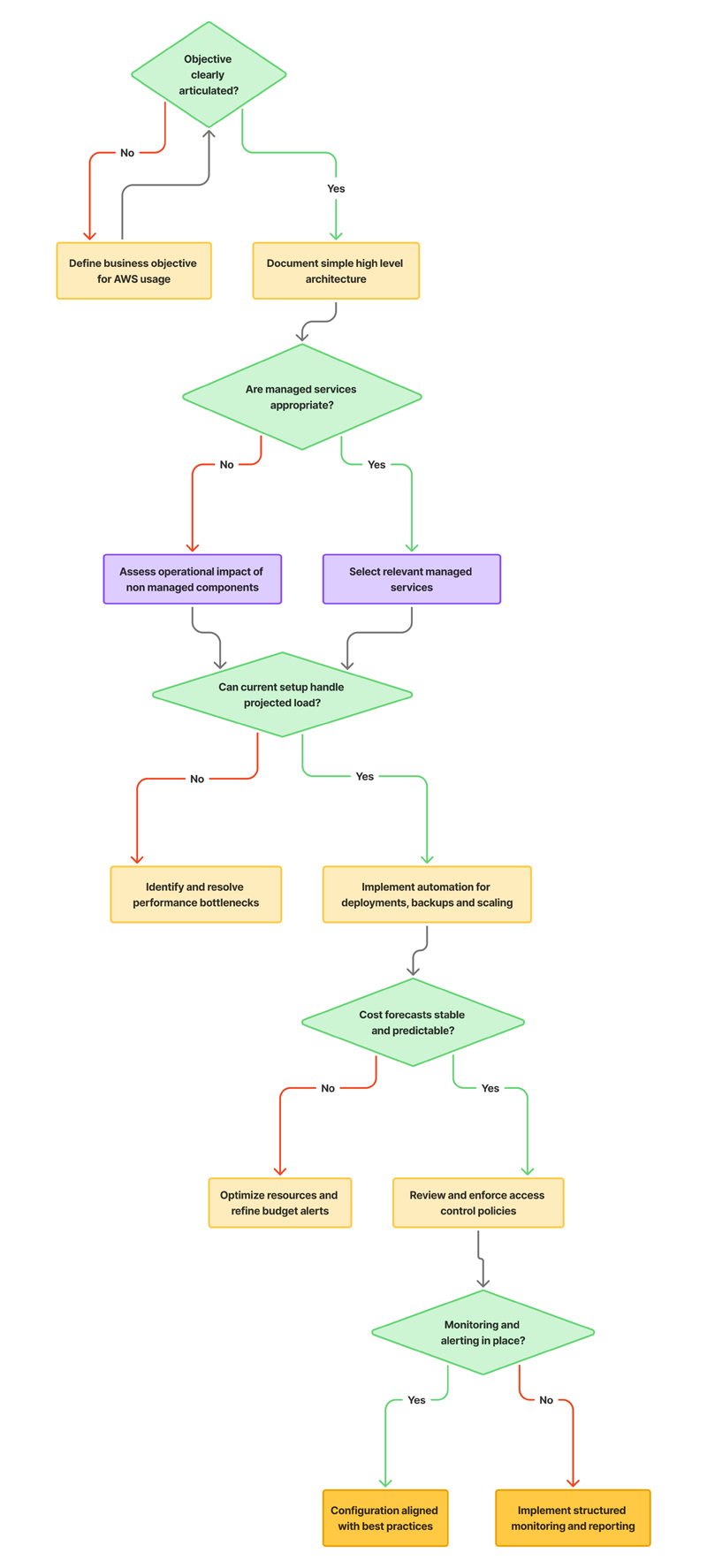
    Everyone says Amazon AWS Cloud is cheap. It is not. What matters is whether you can predict the bill without clutching your chest. Tell your team to set alerts, cap non-prod usage, and avoid fancy setups until you actually need them. Control beats chaos.

    2. Data Should Always Be Yours, Not Buried in Some Engineer’s Laptop

    Make sure backups exist. Make sure they work. Make sure the restore button actually restores. AWS gives you solid tools, but founders still need visibility into where the business’s data lives and who has access to it.

    3. Ship Fast and Break Less

    The whole point of using Amazon AWS Cloud is speed. Your team should not spend weeks tweaking servers or arguing about containers. If AWS has a managed version of something, use it. If you can automate a task, automate it. Progress beats perfection.

    4. Pick the Right Region and Stick to It

    This is a simple choice that many founders unknowingly mess up. Choose the region closest to your customers and avoid moving things around unless you absolutely must. Region chaos leads to billing chaos.

    5. Use Automation to Save Your Weekends

    Auto-scaling, scheduled shutdowns, and basic monitoring are not “nice to have.” They save sleep. They save money. They keep your team from firefighting. Small habits make Amazon AWS Cloud feel less like a wild animal and more like a working system.

    Three Things You Actually Need to Know (Not 153 Services)

    Here is the real story no one tells founders. You do not need to learn every Amazon AWS Cloud service or pretend you understand cloud diagrams that look like a spider fell into a geometry box. You only need to grasp the few things that decide whether your product survives out there. 

    First, your product needs a solid place to live. Forget the dizzying service names. Deep down, all you want is an environment that does not fall apart the moment a few users show up. AWS gives you that stability if you keep the setup clean instead of turning your infrastructure into an ego project.

    Then there is the part that founders never admit. You want growth without chaos. When your user base expands, you want a system that stays calm instead of shaking like a washing machine possessed by whatever haunted Christian Bale in The Machinist. That is what scalability really means. Amazon AWS Cloud handles this beautifully, but only if you resist the temptation to over-engineer everything just to look smart.

    And finally, security. Most small companies think they are too irrelevant to be attacked. That illusion dies the moment someone leaves a door open. Amazon AWS Cloud gives you strong protections, but you need your team to use them properly. Access controls, working backups, basic monitoring, and someone who actually checks alerts. Boring things, but they keep your business alive.

    Also Read: The blueprint of Google Cloud Migration

    The Founder’s Shortcut to What Really Matters

    Shortcut 1: Keep the Architecture Boring

    Fancy diagrams impress nobody when the site is down. Use the simplest pieces of Amazon AWS Cloud that get the job done. The fewer moving parts, the fewer late-night emergencies. Boring architecture is underrated and very profitable.

    Shortcut 2: Spend Time on Monitoring, Not Tweaking Servers

    Do not waste your founder energy debating instance types for hours. Put that energy into basic monitoring. A clean dashboard, a few alerts and regular checks will prevent more disasters than yet another “optimised” server tweak.

    Shortcut 3: Build Only What Moves the Business Needle

    If a feature does not help customers or revenue, it is decoration. Let AWS handle plumbing wherever possible. Managed services exist so your team can build useful things instead of doing heroic but meaningless backend gymnastics.

    Shortcut 4: Automate Every Repetitive Task

    Backups, deployments, scaling, health checks, shutdowns. If it repeats, script it. Automation keeps your team from burning out on routine work and lets them focus on product and users instead of babysitting infrastructure.

    Shortcut 5: Make Cost Awareness a Habit, Not a Monthly Panic

    Most shocking AWS bills are not “bad luck.” They are ignored signals. Set budgets, set alerts and review usage regularly. Treat cost like a weekly hygiene check, not a crime scene investigation at the end of the month.

    Amazon AWS Cloud

    The Stuff You Should Stop Obsessing Over

    Founders love worrying about the wrong things. AWS has a talent for distracting you with shiny topics that look important but honestly do not matter for a growing business. Here are the usual traps.

    1. Kubernetes – NOT FOR ALL

    Everyone throws this word around like it is the secret sauce of successful startups. It is not. If you have ten employees and your product is still finding its feet, you do not need Kubernetes. You need stability, speed, and fewer things that can break.

    2. Multi Cloud Strategy – WOLLY MAMMOTH

    Relax. You are not Netflix. You are not running a global fleet of a zillion microservices. Pick one cloud, stick to it, and focus on building your product. Vendor lock is a fear that sounds intelligent in meetings but drains your energy in real life.

    3. Comparing AWS vs GCP vs Azure – POINTLESS

    This debate never ends. It also does not matter if your team already knows Amazon AWS Cloud. Skill beats platform. A mediocre setup on the wrong cloud costs more time, money, and mental peace than committing to the one your engineers can actually operate.

    4. “We Need AI Everywhere.” – ABSURD

    No. You need your app to work properly first. AI can come later. Adding AI to a buggy product is like spraying perfume on a dumpster. Fix the basics. Then think about the smart stuff.

    5. Over-Engineering the Whole System – THEFT

    Founders sometimes push engineering teams to create overly complex setups to look impressive. Nobody is impressed when things crash. A simple AWS architecture is often stronger than a monster built for bragging rights.

    The Hidden Weak Spots No One Warns You About

    Every founder thinks Amazon AWS Cloud problems come from big issues like traffic spikes or bugs. The real trouble usually hides in tiny, stupid things. A forgotten access key. A test server has been left running for weeks. A permission someone granted in a hurry. These small slip-ups quietly grow into huge bills, security holes and late-night chaos. No one warns you about these weak spots because they look harmless at first. They are not. They bite at the most vulnerable moment…LOL.

    Weak SpotWhat It Actually MeansWhy It Becomes a Problem
    Unused resourcesTest servers, forgotten volumes, old snapshotsBills creep up and no one knows why
    Overly broad accessToo many people with admin-like permissionsOne mistake can break everything or leak data
    Missing backupsBackups exist in theory but not in realityA bad deployment can wipe out days of work
    No monitoring disciplineAlerts exist, but nobody checks themIssues pile up silently until something crashes
    Region mismatchWorkloads are spread across random regionsSlower app performance and unnecessary costs
    Hacky quick fixesTemporary patches that never get cleaned upSystems become brittle and unpredictable

    A Simple, Drama-Free AWS Strategy for 2026

    Most founders want an Amazon AWS Cloud strategy that does not require a cloud monk, a 40-page architecture diagram, or a weekend spent crying into billing dashboards. Here is the truth. You do not need elite access. Unless you play golf with Matt Garman over the weekend, you will never get some secret magic shortcut. What you do get is a simple, clean approach that actually works in the real world.

    Start by keeping your environments limited and controlled. One for development and one for production is more than enough for most companies. More layers only create more confusion. Use managed services whenever possible because maintaining your own servers is basically volunteering for extra stress.

    Make automation your default setting. Backups, deployments, scaling schedules, and shutdown routines should all be automatic. The less you touch manually, the fewer things you break. Set up cost alerts and basic monitoring, and actually look at them once in a while. A small amount of discipline here saves you from huge bills later.

    Security should not be an afterthought. Keep access tight, audit permissions regularly, and avoid the trap of giving everyone god-like rights because it is convenient. A tiny mistake can open a giant hole, and 2026 will be even less forgiving.

    The best AWS strategy is not glamorous. It is calm. It is simple. It lets your team ship faster and keeps your business away from stupid surprises. That is the only drama-free strategy that survives in real life.

    Smart Questions to Ask Your Tech Team (So You Don’t Get Bullshitted)

    Most founders stay quiet during AWS discussions because everything sounds like advanced rocket science mixed with alphabet soup. Here is the trick. You do not need to understand every term. You only need to ask the kind of questions that make your team pause, think and stop bullshitting you. These questions cut through the noise and force clarity without you pretending to be a Amazon AWS Cloud guru.

    “What are the top three things burning money this month and why?”
    This single line exposes waste faster than any dashboard. If your team cannot answer it, nobody is watching the shop.

    “If traffic jumps tonight, what breaks first?”
    Every system has a weak point. You want to hear a clear answer, not a fantasy story. The weak link is where you invest.

    “Which tasks can we automate right now?”
    If you ask this regularly, your team will stop doing repetitive nonsense and start thinking about efficiency. Automation saves time and sanity.

    “Who has access to what and why?”
    This question prevents half of the stupid security incidents that founders hear about too late. If the answer is vague, permissions are already a mess.

    “What is the simplest way to run this setup without adding more moving parts?”
    This forces the team to justify complexity. Most complicated architecture exists because someone wanted to feel clever, not because the business needed it.

    “Show me the monitoring in plain English.”
    If the dashboard cannot be explained without a lecture, it is not being monitored properly. You want clarity, not hieroglyphics.

    Conclusion

    Here is the part founders often forget. Amazon AWS Cloud is not some mythical power source that magically fixes everything. It is a toolbox. A big one. A messy one. A powerful one. What matters is how you use it. If you keep things simple, automate the boring parts and stay alert to the tiny mistakes that turn into huge problems, AWS becomes a strength instead of a stress trigger.

    You do not need elite access, secret cloud knowledge, or a private conversation with someone on Bezos’s yacht. You need clarity, discipline and a team that understands why clean setups always beat clever ones. The real magic is not in the platform. It is in the decisions you make every week.

    Treat AWS like a partner, not a puzzle. Keep the nonsense out. Focus on what helps the business grow. That is the only formula that works for every founder, every team and every product trying to scale without losing its mind.

  • Why Cross-functional Team Alignment Paralyzed Even After Endless Meetings: 5 Reasons

    Why Cross-functional Team Alignment Paralyzed Even After Endless Meetings: 5 Reasons

    Cross-functional team alignment sounds good in theory, but it’s a different story when you see it in practice.

    Sales rolls their eyes at Product. Product complains about Engineering. Engineering quietly builds what it thinks is best because no one else seems to understand it.

    It’s the same dance in every tech-driven company.

    Different rooms. Same friction.

    Each team is convinced they’re the adult in the room. The ones with the objective perspective. The others? Distracted. Overreaching. Unreasonable.

    So we create meetings. Cross-functional working groups. Alignment decks.

    And what do we get?

    Fatigue.

    Everyone’s calendar gets bloated. Decisions take weeks. Progress slows. And ironically, the very thing we wanted – alignment, starts to feel like overhead.

    But here’s the uncomfortable truth: You don’t need more collaboration. You need better clarity.

    And a system that lets Product, Tech, and Sales move without tripping over each other.

    Let’s talk about how that happens.

    The Real Cost of Poor Cross-Functional Team Alignment

    Cross-functional alignment failures rarely show up all at once. They begin as soft friction, slipped deadlines, confusing handovers, and strategy calls that sound out of sync. Everyone is working, but not necessarily together. Priorities shift mid-sprint. Product specs evolve after development starts. Sales pitches get ahead of releases. And soon, no one’s sure where the source of truth is.

    Now put that in numbers. Take a 25-member team working on a mid-sized digital product that includes product managers, engineers, QA, designers, Sales, Pre-Sales, and others. If each person loses just 5 hours a week to misaligned work, back-and-forths, or unnecessary meetings, that’s over 500 hours per month gone. That’s a complete sprint cycle lost to confusion and coordination debt.

    And the cost isn’t just time. It’s output, momentum, and morale. With a blended team cost of $2,500 to $4,000 per person per month (including salaries, overhead, and tools), that’s a monthly burn of $60,000 to $100,000 for a 25-member team. Even a modest 15% productivity leak due to poor alignment equals $9,000 to $15,000 lost every month, with no value shipped.

    Misalignment isn’t a workflow issue. It’s a business risk hiding in plain sight.

    Shared Objectives Beat Shared Calendars

    Cross-functional Team Alignment doesn’t mean syncing schedules. It means syncing priorities. Cross-functional teams don’t need more Zoom or Teams calls; they need a shared definition of success. Here’s how to do it.

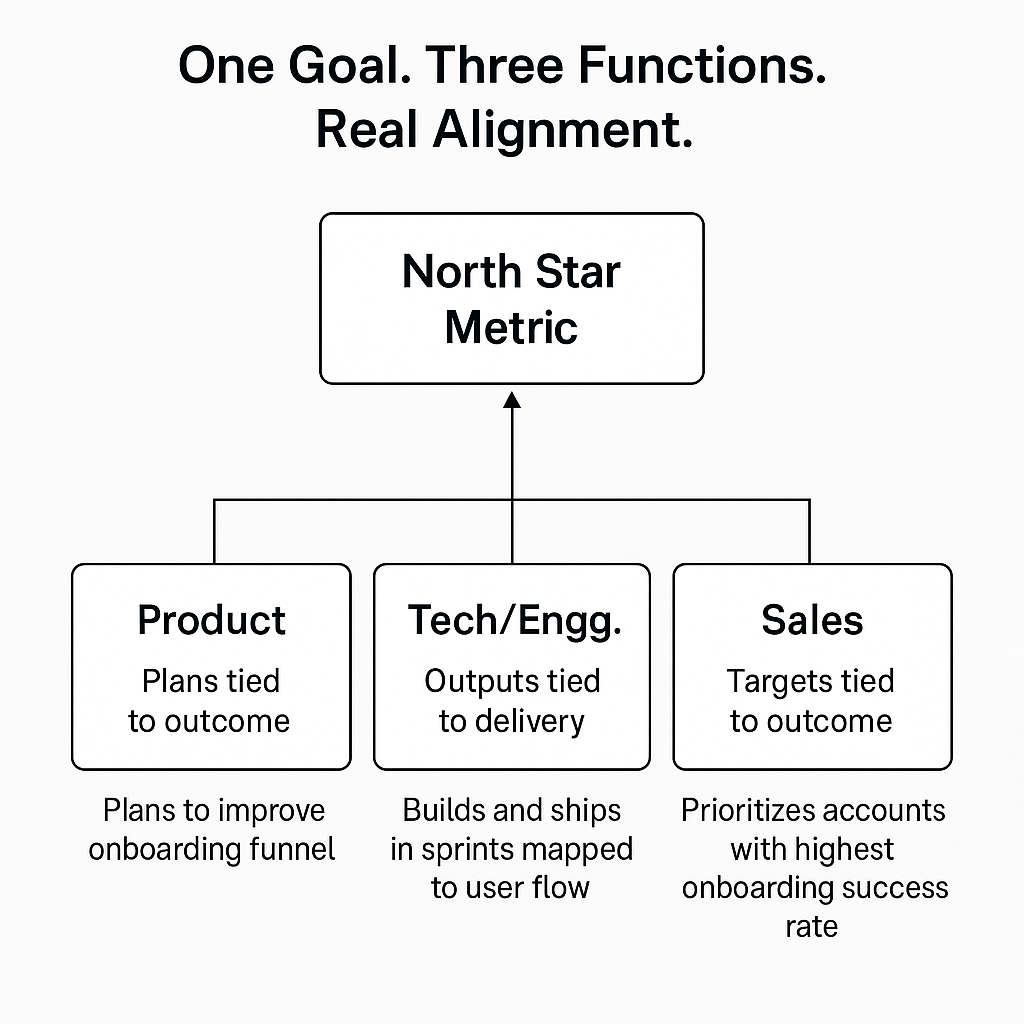
    Anchor all teams to the same North Star metric.

    Whether it’s activation rate, time-to-value, or revenue per seat, pick a metric that reflects real business value and make it visible to everyone.

    Define success for each function in terms of that shared goal.

    The product focuses on adoption, Engineering optimizes for delivery velocity, and Sales drives segment fit, all in service of the same outcome.

    Use lightweight OKRs or thematic goals instead of feature lists.

    Replace “ship feature X” with “increase onboarding completion by 20%.” It gives teams room to innovate while staying aligned.

    Make tradeoffs transparent.

    When two functions have different objectives, tie them back to the shared purpose. If it doesn’t move the needle, it doesn’t move forward.

    Kill vanity metrics at the edges.

    If Sales celebrates leads that churn in 10 days, or Engineering hits ticket velocity while shipping unused features, alignment is already broken.

    Structure the Handoffs, Not the Meetings

    A lack of meetings doesn’t cause most coordination problems; poorly defined handoffs are the primary cause. When Product tosses specs over the wall to Engineering without shared understanding, or when Tech completes delivery but Sales doesn’t know how to position the release, things break. Not immediately, but soon enough.

    What’s missing is a precise operating rhythm. Every stage of a cross-functional workflow should include: what is being handed off, who owns it next, and what “done” means at that point. Is the feature doc just a bullet list, or does it include user flows? Does the tech team flag readiness with a code freeze or a QA-approved staging release? If that language isn’t consistent across teams, misalignment creeps in.

    Instead of recurring syncs, define structured checkpoints. Create handoff playbooks: Product to Tech → MVP approval. Tech to Sales → Release documentation and internal demo. These are the real bridges. Build them once, and meetings become backup, not the backbone.

    Asynchronous Rituals Keep Teams in Sync

    Synchronous updates are useful until they become a hindrance. When your team grows or stretches across time zones, real-time alignment becomes a bottleneck. Async rituals fix that. They reduce interruptions, improve clarity, and scale decision-making without burning hours on Zoom.

    Here’s how async Cross-functional Team Alignment works:

    • Product teams can record feature walkthroughs once. Tech and Sales can review them at their convenience, without needing to schedule a call.
    • Use tools like JIRA, Trello, or ClickUp to give everyone real-time visibility into what’s moving, what’s blocked, and what’s next.
    • Designate specific channels for Product, Tech, and Sales syncs. Use pinned formats for updates (e.g., “What we shipped / What’s coming / Blockers”).
    • Encourage team members to post short demo videos every week; schedule optional office hours instead of mandatory reviews.
    • Hook dashboards to Slack or Teams so significant state changes (MVP tagged, feature shipped, doc ready) notify the right people, instantly.

    The most effective asynchronous rituals are those that are boring and repetitive. That’s the point. They free up your team to do the real work of building, closing, and shipping without waiting on the next invite.

    Respect Autonomy While Staying Aligned

    Cross-functional Team Alignment often breaks down not because teams avoid collaboration, but because they’re pulled into multiple tasks simultaneously. That’s not alignment. That’s micromanagement masquerading as teamwork.

    Once goals and handoffs are clear, each function should execute independently. The product team doesn’t need to approve every design. Engineering shouldn’t have to defend every line of code. Sales doesn’t need a nod before pitching. What matters is that constraints are known, outcomes are defined, and responsibilities are understood.

    The best teams work within guardrails, not approval loops. Product owns the what and why, Tech owns the how, and Sales owns the impact. Everyone stays informed, but no one waits for permission. That’s what absolute autonomy looks like.

    Centralize Context, Decentralize Execution

    In most teams, work slows down not because people lack direction, but because they lack access to context. Key decisions are buried in emails. Requirements are scattered across tools. Customer insights sit with Sales. As a result, meetings become the primary means of staying aligned.

    That’s avoidable. Create a single source where the product vision, specifications, customer feedback, and go-to-market assets are all documented and easily accessible. When context is shared and up to date, teams don’t need to check in constantly. Product can plan, Engineering can build, and Sales can engage customers without waiting for answers. Alignment becomes part of how the team operates, not something you stop to do.

    Cross-functional team alignment

    Read this excellent article on Cross-functional team alignment by Atlassian, creator of Jira.

    Use Review Forums, Not Update Calls

    Most cross-functional teams spend too much time talking about the work and not enough time making decisions. Daily syncs, update calls, and check-ins become routine but offer little value beyond what a dashboard already shows. The real fix is to replace passive updates with structured review forums that drive decisions and move things forward.

    • Replace update meetings with weekly review forums that focus on shipped work, blockers, and decisions. Nothing more.
    • Limit attendance to one representative per function to keep meetings tight and focused.
    • Focus on metrics that matter, not effort logs or activity summaries.
    • Use a consistent format across teams: what shipped, what it impacted, what’s next.
    • Decide live. Every discussion concludes with an explicit action or next step.
    Cross-functional team alignment

    Build Cross-Functional Empathy by Design

    Most Cross-functional Team Alignment issues aren’t technical. They’re relational. Teams work next to each other without understanding what the others are solving, optimizing, or avoiding. Assumptions take the place of insight. Friction follows. The best way to fix this isn’t with more process, it’s with exposure.

    • Rotate engineers into recorded sales calls to hear real objections and customer language.
    • Let sales teams observe product roadmap walkthroughs to understand what’s feasible and why.
    • Share design reviews and usability test clips across teams so everyone sees the product through the user’s eyes.
    • Celebrate launches as a cross-team milestone, not a single-function win.
    • Create informal spaces for product, tech, and sales to talk without an agenda.
    • Encourage people to write, not just talk. Shared notes, Looms, and briefs help teams see each other’s thinking.

    Empathy is built in the details when one team understands how another works, the alignment problems start to fix themselves.

    Read these guidelines for Digital Transformation using AI.

    Conclusion

    The most effective teams aren’t the ones with the most meetings or the fanciest tools. They’re the ones who understand how to move together without getting in each other’s way. With shared goals, clear handoffs, and just the right amount of structure, alignment becomes a benefit rather than a burden. It becomes momentum. That’s the shift modern product companies need to make, and the ones that do it well move faster than everyone else.

  • Common Project Management Mistakes: 8 Ways to Avoid the Blunders

    Common Project Management Mistakes: 8 Ways to Avoid the Blunders

    The common project management mistakes are committed by a project manager not because he/she lacks a particular skill; most of the time it happens because you the PM forget or neglect something vital, something you should never avoid. As an IT project manager, you’ve experienced the unique challenges that come with the territory. It’s not just about juggling timelines or budgets; it’s about navigating a landscape that’s constantly shifting under the influence of new technologies and methodologies. 

    Even the best of us can stumble in this dynamic environment. My aim here is to talk about those common mistakes we’ve all either made or seen happen in IT projects – not to point fingers, but to share insights and maybe have a light-hearted chuckle at the complexities we face. So, let’s pitch in and explore these familiar pitfalls together, and figure out how we can steer clear of them in our future projects.

    Misapplication of Agile Practices

    As a project manager, it’s crucial to apply agile practices correctly in your IT projects. Agile is all about being flexible and responsive, but if you don’t use it properly, it can lead to more problems than solutions. Misapplying agile in one of the common project management mistakes, especially in key areas like sprint planning or managing user stories, can derail a project quickly. It’s not just about going agile; it’s about doing it right.

    To ensure you’re on the right track, consider these key points:

    • Prioritize Effective Sprint Planning: Thoughtfully plan your sprints, setting achievable goals for each iteration and ensuring team buy-in.
    • Smart Management of Epics and User Stories: Break down complex projects into manageable epics and user stories, simplifying tracking and execution.
    • Maintain a Steady Velocity: Keep an eye on the team’s velocity for better forecasting and avoid overcommitting in future sprints.
    • Regular Backlog Grooming: Continuously refine and prioritize the backlog to focus on the most critical and immediate tasks.
    • Incorporate Feedback Loops: Use retrospectives and reviews to gather team feedback and make necessary adjustments to your process.
    • Engage Team in Estimations: Involve your team in estimating tasks to leverage their insights and ensure more accurate sprint planning.
    • Embrace Adaptability: Stay flexible and ready to adjust your plans based on feedback and evolving project requirements.
    • Effective Daily Standups: Conduct brief, focused daily standups to keep the team aligned, identify any blockers early, and maintain momentum throughout the sprint.

    A Common Project Management Mistake is Budget Management

    While agile methodologies enhance project adaptability and efficiency, they can also lead to budget overruns if not managed carefully. Inadequate budget management in IT projects is a common project management mistake that can result from several factors, including poor estimation, scope creep, and failing to account for unexpected expenses.

    To effectively manage your project budget, consider these strategies:

    • Align your budget planning with agile sprints and milestones. This allows for more accurate tracking and allocation of funds based on project progress.
    • Spend time on accurate cost estimation before the project begins. Consider all potential expenses, including software, hardware, manpower, and unexpected costs.
    • Consistently track your project’s spending. Keeping a vigilant eye on expenditures allows for early detection of any budgetary deviations, enabling proactive management of potential overruns.
    • Allocate a portion of your budget for unforeseen expenses. This contingency fund can be a lifesaver in dealing with unexpected challenges or opportunities.
    • Be vigilant about scope creep. Ensure that any changes in project scope are accompanied by corresponding adjustments in the budget.
    • Keep stakeholders informed about the budget status. Transparency in budget matters can help in managing expectations and securing additional funds if needed.
    • After each project or major milestone, review your budget management. Identify what worked well and where improvements can be made for future projects.

    Underestimating Development Time: A Common Project Management Mistake

    Just as budgeting requires careful planning and foresight, estimating the time needed for software development demands a similar level of precision. Underestimating the time required for development tasks can lead to rushed work, compromised quality, and ultimately, project delays that can impact the budget and overall project success.

    As a project manager, here’s how you can tackle this common project management mistake:

    • Reflect on Past Projects: Use historical data from past projects to guide your time estimates. Learning from previous experiences can provide valuable insights.
    • Incorporate Buffer Time: Always include buffer time in your estimates for unexpected delays or technical challenges. This helps in managing unforeseen hiccups without derailing the entire project timeline.
    • Regular Progress Check-Ins: Implement regular check-ins to monitor progress against the timeline. This allows for early detection of delays and swift corrective actions.
    • Involve the Team in Estimations: Get input from the team members who will be doing the work. Their on-the-ground perspective can lead to more realistic time estimates.
    • Understand the Scope Thoroughly: A clear understanding of the project scope helps in better time estimation. Ensure that the scope is well defined and agreed upon by all stakeholders.
    • Be Prepared for Change: Agile projects can evolve, and so can their timelines. Be ready to reassess and adjust your time estimates as the project progresses.

    Communicate Transparently with Stakeholders: Keep all stakeholders informed about any changes in the timeline. Clear communication helps manage expectations and mitigates the impact of any delays.

    Communication Breakdowns Within Teams

    Just as accurate time estimation is essential for project success, so is effective communication. Breakdowns in communication can lead to misunderstandings, missed deadlines, and ultimately, project failure. These breakdowns often occur due to a lack of clear channels, misunderstandings of technical requirements, or simply the fast-paced nature of IT projects.

    Here are some strategies to enhance communication within your team and avoid this common project management mistake:

    • Set up dedicated channels for project communication, such as Slack or Microsoft Teams. This ensures that important information is shared efficiently and is accessible to all team members.
    • Schedule regular meetings to discuss project progress, challenges, and next steps. This keeps everyone aligned and provides an opportunity to address any concerns.
    • Create an environment where team members feel comfortable sharing their ideas and concerns. Open dialogue fosters collaboration and innovation.
    • Ensure that technical requirements are communicated clearly and understood by all team members. This reduces the risk of misinterpretation and errors.
    • Leverage project management tools like JIRA or Trello to keep track of tasks, deadlines, and responsibilities. This helps in maintaining transparency and accountability.
    • Offer training sessions on effective communication practices, especially in a technical context, to enhance team collaboration.
    • Be proactive in identifying and addressing communication issues. Regular check-ins with team members can help in spotting problems early.

    Read our post on Latest IT Innovations in 2024

    Scope Creep

    If strong communication is vital for project cohesion, effectively managing the project scope is essential to ensure that the project remains on track and within budget. Scope creep occurs when new elements are added to a project without corresponding increases in time, resources, or budget, often leading to project overruns and team strain.

    To effectively manage and prevent scope creep and get rid of this common project management mistake, consider these strategies:

    • Start with a clear and detailed project scope statement. Ensure that all stakeholders agree on what is included in the project and, just as importantly, what isn’t.
    • Establish a process for managing changes to the project. Any alterations or additions to the scope should be thoroughly evaluated for their impact on resources and timelines, and formally approved.
    • Keep regular communication with stakeholders to manage their expectations. Ensure they understand the implications of scope changes on the project’s success.
    • Make sure your team understands the importance of maintaining the project scope. They should be aware of how to handle requests for additional features or changes.
    • Regularly review project progress against the defined scope. This helps in identifying any deviations early and addressing them before they escalate.
    • Work with stakeholders to prioritize requirements. This can help in focusing on what’s most important and reduce the likelihood of last-minute additions.
    • Keep detailed records of all project meetings, decisions, and changes. Documentation provides clarity and is crucial for understanding the reasons behind scope changes.

    Neglecting Ongoing Skills Development

    Just as vigilance is key in preventing scope creep, actively fostering skill development within your team is crucial for adapting to the ever-evolving IT landscape. Neglecting this is a common project management mistake that can lead to a skills gap, where your team may not be equipped to handle emerging technologies or methodologies, potentially hindering project progress and innovation.

    To prioritize and implement ongoing skills development, consider these approaches:

    • Regularly Identify and Address Skill Gaps: Stay aware of the evolving technology landscape and update your team’s skills accordingly.
    • Foster a Culture of Continuous Learning: Encourage and support ongoing professional development within your team.
    • Allocate Budget and Time for Training: Invest in workshops, courses, and training sessions to keep skills up-to-date.
    • Promote Internal Knowledge Sharing: Organize tech talks and learning sessions for team members to share insights and expertise.
    • Integrate Learning into Work Schedules: Make skill development a part of the regular work routine, not just an occasional activity.
    • Implement Mentorship Programs: Pair less experienced team members with mentors for guided learning and skill enhancement.
    • Stay Informed of Industry Developments: Keep yourself updated with the latest in IT to guide your team’s learning path effectively.

    Ineffective Stakeholder Engagement

    Just like nurturing your team’s skills, engaging stakeholders effectively is key to the success of your projects. When stakeholders are not properly engaged, it can lead to misaligned expectations, lack of support, and eventual project setbacks.

    Here are actionable steps to enhance stakeholder engagement:

    • Clearly determine who your stakeholders are and understand their interests and influence on the project.
    • Customize your communication strategy to meet the specific needs and preferences of different stakeholders.
    • Keep stakeholders informed with regular progress reports and open discussions about project challenges.
    • Encourage their participation in decision-making processes where appropriate, to foster a sense of ownership.
    • Actively seek out their opinions and concerns, and address them in your project planning and execution.
    • Clarify what is expected from stakeholders and what they can expect from the project team to avoid misunderstandings.
    • Consistently deliver on promises and be honest about project statuses to build a foundation of trust with stakeholders.

    Insufficient Post-Project Analysis

    For IT project managers, conducting a thorough post-project analysis is as vital as any phase of the project lifecycle. Just like nurturing skills or engaging stakeholders, reflecting on completed projects provides invaluable insights for future success. Often, insufficient post-project analysis can result in missed opportunities to learn from mistakes and successes, leading to repeated issues in subsequent projects.

    To maximize the benefits of post-project analysis, consider these steps:

    • Conduct a Project Review: After project completion, gather key project members to discuss what went well and what didn’t.
    • Document Lessons Learned: Systematically record both the successes and failures of the project for future reference.
    • Analyze Performance Metrics: Review project metrics and KPIs to understand the project’s effectiveness and areas for improvement.
    • Feedback from All Levels: Include feedback from team members, stakeholders, and clients to get a well-rounded view of the project’s impact.
    • Evaluate Deliverables Against Objectives: Assess how well the project met its initial objectives and identify any gaps.
    • Plan for Improvement: Use the findings from the analysis to plan actionable improvements for future projects.
    • Share Findings: Communicate the lessons learned with your broader organization to foster a culture of continuous improvement.

    Conclusion

    So, there you have it – a rundown of some common project management mistakes we all face in the world of IT project management. It’s a journey, right? Full of twists and turns. Each project gives us a chance to do better than the last. By keeping an eye on these pitfalls – from getting agile right, to nailing budget management, all the way through to wrapping up with a solid post-project analysis – we’re setting ourselves up for success. And remember, every mistake is a stepping stone to greatness. So, let’s take these lessons, shake off the setbacks, and head into our next projects with confidence.

    Image by DCStudio on Freepik

  • latest IT innovation: 4 major technology trends that you can never avoid

    latest IT innovation: 4 major technology trends that you can never avoid

    Adaptation is the key. Customers now demand more, better, and swifter. As a business owner, your primary job is to live up to this growing demand from those who pay for your service or product. Needless to say, your key to success lies in how effectively you embrace the latest IT innovation. As a business owner or an IT decision-maker, you are now on the lookout for technological advancements that can drive efficiency, spur innovation, and foster growth. 

    In this post, we explore four crucial aspects of the latest IT innovation that are going to be pivotal for your IT decisions: Serverless Computing, Hybrid Cloud Solutions, Edge Computing, and AI & ML Platforms. We are going to discuss these technologies, providing clarity on how they can integrate into and enhance your business operations.

    Serverless Computing (Function as a Service)

    Serverless computing, or Function as a Service (FaaS), represents a paradigm shift in how applications are built, deployed, and managed. This latest IT innovation allows developers to create and run applications without the complexity of managing the underlying infrastructure, which is a significant advantage for IT decision-makers seeking to streamline operations.

    Key Benefits:

    • Cost-Effective Scaling: Direct correlation between usage and cost, ensuring efficient resource allocation.
    • Operational Efficiency: Eliminates server management tasks, allowing teams to focus on core product development.
    • Quick Deployment: Facilitates faster release cycles for applications, enhancing business agility.
    • Reduced Overhead: No need to provision or maintain servers, reducing infrastructure costs and administrative burden.
    • Flexibility: Encourages experimentation and innovation due to lower initial costs and risk.
    • Reliability: Serverless architectures often include built-in fault tolerance and geo-redundancy, increasing application reliability.
    • Workflow management: Simplifies the development process with integrated tools and services.
    • Auto-update: The underlying platforms are continuously updated by the provider, ensuring access to the latest technology.

    Serverless Computing Implementation Guidelines:

    • Begin your serverless journey with a manageable, low-risk project. Gain practical experience and understand serverless concepts in a real-world setting.
    • Clearly articulate your business and technical goals for adopting serverless computing. This will benchmark your implementation strategy and help measure its success.
    • Evaluate and choose a serverless computing platform (like AWS Lambda, Google Cloud Functions, Azure Functions) that aligns with your organization’s technical requirements and existing infrastructure.
    • Invest in educating your team about serverless technologies that are crucial to making the most out of serverless computing.
    • Plan and design your applications to utilize the auto-scaling feature of serverless computing efficiently. Rethink application structure for optimal flexibility and scalability.
    • Implement comprehensive security measures, focusing on access controls, data encryption, and secure API interactions, given the unique security landscape of serverless architectures.
    • Regularly monitor the performance and cost-effectiveness of your serverless applications. Use insights from these analyses to continually refine and optimize your infrastructure.

    latest IT innovation through Hybrid Cloud Solutions

    The hybrid cloud solution is another latest IT innovation that brides traditional IT infrastructure and modern cloud computing, offering a harmonious blend of public and private cloud environments. This approach enables organizations to strike the perfect balance between operational flexibility, security, and cost-controlling. Hybrid cloud solutions are akin to having the best of both worlds, combining the on-demand scalability of public clouds with the customized control of private clouds.

    Key Benefits:

    Enhanced Flexibility: Hybrid clouds provide the flexibility to scale resources up or down, adapting like a chameleon to the dynamic business environment.

    Resource Allocation: By smartly distributing workloads between private and public clouds, organizations can optimize costs, much like balancing a budget to maximize efficiency.

    Security Measures: Combining the security of private clouds with the advanced capabilities of public clouds, hybrid solutions create a fortress of data protection.

    Compliance and Control: This approach allows organizations to navigate the complex tapestry of regulatory requirements, ensuring compliance and data sovereignty.

    Disaster Recovery: Hybrid clouds offer a safety net for data and applications, ensuring business continuity even in turbulent times.

    Read our post on Google Cloud here.

    Implementation Guidelines for Hybrid Cloud Solutions:

    • Begin with a clear strategy that outlines how hybrid cloud solutions will meet your specific business needs.
    • Select public and private cloud services that best align with your technical requirements and business objectives.
    • Implement a system for seamless data management across cloud and on-premises environments.
    • Establish security protocols across all environments, focusing on data encryption, access controls, and regular security audits.
    • Regularly review the performance and efficiency of your hybrid cloud environment, making adjustments as needed to optimize operations

    Edge Computing: The latest IT innovation in 2024

    Edge computing marks a significant shift in data processing and network architecture, bringing computation and data storage closer to the location where it is needed. This latest IT innovation reduces latency and bandwidth use, enhancing the performance of applications and services. By processing data at the edge of the network, closer to where it is being generated and used, organizations can make faster, more efficient decisions. Edge computing is particularly valuable in scenarios where real-time data processing is critical, such as in IoT devices, autonomous vehicles, and smart city infrastructures.

    Key Benefits of Edge Computing:

    Reduced Latency: By processing data near its source, edge computing drastically cuts down on latency, offering near real-time insights and responses.

    Bandwidth Optimization: It minimizes the amount of data that needs to travel over the network, reducing bandwidth requirements and costs.

    Privacy and Security: Local data processing can enhance data security and privacy, as sensitive information does not need to be transmitted over long distances.

    Scalability: It allows for scalable solutions that can adapt to increasing amounts of data without overburdening the central network.

    Energy Efficiency: By processing data locally, edge computing can reduce the energy required for data transmission and processing.

    Implementation Guidelines for Edge Computing:

    • Identify specific scenarios within your organization where edge computing can add the most value, such as IoT deployments or real-time analytics.
    • Choose hardware and software that are specifically designed for edge computing, considering factors like processing power, storage capacity, and energy efficiency.
    • Implement security measures at each edge node like encryption, access controls, and regular security audits.
    • Design your edge computing infrastructure to be scalable, allowing for easy expansion as data processing needs grow.
    • Define how data will be collected, processed, and stored at the edge complying with data privacy regulations.

    Some of the most popular Edge Computing platforms are:

    Amazon Web Services (AWS) – AWS Wavelength
    Microsoft Azure – Azure Edge Zones
    Google Cloud – Google Cloud IoT Edge
    IBM – IBM Edge Application Manager
    Cisco – Cisco Edge Intelligence
    HPE (Hewlett Packard Enterprise)
    Dell Technologies – Dell EMC Edge Gateway

    Artificial Intelligence and Machine Learning Platforms

    When we talk about AI and ML in business, we are talking about a revolution in how things get done.  These latest IT innovations just about crunching numbers or analyzing data; it’s about reimagining how businesses operate. It’s about being more agile, more efficient, and making more informed decisions. Let’s enlist a few things that AI can do for any business:

    • AL can make customer support and product recommendations more personal and responsive.
    • Streamlines everything from supply chain management to inventory control, making your business operations smoother and more cost-effective.
    • Can analyze market trends and customer feedback, helping you design products that hit the mark.
    • Identify new opportunities, and make informed decisions.
    • Human Resources: From finding the right talent to understanding employee satisfaction and performance.
    • AI knows exactly what your customers want. Help you optimize campaigns and boost sales efficiency.
    • Adept at identifying and preventing fraud and strengthening your cybersecurity defenses.

    Read our post on AI for Business Insights here.

    Conclusion

    As we conclude our exploration of the latest IT innovations like Serverless Computing, Hybrid Cloud Solutions, Edge Computing, and AI & ML Platforms, it becomes clear that these technologies are crucial in shaping business in 2024 and beyond. For you as a business owner or IT decision-maker, the opportunity lies in how these tools are adapted to your business framework. The journey towards technological adaptation is not just about keeping up; it’s about leading and transforming. 

    Image by Freepik