Blog

  • Amazon AWS Cloud for Non-Tech Founders in 2026: What Actually Doesn’t Make You Powerless

    Amazon AWS Cloud for Non-Tech Founders in 2026: What Actually Doesn’t Make You Powerless

    Let’s be honest. Half the founders out there talk about “moving to the cloud” like it is some spiritual journey. The minute Amazon AWS Cloud comes up, everyone suddenly becomes an expert, even though most of us have absolutely no clue what is happening behind those shiny dashboards.

    AWS is a beast. A brilliant beast, sure, but also the kind that bites when you look away. One bad click and your monthly bill shoots up like it is trying to give you a heart attack. And their service names feel like the AWS engineers stayed up all night inventing complicated words just to mess with the rest of us.

    Founders? They bluff. They nod in meetings and throw around the word “scalability” as they mean it. Inside, they are only praying that nothing collapses at 4 a.m. They just want the basics:

    “Make the damn thing run. Keep it fast. Do not rob us.”

    Here is the painful part. When AWS works well, it really works. It gives small teams ridiculous power. It lets you scale without begging for mercy. It quietly handles the ugly stuff you never want to think about.

    So this post is for the founder who is done pretending. The one who wants the truth, a little attitude, and a guide that reads as a human wrote it, not a cloud monk chanting jargon.

    Let’s break AWS down to the parts that matter and ignore the rest.

    The Founder Cheat-Sheet for Amazon AWS Cloud

    This is the part every founder secretly wants. Not the architecture diagrams. Not the service names. Just the stuff that actually decides whether AWS (check the AWS Cost Calculator) becomes your growth engine or your monthly headache.

    1. Cost Predictability Is More Important Than Cost Savings

    Everyone says Amazon AWS Cloud is cheap. It is not. What matters is whether you can predict the bill without clutching your chest. Tell your team to set alerts, cap non-prod usage, and avoid fancy setups until you actually need them. Control beats chaos.

    2. Data Should Always Be Yours, Not Buried in Some Engineer’s Laptop

    Make sure backups exist. Make sure they work. Make sure the restore button actually restores. AWS gives you solid tools, but founders still need visibility into where the business’s data lives and who has access to it.

    3. Ship Fast and Break Less

    The whole point of using Amazon AWS Cloud is speed. Your team should not spend weeks tweaking servers or arguing about containers. If AWS has a managed version of something, use it. If you can automate a task, automate it. Progress beats perfection.

    4. Pick the Right Region and Stick to It

    This is a simple choice that many founders unknowingly mess up. Choose the region closest to your customers and avoid moving things around unless you absolutely must. Region chaos leads to billing chaos.

    5. Use Automation to Save Your Weekends

    Auto-scaling, scheduled shutdowns, and basic monitoring are not “nice to have.” They save sleep. They save money. They keep your team from firefighting. Small habits make Amazon AWS Cloud feel less like a wild animal and more like a working system.

    Three Things You Actually Need to Know (Not 153 Services)

    Here is the real story no one tells founders. You do not need to learn every Amazon AWS Cloud service or pretend you understand cloud diagrams that look like a spider fell into a geometry box. You only need to grasp the few things that decide whether your product survives out there. 

    First, your product needs a solid place to live. Forget the dizzying service names. Deep down, all you want is an environment that does not fall apart the moment a few users show up. AWS gives you that stability if you keep the setup clean instead of turning your infrastructure into an ego project.

    Then there is the part that founders never admit. You want growth without chaos. When your user base expands, you want a system that stays calm instead of shaking like a washing machine possessed by whatever haunted Christian Bale in The Machinist. That is what scalability really means. Amazon AWS Cloud handles this beautifully, but only if you resist the temptation to over-engineer everything just to look smart.

    And finally, security. Most small companies think they are too irrelevant to be attacked. That illusion dies the moment someone leaves a door open. Amazon AWS Cloud gives you strong protections, but you need your team to use them properly. Access controls, working backups, basic monitoring, and someone who actually checks alerts. Boring things, but they keep your business alive.

    Also Read: The blueprint of Google Cloud Migration

    The Founder’s Shortcut to What Really Matters

    Shortcut 1: Keep the Architecture Boring

    Fancy diagrams impress nobody when the site is down. Use the simplest pieces of Amazon AWS Cloud that get the job done. The fewer moving parts, the fewer late-night emergencies. Boring architecture is underrated and very profitable.

    Shortcut 2: Spend Time on Monitoring, Not Tweaking Servers

    Do not waste your founder energy debating instance types for hours. Put that energy into basic monitoring. A clean dashboard, a few alerts and regular checks will prevent more disasters than yet another “optimised” server tweak.

    Shortcut 3: Build Only What Moves the Business Needle

    If a feature does not help customers or revenue, it is decoration. Let AWS handle plumbing wherever possible. Managed services exist so your team can build useful things instead of doing heroic but meaningless backend gymnastics.

    Shortcut 4: Automate Every Repetitive Task

    Backups, deployments, scaling, health checks, shutdowns. If it repeats, script it. Automation keeps your team from burning out on routine work and lets them focus on product and users instead of babysitting infrastructure.

    Shortcut 5: Make Cost Awareness a Habit, Not a Monthly Panic

    Most shocking AWS bills are not “bad luck.” They are ignored signals. Set budgets, set alerts and review usage regularly. Treat cost like a weekly hygiene check, not a crime scene investigation at the end of the month.
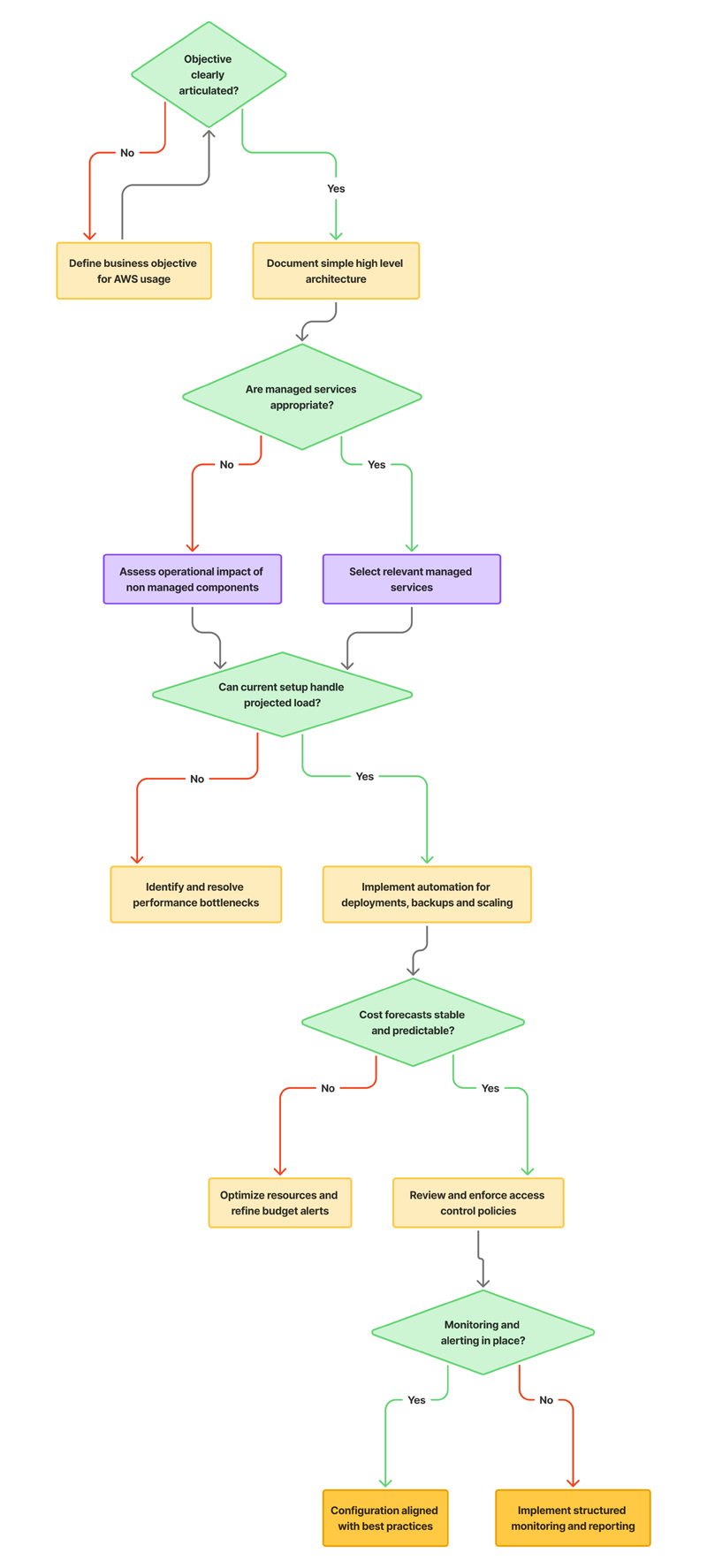
    Amazon AWS Cloud

    The Stuff You Should Stop Obsessing Over

    Founders love worrying about the wrong things. AWS has a talent for distracting you with shiny topics that look important but honestly do not matter for a growing business. Here are the usual traps.

    1. Kubernetes – NOT FOR ALL

    Everyone throws this word around like it is the secret sauce of successful startups. It is not. If you have ten employees and your product is still finding its feet, you do not need Kubernetes. You need stability, speed, and fewer things that can break.

    2. Multi Cloud Strategy – WOLLY MAMMOTH

    Relax. You are not Netflix. You are not running a global fleet of a zillion microservices. Pick one cloud, stick to it, and focus on building your product. Vendor lock is a fear that sounds intelligent in meetings but drains your energy in real life.

    3. Comparing AWS vs GCP vs Azure – POINTLESS

    This debate never ends. It also does not matter if your team already knows Amazon AWS Cloud. Skill beats platform. A mediocre setup on the wrong cloud costs more time, money, and mental peace than committing to the one your engineers can actually operate.

    4. “We Need AI Everywhere.” – ABSURD

    No. You need your app to work properly first. AI can come later. Adding AI to a buggy product is like spraying perfume on a dumpster. Fix the basics. Then think about the smart stuff.

    5. Over-Engineering the Whole System – THEFT

    Founders sometimes push engineering teams to create overly complex setups to look impressive. Nobody is impressed when things crash. A simple AWS architecture is often stronger than a monster built for bragging rights.

    The Hidden Weak Spots No One Warns You About

    Every founder thinks Amazon AWS Cloud problems come from big issues like traffic spikes or bugs. The real trouble usually hides in tiny, stupid things. A forgotten access key. A test server has been left running for weeks. A permission someone granted in a hurry. These small slip-ups quietly grow into huge bills, security holes and late-night chaos. No one warns you about these weak spots because they look harmless at first. They are not. They bite at the most vulnerable moment…LOL.

    Weak SpotWhat It Actually MeansWhy It Becomes a Problem
    Unused resourcesTest servers, forgotten volumes, old snapshotsBills creep up and no one knows why
    Overly broad accessToo many people with admin-like permissionsOne mistake can break everything or leak data
    Missing backupsBackups exist in theory but not in realityA bad deployment can wipe out days of work
    No monitoring disciplineAlerts exist, but nobody checks themIssues pile up silently until something crashes
    Region mismatchWorkloads are spread across random regionsSlower app performance and unnecessary costs
    Hacky quick fixesTemporary patches that never get cleaned upSystems become brittle and unpredictable

    A Simple, Drama-Free AWS Strategy for 2026

    Most founders want an Amazon AWS Cloud strategy that does not require a cloud monk, a 40-page architecture diagram, or a weekend spent crying into billing dashboards. Here is the truth. You do not need elite access. Unless you play golf with Matt Garman over the weekend, you will never get some secret magic shortcut. What you do get is a simple, clean approach that actually works in the real world.

    Start by keeping your environments limited and controlled. One for development and one for production is more than enough for most companies. More layers only create more confusion. Use managed services whenever possible because maintaining your own servers is basically volunteering for extra stress.

    Make automation your default setting. Backups, deployments, scaling schedules, and shutdown routines should all be automatic. The less you touch manually, the fewer things you break. Set up cost alerts and basic monitoring, and actually look at them once in a while. A small amount of discipline here saves you from huge bills later.

    Security should not be an afterthought. Keep access tight, audit permissions regularly, and avoid the trap of giving everyone god-like rights because it is convenient. A tiny mistake can open a giant hole, and 2026 will be even less forgiving.

    The best AWS strategy is not glamorous. It is calm. It is simple. It lets your team ship faster and keeps your business away from stupid surprises. That is the only drama-free strategy that survives in real life.

    Smart Questions to Ask Your Tech Team (So You Don’t Get Bullshitted)

    Most founders stay quiet during AWS discussions because everything sounds like advanced rocket science mixed with alphabet soup. Here is the trick. You do not need to understand every term. You only need to ask the kind of questions that make your team pause, think and stop bullshitting you. These questions cut through the noise and force clarity without you pretending to be a Amazon AWS Cloud guru.

    “What are the top three things burning money this month and why?”
    This single line exposes waste faster than any dashboard. If your team cannot answer it, nobody is watching the shop.

    “If traffic jumps tonight, what breaks first?”
    Every system has a weak point. You want to hear a clear answer, not a fantasy story. The weak link is where you invest.

    “Which tasks can we automate right now?”
    If you ask this regularly, your team will stop doing repetitive nonsense and start thinking about efficiency. Automation saves time and sanity.

    “Who has access to what and why?”
    This question prevents half of the stupid security incidents that founders hear about too late. If the answer is vague, permissions are already a mess.

    “What is the simplest way to run this setup without adding more moving parts?”
    This forces the team to justify complexity. Most complicated architecture exists because someone wanted to feel clever, not because the business needed it.

    “Show me the monitoring in plain English.”
    If the dashboard cannot be explained without a lecture, it is not being monitored properly. You want clarity, not hieroglyphics.

    Conclusion

    Here is the part founders often forget. Amazon AWS Cloud is not some mythical power source that magically fixes everything. It is a toolbox. A big one. A messy one. A powerful one. What matters is how you use it. If you keep things simple, automate the boring parts and stay alert to the tiny mistakes that turn into huge problems, AWS becomes a strength instead of a stress trigger.

    You do not need elite access, secret cloud knowledge, or a private conversation with someone on Bezos’s yacht. You need clarity, discipline and a team that understands why clean setups always beat clever ones. The real magic is not in the platform. It is in the decisions you make every week.

    Treat AWS like a partner, not a puzzle. Keep the nonsense out. Focus on what helps the business grow. That is the only formula that works for every founder, every team and every product trying to scale without losing its mind.

  • 7 Cheapest Cloud Storage Providers We Recommend and How to Choose the Right One

    7 Cheapest Cloud Storage Providers We Recommend and How to Choose the Right One

    Why is everyone after the cheapest cloud storage? The search volume has increased tremendously in Bing and Google Search (well, that’s why I am writing it). Cloud storage used to feel optional. Like something only big companies worry about. Not anymore. 

    Today, it’s where your invoices live, your client files live, your backups live; basically, everything lives there except your peace of mind when the bill arrives.

    And that’s exactly why people search for inexpensive cloud storage. Not because they love comparing plans, but because they’re tired of paying extra for things they don’t even use. Half the time you’re charged for “premium features” you never asked for and probably never will.

    The funny part? What looks cheap on the surface often turns expensive the moment you start actually using it. Some platforms limit downloads, some cap devices, some hide upgrade nudges so cleverly you don’t even notice you’ve clicked “upgrade.” It’s chaos, disguised as cloud.

    Before You Pick a Plan: The Basics You Must Understand

    Choosing the cheapest cloud storage isn’t just about chasing the lowest price tag. It’s about understanding how you actually use your files so you don’t end up paying for things you don’t need. A little clarity upfront saves you from surprise charges, annoying limits, and those “why is my bill suddenly higher?” moments.

    • Know how much data you store today and how fast it’s growing.
    • Check how often you upload or download files.
    • Separate daily-use storage from long-term backup needs.
    • Count how many users genuinely need access.
    • Verify device limits to avoid one-device traps.
    • Check file-size caps, especially if you work with big media files.
    • Look for hidden charges on downloads, sharing, or upgrades.
    • Make sure you can export or migrate your data without pain.

    Now, where will you get all these details in one place? Of course, the comparison sites. However, most comparison sites pretend every provider is amazing (they have the affiliate links, you know), but let’s be honest: half the “popular” platforms become expensive the moment you start using them properly. That’s why finding the most affordable cloud storage is less about brand hype and more about understanding your own habits. If you know what you upload, how often you share, and how many people touch your files, you’ll immediately spot which plans are genuinely cheap and which ones are waiting to ambush your wallet later.

    What Makes The Cheapest Cloud Storage (It’s Not Just Price Per GB)

    When people talk about the Cheapest Cloud Storage, they usually mean the service with the smallest monthly price on the pricing page. That number is only the teaser. Real affordability becomes visible once you start using the storage in your natural, messy way. Random uploads, rushed client folders, weekend backups and everyday sync activity all reveal the true cost. The lowest price tag does not matter if everything else around it quietly chips away at your budget.

    Another thing no one mentions is that cheap depends on how you work. If you upload once a week and mostly store documents, your ideal plan looks very different from someone who handles videos, design files, or heavy media assets. That is where inexpensive cloud storage becomes a personalised choice. A service that works beautifully for one business can feel painful for another simply because of file-size limits, device caps, or slow sharing options. These small restrictions have a very real impact.

    There is also the ecosystem trick. Some platforms look generous on day one, but then hide basic features behind paid upgrades. You try to share a link and suddenly a pop-up tells you to upgrade. You add one more device and the system will gently suggest that you upgrade again. It feels like buying a budget phone and realising the charger is sold separately. What looked like the Cheapest Cloud Storage slowly becomes a plan that constantly asks for a little more money.

    So when you look for truly inexpensive cloud storage, think beyond the headline price. Look at how many people touch your files, how often you download data, and how quickly your storage grows. Cheap storage stays cheap only when the plan fits your behaviour. If it does not, the monthly bill becomes your reminder that choosing on price alone was a bad idea.

    The Factors That Influence Your Actual Monthly Cost

    Your real cloud storage bill rarely matches the number you saw on the pricing page. The cost depends on how you actually use the service, not on the headline price. Even the Cheapest Cloud Storage can become expensive if these factors are ignored.

    • How often do you upload or download files?
    • How many users do you add to your workspace?
    • Whether clients frequently access shared links
    • How quickly does your total storage size grow?
    • Extra charges for higher speeds or priority sync
    • Limits that force you into paid upgrades sooner than expected

    If you keep these in mind, you can choose genuinely inexpensive cloud storage that stays affordable as your data grows, instead of getting surprised by hidden costs or forced upgrades.

    Quick Self-Assessment: What Type of Storage User Are You?

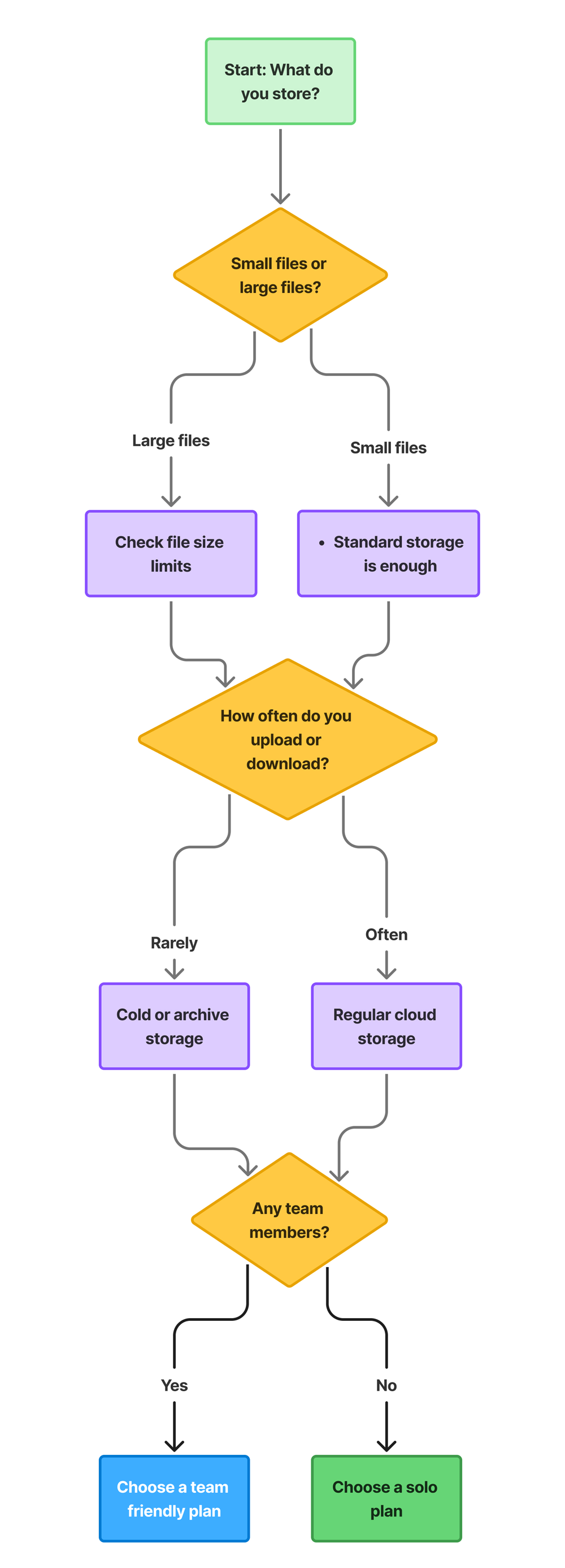
    Before comparing prices in search for the most affordable cloud storage, it helps to understand your own behaviour. This one step saves you from picking the wrong plan and getting forced into upgrades later. Your needs fall into a simple pattern based on how often you upload files, how many people access them and how fast your storage grows. Use this quick flow to understand where you stand.

    cheapest cloud storage

    Hidden Fees That Can Inflate Your Bill

    Most people choose the Cheapest Cloud Storage based on the upfront price, but the real shock comes later when the hidden charges start showing up. Some services quietly bill you for extra downloads, shared links that get too much traffic, faster sync speeds, or even basic collaboration features. These are never highlighted during sign-up, which is why so many users think they got a great deal until the first “unexpected activity charge” lands in their inbox.

    The trick is simple. Every platform makes money from what you do most. If you frequently download files, expect usage fees. If your clients open shared links often, expect traffic charges. If your storage grows quickly, expect auto-upgrades. What looked like inexpensive cloud storage becomes a layered, unpredictable cost. Understanding these hidden fees early means you can choose the services that are transparent and won’t surprise you later.

    Cheapest Cloud Storage Services in 2026

    1. Google Drive / Google One

    Perfect for anyone already using Gmail, Docs, and Photos. Simple, familiar, and smooth for everyday storage and sharing without any learning curve. Around $1.99/month for 100 GB and $9.99/month for 2 TB.

    Pros:

    • Very easy to use and integrate into daily work
    • Great for sharing and collaborating through Docs/Sheets
    • Decent free 15 GB starter space

    Cons:

    • Storage is shared with Gmail and Photos, so it fills faster
    • Not privacy-focused
    • Not ideal for very large media files long-term

    2. Microsoft OneDrive

    Best value for anyone using Word, Excel, Outlook or Windows. Storage feels “built-in” and works flawlessly across devices. Microsoft 365 Family gives 1 TB per person (up to 6 users) for a single monthly fee.

    Pros:

    • Excellent value if you already rely on Microsoft tools
    • Smooth sync on Windows and across devices
    • Reliable for teams using Office apps regularly

    Cons:

    • Storage tied to user accounts, not generic buckets
    • Less attractive if you don’t use Office apps
    • Collaboration is Office-heavy compared to Google

    3. Dropbox

    Known for rock-solid syncing and sharing. Great for creative teams, media-heavy work and constant file exchanges. Around $9.99/month for 2 TB on individual plans. Team plans start higher.

    Pros:

    • Best-in-class sync reliability
    • Excellent for daily sharing and teamwork
    • Strong integrations with third-party tools

    Cons:

    • Typically more expensive per TB
    • Business plans require multiple users
    • Not ideal for pure long-term backup

    4. pCloud

    Ideal for people who want to avoid monthly fees. Lifetime plans make pCloud one of the most cost-effective long-term options. Roughly $4.99/month for 500 GB or $9.99/month for 2 TB. Lifetime plans available.

    Pros:

    • Huge savings with a lifetime one-time payment
    • Optional client-side encryption
    • Great cross-platform support

    Cons:

    • Lifetime plans require a high upfront cost
    • Less mainstream brand recognition
    • Collaboration tools are basic

    5. IDrive

    Fantastic for backing up multiple devices, servers or NAS systems in one account. Designed more for backup than daily collaboration. Around $69–$79 per year for 5 TB (first-year discounts common).

    Pros:

    • Very strong backup features
    • Great value for multi-device protection
    • Large storage options at a low cost

    Cons:

    • Old-school interface
    • Not ideal for day-to-day team sharing
    • Better for backup than everyday file access

    6. Sync.com

    A privacy-first cloud storage option with end-to-end encryption. Great for sensitive documents and compliance-heavy industries. Team plans start around $6/user/month for 1 TB per user (annual billing).

    Pros:

    • Strong encryption and zero-knowledge privacy
    • Good sharing controls and version history
    • Affordable for secure cloud storage

    Cons:

    • Annual billing required for best rates
    • Fewer integrations than Google or Dropbox
    • Less known outside privacy-focused users

    7. Backblaze B2

    Super-cheap bulk storage for backups and archives. Ideal when you store a lot and don’t need fancy collaboration features. About $6 per TB per month for raw storage.

    Pros:

    • Cheapest per-TB pricing in the market
    • Great for large archives and long-term data
    • Simple predictable pricing

    Cons:

    • Not beginner-friendly
    • No “drive-like” interface
    • Not suitable for daily file collaboration or sharing
    • Comparison Snapshot: Pricing, Limits, and Key Features

    Disclaimer:

    Prices may change. Please check the official websites of the above-mentioned service providers for the latest rates. Infogion is not responsible for any pricing updates or variations.

    When to Choose Archive Storage Over Regular Storage

    Archive storage makes sense when you have files that are important but rarely used. Old client deliveries, project folders you are done with, raw footage, past-year financials or bulky media dumps do not belong in your everyday workspace. Keeping these inside regular plans is wasteful when inexpensive cloud storage options exist specifically for long-term parking.

    It also helps you control costs more effectively. Regular storage charges you for convenience, speed, and frequent access. Archive storage removes those premiums and gives you far lower pricing for the same data. If you access these files only a few times a year, choosing the cheapest cloud storage tier designed for archival use can cut your costs dramatically.

    Archive storage is also the best choice when your priority is simply retention. Compliance documents, contracts, backups, audit files, and old creative assets can live safely in an archive tier without slowing down your main storage. This keeps your active workspace clean and efficient while your historical data stays protected at a fraction of the cost.

    Also Read: infogion’s Guidelines on using AI for Startups

    How to Avoid Vendor Lock-In

    Vendor lock-in usually happens when all your files, sharing habits, and workflows get tied so tightly to one provider that moving out feels painful. The goal is to keep your data portable so you can switch to the cheapest cloud storage or any other service whenever you need, without chaos.

    • Keep your files in standard formats like PDF, MP4, CSV, JPG
    • Avoid features that only work inside one provider’s ecosystem
    • Maintain a periodic export or backup of all critical folders
    • Use third-party sync tools instead of provider-only utilities
    • Keep team workflows flexible instead of being tied to one platform’s automation
    • Review your storage size every quarter, so migration never becomes overwhelming

    Practical Tips to Keep Your Storage Bill Low

    Start by cleaning your storage every month. Delete duplicates, old drafts and files you know you will never touch again. Most people pay for extra space simply because they never organise their folders. A quick 10-minute cleanup can delay an upgrade for months.

    Next, push non-essential files into archive tiers or cheaper buckets. Regular storage is for active work, not for forgotten backups or last year’s client videos. Moving the dead weight out of your main drive is the simplest DIY trick to stay within the inexpensive cloud storage plans.

    Keep an eye on sharing habits. Large shared folders, auto-sync from every device and random uploads from apps quietly eat space. 

    Turn off anything you do not use, limit auto-backups to essentials and review your shared links once in a while. Small fixes make a big difference.

    Final Recommendation Framework (Choose in 30 Seconds)

    No overthinking. No spreadsheets. Just pick what matches your style and move on.

    • If you want the cheapest cloud storage with zero learning curve → choose Google Drive.
    • If your entire workflow runs on Word, Excel or Outlook → choose OneDrive.
    • If you need rock-solid syncing and constant file sharing → choose Dropbox.
    • If you want long-term savings with one upfront payment → choose pCloud.
    • If your goal is pure backup across many devices → choose IDrive.
    • If privacy and encryption matter more than anything → choose Sync.com.
    • If you need bulk storage for huge archives → choose Backblaze B2.

    Done. Pick the one that matches your behaviour and forget the rest.

    Conclusion

    Cloud storage is only expensive when you choose it blindly. Once you understand your habits and match them with the right plan, finding the cheapest cloud storage becomes simple. Keep your active files in regular storage, move old stuff to archive tiers, avoid hidden upgrades and pick a service that fits the way you work. Do that, and your storage stays affordable, predictable and quietly efficient in the background while you focus on running your business.

  • AI-powered CRM will bring the depraved leaders back on track in 2026.

    AI-powered CRM will bring the depraved leaders back on track in 2026.

    Before we start talking about AI-powered CRM, let’s take to flashback.

    The last few years were not kind to the CRM giants. Everyone pretended things were fine, but the numbers told a very different story. The industry was slowing down, customers were restless, and the old promise of “digital transformation through CRM” was getting stale.

    Take SAP. Revenue went up, but profits collapsed; net income dropped by 68% in 2022. When a company starts cutting thousands of jobs and slimming down its CRM and CX units, it’s not a strategic refinement. It’s a sign that the machine wasn’t running smoothly.

    Salesforce, the poster child of cloud CRM, also hit a dull patch. The company that once grew like a rocket suddenly slipped into its slowest growth era. A few quarters of weak revenue forecasts and nervous investors made it clear: the momentum was gone.

    Even Oracle felt the drag. Their cloud growth dipped from the 30% range to the mid-20s, and analysts openly called the results “disappointing.” And if the giants felt it, the market felt it too; CRM cloud growth slid from 11.7% in 2022 to 10.8% in 2023.

    Flashback done.

    Now the stage is set for the comeback story.

    Why AI Matters in CRM

    A traditional CRM can only record what your team types into it. It stores activities, logs emails, and displays the pipeline, but it cannot interpret intent or guide decisions. This is why so many companies are shifting to an AI-powered CRM model. In a market where customers move fast and signals are scattered across channels, the old CRM approach simply cannot keep up.

    What AI actually fixes

    • Detects warm leads by analysing behaviour and micro signals
    • Scores opportunities with higher accuracy and reduces wasted effort
    • Automates follow-ups, email drafts, and repetitive sales admin
    • Predicts deal timelines instead of letting teams guess every quarter
    • Routes support tickets intelligently to cut response time
    • Keeps CRM data clean without manual cleaning or updates
    • Surfaces insights that sales teams would never notice on their own

    This is the real shift. An AI-powered CRM does not wait for humans to update it. It works alongside them, guides actions, highlights who to talk to, and removes the noise that slows teams down. It transforms CRM from a storage tool into a decision engine. This is the upgrade the industry needed much earlier.

    ai-powered crm

    Top AI-powered CRM Platforms

    Zoho CRM
    Zoho uses Zia as its built-in intelligence layer. Zia predicts deal success, spots unusual activity in the pipeline, and reads email sentiment to understand buyer mood. For users, this means faster qualification, fewer dead leads, and a clearer idea of which deals deserve attention first. In an AI-powered CRM setup, Zia acts like a small analytical assistant that constantly nudges teams toward the right action.

    HubSpot CRM
    HubSpot’s intelligence comes through HubSpot AI. It offers predictive scoring, automated content suggestions, and smart routing that adjusts to real-time behaviour. For users, this translates into better-timed outreach, cleaner segmentation, and less manual effort in deciding who to contact. The CRM becomes more proactive by telling teams which leads are warming up and what message fits the moment.

    Pipedrive
    Pipedrive uses the AI Sales Assistant to review deal health, calculate win probability, and flag stalled opportunities. It benefits users by cutting guesswork and helping them focus on deals with real potential. Instead of scanning the entire pipeline, reps get simple cues about what to close, what to follow up, and what to drop.

    Freshsales
    Freshsales brings intelligence through Freddy AI. Freddy scores leads, forecasts revenue, and generates quick replies across channels. Users benefit from faster responses and better prioritisation, especially when managing a growing lead pool. It fits naturally into an AI-powered CRM flow, guiding teams toward the leads most likely to convert.

    Salesforce Sales Cloud
    Salesforce integrates Einstein and its conversational assistant Copilot to analyse pipeline health, automate data entry, and forecast revenue. For users, this means fewer manual updates and more reliable predictions about the quarter. The system highlights next steps, suggests actions, and surfaces insights teams would normally miss until it is too late.

    Oracle CX
    Oracle adds intelligence through its Adaptive Intelligent Apps. These tools score opportunities, interpret buying signals, and recommend the next step for complex enterprise deals. Users benefit from sharper qualification and better visibility into which accounts are actually interested instead of just polite. It is built for long sales cycles where small signals make a big difference.

    SAP Sales Cloud
    SAP uses AI-enabled Sales Intelligence to improve forecasting, strengthen account insights, and prompt users with recommended actions. It benefits teams that handle structured enterprise sales by keeping them ahead of delays and identifying priority accounts early. SAP’s AI helps reduce surprises in long pipelines and gives managers a clearer view of what is truly moving.

    Read On: How Conversational AI Assistants can help building business relationships

    Comparison of AI-Powered CRM – Key Features

    CRM PlatformPredictive Lead ScoringDeal / Win ProbabilityEmail & Content IntelligenceAutomated Follow-up & WorkflowForecasting & Pipeline Insights
    Zoho CRM (Zia)YesYesSentiment analysis + suggestionsYesYes
    HubSpot CRM (HubSpot AI)YesPartial (engagement-based)Strong content generationYesYes
    Pipedrive (AI Sales Assistant)YesStrong win probability scoringBasic suggestionsYesDeal progress alerts
    Freshsales (Freddy AI)YesYesAuto replies + intent signalsYesRevenue forecasting
    Salesforce Sales Cloud (Einstein)YesAdvancedStrong NL insights & recommendationsYesAdvanced predictive forecasting
    Oracle CX (AI Apps)YesYesAccount intelligenceSuggested next actionsPipeline risk alerts
    SAP Sales Cloud (AI Sales Intelligence)YesYesAccount insights (less content)Recommended actionsForecast health indicators

    How to Choose the Right AI-Powered CRM

    Choosing an AI-powered CRM is less about brand names and more about how well the system fits the rhythm of your daily work. The right tool should cut noise, guide actions, and make every sales or support task lighter. If the CRM feels like a burden today, the AI layer will not magically fix it tomorrow.

    What you should check

    • Match the CRM to your team size so you do not pay for features that sit unused.
    • Confirm the AI layer can learn from your current data instead of depending on heavy manual updates.
    • Ensure it integrates with your core tools like email, WhatsApp, calendars, landing pages, and support systems.
    • Look for a clean interface because complicated CRMs always end up ignored by busy teams.
    • Check how quickly the AI can surface the next best action, not just display information.
    • See if the CRM can auto-fill activities, so reps stop wasting time on data entry.
    • Test the quality of predictions such as lead score, deal probability, and churn alerts.
    • Make sure the CRM can personalise outreach without sounding mechanical
    • Verify mobile usability because many teams work on the go
    • Look at automation depth for follow-ups, handovers, and reminders
    • Ensure the system can scale as your lead volume increases
    • Confirm reporting quality so managers get clear insights without exporting sheets
    • Check whether onboarding is simple because complex rollouts usually fail
    • Evaluate cost vs. adoption because expensive tools are useless if the team avoids them
    • Review how often the vendor updates AI features, so you do not get stuck with outdated intelligence

    A good AI-powered CRM should guide you toward the right leads, auto-update the boring parts, and give you confidence in your pipeline. When the CRM starts helping instead of demanding, that is when you know you have chosen the right one.

    Conclusion

    The CRM market needed a reset. The last few years showed us what happens when systems grow, but intelligence does not. Deals slow down, teams feel the drag, and companies start questioning the value of their tools. An AI-powered CRM changes that rhythm completely. It removes clutter, reads intent, automates the boring parts, and brings clarity back into the pipeline.

    This new wave of intelligence is not optional anymore. It is the difference between a team that reacts and a team that leads. With AI taking over the heavy lifting, CRM finally becomes the partner it was always supposed to be. And 2026 is shaping up to be the year where this shift becomes visible in performance, revenue and customer experience. This is not just an upgrade. It is the comeback story the entire CRM world needed.

  • Conversational AI Assistants Aren’t Chatbots. They’re Breakthrough Relationships Built on Understanding

    Conversational AI Assistants Aren’t Chatbots. They’re Breakthrough Relationships Built on Understanding

    “You don’t have to explain it again,” the conversational AI assistant replied.

    “It’s already in your plan from yesterday.”

    A simple line, but it makes people instantly realize that they’re not talking to a chatbot. They’re interacting with something that remembers, adapts, and understands.

    Most businesses still measure conversational AI by how well it talks. Smooth replies, natural phrasing, fewer errors: all these are important, but none of them create trust. 

    What actually builds trust is continuity. When an assistant connects today’s conversation with yesterday’s intent, it stops being a tool and starts becoming a relationship.

    That’s the shift here we explore: conversational AI assistants aren’t chatbots.

    They’re relationships built on understanding.

    Conversations Are Momentary. Relationships Are Continuous.

    Most teams still celebrate when their AI gives a clean, polished reply. It looks impressive in a demo. It feels modern. But here’s the practical truth:

    A single good conversation does not MEAN ANYTHING, literally.

    Anyone can string together a few neat lines. Humans can do it. Machines can do it. Even that friend who replies after three days can do it.

    A chatbot that gives perfect answers in the moment is like that colleague who talks politely in meetings and forgets everything the next morning. A chatbot handles the moment. A relationship-based conversational AI assistant handles the pattern.

    Users return to assistants that understand context, not assistants that speak perfectly. If it forgets preferences, repeats questions, or behaves like each session is the first, the experience becomes shallow very quickly. No amount of clever language can hide that.

    A good conversational AI assistant feels steady.

    It learns your rhythm, adjusts when you are rushed, and brings forward what you already settled earlier. It does not need to be dramatic or overly “smart.” It simply needs to show that it is paying attention.

    That continuity is what builds trust.

    It is also what makes an assistant feel genuinely helpful, rather than just chatty.

    Chatbots focus on the reply.

    Conversational AI assistants focus on the relationship.

    And honestly, if an AI keeps forgetting basic context, it does not matter how polished its wording is. It still comes across as a system that talks a lot but understands very little.

    The Human Blueprint for Trust

    When people trust someone, it’s never because of one impressive moment. It comes from small behaviours that repeat consistently over time. A conversational AI assistant earns trust the same way. Users don’t care about the technical depth behind the screen. They care about whether the assistant behaves like something that listens, remembers, and doesn’t make them repeat the work. The more human the signals feel, the more natural it is for users to rely on them.

    Here’s what that looks like in practice:

    • Being steady and predictable so the user doesn’t wonder what version of the assistant they’re getting today.
    • Remembering past interactions or preferences so the user isn’t stuck repeating simple information.
    • Picking up on cues like frustration, urgency, or confusion and adjusting the tone accordingly.
    • Following through on tasks without dropping steps or asking for the same input again.
    • Learning gradually from each interaction, so the experience becomes smoother over time.

    These behaviours are small on their own, but together they create a sense of dependability. Trust forms not in the conversation itself but in the continuity that follows. That’s what separates a tool from a relationship.

    Designing for Understanding, Not Conversation

    Most teams still chase “better chat” as if a conversational AI assistant needs to win a poetry contest. Nice wording looks great in a boardroom demo, but out in the wild, users don’t care. They just want the thing to get them. That’s it. If the assistant can’t understand intent or remember basic context, all that polished language might as well be lipstick on a clueless robot.

    Understanding is the real superpower. If the user already explained something, don’t make them repeat it like some punishment. If they’re clearly rushed, drop the essays. If they correct you, don’t mess it up again tomorrow. And if they’re annoyed, maybe don’t respond like a corporate email template.

    Conversation is cheap. Understanding is hard. But that’s what makes a conversational AI assistant feel alive in the right way, not human, but genuinely useful. The moment it starts anticipating, adjusting, and acting with context, the whole experience shifts from “chatting with a system” to “working with something that actually pays attention.”

    The Invisible Metrics of Relationship-based Conversational AI Assistant

    Traditional chatbot metrics look clean on a slide, but they miss the whole point. A conversational AI assistant isn’t judged by how fast it replies or how perfectly it forms a sentence. It’s judged by whether users come back, whether they forgive small mistakes, and whether the experience feels steady instead of mechanical. These signals are subtle, emotional, and often ignored, yet they’re the real indicators of whether an assistant is building a relationship instead of just running a script.

    What You MeasureWhat It Really ShowsWhy It Matters
    Re-engagement rateUsers return on their ownTrust is forming
    Forgiveness rateUsers continue after errorsEmotional comfort exists
    Continuity scorePast context is rememberedExperience feels stable
    Tone matchReplies fit the user’s moodInteraction feels natural
    Drop-off reasonsWhy users leavePinpoints trust gaps

    When Conversational AI Assistants Start Earning Loyalty

    Loyalty shows up the moment a conversational AI assistant stops behaving like a chatbot and starts behaving like something that actually remembers you. Users don’t celebrate perfect sentences. They notice when the assistant picks up yesterday’s thread without making them repeat the basics. That small continuity feels surprisingly powerful.

    conversational AI assistant

    Over time, the small behaviours add up. 

    The conversational AI assistant answers faster when you’re in a rush, stays calm when you’re irritated, and keeps track of decisions you’ve already made. Nothing flashy. Nothing dramatic. Just a steady, reliable presence. That’s the stuff people trust.

    And once that trust sets in, loyalty follows quietly. The conversational AI assistant becomes part of the user’s routine, not a tool they “try out.” It earns its place by paying attention, not by talking a lot.

    Read On: How AI will shape financial analysis in 2026

    Conclusion

    The real shift in conversational AI assistants isn’t louder, smarter, or more natural chat. It’s the move toward assistants that actually understand people. Not perfectly. Not magically. Just well enough to remember what matters, adapt when needed, and stay consistent over time. That’s what makes an assistant feel reliable instead of replaceable.

    In the end, users don’t form loyalty around conversation. They form it around continuity. When an assistant reduces friction, carries context forward, and behaves like it’s paying attention, the relationship feels real in a practical, grounded way. And that’s the goal. Not chatter. Not clever lines. Understanding.

    A chatbot talks.

    A relationship grows.

  • AI for Financial Analysis in 2026: 10 Breakthrough Ways Finance Leaders Can Use

    AI for Financial Analysis in 2026: 10 Breakthrough Ways Finance Leaders Can Use

    AI for financial analysis is no longer an experiment. Finance teams in various industries use it to find insights, speed up closing cycles, and cut down on manual work. The challenge isn’t accuracy anymore; it’s keeping up with the speed and volume of financial data that floods in every day.

    By 2026, AI will have become a mainstream part of financial operations. From predicting cash flow to summarizing reports, it helps analysts focus on strategy instead of spreadsheets. Traditional tools are useful, but they can’t match the speed and realtime intelligence that AI offers for decision-making.

    This post outlines ten practical ways to apply AI in financial analysis. These specific and proven ideas are ready for finance leaders to explore, test, or put into action in 2026.

    Predictive Cash Flow Forecasting

    Month-end firefighting is not a plan. You want to see liquidity risk early, test “what if” quickly, and walk into reviews with numbers you trust. AI for financial analysis system does that by pulling AR, AP, order book, payroll, and bank feeds into a single model that updates as transactions land. The goal is simple: fewer surprises, tighter working capital, and faster calls on borrowings or investments.

    Use

    • Aggregate AR/AP, bank statements, order pipeline, and seasonality drivers in one store.
    • Start with proven models LSTM, Prophet, or pretrained Chronos for quick baselines.
    • Add drivers like pricing changes, promo calendars, FX, and collections behaviour.
    • Backtest on 12–24 months, track MAPE and P90/P50/P10 intervals, and set alert thresholds.
    • Keep an analyst override log and change notes so Finance owns the forecast, not the model.

    Tools

    Business impact

    • Early visibility into shortfalls so treasury can act days or weeks sooner.
    • Lower idle cash buffers while staying safe, which frees capital for growth.
    • Fewer fire drills at close since forecasts refresh as transactions post.
    • Clear audit trail of overrides and assumptions, which builds trust in reviews.

    Automated Variance & Anomaly Detection using AI for financial analysis

    Finance teams often waste hours looking for numbers that aren’t right. They check for mismatched entries, sudden spikes, or unexplained drops. By the time the issue surfaces, it’s already in the month-end report. AI for financial analysis flips that routine. It continuously scans ledgers, journals, and sub-systems to catch irregularities the moment they occur. Instead of chasing errors after they’re published, analysts can focus on explaining and correcting them early.

    Use

    • Connect your ERP, bank, and expense data into a unified view.
    • Apply unsupervised learning models (Isolation Forest, Autoencoder) to flag deviations in transactions or cost centres.
    • Layer rules for context such as vendor limits, regional expense norms, or historical variance bands.
    • Review flagged anomalies through an analyst dashboard, allowing human validation before escalation.

    Tools

    • MindBridge Ai Auditor: Uses machine learning and control logic to find anomalies across ledgers and journals before audit season.
    • Alteryx Auto Insights: Turns variance data into plain-language summaries for finance teams.
    • DataRobot Time Series: Builds anomaly and trend models with automated feature engineering.
    • Anodot: Real-time anomaly detection for revenue, cost, and operational data streams.
    • Tableau Pulse: Integrates with BI dashboards to highlight unusual metrics automatically.

    Business impact

    • Detects potential fraud, duplicate payments, and manual-entry errors in near real time.
    • Saves hundreds of analyst hours each quarter by replacing manual reconciliation checks.
    • Builds an audit trail of exceptions and corrective actions, improving governance.
    • Reduces surprise variances during close and increases trust in financial data.

    Read on: AI Compliance Becomes a Profit Center in 2026

    Natural-Language Financial Reporting

    AI for financial analysis isn’t only about crunching numbers; it’s also about communicating them clearly. Analysts spend countless hours turning tables and charts into readable commentary for management, investors, and auditors. Natural-language financial reporting uses AI to bridge that gap. It translates raw metrics into easy-to-understand insights, adding context, tone, and even recommendations, all within seconds.

    Use

    • Train large language models (LLMs) on internal data to generate monthly summaries, variance notes, and board-ready commentary.
    • Connect the model with BI tools or your data warehouse so it pulls metrics directly, reducing manual copy-paste.
    • Standardise tone, compliance guidelines, and KPI definitions to maintain consistency.
    • Review and approve generated text to ensure accuracy and alignment with company messaging.

    Tools

    • Microsoft Copilot for Finance: Drafts summaries and commentary from Excel or ERP data right inside Microsoft 365.
    • Narrative Science (Tableau integration): Adds AI-generated explanations to charts and dashboards.
    • Jasper Business: Produces branded, data-driven narratives for reports and presentations.
    • ChatGPT Enterprise: Custom LLMs for internal financial reporting and scenario explanation.
    • Hypotenuse AI: Generates consistent, multi-format narratives for management and investor reports.

    Business benefit

    • Saves hours per reporting cycle by automating commentary and insight summaries.
    • Ensures consistency and clarity across all financial communication.
    • Makes dashboards understandable for non-finance executives.
    • Helps finance teams tell the story behind numbers.
    AI for Financial Analysis

    Scenario Planning & What-If Modelling

    Planning has always been about assumptions, but most teams struggle to test more than a few at a time. Analysts often rebuild complex sheets for every new variable, wasting hours on formulas. With AI for financial analysis, scenario planning becomes fluid. You can model pricing changes, cost hikes, or currency swings in seconds and see their immediate impact on revenue, margins, and cash flow.

    Use

    • Combine forecasting models with core business drivers such as sales volume, margins, or cost of capital.
    • Use generative AI to model best case, base case, and stress case scenarios in seconds.
    • Integrate results into FP&A dashboards so assumptions remain clear and traceable.

    Tools

    • Pigment: Planning platform that uses AI to simulate multiple financial outcomes in real time.
    • Anaplan PlanIQ: Predictive modelling add-on for enterprise planning workflows.
    • Palantir Foundry: Merges operational and financial data for scenario testing at scale.
    • IBM Planning Analytics with Watson: Adds predictive capabilities to budgeting and forecasting models.

    Business benefit

    • Enables faster and more confident decision-making.
    • Cuts down on repetitive spreadsheet modelling.
    • Improves visibility into the financial impact of changing business conditions.

    Expense Categorization & Reconciliation Automation

    Manual expense tagging and reconciliation drain time and patience. Analysts often spend hours tracing mismatched invoices, vendor codes, or duplicate entries across systems. When AI for financial analysis steps in, this tedious work becomes near-instant. It reads invoices, matches payments, and flags irregularities before the month closes.

    Use

    • Apply natural language processing (NLP) and optical character recognition (OCR) to extract data from invoices and receipts.
    • Match transactions automatically against ledger entries and approval workflows.
    • Train the model on historical expense data to improve accuracy and category mapping.

    Tools 

    • Rossum: AI document gateway that captures and validates invoice data from any source.
    • Vic.ai: Automates accounting and expense categorization with self-learning algorithms.
    • AppZen: Real-time audit and spend compliance platform for finance teams.
    • Expensify: Automates expense reporting with integrated AI receipt scanning.
    • Kofax AP Essentials: Cloud-based invoice automation for accounts payable.

    Business benefit

    • Reduces manual reconciliation effort and human error.
    • Speeds up month-end close by automating repetitive checks.
    • Improves spend visibility and compliance tracking.
    • Frees analysts to focus on exception handling and insight generation.

    AI-Driven Investment and Portfolio Insights

    Investment analysis combines skill and instinct. By 2026, that instinct will rely more on machine intelligence than manual spreadsheets. Analysts will handle growing volumes of market data, filings, and news that no human team can fully process alone. With AI for financial analysis integrated into their workflows, portfolio reviews will become sharper and faster. The system will detect correlations, interpret sentiment, and test allocation scenarios under shifting market conditions giving analysts a level of foresight that once came only with experience.

    Use

    • Combine structured data (market prices, fundamentals) with unstructured inputs like news and sentiment.
    • Apply reinforcement learning or predictive models to test portfolio allocations and rebalance strategies dynamically.
    • Integrate AI dashboards into portfolio management systems for real-time monitoring.

    Tools

    • Kensho Analytics: AI AI for financial analysis suite for market trends, macro signals, and portfolio risk.
    • QuantConnect: Cloud-based algorithmic trading platform with backtesting and data feeds.
    • Kavout: AI AI for financial analysis engine that ranks stocks using predictive analytics and factor modelling.
    • Alphasense: Uses NLP to surface insights from financial documents and earnings calls.
    • Sentifi: Real-time market intelligence from millions of news and social media sources.

    Business benefit

    • Delivers faster, more accurate investment insights with continuous model learning.
    • Helps analysts uncover hidden correlations and early risk signals.
    • Improves portfolio performance through proactive rebalancing and predictive risk control.
    • Reduces manual data mining and allows teams to focus on high-value investment decisions.

    Dynamic Risk Scoring for Credit & Accounts Receivable

    Credit and collections are often reactive. Finance teams realise a customer is risky only after payments start slipping. By 2026, that will change. With AI for financial analysis embedded in credit and AR workflows, risk scoring becomes proactive. The system learns from payment behaviour, transaction history, and even market signals to flag customers likely to default before they do.

    Use

    • Combine internal data such as payment patterns, invoice ageing, and dispute history with external inputs like credit bureau data or sector indices.
    • Train classification and regression models to assign risk scores dynamically as new data arrives.
    • Set automated triggers for follow-up, credit limit adjustments, or escalation based on predicted risk levels.

    Tools

    • Zest AI: Uses explainable machine learning for real-time credit risk scoring.
    • Taktile: Decision automation platform that lets analysts design and test credit policies with live data.
    • SAS Risk Engine: Predictive analytics suite for financial institutions managing loan and AR portfolios.
    • FICO Platform: Advanced analytics for credit decisioning and risk mitigation.
    • Credit Benchmark: Aggregates consensus credit risk data from leading financial institutions.

    Business benefit

    • Identifies at-risk customers weeks before default, improving collection efficiency.
    • Optimises working capital by aligning credit limits with real-time behaviour.
    • Reduces bad-debt exposure and enhances confidence in AR forecasts.
    • Supports compliance and audit through transparent, explainable risk models.

    Voice-Based Financial Query Assistants

    Finance systems store massive volumes of data, but most users can’t reach what they need without multiple steps. Analysts still export reports, filter columns, or depend on the BI team for answers. By 2026, this gap will narrow. With AI for financial analysis built into dashboards, voice-based query assistants will let users ask plain questions like “What was our Q3 margin by region?” and get instant, contextual replies within secondsF

    Use

    • Integrate natural language interfaces with existing BI tools and ERP systems.
    • Use voice or chat-based prompts to fetch live metrics, comparisons, or summaries.
    • Enable personalised responses by linking access controls and user roles.

    Tools

    • ThoughtSpot Sage: Conversational BI assistant that answers natural-language queries on enterprise data.
    • ChatGPT for Power BI: Adds conversational data exploration inside Power BI dashboards.
    • Tableau Pulse: Provides contextual insights and smart summaries directly in Tableau workbooks.
    • Zoho Analytics Ask Zia: Voice-enabled AI assistant that retrieves insights from datasets.

    Business benefit

    • Speeds up access to financial data without dependency on technical teams.
    • Makes dashboards interactive and intuitive for all business users.
    • Reduces report-generation workload and improves data-driven responsiveness.
    • Strengthens decision-making with real-time conversational insights.

    AI for Compliance & Continuous Audit

    Compliance checks and audits often feel like afterthoughts. They usually occur after the numbers are finalized. By 2026, that rhythm will shift. With AI for financial analysis built into accounting and ERP systems, compliance becomes a live process. Every transaction is checked against policy, regulatory rules, and approval logic as it happens, not months later.

    Use

    • Deploy NLP models to read and interpret regulation text, linking it to transaction patterns.
    • Map financial policies into rule-based engines that flag exceptions in real time.
    • Use AI-driven reconciliation to trace every entry back to its source document for audit readiness.

    Tools

    • Hyperproof: Automates evidence collection and compliance tracking with AI assistance.
    • Smarsh: Monitors and archives communication data for financial compliance.
    • Ayfie Inspector: Uses NLP to identify non-compliant content across documents.
    • Caseware IDEA: Supports continuous auditing and fraud detection with automated analytics.

    Generative AI for Financial Communication

    Most analysts spend far too much time turning spreadsheets into plain English. Drafting board notes, investor briefs, or policy summaries eats into the hours meant for actual analysis. In the coming months, this will change. Generative AI can now produce readable first drafts directly from structured data, helping teams communicate faster and more consistently.

    Use

    • Link your reporting data or Excel exports to a text-generation tool through APIs or low-code connectors.
    • Create prompt templates for recurring outputs such as board updates or budget summaries.
    • Always keep a review step; the human analyst validates tone, accuracy, and key messaging.

    Tools

    • Notion AI: Helps create narrative summaries within internal knowledge bases.
    • Copy.ai: Drafts business updates and presentation text from structured prompts.
    • TextCortex: Browser-based assistant that rewrites or expands financial paragraphs quickly.
    • Cohere Generate: Developer-friendly API for custom text generation at scale.
    • Local Llama 3 models: Run open-source LLMs on-premise for sensitive financial data.

    Business benefit

    • Cuts report-writing time and reduces dependency on communication teams.
    • Keeps messaging consistent across management decks and investor notes.
    • Reduces cost of paid enterprise tools by using lighter, flexible alternatives.
    • Frees analysts to focus on analysis instead of formatting and phrasing.

    Editor’s Choice:

    And here’s my personal pick….

    ToolBest ForWhy It Stands Out
    Vertex AI ForecastingCash flow predictionScalable model deployment and direct data integration.
    MindBridge Ai AuditorAnomaly detectionDetects irregularities and fraud risk before audits.
    Microsoft Copilot for FinanceFinancial reportingReduces manual reporting time inside Excel and ERP.
    PigmentScenario modellingSimplifies planning through real-time collaborative simulations.
    Vic.aiExpense automationLearns from past data to automate invoice categorisation.
    Kensho AnalyticsPortfolio insightsAnalyzes market and macro trends for smarter investment calls.
    Zest AICredit risk scoringTransparent, explainable risk models for credit decisions.
    ChatGPT EnterpriseFinancial reporting automationCreates secure, compliant financial summaries and narratives.
    HyperproofContinuous auditMaintains real-time compliance evidence and audit trails.
    Notion AICommunication draftsProduces readable summaries and internal financial updates.
  • AI Compliance Becomes a Profit Center in 2026: Turning Regulation into Competitive Advantage

    AI Compliance Becomes a Profit Center in 2026: Turning Regulation into Competitive Advantage

    AI compliance? WTF! Well, that’s the reaction you get when you ask eight out of ten CIOs. Most CIOs don’t know, and the few who pretend usually have a deck, not a plan. (Apologies to the CIO community, but someone had to say it.)

    Everyone is busy chasing “AI transformation.” But there’s one question that matters: can your AI explain without causing you embarrassment? We have reached a point where companies brag about “responsible AI,” yet can’t trace a single decision.

    The truth is simple. Compliance is the part of AI no one wants to talk about until it bites them. It’s boring, it’s bureaucratic, and it’s brutally revealing. In 2026, when regulators tighten rules and customers seek proof, the same boring stuff will differentiate the lasting brands from those that are just trends.

    Because soon, “trust” won’t be a tagline. It’ll be a metric.

    The Great “Responsible AI” Lie

    Let’s be honest. “Responsible AI” has become the new corporate yoga. Everyone talks about doing it, but very few actually practice it. Every other company now has an ethics charter, a fairness slide, and a two-hour workshop with a consultant who once read the EU AI Act. Next, it’s back to business as usual.

    The problem is not that people do not care about ethics. It is that most organizations treat responsibility as optics. It is something to announce in a press release, not bake into a pipeline. You see words like transparency, explainability, and accountability on banners. But when you ask for the bias audit report or model documentation, there is nothing but silence. Sometimes worse, a file named AI_Strategy_Final_v17_NEW(1).pptx.

    The loudest voices about “ethical AI” are often the ones flying blind. They fail to log how their models evolve. They have no rules for protecting sensitive data. Plus, they don’t realize that half of their training data goes against their own privacy policy.

    In short, responsible AI today is like a gym membership. Everyone claims to have one, but most of them never show up.

    You’re About to Face a Compliance Reality Check

    The AI honeymoon is ending. For years, companies dodged accountability. They used half-baked chatbots, data-hungry recommendation engines, and confusing predictive tools that no one outside the tech team could fully explain. That window is closing fast.

    Regulators have started paying attention, and this time they are not asking for vision decks. The EU AI Act, India’s DPDP Act, and a wave of regional privacy frameworks are moving from discussion tables to audit checklists. Procurement teams are asking vendors for proof of AI compliance. They want bias testing reports and clear data handling policies, too.

    The next wave of questions will not come from lawyers. They will come from customers and investors. Someone will ask, “How did your AI make that decision?” and silence will no longer be an acceptable answer. Every enterprise that considers compliance a paperwork chore will have to start treating it as an operational pillar.

    2026 will be the year of accountability in terms of AI compliance. The ones that can prove transparency will grow faster because trust will have a real market value. The rest will learn what happens when the hype fades and the invoices arrive.

    From Panic to Process: Building a Real AI Discipline

    The truth is, most companies start with panic. The first AI compliance request shows up, and everyone scrambles to find where the data came from, who approved it, and what the model actually does. The surprise isn’t that chaos exists. It keeps repeating because nobody turns the panic into a process.

    Building discipline around AI does not mean hiring another consultant or adding another slide to the governance deck. It means setting up habits that make compliance a natural part of building, not a reaction when trouble arrives.

    Here is what that discipline looks like:

    • A culture that documents as it builds. Every model, dataset, and prompt has a record of who created it, where it came from, and who signed off.
    • Clear lines of responsibility exist. There is always a name attached to every system, not a department. Accountability stops being abstract.
    • Regular reviews that aren’t for show. AI Compliance checks happen before launches, not after headlines. Teams walk through what could go wrong, not what went right.
    • Design with transparency in mind. The best AI setups can explain themselves in plain language. If you can’t describe what your system is doing, you are not ready to defend it.
    • Learning is built into the workflow. Data scientists and business heads get comfortable with privacy and fairness basics. Compliance stops being a “legal’s job.”

    Discipline is not about slowing innovation. It is about giving it a spine. Companies that get this will stop seeing compliance as a speed bump. Instead, they will view it as guardrails that let them move faster without crashing.

    Read on: How AI Business Strategy Evolved from Pilot to a Magnificent Game-Changer

    How to Tell if Your Company Is Just Pretending

    You can spot a company faking AI compliance within five minutes of conversation. They talk about “AI ethics” as if it were a branding exercise. They have a working group, a poster, and sometimes even a mascot, but nobody in the room can identify who owns the data or how the team tracks model drift. The moment you ask for documentation, the enthusiasm drops faster than a bad stock.

    Pretending companies love the idea of “transparency” until it means showing something real. They will brag about having a AI compliance governance committee, but cannot produce a single record of a bias review. Their compliance dashboard is usually a slide made by marketing, not a live system that actually monitors anything. And when something fails, they always blame the vendor, the API or the IT team. Never the culture.

    If your team treats AI compliance like a presentation topic rather than an engineering practice, you are pretending. Real compliance lives in commits, logs, and audit trails, not in LinkedIn posts. It is quiet, technical, and sometimes boring. But that is also why it works. The showmen will keep polishing their slides. The serious ones are busy keeping receipts.

    The Four Things That Actually Make You Compliant

    AI compliance is not magic; it is a habit. The companies that get it right are not the ones with the biggest budgets; they are the ones that do the basics without pretending it is innovation.

    1. Someone has to actually own it.

    Every model needs a person behind it. Not a team, not a committee, not a Slack channel. One person who knows what it does and can take a call when it breaks. Real ownership is not about titles; it is about responsibility.

    2. Write down what you did and why.

    Half the chaos around AI compliance comes from missing context. People train a model, deploy it, and six months later, nobody remembers the data, the parameters, or the reason it even exists. Good documentation is not paperwork; it is memory. It saves you when the regulator or customer starts asking hard questions.

    3. Test it like you expect it to fail.

    Most teams test for accuracy and stop there. That is lazy. Real testing looks for what the system might do wrong, who it could hurt, and how it behaves when the data goes weird. The goal is not perfection; it is awareness.

    4. Tell the truth when people ask.

    Transparency sounds fancy until someone asks, “How does your model decide?” and the room goes quiet. Being transparent is not about publishing a manifesto; it is about being able to explain your system in simple words and standing by it when you do.

    The truth is, these four things are not special. They are basic, human, and somewhat dull. Which is exactly why they work.

    Where is the Money in AI Compliance?

    Most leaders still see compliance as an expense, not an asset. They think it is something you do to avoid penalties or bad press. That thinking is outdated. In 2026, the companies that treat AI compliance as part of their business strategy will make more money than the ones that treat it as insurance.

    Here is where the returns actually come from.

    • You close deals faster. Large to mid-sized customers, especially in finance and healthcare, are already asking for AI audit reports and data protection credentials. If you can show them clean records and governance workflows, you move to the front of the line.
    • You retain customers longer. People stay with brands they trust. Transparent systems lead to fewer user complaints. Churn decreases, and your reputation improves without drawing attention.
    • You spend less on fixing messes. Every incident costs more than prevention. Bias, data leaks, or explainability gaps take months to repair. Mature compliance saves those firefighting costs.
    • You attract better investors. The new investor questions are not “What model are you using?” but “Can you prove it is fair, secure, and privacy-compliant?” AI-ready investors now prefer companies that can show ethical stability.

    Compliance pays because it builds something money alone cannot buy: credibility. When everyone’s AI looks similar, the company that can prove it is trustworthy will always win the deal.

    Automation is the new Holy Grail

    AI Compliance

    Everyone in AI governance is chasing automation. The idea sounds perfect. Systems that document themselves, models that log their own changes, or dashboards that tell you when something breaks. In theory, this is how compliance becomes painless. In reality, most companies still rely on spreadsheets, shared drives, and late-night emails to prove they followed the rules.

    Automation works when it is invisible. The goal is not to replace people but to remove friction. A good setup captures what matters without anyone needing to remember it. Training logs, version histories, consent records, and access trails should generate themselves as part of the normal workflow. When evidence builds automatically, compliance stops being a project and becomes a process.

    The best teams already get this. They use automation to create trust, not efficiency. Their systems flag bias before launch, record every data change, and link every deployment to an accountable owner. The result is quiet confidence. When someone asks for proof, they have it ready. No panic, no guesswork, no drama. Only good processes in the background.

    Turning Compliance from Defense to Offense

    Defensive AI compliance protects you. Offensive AI compliance grows you. The first avoids penalties; the second wins contracts, renewals, and trust. The difference lies in how you use the proof you already collected.

    Turn your artifacts into selling points.

    • Model cards become conversation starters. Include a short, visual summary of what your AI does, what data it uses, and its known limits. Clients see honesty before they see capabilities.
    • Bias reports become trust signals. Share the metrics before and after that show how you measured and reduced bias. It turns a vulnerability into proof of progress.
    • Data-lineage maps become confidence charts. Show that you know, consent to, and can audit every data source. Buyers will stop worrying about hidden risks.
    • Audit trails become response tools. When a client questions a prediction, you can trace it instantly. That shortens review cycles and builds credibility.

    Turn governance into product features.

    • Explainability is built into the interface. Add a “why this decision” button that displays key features or reasoning in plain language.
    • Fairness dashboards for enterprise clients. Let them monitor performance and bias across demographics rather than waiting for quarterly reports.
    • Consent and deletion workflows that show proof. Generate automatic confirmations when user data is removed or anonymized.
    • Compliance APIs for partners. Give large customers a way to pull governance logs directly, reducing their audit time and increasing stickiness.

    Turn compliance into commercial leverage.

    • Shorter sales cycles. When your AI is audit-ready, buyers in regulated industries approve faster.
    • Premium pricing. Verified transparency and safety justify higher rates for high-risk use cases.
    • Easier expansion. Strong compliance allows you to enter new geographies with minimal recertification.
    • Investor comfort. Documented governance reduces due diligence friction and raises valuation.

    Conclusion

    By 2026, every serious company will have some version of AI in production, but only a few will have the proof to back it up. AI compliance will no longer be about avoiding fines or filing reports. It will be the language of trust that separates real innovators from fast talkers. The companies that invest early in fairness, explainability, and transparency will walk into boardrooms with evidence instead of slides. The rest will still be updating their policies while the market moves ahead without them.

  • Google Cloud Services Migration Blueprint: 7 Ultimate Steps for a Smoother Move

    Google Cloud Services Migration Blueprint: 7 Ultimate Steps for a Smoother Move

    If you’ve been running on AWS or Azure for a while, chances are you’ve looked at your monthly bill, sighed, and wondered if there’s a more innovative way. That’s where Google Cloud Services has been quietly (and sometimes not so quietly) making its case. For businesses that already have teams, customers, and data spread across different systems, Google isn’t just pitching another cloud. It’s pitching speed, AI-first capabilities, and pricing that can make a CFO smile.

    We’ve seen it happen: companies tired of AWS’s labyrinth of pricing or Azure’s heavy enterprise baggage make the switch and suddenly find themselves pushing out analytics faster, scaling without the migraine, and not dreading the invoice each month. Google Cloud may still be seen as “the third player” by some, but for teams who value agility, modern tooling, and a friendlier bill, it’s becoming the first serious alternative.

    Why Migrate from AWS or Azure to Google Cloud Services

    Every cloud vendor talks about speed, scale, and savings. The reality is, after a few years on AWS or Azure, you start seeing the cracks: creeping costs, sprawling services you are not even using, and vendor quirks that feel like they were built for someone else’s business. That is where Google Cloud Services makes its pitch. It offers fewer headaches, smarter tools, and a platform that lets you get work done without unnecessary complexity.

    Here are the biggest reasons companies make the move:

    • Google Cloud Services Costs are easier to predict, thanks to sustained-use discounts and flexible commitments.
    • Data analytics and AI tools like BigQuery, Vertex AI, and Looker are ready to use without weeks of setup.
    • Anthos allows you to run workloads across clouds without worrying about getting locked in.
    • Google’s open-source culture is strong; Kubernetes is their creation, and that mindset shows in many of their services.
    • Security is built in from the ground up with Zero Trust architecture and real-time threat detection.

    Google Cloud Services provides a modern, AI-first ecosystem that avoids the complexity tax often associated with the other two major clouds.

    Pre-Migration Assessment Before Moving to Google Cloud

    Switching clouds is not something you bring up in one of the slides in a weekly status review and then roll out the following week. Even if the benefits of Google Cloud Services are clear, the move itself needs planning. A quick upfront assessment saves a lot of pain later.

    Key checks before you start:

    1. Take a complete inventory of your workloads. List the applications, databases, and integrations you are running today and identify which ones are critical.
    2. Build a business case. Compare three to five years of projected costs, including migration expenses, to understand the real impact.
    3. Check your team’s readiness. Determine if your IT staff already possesses Google Cloud skills or if training and certifications are required.
    4. Review compliance and data regulations. Know where your data will be stored and whether this aligns with any legal or industry rules you must follow.
    5. Identify dependencies. Some applications may rely on vendor-specific features in AWS or Azure that need an alternative on Google Cloud.
    6. A little groundwork here prevents nasty surprises during migration and makes it far easier to get buy-in from leadership.

    Key Google Cloud Services for Migration

    When companies move from AWS or Azure, they are usually looking for a cleaner set of tools that still covers everything they need. Google Cloud Services has a lineup that can handle most migrations without forcing a complete rebuild of your systems.

    Some of the most valuable services for migration:

    Compute Engine: Virtual machines that can take over workloads from AWS EC2 or Azure VMs with minimal changes.

    Cloud Storage: Object storage that scales up or down as needed, with lifecycle rules to control costs.

    BigQuery: A high-performance analytics warehouse that can replace Redshift or Azure Synapse with less maintenance.

    Cloud SQL and AlloyDB: Managed relational databases for MySQL and PostgreSQL, often used as a landing spot for RDS or Azure SQL migrations.

    Anthos: Platform for running and managing applications across multiple clouds or on-prem systems without lock-in.

    Cloud Run and Google Kubernetes Engine (GKE): Container services that can take workloads from EKS (AWS) or AKS (Azure).

    Migrate for Compute Engine and Database Migration Service: Built-in tools to move servers and databases with minimal downtime.

    Migration Strategies

    There is no single approach that works for every company moving to Google Cloud Services. Some treat it like shifting furniture: pick everything up and drop it into the new house. Others use the move as a chance to reorganize, upgrade, and toss out the clutter. The right approach depends on how much time you have, how critical your workloads are, and how ready your team is for change.

    The most straightforward path is the “lift and shift.” You move applications and data as they are, making minimal changes. It is faster and gets you running on Google Cloud quickly, but you may miss out on optimizations that come from using cloud-native services. A step up from that is “replatforming,” where you tweak some workloads during migration, for example, replacing a managed database on AWS with Cloud SQL on Google. It takes more effort but usually delivers better efficiency and lower costs in the long run.

    Then there is “refactoring,” which means redesigning applications to fully embrace Google Cloud services and architecture. This approach can yield the biggest performance and cost benefits, but it also requires the most time, planning, and skills. For many businesses, a hybrid strategy works best. Start with the workloads that are easiest to move, learn from the process, and then tackle the bigger, more complex systems.

    Challenges & Mitigation

    Moving to Google Cloud Services is not just a technical project. It changes how your systems are run, monitored, billed, and secured. The good news is that most challenges can be anticipated and addressed before they become problems.

    ChallengeHow to Mitigate It
    Downtime during migrationUse staged migration and have a rollback plan ready.
    Skill gaps in the IT teamArrange Google Cloud training or work with certified partners.
    Unexpected costsMonitor data egress fees and run cost simulations before moving workloads.
    Security compliance issues Use Google’s Security Command Center and review compliance requirements early.
    Application dependenciesMap all integrations and replace vendor-specific features with GCP equivalents.
    Data transfer bottlenecksUse Google Transfer Appliance or schedule transfers in low-traffic windows.
    Performance tuning after migrationBenchmark workloads post-migration and adjust configurations for GCP.
    Resistance from internal teamsShare migration benefits early and involve key stakeholders in planning.
    Tooling and process changesAlign DevOps pipelines and monitoring tools with GCP equivalents before migration.
    Vendor lock-in fearsUse Anthos or container-based deployments to maintain multi-cloud flexibility.

    A Case Snapshot

    A fast-growing SaaS company had been running analytics on AWS Redshift for years. As their customer base grew, so did their monthly bill, and query performance started to drag during peak hours. The IT team decided to move their analytics workloads to Google Cloud Services, using BigQuery as the core engine.

    The migration was completed in phases over six weeks, starting with non-critical datasets to test performance and costs. Once stable, they moved their primary reporting workloads. The result was a 60% drop in query times, a 25% reduction in infrastructure costs, and the ability to scale analytics on demand without provisioning extra hardware.

    The switch also opened the door for more advanced machine learning projects, since Vertex AI integrated directly with their BigQuery datasets, something they could not easily achieve in their old setup.

    Action Plan for Decision Makers

    Moving to Google Cloud Services will go smoother if you focus on the practical stuff. These are the kinds of steps that keep the migration on track, your budget under control, and your team from scrambling at the last minute.

    • Be clear on why you are moving. “It’s cheaper” is fine, but add a few more solid reasons.
    • List every workload, app, and database you run today. Surprises are nasty in migrations.
    • Compare costs for at least three years, and include migration expenses so there are no hidden shocks.
    • Start with workloads you can move without risking the whole business.
    • Get your IT team trained on Google Cloud before they touch anything.
    • Move in stages and have a rollback plan ready for each one.
    • Make sure your DevOps, security, and compliance processes are ready for Google Cloud on day one.
    • Watch costs daily in the first month. Fix anything that looks off before it snowballs.
    • Use the AI and analytics tools once you are live; that is where the real fun begins.
    • Keep your escape routes open by using containers and Anthos to stay multi-cloud friendly.

    Conclusion

    The real win in moving to Google Cloud Services is not just getting out of AWS or Azure. It is the freedom to rethink how your systems run, how fast you can roll out new ideas, and how much you can do without adding more complexity. If you treat the migration as a chance to modernize instead of just relocate, you will end up with a platform that grows with you instead of holding you back.

  • 10 AI Marketing Content Tools That Turn the Painstaking Process Into a Smooth Workflow

    10 AI Marketing Content Tools That Turn the Painstaking Process Into a Smooth Workflow

    AI marketing content concepts are reshaping how brands approach personalization at scale. Audiences now expect tailored messaging, but producing individualized content across channels has long been a high-cost, high-effort challenge. Traditional pipelines such as manual copywriting, design cycles, and endless revisions can’t keep up with the demand for relevance. The result? Generic campaigns that underperform. With AI marketing content, lean teams can now generate, adapt, and distribute campaign assets rapidly, affordably, and with greater contextual fit. What was once a luxury for enterprise-scale budgets is now accessible to smaller teams through intelligent tools built for automation, variation, and delivery.

    Building a Scalable Stack for AI Marketing Content Delivery

    AI marketing content only works when there’s a system behind it. Teams that succeed don’t just use automation tools; they also utilize them effectively. They build a flow where user data informs the content, variations happen quickly, and feedback improves results. Most setups follow four working layers of planning.

    Audience Intelligence

    It begins with thorough business planning and a detailed understanding of your audience. That means more than just demographics. You need behavior patterns, purchase history, preferences, and even timing signals. CRM data, browsing habits, and campaign responses all feed into this layer.

    Clearer inputs lead to more relevant content. Without this foundation, even the most intelligent AI will fall short of its potential.

    Content Intelligence

    This is where content gets generated. The AI marketing content platform transforms briefs and audience data into usable marketing assets, including text, visuals, or a combination of both. But it’s not just about output. The system must understand tone, purpose, and format.

    You don’t want generic text. You want a product description tailored to a specific buyer or a headline that aligns with their intent. This layer does that work.

    Variation and Adaptation

    One campaign should never mean one version. At this stage, the AI marketing content system adapts the base content to different users, platforms, or regions. The headline changes for social media, the CTA shifts for returning users, and the visuals align with local preferences.

    Instead of creating something from scratch each time, you build upon what already works.

    Delivery and Feedback

    Once the content is ready, it must be delivered through the appropriate channels. Email, web, ads – each platform has its context. This layer handles that, while also collecting performance data. If a message performs well, it gets reused or scaled. If not, the system adjusts. The goal is steady improvement with minimal manual effort.

    AI marketing content

    15 Tools Powering Scalable Marketing Content

    Phrasee
    Phrasee utilizes AI to craft email subject lines and copy that align with your brand voice and consistently perform better over time. It analyzes past campaign data to suggest phrasing that improves open rates and clicks. Large email teams benefit the most, especially those running frequent or automated campaigns. This AI marketing content tool reduces the guesswork in A/B testing and helps standardize quality at scale.
    Pricing: Custom enterprise pricing. Expect mid-five figures annually for full-scale usage.

    Persado
    Persado specializes in crafting emotionally resonant marketing language. It doesn’t just generate copy; it selects words and tones based on what historically drives action for each audience. It’s often used by retail, finance, and telecom brands for high-volume campaigns where conversion uplift justifies the investment. The platform maps content to emotional triggers, including urgency, trust, and curiosity.
    Pricing: Enterprise-only. Reports suggest contracts starting at $ 100,000 per year for full access.

    Read our post covering Authoritative Guidelies on Digital Transformation using AI

    Creatopy
    Creatopy is a creative automation tool designed for fast ad production. You set up a design template once, input your product data or messaging, and generate multiple ad sizes or variants in just minutes. It’s useful for marketing teams that need consistent, brand-aligned visuals across campaigns, regions, or products.
    Pricing: Starts at $36/month for individuals. Business plans starting at $290/month, including automation features.

    Rephrase.ai
    Rephrase.ai turns your script into a personalized video using photorealistic AI avatars. You can insert names, locations, or products into each video to make it feel personal. This AI marketing content tool is ideal for product introductions, direct outreach, or festive greetings on a large scale, especially when traditional video production is not feasible.
    Pricing: Paid plans start from approx. $25 per video. Custom pricing for enterprise-level personalization.

    Movio
    Movio helps create short AI videos using avatar presenters and voiceovers. It focuses on quick, simple outputs rather than realism. Marketers use it for explainers, promo intros, or social content when speed and consistency matter more than production polish.
    Pricing: Free plan available. Paid plans start from $30/month for 10 video credits.

    Smartly.io
    Smartly.io helps manage and scale paid advertising across platforms like Facebook, Instagram, TikTok, and Pinterest. It automates the creation and testing of ad variations using dynamic templates and live product feeds. This is especially useful for e-commerce brands and agencies that run high-volume campaigns across multiple markets.
    Pricing: Not public. Typically used by larger teams or agencies with monthly ad spends in the five- to six-figure range.

    Bynder
    Bynder is a digital asset management (DAM) platform that helps organize, version, and distribute brand-approved content. Its creative automation features enable teams to generate new visuals based on pre-approved templates, ensuring consistency while accelerating production. It’s ideal for companies managing multi-brand or multi-region content libraries.
    Pricing: Custom enterprise pricing. Generally starts at $450/month for small teams, with higher rates for advanced automation.

    Pencil
    Pencil generates ad creatives using AI trained on your previous campaigns. It learns from past successes and suggests new combinations of headlines, visuals, and formats to test. The tool is designed for performance marketers who want to iterate fast without sacrificing creative quality.
    Pricing: Starts at $79/month for basic plans. Higher-tier pricing includes more creative volume and integrations.

    Mailmodo
    Mailmodo is an email platform that supports interactive AMP emails and AI-powered content generation. It enables marketers to create dynamic elements within emails, such as forms or surveys, without requiring coding. AI features can also assist with crafting subject lines, creating content blocks, and personalizing content to enhance user engagement.
    Pricing: Free plan available. Paid plans start at $39/month with AMP support and automation features.

    Mutiny
    Mutiny personalizes website content in real time based on visitor profile, industry, or behavior. Marketing teams use it to tailor headlines, CTAs, or entire landing pages without involving developers. It’s designed for B2B companies looking to improve conversion rates through targeted messaging.
    Pricing: Not listed publicly and typically geared toward mid- to large-sized B2B teams with dedicated growth roles.

    Mistakes to Avoid When Scaling with AI

    • AI writes fast, but not always smart. If you’re publishing without reviewing, expect weird tone, off-brand lines, or flat messaging.
    • No segments, no signals, no structure? Then don’t expect the AI to produce anything worthwhile. You still need to do the groundwork.
    • Personalization works when it adds meaning. Dropping names or cities into every message doesn’t create real relevance; it just feels forced.
    • Trying to automate everything at once is a recipe for confusion. Start with one campaign or workflow, learn from it, and then expand your efforts.
    • Five tools with no connection slow you down more than they help. If your content, targeting, and delivery tools can’t talk to each other, you’re stuck patching gaps manually.
    • If your brand tone disappears in AI-generated content, it’s a problem. Always feed the system some guardrails, or the voice won’t sound like you.
    • Scaling without tracking is just noise. If you’re not watching what performs and feeding that back into the process, you’re wasting the most significant advantage AI gives you.

    Conclusion

    AI marketing content isn’t just about saving time. It’s about creating more innovative, faster campaigns that still feel personal without overspending. With the right tools, lean teams can now produce at the scale and quality that previously required large creative setups. The tech is ready. What matters is how you build your stack and what you do with it.

  • Predictive Maintenance in Manufacturing with 10 Battle Tested Companies. Does it work?

    Predictive Maintenance in Manufacturing with 10 Battle Tested Companies. Does it work?

    Predictive maintenance in manufacturing is no longer a future goal. It’s becoming a competitive necessity. In most factory environments, maintenance is still largely reactive. Equipment is repaired after it fails, often causing avoidable downtime and production delays. AI-powered systems are now helping manufacturers adopt a proactive approach, one that reduces disruptions, extends asset life, and enhances overall efficiency.

    Let’s explore how AI enables predictive maintenance, where it is currently being utilized, and which startups are helping manufacturers adopt this technology.

    What Is Predictive Maintenance in Manufacturing and Why Does It Matter

    Traditional maintenance follows two models: either fix it when it breaks or service it at fixed intervals. Both approaches carry risks. Waiting too long can lead to unexpected downtime. Servicing too early wastes time and resources.

    Predictive maintenance takes a different path. It uses real-time data from sensors, logs, and control systems to anticipate when equipment is likely to fail. AI models process this data to detect anomalies and flag early signs of wear or malfunction.

    For manufacturers, the impact is measurable. 

    Unplanned downtime can cost thousands per hour. With predictive maintenance, machines stay online longer, servicing is scheduled more efficiently, and parts are replaced only when needed. It enhances asset reliability and enables operations teams to transition from a firefighting mode to a controlled execution.

    Predictive maintenance in manufacturing is more than just a technical fix. It changes how factory floors are run. Maintenance teams spend less time reacting and more time planning. Instead of guessing when something might break, they know. And when machines run predictably, the rest of the operation follows.

    How AI Enables Predictive Maintenance in Manufacturing

    Predictive maintenance in manufacturing begins with raw data, but it’s AI that gives that data meaning. Machines in any manufacturing setup generate constant signals, including temperature, vibration, pressure, speed, current flow, and error logs. This data is already there. The challenge is knowing what to do with it.

    AI models can find patterns in this noise. They analyze how machines behave under normal conditions and learn what changes when a failure is imminent. These systems don’t need a technician to set rules. They learn from past data, such as successful runs, breakdowns, and partial failures, and then apply that knowledge in real-time.

    The goal is simple: to know when a part is likely to fail, before it does.

    For example, a motor might show a slight increase in vibration and heat weeks before it breaks down. A human might miss it. AI won’t. It picks up these shifts early and flags them, giving maintenance teams time to act before the problem becomes critical.

    Over time, the system improves. More data leads to better predictions, fewer false positives, and more confidence in every alert.

    AI doesn’t eliminate maintenance. It just makes it smarter. Instead of working with fixed schedules or waiting for things to go wrong, manufacturers can now maintain machines based on actual need. That’s a practical win, not just for uptime, but for cost and control.

    Examples of Predictive Maintenance in Real Manufacturing Setups

    Predictive maintenance in manufacturing isn’t just a lab concept. It’s already being used on real factory floors across industries. What connects these use cases is not high-end AI complexity, but simple, repeatable value.

    GE Power (Energy Sector)

    GE uses its Predix platform to predict failures in gas turbines, jet engines, and power plant equipment. In one documented case, Predictive maintenance in manufacturing led to a 25% reduction in maintenance costs and a 20% increase in equipment uptime. This has resulted in tens of millions of dollars in savings across industrial clients.

    Penske Truck Leasing (Fleet Maintenance)

    Penske tracks over 433,000 trucks, collecting more than 300 million data points per day. By using Catalyst AI, the company proactively identifies faults before they lead to breakdowns. The result is improved vehicle uptime, faster service response times, and fewer on-road failures, all of which are critical for logistics businesses.

    Siemens (Manufacturing Equipment)

    Siemens utilizes AI-driven predictive maintenance across its factories to monitor equipment, including motors, gearboxes, and pumps. In one project, they reduced unplanned downtime by up to 30% and improved maintenance planning efficiency across multiple plants.

    PRANA System by ROTEC (Power Plants)

    PRANA is deployed across over 100 power units in Russia and Central Asia. In monitored plants, incident rates were reduced by 16.8 times, while the average maintenance cost per plant decreased from $10.1 million to $1.8 million, a staggering reduction attributed to AI-enabled early intervention.

    Konux (Rail & Infrastructure)

    German rail operator Deutsche Bahn utilizes Konux sensors and AI to monitor rail switches, a significant source of delays. With over 3,500 switches tracked, the system predicts mechanical wear, enabling proactive servicing and reducing unexpected disruptions. Train punctuality and asset availability improved significantly.

    Pluto7 + Konnect Manufacturing (Ceramics & Electronics)

    Pluto7 collaborated with Konnect, a global ceramics and electronics manufacturer, to integrate Google Cloud–based ML models into their production lines. The result: $10 million in annual savings by reducing defect rates and anticipating process failures.

    ABB Ability (Industrial Automation)

    ABB’s smart sensors and AI tools are widely deployed in motors and pumps. In a case study, predictive analytics enabled a cement manufacturer to reduce downtime by 70% and extend motor life by 20%, while also decreasing the frequency of technician visits.

    Read our post on 7 Fail-proof Ways to Use AI for Business Planning That Work

    Predictive Maintenance in Manufacturing

    10 Startups Providing Predictive Maintenance Solutions for Manufacturers

    Augury

    Augury builds easy-to-install sensors that monitor vibration and sound. Small manufacturers love the fact that they don’t need a whole data team to make this work. Augury’s AI dashboard provides alerts when machines start to behave abnormally, enabling teams to act before a breakdown occurs. Clients have reported up to a 20× ROI simply by avoiding unexpected stoppages. Pricing is based on the number of assets you monitor. Start with just a few machines and scale up as needed. It’s a perfect system for Predictive maintenance in manufacturing for plants running pumps, motors, or packaging lines. Visit: https://www.augury.com

    Factory AI

    Factory AI is a lean predictive maintenance platform designed for manufacturers seeking simplicity and efficiency. It comes with a free starter plan, and the paid version starts at about $35 per user per month. Their analytics engine flags issues, such as bearing faults or excessive vibration, using real-time data from your machines. You get actionable alerts, not graphs that need decoding. Small teams have reported up to 70% fewer breakdowns and a 25% reduction in maintenance costs. Visit: https://f7i.ai

    Uptime AI

    Uptime AI offers sensor kits and an integrated AI engine that works well for factories with 50 to 200 machines. It’s a good fit if you want to avoid building a complex system from scratch. Their pilot plans start at under $10,000, and pricing scales based on the number of assets. Several clients have reported tens of thousands of dollars in savings through the early detection of failures and reduced downtime. Visit: https://www.uptimeai.com.

    Uptake

    Uptake is known for serving large industrial clients, but its technology also works for mid-sized plants. They offer modular pricing and pre-built failure models for over 800 types of equipment, so you don’t have to build anything from scratch. Customers can start small, just a few critical machines, and expand gradually. Expect setup within a few weeks, not months. Check here: https://www.uptake.com.

    Seebo

    Seebo helps process-heavy industries, such as cement, food, or chemical manufacturing, track their line performance using AI and simulation. It doesn’t require a data science team to run. Their digital twin approach enables you to simulate what’s likely to go wrong before it occurs. Seebo charges based on line complexity and usage, making it easier for mid-sized plants to plan budgets for implementing predictive maintenance in manufacturing. Visit for further details: https://www.seebo.com

    Senseye

    Senseye delivers a cloud-based monitoring solution that uses machine learning to predict asset failures. It works with over 30 types of industrial machines, from gearboxes to fans. Clients report improved uptime and fewer surprise stoppages without needing AI experts on staff. Licensing is modular; choose the assets to monitor and scale from there. One of their customers, who owns a mid-sized plastics plant, reportedly cut downtime by more than 30% in under six months. More details: https://www.senseye.io

    Braincube

    Braincube is a digital ecosystem designed to gather shop floor data and apply AI-based predictive maintenance in manufacturing models to detect failures. It supports dozens of KPIs on a single dashboard and exports alerts directly to your maintenance system. They typically work with plants that have 50 to 500 machines, helping teams avoid production slowdowns and reduce energy spikes. Users have reported up to 20% improvement in OEE. Visit: https://www.braincube.com

    Augmentir

    Augmentir offers an AI-driven maintenance assistant focused on frontline teams. It utilizes sensor data paired with voice and AR-guided workflows, enabling technicians to proactively resolve issues. Onboarding takes only a few days, and small plants see meaningful returns fast. As reported, a mid-tier electronics maker reduced emergency fixes by 40% in the first quarter. Check here: https://www.augmentir.com.

    Fero Labs

    Fero Labs delivers predictive models that are simple enough for on-site teams to adjust. It connects directly with sensors or control systems, monitors variables such as speed or pressure, and sends straightforward alerts. Their pay-per-machine model starts at under $200/month. Fero Labs claimed that a food manufacturing plant avoided costly production line stoppages, saving over $25,000 in a season. Check here: https://www.ferolabs.ai.

    Sight Machine

    Sight Machine ingests data from machines and ERP systems to monitor performance and predict failures across multiple plants. Users get easy reports and alerts via email or SMS. According to reports, a furniture manufacturer that utilized Sight Machine experienced a 15% reduction in unplanned downtime and improved scheduling accuracy across all lines within six months of implementing their predictive maintenance model in manufacturing processes. Check here: https://www.sightmachine.com.

    Predictive Maintenance Toolkit

    Everything you need to get started – startup comparison, ROI calculator, vendor scorecard, and implementation checklist in one handy PDF.

    Conclusion

    Predictive maintenance in manufacturing is no longer a futuristic concept; it’s an operational advantage that’s both practical and proven. Whether you’re running a mid-sized factory or scaling a multi-line setup, the right AI-driven tools can help you reduce unplanned downtime, save on maintenance costs, and extend equipment life. Start small, validate fast, and expand smart. That’s the way to make predictive maintenance work for your factory floor.

  • Why Cross-functional Team Alignment Paralyzed Even After Endless Meetings: 5 Reasons

    Why Cross-functional Team Alignment Paralyzed Even After Endless Meetings: 5 Reasons

    Cross-functional team alignment sounds good in theory, but it’s a different story when you see it in practice.

    Sales rolls their eyes at Product. Product complains about Engineering. Engineering quietly builds what it thinks is best because no one else seems to understand it.

    It’s the same dance in every tech-driven company.

    Different rooms. Same friction.

    Each team is convinced they’re the adult in the room. The ones with the objective perspective. The others? Distracted. Overreaching. Unreasonable.

    So we create meetings. Cross-functional working groups. Alignment decks.

    And what do we get?

    Fatigue.

    Everyone’s calendar gets bloated. Decisions take weeks. Progress slows. And ironically, the very thing we wanted – alignment, starts to feel like overhead.

    But here’s the uncomfortable truth: You don’t need more collaboration. You need better clarity.

    And a system that lets Product, Tech, and Sales move without tripping over each other.

    Let’s talk about how that happens.

    The Real Cost of Poor Cross-Functional Team Alignment

    Cross-functional alignment failures rarely show up all at once. They begin as soft friction, slipped deadlines, confusing handovers, and strategy calls that sound out of sync. Everyone is working, but not necessarily together. Priorities shift mid-sprint. Product specs evolve after development starts. Sales pitches get ahead of releases. And soon, no one’s sure where the source of truth is.

    Now put that in numbers. Take a 25-member team working on a mid-sized digital product that includes product managers, engineers, QA, designers, Sales, Pre-Sales, and others. If each person loses just 5 hours a week to misaligned work, back-and-forths, or unnecessary meetings, that’s over 500 hours per month gone. That’s a complete sprint cycle lost to confusion and coordination debt.

    And the cost isn’t just time. It’s output, momentum, and morale. With a blended team cost of $2,500 to $4,000 per person per month (including salaries, overhead, and tools), that’s a monthly burn of $60,000 to $100,000 for a 25-member team. Even a modest 15% productivity leak due to poor alignment equals $9,000 to $15,000 lost every month, with no value shipped.

    Misalignment isn’t a workflow issue. It’s a business risk hiding in plain sight.

    Shared Objectives Beat Shared Calendars

    Cross-functional Team Alignment doesn’t mean syncing schedules. It means syncing priorities. Cross-functional teams don’t need more Zoom or Teams calls; they need a shared definition of success. Here’s how to do it.

    Anchor all teams to the same North Star metric.

    Whether it’s activation rate, time-to-value, or revenue per seat, pick a metric that reflects real business value and make it visible to everyone.

    Define success for each function in terms of that shared goal.

    The product focuses on adoption, Engineering optimizes for delivery velocity, and Sales drives segment fit, all in service of the same outcome.

    Use lightweight OKRs or thematic goals instead of feature lists.

    Replace “ship feature X” with “increase onboarding completion by 20%.” It gives teams room to innovate while staying aligned.

    Make tradeoffs transparent.

    When two functions have different objectives, tie them back to the shared purpose. If it doesn’t move the needle, it doesn’t move forward.

    Kill vanity metrics at the edges.

    If Sales celebrates leads that churn in 10 days, or Engineering hits ticket velocity while shipping unused features, alignment is already broken.

    Structure the Handoffs, Not the Meetings

    A lack of meetings doesn’t cause most coordination problems; poorly defined handoffs are the primary cause. When Product tosses specs over the wall to Engineering without shared understanding, or when Tech completes delivery but Sales doesn’t know how to position the release, things break. Not immediately, but soon enough.

    What’s missing is a precise operating rhythm. Every stage of a cross-functional workflow should include: what is being handed off, who owns it next, and what “done” means at that point. Is the feature doc just a bullet list, or does it include user flows? Does the tech team flag readiness with a code freeze or a QA-approved staging release? If that language isn’t consistent across teams, misalignment creeps in.

    Instead of recurring syncs, define structured checkpoints. Create handoff playbooks: Product to Tech → MVP approval. Tech to Sales → Release documentation and internal demo. These are the real bridges. Build them once, and meetings become backup, not the backbone.

    Asynchronous Rituals Keep Teams in Sync

    Synchronous updates are useful until they become a hindrance. When your team grows or stretches across time zones, real-time alignment becomes a bottleneck. Async rituals fix that. They reduce interruptions, improve clarity, and scale decision-making without burning hours on Zoom.

    Here’s how async Cross-functional Team Alignment works:

    • Product teams can record feature walkthroughs once. Tech and Sales can review them at their convenience, without needing to schedule a call.
    • Use tools like JIRA, Trello, or ClickUp to give everyone real-time visibility into what’s moving, what’s blocked, and what’s next.
    • Designate specific channels for Product, Tech, and Sales syncs. Use pinned formats for updates (e.g., “What we shipped / What’s coming / Blockers”).
    • Encourage team members to post short demo videos every week; schedule optional office hours instead of mandatory reviews.
    • Hook dashboards to Slack or Teams so significant state changes (MVP tagged, feature shipped, doc ready) notify the right people, instantly.

    The most effective asynchronous rituals are those that are boring and repetitive. That’s the point. They free up your team to do the real work of building, closing, and shipping without waiting on the next invite.

    Respect Autonomy While Staying Aligned

    Cross-functional Team Alignment often breaks down not because teams avoid collaboration, but because they’re pulled into multiple tasks simultaneously. That’s not alignment. That’s micromanagement masquerading as teamwork.

    Once goals and handoffs are clear, each function should execute independently. The product team doesn’t need to approve every design. Engineering shouldn’t have to defend every line of code. Sales doesn’t need a nod before pitching. What matters is that constraints are known, outcomes are defined, and responsibilities are understood.

    The best teams work within guardrails, not approval loops. Product owns the what and why, Tech owns the how, and Sales owns the impact. Everyone stays informed, but no one waits for permission. That’s what absolute autonomy looks like.

    Centralize Context, Decentralize Execution

    In most teams, work slows down not because people lack direction, but because they lack access to context. Key decisions are buried in emails. Requirements are scattered across tools. Customer insights sit with Sales. As a result, meetings become the primary means of staying aligned.

    That’s avoidable. Create a single source where the product vision, specifications, customer feedback, and go-to-market assets are all documented and easily accessible. When context is shared and up to date, teams don’t need to check in constantly. Product can plan, Engineering can build, and Sales can engage customers without waiting for answers. Alignment becomes part of how the team operates, not something you stop to do.

    Cross-functional team alignment

    Read this excellent article on Cross-functional team alignment by Atlassian, creator of Jira.

    Use Review Forums, Not Update Calls

    Most cross-functional teams spend too much time talking about the work and not enough time making decisions. Daily syncs, update calls, and check-ins become routine but offer little value beyond what a dashboard already shows. The real fix is to replace passive updates with structured review forums that drive decisions and move things forward.

    • Replace update meetings with weekly review forums that focus on shipped work, blockers, and decisions. Nothing more.
    • Limit attendance to one representative per function to keep meetings tight and focused.
    • Focus on metrics that matter, not effort logs or activity summaries.
    • Use a consistent format across teams: what shipped, what it impacted, what’s next.
    • Decide live. Every discussion concludes with an explicit action or next step.
    Cross-functional team alignment

    Build Cross-Functional Empathy by Design

    Most Cross-functional Team Alignment issues aren’t technical. They’re relational. Teams work next to each other without understanding what the others are solving, optimizing, or avoiding. Assumptions take the place of insight. Friction follows. The best way to fix this isn’t with more process, it’s with exposure.

    • Rotate engineers into recorded sales calls to hear real objections and customer language.
    • Let sales teams observe product roadmap walkthroughs to understand what’s feasible and why.
    • Share design reviews and usability test clips across teams so everyone sees the product through the user’s eyes.
    • Celebrate launches as a cross-team milestone, not a single-function win.
    • Create informal spaces for product, tech, and sales to talk without an agenda.
    • Encourage people to write, not just talk. Shared notes, Looms, and briefs help teams see each other’s thinking.

    Empathy is built in the details when one team understands how another works, the alignment problems start to fix themselves.

    Read these guidelines for Digital Transformation using AI.

    Conclusion

    The most effective teams aren’t the ones with the most meetings or the fanciest tools. They’re the ones who understand how to move together without getting in each other’s way. With shared goals, clear handoffs, and just the right amount of structure, alignment becomes a benefit rather than a burden. It becomes momentum. That’s the shift modern product companies need to make, and the ones that do it well move faster than everyone else.