Tag: AI Use Case

  • Choosing Between Private AI vs API Based AI: The Real Cost Beyond the License

    Most AI deployment decisions get made in the vendor meeting. The API provider shows you clean per-token pricing and immediate availability. The private model vendor shows you control, customization, and a compelling data residency story. Both are selling you the part of the decision they win on, and both are burying the part that will determine whether you’re still happy with this choice 18 months from now.

    The real decision isn’t about privacy versus convenience. It’s about whether your team can absorb the operational cost of running models in-house, or whether the long-term API spend and limited control will become a tax you can’t optimize away. Neither vendor will tell you which operational reality you’re signing up for until after the contract is signed.

    You’re not choosing between two products. You’re choosing between two cost structures, two operational models, and two very different timelines to regret. Here is how to make this call clearly, before the vendor deadline forces it for you.

    The Vendor Pitch Hides the Operational Reality

    API vendors lead with speed and simplicity. You’ll be live in days, not months. No infrastructure to provision, no models to tune, no ML team to hire. The pricing page shows cost per million tokens. The demo runs fast. Everything looks like an operating expense you can turn off if it doesn’t work.

    What they won’t show you is month seven, when your usage has scaled and the token bill has tripled, but you can’t optimize it because you don’t control the model. Or the moment you need a capability the API doesn’t expose and your only option is to wait for the vendor’s roadmap or rework your entire workflow around the limitation.

    Private model vendors lead with control and cost predictability. You own the model, you control the data, you tune for your exact use case. At scale, the math looks better than paying per API call forever. The pitch assumes you have the team to make that math real.

    What they won’t show you is the six-month ramp before you’re running stable inference at the performance level the API gave you on day one. Or the moment your ML engineer leaves and you realize the model pipeline was held together by one person’s head and a collection of scripts nobody else understands. The model license is cheap. What comes after it isn’t.

    What “Private AI” Actually Means (and Costs)

    Private AI refers to large language models you deploy and operate inside your own infrastructure, whether on-premises, in your cloud tenant, or in a dedicated hosted environment you control. You’re responsible for the compute, the model operations, the fine-tuning, the monitoring, and the uptime.

    The model itself might be open-source or commercially licensed. That’s the easy part. The hard part is everything required to turn a model file into a production system your team can actually use. That means infrastructure capable of running inference at acceptable latency, tooling to manage prompt templates and version deployments, monitoring to catch degraded output quality, and staff who know how to troubleshoot all of it when something breaks.

    Most teams underestimate four costs in particular:

    • Compute infrastructure sized for peak load, not average use, unless you’re willing to accept slow responses during high-demand periods.
    • MLOps tooling and orchestration to manage model updates, A/B testing, rollback, and observability across environments.
    • Ongoing tuning and evaluation to prevent output drift, adapt to new use cases, and maintain quality as your data and requirements evolve.
    • Staffing cost for at least one ML engineer and one infrastructure engineer who can own this full-time, or the consulting cost to fill that gap.

    The sticker price is the model license or the hosting fee. The operational price is the team and tools required to keep it running well.


    BUYER’S REALITY: The Model License Is Cheap; the Team Isn’t

    Most private LLM deployments that pencil out in year one stop penciling out in year two once you factor the cost of the two-to-three-person team required to keep the system from degrading. Budget for the staffing cost before you buy the model.


    What “API-Based AI” Actually Means (and Locks In)

    API-based AI means you send requests to a model hosted and managed by a vendor. You integrate via REST API or SDK, and you pay per use, typically per token or per request. The vendor handles compute, updates, uptime, and scaling. You handle integration, prompt engineering, and cost management.

    What works in API deployment:

    • You’re live in days. Integration is straightforward if your use case fits the vendor’s API design.
    • Zero infrastructure cost. You’re paying for consumption, not for idle compute capacity sitting around for peak load.
    • Automatic model updates. The vendor ships improvements and you get them without deployment work on your side.

    What doesn’t work:

    • Cost scales with usage in ways that are hard to predict. A successful feature can turn into a five-figure monthly bill faster than your finance team can react.
    • Limited customization. You can tune prompts, but you can’t retrain the model on proprietary data or adjust behavior the API doesn’t expose.
    • Vendor dependency. If the vendor changes pricing, deprecates the API version you built on, or restricts usage terms, your options are either accept it or rip out the integration and start over.

    The trade-off is simple on paper. You’re trading control and long-term cost predictability for speed and operational simplicity. The trade-off gets complicated when your usage grows, your requirements drift outside what the API supports, or the vendor decides to reprice the service after you’ve built dependencies you can’t easily unwind.

    The Real Cost Comparison Nobody Puts in the Deck

    Scale/Usage API-Based AI Private LLM (Cloud) Private LLM (On-Prem)
    Small (under 1M tokens/month) $20 to $200/month; no infra cost $2,000 to $5,000/month in compute + staffing overhead not justified $8,000 to $15,000/month in hardware + staffing overhead not justified
    Mid-Market (1M to 50M tokens/month) $500 to $15,000/month; scales linearly, unpredictable if usage spikes $5,000 to $12,000/month in compute; cost predictable; requires 1.5 FTE minimum $15,000 to $40,000/month; CapEx + OpEx + 2 FTE minimum
    Enterprise (50M+ tokens/month) $15,000 to $100,000+/month; cost grows faster than value at this scale $12,000 to $30,000/month; cost advantage clear if team exists $40,000 to $80,000/month; justified only if data residency is mandatory
    Hidden Cost Rework cost if API limits block your roadmap ML + infra staffing; model tuning; monitoring tools Hardware refresh cycle; facilities; redundancy
    Staffing Requirement 0.25 FTE for integration + cost monitoring 1.5 to 2 FTE (ML engineer + infra/DevOps) 2 to 3 FTE (ML + infra + on-call)

    The crossover point where private deployment becomes cheaper than API is somewhere between 10 million and 50 million tokens per month, depending on your team cost and how efficiently you can run infrastructure. Below that threshold, the API is almost always the better financial bet unless you have a specific control or compliance requirement the API can’t meet.

    Above that threshold, private deployment saves money only if you already have the ML and infrastructure team in place. If you’re hiring those people just to justify private deployment, the cost advantage disappears for at least the first 18 months while they’re building and stabilizing the system.

    The table assumes stable usage. If your volume is unpredictable or spiky, API pricing punishes you during peaks, but private infrastructure sits idle during troughs. Neither option is cheap if you haven’t modeled your usage correctly going in.

    When Privacy Requirements Actually Justify Private Deployment

    Most privacy concerns don’t require private deployment. They require a Business Associate Agreement, data processing terms that meet GDPR or CCPA, and a vendor willing to sign contractual liability for data handling. Almost every major API provider offers those terms now. If your concern is “we handle PII,” the API vendor has probably already solved that in contract language.

    Private deployment makes sense when your regulatory or contractual requirements explicitly prohibit sending certain data outside your direct control, even under contract. That’s common in healthcare (HIPAA-covered entities managing electronic health records directly), defense and government contracting (CUI and FedRAMP High requirements), financial services (specific data residency rules in certain jurisdictions), and any scenario where your customer contract includes a clause that prohibits third-party processing of their data.

    If your compliance officer can name the specific regulation or contract clause that requires private deployment, you probably need it. If the answer is “we’d just feel better keeping the data in-house,” you’re solving for organizational comfort, not regulatory necessity. That’s a valid reason to choose private deployment, but it’s not a compliance reason. The cost is real either way, but the justification is different.

    The gap between “our data is sensitive” and “our data legally cannot leave our infrastructure” is the difference between a contract negotiation and a seven-figure deployment. Know which side of that line you’re actually on before you start provisioning hardware.


    RED FLAG: No Specific Regulation? You Probably Don’t Need Private Deployment

    If your compliance officer can’t name the specific regulation requiring private deployment, you probably don’t need it. What you need is a better contract with your API vendor, not a private infrastructure project.


    When API-Based AI Is the Smarter Bet (Even with Sensitive Data)

    API deployment makes sense when speed to production matters more than long-term cost optimization, when your usage volume is low or unpredictable enough that paying for idle infrastructure doesn’t make sense, and when your team doesn’t have ML engineering capacity to own a private deployment without derailing other work.

    When APIs win:

    • You’re testing a new use case and need to prove value before committing to infrastructure. API lets you fail fast and cheap.
    • Your volume is under 10 million tokens per month and isn’t projected to grow 10x in the next 18 months. The cost stays manageable and predictable.
    • Your compliance requirements can be met with contractual terms and the vendor’s existing security posture. Most can.

    When APIs stop winning:

    • Your usage has scaled to the point where the monthly API bill is larger than the cost of hiring one ML engineer and running your own infrastructure.
    • You need model behavior the API doesn’t support and the vendor’s roadmap doesn’t prioritize your use case. Customization is limited to what they expose.
    • The vendor has repriced or changed terms twice already and you’re tired of reforecasting your budget every time their pricing model shifts.

    The smart move for most mid-market teams is to start with the API, validate the use case, and switch to private deployment only once the cost or control limitation becomes the bottleneck. The dumb move is to deploy private infrastructure prematurely because it feels more sophisticated or because the vendor sold you on control you don’t yet need.

    If your API bill isn’t painful yet, you’re not ready to take on the operational cost of running models yourself.

    What Your Team Actually Needs to Own This

    Running a private LLM in production isn’t a side project for your existing DevOps team. It’s a dedicated operational responsibility that requires skills most IT teams don’t have in-house unless they’ve already built ML infrastructure for other systems.

    The model itself is the easy part. The hard part is the pipeline around it: serving infrastructure that can handle your query load without degrading latency, monitoring that catches output quality problems before your users do, version control and deployment tooling so you can roll back when a model update breaks something, and cost management so your GPU bill doesn’t quietly double because someone changed a batch size parameter.

    You need at least these four roles covered, either by dedicated headcount or by consultants you’re paying enough to actually own the outcomes:

    • ML engineer who understands transformer models, can fine-tune and evaluate them, and knows how to debug why output quality degraded after a data refresh.
    • Infrastructure/DevOps engineer who can manage the container orchestration, GPU provisioning, autoscaling policies, and observability stack required to keep this running reliably.
    • Integration/product engineer who can build the API or SDK layer your internal teams will actually use, and who can manage versioning and backward compatibility as the model evolves.
    • On-call coverage for when the inference endpoint goes down at 2 a.m. or when a deployment silently degrades output quality and nobody notices until a stakeholder complains.

    If you’re a team of five and nobody currently owns ML infrastructure, this is at least an 18-month distraction for two of those five people. If you’re enterprise scale and you already have an ML platform team, this is an incremental project. If you’re mid-market and you’d be hiring these people just to justify private deployment, the cost almost never makes sense until your API bill is already five figures a month.


    BUYER’S REALITY: Most Teams Switch Back Within 18 Months

    Most teams that switch from API to private models switch back within 18 months once they see the operational cost. The model runs fine. The team burns out maintaining it, or the person who built it leaves and nobody else knows how it works.


    Who Should Choose Private AI (and Who Shouldn’t)

    Private LLM deployment makes sense for you if at least three of these are true:

    • Your monthly token usage is over 10 million tokens, or you’re confident you’ll hit that within six months.
    • You already have at least one ML engineer and one infrastructure engineer on staff who can own this without deprioritizing other roadmap work.
    • Your regulatory or contractual requirements explicitly prohibit third-party processing of the data you’re running through the model, even under BAA or DPA terms.
    • You’ve hit a functional limitation in API-based models (customization, latency, cost at scale) that’s blocking a validated use case, not a speculative one.
    • You have executive buy-in for an 18-month investment before ROI becomes clearly positive.

    Private deployment is the wrong choice if any of these are true:

    • Your usage is under 5 million tokens per month and you’re not sure it will grow.
    • You don’t currently have ML engineering or infrastructure engineering capacity, and you’d be hiring contractors or new headcount specifically to justify this project.
    • Your compliance concern is “we’d prefer to keep data in-house” rather than “regulation X prohibits us from sending this data to a third party.”
    • You’re deploying private AI because it sounds more secure or sophisticated, not because the API has become a concrete limitation you can name and measure.
    • Your executive sponsor thinks this will be a three-month project. It won’t.

    If you’re mid-market, under 100 employees, and your IT team is fewer than five people, private deployment is almost certainly premature unless you have a customer contract or regulatory requirement that makes API deployment a non-starter. Start with the API. Switch when the bill or the control limitation justifies the operational cost.

    The Buying Decision Table

    Your Situation What It Means for This Decision Recommendation
    Team under 10 people; no ML engineer on staff Operational cost will consume any savings; you’ll spend more time managing the model than using it API-based AI
    10 to 50 employees; some technical staff but no dedicated ML/infra team Private deployment is possible but risky; you’ll need to hire or contract specialized roles Start with API; switch only if cost exceeds $10K/month
    50 to 200 employees; at least one ML-adjacent engineer who could own this Private deployment is feasible if usage justifies it and team has capacity Evaluate cost crossover and team capacity; either option viable
    Enterprise scale; existing ML platform team Private deployment is operationally straightforward; decision comes down to cost and compliance Private AI if usage > 50M tokens/month or compliance requires it
    Monthly token usage under 1M Cost advantage heavily favors API; private infrastructure can’t be justified on financial terms alone API-based AI
    Monthly token usage 1M to 10M API cost is manageable but growing; private deployment is break-even at best unless you already have the team API-based AI unless compliance prohibits it
    Monthly token usage over 50M API cost is likely painful; private deployment saves money if operational cost is managed well Private AI (cloud-hosted unless data residency requires on-prem)
    Hard regulatory requirement (named regulation, not preference) Compliance drives the decision; cost becomes secondary Private AI, on-prem if required
    “We’d prefer to keep data internal” but no specific regulation This is a preference, not a requirement; weigh the operational cost honestly API-based AI unless you can afford the preference
    Proven use case; API limitations blocking roadmap You’ve validated the need and hit a concrete limitation; private deployment solves a real problem Private AI if usage and team capacity support it
    Speculative use case; no production usage yet Private deployment is premature; validate with API first API-based AI; re-evaluate after six months of production usage

    The row that describes most buyers who regret private deployment: mid-market teams with usage under 10 million tokens per month, no existing ML team, and a compliance concern that turned out to be solvable with contract terms instead of private infrastructure. They spent six months and $150,000 building something that worked technically but cost more to operate than the API would have cost for the next three years.

    The row that describes most buyers who regret API deployment: enterprise teams with high, stable usage over 50 million tokens per month who watched their bill grow to $80,000 per month while their ML platform team sat idle. They could have built private deployment for half that recurring cost, but they delayed the decision until the switching cost became painful.

    The decision comes down to whether you’re over-rotating on control you don’t yet need, or under-rotating on cost and limitations you’ll hit in 12 months. Neither option is wrong. Both are wrong if chosen for the wrong reason at the wrong scale.

    Conclusion

    You’re not choosing between private and API-based AI. You’re choosing between absorbing operational complexity now or absorbing cost and control limitations later. API deployment is faster, simpler, and cheaper until your usage scales or your requirements outgrow what the vendor exposes. Private deployment gives you control and cost predictability, but only if your team can carry the operational weight without breaking.

    Buy private AI if your usage is over 10 million tokens per month, you already have the ML and infrastructure team to own it, and your compliance or customization requirements justify the lift. Choose the API if your usage is lower, your team is smaller, or you’re still proving the use case. Don’t choose private deployment because it sounds more secure. Choose it because the API bill or the API limitations have become a measurable problem you can’t solve any other way.

    The next 48 hours: pull your current or projected token usage, your team’s actual available capacity (not wishful capacity), and any contract or regulatory language that restricts where your data can be processed. If all three support private deployment, start scoping infrastructure. If any one of them doesn’t, start with the API and set a calendar reminder to revisit this decision in six months.


    Also read: OpenAI Enterprise Privacy
    Related reading

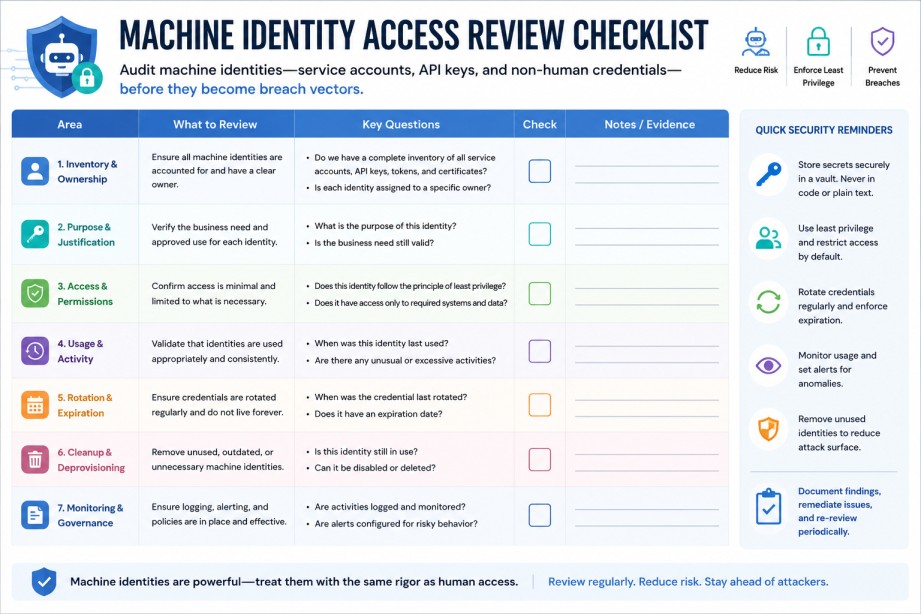
  • Machine Identity Access Review: The Audit Process Most IT Teams Never Run

    Machine Identity Access Review: The Audit Process Most IT Teams Never Run

    Your IT team probably runs quarterly access reviews for every employee who joins, moves, or leaves. You have a process for contractors. You might even review admin accounts monthly. What you don’t have is a recurring audit process for the service accounts, API keys, and bot credentials that outnumber your employees three to one and hold more privilege than most of your engineering team.

    These machine identities don’t show up in your identity provider’s user list. They don’t trigger deprovisioning workflows when someone leaves. They were created by a developer who needed to ship something fast, granted admin rights “temporarily,” and never reviewed again. Some of them are older than your current CTO’s tenure.

    The breach vector isn’t the phishing attack that compromises a user account. It’s the three-year-old API key with full database access that’s hardcoded in a script nobody remembers writing. This checklist covers what to verify before that credential becomes your incident response call at 2 a.m.

    Inventory: What Machine Identities Exist Right Now

    You can’t review what you can’t see. Most organizations discover their full machine identity footprint only after a breach forces the investigation. Start with a complete credential census before attempting any governance work.

    What to document for every machine identity:

    • Service accounts in Active Directory, LDAP, or cloud IAM systems
    • API keys and access tokens across all SaaS platforms and internal applications
    • SSH keys on servers, containers, and CI/CD pipelines
    • Database credentials used by applications and automation scripts
    • Certificate-based authentication for system-to-system communication

    Pull logs from your identity systems, cloud provider consoles, and application configs. Check your secrets management tools if you have them. Check environment variables, config files, and deployment scripts if you don’t. The credentials your security team doesn’t know about are the ones your developers created last quarter to unblock a release.

    For teams under 200 employees, expect to find 300 to 500 machine identities. At enterprise scale, the ratio hits 10:1 or worse.

    Ownership: Who’s Responsible When a Service Account Is Compromised

    Every service account was created by someone. Most of them are now owned by nobody. The developer who spun up that automation bot left the company 18 months ago. The team that built the integration was reorganized. The project that needed those credentials was deprecated, but the credentials weren’t.

    When that orphaned service account gets compromised, your incident response team will spend the first six hours just figuring out what it has access to and who might know why it exists.

    Assign explicit ownership for every credential type:

    • Application service accounts: The team that owns the application in production
    • CI/CD pipeline credentials: The platform engineering or DevOps lead
    • Infrastructure automation: Whoever manages your IaC and configuration management
    • Integration API keys: The business owner of the integration, not just the developer who built it

    If you can’t name an owner, the credential is orphaned. Orphaned credentials get disabled immediately or assigned to a designated cleanup owner with a 30-day review deadline. No exceptions.


    RED FLAG: Nobody owns the service account

    If the original creator left the company or moved teams and no one was formally assigned ownership, you’re managing a credential nobody understands. Disable it and wait for something to break. What breaks will tell you what it was actually used for.


    Access Level: What Privileges These Identities Actually Hold

    Service accounts follow a predictable lifecycle. They’re created with elevated permissions to solve an immediate problem. The problem gets solved. The permissions never get reduced. Six months later, you have a CI/CD service account with full production database access because someone needed to run a one-time migration script.

    Your user access reviews catch privilege creep in human accounts. Nobody’s checking whether the automation bot that posts Slack notifications also has admin rights to your billing system.

    Risk-rank every machine identity by privilege level:

    • Full admin or root access to any system
    • Write access to production databases or customer data stores
    • Ability to provision infrastructure or modify IAM policies
    • Cross-environment access (service accounts that work in both dev and prod)
    • Credentials with no scope limits or expiration dates

    Start with the highest-risk tier. If a credential has admin rights and you can’t immediately explain why, that’s your first rotation candidate. For most organizations, 60% to 70% of service accounts are over-privileged. The credentials with the broadest access are usually the oldest ones that were created before your team had a formal provisioning process.

    Usage Pattern: Which Credentials Are Active, Dormant, or Orphaned

    A service account that hasn’t authenticated in 90 days is either dormant or broken. If it’s dormant, it’s a ghost credential waiting for someone to rediscover it. If it’s broken, something in your environment is failing silently and nobody noticed.

    Pull authentication logs for every machine identity in your inventory. Most IAM systems track last-used timestamps. Cloud providers surface this in their access analyzers. If your environment doesn’t log machine identity usage, that’s the infrastructure gap to fix before attempting a review process.

    Categorize credentials by activity pattern:

    • Active: Authenticated within the past 30 days
    • Stale: Last used 30 to 90 days ago, requires owner verification
    • Dormant: No activity for 90+ days, candidate for immediate disabling

    Disable dormant credentials first and monitor for breakage. What doesn’t break in 72 hours wasn’t critical. What does break gets documented, right-sized for privilege level, and assigned to an active owner. For stale credentials, contact the assigned owner and give them one week to confirm it’s still needed. No response means it gets disabled.

    At mid-market scale, expect 20% to 30% of your machine identities to be dormant. At enterprise scale, that number climbs to 40% or higher if you’ve never run this audit before.


    RED FLAG: Secrets older than your compliance window

    If your compliance framework mandates 90-day password rotation and you’re sitting on API keys that haven’t changed in 18 months, you’re out of policy. Auditors will find this. Fix it before they do, or budget for the finding and the remediation timeline it triggers.


    Rotation Status: When These Credentials Were Last Changed

    Most organizations have a password policy that forces users to rotate every 60 or 90 days. Almost none of them apply that policy to service accounts. The API key your team created three years ago has never been rotated. The database password embedded in your application config was set during the initial deployment and hasn’t changed since.

    Credential age is the single best predictor of whether a machine identity will become a breach vector. The older the credential, the more places it’s been copied, the more people have seen it, and the higher the chance it’s been exposed in a way nobody documented.

    Credential Type Recommended Rotation Why It Matters Red Flag If Missing
    API keys 90 days Keys get logged, cached, and copied into documentation No rotation policy or keys older than 12 months
    Service account passwords 90 days Older passwords often predate your current security baseline Passwords set before your last major security initiative
    SSH keys 180 days Keys accumulate on servers and in admin home directories Keys with no expiration date or passwordless private keys
    Database credentials 90 days Application configs are the most common source of credential exposure Credentials embedded in source code or config files in version control
    TLS/SSL certificates Before expiration Expired certificates cause outages; old ones often use deprecated crypto Certificates using SHA-1 or RSA keys under 2048 bits

    Your rotation policy needs to account for the operational cost of rotating credentials that are embedded in application configs, CI/CD pipelines, and infrastructure code. For teams without secrets management, that cost is high enough that rotation doesn’t happen. If manual rotation is blocking your policy, budget for a secrets manager before you document a rotation cadence you won’t enforce.

    Deprovisioning Process: What Happens When a Service or Project Ends

    Applications get deprecated. Integrations get replaced. Projects get cancelled. The service accounts created for those initiatives don’t get cleaned up. They sit in your environment with whatever access level they were granted, waiting for someone to remember they exist.

    Your user offboarding process disables accounts within 24 hours of an employee’s departure. Your machine identity lifecycle has no equivalent trigger. When a project ends, the credentials live on unless someone manually remembers to revoke them.

    Build deprovisioning triggers into your standard workflows:

    • Application decommissioning checklist must include service account inventory and revocation
    • Project closure requires credential cleanup sign-off from the infrastructure owner
    • Integration deprecation triggers API key revocation at both ends of the connection
    • Quarterly reviews flag service accounts associated with projects marked complete or cancelled

    For every machine identity, document what it supports. When that application, service, or integration is retired, the credential gets disabled immediately. If disabling it breaks something unexpected, you’ve just discovered an undocumented dependency that needs to be mapped before the credential can be safely removed.

    The cleanup backlog grows faster than most teams expect. Budget 2 to 4 hours per quarter for a dedicated credential cleanup sprint where someone goes through the stale and dormant lists and disables everything that doesn’t have an active owner confirmation.

    Review Cadence: How Often This Audit Needs to Run

    User access reviews happen quarterly because regulatory frameworks require it and because user turnover creates obvious risk. Machine identity reviews don’t happen because there’s no compliance driver and no one’s job depends on keeping the list current.

    Set a review cadence based on your organization’s size and rate of change. For startups shipping fast, machine identities proliferate quickly. For enterprises with stable infrastructure, the inventory changes more slowly but the volume is higher.

    Sustainable review intervals by organization size:

    • Under 50 employees: Quarterly full inventory and ownership review
    • 50 to 500 employees: Monthly review of new credentials, quarterly full audit
    • Enterprise scale: Continuous monitoring with monthly high-risk reviews and quarterly full reconciliation

    The first audit will take the longest. Expect 8 to 12 hours of work for a mid-market IT team to complete the initial inventory, assign ownership, and establish the baseline. After that, recurring reviews take 2 to 3 hours per cycle if you’re staying on top of it.

    If your team is under three people, the admin overhead will compete with every other priority you’re managing. Start with a six-month cycle and focus only on credentials with admin-level access. Expanding to full coverage can wait until you have the staffing to support it.


    The license cost for a privileged access management system is easy to justify once you’ve spent 40 hours manually inventorying service accounts and realized you’ll need to do it again next quarter. Most security tools show you what’s happening after credentials get compromised. This checklist finds the exposure before that happens. Before your next security roadmap conversation, run through the access level and rotation sections and count how many credentials fail both checks. That number is your business case.


    Also read: NIST SP 800-63B digital identity guidelines

    Related reading

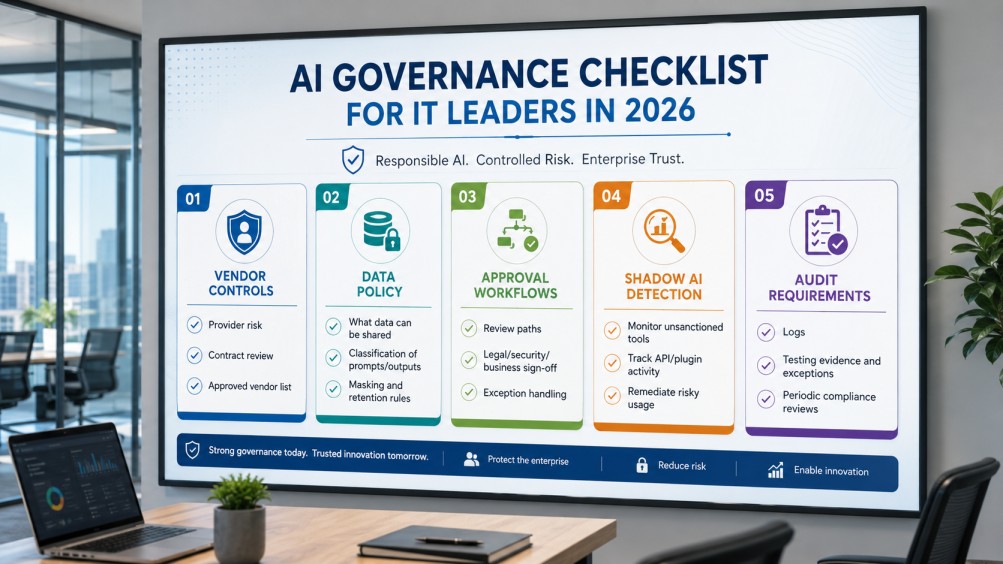
  • The AI Governance Checklist for IT Leaders in 2026 Before Your Next Deployment

    The AI Governance Checklist for IT Leaders in 2026 Before Your Next Deployment

    Most AI governance policies fail within six months because they focus on principles instead of practical controls. By the time you discover shadow AI usage or a vendor compliance gap, you’re managing a crisis instead of preventing one. The gap isn’t philosophical. It’s operational. Your policy document says “responsible AI use,” but nobody defined what happens when an employee pastes customer data into ChatGPT or a vendor refuses to log the prompts your compliance team will need during an audit. This AI governance checklist for IT leaders in 2026 covers the specific controls that prevent those problems before they require incident response. You’ll know what to verify before approving internal AI use, what contract terms stop vendor problems at signing, how to detect shadow AI without dedicated tooling, and what audit trail your first compliance review will demand.

    Internal Use Controls Before the First Model Goes Live

    Run through these five items before you approve general employee access to any AI tool. Missing even one creates a compliance gap your audit team will find six months later.

    Acceptable use policy specific to AI
    Your existing acceptable use policy doesn’t cover generative AI. You need explicit language defining what constitutes approved use, prohibited data types, and consequences. Don’t repurpose your social media policy.

    Data classification training refresher
    Employees need to know which data types they can’t submit to AI tools. If your data classification system hasn’t been reviewed in 18 months, half your team won’t remember what qualifies as sensitive.

    Approved tool list published and enforced
    Saying “use approved tools only” without publishing the list guarantees shadow AI. Name the specific tools, include version numbers if relevant, and update it quarterly.

    Incident reporting path for AI-related concerns
    Your team needs to know where to report an accidental data exposure or a problematic AI output. If the path isn’t clear, they won’t report until the problem escalates.

    Access tied to training completion
    Make AI tool access conditional on completing a 15-minute training module. It’s not foolproof, but it eliminates the “I didn’t know” defense and creates an audit trail proving due diligence.

    Vendor AI Controls That Stop Problems at Contract Stage

    The vendor will not volunteer these terms. You need to require them before the contract is signed, because retrofitting compliance language after deployment costs six figures in legal fees and re-negotiation leverage you no longer have.

    Your vendor contract must specify where your data goes, how long it’s retained, whether it’s used for model training, and who can access it. Most vendor agreements are silent on training data usage or bury consent in a clause your legal team will object to nine months later. Get written confirmation that your inputs and outputs are excluded from training datasets. Require the vendor to specify data residency if you operate under jurisdiction-specific privacy laws.

    The second gap: audit rights and incident notification. Your contract needs explicit language granting you the right to audit AI usage logs and requiring the vendor to notify you within 24 hours of a data incident involving your inputs. Vendor SLAs typically cover uptime, not compliance incidents.

    What to require in every vendor AI agreement:

    • Explicit prohibition on using your data for model training or improvement
    • Data residency specification that matches your regulatory requirements
    • Audit rights covering access logs, prompt history, and data handling
    • 24-hour incident notification for breaches involving your data

    RED FLAG: VENDOR CONTRACT GAP

    The liability clause doesn’t cover AI-generated outputs.

    Standard software liability clauses cover defects and downtime. They don’t cover the risk of the AI generating content that violates copyright, defames someone, or breaches a regulation. If your contract is silent on output liability, you’re assuming all downstream risk from anything the model produces using your data. Require explicit vendor liability for outputs that violate law or regulation when used as directed.


    Data Governance Items Your Legal Team Needs Documented

    Your existing data governance policy needs AI-specific amendments. The controls that worked for traditional software don’t translate cleanly when employees can submit unstructured data to a model and receive outputs you can’t predict in advance.

    Sensitive data submission prohibition
    Define which data classifications are prohibited from AI tool input. If “confidential” and “restricted” are banned but “internal use” is allowed, document it explicitly and train to it.

    Output handling requirements
    AI-generated content needs a classification rule. Does it inherit the classification of the input data? Does it default to a specific tier? Your data handling policy must cover outputs, or you’ll discover inconsistent practices during your first audit.

    Cross-border data flow documentation
    If your vendor’s AI processes data outside your operating jurisdiction, document it. Most privacy regulations require notice and sometimes consent when data crosses borders. API calls to a U.S.-based LLM from your EU office trigger this requirement.

    Third-party data restrictions
    If you handle customer or partner data under contractual terms, verify those terms permit AI processing. Your customer agreement may prohibit third-party processing or require specific safeguards that your AI vendor doesn’t meet.

    Retention and deletion alignment
    Your AI vendor’s data retention period must align with your own data retention and deletion policies. If you’re required to delete customer data on request, but your AI vendor retains prompts for two years, you’re out of compliance the moment a deletion request arrives.

    Approval Workflows That Don’t Slow Down Every Request

    A governance process that requires CIO sign-off for every AI use case will be bypassed within a month. You need tiered approval based on actual risk, not bureaucratic caution. The goal is to make low-risk use fast and high-risk use visible.

    Tier your approval structure into three levels. Low-risk use cases operate under general authorization with no per-use approval. An employee using an approved tool on non-sensitive data for internal work doesn’t need a ticket. Medium-risk use cases require department head approval and a brief risk assessment. Processing internal data that’s confidential but not regulated, or generating content for external use, fits here. High-risk use cases require cross-functional review involving IT, legal, and compliance before any deployment.

    The risk factors that determine tier: data sensitivity, external visibility of outputs, automated decision-making, and whether the use case involves personal data under privacy regulation. If any single factor is high, the entire use case is high-risk. Don’t average risk scores.

    Approval tiers that work in practice:

    • General authorization: Approved tools, non-sensitive data, internal use only, human review of all outputs
    • Department head approval: Confidential data, external-facing outputs, or workflow automation with human oversight
    • Cross-functional review: Personal data under GDPR/CCPA, fully automated decisions, or any use case that could create legal or regulatory exposure
    • Ongoing monitoring requirement: All medium and high-risk use cases require quarterly usage review to verify they’re operating within approved parameters
    • Emergency provisional approval: IT head can grant 30-day provisional access for urgent business need, but full review must complete before the provisional period ends

    Shadow AI Detection Before It Becomes a Compliance Problem

    Shadow AI happens when employees adopt unapproved tools because your approved options are too slow, too restrictive, or non-existent. You won’t eliminate it entirely, but you can detect it early enough to remediate instead of investigate.

    Unusual outbound traffic patterns to known AI services
    Your firewall logs show traffic to OpenAI, Anthropic, Google AI, and similar domains. Baseline normal traffic, then flag anomalies. A 300% spike in one department over two weeks is a signal.

    Expense report line items for AI subscriptions
    Employees expense ChatGPT Plus, Jasper, or Midjourney subscriptions. Your finance team sees these. Flag any AI-related expense that isn’t tied to an approved tool list.

    Browser extension audits
    AI writing assistants and productivity tools run as browser extensions. Your endpoint management platform can inventory installed extensions. Run quarterly audits and cross-reference against approved tools.

    Department-level data export volume changes
    If a department’s data export volume doubles without a project explanation, someone may be feeding data to an external tool. Correlate export spikes with known AI adoption timelines.

    Employee surveys that ask directly
    Twice a year, survey employees about which tools they use to get work done. Make it anonymous, frame it as process improvement, and you’ll get honest answers. The goal is visibility, not punishment, and employees will tell you if you ask correctly.


    RED FLAG: SHADOW AI USAGE PATTERN

    Approved tools exist, but shadow AI usage is growing anyway.

    Your detection system works. You’re finding unapproved tools in regular use. But employees keep adopting new ones despite having approved alternatives. That’s not a compliance problem. That’s a signal your approved tools are too restrictive, too slow, or missing critical capabilities. If shadow AI persists after you’ve published an approved list and trained everyone, the problem is your tool selection, not your users. Fix the tool gap before you tighten enforcement, or you’ll drive usage further underground and lose visibility entirely.


    Model Governance When You’re Training or Fine-Tuning

    Most teams don’t need model governance yet. If you’re only using vendor APIs and pre-built models, skip this section. Model governance becomes mandatory when you start training models on your own data, fine-tuning vendor models with proprietary datasets, or deploying models that make decisions without human review.

    The threshold: if the model’s behavior can change based on data you control, you need model governance. That includes fine-tuning a vendor LLM on your support tickets, retraining an open-source model on your transaction history, or adjusting weights in a classifier you’re running internally. Once you cross that line, you’re responsible for model behavior in ways you aren’t when you’re just calling someone else’s API.

    Model governance requires tracking which data went into training, who approved the training run, what the model’s intended use case is, and how you’ll monitor for drift or bias after deployment. Document model versioning so you can reproduce outputs or roll back to a previous version when something goes wrong. Establish a review cadence: models trained on your data need quarterly performance reviews at minimum, more often if they’re making automated decisions that affect customers or employees.

    Model governance requirements once you cross the training threshold:

    • Training data provenance documentation: source, date range, cleaning steps, any exclusions
    • Model card or equivalent: intended use case, known limitations, performance benchmarks, and decisions the model should not make
    • Version control for model artifacts: every deployed version tagged, stored, and reproducible
    • Monitoring plan for drift and fairness: defined metrics, review cadence, and escalation path if metrics degrade

    AI Audit Trail Requirements Before Your First External Review

    Your first compliance audit will ask for logs proving who used AI on what data and when. If you can’t produce that documentation, the audit fails regardless of whether your actual usage was compliant. Audit trail requirements aren’t optional once you’re operating under privacy regulation, industry-specific compliance frameworks, or contractual obligations to customers.

    The table below defines what your AI audit trail must include, why each item matters for compliance, and the red flag that signals your vendor or internal system won’t meet the requirement when you need it.

    Checklist Item Why It Matters Red Flag If Missing
    User prompt logging Required for most AI compliance frameworks and breach investigation Vendor claims prompts are ephemeral or not accessible
    Model version tracking Reproducing outputs or rolling back requires knowing which model version ran Vendor API doesn’t expose model version in response metadata
    Access audit trail Determines who used AI on what data and when Logging is user-configurable instead of mandatory
    Data lineage for training Proves training data provenance for regulatory review Vendor won’t document data sources in contract
    Retention policy alignment AI logs must match your existing data retention schedule Default retention is shorter than your compliance requirement

    The biggest audit trail failure happens when your vendor’s logging doesn’t meet your retention requirements. Standard SaaS logging often retains data for 90 days, but privacy regulations typically require 12 to 24 months. If your vendor’s logs expire before your retention policy allows, you can’t produce documentation during an audit that covers a date range more than 90 days old. Verify retention alignment before signing, because extending vendor log retention after the fact usually requires an enterprise tier upgrade and costs more than negotiating it into the original contract.

    Your internal systems need logging too. If employees access AI through an internal portal or wrapper, that system must log user actions, timestamps, and data accessed. Treat AI logging with the same rigor you apply to database access logs or privileged account activity. The standard is the same: every action that touches sensitive data or produces an output with compliance implications must be logged, tamper-evident, and retained per policy.

    Conclusion

    The AI governance checklist for IT leaders in 2026 works when it stops problems at contract signing, policy publication, and first deployment, not after the compliance team finds a gap nine months later. If you’re operating under privacy regulation, handling customer data under contract, or facing an audit in the next 12 months, your approval workflows and vendor contracts are the highest-priority items on this list. If shadow AI is already widespread, your detection plan needs to run within the next 30 days, not next quarter. Before your next vendor call or internal AI pilot, verify every item in Section 2 and Section 7. Those are the gaps that create liability, and they’re the easiest to close before you sign anything.


    Related reading

  • Agentic AI ROI Enterprise Math: What Process Savings Actually Look Like

    The vendor deck shows you a 12-month ROI based on process time savings. What it won’t show you is the four months your team will spend mapping workflows, the integration work your platform team will absorb, or the adoption failure that kills 60% of projected savings when users don’t trust the agents enough to stop doing the work manually. The license cost is real. The implementation cost is larger. The cost of getting it wrong is both.

    You’re evaluating agentic AI because someone showed you a demo where an agent handled a process in 90 seconds that currently takes your team two hours. The math looks obvious. The reality is harder. Most enterprises hit month six and realize the ROI model assumed away the three things that actually determine whether this works: how standardized your processes are going in, how much exception handling the agents can’t do, and whether your team actually uses them.

    Here is what agentic AI ROI enterprise implementations actually cost across every line the vendor won’t put in the deck. You’ll know the realistic total investment, the hidden cost layers that determine success or failure, and the specific conditions under which the productivity promise holds up or falls apart. By the end, you’ll know whether your environment is ready for this, or whether you’re about to fund an expensive pilot that never scales.

    The Platform License: What the Vendor Puts in the Deck

    Enterprise agentic AI platforms typically price per agent, per user, or per transaction depending on the vendor’s model. Expect $50 to $150 per user per month for platforms that deploy agents across knowledge work processes, or consumption-based pricing that starts around $0.10 to $0.50 per agent action for transaction-heavy workflows. Annual contracts bring the per-unit cost down 15% to 20%, but lock you in before you know if adoption will hit the vendor’s assumptions.

    The quoted price covers platform access, the agent builder interface, and baseline integrations with major SaaS platforms. It does not cover the API calls your agents will make to external services, the storage cost for training data and interaction logs, or the compute cost if you’re running agents on your own infrastructure instead of the vendor’s cloud. Most vendors bill those separately, and none of them will estimate your actual usage during the sales process.

    Smaller vendors may quote lower license costs but require you to bring your own large language model access, which means you’re paying OpenAI, Anthropic, or Azure separately for every agent interaction. That cost can easily exceed the platform license if your agents are handling high-volume workflows. Ask whether the platform fee includes model access or whether you’re budgeting for both.

    The license is the number they want you to focus on because it’s the only number they control. Everything else depends on your environment, your processes, and your team’s capacity to do the work the platform can’t automate.

    Process Mapping and Workflow Redesign: The Pre-Launch Cost Nobody Quotes

    Agentic AI doesn’t automate your processes as they exist today. It automates the processes you redesign to be agent-suitable, which means someone on your team has to identify which workflows are candidates, document current state, remove the manual judgment calls the agent can’t handle, and pilot the redesigned version before you roll it to production. That work takes 12 to 16 weeks for a mid-sized deployment, longer if your processes live in people’s heads instead of documentation.

    Most enterprises assign this to a business analyst or process owner who’s already at capacity. If you’re serious about hitting the ROI timeline, plan for 0.5 to 1.0 FTE dedicated to process mapping and redesign for every three to five workflows you’re automating. At a loaded cost of $120,000 to $180,000 per FTE annually, you’re looking at $60,000 to $90,000 in internal labor before the first agent runs in production. That’s for a small-scale rollout. Enterprise-wide implementations can require a full team for six months.

    The workflows that look simple in the demo are simple because the vendor pre-mapped them. Your workflows include:

    • Handoffs between systems the agent can’t see
    • Judgment calls that require context the agent doesn’t have access to
    • Exception paths that occur 20% of the time but aren’t documented anywhere
    • Approval steps that exist for compliance reasons nobody remembers

    Redesigning those workflows to be agent-compatible is not a configuration task. It’s a change management project. Budget for it as a separate line item, not as something your IT team will handle during implementation.


    BUYER’S REALITY: Most teams underestimate workflow redesign by half.

    Vendors show you pre-mapped processes in the demo. Your environment requires identifying which processes are agent-suitable, documenting current state, redesigning handoffs, and piloting before production. Budget 12 to 16 weeks of internal labor before the first real workflow runs reliably.


    Integration Cost: Connecting Agents to the Systems That Actually Hold Your Data

    Agentic platforms ship with pre-built connectors for Salesforce, ServiceNow, Slack, and the other platforms every vendor integrates with. If your critical data lives in a home-grown CRM, a legacy ERP system, or behind a firewall that requires VPN access, you’re writing custom API connectors or paying the vendor’s professional services team $200 to $300 per hour to do it for you.

    Custom integration work typically runs $15,000 to $40,000 per system depending on complexity and how well-documented the source system’s API is. Enterprises deploying agents across finance, HR, and operations workflows usually need to connect four to six systems the platform doesn’t support out of the box. That’s $60,000 to $240,000 in integration cost before agents can access the data they need to function.

    The other integration cost vendors won’t highlight: middleware to handle authentication, rate limiting, and error handling when agents call external APIs. Most enterprises run agents through an integration layer that logs every API call, enforces access policies, and handles retries when external systems time out. Building or configuring that layer is not included in the platform license. Expect another $20,000 to $50,000 in setup cost if your security or compliance team requires it.

    The demo works because it’s running in the vendor’s environment with the vendor’s data and the vendor’s pre-configured access. Your environment has three identity providers, five systems that require separate authentication, and a data access policy that nobody’s documented. The integration that takes 20 minutes in the demo will take your platform team six weeks if you have someone who knows what they’re doing.

    Internal Resource Cost: Who Manages the Agents After Month Three

    Agentic workflows don’t run themselves. Someone on your team is monitoring agent performance, handling exceptions the agents escalate, retraining models when accuracy drifts, and updating workflows when your business process changes. That ongoing admin cost is the difference between a successful deployment and an expensive pilot that your team stops using after six months.

    Plan for 0.25 to 0.5 FTE per five production workflows. For teams running 10 to 15 agentic workflows in steady state, that’s one full-time admin or operational owner. At a loaded cost of $120,000 to $150,000 annually, you’re adding $120,000 to $150,000 per year to your total cost of ownership. Enterprises that skip this step and assume agents are “set and forget” see adoption collapse when exception rates climb and nobody’s accountable for fixing them.

    Your admin workload depends on three variables:

    • Exception rate: how often agents escalate decisions they can’t make
    • Process stability: how frequently your workflows change
    • Model accuracy: how often agents produce incorrect outputs that require correction

    Early-stage deployments typically see 20% to 30% exception rates. Mature deployments with stable processes can drive that below 10%. The difference determines whether your admin spends two hours per week or two hours per day managing agents. Budget for the high end until you know your actual exception rate.


    RED FLAG: Exception rates above 15% kill the ROI model.

    If your agentic workflows require human intervention more than 15% of the time, the labor savings disappear into exception handling. Most enterprise processes hit 20 to 30% exception rates in the first six months. The platform can’t fix that, process standardization can.


    Training and Change Management: The Adoption Tax

    The ROI model assumes your team will use the agents. The reality is that adoption fails in 40% of deployments because users don’t trust the agent’s output, don’t understand when to use it, or find it faster to do the work manually than to review what the agent did. If adoption stays below 60%, you’re not hitting the productivity savings the vendor showed you.

    Training is not a one-hour webinar. Your team needs to understand which tasks to delegate to agents, how to review agent output for accuracy, what to do when an agent escalates an exception, and when to override the agent’s recommendation. That training takes four to six hours per user for knowledge workers who will interact with agents daily, less for teams using agents occasionally. For a 50-person rollout, budget 200 to 300 hours of training time.

    Change management is the larger cost. Someone has to communicate why the change is happening, what’s in it for users, and what happens to the time they’re no longer spending on manual work. If your team believes agents are a headcount reduction tool, adoption will fail regardless of how good the training is. Most successful deployments assign a change management owner who runs pilots, collects feedback, and adjusts workflows based on what users actually need. That’s another 0.25 to 0.5 FTE for three to six months.

    Low adoption kills ROI faster than any technical failure. If your users revert to manual processes because they don’t trust the agent or because using it feels slower than doing it themselves, the entire investment delivers zero return. The vendors who succeed at enterprise scale are the ones who treat this as a change management project, not a technology deployment.

    The Total Cost of Ownership Table

    Cost Layer Vendor’s Quoted Figure Real-World Range What Drives the Variance
    Platform license (annual) $50-$150/user/month or $0.10-$0.50/transaction $60,000-$180,000 for 100-user deployment Pricing model, contract length, volume discounts
    Process mapping and redesign Not quoted $60,000-$90,000 (pre-launch) Number of workflows, process complexity, FTE availability
    Integration (custom connectors) Not quoted $60,000-$240,000 Number of legacy systems, API maturity, internal vs. vendor-led
    Internal admin (ongoing) Not quoted $120,000-$150,000/year Exception rate, workflow stability, process change frequency
    Training and change management Not quoted $30,000-$60,000 (first year) User count, workflow complexity, adoption resistance
    Year 2 renewal Quoted at year 1 rate +10% to +20% uplift Usage growth, competitive pressure, contract negotiation leverage
    Switching cost (if it fails) Not quoted $80,000-$200,000 Data migration, retraining, process reversion, sunk integration cost

    The realistic first-year total cost for a 100-user enterprise deployment ranges from $350,000 to $720,000 when you include all layers. The platform license represents 20% to 30% of that total. The biggest surprise cost most buyers didn’t budget for: the internal labor required to map processes, manage integrations, and keep agents running reliably after month three. That labor cost recurs annually and scales with the number of workflows in production. If your ROI model only accounts for the license, you’re underestimating total cost by 3x to 4x.


    BUYER’S REALITY: Time saved does not equal cost saved.

    Agentic workflows may cut process time by 40%, but unless you’re eliminating roles or reallocating labor to revenue work, you’re not reducing cost, you’re shifting it. The ROI appears in what your team does with the freed capacity, not in the automation itself.


    What It Actually Saves: Process Time vs. Reallocated Labor

    Agentic AI cuts process time. That’s measurable and real. What it doesn’t automatically do is reduce your labor cost or free up budget unless you’re eliminating roles, reassigning capacity to higher-value work, or avoiding planned hires. The ROI appears in what your team does with the time the agents save, not in the automation itself.

    What works:

    • Avoiding planned hires by absorbing growth with current headcount plus agents
    • Reallocating freed capacity to revenue-generating work that was previously backlogged
    • Reducing contractor or overtime spend by handling peak volume with agents instead of temporary labor

    What doesn’t work:

    • Assuming time saved equals cost saved when headcount stays flat and work output doesn’t increase
    • Measuring productivity by tasks completed instead of business outcomes delivered
    • Claiming ROI from “efficiency gains” that don’t connect to revenue growth, cost reduction, or service level improvement

    Most enterprises see the highest ROI when they deploy agents to handle volume spikes, seasonal peaks, or growth that would otherwise require adding headcount. The cost avoidance is real and measurable. Teams that deploy agents to optimize existing work without a plan for reallocating freed capacity see time savings but no financial return.

    When the ROI Model Breaks: Adoption Reality and Process Exceptions

    The vendor’s ROI model assumes 80% adoption, 10% exception rates, and stable processes. Your environment determines whether those assumptions hold. Here are the four signals that predict ROI failure before you commit budget:

    Exception rate above 20% in pilot: If your pilot workflows require human intervention more than one time in five, the labor savings evaporate into exception handling and agent supervision. The platform can’t fix this. Process standardization can, but that work happens before deployment, not after.

    Low user trust in agent output: If your team is reviewing every agent action instead of sampling outputs, you’re not saving time, you’re adding a review step. This happens most often in compliance-sensitive workflows where the cost of agent error is high and trust takes months to build.

    Frequent process changes: If your workflows change monthly due to regulatory updates, business pivots, or operational shifts, your admin cost spikes because someone has to retrain agents and update workflow logic constantly. Agentic AI works best in stable processes with infrequent changes.

    No clear plan for freed capacity: If you can’t name what your team will do with the 10 hours per week the agent saves, you won’t see ROI. The savings exist only when freed capacity converts to higher-value work, cost avoidance, or headcount reduction. Time saved without reallocation is just underutilized labor.

    Agentic AI delivers ROI when processes are standardized, exception rates are low, adoption is high, and freed capacity has a planned use. If any of those conditions is missing, the financial return disappears regardless of how well the platform performs. Know which condition your environment fails before you sign, not six months in.

    Conclusion

    The realistic first-year cost of an enterprise agentic AI deployment runs $350,000 to $720,000 when you include the platform license, process redesign, integration work, internal admin, and adoption effort. The ROI appears when freed capacity converts to cost avoidance, revenue work, or headcount reduction, not when agents simply complete tasks faster. This makes financial sense when your processes are stable, your exception rates are manageable, and you have a concrete plan for reallocating labor. It doesn’t make sense when workflows change frequently, your team doesn’t trust agent output, or you’re automating work without a plan for what happens to freed time. Before the next vendor call, ask for a total cost estimate that includes integration and internal labor, not just the platform fee.


    Also read: NIST AI RMF

    Related reading

  • Enterprise LLM Cost Comparison for Business Use: Beyond the Per-Token Marketing Numbers

    Every provider publishes per-token pricing that looks clean until you multiply it by your actual volume, add the cost of the engineer who’ll spend three months prompt tuning, and realize the model that costs half as much per token needs twice the tokens to do the same job. The sticker price is real. It’s also incomplete.

    Your real question isn’t what a million tokens costs. It’s what it costs to run 50,000 customer support summaries a month, or generate 200 product descriptions a day, or keep a chatbot responsive under peak load without burning through your Q3 budget in six weeks. That number includes the API bill, but it starts with how efficiently the model works, how much engineering time you’ll spend making it useful, and whether the provider’s rate limits will throttle your application the first time you actually need it to scale.

    Here’s what this actually costs — across every line the vendor won’t put in the deck.

    The Per-Token Number Is Where the Pricing Story Starts, Not Where It Ends

    Token pricing is how providers compete on paper. It’s not how they make money. The rate card shows you cost per thousand tokens — input and output, sometimes with a volume discount past a certain threshold. What it doesn’t show: how many tokens your job will actually consume, how much latency you’ll tolerate before users complain, and how often you’ll need to rewrite prompts because the model’s output isn’t good enough the first time.

    Three cost layers sit behind the published rate. First, token efficiency — how many tokens the model needs to complete your task at acceptable quality. A model that costs $0.002 per 1K tokens but needs 8,000 tokens to summarize a document will cost you more than a $0.003 model that does it in 4,000. Second, internal labor — the engineering time required to tune prompts, manage context windows, handle errors, and iterate when output quality drifts. Third, operational overhead — rate limit management, latency optimization, fallback logic when the API is slow or unavailable.

    Vendors price on the first layer because it’s the only one they control. You’ll pay for all three.

    How Providers Price Their Models: OpenAI, Anthropic, Google, and AWS

    Four providers dominate enterprise LLM deployment: OpenAI, Anthropic, Google, and AWS (via Bedrock). Each offers multiple tiers. Pricing structure varies, but the pattern holds — lighter models cost less per token and produce lower-quality output. Heavier models cost more and close the quality gap faster.

    OpenAI separates models into GPT-3.5 (legacy, cheap, fast, limited reasoning) and GPT-4 tiers (expensive, slower, stronger at complex tasks). As of late 2024, GPT-3.5 Turbo runs around $0.0015 per 1K input tokens. GPT-4 Turbo is roughly $0.01 per 1K input tokens — about 7x more. Anthropic’s Claude models follow a similar spread: Claude Instant (faster, cheaper) versus Claude 2 and Claude 3 tiers (slower, costlier, better at nuance). Google offers PaLM 2 and Gemini models through Vertex AI, priced competitively with OpenAI’s GPT-4 tier. AWS Bedrock resells third-party models (including Anthropic and Stability AI) with its own pricing layer.

    The published gap between the cheapest and most expensive model in a provider’s lineup runs 5x to 10x. The quality gap is harder to quantify, but it shows up fast — cheaper models need more retries, longer prompts, and tighter guardrails.

    Key pricing differences by provider:

    • OpenAI charges separately for input and output tokens; output costs 2x to 3x input on most models
    • Anthropic offers longer context windows (100K+ tokens) at the same per-token rate, which matters if your use case is document-heavy
    • Google’s Vertex AI pricing includes infrastructure cost, which can push effective per-token cost higher unless you’re already running on GCP
    • AWS Bedrock adds a markup to third-party models but simplifies billing if you’re already in AWS

    BUYER’S REALITY: The Cheaper Model Needs More Tokens

    A model that costs $0.002 per 1K tokens but requires 30% more tokens to hit acceptable quality will cost you more than a $0.003 model that gets it right the first time. Providers know this. They price the inefficient models lower because the volume makes up the margin.


    What Drives Your Actual Monthly Bill: Volume, Context Window, and Model Efficiency

    Volume is the obvious multiplier — if you’re processing 10 million tokens a month, a $0.001 difference in per-token cost is $10,000 annually. Most buyers start there. The two variables that matter more: context window utilization and token efficiency per task.

    Context window is how much input the model can process in a single API call — measured in tokens. If your use case involves summarizing long documents, answering questions about multi-page contracts, or maintaining conversation history in a chatbot, you’ll burn tokens on context even before the model generates a response. A 50-page PDF might be 40,000 tokens. If your model charges $0.01 per 1K input tokens, every document you process costs $0.40 before you get a single word of output. Multiply that by 1,000 documents a month and you’re at $400 just for input.

    Model efficiency is harder to benchmark before you run a pilot, but it’s the variable that breaks budgets. If your prompt needs 12,000 tokens of input to get a usable answer from Model A, but only 6,000 tokens from Model B, Model B can cost twice as much per token and still come in cheaper. The gap shows up in how well the model follows instructions, how much example text you need to include in the prompt, and how often it halts or produces output you can’t use.

    The lowest per-token rate almost never produces the lowest monthly bill once you account for how the model actually performs on your workload.

    The Prompt Engineering Tax: What It Costs to Make a Model Useful

    The API call is instant. Making the model produce output you can use without manual cleanup takes weeks to months of iteration. That labor cost doesn’t appear on the vendor’s invoice, but it will appear on yours.

    Prompt engineering is the work of writing, testing, and refining the instructions you send the model so it produces reliable output at acceptable quality. For simple tasks — sentiment tagging, keyword extraction, basic summarization — this might take a few days. For complex workflows — generating customer-facing content, answering nuanced questions, multi-step reasoning — expect one engineer spending 40% to 60% of their time for the first quarter. If your loaded engineering cost is $80 per hour, that’s $12,000 to $18,000 in labor before the model is production-ready.

    The work doesn’t stop at launch. Output quality drifts when input patterns change — new product categories, different customer language, edge cases you didn’t test for. Somebody has to monitor output, identify failures, and rewrite prompts. For most teams, this settles into 10 to 15 hours a month once the system is stable. If it doesn’t stabilize, the cost compounds.

    What drives prompt engineering cost:

    • How well the model handles ambiguity in your domain (legal, medical, and technical content requires more tuning)
    • How much variance exists in your input data (structured data is cheaper to prompt for than freeform text)
    • Whether your use case requires multi-step reasoning or can be solved in a single pass
    • How often your output requirements change (if stakeholders keep revising what “good” looks like, you’ll keep rewriting prompts)

    RED FLAG: Your Team Is Rewriting Prompts Every Week

    If you’re still tuning prompts 60 days after launch, the model doesn’t fit the job. That’s not a configuration problem — it’s a capability gap. The internal cost of that iteration will exceed your API spend in six months.


    What You’ll Actually Spend: Total Cost Across All Layers

    Cost Layer Vendor’s Quoted Figure Real-World Range What Drives the Variance
    API usage (tokens) $500–$5,000/month $800–$12,000/month Actual volume + token efficiency of the model on your tasks
    Implementation / integration Not quoted $8,000–$40,000 Complexity of your existing stack, API reliability requirements, error-handling logic
    Prompt engineering (initial) Not quoted $10,000–$25,000 Task complexity, how much domain-specific tuning the model needs, internal engineering rates
    Ongoing prompt maintenance Not quoted $1,200–$2,400/month How often input patterns or quality requirements change
    Monitoring / observability tooling Not quoted $200–$1,500/month Whether you build your own logging or pay for a third-party LLM ops platform
    Rate limit / latency mitigation Not quoted $0–$15,000/month Whether you need dedicated throughput or can tolerate standard rate limits
    Year 2 renewal (typical uplift) Same as Year 1 10%–25% higher Provider pricing changes, volume tier shifts, whether you negotiated a rate lock
    Switching cost (if it doesn’t work) Not quoted $15,000–$60,000 Rewriting prompts for a new model, retraining users, re-integrating APIs

    What this means for your budget: Most teams enter with a $2,000/month API budget and discover the real monthly cost — including labor, tooling, and operational overhead — runs $4,000 to $8,000 once the system is live. The biggest surprise cost is prompt engineering labor in months two through four. The second biggest is rate limit overages or latency fixes when traffic spikes. If your finance team approved the API line item but didn’t budget for implementation or ongoing tuning, you’ll hit a wall before you hit production.

    Where the Model Doesn’t Fit the Job: Use Case Alignment by Provider

    Not every model works for every job, regardless of price. Some use cases reward speed and volume. Others require accuracy and nuance. Picking the wrong model-provider fit will cost you more in rework than you’ll save on per-token pricing.

    What works:

    • OpenAI GPT-4 for reasoning-heavy tasks — contract analysis, multi-step troubleshooting, anything that requires the model to follow complex conditional logic. Expensive per token, but completes the task in fewer tries.
    • Anthropic Claude for long-context document work — legal brief summarization, research synthesis, anything over 20,000 tokens of input. The 100K token context window eliminates chunking logic you’d need with shorter models.
    • Google Gemini for multimodal workflows — if your use case mixes text and images (product catalog generation, visual QA), Gemini’s native multimodal support cuts integration complexity.

    What doesn’t:

    • GPT-3.5 for customer-facing content generation — output quality is inconsistent enough that you’ll spend more time editing than you save on API cost. Works for internal summaries. Doesn’t work when a human has to review every result.
    • Cheaper models for high-variability input — if your data is messy, unstructured, or domain-specific (medical notes, legal filings, technical support tickets), lighter models will produce unusable output more often than they’ll save you money.
    • Any model without a latency SLA for real-time user interaction — if your use case is a customer-facing chatbot or live search assistant, slow API response will kill adoption faster than a good answer will drive it. Standard-tier APIs don’t guarantee sub-second response.

    BUYER’S REALITY: Rate Limits Aren’t in the Proposal

    Every provider has rate limits. Most don’t surface them until you hit them. If your workload spikes — customer support surge, end-of-quarter batch jobs — you’ll either throttle your application or pay for a dedicated capacity tier that costs 3x the standard rate. Ask what the limit is before you build around it.


    What the Pricing Page Won’t Tell You: Rate Limits, Latency Costs, and API Reliability

    Three operational constraints determine whether your LLM deployment works in production. None of them appear in the per-token pricing breakdown, and all of them can break your business case after you’ve committed.

    Rate limits cap how many requests you can make per minute. Standard-tier API access from OpenAI, Anthropic, and Google includes rate limits that work fine for prototyping and break immediately under production load. For OpenAI, the free-tier limit is 3 requests per minute on GPT-4. Paid tiers start at 200 requests per minute for smaller customers. If your application handles 500 customer inquiries an hour during peak periods, you’ll need to pay for higher-tier access or build a queue — both of which add cost the pricing page doesn’t mention.

    Latency SLAs don’t exist at standard pricing. Most models return responses in two to eight seconds under normal load. When the provider’s infrastructure is under stress — which happens during high-demand periods — response times can spike to 15 seconds or more. If you’re running a user-facing feature, that delay is unacceptable. Dedicated throughput tiers (available from most providers at 3x to 5x standard rates) guarantee capacity, but they’re priced as reserved instances, not pay-as-you-go.

    API reliability isn’t guaranteed. Downtime happens. OpenAI’s API has experienced multi-hour outages. Anthropic and Google have had similar incidents. If your application depends on real-time LLM access and you don’t have a fallback, an outage will take your feature offline. Building fallback logic — cached responses, rule-based alternatives, or multi-provider failover — adds engineering cost that most teams don’t budget for until the first incident.

    Three red flags that operational cost will exceed expectations:

    • Your use case requires sub-two-second response times, and you’re planning to use standard-tier API access
    • You’re processing more than 10,000 API calls per day, and you haven’t confirmed rate limits with the provider
    • Your application has no fallback logic, and uptime matters to your users

    Who Should Not Be Shopping on Token Price Alone

    If your budget is tight and your use case is simple — tagging, classification, basic extraction — token price is the right starting point. For everyone else, optimizing on per-token cost will lead you to the wrong model.

    Don’t let price drive the decision if:

    • Your output quality directly affects revenue (customer-facing content, sales enablement, product recommendations) — the cost of a bad result is higher than the cost of the API call
    • Your team is under three full-time engineers, and none of them has LLM production experience — the cheaper model will cost you more in tuning labor than you’ll save on tokens
    • Your input data is unstructured, domain-specific, or high-variance — lighter models can’t handle ambiguity, and you’ll spend more time cleaning up output than you save on the invoice
    • You’re running a real-time user-facing feature and latency matters — standard-tier pricing doesn’t include the performance guarantees you need, and upgrading will erase any savings from a cheaper model

    Do optimize on price if:

    • Your use case is high-volume, low-stakes batch processing (internal summarization, lead scoring, data tagging) where output errors are easy to catch and fix
    • You have engineering capacity to invest in prompt tuning and you’re confident the lighter model can hit acceptable quality with enough iteration
    • Your workload is predictable, and you can tolerate standard rate limits and occasional latency spikes

    The model that costs the least per token is the right choice only if it can do the job without burning engineering time or producing output you can’t use. For most business applications, that’s not the cheapest model. It’s the one that gets the task done in the fewest tokens, with the least tuning, at a latency your users will tolerate.


    The per-token rate is where the pricing story starts. The real cost is token efficiency multiplied by your volume, plus the engineering time required to make the model useful, plus the operational overhead of keeping it running under load. A model that costs $0.002 per token but needs 50% more tokens and three months of prompt tuning will cost you more than a $0.004 model that works out of the box. Run a pilot on your actual workload before you commit to a provider. Ask about rate limits, latency SLAs, and what happens when the API goes down. If the vendor’s answer is vague, budget for the cost of building those safeguards yourself — or pick a provider who’ll guarantee them in writing.

    Your next step: take your highest-volume use case and request a token estimate from two providers in different pricing tiers. Run the same 100 tasks through both models and measure output quality, token consumption, and how much prompt iteration each one requires. The model that produces usable output in the fewest tokens, with the least tuning, is the one that will cost you less — regardless of what the rate card says.


    Excerpt:

    Every provider publishes per-token LLM cost comparison numbers that look clean until you factor in token efficiency, prompt engineering labor, and rate limits. The model that costs half as much per token often needs twice the tokens to do the job — and three months of tuning to get there.

    Meta Description:

    LLM cost comparison for business use: real pricing across OpenAI, Anthropic, Google, and AWS including token rates, prompt engineering costs, and hidden fees beyond the rate card.

  • LLM cost comparison for business use: ChatGPT vs Claude vs Gemini

    LLM cost comparison for business use: ChatGPT vs Claude vs Gemini

    The cheapest LLM plan can still end up being the most expensive option once your team starts using it every day.

    ChatGPT, Claude, and Gemini are not priced in one simple way. You may pay per user through a business chat plan, per token through an API, or indirectly through review time, retries, failed automations, and poor adoption. That is why an LLM cost comparison for business use has to separate subscription cost from workflow cost.

    A $25-per-user plan may be fine for a small leadership team. The same tool can become expensive when 80 employees use it casually without clear use cases. A low-cost API model may look efficient until it produces weaker answers and pushes work back to your support, sales, or operations team.

    The right comparison is not “Which LLM is cheapest?” It is “Which LLM gives acceptable output for this workload at the lowest total operating cost?”

    That means comparing ChatGPT, Claude, and Gemini by plan, API usage, context needs, quality, retries, and business fit.

    LLM Cost Comparison for Business Use: Why Chat Pricing and API Pricing Are Different

    Chat pricing and API pricing solve two different problems.

    A business chat plan is priced per user. Your team logs in, asks questions, uploads files, drafts content, reviews documents, and uses the tool directly. The cost appears simple because it usually shows up as a monthly seat cost.

    API pricing is different. Your application sends prompts to the model and pays based on usage. The bill depends on input tokens, output tokens, context size, retries, cached prompts, batch processing, and how often your product calls the model behind the scenes.

    That difference matters.

    A 10-member leadership team using ChatGPT, Claude, or Gemini manually may be easier to budget for. A customer support bot, a sales assistant, a document-review workflow, or an internal knowledge-search layer can behave very differently. The cost moves from “number of users” to “number of model calls.”

    For a proper LLM cost comparison for business use, separate the two cost buckets first:

    Cost typeWhat you pay forBest forMain risk
    Business chat planUser seatsEmployees using AI directlyPaying for seats with low usage
    API usageTokens and model callsApps, workflows, automationsCost spikes as usage scales
    Enterprise planAdmin controls, security, governance, and higher limitsLarger teams and regulated use casesBuying controls before usage is proven

    The hidden cost is adoption waste.

    A company can buy 50 chat seats and still get poor value if only 8 people use them properly. Another company can spend less on API usage but lose more money because weak answers create ticket escalations, manual review, or repeated prompts.

    BUYER’S REALITY: Seats Are Not Usage

    A per-user plan is predictable, but it does not prove value. Track active users, repeat usage, accepted outputs, and time saved before expanding seats companywide.

    For startup and mid-market teams, the clean approach is simple:

    • Use chat plans for human-led work.
    • Use APIs for repeatable workflows.
    • Use premium models only where failure is costly.
    • Use cheaper models where the task is simple and easy to verify.

    The mistake is treating ChatGPT, Claude, and Gemini as one-price products. They are not. Each has chat plans, API tiers, model families, usage limits, and enterprise controls.

    Your first decision is not which vendor is cheapest. Your first decision is whether to buy seats, build workflows, or do both.

    Multi-Cloud AI Architecture: How to Get the Best from AWS, Azure, and GCP Without Paying for Chaos

    ChatGPT vs Claude: API Cost, Business Plans, and Workflow Fit

    Start with a normal business workload.

    Your team wants an AI assistant to summarize customer tickets, draft reply suggestions, and classify the issue type before a human reviews it.

    Monthly usage:

    • 10,000 customer tickets
    • 1,500 input tokens per ticket
    • 500 output tokens per draft reply

    That gives you:

    • Input tokens: 10,000 × 1,500 = 15,000,000 tokens
    • Output tokens: 10,000 × 500 = 5,000,000 tokens

    Now compare current premium API models using public pricing as a working assumption.

    ModelInput costOutput costEstimated monthly API cost
    GPT-5.515M × $5 = $755M × $30 = $150$225
    GPT-5.415M × $2.50 = $37.505M × $15 = $75$112.50
    Claude Opus 4.715M × $5 = $755M × $25 = $125$200
    Claude Sonnet 4.615M × $3 = $455M × $15 = $75$120

    At the API level, GPT-5.4 and Claude Sonnet sit close in this example. GPT-5.5 and Claude Opus are premium choices. They should not be your default model for every ticket, summary, or internal query.

    The real cost starts after the API bill.

    Assume each ticket draft saves your reviewer 30 seconds.

    • 10,000 tickets × 30 seconds = 300,000 seconds
    • 300,000 seconds = 83.3 hours
    • Reviewer cost: $20 per hour
    • Labor saving: 83.3 × $20 = $1,666

    Now compare net value:

    • GPT-5.4 API cost: $112.50
    • Estimated labor saving: $1,666
    • Net savings before other costs: $1,553.50

    For Claude Sonnet:

    • Claude Sonnet API cost: $120
    • Estimated labor saving: $1,666
    • Net savings before other costs: $1,546

    In this simple example, the API difference is too small to drive the decision. You should choose based on output quality, retry rate, review effort, and workflow fit.

    ChatGPT usually fits better when your workflow needs:

    • Tool calling
    • Structured output
    • Coding help
    • Workflow automation
    • CRM or support-system actions
    • Broader employee productivity use cases

    Claude usually fits better when your workflow needs:

    • Long document review
    • Policy summaries
    • Contract analysis
    • RFP drafting
    • Meeting transcript synthesis
    • Careful first-pass writing

    The hidden cost is using premium models where the task does not need premium reasoning.

    You do not need the strongest model for every support ticket, FAQ answer, internal summary, or classification task. Route routine work to lower-cost models. Reserve premium models for complex reasoning, sensitive customer responses, contract risk, coding, and workflow failures, where a bad answer incurs real costs.

    For business chat plans, judge cost by usage depth, not seat count. Ten active users producing accepted outputs are more valuable than fifty casual users experimenting without a defined workflow.

    For this part of the LLM cost comparison for business use, the decision is clear: choose ChatGPT when automation, tool use, structured output, and broader employee productivity matter. Choose Claude when long-form reading, document-heavy work, and first-pass writing quality reduce review time.

    Bare-Metal vs Cloud for AI Workloads: Where the Cost Curve Flips

    ChatGPT vs Gemini: Cost, Speed, and Google Workspace Fit

    Start with a common internal use case.

    Your team wants an AI assistant for employee questions. It answers from HR policies, IT helpdesk articles, onboarding documents, SOPs, and internal process notes.

    Monthly usage:

    • 25,000 employee questions
    • 800 input tokens per question
    • 300 output tokens per answer

    That gives you:

    • Input tokens: 25,000 × 800 = 20,000,000 tokens
    • Output tokens: 25,000 × 300 = 7,500,000 tokens

    Now apply working API rates.

    ModelInput costOutput costEstimated monthly API cost
    GPT-5.420M × $2.50 = $507.5M × $15 = $112.50$162.50
    GPT-5.4 mini20M × $0.75 = $157.5M × $4.50 = $33.75$48.75
    Gemini 3.1 Flash-Lite20M × $0.25 = $57.5M × $1.50 = $11.25$16.25
    Gemini 2.5 Flash20M × $0.30 = $67.5M × $2.50 = $18.75$24.75

    At the API level, Gemini is cheaper for this workload.

    But the buyer’s decision should not stop there. Internal Q&A is cheap only when the answer is correct enough to avoid follow-up work.

    Now add escalation cost.

    Assume poor or incomplete answers push some questions back to the HR or IT support team.

    Human handling assumptions:

    • 3 minutes per escalated question
    • $18 per hour support cost

    Scenario A: ChatGPT has a 3% escalation rate.

    • Escalated questions: 25,000 × 3% = 750
    • Human time: 750 × 3 minutes = 2,250 minutes
    • Human time in hours: 37.5 hours
    • Escalation cost: 37.5 × $18 = $675

    Add API cost:

    • GPT-5.4 mini API cost: $48.75
    • Escalation cost: $675
    • Total estimated monthly cost: $723.75

    Scenario B: Gemini 3.1 Flash-Lite has a 5% escalation rate.

    • Escalated questions: 25,000 × 5% = 1,250
    • Human time: 1,250 × 3 minutes = 3,750 minutes
    • Human time in hours: 62.5 hours
    • Escalation cost: 62.5 × $18 = $1,125

    Add API cost:

    • Gemini 3.1 Flash-Lite API cost: $16.25
    • Escalation cost: $1,125
    • Total estimated monthly cost: $1,141.25

    In this example, Gemini has the lower API cost, but ChatGPT has the lower total cost if it reduces escalations by two percentage points.

    Now reverse the assumption.

    If Gemini answers the same internal questions with the same escalation rate, the API savings become real:

    • GPT-5.4 mini API cost: $48.75
    • Gemini 3.1 Flash-Lite API cost: $16.25
    • Monthly API saving: $32.50
    • Annual API saving: $390

    That is not a huge saving at a small volume. But at 10x usage, the difference becomes visible. At 250,000 monthly questions, that API gap comes to $325 per month before escalation costs, caching, batch pricing, and support effort.

    Gemini becomes especially attractive when your business already uses Google Workspace or Google Cloud. The cost advantage is not only model pricing. It can also come from easier use of Drive, Docs, Gmail, Sheets, BigQuery, Vertex AI, grounding, and internal knowledge workflows.

    Use ChatGPT when your business use case needs:

    • Stronger reasoning
    • Structured responses
    • Workflow automation
    • Tool calling
    • Customer-facing answers
    • Better control over output format

    Use Gemini when your business use case needs:

    • High-volume internal Q&A
    • Google Workspace content
    • Short answers
    • Search-grounded responses
    • Summarization at scale
    • Lower-cost experimentation

    The decision is not “Gemini is cheaper” or “ChatGPT is better.” The decision depends on what happens after the answer is generated.

    Choose Gemini when the task is high-volume, repeatable, and easy to verify. Internal FAQs, policy lookups, basic summaries, document search, and Google Workspace-heavy workflows are good candidates. The lower model cost matters when the business risk is low, and the answer does not trigger a sensitive action.

    Choose ChatGPT when the workflow needs stronger control. Customer-facing replies, structured outputs, tool calls, CRM updates, support classification, coding help, and multi-step reasoning need tighter behavior. A cheaper answer is not useful if your team has to check, rewrite, or manually correct it.

    The practical buying rule is simple:

    • Use Gemini to reduce cost at scale.
    • Use ChatGPT to reduce failure and review effort.
    • Test both on the same workflow before scaling either.

    Gemini is the better cost candidate for low-risk volume. ChatGPT is the better control candidate when the output affects customers, systems, or business decisions. 

    Claude vs Gemini: Long Context, Document Review, and Cost Control

    Start with a document-heavy workflow.

    Your team wants an LLM to review vendor contracts, policy documents, RFPs, meeting transcripts, and long internal notes. The model has to extract risks, summarize obligations, compare clauses, and produce a reviewer-ready brief.

    Monthly usage:

    • 2,000 document reviews
    • 8,000 input tokens per document
    • 1,200 output tokens per review

    That gives you:

    • Input tokens: 2,000 × 8,000 = 16,000,000 tokens
    • Output tokens: 2,000 × 1,200 = 2,400,000 tokens

    Using current public API pricing as working assumptions:

    ModelInput costOutput costEstimated monthly API cost
    Claude Sonnet16M × $3 = $482.4M × $15 = $36$84
    Claude Haiku16M × $1 = $162.4M × $5 = $12$28
    Gemini Flash-Lite16M × $0.25 = $42.4M × $1.50 = $3.60$7.60
    Gemini Flash16M × $0.30 = $4.802.4M × $2.50 = $6$10.80

    Gemini looks dramatically cheaper at the API level. For bulk summaries, low-risk extraction, translation, classification, and internal document search, that cost gap is hard to ignore.

    But document workflows are not always low-risk.

    A weak summary of a meeting transcript is annoying. A missed liability clause in a vendor contract is expensive. A vague RFP answer can reduce win probability. A poor policy comparison can send compliance teams back into manual review.

    That is where Claude often becomes easier to justify. The price is higher, but the model may be a better fit when your team needs careful reading, longer reasoning over source material, and cleaner narrative output.

    Use Gemini when the document task is:

    • High volume
    • Low risk
    • Easy to verify
    • Template-driven
    • Focused on extraction or summarization
    • Connected to Google Drive, Docs, Sheets, or Vertex AI

    Use Claude when the document task is:

    • Review-heavy
    • Sensitive to missed details
    • Dependent on long source material
    • Used for contracts, policies, RFPs, or compliance
    • Expected to reduce human rewriting
    • Closer to decision support than basic summarization

    The cost mistake is using one model for every document.

    You do not need Claude for every internal note. You do not need Gemini for every contract review just because the token rate is lower. Split the workload.

    Use Gemini for first-pass processing, tagging, extraction, and low-risk summaries. Use Claude when the document needs judgment, careful synthesis, or reviewer-ready language.

    That model-routing approach gives you better cost control than choosing one vendor and forcing every workflow through it.

    The cleaner decision is this: Gemini is the better cost candidate for document volume. Claude is the better review candidate when missed context, weak reasoning, or poor writing quality creates downstream work.

    ChatGPT vs Claude vs Gemini Cost Comparison by Business Workload

    The safest way to compare ChatGPT, Claude, and Gemini is not by brand. Compare them by workload.

    One model may be cost-effective for support automation, another for document review, and another for internal knowledge search. Your goal is not to find the “best LLM.” Your goal is to avoid paying premium rates for routine work and to avoid using cheap models, where mistakes create business costs.

    Business workloadBetter starting pointWhy it may fitCost risk to check
    Internal FAQ and policy Q&AGeminiStrong fit when your content sits in Google Workspace, and answers are shortWeak answers may create HR or IT support escalations
    Customer support reply draftingChatGPTBetter fit when the workflow needs structure, tone control, and system actionsPremium models can be overused for simple replies
    Long document reviewClaudeStrong fit for contracts, RFPs, policies, transcripts, and dense source materialLonger outputs can increase token spend and review time
    Basic summarization at scaleGeminiGood candidate for high-volume, low-risk summariesNeeds sampling to ensure summaries do not miss important details
    Coding assistanceChatGPT or ClaudeBoth can work, depending on the stack, coding task, and review processBad code suggestions can create rework, not savings
    Sales and proposal draftingClaude or ChatGPTClaude can help with long-form drafting; ChatGPT can help where structured workflows matterGeneric output can waste reviewer time
    Data extraction and classificationGemini or lower-cost OpenAI/Claude tierUsually, it does not need the strongest model if the task is well-definedAccuracy must be tested against real examples
    Workflow automation and tool callingChatGPTStronger starting point when the model must call tools, return JSON, or trigger actionsBroken outputs can fail downstream systems
    Executive research and synthesisClaude or ChatGPTBetter suited when the answer needs judgment, structure, and nuanceWeak synthesis can mislead decision-makers

    The practical buying sequence should be simple.

    First, separate workloads by risk. Internal summaries, FAQ answers, tagging, and classification are usually lower-risk. Customer responses, contract review, compliance interpretation, coding, and workflow actions carry higher risk.

    Second, separate workloads by volume. High-volume tasks need cost discipline. Low-volume but high-impact tasks can justify a stronger model because the cost of a wrong answer is higher than the API bill.

    Third, separate workloads by review effort. A model that writes beautifully but creates long responses may still slow your team down. A cheaper model that gives short but incomplete answers may push work back to humans. Test accepted output, not just generated output.

    For most startup and mid-market teams, the best approach is not to use a single vendor for everything.

    A practical setup could look like this:

    • Gemini for high-volume internal Q&A, search, and low-risk summaries
    • Claude for document-heavy review, RFPs, contracts, policies, and long-form synthesis
    • ChatGPT for structured workflows, tool use, coding support, and customer-facing automation

    This is not vendor loyalty. This is cost control.

    The hidden cost is standardization too early. When you pick one LLM before testing real workloads, every use case gets forced through the same model. Simple tasks become overpriced. Sensitive tasks become underpowered. Teams then blame “AI cost” when the real issue is poor workload routing.

    Your decision should come from a small test set:

    • 20 real support tickets
    • 10 internal policy questions
    • 5 long documents
    • 5 coding or automation tasks
    • 5 sales or proposal tasks

    Run the same test across ChatGPT, Claude, and Gemini. Score the outputs on first-pass usability, correction time, retry count, latency, and business risk.

    That test will tell you more than any pricing table. It will show which model is cheap, which model is safe, and which model is quietly creating work for your team.

    LLM API Cost Drivers Businesses Should Calculate

    API pricing looks simple until the workflow goes live.

    The model rate is only one part of the bill. Your real cost depends on how your application sends context, how long the model takes to respond, how often users retry, and how much cleanup occurs after the answer.

    Do not calculate LLM cost only like this:

    • Input token price
    • Output token price
    • Monthly request volume

    That gives you a model bill. It does not give you the business cost.

    Calculate these cost drivers before you scale.

    1. Prompt size

    Long prompts quietly increase cost.

    Many teams keep adding instructions to improve output quality:

    • Brand tone
    • Compliance rules
    • Workflow steps
    • Role definitions
    • Formatting rules
    • Examples
    • Retrieved knowledge base content

    Each addition may be valid, but together they create prompt bloat. A 300-token prompt can become a 2,000-token prompt without anyone noticing.

    Decision point: keep system prompts tight. Push reusable rules into templates, retrieval logic, or application code where possible.

    2. Retrieved context

    RAG-based systems can become expensive when they send too much source material to the model.

    Your knowledge search may retrieve ten chunks when three would be enough. Your app may send entire policy pages when only one paragraph is needed. Your support assistant may include full ticket history when the latest two replies are enough.

    This creates two risks:

    • Higher token cost
    • More irrelevant context for the model to process

    Decision point: tune retrieval before blaming the model. Better chunking, ranking, filtering, and context trimming can reduce cost without changing vendors.

    3. Output length

    Output tokens are usually more expensive than input tokens.

    That matters because many business prompts accidentally invite long answers:

    • “Explain in detail.”
    • “Provide a comprehensive response.”
    • “Give a complete analysis.s”
    • “Write a detailed summary.”

    For internal use, long output may feel valuable. For workflow automation, it often creates a review burden.

    Decision point: define output length by use case. A support reply suggestion may need 120 words. A contract risk brief may need 600 words. Do not let the model decide every time.

    4. Retry rate

    Retries are one of the biggest hidden cost drivers.

    A retry can happen because the answer is incomplete, too generic, badly formatted, too long or too short, inaccurate, or unusable by the downstream system.

    The problem is that retries not only increase token cost. They also increase user frustration and manual effort.

    Track these signals:

    • How often users regenerate answers
    • How often users edit heavily
    • How often do outputs fail validation
    • How often do humans escalate the task
    • How often is the same prompt rewritten

    Decision point: a cheaper model with a high retry rate may lose to a higher-cost model that works on the first attempt.

    5. Latency

    Speed has a cost even when it does not show on the invoice.

    Slow responses hurt customer-facing workflows, live agent support, sales tools, and operations dashboards. A few extra seconds may be acceptable for document review. It may not be acceptable for a support agent to wait during a live customer conversation.

    Decision point: match the model’s speed to the workflow’s urgency. Do not use the most powerful model when the user needs a fast, simple answer.

    6. Human review

    Human review is where many LLM savings disappear.

    A model may reduce writing time but increase the time spent on checking. A summary may look polished but still require someone to verify every number, clause, or recommendation. A coding assistant may save typing but create testing effort.

    The question is not whether the model generated output. The question is whether your team accepted it with limited correction.

    Decision point: measure accepted output rate. That is more useful than measuring the total number of generated responses.

    7. Governance and security

    Business LLM cost also includes controls.

    For serious use, you may need:

    • Admin controls
    • SSO
    • Audit logs
    • Data retention settings
    • Role-based access
    • Usage reporting
    • Approval workflows
    • Vendor risk review
    • Legal and compliance checks

    A cheaper model or plan may become expensive if your team has to build missing controls separately.

    Decision point: compare governance costs before choosing the lowest plan. For regulated or client-sensitive use cases, missing controls can become a blocker.

    8. Model routing

    One-model architecture is convenient, but it is rarely the cheapest setup.

    If every task goes to your strongest model, routine work becomes overpriced. If every task goes to your cheapest model, sensitive work becomes risky.

    A better setup is usually tiered:

    • Low-cost model for tagging, classification, routing, and simple summaries
    • Mid-tier model for normal business drafting and internal Q&A
    • Premium model for complex reasoning, customer-facing responses, coding, contracts, and escalation cases

    Decision point: route by task risk and complexity, not by vendor preference.

    9. Monitoring and optimization

    LLM cost does not stay fixed after launch.

    Prompts change. Users ask longer questions. Retrieval size grows. Teams add new use cases. Vendors change prices. Model quality changes. A pilot that looked cheap can become expensive after adoption.

    Track cost like a product metric:

    • Cost per accepted answer
    • Cost per resolved ticket
    • Cost per document reviewed
    • Cost per sales draft approved
    • Cost per workflow action completed

    That gives you a real business view. “Monthly token spend” is too shallow.

    The practical rule is simple: calculate cost per useful outcome, not cost per token. Tokens explain the invoice. Outcomes explain whether the LLM is worth paying for.

    When NOT to Choose the Cheapest LLM

    The cheapest LLM is attractive when your usage is growing, and the invoice is visible. But the lowest-cost model can be the wrong choice when the output carries business risk.

    Do not choose the cheapest LLM when the answer will directly affect a customer, a system, a contract, or a decision.

    Use a lower-cost model only when the task is easy to verify, low-risk, and repeatable.

    Do not choose the cheapest model for customer-facing responses

    A weak internal summary is manageable. A weak customer reply is different.

    If the model gives incomplete, cold, inaccurate, or poorly formatted responses, your support team will spend time rewriting them. Worse, the answer may create confusion, escalation, or reputational damage.

    Choose a stronger model when:

    • The response goes directly to customers
    • The answer must match policy or SLA language
    • Tone and accuracy both matter
    • The customer issue is sensitive
    • The output may trigger escalation

    In customer workflows, the cost of a bad answer is rarely limited to token costs.

    Do not choose the cheapest model for contracts and compliance

    Contract review, policy comparison, risk extraction, and compliance interpretation need careful reading.

    A low-cost model may summarize the document well enough, but miss the clause that matters. That is the dangerous part. The output can look confident while still being incomplete.

    Avoid the cheapest model when the task involves:

    • Vendor contracts
    • Legal terms
    • Compliance obligations
    • Security questionnaires
    • Financial clauses
    • Regulatory language

    A missed detail can cost more than the model bill for the entire year.

    Do not choose the cheapest model for workflow automation

    When an LLM only writes a draft, a human can correct it.

    When an LLM triggers a workflow, the risk changes. A bad classification, broken JSON output, wrong API call, or incorrect routing decision can affect downstream systems.

    Be careful with cheap models in workflows such as:

    • Ticket routing
    • CRM updates
    • Invoice processing
    • Access request handling
    • Lead scoring
    • Incident classification
    • Automated approvals

    The model must not only answer well. It must behave predictably.

    Do not choose the cheapest model for coding without review

    Coding assistants can look productive while creating hidden rework.

    A cheap model that writes plausible but unsafe code can increase testing effort, introduce bugs, or create security issues. This is especially risky when your team uses the output without a strong engineering review.

    Use stronger models when the task involves:

    • Production code
    • Security-sensitive logic
    • API integrations
    • Data pipelines
    • Authentication
    • Payment workflows
    • Infrastructure scripts

    For coding, your real metric is not the number of lines generated. It is accepted, tested, and maintainable code.

    Do not choose the cheapest model if users will not trust the output

    Adoption matters.

    If users do not trust the answer, they will double-check everything. That kills the business case. You may reduce API cost and still lose time across the team.

    Watch for these signs:

    • Users copy the answer into another tool for validation
    • Reviewers rewrite most of the output
    • Teams keep asking the same question in different ways
    • Managers stop using the output in decisions
    • The AI tool becomes a novelty instead of a workflow

    A model that your team does not trust is not cheap. It is shelfware with an API bill.

    When the cheapest model is a good choice

    The cheapest model can work well when the job is narrow and controlled.

    Use it for:

    • Tagging
    • Classification
    • Basic extraction
    • Short summaries
    • Internal FAQ drafts
    • Data cleanup
    • Routing to a better model
    • Low-risk content variants

    The key is containment. The cheaper model should handle work where errors are visible, recoverable, and inexpensive.

    The buying rule

    Choose the cheapest LLM only when the task is low-risk, high-volume, and easy to check.

    Choose a stronger model when the task needs judgment, precision, structure, trust, or downstream action.

    The model bill is only one line item. The real cost shows up when weak output creates review effort, escalations, broken workflows, or bad decisions.

    How to Choose the Right LLM for Business Use

    Do not start with the vendor. Start with the workload.

    ChatGPT, Claude, and Gemini can all be cost-effective, but not for the same job. A model that works well for document review may be too expensive for basic FAQ answers. A model that is cheap for summaries may not be safe for customer replies or workflow actions.

    Use five checks before choosing.

    1. What is the task?

    Separate your use cases first:

    • Employee productivity
    • Internal Q&A
    • Customer support
    • Document review
    • Coding
    • Workflow automation
    • Data extraction or classification

    Each task has a different cost and risk profile.

    2. What happens if the answer is wrong?

    This is the most important question.

    Use cheaper models where mistakes are easy to detect and cheap to fix. Use stronger models where the output affects customers, contracts, code, systems, or business decisions.

    3. How much human review is needed?

    A model is not cheaper if your team keeps rewriting the output.

    Track:

    • First-pass usable answers
    • Heavy edits
    • Regenerated responses
    • Escalations
    • Failed workflow outputs

    The best model is the one that reduces review effort, not the one that only lowers the API bill.

    4. Is this a seat problem or an API problem?

    Use business chat plans when employees need direct access for writing, analysis, research, and document work.

    Use APIs when the task is repeatable:

    • Support automation
    • Knowledge search
    • Ticket classification
    • CRM enrichment
    • Contract review workflows
    • Internal copilots

    Do not buy seats when the real need is automation. Do not build APIs when the real need is controlled employee access.

    5. Can the workload be routed?

    You rarely need one model for everything.

    A practical setup could be:

    • Gemini for high-volume, low-risk internal work
    • Claude for document-heavy review and long-form synthesis
    • ChatGPT for structured outputs, tool use, coding, and workflow automation

    Final Verdict: ChatGPT, Claude, or Gemini for Business Use?

    There is no single cheapest LLM for business use.

    There is only the cheapest model for a specific workload.

    Choose Gemini when your use case is high-volume, low-risk, and closely tied to Google Workspace or Google Cloud. Internal Q&A, basic summaries, search-grounded answers, classification, and document lookup are good starting points. The cost advantage is strongest when answers are short, repeatable, and easy to verify.

    Choose Claude when your work depends on reading, writing, and synthesis. Contracts, policies, RFPs, transcripts, long documents, and knowledge-heavy drafting are stronger candidates. Claude may not always give you the lowest API bill, but it can reduce review time when first-pass quality matters.

    Choose ChatGPT when the workflow needs structure, automation, tools, coding support, or broader employee adoption. It is usually a strong candidate for business copilots, support workflows, CRM actions, structured outputs, and mixed productivity use cases.

    The real mistake is buying one model for every job.

    A better starting architecture is simple:

    • Use low-cost models for low-risk volume.
    • Use stronger models for high-risk output.
    • Use chat plans for human productivity.
    • Use APIs for repeatable workflows.
    • Measure accepted output, not generated output.

    For a serious business use cost comparison, do not stop at token pricing. Run the same business tasks across ChatGPT, Claude, and Gemini. Measure retries, review time, escalation rate, output quality, latency, and final usable result.

    The winner is not the model with the lowest rate card. It is the model that gives your team the lowest cost per useful outcome.

    Conclusion

    The real cost difference among ChatGPT, Claude, and Gemini does not lie only on the pricing page.

    Gemini can be the better cost choice for high-volume, low-risk work. Claude can be the better value choice when document review, writing quality, and synthesis reduce human effort. ChatGPT can be the better fit when your workflow needs structure, tool use, coding help, automation, and broader employee adoption.

    Buy based on workload, not brand preference.

    Use the cheapest model where errors are easy to detect and cheap to fix. Use a stronger model where weak output creates customer escalations, review effort, broken workflows, legal risk, or engineering rework.

    The practical next step is simple: take five real tasks from your business and run them across ChatGPT, Claude, and Gemini. Compare usable output, retry count, review time, latency, and escalation risk. That will give you a more honest cost picture than any rate card.

    Also read: Claude vs ChatGPT vs Copilot vs Gemini: 2026 Enterprise Guide

  • Multi-Cloud AI Architecture: How to Get the Best from AWS, Azure, and GCP Without Paying for Chaos

    Multi-Cloud AI Architecture usually gets sold as freedom. More flexibility. Less dependency. Better leverage. Nice words. Expensive words, too, once the architecture starts multiplying faster than the business value.

    The real problem is not using more than one cloud. The real problem is pretending every cloud needs to play every role. That is where the cost starts spreading sideways. Duplicate platforms. Duplicate governance effort. Duplicate data movement. Duplicate comfort stories told in architecture meetings by people who will never be the ones untangling the bill six months later.

    You are not trying to win a philosophy debate about cloud purity. You are trying to decide where each workload should live, how much portability is worth paying for, and how to stop “resilience” from becoming a polished excuse for waste. That is the point of this piece.

    Multi-Cloud AI Architecture Works When Each Cloud Earns Its Place

    Multi-cloud AI architecture becomes expensive the moment every cloud starts doing everything.

    That is where things go wrong.

    Nobody plans for it. It just happens. One team starts somewhere. Another prefers something else. A third brings in a different stack because it “fits better.” No one draws a boundary. Now every cloud is half-used and fully paid.

    The cost does not explode in one place. It spreads quietly across duplicated pipelines, repeated deployments, parallel governance efforts, and data moving back and forth because no one wants to commit to a single home.

    Looks like flexibility. Runs like duplication.

    A working setup is far less elegant on paper. Slightly unfair too. One cloud handles training because it is better at it. Another handles inference because it sits closer to the application layer. A third might exist for a very specific reason and nothing more. Everything else stays out.

    That is the difference.

    Multi-cloud AI architecture is not about balance. It is about clear roles.

    The moment a cloud cannot answer “why am I here?” with a workload, a cost reason, or a constraint, it is already leaking money.

    Most teams do not have a cloud problem. They have a boundary problem.

    Fix that first.

    Snowflake Cost Optimization: How to Control Data Platform Spend Before Finance Notices

    Multi-Cloud AI Architecture Saves Money Only When Duplication Stops

    Multi-cloud AI architecture does not save money on its own. Savings start only when you stop paying two vendors for the same job.

    That is where most teams slip.

    A workload starts in one cloud. Another team copies part of it elsewhere because integration feels easier. Then monitoring, governance, and data movement follow. No big decision. Just slow duplication. The architecture looks safer. The bill gets fatter.

    The issue is not using multiple clouds. The issue is overlap.

    Model access needs a home. Training needs a home. Production inference needs a home. Once those boundaries blur, costs spread fast.

    The expensive parts are easy to spot: inference, training, data transfer, and the engineering needed to keep them running. Duplicate those, and multi-cloud stops being an optimization story.

    Most savings do not come from discounts. They come from refusing overlap.

    Best Cloud Security Platforms for Enterprise: 10 Market-Leaders You Cannot Miss

    Put AWS, Azure, And GCP To Work Where Each One Is Strongest

    Do not divide AI workloads equally across AWS, Azure, and GCP just to look “strategic.” That is the expensive version of neutrality.

    Give each cloud the work it has the best reason to own.

    When control matters more than convenience, AWS usually earns more room to maneuver. When enterprise rollout, internal adoption, and corporate gravity matter more than architectural purity, Azure becomes harder to ignore. When the workload sits close to data engineering, model operations, and a more AI-native workflow, GCP often makes a cleaner home.

    The mistake is not choosing any of them. The mistake is making all three compete for the same layer.

    You do not need three homes to access the model. You do not need three places to run production inference. You do not need three versions of “just in case.” That is how multi-cloud starts acting like a tax.

    A better pattern is brutally simple. Let AWS take the workloads that need more stack control. Let Azure own the parts that benefit from enterprise integration and easier internal adoption. Let GCP carry the AI-heavy workflows that are already closer to the data and model lifecycle. Then stop adding overlap unless the second placement can defend itself on cost, capability, or constraint.

    Good multi-cloud design is not about fairness among vendors. It is about giving each one a job and refusing to pay for cousins for the same job elsewhere.

    This is better because it:

    • stays reader-first
    • stays decision-first
    • uses vendors inside the argument
    • avoids brochure sequencing
    • cuts fluff
    • sounds more like a writer making a point

    5 Best Okta IAM Alternatives for Modern Identity at a Lower Cost

    Better rule for the next sections

    Every section should answer one sharp reader question:

    • Where should I place the workload?
    • Where am I wasting money?
    • How much portability is enough?
    • Which cloud deserves a role?
    • Where should I refuse overlap?

    Make AI Workload Portability Selective, Not Expensive Theater

    In a multi-cloud AI architecture, portability is a key responsibility. It feels like insurance. Teams still overbuy it all the time.

    The mistake is trying to make every layer portable. Once a multi-cloud AI architecture starts forcing similar pipelines, deployment logic, controls, and data movement across clouds, the design stops being flexible and becomes expensive duplication.

    Portability pays off only when switching is likely, and the switching cost is worth reducing. Model interfaces are a good example. In a multi-cloud AI architecture, keeping model access reasonably portable can protect application logic when vendor pricing, model choice, or service quality changes.

    The data layer is a different story. Portability is usually harder, slower, and more expensive than teams admit. In most multi-cloud AI architecture decisions, keeping data closer to where it is processed is the saner move. Chasing portability too aggressively at that layer often creates waste long before it creates leverage.

    Training pipelines sit in the middle. Some portability helps. Too much turns into maintenance overhead. The more specialized the workflow becomes, the less useful forced symmetry becomes.

    That is the line. A strong multi-cloud AI architecture maintains portability by protecting leverage and dropping it only where it creates overlap. Once portability starts multiplying pipelines, deployments, and movement costs, it stops being a safeguard and becomes theater.

    Data Team Operating Models Are Being Rewritten as Reporting Structures Shift Inside Enterprises

    Keep Governance, Identity, And Spend Controls From Drifting Apart

    A multi-cloud AI architecture gets messy long before it gets clever.

    Governance is usually where the drift starts. One cloud handles model access one way. Another handles identity differently. A third has its own logging, policy, quota, and billing logic. None of that looks fatal in isolation. Together, it turns control into a guessing game.

    That is the real risk. Not a lack of tools. Lack of consistency.

    In a multi-cloud AI architecture, identity cannot be reinvented cloud by cloud. Spend cannot be reviewed cloud by cloud. Model access cannot be approved on a cloud-by-cloud basis. The moment every platform starts to carry its own local rules, the operating model weakens, and the audit story gets uglier.

    Good architecture here is boring in the best way. Shared guardrails. Clear ownership. One cost view. One access logic. One place to decide who can use which models, on what data, at what limit, and at whose cost.

    Without that, multi-cloud AI architecture stops being a leverage play. It becomes a permission maze with a billing problem attached.

    The smart move is simple: distribute workloads if you need to, but keep control tighter than the footprint. That is how you scale choice without scaling confusion.

    Optimize The Service Mix Before You Negotiate The Bill

    Negotiation does not fix a bad architecture.

    Wrong services chosen? You are negotiating a larger number, not reducing it.

    Most multi-cloud AI architecture waste comes from what you picked, not what you were charged.

    Example. Using a premium managed model service for a workload that could run on a smaller model with basic serving. You pay for convenience you did not need.

    Another one. Running the same inference pattern through two different clouds because of “failover.” Now both are warm. Both are billed. Nobody is failing over.

    Or this. Keeping a full ML platform alive in one cloud while inference quietly shifted to another. Training is idle. The platform is still running. Bill is still alive.

    That is where money sits.

    The fix is not complicated. It is uncomfortable.

    Kill overlap—downgrade where possible. Use premium only where it removes real work. Stop paying for symmetry.

    In a multi-cloud AI architecture, every expensive service should defend itself. What does it replace? What does it reduce? What breaks without it?

    If the answer is unclear, the service is already too expensive.

    Discounts come later.

    First, stop paying for things you do not need.

    Build A Multi-Cloud AI Model Your Platform Team Can Live With

    A good multi-cloud AI architecture is not necessarily the most flexible. It is the one your team can still understand after the excitement is gone.

    That rules out a lot.

    You do not need every cloud deeply embedded in the stack. One primary cloud should carry most of the weight. A second cloud can earn a role when the pricing is better, the service fit is stronger, or the constraint is real. A third cloud should enter only when the case is painfully clear, not because somebody likes the sound of future optionality.

    That is the model that survives.

    Anything loser turns into platform sprawl with an AI accent.

    The real test is simple. Can your team explain, in plain language, why each cloud is in the architecture? Can finance trace the cost? Can security trace the controls? Can the platform team tell which workloads will actually move and which will stay put?

    If those answers get fuzzy, the design is already too clever.

    A multi-cloud AI architecture should reduce dependencies where they are dangerous. It should not multiply the number of moving parts just to make the diagram look sophisticated.

    Better to stay slightly boring. Let one cloud do most of the work. Let another earn a defined slice. Keep portability only where it pays back. Keep governance tighter than the footprint. Keep premium services on a short leash.

    That is usually the version that keeps working.

    I can now do one of two things: tighten all sections into one clean final article flow, or write the conclusion, excerpt, and meta.

    Conclusion

    Multi-Cloud AI Architecture pays off when you stop treating every cloud like a full-stack destination. Use each provider where it is strongest, keep boundaries hard, buy portability selectively, and cut overlap early. That is how you get leverage without inviting chaos, and choice without funding waste.

    Also read: Multi-Cloud: Challenges and Best Practices for Cloud Flexibility

  • Bare-Metal vs Cloud for AI Workloads: Where the Cost Curve Flips

    Bare-Metal vs Cloud for AI Workloads: Where the Cost Curve Flips

    The bare-metal vs cloud debate for AI workloads gets distorted because teams keep treating long-running GPU demand as temporary experimentation. That works for a while. Then the bills stop looking like innovation spend and start looking like bad financial discipline. Once training, fine-tuning, or inference runs become predictable, cloud pricing loses its main defense. You are no longer paying for agility. You are paying a premium for staying where you started. 

    That is the point at which GPU infrastructure costs, utilization, and operational control matter more than vendor convenience. 

    Bare metal is not automatically cheaper, and cloud is not automatically smarter. 

    The decision turns when workload patterns stabilize, finance starts questioning recurring GPU spend, and the organization has sufficient operational maturity to convert owned infrastructure into real output rather than stranded capacity.

    Why Cloud Gets Expensive for AI Workloads Faster Than Teams Expect

    Cloud is easy to justify when AI work is still chaotic. One team is testing models, another is running short training jobs, and nobody knows whether demand will disappear in two months or triple in six. In that phase, paying a premium makes sense. You are buying speed and avoiding a bad hardware decision.

    The bare-metal vs cloud for AI workloads question starts becoming real when the chaos disappears. The same training jobs keep coming back. Inference demand stops looking temporary. GPU usage starts showing up every month like a fixed operating habit rather than an experiment. That is when the cloud stops feeling flexible and starts feeling expensive.

    Cloud vs. Bare Metal: Picking the Winner for Your 2026 Budget

    What usually breaks first is not technical performance. 

    It is your ability to keep explaining the bill. 

    Finance does not mind high GPU spend when the work is new, uncertain, or politically important. 

    It starts pushing back when the workload is clearly repeatable, and you are still renting premium capacity as if nothing has stabilized. That is the point where the convenience premium becomes hard to defend.

    Bare-Metal vs Cloud for AI Workloads Comes Down to Utilization

    This decision has less to do with architectural taste and more with whether your GPUs are busy enough to earn their keep. If usage is spiky, political, and still hard to predict, cloud remains the safer choice. 

    You pay more per unit of compute, but you avoid buying capacity that sits half-idle while teams keep changing direction.

    Once utilization climbs and stays there, the math changes fast. The bare-metal vs. cloud debate for AI workloads stops being theoretical when the same model pipelines, inference jobs, or fine-tuning runs keep consuming expensive cloud GPUs week after week. 

    You are not paying for elasticity very often. You are paying a premium for the option to be flexible, even though your demand has already become fairly stable.

    Watch for these signals:

    • GPU demand is recurring, not project-based
    • The same teams need capacity every month
    • Reserved instances still do not make the cloud bill comfortable
    • Queue time, tenancy conflict, or noisy-neighbor effects are hurting throughput
    • Finance has started asking why AI infrastructure still looks like short-term rental spend
    • Platform teams can now forecast workload demand with reasonable confidence

    This is where teams usually discover the hidden breakpoint. Cloud feels cheaper while demand is uncertain. Bare metal starts making more sense when demand becomes boring. That sounds less glamorous, but boring utilization is exactly what makes owned infrastructure financially interesting.

    What to Check Before You Buy GPU Infrastructure

    Most bad AI infrastructure decisions begin the same way: one painful cloud bill, one frustrated engineering leader, and a sudden urge to “own the stack.” That is not a strategy. That is sticker shock posing as capital planning.

    Before you buy anything, get brutally clear on demand quality. 

    Not all GPU demand deserves owned infrastructure. 

    A recurring inference pipeline that supports revenue, customer-facing latency, or internal automation at known volume is one thing. 

    Random model experiments, temporary fine-tuning spikes, and politically protected AI pet projects are something else. If those are mixed, the business case is already contaminated.

    The harder question is not whether the cloud is expensive. Of course it is. The harder question is whether your demand is stable enough, valuable enough, and boring enough to justify ownership. Bare-metal starts to make sense when GPU usage stops being noisy and becomes a predictable operating load. 

    If the usage pattern still changes every quarter, the cloud may still be overpriced, but buying hardware can still be the dumber mistake.

    A serious review usually forces a few uncomfortable filters:

    • Recurring production demand matters more than loud internal demand
    • Predictable inference load matters more than occasional training bursts
    • Utilization quality matters more than raw utilization claims
    • Scheduling discipline matters more than theoretical hardware efficiency
    • Ownership maturity matters more than purchase price
    • One quarter of pain matters less than four quarters of repeatability

    This is usually when weak cases start to collapse. The cloud bill may be real. That does not automatically make the bare metal case real.

    A Rental Trap: A Blueprint for Strategic Exit from Cloud in 2026

    Where GPU Infrastructure Cost Changes the Decision

    Cloud pricing hides the pain well at first. Everything looks variable, temporary, and easy to approve. Then AI usage settles down, the same GPU-heavy jobs keep returning, and the bill starts behaving like a fixed cost with cloud markup on top.

    The real cost pressure usually comes from a few places:

    • premium GPU hourly rates staying premium long after the experimentation phase is over
    • storage, data movement, and networking charges quietly attaching themselves to model pipelines
    • The reserved capacity is still feeling expensive because the base price is already high
    • paying for headroom that rarely gets used well
    • paying extra for convenience even when demand has become routine
    • fragmented workload placement, creating waste across teams

    What makes this tricky is that cloud invoices look operationally clean. Finance likes monthly visibility. Procurement likes avoiding large capital approval. Engineering likes fast access. But clean billing is not the same as efficient economics.

    Bare metal introduces its own cost heads, and they are not decorative:

    • upfront server and GPU purchase
    • rack space, power, cooling, and support contracts
    • cluster management and scheduling overhead
    • Hardware failure planning and spare capacity
    • refresh cycle risk when the GPU market moves faster than depreciation plans, internal staffing cost to keep the platform usable

    This is where experienced teams stop asking, “Which one is cheaper?” and start asking harder questions:

    • Which model continues to hurt after utilization stabilizes?
    • Which spending is easier to reduce when priorities shift?
    • Which platform creates less waste under steady demand?
    • Which option survives a finance review without fantasy assumptions?

    The cost model changes the moment your AI estate stops behaving like exploration and starts behaving like infrastructure. 

    That is usually when cloud’s convenience premium becomes visible enough to challenge, and when bare metal has to survive a much more disciplined ROI test than enthusiasts usually expect.

    When Bare-Metal Performance Is Worth the Operational Burden

    Performance is not the main reason most teams consider bare-metal. Cost is. Performance becomes the real argument later, once cloud variability starts irritating people who have to hit delivery targets.

    You feel it in a few places:

    • training jobs waiting for the right GPU class
    • Inference pipelines are getting shaped around availability instead of business needs
    • Noisy-neighbor effects are hurting consistency
    • Data locality is becoming part of the performance story
    • Shared cloud tenancy adds latency or unpredictability
    • platform teams over-optimizing workloads just to survive infrastructure pricing

    Bare metal earns its keep when you need more than raw speed:

    • predictable throughput
    • tighter control over job scheduling
    • better alignment between hardware profile and workload type
    • fewer surprises from multi-tenant infrastructure
    • more stable performance for repeatable, high-volume jobs

    That said, performance gains do not arrive by magic. Plenty of companies buy powerful GPU servers and still fail to get clean output because the operating layer is weak.

    The burden shows up here:

    • Bad scheduling turns expensive hardware into an internal queue problem
    • Weak tenancy rules create political fights over priority
    • Poor observability hides underused capacity
    • Support gaps stretch outages and maintenance windows
    • refresh planning becomes painful once newer GPU generations reset expectations

    If your AI demand is stable and performance consistency matters to revenue, delivery speed, or internal service levels, bare metal can justify the extra work. If the workload mix remains unstable and the operating model is immature, the same move can become a very expensive lesson in self-hosted complexity.

    Why On-Prem AI Infrastructure ROI Often Gets Overstated

    On-prem AI infrastructure ROI is exaggerated for a simple reason: teams compare the cost of owned GPUs with the painful cloud pricing and mistake the gap for guaranteed savings.

    The first problem is fake utilization. The model assumes the GPUs stay busy enough to justify ownership. Real demand rarely behaves that cleanly.

    The second problem is mixed demand. Stable inference gets bundled with short-lived experiments, temporary training spikes, and internal AI noise. That makes the estate look more necessary than it is.

    The third problem is the omission of operating costs. Hardware gets priced. Scheduling, support, downtime, spare capacity, and refresh pain usually do not.

    The fourth problem is time. AI demand shifts fast. A cloud bill can shrink as demand declines. An underused GPU estate just sits there, looking expensive in a different format.

    Good ROI cases still work after you cut utilization assumptions, add operating burden, and remove noisy demand. Weak ones only work in slides.

    Bare-Metal vs Cloud for AI Workloads: Pricing and ROI View

    Model Best fit Cost advantage What breaks first Vendor examples
    Public cloud GPUs Uncertain demand, burst training, short-lived workloads No capex, instant scale, easy exit Monthly GPU spend once usage becomes steady AWS, Azure, Google Cloud
    AI-focused cloud GPUs Teams needing faster GPU access than hyperscalers Better GPU availability, AI-optimized pricing Still rental economics under sustained load CoreWeave, Lambda
    Dedicated bare metal Stable inference, repeatable GPU workloads Lower unit cost under high utilization Idle capacity kills ROI Equinix Metal, OVHcloud
    On-prem GPU infrastructure Enterprises with steady demand and mature platform teams Highest control, predictable cost at scale Operations, refresh cycles, internal contention Dell, HPE, Lenovo, Supermicro
    Hybrid model Mix of stable production and volatile experimentation Optimizes base cost + keeps flexibility Wrong workload placement wastes both sides Base: Dell, HPE + Burst: AWS, Azure, GCP, CoreWeave

    Cloud examples are easy to understand in practice. AWS, Azure, Google Cloud, and CoreWeave make sense when your AI demand is still uneven, teams are still experimenting, and nobody wants to lock capital into hardware too early. 

    You pay more, but you get fast access, easier scaling, and the option to stop without being stuck with owned GPU capacity.

    Bare metal starts making financial sense when the workload stops moving around. Say you are running steady inference or repeatable training on the same GPU class every month. 

    Then systems from Dell, HPE, Lenovo, or Supermicro stop looking like heavy procurement and start looking like a way to cut the rental premium you have been quietly paying in the cloud. 

    The catch is obvious: the savings only show up if utilization stays high and your team can run the estate properly.

    When Bare-Metal for AI Infrastructure Does Not Make Sense

    Do not buy bare metal for AI infrastructure when:

    • GPU demand is still experimental
    • Model choices are still changing fast
    • Usage spikes are irregular and hard to forecast
    • The same teams are not consuming capacity month after month
    • Cloud bills look ugly, but demand is still not stable
    • The platform team is not ready to run shared GPU infrastructure properly
    • Scheduling and tenancy discipline are still weak
    • The ROI case depends on future demand that has not arrived yet
    • One strong quarter is being mistaken for a long-term pattern
    • Leadership wants cost savings without accepting the operating burden

    Bare metal is the wrong move when workload stability is weak, operating maturity is low, or the business case needs optimism to work.

    Why a Hybrid AI Infrastructure Model Often Works Better

    For many teams, bare-metal vs. cloud for AI workloads is not an all-or-nothing choice.

    Use bare metal for:

    • steady inference demand
    • repeatable high-volume jobs
    • workloads that keep the same GPU class busy
    • long-running demand that finance can forecast

    Use cloud for:

    • new model experiments
    • burst training demand
    • temporary projects
    • uncertain usage that may disappear in a quarter

    This is usually the cleanest answer. Put boring, stable GPU demand on owned infrastructure. Keep volatile demand in the cloud. That way, you cut the rental premium where it hurts and keep flexibility where it still earns its keep.

    Conclusion

    The bare-metal vs. cloud decision for AI workloads becomes simple once you stop treating all GPU demand as equal. Cloud is the right answer when demand is uncertain, bursty, or politically hard to forecast. Bare metal starts to make sense when usage becomes steady, repeatable, and expensive enough to expose the cloud premium for what it is. Most teams do not need to pick one side forever. They need to stop paying premium rental rates for boring, permanent demand while keeping the cloud where uncertainty still has value.

  • Deploying Agentic AIOps Before It Turns Into a Runaway Bride

    Deploying Agentic AIOps Before It Turns Into a Runaway Bride

    Do you remember Maggie Carpenter? Probably not. In Runaway Bride, Maggie, played by the love of a million hearts, Julia Roberts, had a peculiar habit. She did not run early. She waited. She let the dress be tailored, the guests to arrive and the vows to hang in the air. She walked the aisle knowing everyone believed the decision was done. And only at the very last moment, when turning back would feel almost impossible, she left while her fiancé waited.

    Now, fast forward 27 years from that aisle into a production environment. Deploying Agentic AIOps often becomes the same kind of late-stage commitment. The CIO, the platform owner, and the security lead do not start with a desire for autonomy. They start with overload. Too many alerts, too little sleep, too much manual triage, and a mandate to reduce MTTR without adding headcount. So the organization approves agents that can act, not just recommend. 

    The first wins arrive quickly enough to feel like proof. L1 work drops. Response speeds up. The system looks calmer.

    Then the “runaway” part shows up, but it looks nothing like a movie. It looks like momentum. Autonomy expands because rolling it back is awkward and expensive. Budget control weakens when agents can scale resources, retry work at volume, or trigger actions that create spend without a human approving each step. Risk control degrades when remediation can execute faster than your approval chain can stop it. 

    Security control gets strained the moment write access is granted broadly, because every auto-fix path becomes an access path too.

    This is why Agentic AIOps is not a tooling decision. It is a control decision. You can take the speed and cost relief, but only if you define what the agents are never allowed to do, who can override them, and what gets audited when they act.

    Why Deploying Agentic AIOps Is Getting Pulled Into Production Faster Than Teams Expect

    Deploying Agentic AIOps rarely begins as a deliberate transformation program. It shows up as a response to pressure that has already crossed a threshold. Alert volume grows, on-call burns people out, and adding more SREs stops working once someone asks what the new hire will actually remove from the workload.

    In practice, most teams are operating with unresolved basics. Alerting is noisy. Runbooks exist, but are outdated. Ownership across services is fuzzy. Dependency maps look clean on slides and wrong in production. Agentic AIOps enters this environment not as a bold bet on autonomy, but as a way to compress chaos into action. It promises fewer pages, faster closure, and relief from repetitive L1 work that never seems to end.

    What teams usually discover is how quickly expectations shift once agents start acting. 

    Early L1 wins get celebrated. 

    Backlogs shrink. 

    Humans step back. 

    The system remediates once, then becomes the default. That is how Deploying Agentic AIOps drifts from assistance into authority, often before governance, budget control, or security boundaries are treated as first-class decisions.

    What Agentic AIOps Actually Improves When It Works

    Deploying Agentic AIOps pays off by removing human bottlenecks within the first 15 to 30 minutes of an incident. Not the deep root-cause work. The messy part is earlier: triage, correlation, first action, and keeping the blast radius from spreading while people wake up and join the bridge.

    Where it performs best is repetitive L1 and “L1.5” work that follows stable patterns. The agent can classify the alert, pull recent changes, check known dependencies, run basic diagnostics, and execute a limited runbook step. 

    If your environment has clean ownership and predictable runbooks, this is real toil reduction, not a demo.

    What you can claim, without lying

    • Faster triage because the agent gathers context immediately (logs, traces, recent deploys, config diffs) instead of waiting for a human to do it.
    • Fewer false escalations if the agent can suppress noise based on known-good signals and clear thresholds.
    • Lower on-call load when the agent handles routine steps that usually consume the first half-hour.
    • More consistent first response because the agent does not “forget” the checklist at 2 a.m.
    • Better incident notes because the agent can log actions and evidence as it runs, not after the fact.

    What you cannot claim as a default

    • “Autonomous resolution” for complex incidents. That depends on how deterministic your failure modes are and how strict your guardrails are.
    • Net cost reduction from day one. Many teams increase spending first by adding tooling, telemetry, and safety layers.
    • Fewer incidents overall. Agentic AIOps can reduce time-to-mitigate even while incident count stays the same.

    If you cannot name the exact incident types the agent is allowed to act on, early wins are noise, not proof.

    The Early Warning Signs Teams Miss Before Control Slips

    When deploying Agentic AIOps goes wrong, it rarely fails loudly at first. It degrades control quietly, in places teams do not monitor because they still think humans are in charge.

    Red flags that show up early

    • The agent starts handling incidents that were never explicitly approved, usually because “it worked last time.”
    • Runbooks get executed without version pinning, so the agent follows logic that no longer matches the environment.
    • Auto-remediation expands from containment actions to corrective actions, even though rollback paths were never tested.
    • Incident closure rates improve, but post-incident reviews get thinner because fewer humans touch the system.
    • Cost anomalies appear without a clear owner because actions that trigger spend are now indirect.
    • Security reviews lag behind deployment because access was granted “temporarily” and never revisited.

    In practice, teams notice these signals but dismiss them as maturity gaps. The thinking goes: we will tighten controls later, once the value is proven. That is backward. By the time these patterns stabilize, the agent has already become operationally trusted, which makes clawing back authority politically harder than fixing the original problem.

    The most dangerous signal is silence. 

    Fewer pages, fewer escalations, and fewer complaints can look like success. In reality, it means the system is acting in places no one is watching anymore.

    Why Deploying Agentic AIOps Is a Control Plane Decision

    Deploying Agentic AIOps fails when it is treated as a smarter monitoring tool. The real change is not better detection. It is delegated authority. The moment an agent can take action, you have moved a slice of decision-making out of human hands and into software. That shift deserves the same scrutiny as any other control plane change, not a faster rollout.

    In practice, teams focus on the data plane first. Alerts, signals, correlations, and runbooks get attention because they are visible and measurable. Control decisions stay implicit. 

    Who approved this action? 

    What budget boundary applies? 

    Which security policy blocks it? 

    What audit trail exists when something goes wrong? 

    Those questions surface later, usually after the agent has already acted successfully enough to earn trust.

    What breaks first is not uptime. It is the authority. When an agent retries jobs, scales resources, drains traffic, or restarts components, it is exercising power that used to sit with humans and processes. If that power is not bounded by explicit rules, approvals, and reversibility, deploying Agentic AIOps becomes a governance shortcut. Speed improves. Oversight erodes. 

    By the time leadership notices, rolling back autonomy costs more than living with the risk.

    How Agentic AIOps Changes Budget Authority in Practice

    Cost triggerWhat the agent actually doesWhat keeps spending from running away
    Auto-scaling and retriesScales capacity, increases retry volume, and extends execution timeHard spend limits per incident and per time window
    Traffic reroutingShifts load to higher-cost regions or tiersExplicit region and tier allowlists with default deny
    Toolchain actionsCalls paid APIs, diagnostics, or external servicesPer-action cost attribution with escalation thresholds
    Incident containmentSpins up temporary capacity “just in case.”Time-bound capacity leases with forced teardown
    Repeated remediationReplays the same fix across incidentsBurn-rate alerts tied to agent actions, not services

    Deploying Agentic AIOps quietly moves spending authority from people to software. Humans used to approve retries, scale-ups, and diagnostics explicitly. Agents now trigger the same costs indirectly, through operational actions that look harmless in isolation. 

    In reality, teams notice only after finance flags unexplained spikes. At that point, the problem is not overspending. It is the unassigned authority.

    If finance sees cost anomalies but cannot trace them back to specific agent actions, budget control has already slipped.

    The Guardrails That Must Exist Before You Let Agents Act

    Deploying Agentic AIOps safely is less about intelligence and more about restraint. These controls are not maturity signals or optional best practices. This is the cost of delegating authority to software.

    Do these first:

    1. Write an action allowlist, not a capability slide
      Specify the exact actions an agent is permitted to execute in production. Restarting a service, draining traffic, and changing configuration are different decisions. Anything not explicitly allowed is denied.
    2. Require reversibility for every automated action
      If an action cannot be rolled back cleanly, it should not execute without human approval. Confidence in the agent is not a substitute for a tested rollback path.
    3. Set blast-radius limits at the action level
      Put hard caps on how many nodes, services, or regions a single action can touch. Local incidents do not deserve global permissions.
    4. Make every permission time-bound
      Overrides, suppressions, and temporary scale-ups must expire automatically unless a human renews them. Permanent automation is how temporary exceptions become permanent risk.
    5. Log ownership like you mean it
      Every action must record who delegated authority, under which policy, with what limits, and what changed. If ownership cannot be named, the agent should not act.

    Teams that try to add these boundaries after early wins usually fail. Once agents are trusted to act, tightening permissions feels like regression. 

    Control has to be part of deploying Agentic AIOps, not a clean-up step after automation is already in charge.

    Also read: FinOps Tool for Cloud Cost Optimization: How to Evaluate and Use Them Without Wasting 6 Months

    Security Boundaries That Agentic AIOps Exposes Immediately

    Deploying Agentic AIOps forces a security decision most teams postpone. You are no longer securing people and tools only. You are securing delegated authority. The risk is not that the agent makes a wrong call. The risk is that it is allowed to take high-impact actions in places it should not touch.

    The first exposure is write access. Read-only agents are mostly harmless. The moment an agent can restart services, modify configuration, rotate credentials, or suppress alerts, every remediation path becomes a security path. That changes your threat model. 

    An agent with broad write permissions behaves like a privileged operator, except it moves faster and does not pause.

    Trade-offs security leaders have to accept:

    Pros

    • Faster containment because actions are immediate
    • Fewer humans with standing production access
    • More consistent execution of security-approved runbooks

    Cons

    • Larger blast radius if credentials or policies are mis-scoped
    • Harder forensics when actions are automatic
    • Permission creep when temporary access becomes permanent

    What breaks first is usually auditability. Human actions create friction that leaves traces: tickets, approvals, chat logs, and hesitations. Agent actions are fast and quiet, so traces must be engineered. If you cannot answer who authorized the action, under which policy, with what scope, and what changed, you have a control gap even if nothing has exploded yet.

    If the agent has write access, it is a privileged identity. 

    Manage it like one: scoped roles, time-bound permissions, and a complete action trail. If you manage it like a script, the first availability incident that touches credentials or access policies will turn into a security incident.

    When Automation Moves Faster Than Accountability

    Deploying Agentic AIOps breaks an assumption most organizations rely on without realizing it. When humans act, accountability is implicit. A name is attached. A ticket exists. Someone can be asked why a decision was made. 

    When agents act, that chain is no longer automatic. Actions happen because a policy allowed them, not because a person approved them in that moment.

    The gap shows up during incidents, not during demos. An agent drains traffic, restarts a service, suppresses alerts, or retries jobs at scale. The system recovers. Then the questions start. 

    Who decided this was the right action? 

    Under which conditions would it have been blocked? 

    Who carries responsibility if the action worsened impact or violates policy? 

    Without clear answers, accountability dissolves into “the system did it.” Teams that handle this well separate execution from authority. 

    Agents can act, but authority is still human-owned and reviewable. Every automated decision is tied back to a named policy owner, a defined risk tolerance, and an escalation path. Post-incident reviews examine agent actions with the same scrutiny applied to human decisions.

    Teams that struggle treat accountability as implicit. They assume automation removes the need to ask hard questions. It does the opposite. 

    When automation moves faster than accountability, incidents close faster, but learning stops. That is when Agentic AIOps becomes operationally efficient and organizationally unsafe.

    When Agentic AIOps Is the Wrong Decision Entirely

    Deploying Agentic AIOps is the wrong move when autonomy is being used to compensate for unresolved fundamentals. Automation does not fix unclear ownership, noisy signals, or weak decision discipline. It accelerates whatever already exists.

    Do not deploy if these conditions are true:

    • You cannot clearly separate containment actions from corrective actions
    • Runbooks are outdated, unowned, or exist only in people’s heads
    • Budget authority for scale, retries, and paid diagnostics is disputed
    • Security permissions are broad because tightening them is seen as friction
    • Incident reviews reward closure speed but ignore decision quality
    • No single role can explain what the agent is allowed to do and why

    These are not edge cases. They decide whether autonomy reduces toil or multiplies risk. In these environments, Agentic AIOps does not fail immediately. It appears to work. Incidents close faster. Noise drops. That is exactly what makes the failure expensive. Authority hardens before it is defined.

    Maggie did not flee the aisle. She fled the moment when her choice stopped being reversible. That is the real problem: not commitment, but commitment without boundaries. Deploying Agentic AIOps fails when autonomy becomes the default before anyone can describe its limits in plain English. If the limits are unclear, the system will find them for you, and it will do it in production.

    Conclusion

    Deploying Agentic AIOps is not about trusting the model. It is about deciding, in advance, how much authority the organization is willing to delegate and under what conditions it can be taken back. 

    The teams that succeed do not slow automation down. They bound it. They treat autonomy as a controlled asset with owners, limits, expiry, and audit, not as a capability that quietly expands because it works. When those controls are explicit, Agentic AIOps delivers real speed, real cost relief, and real operational calm. When they are implicit, the system will still move fast, just not in the directions you chose.

    Additional Reading: What is agentic AIOps, and why is it crucial for modern IT?

  • Chatbots vs AI Agents: An Efficiency Audit for Real Operations

    Chatbots vs AI Agents: An Efficiency Audit for Real Operations

    Most enterprise AI conversations still start in the wrong place.

    Teams debate chatbots vs AI agents as an architectural choice, a tooling upgrade, or a maturity signal. A CIO’s question is simpler: Did this reduce operating cost or just move it around?

    For many organizations, the answer is unclear. Chatbots reduced ticket volume but increased escalations and rework. Early agents completed multi-step tasks but added orchestration overhead, tool latency, retries, and a bigger governance footprint. Demos improved. Dashboards looked busier. Unit economics did not always improve.

    This is why an efficiency audit matters.

    What “Efficiency” Actually Means in Production AI

    Efficiency in AI operations is not “faster replies” or “more tasks completed.” For a CIO, efficiency means unit economics + controllability: lower cost per resolved outcome, predictable performance under load, and fewer operational surprises. If those three don’t improve together, you usually just shifted cost from one line item to another.

    In production, measure efficiency as a stack of surfaces, not a single KPI:

    • Cost per resolved outcome (AI + platform + people cost divided by outcomes that don’t bounce back as rework)
    • End-to-end cycle time (including tool calls, queues, approvals, and human fallback)
    • Completion rate that actually sticks (completed without escalation and passes acceptance checks)
    • Retries and rework (loops, re-asks, repeated tool runs, “almost right” outputs that humans fix)
    • Human minutes consumed (supervision, correction, approvals, rollbacks)
    • Change cost (updating prompts, tools, policies, guardrails, regression tests as workflows evolve)
    • Risk overhead (controls needed to prevent bad actions, data exposure, audit gaps, plus incident handling when things slip)

    If you can’t express your chatbot or agent in these terms, you don’t have an efficiency story yet. You have activity.

    Also Read: Conversational AI Assistants Aren’t Chatbots. They’re Breakthrough Relationships Built on Understanding

    Where Chatbots Still Outperform Agents

    Chatbots win when the job is bounded: limited steps, limited tool use, and a clear “done” state. In those zones, agents often add overhead without adding proportionate value.

    They typically outperform agents when the work is mostly Q&A or guided navigation, or when the backend action is single-step, like one lookup, one ticket creation, or one update. They also fit better when inputs are messy, but outputs must stay constrained to templates or fixed fields, and when the cost target is strict and predictable because volume is high and margins are thin.

    Chatbots are also the safer choice when latency matters more than cleverness, when governance demands minimal risk of action, and when the system landscape is fragmented. 

    If tool reliability is inconsistent, agents don’t “fix” the environment; they amplify the chaos.

    If your use cases are mostly Q&A, guided flows, or single-step actions, a hardened chatbot usually gives better unit economics than an agent. Move to agents only when multi-step execution across tools is unavoidable and measurable end-to-end.

    The First Efficiency Trap When Moving to Agents

    The first trap is simple: you replace a bounded flow with a multi-step system, but you keep measuring success as if it is still a bounded flow. The agent looks “more capable,” yet your unit cost and cycle time quietly get worse.

    What to look atWhat you do nextWhat you should end up with
    One workflow at a timePick 2 workflows that hurt today (high volume + high delay). Write the “done” condition in plain EnglishTwo short workflow definitions with a clear done state
    Step explosionRun 20 real cases through the agent and count steps and tool calls. Mark where it loops or stallsA simple tally: steps, tool calls, loop points
    Retry costPut a hard cap on retries and tool re-calls. Track how often the cap is hitA list of the top failure reasons when caps are hit
    Human dragTime is how long humans spend fixing outputs, approving actions, or cleaning up partial executionMinutes per case and the 3 most common human interventions
    Go or no-go economicsCompare unit cost and cycle time against the chatbot or manual baseline. Decide to scale, redesign, or revertOne-page decision note with 3 numbers that justify it

    Task Completion vs Interaction Completion

    A conversation can end cleanly and still fail the operation.

    Example: a user requests a refund. The assistant replies confidently, the user stops responding, and the dashboard records a “successful resolution.” But the refund was never initiated, was initiated against the wrong order, or got stuck in an approval queue. The work returns as a reopen, escalation, or manual fix.

    This is why interaction-level metrics are misleading in production. They measure how well the system manages dialogue, not how well it manages outcomes. High containment, fast closure, or “agent completed plan” metrics can all improve while operational load increases in the background through reopens, corrections, and cleanup work.

    Operations should define completion in business terms, not conversational ones. 

    A task is complete only when the backend state has changed correctly, downstream systems have accepted the change, and the case does not resurface as a reopen, escalation, or manual fix. Until that point, the work is still in progress, even if the conversation has ended.

    If you don’t draw this distinction explicitly, your AI metrics will look better every quarter while your teams stay just as busy fixing the aftermath.

    The Cost Audit Most AI Programs Avoid

    AI pilots love one kind of math: “The bot handled 38% of chats.”
    CFOs ask the annoying question: “Cool. Did the cost go down?”

    Most teams answer with the wrong numbers. They show token spend or license cost, then act surprised when the real bill shows up elsewhere. Because the money does not disappear. It moves. Usually into orchestration, tool calls, retries, monitoring, security controls, and the biggest one nobody budgets for: people time spent supervising and fixing.

    So the cost audit is not complicated. It is just uncomfortable.

    Stop counting conversations. Count finished outcomes. Then attach the full cost to that outcome.

    When you do that, the “agent upgrade” story often changes. Agents are not expensive because they are smart. They are expensive because they do more steps per case. More steps mean more tool calls. More tool calls mean more latency, more retries, more partial execution, and more cleanup. Your dashboard looks healthier. Your unit cost quietly gets worse.

    What you actually total up in the audit:

    • What you paid the model
    • What you paid the platform to run the workflow (orchestration, tool gateways, monitoring, logging)
    • What you paid in retries and exception handling when tools fail
    • What humans spend in minutes per case (review, approval, correction, rollback)
    • What came back later as rework (reopens, escalations, complaints)

    AI is cheap when it talks. It gets expensive when it touches systems.

    The Risk and Control Audit Nobody Wants to Own

    Every AI program says, “We’ll add governance later.”
    Later is when things get expensive.

    Risk does not show up as a dramatic failure on day one. It shows up as friction. Extra approvals. More reviews. More people are copied on emails. Slower cycles. Nobody calls it risk cost. Everyone feels it.

    This is where the control audit comes in.

    When you move from chatbots to AI agents, you are not just changing capability. You are changing who is allowed to act. That triggers a predictable chain reaction: security wants guardrails, legal wants audit trails, ops wants rollback, and compliance wants proof that the system did what it claims it did.

    Here’s the uncomfortable part. Every control you add reduces risk, but also eats efficiency. Approvals slow things down. Logging costs money. Rollbacks add process. Human sign-offs turn automation into assisted manual work.

    A real audit asks questions most teams avoid:

    • Which actions are allowed without human approval, and why?
    • Where does the agent stop and ask for permission?
    • When does an action partially succeed?
    • Who is accountable when the agent does the wrong thing correctly?

    If the answer is “we’ll handle it operationally,” that is not a plan. That is the future cost.

    The pattern to watch for is silent expansion. A pilot runs fine with light controls. Scale starts. Controls multiply. Efficiency drops, but nobody can remove the controls without taking risks. At that point, the agent is technically impressive and operationally slow.

    The control audit is not about being paranoid. It is about deciding, upfront, where autonomy is worth the risk and where it is not. If you do not make that decision deliberately, the organization will make it for you, one approval step at a time.

    When AI Agents Beat Chatbots on Efficiency

    Let’s flip the bias for a moment. Agents are not a mistake. They just fail the efficiency audit more often than teams admit, especially in the early “Chatbots vs AI Agents” hype cycle.

    Agents start to make sense only when manual coordination is already the dominant cost. Not when conversations are long. Not when answers are complex. When humans are spending real time stitching steps together across systems.

    You usually see this in three situations.

    First, the work is genuinely multi-step and cross-system. Not “could be multi-step,” but work that cannot be completed without jumping systems, waiting on dependencies, and resuming later.

    Second, the tools are boring and reliable. This is non-negotiable. Agents only behave when the systems they touch behave. Stable APIs, predictable latency, clean failure signals. Flaky tools turn agents into retry engines.

    Third, the business accepts delayed gratification. Agents rarely shine on first pass. They earn efficiency after tuning, pruning steps, cutting retries, and tightening the scope.

    One sanity check that works in practice:
    If a human today needs a checklist to finish the job, an agent might help.
    If a human today just needs a button, an agent is overkill.

    When agents win, it is not because they are smarter. It is because they replace coordination, not conversation.

    When Agents Actually Reduce Operational Load

    Agents help only when people are already doing coordination work by hand. If there is no coordination problem, an agent just adds complexity.

    Agents make sense when the work looks like this:

    • A request cannot be completed in one system
    • Data has to move across tools before the job is finished
    • One action depends on another action completing first
    • Completion has to be checked later, not immediately

    Agents do not help when the work looks like this:

    • One lookup
    • One update
    • One ticket
    • One standard response

    Takeaway:
    If finishing the job requires multiple steps across systems, an agent can reduce the load.
    If finishing the job is a single action, a chatbot plus deterministic automation is enough.

    The Efficiency Audit You Can Actually Run

    Most AI discussions collapse because nobody agrees on what to audit. So keep it brutally simple. This is not a maturity model. It is a sanity check.

    Start with one workflow. Not a category. One real, high-volume workflow that people complain about today. Freeze it. Do not improve it yet.

    Then audit it in this order:

    • What is the real “done” state?
      Not “user satisfied.” Not “agent finished.” The exact backend state that proves the work is complete.
    • How many steps does it really take today?
      Count human steps, system hops, approvals, and follow-ups. Write the number down. This is your baseline.
    • What breaks most often?
      Not hypotheticals. Look at reopens, escalations, and manual fixes. These are where cost hides.
    • What changes after AI is added?
      Steps usually shift, not disappear. Some move to the model. Some move to ops. Some move to governance. Track where they land.
    • What happened to unit cost?
      One finished outcome. Total cost. No averaging tricks. If this number does not go down, the audit fails.

    Only after this should you ask whether the workflow belongs on a chatbot, an agent, or neither.

    Hard rule:
    If you cannot explain the result of the audit on one slide to a CFO, you are not ready to scale the solution.

    The Verdict

    After your Chatbots vs AI Agents audit, the decision is usually simple. If the workflow is mostly answering, routing, or a single backend action, stick with chatbots. They give better unit economics, lower governance burden, and fewer moving parts. Improve instrumentation and tighten flows, but do not “upgrade” to agents just because you can.

    Use agents only where the audit shows real coordination work that humans are doing today across systems and follow-ups. If tools are stable and the “done” state is verifiable in the backend, agents can reduce cycle time and cost per finished outcome. If not, pause and fix foundations first, because agents will amplify instability and push cost into retries, oversight, and cleanup.

    Additional reading: How to Build an AI Agent