Category: Cloud Computing

  • Inter-AZ Data Transfer Cost Optimization: The Silent Bill You Forgot to Budget

    Inter-AZ Data Transfer Cost Optimization: The Silent Bill You Forgot to Budget

    The surprise was not egress. It was internal. We had a “safe” multi-AZ setup, clean dashboards, and zero customer complaints. Then, Finance asked why the cloud data transfer cost was rising inside a single region when traffic was flat. Nobody could answer, because nobody owned east-west traffic. The load balancer was cross-zone by default. A few services were chatty and synchronous. Retries were tuned like a stress test. A shared cache sat in one AZ, so half the fleet kept reaching across zones for reads. On paper, it was high on availability. On the invoice, it was a recurring tax.

    That is the real job of inter-AZ data transfer cost optimization: not shaving pennies, but stopping architectural habits that compound. If you do not fix attribution and routing now, “Day 300” will look like cost creep, alert fatigue, and a platform nobody wants to touch.

    Where your cloud data transfer cost is really coming from

    Most teams look at cloud data transfer cost and assume the pain is internet egress. Inter-AZ spend is different. It is the bill you get for traffic that never left the region but still crossed a zone boundary. You create it every time a request enters in AZ-A and lands on compute in AZ-B, every time a service in one AZ calls a database node in another AZ, and every time retries turn one call into three cross-AZ attempts. This is why the curve often rises even when user traffic is flat.

    Inter-AZ charges usually come from a small set of patterns: cross-zone load balancing, shared endpoints that ignore locality, centralized caches, and replication paths that acknowledge across zones.

    The expensive part is rarely one big transfer. It is the background chatter: health checks, service-to-service calls, telemetry exports, image pulls, and periodic jobs that run wherever capacity exists, not where the data is.

    The trap is that this spending becomes structural. Once teams build around “any zone can talk to any zone” and hide it behind a global endpoint, fixing it later touches routing, failure handling, and ownership boundaries. That is why inter-AZ data transfer cost optimization is an architecture and operating model problem, not a one-time FinOps cleanup.

    Also Read: A Rental Trap: A Blueprint for Strategic Exit from Cloud in 2026

    Map inter-AZ traffic to the exact billing line items

    1. Pull the bill export and isolate network-related line items
    Group by account, region, service, and usage type. You are looking for intra-region, cross-AZ, load balancer processing, NAT, and any “data processed” meters that behave like transfer charges. Do not optimize blindly. First, name the meters you are paying.

    2. Build a simple path list: source → hop → destination
    Write down the top 20 traffic paths by volume. Example: client → load balancer → service A → service B → cache → database. If you cannot list the hops, you cannot explain the charges. Your goal is to identify where the AZ boundary is crossed.

    3. Measure bytes and requests by path, not by service
    Per-service metrics hide the real cause. You need bytes in and out between specific endpoints. Use flow logs, load balancer access logs, service mesh telemetry, or VPC-level observability. Capture: source, destination, AZ, bytes, request count, and retry count.

    4. Correlate traffic paths to cost meters
    For each major path, tie it to the billing line item that charges it. This is where teams get burned: a “free” design change can move spend from one meter to another. If a load balancer starts distributing across AZs, you will see it in both traffic patterns and line items.

    5. Attribute spend to owners using a unit that makes arguments stop
    Pick one unit: cost per million requests, cost per GB of internal traffic, or cost per tenant. Then allocate per environment (prod vs non-prod) and per product line. If you cannot assign an owner, nobody will fix it and it will creep back.

    6. Create a baseline and a guardrail
    Baseline: current inter-AZ bytes and monthly cost by top 10 paths. Guardrail: an alert when internal cross-AZ bytes or associated meters jump outside a threshold. The point is not perfect accuracy. The point is early detection when a release changes routing or retries.

    Start with the top two traffic paths. If you chase every line item, you will drown. Two paths usually explain most of the spending.

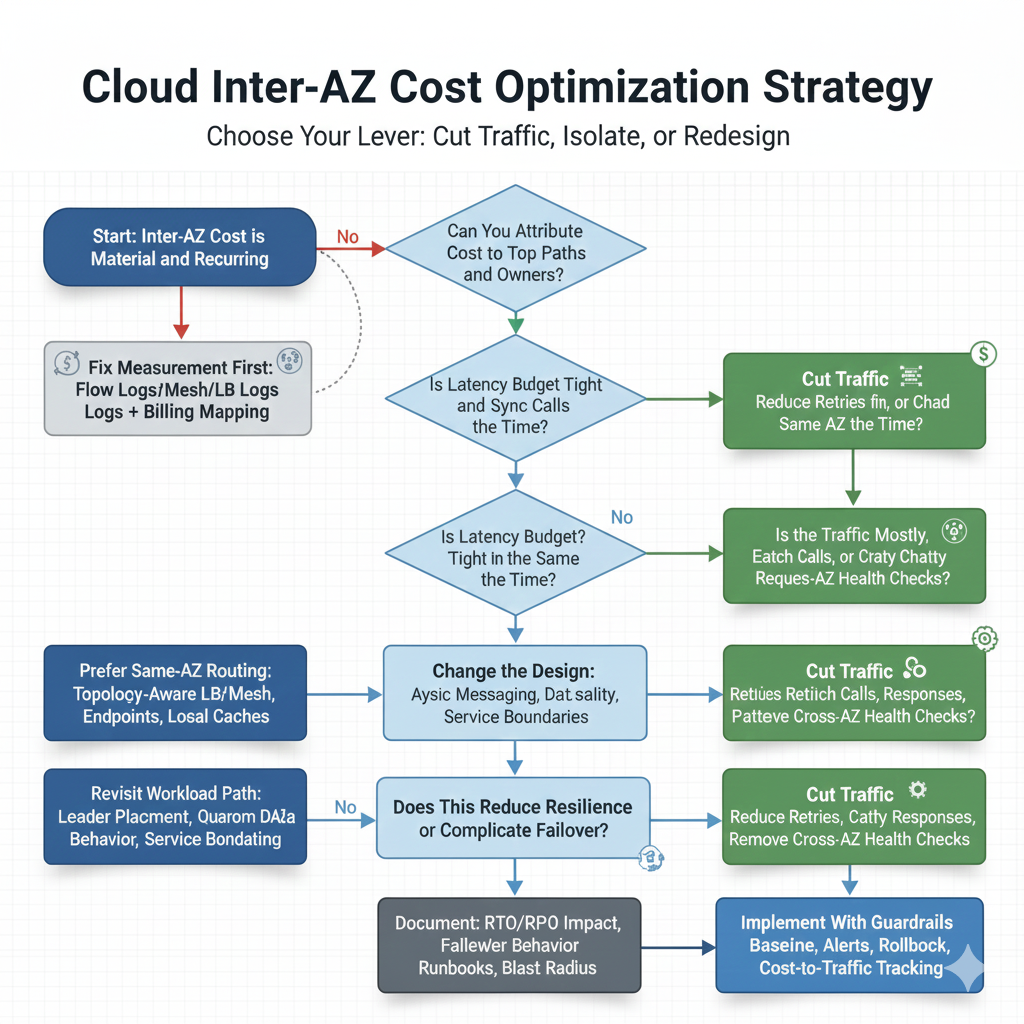
    Choose your lever: cut traffic, keep it in one AZ, or change the design
    Inter-AZ Data Transfer Cost Optimization

    Low-risk changes that reduce cloud data transfer cost (no migration required)

    If you want quick savings, stop paying for accidental cross-AZ behavior. Most stacks bleed money because traffic lands in the “wrong” AZ by default, retries multiply requests, and common reads keep reaching across zones for caches or dependencies.

    You are not changing your architecture here. You are tightening routing, tuning client behavior, and forcing locality in the steady state, while keeping cross-AZ as a failover tool, not the default operating mode.

    Treat these as controlled changes with a baseline and rollback. Otherwise, you will ship “optimizations” that move cost between line items, or you will reduce transfer charges and replace them with incident load.

    • Keep requests in the same AZ when everything is healthy. Use topology-aware routing (Kubernetes or mesh policies) and avoid cross-zone distribution unless capacity or health requires it. The trade-off is uneven load if one AZ runs hotter, so you need auto-scaling and per-AZ capacity discipline.
    • If a load balancer is spraying traffic across AZs by default, localize it. Many teams pay an always-on tax here without realizing it. The trade-off is that failover behavior must be explicit and tested, not assumed.
    • Avoid centralized caching patterns that force cross-AZ reads. If reads dominate, make caches locality-aware or zonal so the majority of traffic stays local. The trade-off is cache fragmentation and a lower hit rate if your traffic is not naturally sticky.
    • Kill retry amplification. Align timeouts across client, gateway, and backend so you do not create duplicate in-flight requests that bounce across AZs. Cap retries, add jitter, and use circuit breakers. The trade-off is that real errors surface faster, which some teams initially misread as “worse stability.”
    • Reduce chatty internal calls. Batch where it is safe, cache responses with short TTLs, and stop moving full payloads when only two fields are needed. The trade-off is stale reads and more careful invalidation logic.
    • Stop cross-AZ polling and noisy health checks. Keep routine checks local; reserve cross-AZ probes for failover validation and periodic sanity tests. The trade-off is less global visibility, so you compensate with better per-AZ SLOs and alerting.
    • Pin heavy scheduled jobs to the data’s AZ. ETL, indexing, exports, and backups often run wherever compute is available, then pull data across zones. The trade-off is less scheduling flexibility and sometimes longer job queues in a single AZ.
    • Watch observability volume. Traces and logs can become a quiet internal transfer driver, especially with high-cardinality tags and full-payload logging. Sampling and dropping noise saves cost, but the trade-off is reduced forensic detail unless you keep on-demand burst logging.

    Side-by-side options: what saves money and what increases on-call load

    Optimization leverCost mechanism it targetsOperational downside (what can go wrong, who owns it)
    Prefer same-AZ routing for service-to-service callsCuts cross-AZ bytes by keeping east-west traffic localUneven per-AZ load or bad routing rules; platform/SRE owns saturation and routing incidents
    Disable cross-zone load balancing where safeStops constant cross-AZ request distributionFailover behavior must be explicit and tested; the platform/app on-call owns outage risk during AZ impairment
    Zonal or locality-aware cachingAvoids cross-AZ cache reads and repeated fetchesLower hit rate from cache split; app team owns latency regressions and cache correctness
    Retry and timeout tuning (caps, jitter, circuit breakers)Prevents retry amplification, multiplying bytes and requestsMore fast-fail behavior if backends are unhealthy; SRE owns alert tuning and incident noise
    Batch calls and shrink payloadsReduces bytes per request and total request countStale data or harder debugging; app team owns the correctness and observability gaps
    Pin heavy jobs near data (ETL, exports, backups)Avoids large cross-AZ reads and transfersJob queueing or missed windows in a busy AZ; the data/platform team owns scheduling and SLAs
    Replace sync fan-out with async messaging for non-critical pathsCuts synchronous cross-AZ chatter and tail latencyQueue lag and backpressure become the new incident; platform/app owns retries and lag SLOs
    Change write topology or replication rules (where feasible)Reduces cross-AZ write acks and replication trafficConsistency trade-offs and harder recovery; the data team owns integrity and restores playbooks
    Enforce per-AZ capacity and placement policiesReduces random cross-AZ drift from autoscaler placementHigher ops overhead and capacity planning work; the platform team owns sizing and guardrails

    Playbooks by stack: Microservices, Kubernetes and data pipelines

    Scenario 1: Cross-zone load balancing is always on.
    Action: localize steady state traffic. Keep cross-AZ only for failover. Validate with LB logs: % requests served by same-AZ backends should dominate.

    Scenario 2: Gateway is in one AZ, services are multi-AZ.
    Action: deploy the gateway per AZ or use zonal ingress. Otherwise, every request starts back as cross-AZ.

    Scenario 3: Service discovery gives a “global” endpoint.
    Action: use zonal endpoints or topology-aware routing. If clients cannot prefer same-AZ, you will pay forever.

    Scenario 4: Retry policy is multiplying bytes.
    Action: cap retries, add jitter, align timeouts end-to-end. Check if retries hop AZs. They often do.

    Scenario 5: Fan-out aggregator calls 8 services per request.
    Action: cache at the aggregator, batch downstream calls, and kill unnecessary sync dependencies. Measure bytes per request at the aggregator.

    Scenario 6: Health checks and polling are cross-AZ and constant.
    Action: keep probes local; do cross-AZ probes only as periodic failover validation. Track steady baseline bytes at idle traffic.

    Scenario 7: Cache is “shared,” but physically sits in one place.
    Action: make cache zonal or make the client locality-aware. Verify hit traffic stays in-zone via flow logs.

    Scenario 8: Kubernetes places pods evenly, but traffic ignores locality.
    Action: add topology spread constraints and topology-aware routing. Confirm endpoints returned are the same AZ first.

    Scenario 9: Auto-scaling adds nodes in one AZ, traffic spills to other AZs.
    Action: per-AZ node group sizing. If one AZ is short on capacity, your “locality” rules get bypassed.

    Scenario 10: NAT gateway is single-AZ and used for internal paths by accident.
    Action: ensure private routing for internal services. Validate routes, DNS, and endpoints so you are not hairpinning.

    Scenario 11: Data jobs read huge volumes from replicated storage in the wrong AZ.
    Action: pin compute to data. Schedule ETL/export jobs in the same AZ as the primary read source.

    Scenario 12: Producers and consumers sit in different AZs around a broker.
    Action: co-locate hot consumers with the broker leader or partition leaders. Otherwise, every message is cross-AZ.

    Scenario 13: Database writes require cross-AZ quorum acknowledgments.
    Action: keep writers close to the leader. Move non-critical writes to async if allowed. Confirm commit path behavior in docs, not guesses.

    Common misconceptions about multi-AZ and replication (and the real cost)

    Teams often treat multi-AZ as a reliability checkbox and assume the cost is basically fixed. In practice, multi-AZ changes the default traffic path. If your load balancer, gateway, service discovery, or auto-scaler does not preserve locality, requests routinely enter one AZ and get served in another. That creates a steady cloud data transfer cost inside a single region, even when user traffic is flat, and it is exactly why inter-AZ data transfer cost optimization turns into a recurring fight.

    Replication is also not an isolated storage detail. It changes what your write path does under the hood: cross-AZ acknowledgments, coordination, and retries during minor jitter.

    A single logical write can fan out into multiple network hops depending on leader placement and quorum rules. That is how cloud data transfer cost creeps up without anyone shipping “more features,” because the platform is doing more work per write.

    The misconception that “more replicas are always safer” is only half true. Safety improves, but you pay in complexity: failover timing, read/write routing, and ownership of consistency behavior.

    If nobody owns those rules, the system drifts into “works but expensive” mode: cross-AZ routing becomes default, retries amplify, and replication overhead becomes structural. Inter-AZ data transfer cost optimization is easier when locality and write semantics are treated as explicit decisions, not defaults.

    Warning signs your inter-AZ charges will keep climbing

    You usually do not need a perfect model to predict runaway spend. If the same paths keep crossing AZs in the steady state, the cost will scale linearly with traffic, and sometimes faster when retries and fan-out show up.

    The point of this section is to give you patterns you can detect quickly in logs, traces, and billing exports before the spend becomes “normal.”

    • Your load balancer or gateway routinely serves requests from a different AZ than where they entered (cross-zone distribution is the default, not the exception).
    • Service-to-service calls show a high cross-AZ percentage even when both services run in every AZ (locality is not being respected).
    • Retry rates spike during small blips, and retries tend to land on different AZ endpoints (traffic multiplication across AZs).
    • A shared cache, shared auth service, or shared config service effectively lives in one AZ (every other AZ pays a read tax).
    • Aggregator services fan out to many downstream services per request (bytes per request grow with every new dependency).
    • Batch jobs, exports, or indexing pull large volumes from replicated storage in the “wrong” AZ (scheduled work creates a constant baseline).
    • Non-prod environments (QA, staging) generate meaningful cross-AZ transfer (test traffic is quietly expensive and always on).
    • Observability pipelines move too much data across AZs (over-tracing, payload logging, high-cardinality tags).

    If you see two or more of these at the same time, data transfer cost optimization should move from “FinOps cleanup” to “platform change with ownership.” The next step is to pick one high-volume path, force locality, and then lock it with guardrails so it does not drift back after the next release.

    If cross-AZ traffic is your “steady state,” you are not paying for resilience. You are paying for default routing mistakes.

    When not to optimize inter-AZ data transfer costs

    Optimize later (or not at all) if it compromises your recovery goals. If your RTO/RPO depends on multi-AZ synchronous behavior for a truly critical system, forcing strict locality can create a false sense of savings while increasing outage risk. In these cases, the right move is often governance: prove which flows must stay multi-AZ, set budgets for internal transfer, and keep the rest local. Your data transfer cost control process should not be allowed to quietly rewrite your resilience posture.

    Optimize later if you cannot measure and attribute. If you cannot map the top inter-AZ traffic paths to owners and billing meters, any change will be political and reversible. You will “save” for a month, then a rollout changes routing, retries, or placement and the cost returns. Fix measurement first, then optimize. Otherwise, you are trading engineering time for temporary optics.

    Optimize later if the main driver is product growth, not waste. Some inter-AZ cost is simply the price of a design choice you intentionally made: cross-AZ quorum writes, cross-AZ replication, or global endpoints for operational simplicity. If growth is the driver, your decision is not “reduce cost,” it is “choose the cheapest safe design.” Focus on unit economics (cost per million requests, per tenant, per GB processed) and make that cost visible to the business.

    Optimize later if the change creates permanent lock-in or a new ops tax. Some “fixes” push you into proprietary routing features, complex meshes, or fragile placement rules that only a few people understand. If the savings are small and the operational downside is large, you are buying technical debt. Favor changes that are reversible, testable, and owned by a team with real on-call accountability.

    Conclusion

    Inter-AZ data transfer cost control works when you treat it like an engineering control system, not a billing exercise: measure the top paths, force locality in the steady state, and add guardrails so the next release does not reintroduce cross-AZ drift through routing, retries, or “global” endpoints. The honest trade-off is operational ownership. You are choosing where you want complexity to live: in a higher cloud data transfer cost that nobody questions, or in explicit routing and failure behavior that teams can test, operate, and defend in review.

  • A Rental Trap: A Blueprint for Strategic Exit from Cloud in 2026

    A Rental Trap: A Blueprint for Strategic Exit from Cloud in 2026

    Before I talk about Strategic Exit from Cloud, let me tell you a story.

    I recently sat across from the Head of IT for a major Japanese venture here in India. We met at one of those ubiquitous coffee chains in Gurgaon; it is the kind of place that serves as the unofficial headquarters for the local tech scene.

    It is a strange environment. You look around and see a sea of glowing Apple logos, noise-canceling headphones, and people in their twenties wearing Build t-shirts. These are the high-salaried tech elite of the city. They are huddled over their machines, deep into anything from Python scripts and Power BI dashboards to complex Kubernetes clusters and Spark jobs. It is a room full of people building the future, fueled by overpriced avocado toasts and pour-overs. For a packed house, it is surprisingly quiet. The only real sound is the rhythmic clicking of mechanical keyboards.

    To anyone else, this was the Cloud Generation in its natural habitat. But the man sitting across from me, a veteran of high-scale Japanese engineering, was not buying the hype. He looked out of place among the “oldies” like us, but he carried the quiet confidence of someone who knows the math everyone else is ignoring.

    I expected our conversation to drift toward the usual topics like multi-cloud strategies or their 2026 AWS commitment. Instead, he leaned in, lowered his voice to match the café’s studious hum, and dropped a bombshell.

    “Except for our public-facing CMS, we have zero presence on the cloud,” he said. “Everything else is on-prem.”

    In this temple of SaaS and “Serverless,” his words felt like heresy.

    I looked around at the tech talent in the room, likely burning through thousands of dollars in cloud credits to run the very Spark jobs and Kubernetes nodes they were monitoring, and then back at him. He was not avoiding the cloud because he was stuck in the past. He was avoiding it because he was mathematically disciplined.

    As he walked me through their architecture, the irony was thick. The high-paid crowd around us was happy to pay exorbitant prices for both their coffee and their computing power, but his firm had quietly realized that the Cloud is a spectacular place to start and a dangerous place to stay.

    By owning their iron, they had achieved what everyone in that café was chasing, but few were actually hitting: True Data Sovereignty and 40% higher margins than their competitors.

    This encounter confirmed a shift I have been tracking for months. The era of “Cloud-at-all-costs” is hitting a wall. We are entering the age of the Strategic Exit from Cloud.

    cloud data transfer costInter-AZ Data Transfer Cost Optimization: The Silent Bill You Forgot to Budget

    The “Cloud Tax” and the Law of Diminishing Returns

    The public cloud is sold as an infinitely scalable utility. The marketing tells you that you only pay for what you use. That is a half-truth. In reality, you pay a massive premium for “agility” that your business might no longer need once your product is stable.

    If your workloads are predictable like the Japanese firm I mentioned, the cloud stops being a tool for growth and starts becoming a tax on your margins.

    Also Read: Google Cloud migration Blueprint from Infogion

    The Math: Why 2026 is the Year of the Iron

    To understand why a high-growth venture would choose on-prem, you have to look at the three-year TCO (Total Cost of Ownership).

    Consider a standard “High-Compute” setup required for Spark jobs or large-scale Python data processing:

    Expense CategoryPublic Cloud (Managed)On-Prem (Colocation)
    Monthly Compute$8,500 (Reserved Instances)$1,200 (Power/Rack Space)
    Data Egress$2,000 (The “Exit Tax”)$0 (Flat Bandwidth)
    Hardware Cost$0 (Rental model)$65,000 (Upfront Purchase)
    3-Year Total$378,000$108,200

    Even after factoring in the $65,000 for high-end Dell or HP servers and the cost of a specialized engineer to “rack and stack” the gear, the on-premises model is nearly $270,000 cheaper over three years.

    For the tech guys in that Gurgaon café, that difference is invisible because the cloud bill is often hidden in “OpEx” budgets. But for the Japanese IT Head, that $270k represents the difference between a profitable quarter and a round of layoffs.

    Also Read: 7 cheapest Cloud Storage Service Provider

    The “Hidden” Exit Taxes

    Cloud providers know their pricing is vulnerable to hardware ownership. This is why they have built “moats” to keep you trapped:

    1. Egress Fees: Moving data into the cloud is free. Moving it out to your own servers can cost upwards of $0.09 per GB. If you have petabytes of data, you are effectively a hostage.
    2. Feature Lock-in: Proprietary tools like AWS Glue or DynamoDB are designed so that “leaving” requires a complete rewrite of your codebase.
    3. The Support Premium: As soon as you scale, “Basic Support” is not enough. You end up paying a percentage of your total spend just to talk to a human when a node goes down.

    Also Read: Cloud vs. Bare Metal: Picking the Winner for Your 2026 Budget

    The Hardware Reality: What “Iron” Actually Looks Like in 2026

    When that IT Head in Gurgaon told me they were 100% on-prem, my first thought was about their supply chain. You can’t just “click” a button to get a new H100 GPU or a petabyte of NVMe storage. You have to negotiate with vendors, wait for shipping, and deal with DOA (Dead on Arrival) parts.

    For a venture-scale operation, you aren’t buying consumer-grade gear. You are looking at enterprise-grade infrastructure in line of Dell PowerEdge, HPE ProLiant, or Supermicro. But here is the “Brutally Honest” part: you also need to think about the secondary market.

    Many high-growth firms are realizing that “Last-Gen” hardware (like a 2-year-old Xeon gold processor) can handle 90% of their Spark and Python workloads at 30% of the cost of new equipment. In the cloud, you pay for the newest chips whether you need them or not. On-prem, you choose the exact horsepower for the job.

    Also read: Comparison of the top four Cloud Platforms – Google Cloud, Amazon Web Services, Microsoft Azure, and IBM Cloud

    The Skill Gap: Why Your “Cloud Native” Team Might Panic after Strategic Exit from Cloud

    This is the biggest risk of strategic Exit from Cloud. Most of the high-paid tech elite in that café have spent their entire careers in a world where “infrastructure” is an API call. They know Kubernetes, but they might not know how to troubleshoot a failing RAID controller or a misconfigured Top-of-Rack switch.

    When you leave the cloud, you are trading “Provider Risk” for “Personnel Risk.” You are moving from a world where AWS manages the hardware to a world where you are the data center manager.

    If you don’t have a Greybeard on the team, someone who remembers what it’s like to work in a cold aisle with a crash cart, you are going to struggle. You need people who understand the Linux kernel, not just the Terraform provider. The savings on your AWS bill will quickly vanish if your on-prem cluster goes down for 48 hours because nobody knows how to fix a corrupted file system.

    Also read: Amazon AWS Cloud for Non-Tech Founders in 2026

    The “Stealth” Costs of Ownership

    I want to be clear: On-prem is not “free.” You are trading a monthly rental fee for a set of new responsibilities.

    • You are paying the Colocation provider for redundant power feeds and massive cooling units.
    • Unless you want to drive to the data center at 3 AM to swap a failed drive, you need a “Remote Hands” agreement. These guys are your feet on the ground, and they don’t work for cheap.
    • Every hour your lead engineer spends debugging a networking hardware issue is an hour they aren’t building your product. This is the “hidden” trade-off.

    The 90-Day Blueprint: How to Reclaim Your Infrastructure

    The strategic Exit from Cloud is not a “weekend project.” It is a surgical operation. If you try to move everything at once, you will fail. The Japanese firm I spoke with took a phased approach that prioritized data safety over speed.

    Also Read: 20 Pay-zero Cloud Storage Services

    Here is how you execute a strategic exit in three distinct phases.

    Phase 1: The Inventory and “Egress Audit” (Days 1–30)

    Before you buy a single server, you must know what you are actually using. Most companies have “Zombie Instances” running that nobody monitors.

    • Identify exactly where your data is flowing. Is it mostly internal, or are you serving petabytes to the public?
    • Categorize your services. Anything using a proprietary cloud tool (like AWS Athena or SageMaker) will need a code refactor. Anything running in a standard Docker container is an easy candidate for relocation.
    • Calculate your current “Price per Compute Hour.” This is your benchmark for success.

    Phase 2: The “Pilot” and Colocation Setup (Days 31–60)

    Do not build your own data center. Use a Colocation (Colo) provider. They provide the power, cooling, and physical security; you just provide the iron.

    • In 2026, lead times for high-end GPUs and servers are still a factor. Order your hardware on Day 31.
    • Set up a “Direct Connect” or a high-speed VPN between your cloud VPC and your new hardware.
    • Move a non-critical, steady-state workload (like a staging environment or a secondary data processing job) to the new servers. Monitor it for 14 days. If the performance holds, move to Phase 3.

    Phase 3: The Data Migration and the Point of No Return

    This is where things get expensive and stressful. This is the moment you have to pay the Exit Tax I mentioned earlier. If you try to move a few hundred terabytes over a standard internet connection, you will likely spend more on bandwidth and time than the hardware is worth.

    For the Japanese firm, they didn’t even try to push it over the wire. They used physical transfer appliances basically ruggedized storage arrays that you fill up, encrypt, and ship via a courier. It sounds primitive in 2026, but moving ten petabytes via a truck is often faster and more secure than any fiber optic cable you can rent.

    Once that data is sitting in your new racks, you start the Weighted DNS dance. You don’t just flip a switch and pray. You send 5% of your traffic to the on-prem cluster and watch the logs like a hawk. If the Spark jobs are finishing on time and the latency isn’t spiking, you bump it to 20%, then 50%.

    The most satisfying moment isn’t the cost savings; it is the moment you finally click Terminate on those massive AWS instances. It is the digital equivalent of finally paying off your mortgage. You are no longer a tenant; you are an owner.

    Also Read: Master Mastering Cost-Effective Cloud Platforms: 4 Absolute Insights for Small Business Owners

    Conclusion: Reclaiming the Frontier

    As I finished my coffee and watched the Gurgaon tech crowd slowly filter out of the cafe, I realized that the Japanese IT Head wasn’t an outlier. He was a pioneer.

    He saw the cloud for what it really is: a fantastic incubator for the “0 to 1” phase of a company. It is a place to experiment, fail fast, and find product-market fit. But once you have found that fit once your workloads are steady and your data is your most valuable asset staying in the cloud is like continuing to live in a hotel long after you’ve become a millionaire. It’s convenient, but it’s financially reckless.

    The Strategic Exit isn’t about being anti-cloud. It’s about being pro-business. It is about realizing that in 2026, the real innovators aren’t just the ones writing the best code; they are the ones who actually own the machines the code runs on.

    If you are tired of paying the exorbitant price for your compute and your coffee, it might be time to stop renting and start building.

    Additional reading: On Premise vs. Cloud: Key Differences, Benefits and Risks

    FAQs

    How is the Capex justified to the board?

    Frame it as an equity play. Cloud spending is a black hole of pure Opex. Buying hardware converts that waste into a depreciating asset that pays for itself in 18 months by nuking the “rental tax” on your margins.

    Does this kill our “Speed to Market”?

    Only if your team is lazy. Modern automation tools provide the same “one-click” deployment on-premises as they do in AWS. You are trading the convenience of a leased car for the performance of a custom-tuned engine you actually own.

    Is the egress fee a dealbreaker?

    It is a ransom, not a fee. Audit your data gravity now. Moving services before data is a financial suicide mission. Pull the heaviest data sets first to stop the cloud provider from holding your operations hostage.

    Do we need to hire a massive infrastructure team?

    No. Software-defined networking means a lean team can run a data center from a laptop. If you can manage a Kubernetes cluster in the cloud, you can manage it on your own iron. The headcount stays flat; the bill drops.

    What about the “Noisy Neighbor” security risk?

    In the cloud, you share a hallway with strangers. On-premises, you own the building. Repatriation gives you absolute sovereignty over data residency and hardware-level isolation—critical for high-stakes compliance and protecting IP.

  • Amazon AWS Cloud for Non-Tech Founders in 2026: What Actually Doesn’t Make You Powerless

    Amazon AWS Cloud for Non-Tech Founders in 2026: What Actually Doesn’t Make You Powerless

    Let’s be honest. Half the founders out there talk about “moving to the cloud” like it is some spiritual journey. The minute Amazon AWS Cloud comes up, everyone suddenly becomes an expert, even though most of us have absolutely no clue what is happening behind those shiny dashboards.

    AWS is a beast. A brilliant beast, sure, but also the kind that bites when you look away. One bad click and your monthly bill shoots up like it is trying to give you a heart attack. And their service names feel like the AWS engineers stayed up all night inventing complicated words just to mess with the rest of us.

    Founders? They bluff. They nod in meetings and throw around the word “scalability” as they mean it. Inside, they are only praying that nothing collapses at 4 a.m. They just want the basics:

    “Make the damn thing run. Keep it fast. Do not rob us.”

    Here is the painful part. When AWS works well, it really works. It gives small teams ridiculous power. It lets you scale without begging for mercy. It quietly handles the ugly stuff you never want to think about.

    So this post is for the founder who is done pretending. The one who wants the truth, a little attitude, and a guide that reads as a human wrote it, not a cloud monk chanting jargon.

    Let’s break AWS down to the parts that matter and ignore the rest.

    The Founder Cheat-Sheet for Amazon AWS Cloud

    This is the part every founder secretly wants. Not the architecture diagrams. Not the service names. Just the stuff that actually decides whether AWS (check the AWS Cost Calculator) becomes your growth engine or your monthly headache.

    1. Cost Predictability Is More Important Than Cost Savings

    Everyone says Amazon AWS Cloud is cheap. It is not. What matters is whether you can predict the bill without clutching your chest. Tell your team to set alerts, cap non-prod usage, and avoid fancy setups until you actually need them. Control beats chaos.

    2. Data Should Always Be Yours, Not Buried in Some Engineer’s Laptop

    Make sure backups exist. Make sure they work. Make sure the restore button actually restores. AWS gives you solid tools, but founders still need visibility into where the business’s data lives and who has access to it.

    3. Ship Fast and Break Less

    The whole point of using Amazon AWS Cloud is speed. Your team should not spend weeks tweaking servers or arguing about containers. If AWS has a managed version of something, use it. If you can automate a task, automate it. Progress beats perfection.

    4. Pick the Right Region and Stick to It

    This is a simple choice that many founders unknowingly mess up. Choose the region closest to your customers and avoid moving things around unless you absolutely must. Region chaos leads to billing chaos.

    5. Use Automation to Save Your Weekends

    Auto-scaling, scheduled shutdowns, and basic monitoring are not “nice to have.” They save sleep. They save money. They keep your team from firefighting. Small habits make Amazon AWS Cloud feel less like a wild animal and more like a working system.

    Three Things You Actually Need to Know (Not 153 Services)

    Here is the real story no one tells founders. You do not need to learn every Amazon AWS Cloud service or pretend you understand cloud diagrams that look like a spider fell into a geometry box. You only need to grasp the few things that decide whether your product survives out there. 

    First, your product needs a solid place to live. Forget the dizzying service names. Deep down, all you want is an environment that does not fall apart the moment a few users show up. AWS gives you that stability if you keep the setup clean instead of turning your infrastructure into an ego project.

    Then there is the part that founders never admit. You want growth without chaos. When your user base expands, you want a system that stays calm instead of shaking like a washing machine possessed by whatever haunted Christian Bale in The Machinist. That is what scalability really means. Amazon AWS Cloud handles this beautifully, but only if you resist the temptation to over-engineer everything just to look smart.

    And finally, security. Most small companies think they are too irrelevant to be attacked. That illusion dies the moment someone leaves a door open. Amazon AWS Cloud gives you strong protections, but you need your team to use them properly. Access controls, working backups, basic monitoring, and someone who actually checks alerts. Boring things, but they keep your business alive.

    Also Read: The blueprint of Google Cloud Migration

    The Founder’s Shortcut to What Really Matters

    Shortcut 1: Keep the Architecture Boring

    Fancy diagrams impress nobody when the site is down. Use the simplest pieces of Amazon AWS Cloud that get the job done. The fewer moving parts, the fewer late-night emergencies. Boring architecture is underrated and very profitable.

    Shortcut 2: Spend Time on Monitoring, Not Tweaking Servers

    Do not waste your founder energy debating instance types for hours. Put that energy into basic monitoring. A clean dashboard, a few alerts and regular checks will prevent more disasters than yet another “optimised” server tweak.

    Shortcut 3: Build Only What Moves the Business Needle

    If a feature does not help customers or revenue, it is decoration. Let AWS handle plumbing wherever possible. Managed services exist so your team can build useful things instead of doing heroic but meaningless backend gymnastics.

    Shortcut 4: Automate Every Repetitive Task

    Backups, deployments, scaling, health checks, shutdowns. If it repeats, script it. Automation keeps your team from burning out on routine work and lets them focus on product and users instead of babysitting infrastructure.

    Shortcut 5: Make Cost Awareness a Habit, Not a Monthly Panic

    Most shocking AWS bills are not “bad luck.” They are ignored signals. Set budgets, set alerts and review usage regularly. Treat cost like a weekly hygiene check, not a crime scene investigation at the end of the month.

    Amazon AWS Cloud

    The Stuff You Should Stop Obsessing Over

    Founders love worrying about the wrong things. AWS has a talent for distracting you with shiny topics that look important but honestly do not matter for a growing business. Here are the usual traps.

    1. Kubernetes – NOT FOR ALL

    Everyone throws this word around like it is the secret sauce of successful startups. It is not. If you have ten employees and your product is still finding its feet, you do not need Kubernetes. You need stability, speed, and fewer things that can break.

    2. Multi Cloud Strategy – WOLLY MAMMOTH

    Relax. You are not Netflix. You are not running a global fleet of a zillion microservices. Pick one cloud, stick to it, and focus on building your product. Vendor lock is a fear that sounds intelligent in meetings but drains your energy in real life.

    3. Comparing AWS vs GCP vs Azure – POINTLESS

    This debate never ends. It also does not matter if your team already knows Amazon AWS Cloud. Skill beats platform. A mediocre setup on the wrong cloud costs more time, money, and mental peace than committing to the one your engineers can actually operate.

    4. “We Need AI Everywhere.” – ABSURD

    No. You need your app to work properly first. AI can come later. Adding AI to a buggy product is like spraying perfume on a dumpster. Fix the basics. Then think about the smart stuff.

    5. Over-Engineering the Whole System – THEFT

    Founders sometimes push engineering teams to create overly complex setups to look impressive. Nobody is impressed when things crash. A simple AWS architecture is often stronger than a monster built for bragging rights.

    The Hidden Weak Spots No One Warns You About

    Every founder thinks Amazon AWS Cloud problems come from big issues like traffic spikes or bugs. The real trouble usually hides in tiny, stupid things. A forgotten access key. A test server has been left running for weeks. A permission someone granted in a hurry. These small slip-ups quietly grow into huge bills, security holes and late-night chaos. No one warns you about these weak spots because they look harmless at first. They are not. They bite at the most vulnerable moment…LOL.

    Weak SpotWhat It Actually MeansWhy It Becomes a Problem
    Unused resourcesTest servers, forgotten volumes, old snapshotsBills creep up and no one knows why
    Overly broad accessToo many people with admin-like permissionsOne mistake can break everything or leak data
    Missing backupsBackups exist in theory but not in realityA bad deployment can wipe out days of work
    No monitoring disciplineAlerts exist, but nobody checks themIssues pile up silently until something crashes
    Region mismatchWorkloads are spread across random regionsSlower app performance and unnecessary costs
    Hacky quick fixesTemporary patches that never get cleaned upSystems become brittle and unpredictable

    A Simple, Drama-Free AWS Strategy for 2026

    Most founders want an Amazon AWS Cloud strategy that does not require a cloud monk, a 40-page architecture diagram, or a weekend spent crying into billing dashboards. Here is the truth. You do not need elite access. Unless you play golf with Matt Garman over the weekend, you will never get some secret magic shortcut. What you do get is a simple, clean approach that actually works in the real world.

    Start by keeping your environments limited and controlled. One for development and one for production is more than enough for most companies. More layers only create more confusion. Use managed services whenever possible because maintaining your own servers is basically volunteering for extra stress.

    Make automation your default setting. Backups, deployments, scaling schedules, and shutdown routines should all be automatic. The less you touch manually, the fewer things you break. Set up cost alerts and basic monitoring, and actually look at them once in a while. A small amount of discipline here saves you from huge bills later.

    Security should not be an afterthought. Keep access tight, audit permissions regularly, and avoid the trap of giving everyone god-like rights because it is convenient. A tiny mistake can open a giant hole, and 2026 will be even less forgiving.

    The best AWS strategy is not glamorous. It is calm. It is simple. It lets your team ship faster and keeps your business away from stupid surprises. That is the only drama-free strategy that survives in real life.

    Smart Questions to Ask Your Tech Team (So You Don’t Get Bullshitted)

    Most founders stay quiet during AWS discussions because everything sounds like advanced rocket science mixed with alphabet soup. Here is the trick. You do not need to understand every term. You only need to ask the kind of questions that make your team pause, think and stop bullshitting you. These questions cut through the noise and force clarity without you pretending to be a Amazon AWS Cloud guru.

    “What are the top three things burning money this month and why?”
    This single line exposes waste faster than any dashboard. If your team cannot answer it, nobody is watching the shop.

    “If traffic jumps tonight, what breaks first?”
    Every system has a weak point. You want to hear a clear answer, not a fantasy story. The weak link is where you invest.

    “Which tasks can we automate right now?”
    If you ask this regularly, your team will stop doing repetitive nonsense and start thinking about efficiency. Automation saves time and sanity.

    “Who has access to what and why?”
    This question prevents half of the stupid security incidents that founders hear about too late. If the answer is vague, permissions are already a mess.

    “What is the simplest way to run this setup without adding more moving parts?”
    This forces the team to justify complexity. Most complicated architecture exists because someone wanted to feel clever, not because the business needed it.

    “Show me the monitoring in plain English.”
    If the dashboard cannot be explained without a lecture, it is not being monitored properly. You want clarity, not hieroglyphics.

    Conclusion

    Here is the part founders often forget. Amazon AWS Cloud is not some mythical power source that magically fixes everything. It is a toolbox. A big one. A messy one. A powerful one. What matters is how you use it. If you keep things simple, automate the boring parts and stay alert to the tiny mistakes that turn into huge problems, AWS becomes a strength instead of a stress trigger.

    You do not need elite access, secret cloud knowledge, or a private conversation with someone on Bezos’s yacht. You need clarity, discipline and a team that understands why clean setups always beat clever ones. The real magic is not in the platform. It is in the decisions you make every week.

    Treat AWS like a partner, not a puzzle. Keep the nonsense out. Focus on what helps the business grow. That is the only formula that works for every founder, every team and every product trying to scale without losing its mind.

  • 7 Cheapest Cloud Storage Providers We Recommend and How to Choose the Right One

    7 Cheapest Cloud Storage Providers We Recommend and How to Choose the Right One

    Why is everyone after the cheapest cloud storage? The search volume has increased tremendously in Bing and Google Search (well, that’s why I am writing it). Cloud storage used to feel optional. Like something only big companies worry about. Not anymore. 

    Today, it’s where your invoices live, your client files live, your backups live; basically, everything lives there except your peace of mind when the bill arrives.

    And that’s exactly why people search for inexpensive cloud storage. Not because they love comparing plans, but because they’re tired of paying extra for things they don’t even use. Half the time you’re charged for “premium features” you never asked for and probably never will.

    The funny part? What looks cheap on the surface often turns expensive the moment you start actually using it. Some platforms limit downloads, some cap devices, some hide upgrade nudges so cleverly you don’t even notice you’ve clicked “upgrade.” It’s chaos, disguised as cloud.

    Before You Pick a Plan: The Basics You Must Understand

    Choosing the cheapest cloud storage isn’t just about chasing the lowest price tag. It’s about understanding how you actually use your files so you don’t end up paying for things you don’t need. A little clarity upfront saves you from surprise charges, annoying limits, and those “why is my bill suddenly higher?” moments.

    • Know how much data you store today and how fast it’s growing.
    • Check how often you upload or download files.
    • Separate daily-use storage from long-term backup needs.
    • Count how many users genuinely need access.
    • Verify device limits to avoid one-device traps.
    • Check file-size caps, especially if you work with big media files.
    • Look for hidden charges on downloads, sharing, or upgrades.
    • Make sure you can export or migrate your data without pain.

    Now, where will you get all these details in one place? Of course, the comparison sites. However, most comparison sites pretend every provider is amazing (they have the affiliate links, you know), but let’s be honest: half the “popular” platforms become expensive the moment you start using them properly. That’s why finding the most affordable cloud storage is less about brand hype and more about understanding your own habits. If you know what you upload, how often you share, and how many people touch your files, you’ll immediately spot which plans are genuinely cheap and which ones are waiting to ambush your wallet later.

    What Makes The Cheapest Cloud Storage (It’s Not Just Price Per GB)

    When people talk about the Cheapest Cloud Storage, they usually mean the service with the smallest monthly price on the pricing page. That number is only the teaser. Real affordability becomes visible once you start using the storage in your natural, messy way. Random uploads, rushed client folders, weekend backups and everyday sync activity all reveal the true cost. The lowest price tag does not matter if everything else around it quietly chips away at your budget.

    Another thing no one mentions is that cheap depends on how you work. If you upload once a week and mostly store documents, your ideal plan looks very different from someone who handles videos, design files, or heavy media assets. That is where inexpensive cloud storage becomes a personalised choice. A service that works beautifully for one business can feel painful for another simply because of file-size limits, device caps, or slow sharing options. These small restrictions have a very real impact.

    There is also the ecosystem trick. Some platforms look generous on day one, but then hide basic features behind paid upgrades. You try to share a link and suddenly a pop-up tells you to upgrade. You add one more device and the system will gently suggest that you upgrade again. It feels like buying a budget phone and realising the charger is sold separately. What looked like the Cheapest Cloud Storage slowly becomes a plan that constantly asks for a little more money.

    So when you look for truly inexpensive cloud storage, think beyond the headline price. Look at how many people touch your files, how often you download data, and how quickly your storage grows. Cheap storage stays cheap only when the plan fits your behaviour. If it does not, the monthly bill becomes your reminder that choosing on price alone was a bad idea.

    The Factors That Influence Your Actual Monthly Cost

    Your real cloud storage bill rarely matches the number you saw on the pricing page. The cost depends on how you actually use the service, not on the headline price. Even the Cheapest Cloud Storage can become expensive if these factors are ignored.

    • How often do you upload or download files?
    • How many users do you add to your workspace?
    • Whether clients frequently access shared links
    • How quickly does your total storage size grow?
    • Extra charges for higher speeds or priority sync
    • Limits that force you into paid upgrades sooner than expected

    If you keep these in mind, you can choose genuinely inexpensive cloud storage that stays affordable as your data grows, instead of getting surprised by hidden costs or forced upgrades.

    Quick Self-Assessment: What Type of Storage User Are You?

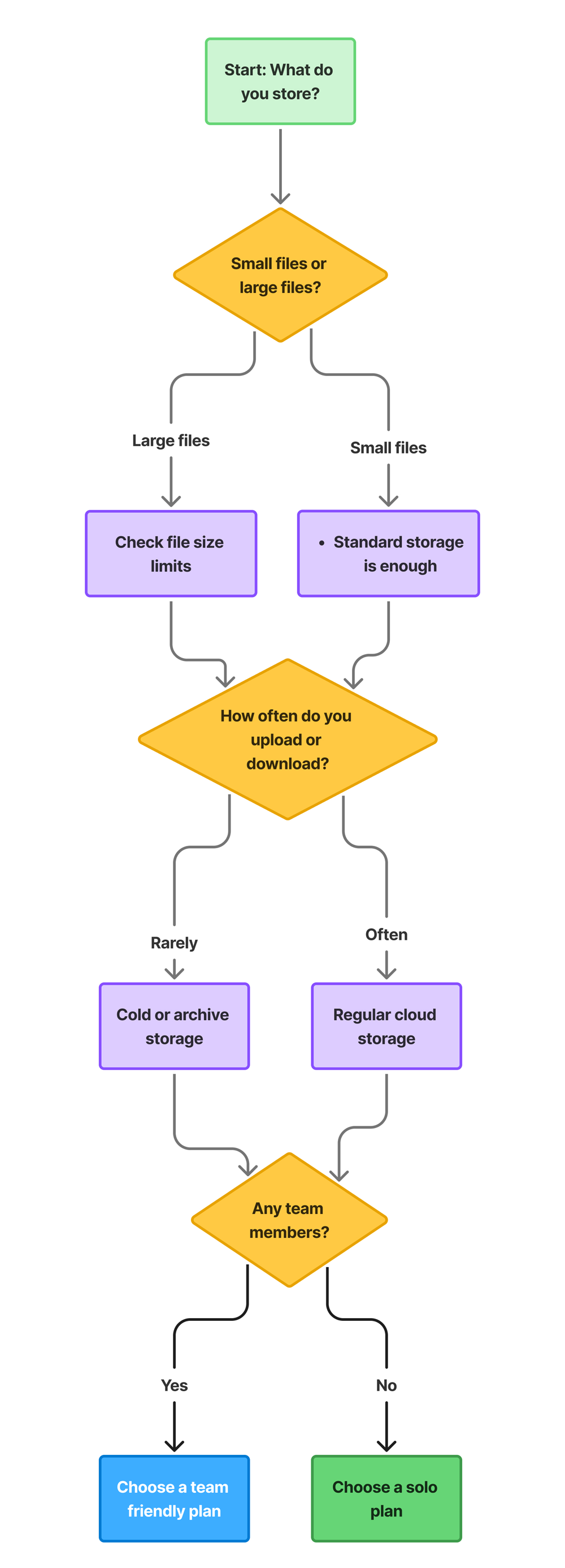
    Before comparing prices in search for the most affordable cloud storage, it helps to understand your own behaviour. This one step saves you from picking the wrong plan and getting forced into upgrades later. Your needs fall into a simple pattern based on how often you upload files, how many people access them and how fast your storage grows. Use this quick flow to understand where you stand.

    cheapest cloud storage

    Hidden Fees That Can Inflate Your Bill

    Most people choose the Cheapest Cloud Storage based on the upfront price, but the real shock comes later when the hidden charges start showing up. Some services quietly bill you for extra downloads, shared links that get too much traffic, faster sync speeds, or even basic collaboration features. These are never highlighted during sign-up, which is why so many users think they got a great deal until the first “unexpected activity charge” lands in their inbox.

    The trick is simple. Every platform makes money from what you do most. If you frequently download files, expect usage fees. If your clients open shared links often, expect traffic charges. If your storage grows quickly, expect auto-upgrades. What looked like inexpensive cloud storage becomes a layered, unpredictable cost. Understanding these hidden fees early means you can choose the services that are transparent and won’t surprise you later.

    Cheapest Cloud Storage Services in 2026

    1. Google Drive / Google One

    Perfect for anyone already using Gmail, Docs, and Photos. Simple, familiar, and smooth for everyday storage and sharing without any learning curve. Around $1.99/month for 100 GB and $9.99/month for 2 TB.

    Pros:

    • Very easy to use and integrate into daily work
    • Great for sharing and collaborating through Docs/Sheets
    • Decent free 15 GB starter space

    Cons:

    • Storage is shared with Gmail and Photos, so it fills faster
    • Not privacy-focused
    • Not ideal for very large media files long-term

    2. Microsoft OneDrive

    Best value for anyone using Word, Excel, Outlook or Windows. Storage feels “built-in” and works flawlessly across devices. Microsoft 365 Family gives 1 TB per person (up to 6 users) for a single monthly fee.

    Pros:

    • Excellent value if you already rely on Microsoft tools
    • Smooth sync on Windows and across devices
    • Reliable for teams using Office apps regularly

    Cons:

    • Storage tied to user accounts, not generic buckets
    • Less attractive if you don’t use Office apps
    • Collaboration is Office-heavy compared to Google

    3. Dropbox

    Known for rock-solid syncing and sharing. Great for creative teams, media-heavy work and constant file exchanges. Around $9.99/month for 2 TB on individual plans. Team plans start higher.

    Pros:

    • Best-in-class sync reliability
    • Excellent for daily sharing and teamwork
    • Strong integrations with third-party tools

    Cons:

    • Typically more expensive per TB
    • Business plans require multiple users
    • Not ideal for pure long-term backup

    4. pCloud

    Ideal for people who want to avoid monthly fees. Lifetime plans make pCloud one of the most cost-effective long-term options. Roughly $4.99/month for 500 GB or $9.99/month for 2 TB. Lifetime plans available.

    Pros:

    • Huge savings with a lifetime one-time payment
    • Optional client-side encryption
    • Great cross-platform support

    Cons:

    • Lifetime plans require a high upfront cost
    • Less mainstream brand recognition
    • Collaboration tools are basic

    5. IDrive

    Fantastic for backing up multiple devices, servers or NAS systems in one account. Designed more for backup than daily collaboration. Around $69–$79 per year for 5 TB (first-year discounts common).

    Pros:

    • Very strong backup features
    • Great value for multi-device protection
    • Large storage options at a low cost

    Cons:

    • Old-school interface
    • Not ideal for day-to-day team sharing
    • Better for backup than everyday file access

    6. Sync.com

    A privacy-first cloud storage option with end-to-end encryption. Great for sensitive documents and compliance-heavy industries. Team plans start around $6/user/month for 1 TB per user (annual billing).

    Pros:

    • Strong encryption and zero-knowledge privacy
    • Good sharing controls and version history
    • Affordable for secure cloud storage

    Cons:

    • Annual billing required for best rates
    • Fewer integrations than Google or Dropbox
    • Less known outside privacy-focused users

    7. Backblaze B2

    Super-cheap bulk storage for backups and archives. Ideal when you store a lot and don’t need fancy collaboration features. About $6 per TB per month for raw storage.

    Pros:

    • Cheapest per-TB pricing in the market
    • Great for large archives and long-term data
    • Simple predictable pricing

    Cons:

    • Not beginner-friendly
    • No “drive-like” interface
    • Not suitable for daily file collaboration or sharing
    • Comparison Snapshot: Pricing, Limits, and Key Features

    Disclaimer:

    Prices may change. Please check the official websites of the above-mentioned service providers for the latest rates. Infogion is not responsible for any pricing updates or variations.

    When to Choose Archive Storage Over Regular Storage

    Archive storage makes sense when you have files that are important but rarely used. Old client deliveries, project folders you are done with, raw footage, past-year financials or bulky media dumps do not belong in your everyday workspace. Keeping these inside regular plans is wasteful when inexpensive cloud storage options exist specifically for long-term parking.

    It also helps you control costs more effectively. Regular storage charges you for convenience, speed, and frequent access. Archive storage removes those premiums and gives you far lower pricing for the same data. If you access these files only a few times a year, choosing the cheapest cloud storage tier designed for archival use can cut your costs dramatically.

    Archive storage is also the best choice when your priority is simply retention. Compliance documents, contracts, backups, audit files, and old creative assets can live safely in an archive tier without slowing down your main storage. This keeps your active workspace clean and efficient while your historical data stays protected at a fraction of the cost.

    Also Read: infogion’s Guidelines on using AI for Startups

    How to Avoid Vendor Lock-In

    Vendor lock-in usually happens when all your files, sharing habits, and workflows get tied so tightly to one provider that moving out feels painful. The goal is to keep your data portable so you can switch to the cheapest cloud storage or any other service whenever you need, without chaos.

    • Keep your files in standard formats like PDF, MP4, CSV, JPG
    • Avoid features that only work inside one provider’s ecosystem
    • Maintain a periodic export or backup of all critical folders
    • Use third-party sync tools instead of provider-only utilities
    • Keep team workflows flexible instead of being tied to one platform’s automation
    • Review your storage size every quarter, so migration never becomes overwhelming

    Practical Tips to Keep Your Storage Bill Low

    Start by cleaning your storage every month. Delete duplicates, old drafts and files you know you will never touch again. Most people pay for extra space simply because they never organise their folders. A quick 10-minute cleanup can delay an upgrade for months.

    Next, push non-essential files into archive tiers or cheaper buckets. Regular storage is for active work, not for forgotten backups or last year’s client videos. Moving the dead weight out of your main drive is the simplest DIY trick to stay within the inexpensive cloud storage plans.

    Keep an eye on sharing habits. Large shared folders, auto-sync from every device and random uploads from apps quietly eat space. 

    Turn off anything you do not use, limit auto-backups to essentials and review your shared links once in a while. Small fixes make a big difference.

    Final Recommendation Framework (Choose in 30 Seconds)

    No overthinking. No spreadsheets. Just pick what matches your style and move on.

    • If you want the cheapest cloud storage with zero learning curve → choose Google Drive.
    • If your entire workflow runs on Word, Excel or Outlook → choose OneDrive.
    • If you need rock-solid syncing and constant file sharing → choose Dropbox.
    • If you want long-term savings with one upfront payment → choose pCloud.
    • If your goal is pure backup across many devices → choose IDrive.
    • If privacy and encryption matter more than anything → choose Sync.com.
    • If you need bulk storage for huge archives → choose Backblaze B2.

    Done. Pick the one that matches your behaviour and forget the rest.

    Conclusion

    Cloud storage is only expensive when you choose it blindly. Once you understand your habits and match them with the right plan, finding the cheapest cloud storage becomes simple. Keep your active files in regular storage, move old stuff to archive tiers, avoid hidden upgrades and pick a service that fits the way you work. Do that, and your storage stays affordable, predictable and quietly efficient in the background while you focus on running your business.

  • Google Cloud Services Migration Blueprint: 7 Ultimate Steps for a Smoother Move

    Google Cloud Services Migration Blueprint: 7 Ultimate Steps for a Smoother Move

    If you’ve been running on AWS or Azure for a while, chances are you’ve looked at your monthly bill, sighed, and wondered if there’s a more innovative way. That’s where Google Cloud Services has been quietly (and sometimes not so quietly) making its case. For businesses that already have teams, customers, and data spread across different systems, Google isn’t just pitching another cloud. It’s pitching speed, AI-first capabilities, and pricing that can make a CFO smile.

    We’ve seen it happen: companies tired of AWS’s labyrinth of pricing or Azure’s heavy enterprise baggage make the switch and suddenly find themselves pushing out analytics faster, scaling without the migraine, and not dreading the invoice each month. Google Cloud may still be seen as “the third player” by some, but for teams who value agility, modern tooling, and a friendlier bill, it’s becoming the first serious alternative.

    Why Migrate from AWS or Azure to Google Cloud Services

    Every cloud vendor talks about speed, scale, and savings. The reality is, after a few years on AWS or Azure, you start seeing the cracks: creeping costs, sprawling services you are not even using, and vendor quirks that feel like they were built for someone else’s business. That is where Google Cloud Services makes its pitch. It offers fewer headaches, smarter tools, and a platform that lets you get work done without unnecessary complexity.

    Here are the biggest reasons companies make the move:

    • Google Cloud Services Costs are easier to predict, thanks to sustained-use discounts and flexible commitments.
    • Data analytics and AI tools like BigQuery, Vertex AI, and Looker are ready to use without weeks of setup.
    • Anthos allows you to run workloads across clouds without worrying about getting locked in.
    • Google’s open-source culture is strong; Kubernetes is their creation, and that mindset shows in many of their services.
    • Security is built in from the ground up with Zero Trust architecture and real-time threat detection.

    Google Cloud Services provides a modern, AI-first ecosystem that avoids the complexity tax often associated with the other two major clouds.

    Pre-Migration Assessment Before Moving to Google Cloud

    Switching clouds is not something you bring up in one of the slides in a weekly status review and then roll out the following week. Even if the benefits of Google Cloud Services are clear, the move itself needs planning. A quick upfront assessment saves a lot of pain later.

    Key checks before you start:

    1. Take a complete inventory of your workloads. List the applications, databases, and integrations you are running today and identify which ones are critical.
    2. Build a business case. Compare three to five years of projected costs, including migration expenses, to understand the real impact.
    3. Check your team’s readiness. Determine if your IT staff already possesses Google Cloud skills or if training and certifications are required.
    4. Review compliance and data regulations. Know where your data will be stored and whether this aligns with any legal or industry rules you must follow.
    5. Identify dependencies. Some applications may rely on vendor-specific features in AWS or Azure that need an alternative on Google Cloud.
    6. A little groundwork here prevents nasty surprises during migration and makes it far easier to get buy-in from leadership.

    Key Google Cloud Services for Migration

    When companies move from AWS or Azure, they are usually looking for a cleaner set of tools that still covers everything they need. Google Cloud Services has a lineup that can handle most migrations without forcing a complete rebuild of your systems.

    Some of the most valuable services for migration:

    Compute Engine: Virtual machines that can take over workloads from AWS EC2 or Azure VMs with minimal changes.

    Cloud Storage: Object storage that scales up or down as needed, with lifecycle rules to control costs.

    BigQuery: A high-performance analytics warehouse that can replace Redshift or Azure Synapse with less maintenance.

    Cloud SQL and AlloyDB: Managed relational databases for MySQL and PostgreSQL, often used as a landing spot for RDS or Azure SQL migrations.

    Anthos: Platform for running and managing applications across multiple clouds or on-prem systems without lock-in.

    Cloud Run and Google Kubernetes Engine (GKE): Container services that can take workloads from EKS (AWS) or AKS (Azure).

    Migrate for Compute Engine and Database Migration Service: Built-in tools to move servers and databases with minimal downtime.

    Migration Strategies

    There is no single approach that works for every company moving to Google Cloud Services. Some treat it like shifting furniture: pick everything up and drop it into the new house. Others use the move as a chance to reorganize, upgrade, and toss out the clutter. The right approach depends on how much time you have, how critical your workloads are, and how ready your team is for change.

    The most straightforward path is the “lift and shift.” You move applications and data as they are, making minimal changes. It is faster and gets you running on Google Cloud quickly, but you may miss out on optimizations that come from using cloud-native services. A step up from that is “replatforming,” where you tweak some workloads during migration, for example, replacing a managed database on AWS with Cloud SQL on Google. It takes more effort but usually delivers better efficiency and lower costs in the long run.

    Then there is “refactoring,” which means redesigning applications to fully embrace Google Cloud services and architecture. This approach can yield the biggest performance and cost benefits, but it also requires the most time, planning, and skills. For many businesses, a hybrid strategy works best. Start with the workloads that are easiest to move, learn from the process, and then tackle the bigger, more complex systems.

    Challenges & Mitigation

    Moving to Google Cloud Services is not just a technical project. It changes how your systems are run, monitored, billed, and secured. The good news is that most challenges can be anticipated and addressed before they become problems.

    ChallengeHow to Mitigate It
    Downtime during migrationUse staged migration and have a rollback plan ready.
    Skill gaps in the IT teamArrange Google Cloud training or work with certified partners.
    Unexpected costsMonitor data egress fees and run cost simulations before moving workloads.
    Security compliance issues Use Google’s Security Command Center and review compliance requirements early.
    Application dependenciesMap all integrations and replace vendor-specific features with GCP equivalents.
    Data transfer bottlenecksUse Google Transfer Appliance or schedule transfers in low-traffic windows.
    Performance tuning after migrationBenchmark workloads post-migration and adjust configurations for GCP.
    Resistance from internal teamsShare migration benefits early and involve key stakeholders in planning.
    Tooling and process changesAlign DevOps pipelines and monitoring tools with GCP equivalents before migration.
    Vendor lock-in fearsUse Anthos or container-based deployments to maintain multi-cloud flexibility.

    A Case Snapshot

    A fast-growing SaaS company had been running analytics on AWS Redshift for years. As their customer base grew, so did their monthly bill, and query performance started to drag during peak hours. The IT team decided to move their analytics workloads to Google Cloud Services, using BigQuery as the core engine.

    The migration was completed in phases over six weeks, starting with non-critical datasets to test performance and costs. Once stable, they moved their primary reporting workloads. The result was a 60% drop in query times, a 25% reduction in infrastructure costs, and the ability to scale analytics on demand without provisioning extra hardware.

    The switch also opened the door for more advanced machine learning projects, since Vertex AI integrated directly with their BigQuery datasets, something they could not easily achieve in their old setup.

    Action Plan for Decision Makers

    Moving to Google Cloud Services will go smoother if you focus on the practical stuff. These are the kinds of steps that keep the migration on track, your budget under control, and your team from scrambling at the last minute.

    • Be clear on why you are moving. “It’s cheaper” is fine, but add a few more solid reasons.
    • List every workload, app, and database you run today. Surprises are nasty in migrations.
    • Compare costs for at least three years, and include migration expenses so there are no hidden shocks.
    • Start with workloads you can move without risking the whole business.
    • Get your IT team trained on Google Cloud before they touch anything.
    • Move in stages and have a rollback plan ready for each one.
    • Make sure your DevOps, security, and compliance processes are ready for Google Cloud on day one.
    • Watch costs daily in the first month. Fix anything that looks off before it snowballs.
    • Use the AI and analytics tools once you are live; that is where the real fun begins.
    • Keep your escape routes open by using containers and Anthos to stay multi-cloud friendly.

    Conclusion

    The real win in moving to Google Cloud Services is not just getting out of AWS or Azure. It is the freedom to rethink how your systems run, how fast you can roll out new ideas, and how much you can do without adding more complexity. If you treat the migration as a chance to modernize instead of just relocate, you will end up with a platform that grows with you instead of holding you back.

  • 6 Strategies for Successful Digital Transformation Strategy in Businesses

    6 Strategies for Successful Digital Transformation Strategy in Businesses

    A successful digital transformation strategy is more than just a buzzword; it’s critical for businesses aiming to thrive in the marketplace. It involves integrating digital technologies into every aspect of a company, fundamentally altering how you operate and deliver value to customers. This transformation is not solely about adopting new technologies but about utilizing these advancements to drive significant improvements in business processes, enhance customer experiences, and create new business models.

    In an era where technological advancements are happening at breakneck speed, businesses that fail to adapt risk being left behind. Digital transformation enables companies to harness the power of data, improve operational efficiency, and foster a culture of continuous innovation. It’s about rethinking old operating models, experimenting more, and becoming more agile in your response to customer needs and market changes.

    This post will cover the key components of a successful digital transformation strategy, provide practical business transformation tips, and explore digital change management. We’ll also look at how different business verticals can undergo digital transformation, measure the success of these initiatives, and discuss the role of cybersecurity and future trends. 

    Let’s explore digital transformation.

    Key Components of a Successful Digital Transformation Strategy

    A successful digital transformation strategy relies on several essential components:

    • Establish a clear vision and specific, measurable objectives aligned with the business strategy.
    • Strong leadership to champion efforts and foster a culture of innovation, agility, and continuous improvement.
    • Invest in advanced technologies like cloud computing, AI, and IoT, and ensure a scalable, secure IT infrastructure.
    • Use data analytics and business intelligence tools for real-time, informed decision-making and agility.
    • Implement agile frameworks to promote flexibility, collaboration, and iterative progress.
    • Understand customer needs and create personalized, seamless, and engaging experiences.

    These components lay the foundation for a robust digital transformation strategy. To effectively implement these elements, businesses should follow practical business transformation tips, ensuring a cohesive and successful transformation journey.

    Business Transformation Tips

    Undertaking a digital transformation endeavor for your organization or business can be challenging, but these practical tips can make the process smoother:

    • Conduct a thorough assessment to understand your current strengths, weaknesses, opportunities, and threats. This baseline will guide your transformation efforts.
    • Develop a clear roadmap with defined milestones and timelines, ensuring everyone in the organization understands and supports the plan.
    • Prioritize customer experience by using digital tools to enhance interactions, personalize experiences, and meet evolving needs.
    • Invest in the right technology that aligns with your goals and offers the most value, whether it’s cloud computing, AI, or IoT.
    • Foster a culture of innovation by encouraging creative thinking and embracing new ideas. An innovative culture is more adaptable and resilient.
    • Engage and empower employees by involving them in the transformation process, providing necessary training, and encouraging initiative.
    • Try creating an ecosystem and forge partnerships by collaborating with technology partners, industry experts, and other businesses to gain insights, share resources, and accelerate your transformation.

    Remember to stay flexible and open to feedback. Regularly review and adjust your strategies based on what’s working and what isn’t. Encourage continuous learning and adaptability within your team. Equip yourself to deal with the complexities of digital transformation and drive long-term success for your business. Now, let’s explore the critical aspect of digital change management.

    Digital Change Management

    As you get your business transformation tips, it is now time to understand how effectively you can carry out digital change management is crucial for successful digital transformation. Here are some key steps to guide you:

    • Plan thoroughly, communicate clearly, and involve all stakeholders. Ensure that everyone understands the vision and their role in the change.
    • Address concerns proactively and provide support. Listen to feedback and make adjustments as needed to ease the transition.
    • Invest in training programs to equip your team with the necessary skills. Continuous learning is vital for adapting to new technologies and processes.
    • Maintain open and transparent communication throughout the transformation process. Regular updates and open forums for discussion can help build trust and alignment.

    Managing digital change isn’t just a one-time effort; it’s an ongoing journey. Regularly monitor your progress, track key performance indicators (KPIs), and be ready to adapt to new challenges and opportunities. Being flexible and responsive to feedback is crucial to overcoming obstacles and keeping your transformation process on track. Regularly checking in on your progress and making necessary tweaks will help you maintain momentum and achieve your goals. 

    Think of digital change management as the art of guiding your team smoothly through the tech transformation maze, ensuring everyone stays on board and adapts along the way. Now, let’s see how different business verticals within your organization can undergo digital transformation.

    Successful Digital Transformation Strategy

    Digital Transformation Processes in Different Business Verticals

    Digital transformation looks different across various business verticals, but the core goal remains the same: leveraging technology to improve efficiency, enhance customer experiences, and drive growth. Here’s a look at how different sectors can successfully undergo digital transformation:

    Customer Service and Support

    In customer service, digital transformation can work wonders. AI-driven chatbots offer instant responses, cutting down wait times and boosting customer satisfaction. Upgrading CRM systems with advanced analytics helps you understand customer behavior better, allowing for personalized and proactive support. These tools make customer interactions smoother and more efficient.

    Sales and Marketing

    Sales and marketing grow around proper data and better experiences. Using data analytics, you can get a clear picture of customer preferences, enabling targeted marketing campaigns. Omnichannel strategies ensure that your customers have a consistent, personalized experience across all touchpoints, whether they’re online, in-store, or on social media. This not only engages customers but also drives loyalty and conversions.

    Operations and Supply Chain

    Operations and supply chain management benefit immensely from automation and real-time monitoring. Robotic Process Automation (RPA) handles repetitive tasks, reducing errors and boosting efficiency. IoT integration allows real-time tracking and management of supply chain activities, enhancing transparency and reducing delays. These advancements make your supply chain more agile and cost-effective.

    Read about AI in Supply Chain Management: Essential Details You Mustn’t Overlook Before Implementation

    Finance and Accounting

    Finance and accounting can be revolutionized through digital transformation. Implementing blockchain technology ensures secure and transparent transactions. AI can be used for financial forecasting, providing accurate predictions and helping in better budgeting and decision-making. These technologies streamline financial processes, reduce fraud, and improve accuracy.

    Human Resources

    A successful digital transformation strategy in HR focuses on better workforce management and development. HR analytics provides insights into employee performance and engagement, aiding in strategic planning. Digital learning platforms support continuous skill development, ensuring that employees stay updated with the latest knowledge. This leads to a more efficient and motivated workforce.

    Product Development and Innovation

    In product development, digital transformation can accelerate innovation and streamline processes:

    • Enhance collaboration and flexibility.
    • Facilitate real-time collaboration.
    • Drive creativity and streamline development.
    • Improve product testing and quality assurance.
    • Accelerate time-to-market with automated processes.

    Measuring the Success of Digital Transformation

    Measuring the success of digital transformation is crucial to ensure your efforts are yielding the desired results and driving growth.

    • Establish clear KPIs that align with your digital change management goals, such as revenue growth, cost savings, customer satisfaction scores, and employee productivity levels.
    • Collect and analyze customer feedback through surveys, reviews, and direct interactions to gauge customer satisfaction and adjust strategies accordingly.
    • Use employee surveys and performance analytics to monitor satisfaction, retention rates, and productivity levels, ensuring your team is adapting well to new technologies.
    • Regularly review and refine your strategies based on performance data and feedback. Be prepared to make necessary adjustments to stay aligned with your goals.
    • Compare the benefits gained from your digital initiatives against the costs incurred, considering financial returns and improvements in efficiency, customer satisfaction, and competitive advantage.

    The Role of Cybersecurity in Digital Transformation

    Cybersecurity is crucial in formulating a Successful digital transformation strategy since as businesses embrace new technologies and digital processes, they become more vulnerable to cyber threats. Without strong cybersecurity measures, all the benefits of digital transformation can quickly turn into liabilities. Protecting sensitive data, maintaining customer trust, and ensuring compliance with regulations are essential. Cybersecurity isn’t just a tech issue; it’s about building a security-first mindset throughout the organization. This means everyone, from top management to front-line employees, needs to be aware of security best practices.

    Integrating cybersecurity into your digital change management process from the get-go can save you a lot of headaches down the road. Think of it as the backbone of your digital initiatives—without it, the entire structure can crumble. Prioritizing security helps protect your business and creates a foundation for sustainable growth and innovation. Advanced security technologies, like AI-driven threat detection, can proactively identify and mitigate risks, keeping your digital transformation efforts on track. In the digital age, robust cybersecurity isn’t optional; it’s a must-have for any business looking to thrive.

    Conclusion

    A successful digital transformation strategy is your ticket to greater productivity, increased revenue growth, and the elimination of silos within your organization. By focusing on the essentials, managing change effectively, and measuring your success, you can navigate this journey smoothly. If you need guidance, don’t hesitate to bring in consultants—they can provide the expertise and support to ensure your transformation is seamless and successful. Embrace these changes, stay adaptable, and unlock the full potential of your business.

    Image by freepik

  • Free Cloud Storage: 20 Pay Zero services

    Free Cloud Storage: 20 Pay Zero services

    Storing our data safely and being able to access it whenever we need has become a non-negotiable part of our daily lives. We all deal with a variety of files, from important work projects to personal memories we want to keep safe. That’s where the magic of free cloud storage steps in. It’s like having a virtual filing cabinet that’s always within reach, no matter where you are. And the best part? You don’t always have to pay for it. In this post, we’re exploring 20 free cloud storage options that offer a safe home for your data without dipping into your wallet. Whether you’re looking for a place to keep your school assignments, a safe spot for your work files, or a secure space for your family photos, there’s a free service out there for you.

    Let’s dive in and find out which one suits your needs the best, all while keeping things simple and cost-free.

    Google Drive Free Cloud Storage

    Google Drive offers 15GB of free storage, seamlessly integrated with Google Workspace apps like Docs, Sheets, and Slides. It allows for easy sharing, collaboration, and access from any device.

    Pros: Generous free storage; deep integration with Google’s ecosystem; real-time collaboration.

    Cons: Privacy concerns; shared storage space with Gmail and Google Photos.

    Premium: Google One pricing starts at approximately $1.99/month for 100GB of storage, with plans extending up to 2TB and more, including additional benefits like Google Store discounts and Google Photos features.

    Dropbox

    Dropbox free cloud storage provides 2GB of free storage, known for its simplicity and effectiveness in file sharing and collaboration across any platform or device.

    Pros: Easy to use; reliable syncing; great for collaboration.

    Cons: Limited free storage; higher cost for premium plans compared to competitors.

    Premium: Dropbox Plus starts at $9.99/month for 2TB of storage, including features like Dropbox Passwords, Dropbox Vault, and advanced sharing controls.

    Microsoft OneDrive

    With 5GB of free cloud storage, OneDrive is tightly integrated with Microsoft Office Online, facilitating easy access to Word, Excel, and PowerPoint without installing the software.

    Pros: Seamless integration with Windows and Office; file versioning.

    Cons: Limited free storage; full benefits require a Microsoft 365 subscription.

    Premium: Microsoft 365 Personal includes 1TB of OneDrive storage and is priced at about $69.99/year, also granting access to the Office suite and additional features like ransomware detection and recovery.

    Apple iCloud

    iCloud offers 5GB of free cloud storage, perfect for backup, file storage, and seamless integration across all Apple devices, including iPhone, iPad, and Mac.

    Pros: Excellent integration with Apple ecosystem; easy device backup and sync.

    Cons: Limited free storage; less useful for non-Apple users.

    Premium: iCloud+ plans start at $0.99/month for 50GB of storage, with options up to 2TB. Additional features include iCloud Private Relay, Hide My Email, and HomeKit Secure Video support.

    Box

    Box provides 10GB of free storage, targeting professionals and businesses with a focus on collaboration, security, and integration with third-party apps.

    Pros: Generous free storage for business users; advanced collaboration tools; strong security features.

    Cons: 250MB file upload limit on the free plan; some advanced features only in premium plans.

    Premium: Box Personal Pro offers 100GB of storage for $10/month, and business plans start at $5/user/month for the Starter plan, offering more storage and advanced security and collaboration features.

    MEGA

    MEGA offers 20GB of free storage and is renowned for its end-to-end encryption, ensuring a high level of security and privacy for user data.

    Pros: Generous free storage; excellent security features; secure chat and collaboration tools.

    Cons: Variable speeds due to encryption; some past controversies regarding management.

    Premium Service: MEGA’s premium plans start at approximately $4.99/month for 400GB of storage, with higher tiers offering up to 16TB, including enhanced transfer speeds and secure collaboration tools.

    Sync.com

    Sync.com provides 5GB of free cloud storage, focusing on privacy and secure file sharing with end-to-end encryption.

    Pros: Strong privacy features; easy to use; secure sharing options.

    Cons: No monthly billing for lower-tier plans; relatively limited free storage.

    Premium Service: Premium plans start at $8/month (billed annually) for 2TB of storage, offering features like advanced sharing controls, remote wipe, and priority support.

    pCloud

    pCloud offers 10GB of free storage, with unique features like media playing directly from the cloud and file versioning for easy recovery.

    Pros: No file size limits; lifetime subscription option; integrated media player.

    Cons: File versioning for only 15 days on the free plan; lifetime plan might be a significant upfront cost.

    Premium Service: Pricing starts at $4.99/month for 500GB. pCloud also offers a unique lifetime purchase option, priced at $175 for 500GB and $350 for 2TB.

    MediaFire

    MediaFire provides 10GB of free storage, allowing for large file uploads up to 4GB, making it suitable for sharing large files.

    Pros: Easy to use; direct file sharing without an account; initial free storage can be expanded.

    Cons: Ads in the free version; lacks advanced security features.

    Premium: MediaFire’s Pro plan starts at $3.75/month (billed annually) for 1TB of storage, offering ad-free downloads and sharing, security logs, and custom branding options.

    Icedrive

    Icedrive offers 10GB of free storage and stands out for its clean interface and strong encryption, providing a secure and user-friendly experience.

    Pros: Twofish encryption; attractive, easy-to-use interface; no file size limits.

    Cons: Relatively new, with fewer integrations than competitors; limited features on the free plan.

    Premium: Premium plans start at $1.67/month (billed annually) for 150GB of storage, with options up to 5TB, emphasizing secure storage and fast speeds.

    Yandex Disk

    Offers 10GB of free cloud storage, and it’s widely recognized as Russia’s leading cloud service, providing a suite of collaboration tools and office suite integration.

    Pros: Good integration with Yandex services; document editing and collaboration tools.

    Cons: Primarily Russian interface and support; concerns about data privacy.

    Premium: Premium plans start at approximately $2/month for 100GB of storage, with options going up to 1TB, including features like version history and password-protected sharing.

    Degoo

    Provides 100GB of free storage, focusing on photo storage and sharing with an emphasis on mobile users.

    Pros: Generous free storage; automatic photo backup; AI-driven photo organization.

    Cons: Ads supported free version; limited file type support beyond photos.

    Premium: Premium options include $3/month for 500GB and $9.99/month for 10TB, removing ads and enabling more comprehensive file support.

    Adobe Creative Cloud

    Offers 2GB of free cloud storage, ideal for users of Adobe’s suite of creative apps, facilitating easy sharing and access to creative files.

    Pros: Seamless integration with Adobe applications; reliable and secure.

    Cons: Limited free storage; most useful for users heavily invested in Adobe’s ecosystem.

    Premium Service: Various Creative Cloud plans are available, starting around $9.99/month for individual apps and $52.99/month for the entire collection, including much larger storage options.

    Amazon Drive

    Provides 5GB of free storage plus unlimited photo storage for Amazon Prime members, suitable for backing up photos and files.

    Pros: Unlimited photo storage for Prime members; integration with Amazon devices.

    Cons: Limited free storage for non-photos; better features behind Prime subscription.

    Premium: Additional storage plans start at $1.99/month for 100GB, with options up to 30TB for users requiring more space.

    Tresorit

    Offers 3GB of free storage with a focus on end-to-end encryption for secure file storage, sharing, and collaboration.

    Pros: High-level security; GDPR compliance; secure file sharing.

    Cons: Limited free storage; premium plans are more expensive than competitors.

    Premium: Plans start at $10.42/month (billed annually) for 500GB, aimed at individuals who prioritize security.

    Read our post on 5 Exclusive Free open-source AI tools

    IDrive

    Provides 5GB of free storage and supports backup from multiple devices, including PCs, Macs, smartphones, and tablets.

    Pros: Multi-device backup; file syncing; historical file versions.

    Cons: User interface can be complex; backup speeds vary.

    Premium: Personal plans start at $59.62/year for 5TB, offering a comprehensive backup solution for all your devices.

    SpiderOak ONE

    Offers 2GB of free cloud storage, known for its “No Knowledge” privacy approach, ensuring only the user has access to their data.

    Pros: Strong privacy and security; file versioning and recovery.

    Cons: Limited free storage; higher cost for premium plans.

    Premium: Pricing starts at $6/month for 150GB, focusing on users who need secure, private cloud storage.

    Zoho Docs

    Provides 5GB of free storage, part of Zoho’s suite of online productivity tools, offering document creation, collaboration, and file management.

    Pros: Integration with Zoho’s productivity suite; collaboration tools.

    Cons: Limited storage compared to standalone cloud services; most powerful when used within the Zoho ecosystem.

    Premium: Zoho’s plans start at $5/user/month for 100GB (WorkDrive), tailored for businesses looking for integrated productivity tools.

    Koofr

    Offers 2GB of free storage, with the unique ability to connect and access other cloud accounts like Google Drive and Dropbox.

    Pros: Connects multiple cloud accounts; straightforward interface.

    Cons: Limited free storage; additional features and storage require premium membership.

    Premium: Plans start at €0.5/month for 10GB, scaling up to 1TB for users needing more space and connectivity options.

    hubiC

    Based in France, providing 25GB of free storage, offering straightforward cloud storage solutions with basic file storage and sharing capabilities.

    Pros: Generous free storage; simple to use.

    Cons: Service has been discontinued for new subscribers; existing users should look for alternatives.

    Premium Service: As the service is no longer accepting new users, there are no current premium plans available.

    Additional tips: How to connect Google Drive with Microsoft OneDrive

    Using Zapier:

    • Sign Up or Log In: Create an account on Zapier or log in if you already have one.
    • Create a Zap: Click the “Make a Zap” button to start creating a new automation.
    • Set Up the Trigger:
      • Choose Google Drive as the Trigger App: Select Google Drive and then choose a trigger event, like “New File in Folder”.
      • Select Google Drive Account: Connect your Google Drive account by signing in and granting Zapier permission.
      • Customize Trigger: Pick the specific Google Drive folder you want to monitor for new files.
    • Set Up the Action:
      • Choose OneDrive as the Action App: Select Microsoft OneDrive and choose an action event, such as “Create File”.
      • Select OneDrive Account: Connect your OneDrive account by signing in and granting Zapier permission.
      • Customize Action: Choose the folder in OneDrive where you want the Google Drive files to be saved and configure any other necessary file details.
    • Test & Review: Test your Zap to ensure it works as expected.
    • Activate the Zap: If the test is successful, turn on your Zap.

    Using IFTTT:

    • Create an Account or Log In: Go to the IFTTT website and sign up or log in.
    • Create an Applet: Click on your profile and select “Create” to start a new applet.
    • Choose a Service for “This”:
      • Select Google Drive: Choose Google Drive as the trigger service and select an appropriate trigger, like “New file in your folder”.
    • Choose a Service for “That”:
      • Select OneDrive: Choose Microsoft OneDrive as the action service and select an action, such as “Create a file”.
    • Configure Trigger and Action: Specify the details for both the trigger from Google Drive and the action in OneDrive, including folder paths and file names.
    • Finish and Activate: Review the applet settings, then finish and activate it.

    Conclusion

    The array of free cloud storage solutions is vast, each with distinctive features, capacities, and security protocols to suit different needs—from backing up personal files to enabling team collaborations. While these free options are a great starting point, they have their limits in terms of space, speed, and functionality. As your storage needs grow or your demand for more advanced features increases, considering a paid upgrade might be worthwhile for enhanced capabilities and improved security. 

    Choosing the right cloud service depends on understanding your specific requirements and how you intend to use the storage. An informed decision ensures your data is not just safe but also supports your daily needs effectively. Adopting cloud storage means embracing a future where our digital lives are secure, easily accessible, and seamlessly integrated into our everyday tasks.

    Additional Reading:

    Here are the website links for each of the mentioned free cloud storage and file sharing platforms:

    1. Google Drive: https://www.google.com/drive/
    2. Dropbox: https://www.dropbox.com/
    3. Microsoft OneDrive: https://onedrive.live.com/
    4. Apple iCloud: https://www.icloud.com/
    5. Box: https://www.box.com/
    6. MEGA: https://mega.nz/
    7. Sync.com: https://www.sync.com/
    8. pCloud: https://www.pcloud.com/
    9. MediaFire: https://www.mediafire.com/
    10. Icedrive: https://icedrive.net/
    11. Yandex Disk: https://disk.yandex.com/
    12. Degoo: https://www.degoo.com/
    13. Adobe Creative Cloud: https://www.adobe.com/creativecloud.html
    14. Amazon Drive: https://www.amazon.com/clouddrive
    15. Tresorit: https://tresorit.com/
    16. IDrive: https://www.idrive.com/
    17. SpiderOak ONE: https://spideroak.com/
    18. Zoho Docs: https://www.zoho.com/docs/
    19. Koofr: https://www.koofr.eu/
    20. hubiC: https://hubic.com/
  • Deep Learning Techniques: 5 ways to Build the Fortune of Tomorrow

    Deep Learning Techniques: 5 ways to Build the Fortune of Tomorrow

    Deep learning technique is a term that’s been buzzing around the tech world for a while now, and it’s not just hype. It’s a type of artificial intelligence that’s making a big splash across various industries, offering new ways for businesses to solve problems and make decisions. But what does it really mean for you, as a business owner or an IT decision maker?

    At its core, deep learning technique involves teaching computers to do what comes naturally to humans: learn from experience. It uses algorithms called neural networks that mimic the human brain’s structure and function, enabling machines to recognize patterns, interpret data, and make informed decisions.

    Why should you care? Because deep learning can transform how your business operates. It can automate complex tasks, provide insights from data that were previously overlooked, and even predict future trends. Whether it’s improving customer service, streamlining operations, or creating more personalized marketing campaigns, deep learning has the potential to boost efficiency and drive growth.

    In this blog post, we’re diving into the practical side of deep learning for businesses. We’ll explore how it’s already making a difference in various sectors and how you can leverage its power to benefit your own business. So, even if you’re not a tech expert, stay with us. This journey into the world of deep learning is about unlocking new opportunities and understanding how technology can serve your business goals.

    Practical Use of Deep Learning Techniques in Customer Service

    Deep learning technique is revolutionizing customer service by providing intelligent automation solutions that improve efficiency and enhance the customer experience. By making use of vast datasets and complex algorithms, businesses can now deploy chatbots and virtual assistants that understand and process natural language at a level that closely mimics human interaction.

    A few key benefits are:

    • Automated customer service solutions can operate continuously, providing instant responses to customer inquiries anytime.
    • By automating routine inquiries, businesses can reduce the workload on human agents, leading to significant cost savings.
    • Quick and accurate responses to customer queries improve overall satisfaction levels.
    • Deep learning models can handle a large volume of queries simultaneously, scaling as customer demand increases without the need for proportional increases in support staff.
    • The system can learn from previous interactions to offer more personalized customer service experiences over time.
    • Analysis of customer queries and interactions provides valuable insights into common concerns and potential areas for improvement in products or services.

    Deep learning can analyze customer sentiment to identify unhappy customers by using a variety of techniques, including:

    • Natural language processing (NLP) to understand the meaning of customer communications, such as text, speech, and social media posts.
    • Sentiment analysis to identify the emotional tone of customer communications and determine whether they are positive, negative, or neutral.
    • Machine learning algorithms to learn from historical data and identify patterns that indicate customer dissatisfaction.

    For example, a deep learning model could be trained on a dataset of customer support tickets to learn the relationship between the language used in the tickets and the customer’s satisfaction level. Once the model is trained, it can be used to analyze new customer support tickets and identify those that are likely to be from unhappy customers.

    Deep learning models can also be used to analyze customer sentiment in real time. For example, a deep learning model could be used to analyze the sentiment of customer interactions on a live chat platform. This information could then be used to route customers to the most appropriate customer service representative or to provide automated support for customers who are unhappy.

    In marketing

    Deep learning is transforming the marketing endeavors  by enabling more personalized, efficient, and data-driven strategies. Through the analysis of vast amounts of data, from customer behavior to market trends, deep learning algorithms can predict consumer preferences and optimize marketing efforts in real-time. This level of insight and automation allows businesses to formulate marketing campaigns that align with their target audience and thereby, improving engagement and driving sales.

    Key advantages of applying deep learning in marketing include:

    • Deep learning enables hyper-personalized marketing campaigns by analyzing individual consumer behaviors and preferences.
    • By predicting which marketing channels and messages are most effective for different segments, businesses can allocate their budgets more efficiently.
    • Analysis of customer data through deep learning helps uncover new customer segments and preferences, informing product development and marketing strategies.
    • Automatically generate or recommend content that matches individual user interests, increasing engagement rates.
    • Use deep learning to adjust pricing in real-time based on market demand, competition, and consumer behavior patterns.
    • Forecast future consumer trends and behaviors, allowing businesses to stay ahead of market shifts and tailor their marketing strategies accordingly.
    • Detect fraudulent marketing activities, such as click fraud and fake reviews. This can help businesses to protect their marketing budgets and improve the quality of their marketing data.

    Examples:

    Amazon uses deep learning techniques to analyze customers’ past purchases and browsing preferences, presenting highly relevant product recommendations that significantly enhance the shopping experience and boost sales. Netflix, similarly, personalized viewers’ home screens by using deep learning to sift through their viewing histories, ensuring recommendations are precisely tailored to individual tastes, thus increasing content consumption and subscriber satisfaction. Google’s targeted advertising is powered by deep learning analyses of search histories and browsing behaviors, ensuring that ads displayed to users are both relevant and likely to evoke interest. Meanwhile, Facebook employs deep learning to combat fraudulent activities on its platform, including fake reviews.

    A few companies that offer services for improving marketing efforts by using deep learning techniques are:

    Adobe Sensei: Integrates AI and machine learning into Adobe’s cloud platform, enhancing marketing efforts with data-driven insights and personalized experiences.

    Salesforce Marketing Cloud: Utilizes AI to personalize customer journeys, optimize marketing campaigns, and predict the optimal timing and content for engagement.

    HubSpot: Offers AI-powered solutions that enhance inbound marketing, content management, and customer relationship management, tailored to improve engagement and conversions.

    Oracle AI: Provides AI-driven marketing solutions that help businesses personalize customer experiences, optimize marketing campaigns, and improve ROI.SAS: Offers advanced analytics and AI solutions, including customer intelligence and marketing optimization tools, to drive personalized customer interactions and insights.

    Deep Learning for Fraud detection

    Deep learning is now a critical tool in combating financial fraud, equipping businesses with the ability to identify and thwart fraudulent activities as they happen. Through the analysis of vast datasets for unusual patterns and anomalies, deep learning algorithms can successfully spot fraudulent transactions that could slip past traditional detection methods. This is especially crucial in industries such as banking, e-commerce, and online payments, where the sheer scale and rapid pace of transactions could outstrip the capabilities of standard fraud detection techniques. 

    Key benefits of deploying deep learning for fraud detection include:

    • Deep learning models process transactions instantaneously, flagging fraudulent activities as they occur and minimizing potential losses.
    • By learning from vast amounts of transaction data, these models improve over time, reducing false positives and ensuring legitimate transactions proceed smoothly.
    • Deep learning algorithms can adapt to evolving fraud tactics, continuously learning from new data and patterns to stay ahead of sophisticated fraud schemes.
    • Unlike rule-based systems, deep learning can analyze a broader range of data points, including transaction context and user behavior, leading to more nuanced and effective fraud detection.

    Following companies are considered experts in the use deep learning techniques in fraud detection:

    IBM Watson: IBM offers advanced AI and deep learning solutions designed to enhance fraud detection and financial crime prevention.

    Kount: An Equifax company, Kount uses deep learning and AI to protect digital transactions and prevent payment fraud.

    Feedzai: Specializes in using AI and machine learning to detect and prevent fraud in real-time across banking and commerce.

    Darktrace: Uses AI to detect and respond to cyber threats, including fraudulent activities, in real-time.

    SAS: Offers sophisticated analytics solutions, including deep learning-based fraud detection and prevention.

    Read our post on: AI in Supply Chain Management

    Product development

    Deep learning is transforming product development by enabling a data-driven approach to innovation. It utilizes large datasets from customer feedback, market research, and product usage to come out with new features and insights for a new or improved product. This method allows businesses to precisely forecast market trends and consumer demands. As a result, products are developed that not only meet but also surpass customer expectations, ensuring businesses stay ahead in a competitive market.

    Deep learning techniques can assist in product development in a number of ways, including:

    • Use deep learning to sift through customer data, such as surveys and social media, pinpointing key preferences and needs for targeted product development.
    • Use deep learning to explore feature combinations, sparking innovative product ideas that differentiate from competitors.
    • Apply deep learning to fine-tune product designs, ensuring they meet customer desires for functionality and aesthetics.
    • Utilize deep learning for simulating customer interactions, enabling early detection and correction of potential product issues.
    • Employ deep learning to analyze sales trends and factors, accurately predicting demand to optimize production and inventory management.

    Examples:

    • Nike uses deep learning to design new shoes that are both functional and stylish. 
    • Tesla uses deep learning to develop self-driving cars that are safer and more efficient. 
    • BMW uses deep learning to develop new features for its cars, such as gesture control and voice control. 
    • Siemens uses deep learning to develop new medical imaging technologies, such as MRI machines and CT scanners. 
    • GE uses deep learning to develop new wind turbines that are more efficient and reliable.
    • Google uses deep learning to develop new AI-powered products, such as the Google Pixel smartphone and the Google Home smart speaker.

    Risk management

    Deep learning technique is significantly enhancing risk management practices, enabling businesses to make more informed and precise decisions. By analyzing vast datasets, deep learning algorithms can predict potential risks and identify strategies to mitigate them. This technology allows companies to navigate uncertainties with greater confidence, protecting assets and ensuring stability.

    Here are the core benefits of applying deep learning in risk management:

    • Deep learning models process and analyze complex datasets to forecast various risks, from financial to operational.
    • Continuously learn from new data, allowing for real-time updates to risk assessments as conditions change.
    • Can predict disruptions, helping businesses to proactively manage supply chain risks.
    • Automated analysis of regulatory requirements and company data ensures compliance and minimizes legal risks.
    • In finance, deep learning tailors insurance policies based on precise risk assessments, benefiting both providers and clients.

    For businesses aiming to incorporate deep learning into risk management, consider exploring services from these companies:

    Palantir: Specializes in data integration and analytics platforms for comprehensive risk analysis, helping businesses to proactively identify and mitigate risks.

    Riskified: Uses advanced machine learning techniques to protect eCommerce businesses from fraud and abuse, enhancing overall risk management strategies.

    Ayasdi: Offers AI-driven tools tailored for financial services, including sophisticated risk management solutions that leverage deep learning for predictive analytics.

    DataRobot: Provides an enterprise AI platform that automates the building and deployment of machine learning models, including those for risk assessment and management.H2O.ai: Known for its open-source machine learning platform, H2O.ai also delivers advanced AI solutions that can be applied to risk management, offering predictive insights and analytics.

    Conclusion

    Deep learning techniques are changing the game across several business domains, from customer care to product development, and it’s doing so in a big way. By tapping into vast amounts of data, businesses are finding new ways to engage customers, innovate products, safeguard transactions, and navigate risks. It’s not just about automating tasks; it’s about making smarter decisions and offering personalized experiences that truly resonate with consumers.

    As we’ve seen, whether it’s providing round-the-clock customer service, tailoring marketing efforts, detecting fraud before it hits, managing risks with precision, or crafting the next big product, deep learning stands at the forefront, offering solutions that were once deemed futuristic. And the best part? This is just the beginning. As technology evolves, so too will the capabilities and applications of deep learning in the business world.

  • AI in Supply Chain Management: Essential Details You Mustn’t Overlook Before Implementation

    AI in Supply Chain Management: Essential Details You Mustn’t Overlook Before Implementation

    AI in supply chain management is like having a super-smart assistant who can predict the future, telling you exactly what your customers will want, when they’ll want it, and the best way to get it to them. If you’re at the helm of your company’s IT strategy, eyeing the horizon for the next big thing that’ll give your business an edge, this is exactly what you want. This isn’t just about cutting costs or speeding things up; it’s about making your business nimble, savvy, and ahead of the curve.

    Now, diving into AI for your supply chain isn’t just flipping a switch. It’s about strategically unleashing AI’s potential to sift through mountains of data, spot trends you didn’t know existed, and even sidestep disasters before they happen. For us in the IT world, it means rolling up our sleeves and figuring out how to weave this AI magic into the fabric of our operations. But here’s the kicker: the payoff is huge. We’re talking about transforming headaches and guesswork into smooth operations and spot-on predictions. So, here’s how you can lead the change.

    The Role of AI in Supply Chain Management

    Think of AI in supply chain as your secret weapon. It’s not just making things faster; it’s making them smarter, too. With AI in supply chain management, you’re not just reacting to the market; you’re anticipating it. It’s about having the right goods, in the right place, exactly when they’re needed, and doing it all with the finesse of a seasoned pro. This isn’t just about crunching numbers; it’s about insights that lead to action, ensuring your operations are lean, mean, and on the cutting edge.

    Here’s how AI in supply chain is playing its part:

    Demand Forecasting: With AI, you’re not guessing what customers want; you’re predicting it with precision, thanks to a deep dive into trends, history, and even social media buzz.

    Inventory Management: AI keeps an eye on your stock like a hawk, making sure you’re never over or under-stocked, and even gives you a heads-up on what you’ll need down the road.

    Logistics Optimization: It’s all about getting your products from point A to point B in the smartest way possible. AI navigates through traffic jams, dodges bad weather, and cuts costs, ensuring deliveries are not just on time, but also on budget.

    Supplier Selection: AI does the homework on suppliers for you, helping you choose the best partners based on quality, reliability, and cost, strengthening your supply chain’s backbone.

    Quality Control: AI’s sharp eye for detail means it can spot a flaw before it becomes a problem, ensuring your products meet the mark every single time.

    Customer Service: AI’s not just behind the scenes; it’s front and center, too, with chatbots and automated services that keep your customers informed and happy, solving issues before they even know they have them.

    Read our latest post on latest IT innovation: 4 major technology trends

    Benefits of AI in Supply Chain

    Bringing AI in supply chain is more than just jumping on the tech bandwagon; it’s about smartly reshaping how things get done. Imagine turning the complex web of supply chain operations into a well-oiled machine that’s not just fast but also incredibly smart. AI steps in to cut through the noise, making sure every dollar you spend is working as hard as it can. It’s not about pinching pennies; it’s about strategic spending that slashes unnecessary costs and boosts your bottom line. With AI, overstocked inventories and costly logistical missteps become things of the past.

    But the magic of AI in supply chain doesn’t stop at cost-saving. It transforms your supply chain into a nimble beast that adapts to changes on the fly. Market trends, unexpected disruptions, you name it—AI helps you stay ahead, making swift adjustments that keep the gears moving smoothly. This kind of agility is priceless, especially in today’s fast-paced market where being able to pivot quickly can mean the difference between leading the pack and playing catch-up.

    When it comes to making decisions, AI turns guesswork into precision. It arms you with insights pulled from analyzing mountains of data, ensuring every move you make is informed and strategic. This is about giving you a clearer picture of where to steer your supply chain for maximum efficiency and impact. And let’s not forget the end goal here: making your customers happy. AI fine-tunes the delivery process, ensuring products are in your customers’ hands faster and without a hitch. It’s about delivering a service that keeps them coming back for more.

    Read our latest post on Best AI companies

    Challenges and Considerations

    Integrating AI into the supply chain, while transformative, comes with its own set of challenges and considerations that seasoned IT decision makers must navigate carefully. These hurdles are not insurmountable but require a thoughtful approach to ensure the benefits of AI are fully realized without unintended consequences.

    • Data security is critical when deploying AI. You need to implement strong security measures and comply with privacy laws to protect customer information and avoid legal issues.
    • The initial investment in AI, both in terms of cost and time, requires careful consideration. Starting with smaller pilot projects can help you assess the value of AI without committing your entire budget.
    • Ethical considerations are essential when integrating AI. This includes ensuring that AI systems are unbiased and transparent in their decision-making, as well as considering the impact on employment.
    • Upgrading your team’s skills is important to fully leverage AI. This might mean training your existing team or hiring new talent with the necessary expertise.
    • Keeping up with regulations related to AI and data usage is crucial to ensure compliance and avoid penalties. The regulatory landscape is constantly evolving, so staying informed is necessary.

    Real-World Examples

    • Amazon uses AI for demand forecasting, warehouse robotics, delivery route optimization, equipment maintenance predictions, and customer service enhancements​​.
    • Maersk Line applies AI for container loading efficiency, route planning, and real-time supply chain insights, achieving fuel savings and reduced environmental impact​​.
    • Walmart implements AI for forecasting demand, warehouse automation, delivery optimization, and customer service improvements through chatbots​​.
    • FedEx optimizes trailer loading with AI, enhancing shipping efficiency​​.
    • Alibaba employs AI for supplier selection, improving supply chain management by assessing supplier data for better decision-making​​.

    Conclusion

    So, we’ve taken a pretty deep dive into the world of AI and its impact on the supply chain. It’s clear that AI is not just a buzzword; it’s reshaping how things get done, from making sure products are exactly where they need to be, to keeping customers happy with timely updates. The perks, like cutting down costs and making our supply chains smarter and more efficient, are hard to ignore.

    But, let’s be real, it’s not all smooth sailing. Jumping into AI comes with its fair share of headaches – think protecting customer data, getting your team up to speed, and making sure it’s all worth the investment. Yet, when we see giants like Amazon, Maersk, and Walmart making big moves with AI, it’s a pretty solid nudge that we’re onto something big.

    Wrapping this up, diving into AI feels a bit like gearing up for the future. For those of us ready to take the plunge, it’s more than just keeping up with the times—it’s about setting the pace. The journey with AI in the supply chain is kind of like embarking on an adventure where the rewards can be game-changing. Sure, we’ve got hurdles to clear, but the finish line? It’s looking pretty bright.

  • Mastering Cost-Effective Cloud Platforms: 4 Absolute Insights for Small Business Owners

    Mastering Cost-Effective Cloud Platforms: 4 Absolute Insights for Small Business Owners

    For a small business owner juggling a lot of tasks and wearing multiple hats is the order of the day. Budgets are always tight, and your time is even tighter. This is where Cost-Effective Cloud Platforms steps in as your guardian angel. Without splurging on expensive hardware or software, you get to use top-notch technologies that save both time and money for you. You get what you need, when you need it, and you pay as you go. As your business grows, you spend more on the cloud as you have no qualms since your work is getting done. During ‘rainy seasons’ you scale down, pay less and thereby maintain the perfectly balanced tech-portfolio for your business.

    Necessity is the mother of invention and COVID-19 gave us the concept of working from home or working from anywhere in that matter. With cloud computing, your office isn’t confined to four walls. Whether you’re at home, sipping coffee at your local café, or even on vacation, your business is right there with you. You may have a team that doesn’t necessarily sit physically at the office; but thanks to Cost-Effective Cloud Platforms, the work never gets hindered. With the power of the cloud at the helm, you concentrate on only one thing – your business.

    Key Features to Look for in a Cost-Effective Cloud Platform

    First and foremost, scalability is a game-changer. It’s about having a service that grows with your business. Whether you’re in a growth phase or facing fluctuating demands, a scalable cloud platform means you only use — and pay for — what you need at any given time. It’s this kind of flexibility that can make a big difference for a small business’s budget.

    We often think sophisticated security is out of reach for a small budget, but that’s not the case. Cost-Effective Cloud Platforms now offer robust security features. This means your data — the lifeline of your business — stays protected, which in today’s digitzed time, is more important than ever.

    Then there’s reliability. Look for platforms known for consistent uptime. After all, every minute of downtime is a minute lost in productivity and potentially, revenue.

    As small business owners, we need to know exactly what we’re paying for and plan our expenses accordingly. A cloud platform that offers clear and predictable pricing can save us from those unexpected costs that can throw a wrench in our budgeting.

    A user-friendly interface is a must, especially for those of us who aren’t tech experts. We need a platform that’s easy to navigate and backed by strong customer support. This ensures that our journey to the cloud is smooth and we can focus more on running our business, not wrestling with complicated software.

    Popular Cost-Effective Cloud Platforms for Small Businesses

    HubSpot: A popular CRM solution for small businesses, HubSpot offers a free version with basic features, making it ideal for small enterprises looking to manage customer relationships effectively without a significant investment.

    AWS Lightsail: Specifically designed for smaller businesses, Lightsail provides a simpler and more cost-effective cloud platform solution from Amazon Web Services. It’s perfect for managing websites, web applications, and private servers with predictable pricing.

    Google Workspace (formerly G Suite): Provides collaborative tools like Gmail, Docs, Drive, Calendar, and Meet, useful for businesses needing reliable email hosting and document sharing.

    Microsoft 365: Includes cloud versions of Office applications along with Outlook for email and OneDrive for storage, great for businesses familiar with Microsoft products.

    Dropbox Business: Offers cloud storage and file sharing in a user-friendly platform, suitable for file collaboration and large file transfers.

    Slack: A communication platform ideal for team messaging, file sharing, and integrating with other business tools.

    Zoom: Provides reliable video conferencing, essential for remote work and virtual meetings.

    QuickBooks Online: A cloud-based accounting software tailored for small business financial management, including payroll and taxes.

    Shopify: An e-commerce platform that allows setting up an online store with features like inventory management and payment processing.
    Zoho Suite: Offers a collection of business applications including Zoho CRM, which is more suited for small businesses compared to Salesforce, Zoho Books for accounting, and Zoho Projects for project management.

    Read our post on Comparison of the top four Cloud Platforms

    Tips for Choosing the Right Cloud Platform

    Stepping into the world of cloud platforms can be quite the task for small business owners. With a wide array of choices, each with their unique features and pricing, the goal is to find the cost-effective Cloud platform that best suits your business needs and budget. The right cloud platform can make a significant difference, streamlining your operations and scaling with your business as it grows. To aid in this important decision, here are ten straightforward tips. These will help you evaluate and choose a cloud platform that not only fits your current requirements but also supports your business as it evolves. Let’s take a closer look.

    Utilize Trial Versions: Before committing, take advantage of trial versions offered by cloud platforms. This allows you to test the service’s features and compatibility with your business needs without any initial investment.

    Opt for Monthly Subscriptions Initially: Even though annual subscriptions may offer discounts, start with a monthly plan. This approach gives you the flexibility to evaluate the service over a short period and ensures it meets your expectations before committing to a longer-term plan.

    Negotiate Pricing: Don’t hesitate to negotiate with cloud service providers. Many are willing to offer discounts or tailor pricing plans to suit your business needs, especially if you’re considering a long-term commitment.

    Choose SaaS Over Perpetual Licenses: Opt for Software as a Service (SaaS) models instead of perpetual licenses. SaaS models are generally more cost-effective, offer regular updates, and require less maintenance from your end.

    Prefer Browser-Based Applications: Look for cost-effective Cloud platform that are accessible via a web browser and don’t require installation of software on your local machines. This not only simplifies access and use but also reduces the dependence on specific hardware.

    Be Wary of Add-on Costs: While exploring cost-effective Cloud platforms, be mindful of the additional costs associated with add-ons or extra features. Sometimes, essential features might be available only through add-ons, which can increase the overall cost.

    Ask for Freebies or Extras: Don’t be shy to ask for freebies or additional features as part of your package. Providers often have promotions or can offer extra services to sweeten the deal, especially for new customers.

    Check for Integration Capabilities: Ensure the cloud platform integrates smoothly with the tools and software you currently use. Seamless integration is key to maintaining efficiency and avoiding disruptions in your workflow.

    Read Reviews and Seek Recommendations: Look for user reviews and seek recommendations from other small business owners or industry peers. Their experiences can provide practical insights into the platform’s real-world performance and reliability.

    Evaluate Customer Support: Good customer support is vital. Make sure the provider offers accessible and helpful customer service, as this will be crucial in resolving any issues that may arise during use.

    Managing Costs in Cloud Computing

    Effectively managing costs in cloud computing is essential for maintaining financial control in today’s digital landscape. With cloud services, while scalable and flexible, comes the challenge of variable costs that need strategic oversight.

    Key to managing these costs is the regular monitoring of cloud usage. Utilizing the analytical tools provided by cloud service providers enables businesses to track real-time usage and identify potential cost-saving areas. This not only helps in immediate adjustments but also aids in accurate budget forecasting.

    Another crucial aspect is optimizing resource utilization. Often, businesses may pay for more resources than needed. Conducting periodic reviews to adjust or deactivate underutilized resources, and employing autoscaling features, ensures that you only pay for what you use.

    Moreover, using the budgeting and cost management tools offered by cloud platforms is vital. These tools help in setting and tracking spending limits and alert you when you’re nearing or exceeding these limits. Understanding the cloud provider’s pricing models can also lead to cost savings, especially when selecting plans that align with your actual usage patterns.

    Conclusion

    Cloud computing offers a cost-effective solution by eliminating the need for substantial upfront investments in IT infrastructure. With the ability to scale resources on-demand, businesses can efficiently allocate computing power and storage, resulting in significant cost savings. Cloud computing also facilitates seamless collaboration and remote work, enhancing operational flexibility and productivity. In essence, cloud computing equips small businesses with the tools for cost-effective, flexible, and secure technological advancement, bolstering their competitiveness and help to remain ahead in the market.

    Image by rawpixel.com on Freepik