Tag: Leadership Strategy

  • Amazon AWS Cloud for Non-Tech Founders in 2026: What Actually Doesn’t Make You Powerless

    Amazon AWS Cloud for Non-Tech Founders in 2026: What Actually Doesn’t Make You Powerless

    Let’s be honest. Half the founders out there talk about “moving to the cloud” like it is some spiritual journey. The minute Amazon AWS Cloud comes up, everyone suddenly becomes an expert, even though most of us have absolutely no clue what is happening behind those shiny dashboards.

    AWS is a beast. A brilliant beast, sure, but also the kind that bites when you look away. One bad click and your monthly bill shoots up like it is trying to give you a heart attack. And their service names feel like the AWS engineers stayed up all night inventing complicated words just to mess with the rest of us.

    Founders? They bluff. They nod in meetings and throw around the word “scalability” as they mean it. Inside, they are only praying that nothing collapses at 4 a.m. They just want the basics:

    “Make the damn thing run. Keep it fast. Do not rob us.”

    Here is the painful part. When AWS works well, it really works. It gives small teams ridiculous power. It lets you scale without begging for mercy. It quietly handles the ugly stuff you never want to think about.

    So this post is for the founder who is done pretending. The one who wants the truth, a little attitude, and a guide that reads as a human wrote it, not a cloud monk chanting jargon.

    Let’s break AWS down to the parts that matter and ignore the rest.

    The Founder Cheat-Sheet for Amazon AWS Cloud

    This is the part every founder secretly wants. Not the architecture diagrams. Not the service names. Just the stuff that actually decides whether AWS (check the AWS Cost Calculator) becomes your growth engine or your monthly headache.

    1. Cost Predictability Is More Important Than Cost Savings

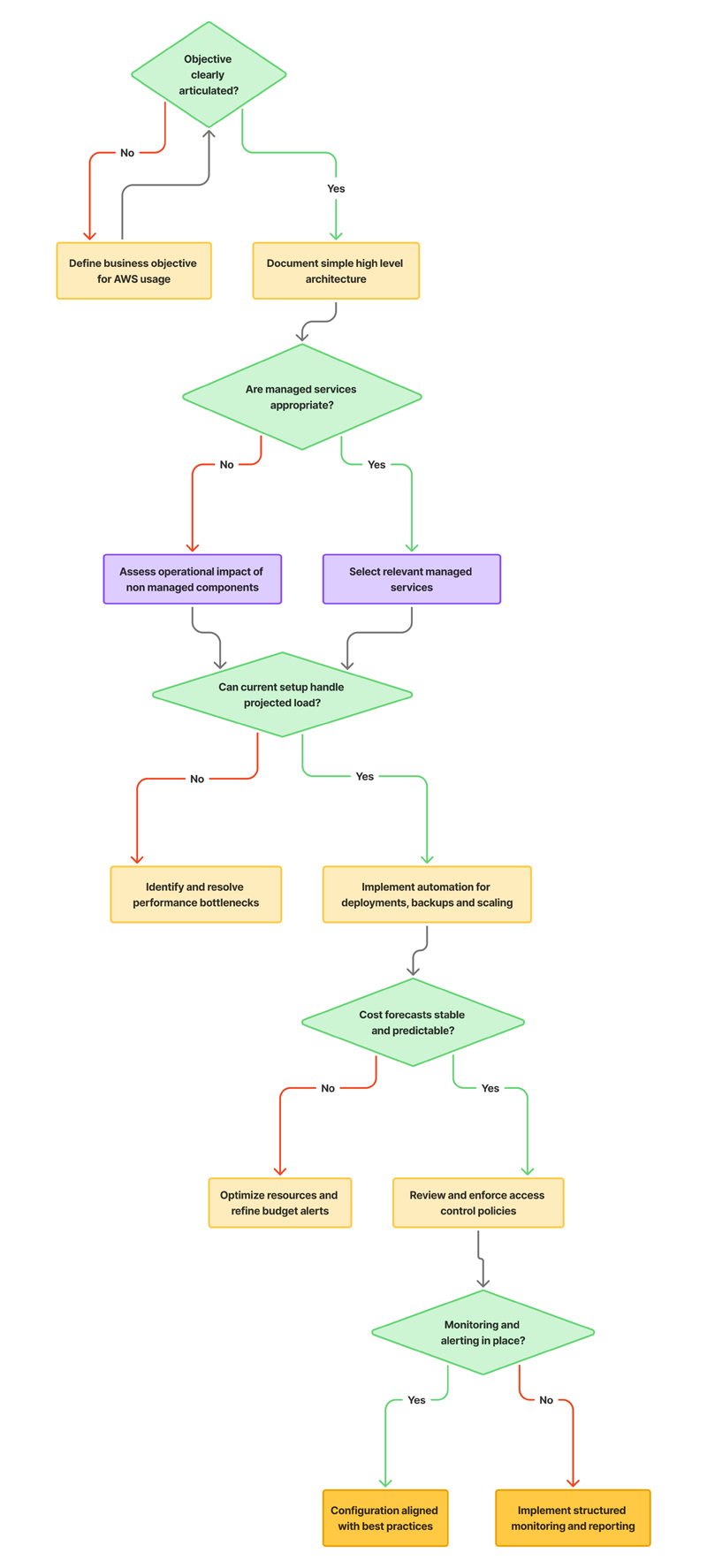
    Everyone says Amazon AWS Cloud is cheap. It is not. What matters is whether you can predict the bill without clutching your chest. Tell your team to set alerts, cap non-prod usage, and avoid fancy setups until you actually need them. Control beats chaos.

    2. Data Should Always Be Yours, Not Buried in Some Engineer’s Laptop

    Make sure backups exist. Make sure they work. Make sure the restore button actually restores. AWS gives you solid tools, but founders still need visibility into where the business’s data lives and who has access to it.

    3. Ship Fast and Break Less

    The whole point of using Amazon AWS Cloud is speed. Your team should not spend weeks tweaking servers or arguing about containers. If AWS has a managed version of something, use it. If you can automate a task, automate it. Progress beats perfection.

    4. Pick the Right Region and Stick to It

    This is a simple choice that many founders unknowingly mess up. Choose the region closest to your customers and avoid moving things around unless you absolutely must. Region chaos leads to billing chaos.

    5. Use Automation to Save Your Weekends

    Auto-scaling, scheduled shutdowns, and basic monitoring are not “nice to have.” They save sleep. They save money. They keep your team from firefighting. Small habits make Amazon AWS Cloud feel less like a wild animal and more like a working system.

    Three Things You Actually Need to Know (Not 153 Services)

    Here is the real story no one tells founders. You do not need to learn every Amazon AWS Cloud service or pretend you understand cloud diagrams that look like a spider fell into a geometry box. You only need to grasp the few things that decide whether your product survives out there. 

    First, your product needs a solid place to live. Forget the dizzying service names. Deep down, all you want is an environment that does not fall apart the moment a few users show up. AWS gives you that stability if you keep the setup clean instead of turning your infrastructure into an ego project.

    Then there is the part that founders never admit. You want growth without chaos. When your user base expands, you want a system that stays calm instead of shaking like a washing machine possessed by whatever haunted Christian Bale in The Machinist. That is what scalability really means. Amazon AWS Cloud handles this beautifully, but only if you resist the temptation to over-engineer everything just to look smart.

    And finally, security. Most small companies think they are too irrelevant to be attacked. That illusion dies the moment someone leaves a door open. Amazon AWS Cloud gives you strong protections, but you need your team to use them properly. Access controls, working backups, basic monitoring, and someone who actually checks alerts. Boring things, but they keep your business alive.

    Also Read: The blueprint of Google Cloud Migration

    The Founder’s Shortcut to What Really Matters

    Shortcut 1: Keep the Architecture Boring

    Fancy diagrams impress nobody when the site is down. Use the simplest pieces of Amazon AWS Cloud that get the job done. The fewer moving parts, the fewer late-night emergencies. Boring architecture is underrated and very profitable.

    Shortcut 2: Spend Time on Monitoring, Not Tweaking Servers

    Do not waste your founder energy debating instance types for hours. Put that energy into basic monitoring. A clean dashboard, a few alerts and regular checks will prevent more disasters than yet another “optimised” server tweak.

    Shortcut 3: Build Only What Moves the Business Needle

    If a feature does not help customers or revenue, it is decoration. Let AWS handle plumbing wherever possible. Managed services exist so your team can build useful things instead of doing heroic but meaningless backend gymnastics.

    Shortcut 4: Automate Every Repetitive Task

    Backups, deployments, scaling, health checks, shutdowns. If it repeats, script it. Automation keeps your team from burning out on routine work and lets them focus on product and users instead of babysitting infrastructure.

    Shortcut 5: Make Cost Awareness a Habit, Not a Monthly Panic

    Most shocking AWS bills are not “bad luck.” They are ignored signals. Set budgets, set alerts and review usage regularly. Treat cost like a weekly hygiene check, not a crime scene investigation at the end of the month.
    Amazon AWS Cloud

    The Stuff You Should Stop Obsessing Over

    Founders love worrying about the wrong things. AWS has a talent for distracting you with shiny topics that look important but honestly do not matter for a growing business. Here are the usual traps.

    1. Kubernetes – NOT FOR ALL

    Everyone throws this word around like it is the secret sauce of successful startups. It is not. If you have ten employees and your product is still finding its feet, you do not need Kubernetes. You need stability, speed, and fewer things that can break.

    2. Multi Cloud Strategy – WOLLY MAMMOTH

    Relax. You are not Netflix. You are not running a global fleet of a zillion microservices. Pick one cloud, stick to it, and focus on building your product. Vendor lock is a fear that sounds intelligent in meetings but drains your energy in real life.

    3. Comparing AWS vs GCP vs Azure – POINTLESS

    This debate never ends. It also does not matter if your team already knows Amazon AWS Cloud. Skill beats platform. A mediocre setup on the wrong cloud costs more time, money, and mental peace than committing to the one your engineers can actually operate.

    4. “We Need AI Everywhere.” – ABSURD

    No. You need your app to work properly first. AI can come later. Adding AI to a buggy product is like spraying perfume on a dumpster. Fix the basics. Then think about the smart stuff.

    5. Over-Engineering the Whole System – THEFT

    Founders sometimes push engineering teams to create overly complex setups to look impressive. Nobody is impressed when things crash. A simple AWS architecture is often stronger than a monster built for bragging rights.

    The Hidden Weak Spots No One Warns You About

    Every founder thinks Amazon AWS Cloud problems come from big issues like traffic spikes or bugs. The real trouble usually hides in tiny, stupid things. A forgotten access key. A test server has been left running for weeks. A permission someone granted in a hurry. These small slip-ups quietly grow into huge bills, security holes and late-night chaos. No one warns you about these weak spots because they look harmless at first. They are not. They bite at the most vulnerable moment…LOL.

    Weak SpotWhat It Actually MeansWhy It Becomes a Problem
    Unused resourcesTest servers, forgotten volumes, old snapshotsBills creep up and no one knows why
    Overly broad accessToo many people with admin-like permissionsOne mistake can break everything or leak data
    Missing backupsBackups exist in theory but not in realityA bad deployment can wipe out days of work
    No monitoring disciplineAlerts exist, but nobody checks themIssues pile up silently until something crashes
    Region mismatchWorkloads are spread across random regionsSlower app performance and unnecessary costs
    Hacky quick fixesTemporary patches that never get cleaned upSystems become brittle and unpredictable

    A Simple, Drama-Free AWS Strategy for 2026

    Most founders want an Amazon AWS Cloud strategy that does not require a cloud monk, a 40-page architecture diagram, or a weekend spent crying into billing dashboards. Here is the truth. You do not need elite access. Unless you play golf with Matt Garman over the weekend, you will never get some secret magic shortcut. What you do get is a simple, clean approach that actually works in the real world.

    Start by keeping your environments limited and controlled. One for development and one for production is more than enough for most companies. More layers only create more confusion. Use managed services whenever possible because maintaining your own servers is basically volunteering for extra stress.

    Make automation your default setting. Backups, deployments, scaling schedules, and shutdown routines should all be automatic. The less you touch manually, the fewer things you break. Set up cost alerts and basic monitoring, and actually look at them once in a while. A small amount of discipline here saves you from huge bills later.

    Security should not be an afterthought. Keep access tight, audit permissions regularly, and avoid the trap of giving everyone god-like rights because it is convenient. A tiny mistake can open a giant hole, and 2026 will be even less forgiving.

    The best AWS strategy is not glamorous. It is calm. It is simple. It lets your team ship faster and keeps your business away from stupid surprises. That is the only drama-free strategy that survives in real life.

    Smart Questions to Ask Your Tech Team (So You Don’t Get Bullshitted)

    Most founders stay quiet during AWS discussions because everything sounds like advanced rocket science mixed with alphabet soup. Here is the trick. You do not need to understand every term. You only need to ask the kind of questions that make your team pause, think and stop bullshitting you. These questions cut through the noise and force clarity without you pretending to be a Amazon AWS Cloud guru.

    “What are the top three things burning money this month and why?”
    This single line exposes waste faster than any dashboard. If your team cannot answer it, nobody is watching the shop.

    “If traffic jumps tonight, what breaks first?”
    Every system has a weak point. You want to hear a clear answer, not a fantasy story. The weak link is where you invest.

    “Which tasks can we automate right now?”
    If you ask this regularly, your team will stop doing repetitive nonsense and start thinking about efficiency. Automation saves time and sanity.

    “Who has access to what and why?”
    This question prevents half of the stupid security incidents that founders hear about too late. If the answer is vague, permissions are already a mess.

    “What is the simplest way to run this setup without adding more moving parts?”
    This forces the team to justify complexity. Most complicated architecture exists because someone wanted to feel clever, not because the business needed it.

    “Show me the monitoring in plain English.”
    If the dashboard cannot be explained without a lecture, it is not being monitored properly. You want clarity, not hieroglyphics.

    Conclusion

    Here is the part founders often forget. Amazon AWS Cloud is not some mythical power source that magically fixes everything. It is a toolbox. A big one. A messy one. A powerful one. What matters is how you use it. If you keep things simple, automate the boring parts and stay alert to the tiny mistakes that turn into huge problems, AWS becomes a strength instead of a stress trigger.

    You do not need elite access, secret cloud knowledge, or a private conversation with someone on Bezos’s yacht. You need clarity, discipline and a team that understands why clean setups always beat clever ones. The real magic is not in the platform. It is in the decisions you make every week.

    Treat AWS like a partner, not a puzzle. Keep the nonsense out. Focus on what helps the business grow. That is the only formula that works for every founder, every team and every product trying to scale without losing its mind.


  • AI Compliance Becomes a Profit Center in 2026: Turning Regulation into Competitive Advantage

    AI Compliance Becomes a Profit Center in 2026: Turning Regulation into Competitive Advantage

    AI compliance? WTF! Well, that’s the reaction you get when you ask eight out of ten CIOs. Most CIOs don’t know, and the few who pretend usually have a deck, not a plan. (Apologies to the CIO community, but someone had to say it.)

    Everyone is busy chasing “AI transformation.” But there’s one question that matters: can your AI explain without causing you embarrassment? We have reached a point where companies brag about “responsible AI,” yet can’t trace a single decision.

    The truth is simple. Compliance is the part of AI no one wants to talk about until it bites them. It’s boring, it’s bureaucratic, and it’s brutally revealing. In 2026, when regulators tighten rules and customers seek proof, the same boring stuff will differentiate the lasting brands from those that are just trends.

    Because soon, “trust” won’t be a tagline. It’ll be a metric.

    The Great “Responsible AI” Lie

    Let’s be honest. “Responsible AI” has become the new corporate yoga. Everyone talks about doing it, but very few actually practice it. Every other company now has an ethics charter, a fairness slide, and a two-hour workshop with a consultant who once read the EU AI Act. Next, it’s back to business as usual.

    The problem is not that people do not care about ethics. It is that most organizations treat responsibility as optics. It is something to announce in a press release, not bake into a pipeline. You see words like transparency, explainability, and accountability on banners. But when you ask for the bias audit report or model documentation, there is nothing but silence. Sometimes worse, a file named AI_Strategy_Final_v17_NEW(1).pptx.

    The loudest voices about “ethical AI” are often the ones flying blind. They fail to log how their models evolve. They have no rules for protecting sensitive data. Plus, they don’t realize that half of their training data goes against their own privacy policy.

    In short, responsible AI today is like a gym membership. Everyone claims to have one, but most of them never show up.

    You’re About to Face a Compliance Reality Check

    The AI honeymoon is ending. For years, companies dodged accountability. They used half-baked chatbots, data-hungry recommendation engines, and confusing predictive tools that no one outside the tech team could fully explain. That window is closing fast.

    Regulators have started paying attention, and this time they are not asking for vision decks. The EU AI Act, India’s DPDP Act, and a wave of regional privacy frameworks are moving from discussion tables to audit checklists. Procurement teams are asking vendors for proof of AI compliance. They want bias testing reports and clear data handling policies, too.

    The next wave of questions will not come from lawyers. They will come from customers and investors. Someone will ask, “How did your AI make that decision?” and silence will no longer be an acceptable answer. Every enterprise that considers compliance a paperwork chore will have to start treating it as an operational pillar.

    2026 will be the year of accountability in terms of AI compliance. The ones that can prove transparency will grow faster because trust will have a real market value. The rest will learn what happens when the hype fades and the invoices arrive.

    From Panic to Process: Building a Real AI Discipline

    The truth is, most companies start with panic. The first AI compliance request shows up, and everyone scrambles to find where the data came from, who approved it, and what the model actually does. The surprise isn’t that chaos exists. It keeps repeating because nobody turns the panic into a process.

    Building discipline around AI does not mean hiring another consultant or adding another slide to the governance deck. It means setting up habits that make compliance a natural part of building, not a reaction when trouble arrives.

    Here is what that discipline looks like:

    • A culture that documents as it builds. Every model, dataset, and prompt has a record of who created it, where it came from, and who signed off.
    • Clear lines of responsibility exist. There is always a name attached to every system, not a department. Accountability stops being abstract.
    • Regular reviews that aren’t for show. AI Compliance checks happen before launches, not after headlines. Teams walk through what could go wrong, not what went right.
    • Design with transparency in mind. The best AI setups can explain themselves in plain language. If you can’t describe what your system is doing, you are not ready to defend it.
    • Learning is built into the workflow. Data scientists and business heads get comfortable with privacy and fairness basics. Compliance stops being a “legal’s job.”

    Discipline is not about slowing innovation. It is about giving it a spine. Companies that get this will stop seeing compliance as a speed bump. Instead, they will view it as guardrails that let them move faster without crashing.

    Read on: How AI Business Strategy Evolved from Pilot to a Magnificent Game-Changer

    How to Tell if Your Company Is Just Pretending

    You can spot a company faking AI compliance within five minutes of conversation. They talk about “AI ethics” as if it were a branding exercise. They have a working group, a poster, and sometimes even a mascot, but nobody in the room can identify who owns the data or how the team tracks model drift. The moment you ask for documentation, the enthusiasm drops faster than a bad stock.

    Pretending companies love the idea of “transparency” until it means showing something real. They will brag about having a AI compliance governance committee, but cannot produce a single record of a bias review. Their compliance dashboard is usually a slide made by marketing, not a live system that actually monitors anything. And when something fails, they always blame the vendor, the API or the IT team. Never the culture.

    If your team treats AI compliance like a presentation topic rather than an engineering practice, you are pretending. Real compliance lives in commits, logs, and audit trails, not in LinkedIn posts. It is quiet, technical, and sometimes boring. But that is also why it works. The showmen will keep polishing their slides. The serious ones are busy keeping receipts.

    The Four Things That Actually Make You Compliant

    AI compliance is not magic; it is a habit. The companies that get it right are not the ones with the biggest budgets; they are the ones that do the basics without pretending it is innovation.

    1. Someone has to actually own it.

    Every model needs a person behind it. Not a team, not a committee, not a Slack channel. One person who knows what it does and can take a call when it breaks. Real ownership is not about titles; it is about responsibility.

    2. Write down what you did and why.

    Half the chaos around AI compliance comes from missing context. People train a model, deploy it, and six months later, nobody remembers the data, the parameters, or the reason it even exists. Good documentation is not paperwork; it is memory. It saves you when the regulator or customer starts asking hard questions.

    3. Test it like you expect it to fail.

    Most teams test for accuracy and stop there. That is lazy. Real testing looks for what the system might do wrong, who it could hurt, and how it behaves when the data goes weird. The goal is not perfection; it is awareness.

    4. Tell the truth when people ask.

    Transparency sounds fancy until someone asks, “How does your model decide?” and the room goes quiet. Being transparent is not about publishing a manifesto; it is about being able to explain your system in simple words and standing by it when you do.

    The truth is, these four things are not special. They are basic, human, and somewhat dull. Which is exactly why they work.

    Where is the Money in AI Compliance?

    Most leaders still see compliance as an expense, not an asset. They think it is something you do to avoid penalties or bad press. That thinking is outdated. In 2026, the companies that treat AI compliance as part of their business strategy will make more money than the ones that treat it as insurance.

    Here is where the returns actually come from.

    • You close deals faster. Large to mid-sized customers, especially in finance and healthcare, are already asking for AI audit reports and data protection credentials. If you can show them clean records and governance workflows, you move to the front of the line.
    • You retain customers longer. People stay with brands they trust. Transparent systems lead to fewer user complaints. Churn decreases, and your reputation improves without drawing attention.
    • You spend less on fixing messes. Every incident costs more than prevention. Bias, data leaks, or explainability gaps take months to repair. Mature compliance saves those firefighting costs.
    • You attract better investors. The new investor questions are not “What model are you using?” but “Can you prove it is fair, secure, and privacy-compliant?” AI-ready investors now prefer companies that can show ethical stability.

    Compliance pays because it builds something money alone cannot buy: credibility. When everyone’s AI looks similar, the company that can prove it is trustworthy will always win the deal.

    Automation is the new Holy Grail

    AI Compliance

    Everyone in AI governance is chasing automation. The idea sounds perfect. Systems that document themselves, models that log their own changes, or dashboards that tell you when something breaks. In theory, this is how compliance becomes painless. In reality, most companies still rely on spreadsheets, shared drives, and late-night emails to prove they followed the rules.

    Automation works when it is invisible. The goal is not to replace people but to remove friction. A good setup captures what matters without anyone needing to remember it. Training logs, version histories, consent records, and access trails should generate themselves as part of the normal workflow. When evidence builds automatically, compliance stops being a project and becomes a process.

    The best teams already get this. They use automation to create trust, not efficiency. Their systems flag bias before launch, record every data change, and link every deployment to an accountable owner. The result is quiet confidence. When someone asks for proof, they have it ready. No panic, no guesswork, no drama. Only good processes in the background.

    Turning Compliance from Defense to Offense

    Defensive AI compliance protects you. Offensive AI compliance grows you. The first avoids penalties; the second wins contracts, renewals, and trust. The difference lies in how you use the proof you already collected.

    Turn your artifacts into selling points.

    • Model cards become conversation starters. Include a short, visual summary of what your AI does, what data it uses, and its known limits. Clients see honesty before they see capabilities.
    • Bias reports become trust signals. Share the metrics before and after that show how you measured and reduced bias. It turns a vulnerability into proof of progress.
    • Data-lineage maps become confidence charts. Show that you know, consent to, and can audit every data source. Buyers will stop worrying about hidden risks.
    • Audit trails become response tools. When a client questions a prediction, you can trace it instantly. That shortens review cycles and builds credibility.

    Turn governance into product features.

    • Explainability is built into the interface. Add a “why this decision” button that displays key features or reasoning in plain language.
    • Fairness dashboards for enterprise clients. Let them monitor performance and bias across demographics rather than waiting for quarterly reports.
    • Consent and deletion workflows that show proof. Generate automatic confirmations when user data is removed or anonymized.
    • Compliance APIs for partners. Give large customers a way to pull governance logs directly, reducing their audit time and increasing stickiness.

    Turn compliance into commercial leverage.

    • Shorter sales cycles. When your AI is audit-ready, buyers in regulated industries approve faster.
    • Premium pricing. Verified transparency and safety justify higher rates for high-risk use cases.
    • Easier expansion. Strong compliance allows you to enter new geographies with minimal recertification.
    • Investor comfort. Documented governance reduces due diligence friction and raises valuation.

    Conclusion

    By 2026, every serious company will have some version of AI in production, but only a few will have the proof to back it up. AI compliance will no longer be about avoiding fines or filing reports. It will be the language of trust that separates real innovators from fast talkers. The companies that invest early in fairness, explainability, and transparency will walk into boardrooms with evidence instead of slides. The rest will still be updating their policies while the market moves ahead without them.

  • Predictive Maintenance in Manufacturing with 10 Battle Tested Companies. Does it work?

    Predictive Maintenance in Manufacturing with 10 Battle Tested Companies. Does it work?

    Predictive maintenance in manufacturing is no longer a future goal. It’s becoming a competitive necessity. In most factory environments, maintenance is still largely reactive. Equipment is repaired after it fails, often causing avoidable downtime and production delays. AI-powered systems are now helping manufacturers adopt a proactive approach, one that reduces disruptions, extends asset life, and enhances overall efficiency.

    Let’s explore how AI enables predictive maintenance, where it is currently being utilized, and which startups are helping manufacturers adopt this technology.

    What Is Predictive Maintenance in Manufacturing and Why Does It Matter

    Traditional maintenance follows two models: either fix it when it breaks or service it at fixed intervals. Both approaches carry risks. Waiting too long can lead to unexpected downtime. Servicing too early wastes time and resources.

    Predictive maintenance takes a different path. It uses real-time data from sensors, logs, and control systems to anticipate when equipment is likely to fail. AI models process this data to detect anomalies and flag early signs of wear or malfunction.

    For manufacturers, the impact is measurable. 

    Unplanned downtime can cost thousands per hour. With predictive maintenance, machines stay online longer, servicing is scheduled more efficiently, and parts are replaced only when needed. It enhances asset reliability and enables operations teams to transition from a firefighting mode to a controlled execution.

    Predictive maintenance in manufacturing is more than just a technical fix. It changes how factory floors are run. Maintenance teams spend less time reacting and more time planning. Instead of guessing when something might break, they know. And when machines run predictably, the rest of the operation follows.

    How AI Enables Predictive Maintenance in Manufacturing

    Predictive maintenance in manufacturing begins with raw data, but it’s AI that gives that data meaning. Machines in any manufacturing setup generate constant signals, including temperature, vibration, pressure, speed, current flow, and error logs. This data is already there. The challenge is knowing what to do with it.

    AI models can find patterns in this noise. They analyze how machines behave under normal conditions and learn what changes when a failure is imminent. These systems don’t need a technician to set rules. They learn from past data, such as successful runs, breakdowns, and partial failures, and then apply that knowledge in real-time.

    The goal is simple: to know when a part is likely to fail, before it does.

    For example, a motor might show a slight increase in vibration and heat weeks before it breaks down. A human might miss it. AI won’t. It picks up these shifts early and flags them, giving maintenance teams time to act before the problem becomes critical.

    Over time, the system improves. More data leads to better predictions, fewer false positives, and more confidence in every alert.

    AI doesn’t eliminate maintenance. It just makes it smarter. Instead of working with fixed schedules or waiting for things to go wrong, manufacturers can now maintain machines based on actual need. That’s a practical win, not just for uptime, but for cost and control.

    Examples of Predictive Maintenance in Real Manufacturing Setups

    Predictive maintenance in manufacturing isn’t just a lab concept. It’s already being used on real factory floors across industries. What connects these use cases is not high-end AI complexity, but simple, repeatable value.

    GE Power (Energy Sector)

    GE uses its Predix platform to predict failures in gas turbines, jet engines, and power plant equipment. In one documented case, Predictive maintenance in manufacturing led to a 25% reduction in maintenance costs and a 20% increase in equipment uptime. This has resulted in tens of millions of dollars in savings across industrial clients.

    Penske Truck Leasing (Fleet Maintenance)

    Penske tracks over 433,000 trucks, collecting more than 300 million data points per day. By using Catalyst AI, the company proactively identifies faults before they lead to breakdowns. The result is improved vehicle uptime, faster service response times, and fewer on-road failures, all of which are critical for logistics businesses.

    Siemens (Manufacturing Equipment)

    Siemens utilizes AI-driven predictive maintenance across its factories to monitor equipment, including motors, gearboxes, and pumps. In one project, they reduced unplanned downtime by up to 30% and improved maintenance planning efficiency across multiple plants.

    PRANA System by ROTEC (Power Plants)

    PRANA is deployed across over 100 power units in Russia and Central Asia. In monitored plants, incident rates were reduced by 16.8 times, while the average maintenance cost per plant decreased from $10.1 million to $1.8 million, a staggering reduction attributed to AI-enabled early intervention.

    Konux (Rail & Infrastructure)

    German rail operator Deutsche Bahn utilizes Konux sensors and AI to monitor rail switches, a significant source of delays. With over 3,500 switches tracked, the system predicts mechanical wear, enabling proactive servicing and reducing unexpected disruptions. Train punctuality and asset availability improved significantly.

    Pluto7 + Konnect Manufacturing (Ceramics & Electronics)

    Pluto7 collaborated with Konnect, a global ceramics and electronics manufacturer, to integrate Google Cloud–based ML models into their production lines. The result: $10 million in annual savings by reducing defect rates and anticipating process failures.

    ABB Ability (Industrial Automation)

    ABB’s smart sensors and AI tools are widely deployed in motors and pumps. In a case study, predictive analytics enabled a cement manufacturer to reduce downtime by 70% and extend motor life by 20%, while also decreasing the frequency of technician visits.

    Read our post on 7 Fail-proof Ways to Use AI for Business Planning That Work

    Predictive Maintenance in Manufacturing

    10 Startups Providing Predictive Maintenance Solutions for Manufacturers

    Augury

    Augury builds easy-to-install sensors that monitor vibration and sound. Small manufacturers love the fact that they don’t need a whole data team to make this work. Augury’s AI dashboard provides alerts when machines start to behave abnormally, enabling teams to act before a breakdown occurs. Clients have reported up to a 20× ROI simply by avoiding unexpected stoppages. Pricing is based on the number of assets you monitor. Start with just a few machines and scale up as needed. It’s a perfect system for Predictive maintenance in manufacturing for plants running pumps, motors, or packaging lines. Visit: https://www.augury.com

    Factory AI

    Factory AI is a lean predictive maintenance platform designed for manufacturers seeking simplicity and efficiency. It comes with a free starter plan, and the paid version starts at about $35 per user per month. Their analytics engine flags issues, such as bearing faults or excessive vibration, using real-time data from your machines. You get actionable alerts, not graphs that need decoding. Small teams have reported up to 70% fewer breakdowns and a 25% reduction in maintenance costs. Visit: https://f7i.ai

    Uptime AI

    Uptime AI offers sensor kits and an integrated AI engine that works well for factories with 50 to 200 machines. It’s a good fit if you want to avoid building a complex system from scratch. Their pilot plans start at under $10,000, and pricing scales based on the number of assets. Several clients have reported tens of thousands of dollars in savings through the early detection of failures and reduced downtime. Visit: https://www.uptimeai.com.

    Uptake

    Uptake is known for serving large industrial clients, but its technology also works for mid-sized plants. They offer modular pricing and pre-built failure models for over 800 types of equipment, so you don’t have to build anything from scratch. Customers can start small, just a few critical machines, and expand gradually. Expect setup within a few weeks, not months. Check here: https://www.uptake.com.

    Seebo

    Seebo helps process-heavy industries, such as cement, food, or chemical manufacturing, track their line performance using AI and simulation. It doesn’t require a data science team to run. Their digital twin approach enables you to simulate what’s likely to go wrong before it occurs. Seebo charges based on line complexity and usage, making it easier for mid-sized plants to plan budgets for implementing predictive maintenance in manufacturing. Visit for further details: https://www.seebo.com

    Senseye

    Senseye delivers a cloud-based monitoring solution that uses machine learning to predict asset failures. It works with over 30 types of industrial machines, from gearboxes to fans. Clients report improved uptime and fewer surprise stoppages without needing AI experts on staff. Licensing is modular; choose the assets to monitor and scale from there. One of their customers, who owns a mid-sized plastics plant, reportedly cut downtime by more than 30% in under six months. More details: https://www.senseye.io

    Braincube

    Braincube is a digital ecosystem designed to gather shop floor data and apply AI-based predictive maintenance in manufacturing models to detect failures. It supports dozens of KPIs on a single dashboard and exports alerts directly to your maintenance system. They typically work with plants that have 50 to 500 machines, helping teams avoid production slowdowns and reduce energy spikes. Users have reported up to 20% improvement in OEE. Visit: https://www.braincube.com

    Augmentir

    Augmentir offers an AI-driven maintenance assistant focused on frontline teams. It utilizes sensor data paired with voice and AR-guided workflows, enabling technicians to proactively resolve issues. Onboarding takes only a few days, and small plants see meaningful returns fast. As reported, a mid-tier electronics maker reduced emergency fixes by 40% in the first quarter. Check here: https://www.augmentir.com.

    Fero Labs

    Fero Labs delivers predictive models that are simple enough for on-site teams to adjust. It connects directly with sensors or control systems, monitors variables such as speed or pressure, and sends straightforward alerts. Their pay-per-machine model starts at under $200/month. Fero Labs claimed that a food manufacturing plant avoided costly production line stoppages, saving over $25,000 in a season. Check here: https://www.ferolabs.ai.

    Sight Machine

    Sight Machine ingests data from machines and ERP systems to monitor performance and predict failures across multiple plants. Users get easy reports and alerts via email or SMS. According to reports, a furniture manufacturer that utilized Sight Machine experienced a 15% reduction in unplanned downtime and improved scheduling accuracy across all lines within six months of implementing their predictive maintenance model in manufacturing processes. Check here: https://www.sightmachine.com.

    Predictive Maintenance Toolkit

    Everything you need to get started – startup comparison, ROI calculator, vendor scorecard, and implementation checklist in one handy PDF.

    Conclusion

    Predictive maintenance in manufacturing is no longer a futuristic concept; it’s an operational advantage that’s both practical and proven. Whether you’re running a mid-sized factory or scaling a multi-line setup, the right AI-driven tools can help you reduce unplanned downtime, save on maintenance costs, and extend equipment life. Start small, validate fast, and expand smart. That’s the way to make predictive maintenance work for your factory floor.

  • Why Cross-functional Team Alignment Paralyzed Even After Endless Meetings: 5 Reasons

    Why Cross-functional Team Alignment Paralyzed Even After Endless Meetings: 5 Reasons

    Cross-functional team alignment sounds good in theory, but it’s a different story when you see it in practice.

    Sales rolls their eyes at Product. Product complains about Engineering. Engineering quietly builds what it thinks is best because no one else seems to understand it.

    It’s the same dance in every tech-driven company.

    Different rooms. Same friction.

    Each team is convinced they’re the adult in the room. The ones with the objective perspective. The others? Distracted. Overreaching. Unreasonable.

    So we create meetings. Cross-functional working groups. Alignment decks.

    And what do we get?

    Fatigue.

    Everyone’s calendar gets bloated. Decisions take weeks. Progress slows. And ironically, the very thing we wanted – alignment, starts to feel like overhead.

    But here’s the uncomfortable truth: You don’t need more collaboration. You need better clarity.

    And a system that lets Product, Tech, and Sales move without tripping over each other.

    Let’s talk about how that happens.

    The Real Cost of Poor Cross-Functional Team Alignment

    Cross-functional alignment failures rarely show up all at once. They begin as soft friction, slipped deadlines, confusing handovers, and strategy calls that sound out of sync. Everyone is working, but not necessarily together. Priorities shift mid-sprint. Product specs evolve after development starts. Sales pitches get ahead of releases. And soon, no one’s sure where the source of truth is.

    Now put that in numbers. Take a 25-member team working on a mid-sized digital product that includes product managers, engineers, QA, designers, Sales, Pre-Sales, and others. If each person loses just 5 hours a week to misaligned work, back-and-forths, or unnecessary meetings, that’s over 500 hours per month gone. That’s a complete sprint cycle lost to confusion and coordination debt.

    And the cost isn’t just time. It’s output, momentum, and morale. With a blended team cost of $2,500 to $4,000 per person per month (including salaries, overhead, and tools), that’s a monthly burn of $60,000 to $100,000 for a 25-member team. Even a modest 15% productivity leak due to poor alignment equals $9,000 to $15,000 lost every month, with no value shipped.

    Misalignment isn’t a workflow issue. It’s a business risk hiding in plain sight.

    Shared Objectives Beat Shared Calendars

    Cross-functional Team Alignment doesn’t mean syncing schedules. It means syncing priorities. Cross-functional teams don’t need more Zoom or Teams calls; they need a shared definition of success. Here’s how to do it.

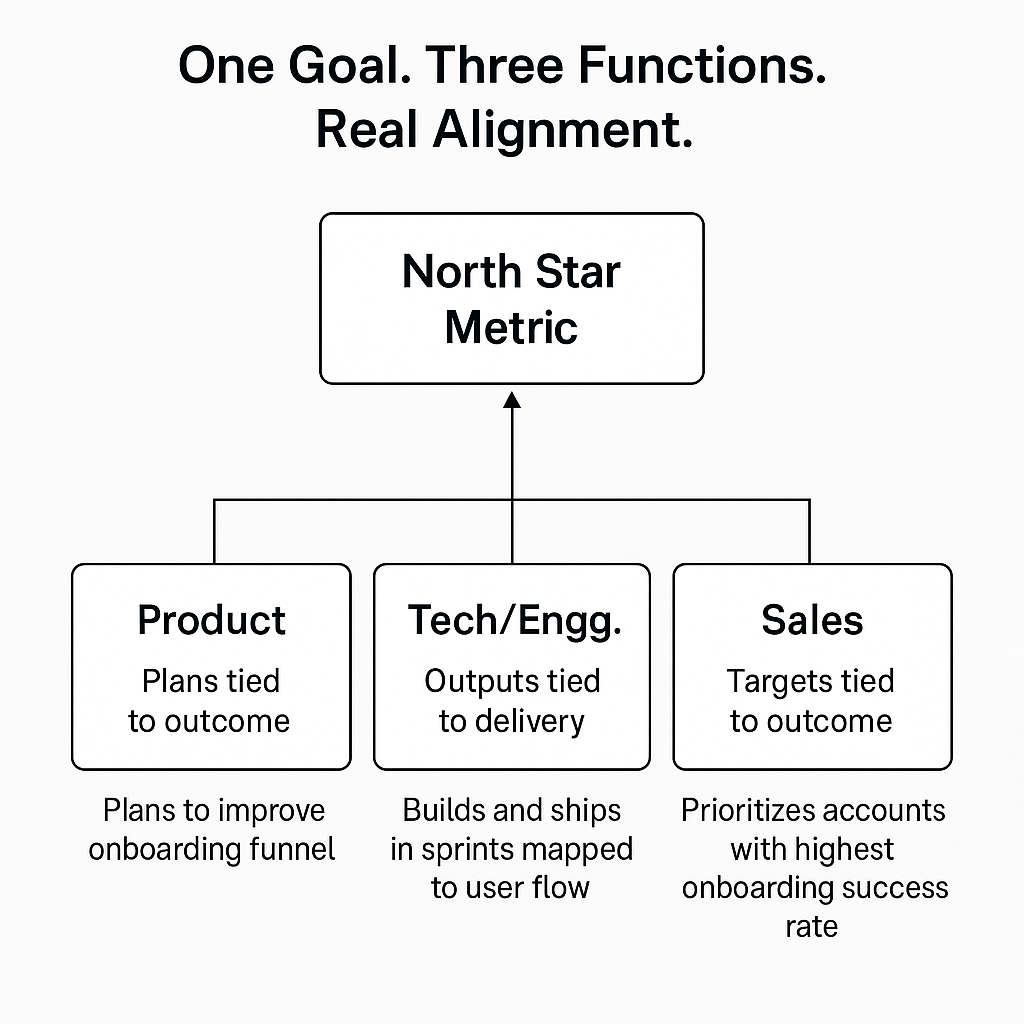
    Anchor all teams to the same North Star metric.

    Whether it’s activation rate, time-to-value, or revenue per seat, pick a metric that reflects real business value and make it visible to everyone.

    Define success for each function in terms of that shared goal.

    The product focuses on adoption, Engineering optimizes for delivery velocity, and Sales drives segment fit, all in service of the same outcome.

    Use lightweight OKRs or thematic goals instead of feature lists.

    Replace “ship feature X” with “increase onboarding completion by 20%.” It gives teams room to innovate while staying aligned.

    Make tradeoffs transparent.

    When two functions have different objectives, tie them back to the shared purpose. If it doesn’t move the needle, it doesn’t move forward.

    Kill vanity metrics at the edges.

    If Sales celebrates leads that churn in 10 days, or Engineering hits ticket velocity while shipping unused features, alignment is already broken.

    Structure the Handoffs, Not the Meetings

    A lack of meetings doesn’t cause most coordination problems; poorly defined handoffs are the primary cause. When Product tosses specs over the wall to Engineering without shared understanding, or when Tech completes delivery but Sales doesn’t know how to position the release, things break. Not immediately, but soon enough.

    What’s missing is a precise operating rhythm. Every stage of a cross-functional workflow should include: what is being handed off, who owns it next, and what “done” means at that point. Is the feature doc just a bullet list, or does it include user flows? Does the tech team flag readiness with a code freeze or a QA-approved staging release? If that language isn’t consistent across teams, misalignment creeps in.

    Instead of recurring syncs, define structured checkpoints. Create handoff playbooks: Product to Tech → MVP approval. Tech to Sales → Release documentation and internal demo. These are the real bridges. Build them once, and meetings become backup, not the backbone.

    Asynchronous Rituals Keep Teams in Sync

    Synchronous updates are useful until they become a hindrance. When your team grows or stretches across time zones, real-time alignment becomes a bottleneck. Async rituals fix that. They reduce interruptions, improve clarity, and scale decision-making without burning hours on Zoom.

    Here’s how async Cross-functional Team Alignment works:

    • Product teams can record feature walkthroughs once. Tech and Sales can review them at their convenience, without needing to schedule a call.
    • Use tools like JIRA, Trello, or ClickUp to give everyone real-time visibility into what’s moving, what’s blocked, and what’s next.
    • Designate specific channels for Product, Tech, and Sales syncs. Use pinned formats for updates (e.g., “What we shipped / What’s coming / Blockers”).
    • Encourage team members to post short demo videos every week; schedule optional office hours instead of mandatory reviews.
    • Hook dashboards to Slack or Teams so significant state changes (MVP tagged, feature shipped, doc ready) notify the right people, instantly.

    The most effective asynchronous rituals are those that are boring and repetitive. That’s the point. They free up your team to do the real work of building, closing, and shipping without waiting on the next invite.

    Respect Autonomy While Staying Aligned

    Cross-functional Team Alignment often breaks down not because teams avoid collaboration, but because they’re pulled into multiple tasks simultaneously. That’s not alignment. That’s micromanagement masquerading as teamwork.

    Once goals and handoffs are clear, each function should execute independently. The product team doesn’t need to approve every design. Engineering shouldn’t have to defend every line of code. Sales doesn’t need a nod before pitching. What matters is that constraints are known, outcomes are defined, and responsibilities are understood.

    The best teams work within guardrails, not approval loops. Product owns the what and why, Tech owns the how, and Sales owns the impact. Everyone stays informed, but no one waits for permission. That’s what absolute autonomy looks like.

    Centralize Context, Decentralize Execution

    In most teams, work slows down not because people lack direction, but because they lack access to context. Key decisions are buried in emails. Requirements are scattered across tools. Customer insights sit with Sales. As a result, meetings become the primary means of staying aligned.

    That’s avoidable. Create a single source where the product vision, specifications, customer feedback, and go-to-market assets are all documented and easily accessible. When context is shared and up to date, teams don’t need to check in constantly. Product can plan, Engineering can build, and Sales can engage customers without waiting for answers. Alignment becomes part of how the team operates, not something you stop to do.

    Cross-functional team alignment

    Read this excellent article on Cross-functional team alignment by Atlassian, creator of Jira.

    Use Review Forums, Not Update Calls

    Most cross-functional teams spend too much time talking about the work and not enough time making decisions. Daily syncs, update calls, and check-ins become routine but offer little value beyond what a dashboard already shows. The real fix is to replace passive updates with structured review forums that drive decisions and move things forward.

    • Replace update meetings with weekly review forums that focus on shipped work, blockers, and decisions. Nothing more.
    • Limit attendance to one representative per function to keep meetings tight and focused.
    • Focus on metrics that matter, not effort logs or activity summaries.
    • Use a consistent format across teams: what shipped, what it impacted, what’s next.
    • Decide live. Every discussion concludes with an explicit action or next step.
    Cross-functional team alignment

    Build Cross-Functional Empathy by Design

    Most Cross-functional Team Alignment issues aren’t technical. They’re relational. Teams work next to each other without understanding what the others are solving, optimizing, or avoiding. Assumptions take the place of insight. Friction follows. The best way to fix this isn’t with more process, it’s with exposure.

    • Rotate engineers into recorded sales calls to hear real objections and customer language.
    • Let sales teams observe product roadmap walkthroughs to understand what’s feasible and why.
    • Share design reviews and usability test clips across teams so everyone sees the product through the user’s eyes.
    • Celebrate launches as a cross-team milestone, not a single-function win.
    • Create informal spaces for product, tech, and sales to talk without an agenda.
    • Encourage people to write, not just talk. Shared notes, Looms, and briefs help teams see each other’s thinking.

    Empathy is built in the details when one team understands how another works, the alignment problems start to fix themselves.

    Read these guidelines for Digital Transformation using AI.

    Conclusion

    The most effective teams aren’t the ones with the most meetings or the fanciest tools. They’re the ones who understand how to move together without getting in each other’s way. With shared goals, clear handoffs, and just the right amount of structure, alignment becomes a benefit rather than a burden. It becomes momentum. That’s the shift modern product companies need to make, and the ones that do it well move faster than everyone else.

  • 7 Fail-proof Ways to Use AI for Business Planning That Actually Work

    7 Fail-proof Ways to Use AI for Business Planning That Actually Work

    Before we talk about AI for business planning, let’s do a reality check first; to be more precise, let’s stop pretending. Most strategic planning today is just theater. Fancy decks, three-option forecasts, and a few gut-feel bets dressed up as insight. It looks good in boardrooms, but collapses the moment real-world volatility kicks in. And yet, many companies still cling to this process like it’s some corporate deity – sacred, unquestioned, and entirely out of touch. The spreadsheet becomes scripture. The annual offsite is a ritual. No one asks if any of it still works.

    AI doesn’t just improve planning. It exposes how broken most planning already is. It shows how little control we have when we rely on rearview data, rigid templates, and optimistic timelines. AI for business planning is not a tech upgrade; it’s a reset button. It replaces false certainty with dynamic insight. Businesses still planning without it aren’t just behind. They’re delusional. The gap is no longer between good and grand strategy. It’s between those who adapt in real time and those who plan for a world that doesn’t exist anymore.

    AI-augmented scenario planning that goes beyond fixed models

    Traditional planning loves simplicity. Three scenarios neatly packaged for the boardroom: good, bad, and average. Easy to grasp, easier to pitch, and utterly useless when markets swing wildly. But here’s the reality check from McKinsey: companies stuck on these fixed scenarios take up to 60% longer to respond when crises hit. That delay isn’t trivial. It costs millions in lost revenue, market share, and credibility.

    AI-driven scenario planning exposes how limited that approach is. Instead of forcing reality into a few comfortable outcomes, AI tools simulate thousands of possibilities rapidly and continuously. Gartner reports that 70% of top-performing companies now rely on AI for business planning to generate scenarios to manage risks and opportunities. Three years ago, that figure was just 20%. These organizations, with multimillion-dollar talent pools and vast resources, aren’t betting their future on guesswork anymore. They’re using AI to shift planning from static forecasts to real-time strategic intelligence.

    Look at Lenovo, for instance. Its Supply Chain Intelligence platform uses AI to scan hundreds of data sources in real time. Everything from demand signals to logistics paths is processed to generate dynamic plan updates on the fly. The result? The company boosted forecast accuracy, cut operational delays, and climbed into Gartner’s Supply Chain Top 25 rankings.

    Planning without AI isn’t just outdated. It’s a liability.

    Planning in uncertain times with help from real-time AI insights

    Most strategic plans still assume a world that behaves. But the world doesn’t. Supply chains collapse without warning. Policies shift overnight. Consumer sentiment flips with a headline. What used to be a structured planning cycle now feels like gambling with incomplete information.

    This is where real-time AI starts to matter. It continuously scans live signals and feeds them into your planning model. We’re not talking about quarterly updates. We’re talking about AI for business planning systems that respond as fast as the market moves.

    What kind of signals? A few examples:

    • News sentiment and geopolitical developments
    • Commodity price changes and logistics data
    • Local weather shifts affecting supply or demand
    • Social media chatter or consumer behavior signals
    • Competitor activity and promotional events

    A 2024 BCG study found that companies using real-time AI in their planning processes responded to market disruptions 33 percent faster. That advantage translated into fewer stockouts, more accurate pricing adjustments, and better inventory turns.

    And you don’t need a global crisis to justify it. A sudden sales spike in one city or a supplier delay in another can throw off your entire plan. If your planning still relies on frozen spreadsheets and backward-looking models, you are reacting to a world that has already moved on.

    Zero-based strategy using AI for business planning from the ground up

    Most planning doesn’t actually plan. It inherits. Budgets are recycled. Priorities are carried over. Last year’s headcount, costs, and assumptions are pushed forward with minor edits and a few slides pretending things have changed. It’s not a strategy. It’s corporate muscle memory.

    Zero-based planning flips that logic. It asks a more challenging question: If we had to build this strategy from scratch today, would we still do it this way? That’s not easy to answer, especially at scale. This is where AI steps in. Not just as a calculator, but as a challenger.

    Read our post on AI for Startups: 6 Authoritative Guidelines

    AI tools break down operations line by line. They map spending to outcomes, flag outdated processes, and surface inefficiencies that human planners miss. Instead of relying on instinct or internal politics, AI provides cold clarity. It forces strategy teams to defend every choice, not just the new ones but the old ones too.

    Here’s what this looks like in practice:

    • Unused software licenses identified and dropped from renewal plans
    • Marketing channels re-prioritized based on actual ROI, not legacy commitments.
    • Product lines flagged for phase-out after multi-dimensional profitability analysis.
    • Facilities, logistics routes, and inventory policies are challenged by data, not habit.

    The goal isn’t to cut for the sake of cutting. It is to plan with full awareness of where the business is spending time, money, and effort, and whether any of it still makes sense.

    Used right, AI for business planning turns zero-based strategy into a company-wide rethinking of value. The result is leaner, faster, and often surprisingly liberating.

    Using AI to connect business planning with real-world execution

    Most strategic plans fall apart within weeks. Not because the thinking is wrong, but because execution is nowhere in the picture. Plans are built like academic exercises. Assumptions stack up. Nobody consults the Operations Team. And by the time reality hits, it’s too late to adjust.
    This isn’t a failure of intelligence. It’s a failure of connection. Strategy is treated like a separate layer of the business: high-level, polished, and utterly detached from the chaos below. AI for business planning can change that, not by replacing planners, but by forcing the plan to live in the same world as the work.

    Here are a few direct ways to bring execution into the planning process using AI:

    Connect planning tools with operational systems
    Integrate AI forecasting tools with your ERP, CRM, or logistics platform. Let your plans update in real time based on what’s happening, not what you hoped would happen.

    Use AI to catch breakdowns early.
    If your plan expects a sales spike but the pipeline starts slipping, AI flags it early. You adjust before it shows up in missed targets.

    Automate within boundaries
    Give AI the green light to make small decisions like pricing tweaks or resource shifts, as long as they align with your broader strategy. You set the rules. The system handles the noise.

    Track what’s about to go wrong.
    Leading signals matter more than lagging ones. Drops in engagement, rising support tickets, or delays in supply chains show up early if you know where to look. AI knows.

    Explain the plan in plain language
    Good AI tools can break down strategic models into what each team needs to do. No abstract charts. Just actions with context and clarity.

    When execution feeds back into planning, strategy stops being theoretical. It becomes something teams can follow and improve in real time.

    Building early warning systems through predictive AI

    Disruptions rarely arrive without warning. The clues are almost always there, scattered across supplier updates, pricing shifts, consumer behavior, and even weather patterns. The failure isn’t in the data; it’s in the systems that ignore it. Traditional planning reacts late, often after the damage is done. Predictive AI, on the other hand, is designed to sense weak signals early and convert them into forward action.

    In 2023, Siemens Energy began using AI to monitor real-time data from turbines across its global fleet. The system identified subtle anomalies in vibration and thermal patterns that human analysts would have missed. The result was a 30 percent reduction in unplanned downtime. When failure can cost millions per hour, catching it a few days earlier is a competitive advantage, not a technical detail.

    That’s not an IT win. That’s a business continuity win. 

    Other sectors are catching up fast. A Southeast Asian logistics startup recently used predictive AI to reroute shipments ahead of flooding caused by a regional storm. By layering weather data, route history, and traffic flow patterns, the system flagged delays before they happened. The company met 96 percent of its delivery SLAs that week, while competitors were stalled. In environments where speed is everything, prediction isn’t a nice-to-have. It’s the difference between leading and losing.

    How startups can use affordable AI for business planning

    Most startups don’t lack ideas. They lack time, clarity, and reliable data to turn ideas into executable plans. Traditional planning tools feel too heavy, and full-scale enterprise systems are out of reach. That’s where affordable, modular AI tools come in. They don’t require a data science team or deep tech stacks, just the willingness to plan smarter from day one.

    AI for business planning isn’t limited to large enterprises anymore. Startups are now using tools like ChatGPT, Microsoft Copilot, and Notion AI to test pricing strategies, model growth projections, map hiring needs, and even generate investor-ready plans in hours, not weeks. Combine that with platforms like Tableau Pulse or Zoho Analytics, and early-stage teams can start tracking signals and spotting risks without hiring analysts.

    An AWS‑backed Bengaluru startup is a perfect example. Stylumia began as a fashion-tech venture helping brands track trends, then added AI‐based demand forecasting to refine inventory decisions. The founders used AI-based demand forecasting from a Shopify plugin to time their restocks around influencer campaigns. They also used Notion AI to generate weekly planning summaries based on sales, returns, and reviews. Within three months, they cut inventory holding costs by 18 percent and shortened their response time to market shifts. No custom software. No consultants. Just accessible AI and a bias for action.

    Planning with AI doesn’t mean overengineering your startup. It means skipping the guesswork, learning faster, and staying ahead before the chaos kicks in.

    Improving cross-functional planning with AI-driven visibility

    Planning fails quietly when teams don’t talk. Sales chase one target. Operations tries to keep up. Finance patches the gaps. Leadership sees the wreckage two weeks later in a report. It’s not incompetence, it’s fragmentation.

    AI for business planning doesn’t fix culture, but it can fix visibility. By syncing live data across functions, it gives every team a shared picture of what’s happening now and what’s about to happen next. That one change turns planning from a series of disconnected bets into a coordinated move.

    Here’s what that looks like when AI is working under the hood:

    • Sales stops dreaming in isolation, supply chain sees the spike before it’s too late.
    • Marketing stops hyping what the warehouse doesn’t have.
    • Finance sees trouble while it’s still optional, not when it shows up in the P&L.
    • Leadership finally stops squinting at half-baked dashboards and sees the whole field.
    • Teams stop fighting over who’s right and start moving on to what’s next.

    Good planning isn’t just about the correct forecast. It’s about alignment. AI gives you that alignment at speed, across the entire business, without waiting for someone to email the latest deck.

    Conclusion

    The shift to AI-driven planning isn’t about chasing trends. It’s about building more innovative businesses that can see better, act faster, and stay in sync when it counts. Companies that embrace this shift don’t just react better, they lead with sharper focus, tighter alignment, and a plan that keeps evolving. That’s not just better planning. That’s the real strategic advantage to stay ahead in the coming days.

  • How AI Business Strategy Evolved from Pilot to a Magnificent Game-Changer in Just 5 Years

    How AI Business Strategy Evolved from Pilot to a Magnificent Game-Changer in Just 5 Years

    In early 2018, Carrefour Taiwan decided on an AI Business Strategy and to develop a system to forecast demand and reduce perishable waste across select stores. The model looked promising in development. But store-level data was inconsistent, floor staff didn’t trust the alerts, and the system wasn’t integrated into day-to-day operations. Within months, the pilot was shelved not loudly, just quietly, like so many others.

    This wasn’t a one-off. It was normal.

    Back then, AI primarily resided within IT teams or innovation labs. Business leaders were interested but not involved. Most pilots lacked a clear goal, a strong business sponsor, or a plan to scale. And because no one owned it, no one missed it when it failed.

    AI in business wasn’t expected to deliver results. It was there to check a box. That mindset kept it on the sidelines for years.

    The COVID Effect: Why 2020 Changed the Game

    In 2020, businesses stopped experimenting and started firefighting. Offices shut down. Supply chains cracked. Manual processes became liabilities. Automation was no longer a future priority. It became the only way to keep things running.

    AI Business Strategy found its opening. Not because it was new or flashy, but because it could move faster than most teams. Chatbots handled the spike in customer queries when call centers went offline. Inventory models helped retailers manage shortages and shifting demand. HR teams used AI to track employee sentiment across remote teams. What had once lived at the edges of operations moved to the center, almost overnight.

    And this time, it wasn’t just IT pushing the tools. Business heads needed fast solutions. They cleared pilots, skipped multi-layer approvals, and focused on what could be deployed within weeks. The usual blockers, such as long planning cycles, limited budgets, and internal hesitation, gave way to something else entirely. The Urgency!

    That urgency didn’t just accelerate AI. It made it real.

    AI Business Strategy

    Where AI Business Strategy started delivering real value

    Urgency got AI through the door. But what kept it there was performance. Once companies saw it working in live environments, it stopped being just another untested backup plan and started becoming part of their core operations.

    H&M used AI to fine-tune merchandising decisions across regions. Instead of pushing the same products everywhere, they adjusted inventory to match local demand and moved stock faster with less waste. American Express upgraded its fraud detection with machine learning and cut false positives. Fewer blocked cards. Fewer angry customers. Bosch used AI in its factories to predict equipment failures before they happened. Downtime dropped. Planning got easier. Costs went down.

    These weren’t side projects. They were operational wins. And they changed the way business leaders looked at AI in Business. The question was no longer, “Should we try this?” It became, “Where else can we apply it?”

    That’s when AI stopped being interesting and started being useful.

    From Tech silo to strategic investment

    Once AI Business Strategy started delivering real results, it stopped living quietly inside IT. Business heads stopped asking, “Can we try this?” and started asking, “Where else can we use it?”

    Budgets followed. What used to be tucked into innovation funds has become full-line items within annual plans. AI was no longer a sandbox project. It was part of how the business expected to run, which is visible on dashboards, tied to KPIs, and built into timelines.

    The shift wasn’t just in funding. It was in structure. Companies began looking beyond isolated tools and started thinking in terms of platforms. AI wasn’t something one team played with on the side. It became the engine behind CRM upgrades, customer journeys, pricing logic, and even hiring processes.

    Leadership took notice. Some firms created new roles such as a Chief AI Officer. Others didn’t change titles, but made AI the quiet thread running through strategy reviews, vendor choices, and quarterly ops plans. Whatever the model, one thing became clear: AI Business Strategy had moved out of the lab and into the room where business decisions were being made.

    What decision-makers need to act on now

    AI is no longer a wait-and-watch space. The companies that are ahead didn’t get there by decoding how it works. They got there by figuring out where it fits. They picked a problem that was slowing them down or costing too much, and acted on it.

    This isn’t about building complex models from scratch. It’s about asking simple but pointed questions. Where are we relying on guesswork? Which processes still feel manual? Where are we losing time that we can’t afford to waste?

    The real risk now isn’t missing the next big innovation. The risk is doing nothing while others move ahead with AI in business.

    Start with what you already have – data, processes, people. Choose one use case that’s visible and valuable. Run a controlled pilot. Track the outcome. If it works, expand it. If it doesn’t, adjust and try again.

    You don’t need a perfect strategy to move forward. You need a clear one and a willingness to start.

    Conclusion

    AI didn’t go mainstream because of hype. It happened because real businesses found real value. What was once experimental is now embedded. The companies that moved early didn’t wait to understand everything; they picked a problem, tested fast, and scaled what worked.

    That’s the shift. AI is no longer an edge initiative or a tech showcase. It’s a business tool. It saves time, reduces risk, improves outcomes, and creates room for people to focus on what matters most.

    If you’re still watching from the sidelines, now is the time to step in. Start with one use case that makes sense. Learn quickly. Build from there.

    Because AI Business Strategy isn’t coming. It’s already in the room.

  • AI in Business: What Decision-Makers can Confidently Master in 2025

    AI in Business: What Decision-Makers can Confidently Master in 2025

    AI in Business isn’t a future trend anymore; it’s already reshaping how businesses operate, compete, and grow. From boardrooms to back offices, leaders are under pressure to act, but many still struggle with one basic question: Where do we start? This guide cuts through the noise. No jargon. No hype. Just what you need to know to make smart, timely decisions about AI in your business.

    Where We Stand Today

    AI has moved quickly. What began as a series of pilot experiments has become an integral part of how businesses operate. AI agents now handle customer service. Marketing teams use it to generate content. Operations are running on AI-powered insights.

    According to a 2024 McKinsey report, over 55% of companies now use AI in at least one core business function. In sectors like banking, telecom, and retail, that number is even higher.

    But it’s not just about tools. It’s about a shift in mindset. AI in business is no longer reserved for tech-first companies. Retail, healthcare, logistics, and finance are all finding real and practical ways to utilize it. Leaders aren’t asking “should we use AI?” anymore. They’re asking, “Where do we use it, and how fast can we move?”

    You don’t need to be an expert. But you do need to know what’s changing and how it affects your business.

    AI in Business for Long-Term Strategic Planning

    For most leaders, AI for business planning is no longer a short-term experiment. It’s becoming a key factor in multi-year business planning. The goal is not just to adopt AI tools, it’s to rethink how the business will operate, compete, and scale in an AI-first world.

    Here’s how AI is shaping long-term strategy across industries:

      • Automating repetitive workflows, reducing manual errors, and cutting overhead costs

      • Personalizing interactions at scale, anticipating customer needs, and improving retention

      • Using predictive models for forecasting, resource planning, and risk analysis

      • Identifying roles AI can augment, reskilling teams, and planning for future talent needs

      • Enabling rapid prototyping, testing new features using synthetic data, and exploring new service models

      • Making use of proprietary data to create unique AI capabilities that others can’t easily copy

    The takeaway: AI isn’t just a tool; it’s a planning lens. And leaders who treat it that way will shape markets, not just react to them.

    Real Business Use Cases That Matter

    AI in business makes headlines with big promises, but what works in the field? These use cases are not future predictions; they’re happening now, across industries, with measurable results.

    Retail: AI for Demand Forecasting

    What it solves: Overstocking, understocking, and slow inventory turnover

    Real-world result: Walmart uses AI-driven demand planning to improve shelf availability and reduce stockouts by up to 30%, especially during seasonal peaks.

    Why it matters: Retailers now rely on AI to respond to shifting buying behavior in near real time.

    Banking: AI in Credit Risk and Fraud Detection

    What it solves: Time-consuming loan approvals and growing digital fraud

    Real-world result: JPMorgan Chase reduced false positives in fraud detection by 50% using machine learning models trained on transaction patterns.

    Why it matters: Faster approvals improve customer satisfaction, while better fraud control reduces operational losses.

    AI in Business of Manufacturing: Predictive Maintenance

    What it solves: Unplanned downtime and costly equipment failures

    Real-world result: Siemens uses AI sensors and machine learning to predict faults. Plants using this predictive maintenance system report up to 25% less unplanned downtime.

    Why it matters: Preventing breakdowns helps avoid lost revenue and unnecessary repairs.

    Customer Service: AI Agents for First-Level Support

    What it solves: Long wait times and rising support costs using virtual customer assistants.

    Real-world result: Vodafone deployed an AI chatbot that now handles over 60% of first-level queries, reducing call center volume significantly.

    Why it matters: Customers get instant support, and agents are freed up for complex issues.

    Marketing: Personalised Content at Scale

    What it solves: Generic campaigns that don’t convert

    Real-world result: Netflix uses AI to generate personalised artwork and recommendations. This personalization contributes directly to retention rates over 90% among subscribers.

    Why it matters: AI makes one-to-one content delivery possible without needing huge creative teams.

    Read: AI for Startups: 6 Authoritative Guidelines on Digital Transformation

    Separating Hype from Reality in AI

    There’s a lot of noise around AI in business. Every week brings a new headline: machines writing novels, AI replacing jobs, tools that promise to do in seconds what used to take hours. Some of it is real. A lot of it isn’t. For business leaders, the real challenge isn’t just keeping up. It’s knowing what to ignore.

    AI isn’t magic. It doesn’t think like a human, and it doesn’t always get things right. Generative AI, for example, can produce impressive-sounding content but also makes basic factual errors. These are called hallucinations, and they happen more often than people realise. In areas like finance or healthcare, a mistake isn’t just embarrassing. It can be costly. That’s why smart businesses are adding human checks, setting clear rules, and taking data quality seriously before going all in.

    Another myth is that AI in business will take over everyone’s jobs. In practice, it’s changing how work gets done. Repetitive tasks are being automated, but new roles are opening up around data, oversight, and design. The companies that get ahead are the ones reskilling early and planning for hybrid teams. Not waiting to be disrupted by them.

    Practical Roadmap for AI Adoption

    Jumping into AI without a plan and vision is a recipe for wasted money and time. AI should be considered as just another tool for your business – an enabler or a catalyst. Here are a few instances where AI can be used for a long-term gain.

    1. Start with real business problems
      Don’t begin with the technology. Begin with questions like: What tasks are slow, manual, or repetitive? Where are we losing time, money, or customers? Use AI to solve a problem that already matters to the business.
    2. Use simple, off-the-shelf tools first
      You don’t need to hire a team of data scientists to get started. Many AI-powered platforms already exist for customer support, content, analytics, and automation. Test these tools in small pilots. Focus on speed to value.
    3. Build internal confidence before scaling
      Run a few projects, measure results, and learn what worked. This helps you win leadership support and figure out what kind of internal processes, skills, or data cleanup you need to go further.
    4. Invest in the right people and data
      If you see results, start building internal capability. That includes hiring (or upskilling) people who can work with data, evaluate vendors, and understand model risks. Additionally, ensure that your data is structured, accessible, and clean enough for AI to utilize effectively.
    5. Plan for governance early
      AI decisions can impact customers, operations, and compliance. Set up a small review team to track ethics, bias, accuracy, and accountability. It’s easier to do this early than to bolt it on later.

    Supplementary reading: Why Cross-functional Team Alignment Paralyzed Even After Endless Meetings: 5 Reasons

    How to Choose the Right AI Tools and Partners

    The AI in Business Tools

    Not every AI tool is right for your business. The market is full of platforms claiming to do everything – automate, predict, personalise, optimise. But most tools are built with specific use cases, industries, or data types in mind. What works for a media company may not work for a manufacturer. That’s why choosing an AI tool isn’t just about features. It’s about fit.

    Action Point What to Do Key Question to Ask Why It Matters
    1. Pinpoint Your Problem “Does this tool perform the tasks we need it to, with the necessary accuracy and capabilities?” “What specific pain point or goal is this AI tool meant to solve for us?” AI is a strategic investment, not a gimmick. A clear problem ensures you pick a relevant solution and can measure its impact.
    2. Check the Features Map the tool’s functionalities directly to your defined needs. “Does this tool actually perform the tasks we need it to, with the necessary accuracy and capabilities?” Avoid overspending on features you don’t need, and ensure it can handle your specific data types and processes.
    3. Look at Your Data Understand the data types, volume, location, and security requirements of the tool. “Can this tool safely and effectively process our existing data, and does it meet our privacy/compliance standards?” AI is data-hungry. Proper data handling, integration, and security are non-negotiable for successful and compliant AI deployment.
    4. Ensure Easy Integration Assess how well the tool integrates with your current IT systems (CRM, ERP, etc.). “How seamlessly can this AI tool connect and exchange data with our existing software infrastructure?” Poor integration leads to operational headaches, data silos, and reduces the overall value of your AI investment.
    5. Plan for Growth Evaluate the tool’s ability to scale with increasing data, users, and complexity. “Can this tool grow with our business, handling increased demand without a drop in performance or a spike in unmanageable cost?” You want a long-term solution. A scalable tool avoids costly re-platforming and ensures your AI initiatives can expand with your business.
    6. User-Friendliness Counts Review the tool’s interface, learning curve, and available training/documentation. “How easy will it be for our team to learn, adopt, and consistently use this AI tool in their daily workflows?” High adoption rates are key to ROI. A complex or unintuitive tool will likely sit underutilized, wasting resources.
    7. Calculate All Costs Go beyond the initial price; factor in subscriptions, maintenance, training, and support. “What’s the total cost of ownership over 1-3 years, and does the potential ROI justify this investment?” Hidden costs can quickly erode perceived value. A full financial picture prevents budget surprises and helps justify the investment.
    8. Vet the Vendor Research the provider’s reputation, customer support, and track record. “Is this vendor reliable? Do they offer strong, timely support and have a history of successful deployments?” A strong vendor partnership provides essential support, ongoing updates, and can be crucial for smooth implementation and problem-solving.
    9. Consider Ethics & Bias Investigate the tool’s approach to fairness, transparency, and bias mitigation. “How does this tool ensure ethical outputs and avoid perpetuating or amplifying harmful biases?” Responsible AI builds trust with customers and employees, mitigates risks, and is increasingly important for brand reputation and regulatory compliance.
    10. Eye on the Future Look for a vendor with a clear product roadmap and commitment to innovation. “Is this tool continuously evolving? Will it remain competitive and relevant as AI technology advances?” The AI landscape changes rapidly. Choosing a forward-thinking tool ensures your investment remains valuable and adaptable to future trends.

    Choosing the Right AI Partners

    You’ve got your AI in business tools picked out. Now, it’s time to think about your AI partners. Building powerful AI solutions rarely happens in isolation. External experts can fill gaps, speed up your projects, and make sure your AI efforts truly pay off. But a poor partner choice can lead to wasted time and money. By being direct and strategic in your selection, you’ll build strong alliances that boost innovation and help you reach your AI goals.

    Here’s a straightforward checklist for picking AI in Business partners:

    Action Point What to Do Why It Matters
    1. Define Partner Needs Be clear on why you need a partner (e.g., specific skills, speed, advice). Knowing your “why” helps you find the right fit.
    2. Check Expertise & History Look for proven success in your industry or with similar projects. Past performance is a good sign of future success.
    3. Evaluate Technical Skills Assess their AI technical knowledge and experience. Their technical depth affects the quality of your AI solution.
    4. Scrutinize Data Security & Ethics Ask about their data handling, privacy, and ethical AI practices. Data security and ethics are critical for trust and compliance.
    5. Understand Collaboration Style Discuss how they manage projects and communicate with your team. Good teamwork is essential for project success.
    6. Check Scalability Ensure their solutions can grow as your business does. Your partner should support your future growth.
    7. Be Clear on Costs & ROI Get a detailed cost breakdown and discuss how success will be measured. Understand the full financial commitment and expected returns.
    8. Inquire About Support Ask about post-deployment support and ongoing maintenance. AI solutions need continuous care.
    9. Consider Cultural Fit See if their company culture aligns with yours. Good fit makes working together much smoother.
    10. Clarify IP Ownership Define who owns the intellectual property created during the project. A good fit makes working together much smoother.

    Boutique AI Consulting & Development Partners (Examples)

    These firms often focus on specific industries, offer tailored solutions, or cater directly to SMBs and startups.

      1. InData Labs: indatalabs.com – A data science and AI consulting company often highlighted for working with various industries and businesses.

      1. LeewayHertz: leewayhertz.com – Offers AI development and consulting, often noted for custom AI solutions for businesses of different sizes.

      1. Addepto: addepto.com – Specializes in data analytics and AI-based solutions, aiming to help businesses leverage data and AI for growth.

      1. AI Superior: aisuperior.com – A Germany-based AI services company focusing on pragmatic, data-driven solutions with real business value.

      1. Markovate: markovate.com – Offers a range of AI business consulting solutions across diverse domains.

    Conclusion

    Let’s be honest. AI is everywhere now, and most of it is noise. Everyone’s either hyping it up or scrambling to look like they’re doing something with it. But here’s the truth: most businesses don’t need half the tools being pushed at them. What they need is clarity. Not a 10-step roadmap, not another SaaS demo – just one real problem worth solving, and the guts to stick with it.

    The companies that are actually getting value from AI aren’t the ones with the biggest budgets or the fanciest dashboards. They’re the ones who’ve said, “We’re wasting time here, let’s fix this with AI in business, and ignore the rest.” It’s not glamorous. It’s not headline-worthy. But it works. Start small, get it right, and don’t pretend you’re building the future unless you actually are.

  • 9 Latest Cybersecurity Threats: How Devastating These Can Be

    9 Latest Cybersecurity Threats: How Devastating These Can Be

    In 2024, the latest cybersecurity threats aren’t just a concern for large corporations—it’s something every business owner needs to consider. As technology becomes more integral to our operations, the threats we face are becoming more sophisticated and widespread. Cybercriminals are now using advanced tools like artificial intelligence and machine learning to launch targeted attacks that can cripple businesses of any size. Whether you’re running a small business or managing a larger enterprise, you can’t afford to ignore the rise of AI-driven cyber attacks, deepfake technology, and ransomware-as-a-service (RaaS) platforms.

    These emerging threats mean that you need more than simply having basic security measures in place is required. It’s crucial to be proactive – anticipating potential threats and being ready to respond quickly and effectively. Understanding these top emerging cybersecurity threats is your first step toward protecting your business. I will now walk you through the most significant cybersecurity threats of 2024, focusing on the newest types of attacks and how to mitigate them.

    AI-Powered Cyber Attacks: One of the latest cybersecurity threats

    Artificial intelligence (AI) is revolutionizing many industries and cybersecurity is no exception. However, while AI offers powerful tools to strengthen defenses, it also provides cybercriminals with new ways to launch highly sophisticated attacks. For business owners, AI-powered cyber attack mitigation is way too difficult since it is hard to detect or preempt.

    latest cybersecurity threats

    Some of the key characteristics of AI-powered cyber attacks include:

    • AI-driven attacks can quickly adjust their tactics based on the defenses they encounter, making traditional security measures less effective.
    • Using AI, attackers can craft highly personalized and convincing phishing messages, significantly increasing the likelihood of success.
    • Malicious software can now be designed to mutate and evolve, allowing it to evade detection by conventional security systems.
    • AI can analyze vast amounts of data to identify vulnerabilities and plan more targeted attacks, increasing the precision and impact of breaches.

    For businesses, the implications are clear: the scope of the threat is becoming more complex, and the speed at which AI-powered attacks can occur demands a proactive and advanced defense strategy. Relying on outdated security measures is no longer an option. To protect your business, it’s essential to invest in AI-driven security solutions that can detect and respond to threats in real time ensuring you stay ahead of the attackers who are increasingly leveraging AI to their advantage.

    Deepfake Technology: A Growing Threat to Digital Integrity

    Deepfake technology is one of the latest cybersecurity threats and the most troubling one, enabling attackers to create highly realistic but entirely fake images, videos, and audio. This technology poses serious risks to businesses, as it can be exploited for fraud, misinformation, and other malicious activities that threaten digital integrity.

    A few examples from recent years:

    • In 2023, a video impersonating Elon Musk falsely announced a major investment deal, briefly influencing stock prices before being debunked.
    • An audio deepfake mimicking the CFO of a tech company led to the unauthorized transfer of funds, causing significant financial loss.
    • A video of Ukrainian President Volodymyr Zelenskyy falsely showed him urging soldiers to surrender, raising concerns about the use of deepfakes in wartime propaganda.
    • A deepfake targeting a European Union official spread misinformation about a policy decision, causing confusion and temporary diplomatic tensions.

    The risks associated with deepfake technology are profound. Financial losses from impersonation scams, the spread of damaging misinformation, and the potential for market manipulation are just a few of the dangers. In the cyber attack mitigation plan, business owners should implement rigorous verification processes for communications and transactions and stay updated on deepfake detection technologies.

    Ransomware as a Service (RaaS): Democratizing Cybercrime

    Ransomware has escalated into one of the most alarming cybersecurity threats in 2024, with the rise of Ransomware as a Service (RaaS) amplifying the danger. What once required advanced technical expertise is now available to anyone willing to pay. RaaS platforms have opened the floodgates for cybercriminals, enabling even those with minimal skills to launch devastating ransomware attacks. This development has led to a surge in attacks, leaving businesses of all sizes vulnerable to crippling financial and operational damage.

    Here’s how RaaS typically works:

    • Cybercriminals can subscribe to a RaaS platform, paying a fee for access to a ransomware kit and associated services.
    • RaaS operators often run affiliate programs, where affiliates receive a share of the ransom payments in exchange for distributing the ransomware.
    • RaaS platforms often allow users to customize the ransomware, choosing specific encryption methods, ransom amounts, and target criteria.
    • Many RaaS platforms provide technical support to their users, helping them deploy the ransomware effectively.
    • RaaS operators handle the logistics of ransom payments, often through cryptocurrency, making it difficult to trace transactions.

    The ability of less-skilled attackers to launch sophisticated attacks has expanded the threat, making it harder for businesses to defend themselves. To mitigate these risks, businesses must adopt a proactive approach to cybersecurity, including regular data backups, employee training on phishing, and investing in advanced threat detection and response tools.

    Learn about: 5 Exclusive Free open-source AI tools for small businesses to automate tasks

    Supply Chain Attacks: Targeting the Weakest Link

    Supply chain attacks have emerged as a significant threat in cybersecurity, where attackers infiltrate an organization by compromising its less secure suppliers, vendors, or third-party service providers. These attacks are particularly dangerous because they target the weakest link in a company’s security chain, often going undetected until significant damage has been done.

    Here’s how supply chain attacks typically work:

    • Focus on third-party vendors with weaker security.
    • Insert malicious code into legitimate software updates.
    • Hijack trusted communication channels to distribute malware.
    • Compromise widely used software or hardware components.
    • Use social engineering to trick vendor employees.
    • Steal vendor credentials to access target networks.
    • Embed malware in files shared within the supply chain.
    • Introduce malware during the manufacturing process.
    • Launch indirect attacks on multiple clients via a compromised vendor.
    • Maintain long-term infiltration of vendor networks to gather intelligence.

    The growing prevalence of supply chain attacks underscores the need for businesses to scrutinize their partnerships and third-party relationships closely. Effective cyber attack mitigation requires not only securing your network but also ensuring that your suppliers and vendors adhere to stringent security practices.

    IoT Vulnerabilities: A Growing Risk in a Connected World

    The rapid expansion of the Internet of Things (IoT) has revolutionized how businesses operate, offering enhanced connectivity and efficiency across various sectors. From smart factories to connected healthcare devices, IoT technology is increasingly integrated into critical operations. However, this surge in connected devices also brings a new array of cybersecurity challenges that cannot be overlooked. Many IoT devices are designed with convenience in mind rather than security, making them prime targets for cybercriminals.

    One of the most significant issues with IoT devices is their often inadequate security protocols. Many come with default settings that are rarely changed by users, creating easy entry points for attackers. Additionally, IoT devices are frequently not updated with the latest security patches, leaving them exposed to known vulnerabilities. The sheer volume of these devices, combined with their varied and often lax security measures, vastly increases the attack surface that organizations need to defend.

    The consequences of IoT vulnerabilities can be severe. Cybercriminals can exploit these weaknesses to form botnets, launching massive distributed denial-of-service (DDoS) attacks that can cripple networks. Moreover, the data collected by IoT devices—ranging from personal health information to industrial process data—can be highly sensitive. A breach could lead to significant privacy violations or operational disruptions. Even more concerning is the potential for physical harm; compromised IoT devices can be used to manipulate critical systems, such as smart locks or industrial controls, posing a direct threat to safety.

    Social Engineering Attacks: Exploiting Human Vulnerability

    Social engineering attacks remain one of the most effective methods for cybercriminals to gain access to sensitive information and systems. Unlike technical exploits, social engineering relies on manipulating human psychology to deceive individuals into revealing confidential information or performing actions that compromise security. 

    Here’s how social engineering attacks typically work:

    • Phishing: Attackers send emails or messages that appear to be from legitimate sources, tricking recipients into clicking on malicious links or providing sensitive information.
    • Spear Phishing: A more targeted form of phishing where attackers customize their messages to specific individuals, often using personal details to increase credibility.
    • Vishing (Voice Phishing): Attackers use phone calls to impersonate trusted figures, such as company executives or IT support, to extract sensitive information or gain access to systems.
    • Pretexting: Attackers create a fabricated scenario, such as pretending to be an employee or a vendor, to manipulate victims into providing confidential information.
    • Baiting: Cybercriminals lure victims by offering something enticing, like free software or media files, which are in fact, malicious.
    • Quid Pro Quo: Attackers offer a service or benefit in exchange for information, such as pretending to be tech support in exchange for login credentials.
    • Tailgating: Attackers gain physical access to a secured area by following an authorized person, often by pretending to have forgotten their access card.
    • Impersonation: Cybercriminals pose as trusted individuals, such as executives or colleagues, to manipulate victims into taking actions that compromise security.

    The breach often erodes trust within the organization and with clients, partners, and customers. Beyond the immediate damage, such attacks can result in long-term consequences, including legal liabilities, loss of competitive advantage, and increased exposure to future threats. The human factor in these attacks makes them particularly dangerous, as even the most advanced security measures can be compromised by a single manipulated individual.

    Cloud Security Breaches: Risks in the Age of Digital Transformation

    As more businesses migrate their operations to the cloud, the convenience and scalability of cloud computing are accompanied by new security challenges. Cloud environments, while offering flexibility and cost savings, also present unique vulnerabilities that can be exploited by cybercriminals. 

    Cloud security breaches can occur in several ways:

    • Incorrect access controls or open ports expose cloud resources to unauthorized access.
    • Over-permissive roles and lack of multi-factor authentication lead to unauthorized access.
    • Insecure APIs allow attackers to exploit weak authentication or input validation.
    • Data in transit without encryption can be intercepted by attackers.
    • Compromised devices connected to the cloud serve as entry points for attacks.
    • Insufficient logging and monitoring delay the detection of unauthorized activities.
    • Exploitable flaws in container images or hypervisors provide attackers with access to cloud environments.
    • Failure to secure customer-managed aspects of the cloud infrastructure leads to breaches.

    Sensitive information stored in the cloud—such as customer data, intellectual property, and financial records—is particularly at risk. A breach compromises this data, potentially resulting in regulatory scrutiny, legal action, and a damaged reputation.

    Cryptojacking: The Silent Hijacking of Computing Power

    Cryptojacking is one of the latest cybersecurity threats where attackers secretly use a victim’s computing resources to mine cryptocurrencies without their knowledge or consent. Unlike other cyber attacks, cryptojacking is often stealthy and goes unnoticed for extended periods, gradually degrading system performance and increasing energy consumption. As cryptocurrency mining becomes more profitable, cryptojacking has emerged as a significant concern for businesses and individuals alike in 2024.

    Here’s how cryptojacking typically takes place:

    • Malicious Scripts: Attackers inject malicious scripts into websites or online ads that execute cryptocurrency mining code when visited by users.
    • Compromised Software: Legitimate software or apps are compromised with cryptojacking code, running mining operations in the background.
    • Browser Extensions: Malicious or compromised browser extensions can include hidden mining scripts that use the browser’s processing power.
    • Email Phishing: Attackers use phishing emails to trick users into downloading cryptojacking malware onto their devices.
    • Cloud Exploitation: Attackers exploit vulnerabilities in cloud services to deploy cryptojacking scripts, harnessing the cloud’s powerful computing resources.
    • Infected IoT Devices: IoT devices with weak security are compromised and used for cryptocurrency mining, often going unnoticed due to their low processing power.

    The impact of cryptojacking can lead to increased electricity costs, reduced system performance, and accelerated hardware degradation. For businesses, the presence of cryptojacking malware on their systems can disrupt operations and reduce the efficiency of critical applications. Additionally, cryptojacking often indicates that a system has other vulnerabilities that could be exploited for more damaging attacks.

    Zero-Day Exploits: The Race Against Time

    Zero-day exploits are one of those cybersecurity threats that can cripple your entire business with a single stroke. Imagine a flaw in your software that no one knows about—not the developers, not the security teams, and certainly not you. Now, picture a hacker discovering that flaw before anyone else and creating a way to exploit it. That’s the reality of a zero-day exploit. These vulnerabilities are like ticking time bombs because they’re unknown until they’re actively used in an attack. By the time you realize something’s wrong, the damage might already be done.

    The scary part is how quickly these exploits can be weaponized. Once attackers find a zero-day vulnerability, they don’t waste any time. They craft specific exploits—malware or other malicious code—that can infiltrate systems, bypass defenses, and wreak havoc. Since there’s no patch or fix available yet, traditional security measures are often useless against these attacks. This makes zero-day exploits particularly dangerous because they can slip through the cracks without setting off any alarms.

    What’s worse, these exploits aren’t just limited to a single target. Attackers can use zero-day vulnerabilities to launch widespread attacks, affecting multiple organizations across various sectors. Whether it’s stealing sensitive data, deploying ransomware, or gaining control over critical systems, the consequences can be catastrophic. And because the vulnerability is unknown, even the most vigilant cybersecurity teams might not spot the threat until it’s too late.

    The race to patch a zero-day vulnerability is intense. As soon as a zero-day exploit is discovered in the system, developers and security professionals scramble to create and deploy a fix. But during this “zero-day window,” attackers are in a race of their own, trying to exploit the flaw as widely as possible before a patch can be released. It’s a high-stakes game of cat and mouse, where every moment counts, and the balance between discovery and defense is constantly shifting.

    How to Neutralize Emerging Cybersecurity Threats

    Neutralizing emerging cybersecurity threats in 2024 requires a combination of cutting-edge technology, robust security practices, and constant vigilance. Partnering with the right cybersecurity companies can make a critical difference in defending against sophisticated attacks like zero-day exploits, ransomware, and phishing. Startups in the cybersecurity space often bring innovative approaches and cost-effective solutions to the table, making them valuable allies in the fight against cyber threats.

    Here’s a list of 15 cybersecurity companies to consider:

    1. Tessian – Specializes in email security by using machine learning to prevent phishing and other email-based threats. (https://www.tessian.com)
    2. Cybereason – Provides an AI-powered platform for endpoint detection and response to combat advanced cyber threats. (https://www.cybereason.com)
    3. Snyk – Focuses on securing code by identifying and fixing vulnerabilities in open-source libraries and container images. (https://snyk.io)
    4. Cynet – Offers an autonomous breach protection platform that includes detection, response, and prevention in one solution. (https://www.cynet.com)
    5. Aqua Security – Concentrates on container security, protecting applications from development to production. (https://www.aquasec.com)
    6. Arctic Wolf – Delivers managed detection and response services to small and mid-sized businesses. (https://arcticwolf.com)
    7. Orca Security – Provides agentless cloud security, delivering full-stack visibility and monitoring across cloud environments. (https://orca.security)
    8. Axonius – Helps organizations manage and secure all their devices by providing comprehensive asset visibility and security management. (https://www.axonius.com)
    9. BigID – Focuses on data privacy and protection, helping businesses comply with global privacy regulations. (https://bigid.com)
    10. Darktrace – Uses AI to detect and respond to cyber threats in real-time across networks, cloud, and IoT environments. (https://www.darktrace.com)
    11. Expel – Offers transparent managed security services that focus on simplifying threat detection and response. (https://expel.io)
    12. CyberGRX – Provides a third-party cyber risk management platform that helps businesses assess and mitigate risks from vendors. (https://www.cybergrx.com)
    13. Vectra AI – Specializes in network detection and response, using AI to find and stop cyberattacks in real-time. (https://www.vectra.ai)
    14. Immersive Labs – Focuses on upskilling cybersecurity teams through real-time threat intelligence and hands-on exercises. (https://www.immersivelabs.com)
    15. Todyl – Delivers a cloud-first, all-in-one cybersecurity solution tailored for small businesses, combining network, endpoint, and SOC-as-a-service. (https://www.todyl.com)

    Conclusion

    Staying ahead of cybersecurity threats might seem challenging, but it’s doable with the right approach. By adopting proactive strategies and working with innovative cybersecurity specialists, you can protect your business from emerging risks and build a stronger, more resilient operation. The tools and expertise you need are more available than ever, helping you not just defend against potential attacks, but also prepare for whatever comes next. With the right mindset, cybersecurity isn’t just about protection—it’s about empowering your business to thrive.

  • AI in Supply Chain Management: Essential Details You Mustn’t Overlook Before Implementation

    AI in Supply Chain Management: Essential Details You Mustn’t Overlook Before Implementation

    AI in supply chain management is like having a super-smart assistant who can predict the future, telling you exactly what your customers will want, when they’ll want it, and the best way to get it to them. If you’re at the helm of your company’s IT strategy, eyeing the horizon for the next big thing that’ll give your business an edge, this is exactly what you want. This isn’t just about cutting costs or speeding things up; it’s about making your business nimble, savvy, and ahead of the curve.

    Now, diving into AI for your supply chain isn’t just flipping a switch. It’s about strategically unleashing AI’s potential to sift through mountains of data, spot trends you didn’t know existed, and even sidestep disasters before they happen. For us in the IT world, it means rolling up our sleeves and figuring out how to weave this AI magic into the fabric of our operations. But here’s the kicker: the payoff is huge. We’re talking about transforming headaches and guesswork into smooth operations and spot-on predictions. So, here’s how you can lead the change.

    The Role of AI in Supply Chain Management

    Think of AI in supply chain as your secret weapon. It’s not just making things faster; it’s making them smarter, too. With AI in supply chain management, you’re not just reacting to the market; you’re anticipating it. It’s about having the right goods, in the right place, exactly when they’re needed, and doing it all with the finesse of a seasoned pro. This isn’t just about crunching numbers; it’s about insights that lead to action, ensuring your operations are lean, mean, and on the cutting edge.

    Here’s how AI in supply chain is playing its part:

    Demand Forecasting: With AI, you’re not guessing what customers want; you’re predicting it with precision, thanks to a deep dive into trends, history, and even social media buzz.

    Inventory Management: AI keeps an eye on your stock like a hawk, making sure you’re never over or under-stocked, and even gives you a heads-up on what you’ll need down the road.

    Logistics Optimization: It’s all about getting your products from point A to point B in the smartest way possible. AI navigates through traffic jams, dodges bad weather, and cuts costs, ensuring deliveries are not just on time, but also on budget.

    Supplier Selection: AI does the homework on suppliers for you, helping you choose the best partners based on quality, reliability, and cost, strengthening your supply chain’s backbone.

    Quality Control: AI’s sharp eye for detail means it can spot a flaw before it becomes a problem, ensuring your products meet the mark every single time.

    Customer Service: AI’s not just behind the scenes; it’s front and center, too, with chatbots and automated services that keep your customers informed and happy, solving issues before they even know they have them.

    Read our latest post on latest IT innovation: 4 major technology trends

    Benefits of AI in Supply Chain

    Bringing AI in supply chain is more than just jumping on the tech bandwagon; it’s about smartly reshaping how things get done. Imagine turning the complex web of supply chain operations into a well-oiled machine that’s not just fast but also incredibly smart. AI steps in to cut through the noise, making sure every dollar you spend is working as hard as it can. It’s not about pinching pennies; it’s about strategic spending that slashes unnecessary costs and boosts your bottom line. With AI, overstocked inventories and costly logistical missteps become things of the past.

    But the magic of AI in supply chain doesn’t stop at cost-saving. It transforms your supply chain into a nimble beast that adapts to changes on the fly. Market trends, unexpected disruptions, you name it—AI helps you stay ahead, making swift adjustments that keep the gears moving smoothly. This kind of agility is priceless, especially in today’s fast-paced market where being able to pivot quickly can mean the difference between leading the pack and playing catch-up.

    When it comes to making decisions, AI turns guesswork into precision. It arms you with insights pulled from analyzing mountains of data, ensuring every move you make is informed and strategic. This is about giving you a clearer picture of where to steer your supply chain for maximum efficiency and impact. And let’s not forget the end goal here: making your customers happy. AI fine-tunes the delivery process, ensuring products are in your customers’ hands faster and without a hitch. It’s about delivering a service that keeps them coming back for more.

    Read our latest post on Best AI companies

    Challenges and Considerations

    Integrating AI into the supply chain, while transformative, comes with its own set of challenges and considerations that seasoned IT decision makers must navigate carefully. These hurdles are not insurmountable but require a thoughtful approach to ensure the benefits of AI are fully realized without unintended consequences.

    • Data security is critical when deploying AI. You need to implement strong security measures and comply with privacy laws to protect customer information and avoid legal issues.
    • The initial investment in AI, both in terms of cost and time, requires careful consideration. Starting with smaller pilot projects can help you assess the value of AI without committing your entire budget.
    • Ethical considerations are essential when integrating AI. This includes ensuring that AI systems are unbiased and transparent in their decision-making, as well as considering the impact on employment.
    • Upgrading your team’s skills is important to fully leverage AI. This might mean training your existing team or hiring new talent with the necessary expertise.
    • Keeping up with regulations related to AI and data usage is crucial to ensure compliance and avoid penalties. The regulatory landscape is constantly evolving, so staying informed is necessary.

    Real-World Examples

    • Amazon uses AI for demand forecasting, warehouse robotics, delivery route optimization, equipment maintenance predictions, and customer service enhancements​​.
    • Maersk Line applies AI for container loading efficiency, route planning, and real-time supply chain insights, achieving fuel savings and reduced environmental impact​​.
    • Walmart implements AI for forecasting demand, warehouse automation, delivery optimization, and customer service improvements through chatbots​​.
    • FedEx optimizes trailer loading with AI, enhancing shipping efficiency​​.
    • Alibaba employs AI for supplier selection, improving supply chain management by assessing supplier data for better decision-making​​.

    Conclusion

    So, we’ve taken a pretty deep dive into the world of AI and its impact on the supply chain. It’s clear that AI is not just a buzzword; it’s reshaping how things get done, from making sure products are exactly where they need to be, to keeping customers happy with timely updates. The perks, like cutting down costs and making our supply chains smarter and more efficient, are hard to ignore.

    But, let’s be real, it’s not all smooth sailing. Jumping into AI comes with its fair share of headaches – think protecting customer data, getting your team up to speed, and making sure it’s all worth the investment. Yet, when we see giants like Amazon, Maersk, and Walmart making big moves with AI, it’s a pretty solid nudge that we’re onto something big.

    Wrapping this up, diving into AI feels a bit like gearing up for the future. For those of us ready to take the plunge, it’s more than just keeping up with the times—it’s about setting the pace. The journey with AI in the supply chain is kind of like embarking on an adventure where the rewards can be game-changing. Sure, we’ve got hurdles to clear, but the finish line? It’s looking pretty bright.

  • Best ERP for Small Business: The  Comprehensive Guide Exploring The Top 5

    Best ERP for Small Business: The  Comprehensive Guide Exploring The Top 5

    Imagine having all your business operations, from inventory management to customer relations, effortlessly connected and streamlined. This is exactly what the best ERP for small business offers – a comprehensive solution that transforms your enterprise into a well-oiled machine. An ERP system isn’t just a tool; it’s the backbone of your business, integrating diverse functions into a cohesive, efficient entity. With such a system, you can wave goodbye to the chaos of disconnected processes and hello to a world where everything works in harmony.

    The beauty of the best ERP for small business lies in its ability to adapt to your specific needs. Whether it’s tracking sales, managing supply chains, or keeping a close eye on financial health, an ERP system customizes its functionalities to fit your unique business landscape. It’s like having a bespoke suit – perfectly tailored to your business, ensuring comfort and efficiency. This isn’t just about keeping things running; it’s about propelling your business forward with smarter insights, streamlined processes, and a strategic edge that sets you apart from the competition.

    In our quest to find the best ERP for small business, we’ve zeroed in on five outstanding options that stand out in the market: SAP Business One, TallyPrime, Acumatica, BrightPearl, and Sage Intacct. Each of these ERPs brings something unique to the table, offering a range of functionalities designed to cater to the diverse needs of small enterprises. In the following sections, we’ll delve into what makes each of these systems a top contender.

    Whether it’s the comprehensive integration capabilities of SAP Business One, the user-friendly interface of TallyPrime, the cloud-based flexibility of Acumatica, the retail-focused features of BrightPearl, or the financial management prowess of Sage Intacct, we’ll explore how these ERPs can revolutionize the way you manage your business, driving efficiency and growth.

    But, let’s first explore something else.

    Key features of the best ERP for Small Business

    When considering the best ERP for small business, focus on key features that drive efficiency and growth. Look for scalability to match your business’s evolving needs, seamless integration for smooth operations, user-friendly interfaces for ease of use, and real-time analytics for quick decision-making.

    [table id=2 /]

    SAP Business One

    SAP Business One is a comprehensive Enterprise Resource Planning (ERP) solution designed specifically for small and midsize businesses. Regarded as the best ERP for small business, it integrates all core business functions, providing a single, unified system to streamline processes, increase efficiency, and gain real-time insights. Here’s a detailed look at SAP Business One:

    Key Features

    • Financial Management: Offers robust accounting and financial tools, including general ledger, account setup and maintenance, journal entries, foreign currency adjustments, and budgeting.
    • Sales and Customer Management: Enhances sales processes from tracking leads to managing after-sales support. It includes functionality for sales orders, pricing, quotations, and customer management.
    • Purchasing and Inventory Control: Streamlines the procurement process, including purchase orders, stock handling, and supplier contract management. It helps manage inventory levels and integrates with sales for efficient supply chain management.
    • Business Intelligence: Comes with built-in analytics and reporting tools, enabling businesses to make informed decisions based on real-time data.
    • Project Management: Assists in managing projects effectively by tracking project stages, costs, and resource allocation.

    Advantages

    • By consolidating all business functions, SAP Business One reduces the need for separate software solutions and eliminates data silos.
    • It grows with your business, accommodating new processes and additional users as your business expands.
    • Supports multiple languages and currencies, making it suitable for businesses operating in different countries.
    • Offers flexibility with various add-ons and the ability to tailor the system to specific business needs.

    Ideal For

    SAP Business One is ideal for small to medium-sized businesses looking for a comprehensive ERP solution that covers all aspects of their operations. It’s particularly beneficial for companies seeking to integrate disparate systems into a cohesive framework and those with plans for scaling up operations.

    Deployment Options

    SAP Business One can be deployed on-premise or in the cloud, providing flexibility based on the company’s infrastructure and preferences.

    User Experience

    The software is known for its user-friendly interface, making it easier for employees to adapt and use efficiently. Training resources and support are readily available, facilitating a smooth transition for businesses adopting the ERP.

    For further details, visit SAP Business One.

    Read: Mastering Cost-Effective Cloud Platforms: 4 Absolute Insights for Small Business Owners

    TallyPrime

    TallyPrime is a highly regarded Enterprise Resource Planning (ERP) software, particularly well-suited for small and medium-sized businesses. It simplifies complex business processes such as accounting, inventory, taxation, payroll, and more. Here’s a closer look at TallyPrime:

    Key Features

    • Accounting and Finance Management: Comprehensive tools for accounts receivable and payable, general ledger, bank reconciliation, and financial reporting.
    • Inventory Management: Capabilities for tracking stock levels, stock valuation, and inventory analysis. Includes batch-wise and serial number management.
    • Taxation and Compliance: Simplifies calculation and filing of various taxes like VAT, GST, TDS, and TCS, ensuring compliance with the latest regulations.
    • Payroll Management: Functionalities for efficient salary processing, employee tax management, and attendance tracking.
    • Data Security and Access Control: Robust security measures with secure access controls and encrypted data storage.

    Advantages

    User-Friendly: Known for its accessible interface, suitable for all levels of technical expertise.

    Customizable: Flexible customization options to meet specific business requirements.

    Real-Time Reporting: Offers instant, insightful reports for informed decision-making.

    Remote Access Capabilities: Enables remote access to financial data, enhancing business flexibility.

    Ideal For

    TallyPrime is best for small to mid-sized businesses needing a straightforward system for accounting and inventory management, particularly popular in the retail, distribution, manufacturing, and service industries.

    Deployment Options

    TallyPrime primarily offers an on-premise solution but also supports remote access, providing a balance between local data control and remote operation flexibility.

    User Experience

    Renowned for its simplicity and ease of navigation, TallyPrime’s quick installation and minimalistic ERP approach make it one of the best ERP for small business seeking an effective, straightforward solution. Its focus on core functionalities without the complexities of larger ERP systems makes it especially appealing to those who require a reliable yet user-friendly system.

    TallyPrime’s design ensures that even users with limited technical background can comfortably navigate through its features. With TallyPrime, small and medium-sized businesses find a solution that not only addresses their immediate needs but also supports their growth with scalable and adaptable functionalities.

    Visit TallyPrime‘s Official Page for details.

    Acumatica

    Acumatica is a modern cloud-based Enterprise Resource Planning (ERP) solution that caters especially to small and medium-sized businesses. It is recognized for its adaptability, ease of use, and comprehensive functionality. Acumatica offers a range of features designed to streamline business processes and enhance operational efficiency.

    Key Features

    • Cloud-Based Flexibility: Offers full ERP functionality through a cloud-based platform, ensuring accessibility from anywhere and anytime.
    • Financial Management: Robust financial management tools including general ledger, accounts payable, accounts receivable, and cash management.
    • Customer Relationship Management (CRM): Integrated CRM functionalities to manage leads, contacts, opportunities, and customer accounts.
    • Project Accounting: Tracks project costs and compares them to budgets in real time, providing control over project accounting.
    • Supply Chain Management: Manages purchasing, inventory, and distribution processes efficiently, optimizing the supply chain.

    Advantages

    • Flexibility and Scalability: Easily adapts to the growing needs of a business, scaling as required.
    • Comprehensive Integration: Seamlessly integrates with various business systems and applications, ensuring cohesive operations.
    • Real-Time Insights: Provides real-time data and analytics for informed decision-making.
    • Customizable Dashboards: Offers customizable dashboards and reports to suit specific business requirements.

    Ideal For

    Acumatica is an excellent choice for small to medium-sized businesses that require a comprehensive, cloud-based ERP solution. Its flexibility and scalability make it suitable for businesses in various industries, including manufacturing, distribution, retail, and services.

    Deployment Options

    As a cloud-based ERP solution, Acumatica offers flexibility in deployment, allowing businesses to choose between public cloud, private cloud, or on-premises deployment based on their specific needs.

    User Experience

    Acumatica is known for its intuitive user interface and ease of use, which minimizes the learning curve for new users. The platform’s user-friendly design and customizable nature ensure a smooth user experience, tailored to the specific workflow and data needs of a business.

    Acumatica is widely recognized as one of the best ERP for small business, distinguished for its versatile and efficient cloud-based platform. It delivers a suite of powerful yet user-friendly features, catering to the diverse needs of small businesses. Its adaptability and comprehensive capabilities make it a top choice for small and medium-sized businesses looking to leverage the benefits of modern ERP technology.

    BrightPearl

    BrightPearl is a robust and versatile cloud-based Enterprise Resource Planning (ERP) solution, tailor-made for small to medium-sized retail and wholesale businesses. It is one of the best ERP for small business and stands out for its strong focus on automating retail processes, providing comprehensive tools for inventory, sales, and order management.

    Key Features

    • Retail-Focused Inventory Management: Advanced inventory management capabilities including real-time tracking, demand forecasting, and automated reorder points.
    • Sales Order Management: Streamlines the entire sales process, from order creation to fulfillment, including integrated POS systems for omnichannel retailing.
    • Purchasing and Supplier Management: Efficient management of purchasing processes and supplier relationships, optimizing the supply chain.
    • Warehouse Management: Tools for efficient warehouse operations, including barcode scanning and batch tracking.
    • Real-Time Reporting and Analytics: Offers in-depth insights into sales, inventory, and overall business performance, enabling data-driven decisions.

    Advantages

    • Retail and Wholesale Specific: Tailored specifically for the needs of retailers and wholesalers, providing targeted solutions.
    • Automation of Core Processes: Automates key retail processes, reducing manual effort and increasing efficiency.
    • Omnichannel Capabilities: Supports omnichannel sales strategies, integrating online and offline sales channels.
    • Seamless Integrations: Easily integrates with major e-commerce platforms, marketplaces, and shipping services.

    Ideal For

    BrightPearl is particularly well-suited for retail and wholesale businesses looking for a comprehensive, retail-specific ERP solution. Its focus on automation and integration makes it ideal for businesses engaged in omnichannel retailing and those looking to streamline their sales and inventory processes.

    Deployment Options

    As a cloud-based solution, BrightPearl offers the flexibility of online access, allowing businesses to manage operations from anywhere, any time, with cloud security and reliability.

    User Experience

    Known for its user-friendly interface, BrightPearl is designed to be accessible and easy to navigate, ensuring a smooth learning curve for new users. The software emphasizes efficiency and clarity in its design, making it easier for retail and wholesale businesses to manage their operations without being overwhelmed by complexity.

    BrightPearl stands as a prime choice for small to medium-sized retail and wholesale businesses seeking an ERP solution that combines ease of use with a deep understanding of the retail industry. Its automation capabilities and seamless integrations provide a significant advantage for businesses aiming to optimize their retail operations and grow efficiently.

    Sage Intacct

    Sage Intacct is a highly regarded cloud-based Enterprise Resource Planning (ERP) software, particularly popular among small to medium-sized businesses. It is recognized for its strong financial management capabilities and its flexibility to adapt to a wide range of industry needs.

    Key Features

    • Advanced Financial Management: Comprehensive tools for core financials, including accounts payable, accounts receivable, cash management, and general ledger.
    • Multi-Dimensional Reporting and Dashboards: Enables in-depth financial and operational reporting with customizable dashboards to suit various business needs.
    • Project Accounting and Management: Detailed tracking and management of project costs, time, and billing, making it ideal for service-based industries.
    • Revenue Management: Sophisticated revenue recognition management suitable for businesses with complex billing and revenue recognition requirements.
    • Integration Capabilities: Robust integration with other business systems and applications, enhancing overall business process efficiency.

    Advantages

    • Customizable and Scalable: Highly customizable and scalable, making it suitable for a variety of business sizes and types.
    • Real-Time Financial Insights: Offers real-time financial data and insights, aiding in strategic decision-making.
    • Industry-Specific Solutions: Provides solutions tailored to specific industries, ensuring relevance and effectiveness.
    • Cloud-Based Flexibility: Cloud-based deployment offers accessibility, security, and reliability.

    Ideal For

    Sage Intacct one of the best ERP for small business and is an excellent choice for small to medium-sized businesses, particularly those in industries like healthcare, professional services, and non-profit, where advanced financial management and reporting are crucial. It’s also well-suited for businesses looking to scale and require a flexible ERP solution.

    Deployment Options

    As a cloud-based ERP solution, Sage Intacct offers the flexibility of being accessible from anywhere, facilitating remote work and real-time data access.

    User Experience

    Sage Intacct is known for its user-friendly interface and robust customer support, making it easy for businesses to adopt and effectively use the software. The platform’s focus on usability and its comprehensive training resources ensure a positive user experience, even for those new to ERP systems.

    Sage Intacct stands out as a versatile and powerful ERP solution for small to medium-sized businesses, offering deep financial management capabilities along with the flexibility and scalability needed to support growing businesses across various industries. Its cloud-based nature and strong focus on user experience make it a popular choice among businesses looking to leverage ERP for strategic growth and efficiency.

    [table id=3 /]

    Conclusion

    After diving into the details of these best ERP for small business – SAP Business One, TallyPrime, Acumatica, BrightPearl, and Sage Intacct – it’s clear that each has its unique strengths and potential limitations. The choice really boils down to what fits best with your specific business needs, size, and industry.

    If you’re running a small to mid-sized business that’s growing and diversifying, SAP Business One or Acumatica might be the perfect match, especially if you’re looking for something that scales with your growth. For those who need something straightforward, particularly for accounting and inventory, TallyPrime could be your go-to. And if you’re in the retail or wholesale world, BrightPearl’s specialized features are tailored just for you. Meanwhile, Sage Intacct stands out for businesses that require advanced financial management and reporting.

    Remember, the best ERP for small business isn’t just about the most features; it’s about the right fit for your business. It’s like choosing a new team member – you want someone who not only brings the right skills to the table but also aligns with your business culture and goals.

    Take your time, weigh the pros and cons, and maybe even try a demo or two. After all, this decision is a big step towards streamlining your operations and setting your business up for future success.

    Image by DCStudio on Freepik