Tag: Ops Tools

  • FinOps Tool for Cloud Cost Optimization: How to Evaluate and Use Them Without Wasting 6 Months

    FinOps Tool for Cloud Cost Optimization: How to Evaluate and Use Them Without Wasting 6 Months

    Cloud bills have a special talent. They look innocent for three weeks, then show up like a parking ticket you do not remember earning. You open the dashboard, stare at a rainbow of charts, and everyone in the room suddenly has an opinion except the person who can actually fix it.

    That is usually when someone says, “We need a FinOps tool.”

    Six months later, you have one. It has alerts, reports, filters, and a login nobody enjoys using. The outcome is familiar: better visibility, louder debates, the same uncomfortable month-end conversation. The only thing that improved is the vocabulary. People now argue using better screenshots.

    This is the quiet failure mode behind a FinOps Tool for Cloud Cost Optimization. The tool works. The operating model does not.

    Whether you are deep in AWS, or mostly Azure, or mostly GCP, the moment your estate includes shared platforms, multiple teams, and Kubernetes clusters running real workloads, cost stops behaving like a neat invoice. It behaves like shared infrastructure: hard to attribute, easy to dispute and impossible to “optimize” by asking nicely.

    This post is not about which tool to buy. It is about how to avoid buying clarity without control, and how to make any FinOps tool earn its keep in the real world.

    Why FinOps Tools Fail After Procurement

    A FinOps tool for cloud cost optimization does what they promise: they show you where the money went. The failure starts right after that, as the organization assumes visibility will automatically turn into savings. You get a clean dashboard, a spike here, a “top services” chart there, and then the real-world question shows up: Who is allowed to touch production to reduce this number?

    In many IT orgs, the answer is nobody. Or everybody, which is the same thing. Finance wants a straight story, engineering wants safe changes, platform teams get blamed for shared costs, and product teams claim they cannot slow down. 

    The tool becomes a mirror. 

    People do not like what they see. So they argue with the mirror.

    Multi-cloud makes this worse, even if you are mostly on one provider. Teams still use other clouds for specific workloads, plus Kubernetes, plus shared observability, plus data platforms. The highest costs are often the least “owned”: data transfer, logging, cluster overhead, shared networking, and security tooling. 

    If your first six weeks are spent debating allocation, your next six months will be spent ignoring recommendations.

    The procurement trap is simple: you buy a FinOps tool to reduce cloud spend, but you implement it like reporting software. Reporting does not change behavior. Operating discipline does.

    Define “Control” Before You Evaluate Any Tool

    Before you open a vendor deck or book a demo for FinOps tools for cloud cost optimization, pause and write down what “control” actually means in your environment. Not as a vision statement. As acceptance criteria.

    Here is a definition that works in real IT organizations, not slideware.

    First, explainability. You should be able to explain most of your cloud spend in business terms without apologizing. Not every dollar, but enough that finance stops asking for “one more breakdown.” If shared services or platform costs cannot be explained calmly, control does not exist.

    Second, actionability. You must be able to take a cost driver and turn it into an owned action within a week. Not a recommendation. An action with a name, a due date, and a clear rollback path. If the tool can surface issues but not push them into your operating workflow, it is a reporting system wearing a FinOps badge.

    Third, repeatability. Once you fix an obvious inefficiency, it should not quietly come back three months later. Control means guardrails: budgets, policies and constraints that prevent the same waste pattern from reappearing under a different service name.

    Do this before evaluating tools:

    1. Write one page titled “What Control Means for Us.”
    2. List the three outcomes above in your own words.
    3. Add one sentence per outcome describing how you will know it is working.

    If leadership cannot agree on “control,” pause the tool search. You are trying to buy your way out of governance.

    Pre-Buy Readiness: The 10 Questions You Must Answer

    Before you blame tools, check readiness. Most FinOps tools for cloud cost optimization stall because teams rush into procurement with unresolved ownership, weak cost boundaries, and no execution path. The result is predictable: insights pile up, actions do not.

    Here is the litmus test. If you cannot answer these cleanly, delay the purchase and fix the basics first.

    • Who owns cloud cost outcomes? One accountable owner, not a rotating committee.
      What spending is in scope? Just cloud infrastructure, or cloud plus data, observability, AI, and shared platforms.
    • Which unit metrics matter? Pick two or three that leadership will accept, such as cost per transaction or cost per environment.
    • How will allocation work? Accounts, subscriptions, projects, tags, namespaces, and business mappings must be defined upfront.
    • How are shared costs handled? Networking, security, logging, clusters, and platform services cannot stay in a gray bucket.
    • What is the action path? Jira, ServiceNow, Slack, Teams. Pick one and stick to it.
    • Who approves commitments? Savings Plans, RIs and CUDs need a risk policy, not enthusiasm.
    • Which teams go first? Platform, data, or app teams. Start where spend and influence are highest.
    • What optimizations are allowed initially? Rightsizing, idle cleanup, storage tiering. Avoid risky changes early.
    • What cadence can you run? Weekly action review plus a monthly executive review is usually the limit.

    Remember: Every unanswered item becomes implementation drag and drag kills FinOps faster than any weak feature set.

    Pro Tip: If your first answer to most of these is “we will figure it out later,” later usually arrives after the renewal invoice.

    Tool Evaluation Lens: What to Validate (Allocation, Multi-Cloud, K8s, Automation, Governance)

    Pressure-test the FinOps vendor. Find out in one pass whether the tool will (a) assign clear ownership, (b) drive weekly actions, and (c) hold savings through guardrails. Whether you shortlist Cloudability, CloudHealth, Kubecost, Antimetal, or something else, these checks decide if you get control or just prettier reports.

    Validation AreaWhat to See (Non-Negotiable)Red Flags
    Allocation and Shared CostsShared costs are redistributed by rule (logging, security, network, clusters). Owners can trace “why this cost landed here.”“Unallocated” stays high. Shared costs dumped under “platform.” Allocation cannot be explained without manual work.
    Multi-Cloud ParitySame depth for AWS/Azure/GCP. Bills reconcile. Credits/discounts handled cleanly.AWS looks solid, Azure/GCP feels shallow. Reconciliation gaps. Teams export to Excel to “fix numbers.”
    Kubernetes AttributionCost by cluster, namespace, workload. Overhead included. Shared services are separated.Overhead missing. Shared services distort app team costs. K8s costs cannot be traced back to node and cloud charges.
    Action WorkflowA recommendation becomes a ticket with an owner, due date, closure, and verified impact.Recommendations stay as a list. No owner. No closure. “Savings” never verified post-change.
    Governance and GuardrailsBudgets, policies, approvals, and exceptions are tracked inside the process.Governance lives outside the tool. Exceptions handled in chat. The same waste patterns repeat monthly.
    Commitments and Rate ControlsCoverage/utilization visible. Policy-controlled commitments with decision trail.Ad hoc commitments. The tool pushes long commitments. No downside scenario view.

    Pro Tip: In the demo, force one ugly scenario: shared K8s cluster costs plus egress plus logging. If they cannot explain it cleanly, do not sign.

    Vendor Demo Script: What to Make Them Show Live

    Do not let vendors run the demo. If you do, you will see polished dashboards, canned datasets, and a happy path that never exists in production. Your goal is not to admire features. Your goal is to surface friction early.

    Use this script. Ask them to share the screen and do it live.

    Step 1: Ingest something real
    Ask them to show AWS, Azure, or GCP connected with more than one account or subscription. If Kubernetes matters to you, insist on one real cluster, not a sample.
    If they hesitate here, implementation will hurt.

    Step 2: Allocation under pressure
    Ask: “Show me one product or team view that includes shared costs.”
    Then ask why a specific cost landed there.
    You are testing explainability, not math.

    Step 3: Unit metric, not total spend
    Ask them to show one unit metric. Cost per environment. Cost per transaction. Anything business-facing.
    If they cannot do this without custom work, you are buying reporting, not decision support.

    Step 4: Anomaly to the owner
    Point to a spike. Any spike.
    Ask: Who owns this, and where does the action go?
    You should see routing into Jira or ServiceNow, not a note saying “investigate later.”

    Step 5: Recommendation to closure
    Pick one optimization recommendation and follow it end-to-end.
    Owner assigned. Due date set. Status tracked. Impact verified.
    If savings stop at “estimated,” assume they always will.

    Step 6: Governance in action
    Ask them to show a budget, a policy, or an approval flow.
    Then ask what happens when someone breaks it.
    Silence here means governance lives outside the tool.

    Step 7: Commitments with downside
    Ask how commitment decisions are made and reviewed.
    Then ask what happens if usage drops.
    You want to see policy, not enthusiasm.

    Pro Tip: If the demo avoids ugly scenarios like shared clusters, egress-heavy workloads, or noisy environments, stop the session. You are watching a theatre, not operations.

    How to Use the Tool: Weekly and Monthly Operating Rhythm

    If you want the FinOps Tool for Cloud Cost Optimization to work, stop thinking “tool rollout” and start thinking “operating cadence.” The tool is just the scoreboard. Savings happen when you run the plays.

    Weekly: Run the Action Loop (45 minutes, no exceptions)
    This is not a review meeting. This is an assignment meeting.

    1. Start with deltas, not totals. Pick the top 3 spend movers week over week. One cloud, one view. No deep dive yet.
    2. Pick actions, not observations. For each mover, assign one action: rightsizing, cleanup, scheduling, storage tiering, commitment adjustment, or “needs design change.”
    3. Every action gets an owner and a due date. If the owner is “platform,” you are hiding. Push it to the service team.
    4. Close last week first. If actions do not close, your program is fake. Track closure-like incidents.
    5. Verify impact. “Estimated savings” is a guess. Require a before/after check using the tool, plus the native bill view.

    You can use CloudHealth or Cloudability to spot the top drivers and normalize spend across accounts and clouds. 

    If Kubernetes is driving debates, use Kubecost to translate node costs into namespace and workload ownership. 

    If commitment tuning or resource cleanup is repetitive, tools like Antimetal can automate parts of it, but only after you establish guardrails.

    Monthly: Run the Decision Review (30 minutes, leadership only)
    Leadership should not be asked to “review dashboards.” They should be asked to decide.

    Agenda, always the same:

    • Variance: top 3 drivers, in business terms
    • Savings: what closed, what impact was verified
    • Decisions: commitments, policy changes, new guardrails, platform investments and exceptions to approve

    If a monthly review turns into “why is this number wrong,” your allocation model is not stable yet. Fix allocation before scaling.

    Pro Tip: Track “actions closed” and “actions reopened.” Reopened actions expose missing guardrails and weak ownership.

    60-Day Rollout Plan That Delivers Early Control

    Day 1 reality check: you do not “implement a FinOps tool.” You implement ownership, allocation, and an action loop. The tool is the instrument panel. The rollout plan should be measured by control, not configuration.

    Days 1–15: Make Spend Explainable

    Goal: One version of the truth that people stop fighting.

    • Connect your cloud accounts cleanly and keep the hierarchy sane (accounts, subscriptions, projects).
    • Define allocation rules and owners for at least 70–80% of spend.
    • Break out shared costs explicitly (network, logging, security, clusters). Do not hide them.
    • Publish three views only: spend by owner, top drivers, and anomalies.
    • If Kubernetes is material, make K8s attribution defensible early. For example, use Kubecost/OpenCost to translate node cost into namespace and workload ownership, including cluster overhead.

    For the baseline multi-cloud layer, teams often start with suites such as Apptio Cloudability or VMware Tanzu CloudHealth (or similar platforms like Flexera One or Harness Cloud Cost Management) to normalize reporting across accounts and clouds.

    Days 16–40: Convert Insights Into Closed Actions

    Goal: Prove the system can produce realized savings.

    • Start the weekly action loop. Same day, same time, same attendees.
    • Create a top-10 optimization backlog with owners and due dates.
    • Push actions into your ticketing system (Jira or ServiceNow). No work living only inside the FinOps tool.
    • Verify impact on closure: before and after usage or cost, not “estimated savings.”
    • Limit early actions to safe levers: idle cleanup, obvious rightsizing, storage tiering, and scheduling.

    If leadership wants cost in product terms, not just cloud line items, you can layer in cost intelligence tools later. For example, CloudZero, Finout, or Vantage are often used to map spend to services and unit metrics.

    Also Read: Cloud vs. Bare Metal: Picking the Winner for Your 2026 Budget

    Days 41–60: Add Guardrails So Waste Does Not Return

    Goal: Stop repeating waste, not just fix one-time waste.

    • Put budget alerts in place and route them to owners, not a shared inbox.
    • Define commitment governance (who can commit, what limits apply, and how reviews happen).
    • Set basic policies: tagging requirements, environment limits, and exception tracking.
    • Run the first monthly executive decision review: variance, realized savings, and decisions needed.

    If commitment management and repeatable optimizations are consuming too much engineer time, evaluate automation specialists only after the loop exists. For example, ProsperOps or Zesty (commitments) and Antimetal (automation plus FinOps practitioner support) can reduce manual effort, but they must sit inside your governance model.

    Your 60-day success metric is not “tool is live.” It is: allocation disputes drop, actions close weekly, and waste patterns stop repeating.

    Conclusion

    A FinOps Tool for Cloud Cost Optimization does not fail because it lacks features. They fail because teams expect tools to fix ownership, incentives, and decision latency. If you define control first, pressure-test allocation and workflow during evaluation, and run a tight operating cadence, most serious FinOps platforms will deliver value. If you skip those steps, even the best tooling will quietly turn into reporting infrastructure with a renewal reminder.


  • 5 Things No One Talks About Human Capital Management Software (But You Learn the Hard Way)

    5 Things No One Talks About Human Capital Management Software (But You Learn the Hard Way)

    Do you need Human Capital Management Software? Duh! Every company claims its people are its biggest asset, and they are managed all by themselves!

    Cool. Then why does HR still look like a drunk group project where everyone is forwarding PDFs, digging through Excel sheets named “final_v12_last_version_real_final.xlsx”, and praying payroll doesn’t blow up again?

    Let’s be honest, ok? Most businesses don’t manage people.

    They manage chaos that involves people.

    Interviews get lost in email threads.

    Attendance records look like they were tracked by a blindfolded intern.

    Half the performance reviews feel like they were copy-pasted from last year.

    And onboarding?

    That’s just a ritual where new employees sign 27 forms and hope someone remembers to create their laptop request.

    HR teams aren’t lazy. They’re drowning.

    Drowning in admin.

    Drowning in compliance.

    Drowning in “Can you resend that document?”

    Drowning in bosses who want numbers but refuse to give systems.

    This is exactly why human capital management exists, not the fluffy, brochure version.

    The real reason:

    Because running HR manually in 2026 is like trying to run a marathon in flip-flops. You’ll survive, but you’ll look stupid doing it all through it.

    And that’s where things get interesting.

    What HCM Actually Means When You Remove the Corporate Packaging

    Most HR tools promise to “streamline people operations,” which is a fancy way of saying: we will stop your HR team from losing their mind every Monday morning.

    Human capital management software is basically the central nervous system of your organisation. It keeps your people data clean, your processes predictable, and your managers a little less dramatic.

    At its core, it replaces the ten different tools, five different spreadsheets, and two WhatsApp groups you currently use to run HR.

    Attendance, payroll, hiring, onboarding, performance reviews, exits; everything sits in one place, so HR doesn’t spend half their life asking, “Who updated this file?”

    And here’s the truth nobody likes to say out loud: When companies grow, chaos grows faster. Human capital management software slows that chaos down.

    It gives you visibility, control, compliance, and a single version of the truth: something most businesses desperately need but rarely admit.

    The Everyday HR Problems That HCM Quietly Solves

    Most companies don’t realise how much money, morale, and time they burn until they finally switch to a proper system. These are the everyday fires human capital management software quietly puts out:

    • Scattered employee data: IDs in one folder, resumes in another, leave history in emails, performance notes in someone’s notebook. HCM centralises everything, so HR stops playing detective.
    • Payroll mistakes: Miscalculations, wrong deductions, late salaries, compliance slip-ups. A modern HCM keeps payroll predictable and audit-ready.
    • Broken onboarding: New hires wandering around because nobody knows who should give them what. Automated workflows turn Day 1 into a real welcome, not a treasure hunt.
    • Attendance chaos: Missing logs, buddy punching, rejected leave requests that nobody saw. HCM adds transparency and accountability.
      Messy performance reviews: Managers filling forms 10 minutes before the appraisal cycle. HCM forces structure, reminders, and continuous feedback.
    • Compliance anxiety: Labour laws, PF/ESI, overtime rules, contract staff records; HCM helps you stay clean and avoid legal surprises.
    • Zero workforce visibility: Leadership has no clue who’s doing what, where the bottlenecks are, or who’s burning out. HCM dashboards give real-time clarity.

    If these feel too real, it’s because they happen everywhere, from startups with 20 employees to enterprises pretending Excel is immortal.

    The Core Modules You Should Expect in Modern Human Capital Management Software

    ModuleWhat It Actually DoesWhy It Matters
    Core HR RecordsCentralised employee data, documents, and contractsReduces admin mess and avoids compliance disasters
    Payroll & ComplianceSalary processing, tax handling, statutory updatesPrevents errors that cost money and reputation
    Time & AttendanceTracks hours, shifts, remote work, overtimeHelps managers plan realistically and pay accurately
    Recruitment & OnboardingHiring pipeline, offer letters, and onboarding tasksSaves weeks in hiring and avoids “who’s doing what?” chaos
    Performance & GoalsReviews, KPIs, feedback loopsBuilds transparency and reduces bias in evaluations
    Learning & DevelopmentCourses, skill journeys, certificationsMakes upskilling a habit, not an afterthought
    Workforce AnalyticsInsights on attrition, productivity, hiring gapsHelps leadership make decisions with clarity
    Employee Self-ServiceMobile-first updates, leave, requestsCuts HR workload and improves employee satisfaction

    Where AI Starts to Make HR Smarter in 2026

    Artificial intelligence stopped being a “future HR dream” the moment companies realised people problems cost real money. Hiring delays, poor performance reviews, biased decisions, broken onboarding, and exit chaos; all of these eat into the bottom line. And that’s where modern human capital management software quietly slips in and fixes the mess without shouting about it.

    Every company sits on mountains of employee data, but uses maybe 5% of it. AI flips that equation. It reads patterns, behaviours, timelines, and activity logs that humans simply don’t have time to analyse. It doesn’t replace HR; it stops HR from drowning in repetitive admin so they can focus on actual humans instead of Excel sheets that resemble crime scene files.

    The real magic isn’t that AI “automates tasks.” The real magic is that AI makes people’s decisions predictable. Attrition flags. Skills gaps. Team-level behavioural risks. Hiring funnel leaks. Performance inconsistencies. These are things managers used to sense intuitively when they weren’t buried in emails. AI brings that intuition back, but with data.

    And because AI sits inside HCM tools instead of being bolted on as a gimmick, companies finally get something HR leaders have begged for since 2014: one view of the entire employee lifecycle. One source of truth. One system that says, “Here is what’s happening, why it’s happening, and what you should fix first.”

    AI Capabilities You’ll Find in Modern HCM Tools

    • Predictive attrition scoring
    • Skills-matching for internal mobility
    • AI-assisted hiring (screening, JD creation, candidate scoring)
    • Behaviour analytics for early intervention
    • Automated onboarding journeys
    • Payroll anomaly detection
    • Performance review sentiment analysis
    • AI-guided learning path recommendations

    Also read: AI-powered CRM to make the difference in 2026

    Top HCM Platforms Worth Considering in 2026

    1. Rippling

    Rippling is that loud, overachieving kid in class who wants to do everything at once. It combines HR, IT and finance in one cloud platform, so you can hire someone, issue their laptop, assign apps, run payroll and manage benefits from the same place. It treats human capital management software as a full employee lifecycle engine, not just HR paperwork. Great fit if you are scaling, love automation and do not want ten different tools stitched together with duct tape. 

    2. BambooHR

    BambooHR is the “let us clean up your mess” option for small and mid-sized businesses. It focuses on the basics and does them well: employee records, time off, simple onboarding, light performance, and clean reporting. The idea is simple: pull all people data, payroll info, time, and benefits into one place so HR is not living inside spreadsheets with names like HR_backup_final_new.xlsx. If you want a platform that your HR team and managers actually use without weeks of training, this is a good starting point. 

    3. HiBob (Bob)

    HiBob feels like an HCM built for companies where people actually talk on Slack and do not wear suits. It is a modern HRIS and HCM layer that focuses on engagement, visibility and flexible workflows. You still get core HR, time off and people data, but with a more social, “people first” interface that works nicely for younger or distributed teams. If your culture is modern but your HR stack still looks like 2008, Bob is worth a serious look. 

    4. Workday HCM

    Workday is the big, serious gun in the room. This is full-scale enterprise human capital management software that also plays nicely with finance and planning. It is built for global orgs that care about skills, workforce planning, talent, compliance and analytics at serious volume. You do not buy Workday to clean up a few spreadsheets. You buy Workday when your org chart looks like a spider web and you still want one clean view of people, roles and costs. 

    5. Oracle Fusion Cloud HCM

    Oracle Cloud HCM is for companies that want everything connected and configured their way. It is a full-stack cloud suite that covers recruiting, core HR, payroll, talent, learning and workforce management. The pitch is one data model, one UX and one system for the entire employee journey, from hire to retire. If you already live in the Oracle ecosystem or have very complex structures and policies, this is a natural contender. 

    6. SAP SuccessFactors

    SuccessFactors is SAP’s cloud HCM play and is built to handle the full lifecycle: recruiting, onboarding, performance, compensation, learning and more. The emphasis is on a unified, AI-supported view of people and skills, plus strong integration with the rest of the SAP world. If your backbone runs on SAP and you want human capital management software that respects that landscape, SuccessFactors usually lands on the shortlist. 

    7. UKG (Pro / Ready)

    UKG targets organisations that treat workforce management as serious business, not a side feature. It focuses on time, attendance, scheduling, and complex people operations alongside HR and payroll. If you have shift workers, frontline teams or multi-location operations where labour compliance and rostering can kill your margins, UKG is worth checking. It sits nicely in that space where HR, operations, and compliance all overlap. 

    8. Deel

    Deel exists for the world where your designer sits in Lisbon, your data engineer in Bengaluru and your PM in Toronto. It focuses on global hiring, payroll, compliance and contractor management across more than a hundred countries. You get HR and performance features on top, but its real power is in making remote and distributed teams legally safe and operationally smooth. If your talent strategy is “hire the best anywhere” instead of “hire only in our city”, Deel deserves a hard look. 

    9. Dayforce

    Dayforce (earlier Ceridian) is a mature HCM platform that takes an all-in-one view of HR: payroll, tax, benefits, core HR, recruiting, and workforce management in a single cloud suite. It has a strong reputation in payroll-heavy environments and industries where compliance is painful. Recent investor interest and acquisitions around Dayforce show it is a serious long-term player in the HCM space, not a side project. 

    10. ADP Workforce Now

    ADP has been doing HR and payroll long before “SaaS” was a buzzword, and Workforce Now is its cloud HCM stack for mid-sized and larger organisations. It brings payroll, time, benefits, HR management and talent features into one platform, wrapped with ADP’s long-standing compliance and tax expertise. If your biggest risk is getting payroll, tax, and regulations wrong, Workforce Now is a very safe, very grown-up choice.

    human capital management software

    Implementation Mistakes Companies Keep Repeating (And How to Avoid Them)

    Most companies treat implementation like a software install instead of a behaviour change. They sign up for a powerful human capital management software suite and then dump everything on HR with no cross-department ownership. The result is predictable. Half-configured features. Broken approval chains. Managers who still prefer Excel because no one has trained them properly. The problem is never the tool. It is the lack of planning around people, process and adoption.

    The second mistake is racing to switch everything on at once. Core HR, payroll, attendance, performance, recruitment, learning, analytics. All are activated on day zero. Nobody knows who owns what and the system becomes a Frankenstein of partial configurations. The right approach is phased. Start with core HR and attendance. Stabilise. Then expand into performance and recruitment. When the foundation is clean, every other module behaves as it should.

    The final mistake is treating data migration as an afterthought. Dirty employee records, duplicated IDs, outdated designations and broken reporting lines will choke even the best human capital management software. If the base data is wrong, analytics will lie, payroll will break and workflows will misfire. The fix is simple. Clean the data before migration. Define naming conventions. Lock ownership. Once the input is trusted, the system becomes a true source of truth instead of a digital filing cabinet with prettier screens.

    Conclusion

    At the end of the day, a company is just people trying to do their best work without drowning in chaos. Systems matter because they protect that effort. And whether you’re a ten-person shop or a thousand-person operation, human capital management software is the difference between managing your workforce with intention and managing it with luck. The companies that grow in 2026 will be the ones that take their people engine seriously and build it on clean data, predictable workflows, and honest visibility. The ones who don’t will stay stuck, firefighting the same problems every quarter. Choose your side.

  • 7 Cheapest Cloud Storage Providers We Recommend and How to Choose the Right One

    7 Cheapest Cloud Storage Providers We Recommend and How to Choose the Right One

    Why is everyone after the cheapest cloud storage? The search volume has increased tremendously in Bing and Google Search (well, that’s why I am writing it). Cloud storage used to feel optional. Like something only big companies worry about. Not anymore. 

    Today, it’s where your invoices live, your client files live, your backups live; basically, everything lives there except your peace of mind when the bill arrives.

    And that’s exactly why people search for inexpensive cloud storage. Not because they love comparing plans, but because they’re tired of paying extra for things they don’t even use. Half the time you’re charged for “premium features” you never asked for and probably never will.

    The funny part? What looks cheap on the surface often turns expensive the moment you start actually using it. Some platforms limit downloads, some cap devices, some hide upgrade nudges so cleverly you don’t even notice you’ve clicked “upgrade.” It’s chaos, disguised as cloud.

    Before You Pick a Plan: The Basics You Must Understand

    Choosing the cheapest cloud storage isn’t just about chasing the lowest price tag. It’s about understanding how you actually use your files so you don’t end up paying for things you don’t need. A little clarity upfront saves you from surprise charges, annoying limits, and those “why is my bill suddenly higher?” moments.

    • Know how much data you store today and how fast it’s growing.
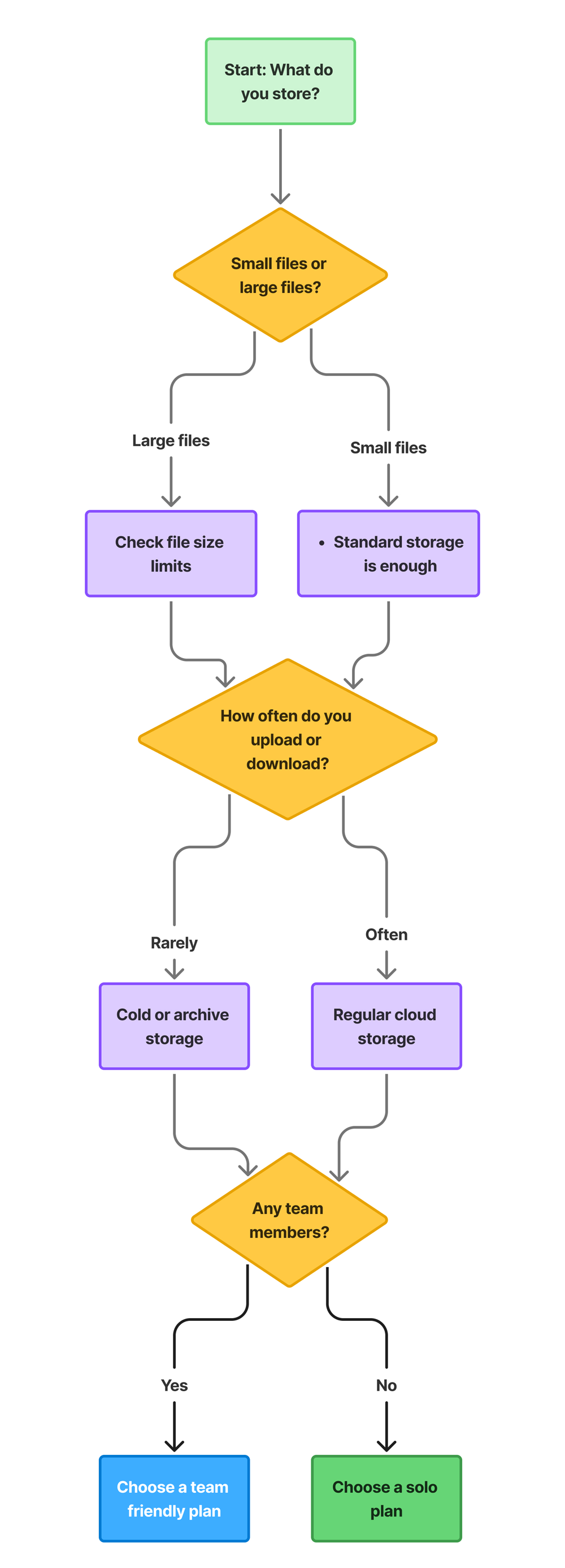
    • Check how often you upload or download files.
    • Separate daily-use storage from long-term backup needs.
    • Count how many users genuinely need access.
    • Verify device limits to avoid one-device traps.
    • Check file-size caps, especially if you work with big media files.
    • Look for hidden charges on downloads, sharing, or upgrades.
    • Make sure you can export or migrate your data without pain.

    Now, where will you get all these details in one place? Of course, the comparison sites. However, most comparison sites pretend every provider is amazing (they have the affiliate links, you know), but let’s be honest: half the “popular” platforms become expensive the moment you start using them properly. That’s why finding the most affordable cloud storage is less about brand hype and more about understanding your own habits. If you know what you upload, how often you share, and how many people touch your files, you’ll immediately spot which plans are genuinely cheap and which ones are waiting to ambush your wallet later.

    What Makes The Cheapest Cloud Storage (It’s Not Just Price Per GB)

    When people talk about the Cheapest Cloud Storage, they usually mean the service with the smallest monthly price on the pricing page. That number is only the teaser. Real affordability becomes visible once you start using the storage in your natural, messy way. Random uploads, rushed client folders, weekend backups and everyday sync activity all reveal the true cost. The lowest price tag does not matter if everything else around it quietly chips away at your budget.

    Another thing no one mentions is that cheap depends on how you work. If you upload once a week and mostly store documents, your ideal plan looks very different from someone who handles videos, design files, or heavy media assets. That is where inexpensive cloud storage becomes a personalised choice. A service that works beautifully for one business can feel painful for another simply because of file-size limits, device caps, or slow sharing options. These small restrictions have a very real impact.

    There is also the ecosystem trick. Some platforms look generous on day one, but then hide basic features behind paid upgrades. You try to share a link and suddenly a pop-up tells you to upgrade. You add one more device and the system will gently suggest that you upgrade again. It feels like buying a budget phone and realising the charger is sold separately. What looked like the Cheapest Cloud Storage slowly becomes a plan that constantly asks for a little more money.

    So when you look for truly inexpensive cloud storage, think beyond the headline price. Look at how many people touch your files, how often you download data, and how quickly your storage grows. Cheap storage stays cheap only when the plan fits your behaviour. If it does not, the monthly bill becomes your reminder that choosing on price alone was a bad idea.

    The Factors That Influence Your Actual Monthly Cost

    Your real cloud storage bill rarely matches the number you saw on the pricing page. The cost depends on how you actually use the service, not on the headline price. Even the Cheapest Cloud Storage can become expensive if these factors are ignored.

    • How often do you upload or download files?
    • How many users do you add to your workspace?
    • Whether clients frequently access shared links
    • How quickly does your total storage size grow?
    • Extra charges for higher speeds or priority sync
    • Limits that force you into paid upgrades sooner than expected

    If you keep these in mind, you can choose genuinely inexpensive cloud storage that stays affordable as your data grows, instead of getting surprised by hidden costs or forced upgrades.

    Quick Self-Assessment: What Type of Storage User Are You?

    Before comparing prices in search for the most affordable cloud storage, it helps to understand your own behaviour. This one step saves you from picking the wrong plan and getting forced into upgrades later. Your needs fall into a simple pattern based on how often you upload files, how many people access them and how fast your storage grows. Use this quick flow to understand where you stand.

    cheapest cloud storage

    Hidden Fees That Can Inflate Your Bill

    Most people choose the Cheapest Cloud Storage based on the upfront price, but the real shock comes later when the hidden charges start showing up. Some services quietly bill you for extra downloads, shared links that get too much traffic, faster sync speeds, or even basic collaboration features. These are never highlighted during sign-up, which is why so many users think they got a great deal until the first “unexpected activity charge” lands in their inbox.

    The trick is simple. Every platform makes money from what you do most. If you frequently download files, expect usage fees. If your clients open shared links often, expect traffic charges. If your storage grows quickly, expect auto-upgrades. What looked like inexpensive cloud storage becomes a layered, unpredictable cost. Understanding these hidden fees early means you can choose the services that are transparent and won’t surprise you later.

    Cheapest Cloud Storage Services in 2026

    1. Google Drive / Google One

    Perfect for anyone already using Gmail, Docs, and Photos. Simple, familiar, and smooth for everyday storage and sharing without any learning curve. Around $1.99/month for 100 GB and $9.99/month for 2 TB.

    Pros:

    • Very easy to use and integrate into daily work
    • Great for sharing and collaborating through Docs/Sheets
    • Decent free 15 GB starter space

    Cons:

    • Storage is shared with Gmail and Photos, so it fills faster
    • Not privacy-focused
    • Not ideal for very large media files long-term

    2. Microsoft OneDrive

    Best value for anyone using Word, Excel, Outlook or Windows. Storage feels “built-in” and works flawlessly across devices. Microsoft 365 Family gives 1 TB per person (up to 6 users) for a single monthly fee.

    Pros:

    • Excellent value if you already rely on Microsoft tools
    • Smooth sync on Windows and across devices
    • Reliable for teams using Office apps regularly

    Cons:

    • Storage tied to user accounts, not generic buckets
    • Less attractive if you don’t use Office apps
    • Collaboration is Office-heavy compared to Google

    3. Dropbox

    Known for rock-solid syncing and sharing. Great for creative teams, media-heavy work and constant file exchanges. Around $9.99/month for 2 TB on individual plans. Team plans start higher.

    Pros:

    • Best-in-class sync reliability
    • Excellent for daily sharing and teamwork
    • Strong integrations with third-party tools

    Cons:

    • Typically more expensive per TB
    • Business plans require multiple users
    • Not ideal for pure long-term backup

    4. pCloud

    Ideal for people who want to avoid monthly fees. Lifetime plans make pCloud one of the most cost-effective long-term options. Roughly $4.99/month for 500 GB or $9.99/month for 2 TB. Lifetime plans available.

    Pros:

    • Huge savings with a lifetime one-time payment
    • Optional client-side encryption
    • Great cross-platform support

    Cons:

    • Lifetime plans require a high upfront cost
    • Less mainstream brand recognition
    • Collaboration tools are basic

    5. IDrive

    Fantastic for backing up multiple devices, servers or NAS systems in one account. Designed more for backup than daily collaboration. Around $69–$79 per year for 5 TB (first-year discounts common).

    Pros:

    • Very strong backup features
    • Great value for multi-device protection
    • Large storage options at a low cost

    Cons:

    • Old-school interface
    • Not ideal for day-to-day team sharing
    • Better for backup than everyday file access

    6. Sync.com

    A privacy-first cloud storage option with end-to-end encryption. Great for sensitive documents and compliance-heavy industries. Team plans start around $6/user/month for 1 TB per user (annual billing).

    Pros:

    • Strong encryption and zero-knowledge privacy
    • Good sharing controls and version history
    • Affordable for secure cloud storage

    Cons:

    • Annual billing required for best rates
    • Fewer integrations than Google or Dropbox
    • Less known outside privacy-focused users

    7. Backblaze B2

    Super-cheap bulk storage for backups and archives. Ideal when you store a lot and don’t need fancy collaboration features. About $6 per TB per month for raw storage.

    Pros:

    • Cheapest per-TB pricing in the market
    • Great for large archives and long-term data
    • Simple predictable pricing

    Cons:

    • Not beginner-friendly
    • No “drive-like” interface
    • Not suitable for daily file collaboration or sharing
    • Comparison Snapshot: Pricing, Limits, and Key Features

    Disclaimer:

    Prices may change. Please check the official websites of the above-mentioned service providers for the latest rates. Infogion is not responsible for any pricing updates or variations.

    When to Choose Archive Storage Over Regular Storage

    Archive storage makes sense when you have files that are important but rarely used. Old client deliveries, project folders you are done with, raw footage, past-year financials or bulky media dumps do not belong in your everyday workspace. Keeping these inside regular plans is wasteful when inexpensive cloud storage options exist specifically for long-term parking.

    It also helps you control costs more effectively. Regular storage charges you for convenience, speed, and frequent access. Archive storage removes those premiums and gives you far lower pricing for the same data. If you access these files only a few times a year, choosing the cheapest cloud storage tier designed for archival use can cut your costs dramatically.

    Archive storage is also the best choice when your priority is simply retention. Compliance documents, contracts, backups, audit files, and old creative assets can live safely in an archive tier without slowing down your main storage. This keeps your active workspace clean and efficient while your historical data stays protected at a fraction of the cost.

    Also Read: infogion’s Guidelines on using AI for Startups

    How to Avoid Vendor Lock-In

    Vendor lock-in usually happens when all your files, sharing habits, and workflows get tied so tightly to one provider that moving out feels painful. The goal is to keep your data portable so you can switch to the cheapest cloud storage or any other service whenever you need, without chaos.

    • Keep your files in standard formats like PDF, MP4, CSV, JPG
    • Avoid features that only work inside one provider’s ecosystem
    • Maintain a periodic export or backup of all critical folders
    • Use third-party sync tools instead of provider-only utilities
    • Keep team workflows flexible instead of being tied to one platform’s automation
    • Review your storage size every quarter, so migration never becomes overwhelming

    Practical Tips to Keep Your Storage Bill Low

    Start by cleaning your storage every month. Delete duplicates, old drafts and files you know you will never touch again. Most people pay for extra space simply because they never organise their folders. A quick 10-minute cleanup can delay an upgrade for months.

    Next, push non-essential files into archive tiers or cheaper buckets. Regular storage is for active work, not for forgotten backups or last year’s client videos. Moving the dead weight out of your main drive is the simplest DIY trick to stay within the inexpensive cloud storage plans.

    Keep an eye on sharing habits. Large shared folders, auto-sync from every device and random uploads from apps quietly eat space. 

    Turn off anything you do not use, limit auto-backups to essentials and review your shared links once in a while. Small fixes make a big difference.

    Final Recommendation Framework (Choose in 30 Seconds)

    No overthinking. No spreadsheets. Just pick what matches your style and move on.

    • If you want the cheapest cloud storage with zero learning curve → choose Google Drive.
    • If your entire workflow runs on Word, Excel or Outlook → choose OneDrive.
    • If you need rock-solid syncing and constant file sharing → choose Dropbox.
    • If you want long-term savings with one upfront payment → choose pCloud.
    • If your goal is pure backup across many devices → choose IDrive.
    • If privacy and encryption matter more than anything → choose Sync.com.
    • If you need bulk storage for huge archives → choose Backblaze B2.

    Done. Pick the one that matches your behaviour and forget the rest.

    Conclusion

    Cloud storage is only expensive when you choose it blindly. Once you understand your habits and match them with the right plan, finding the cheapest cloud storage becomes simple. Keep your active files in regular storage, move old stuff to archive tiers, avoid hidden upgrades and pick a service that fits the way you work. Do that, and your storage stays affordable, predictable and quietly efficient in the background while you focus on running your business.

  • 10 AI Marketing Content Tools That Turn the Painstaking Process Into a Smooth Workflow

    10 AI Marketing Content Tools That Turn the Painstaking Process Into a Smooth Workflow

    AI marketing content concepts are reshaping how brands approach personalization at scale. Audiences now expect tailored messaging, but producing individualized content across channels has long been a high-cost, high-effort challenge. Traditional pipelines such as manual copywriting, design cycles, and endless revisions can’t keep up with the demand for relevance. The result? Generic campaigns that underperform. With AI marketing content, lean teams can now generate, adapt, and distribute campaign assets rapidly, affordably, and with greater contextual fit. What was once a luxury for enterprise-scale budgets is now accessible to smaller teams through intelligent tools built for automation, variation, and delivery.

    Building a Scalable Stack for AI Marketing Content Delivery

    AI marketing content only works when there’s a system behind it. Teams that succeed don’t just use automation tools; they also utilize them effectively. They build a flow where user data informs the content, variations happen quickly, and feedback improves results. Most setups follow four working layers of planning.

    Audience Intelligence

    It begins with thorough business planning and a detailed understanding of your audience. That means more than just demographics. You need behavior patterns, purchase history, preferences, and even timing signals. CRM data, browsing habits, and campaign responses all feed into this layer.

    Clearer inputs lead to more relevant content. Without this foundation, even the most intelligent AI will fall short of its potential.

    Content Intelligence

    This is where content gets generated. The AI marketing content platform transforms briefs and audience data into usable marketing assets, including text, visuals, or a combination of both. But it’s not just about output. The system must understand tone, purpose, and format.

    You don’t want generic text. You want a product description tailored to a specific buyer or a headline that aligns with their intent. This layer does that work.

    Variation and Adaptation

    One campaign should never mean one version. At this stage, the AI marketing content system adapts the base content to different users, platforms, or regions. The headline changes for social media, the CTA shifts for returning users, and the visuals align with local preferences.

    Instead of creating something from scratch each time, you build upon what already works.

    Delivery and Feedback

    Once the content is ready, it must be delivered through the appropriate channels. Email, web, ads – each platform has its context. This layer handles that, while also collecting performance data. If a message performs well, it gets reused or scaled. If not, the system adjusts. The goal is steady improvement with minimal manual effort.

    AI marketing content

    15 Tools Powering Scalable Marketing Content

    Phrasee
    Phrasee utilizes AI to craft email subject lines and copy that align with your brand voice and consistently perform better over time. It analyzes past campaign data to suggest phrasing that improves open rates and clicks. Large email teams benefit the most, especially those running frequent or automated campaigns. This AI marketing content tool reduces the guesswork in A/B testing and helps standardize quality at scale.
    Pricing: Custom enterprise pricing. Expect mid-five figures annually for full-scale usage.

    Persado
    Persado specializes in crafting emotionally resonant marketing language. It doesn’t just generate copy; it selects words and tones based on what historically drives action for each audience. It’s often used by retail, finance, and telecom brands for high-volume campaigns where conversion uplift justifies the investment. The platform maps content to emotional triggers, including urgency, trust, and curiosity.
    Pricing: Enterprise-only. Reports suggest contracts starting at $ 100,000 per year for full access.

    Read our post covering Authoritative Guidelies on Digital Transformation using AI

    Creatopy
    Creatopy is a creative automation tool designed for fast ad production. You set up a design template once, input your product data or messaging, and generate multiple ad sizes or variants in just minutes. It’s useful for marketing teams that need consistent, brand-aligned visuals across campaigns, regions, or products.
    Pricing: Starts at $36/month for individuals. Business plans starting at $290/month, including automation features.

    Rephrase.ai
    Rephrase.ai turns your script into a personalized video using photorealistic AI avatars. You can insert names, locations, or products into each video to make it feel personal. This AI marketing content tool is ideal for product introductions, direct outreach, or festive greetings on a large scale, especially when traditional video production is not feasible.
    Pricing: Paid plans start from approx. $25 per video. Custom pricing for enterprise-level personalization.

    Movio
    Movio helps create short AI videos using avatar presenters and voiceovers. It focuses on quick, simple outputs rather than realism. Marketers use it for explainers, promo intros, or social content when speed and consistency matter more than production polish.
    Pricing: Free plan available. Paid plans start from $30/month for 10 video credits.

    Smartly.io
    Smartly.io helps manage and scale paid advertising across platforms like Facebook, Instagram, TikTok, and Pinterest. It automates the creation and testing of ad variations using dynamic templates and live product feeds. This is especially useful for e-commerce brands and agencies that run high-volume campaigns across multiple markets.
    Pricing: Not public. Typically used by larger teams or agencies with monthly ad spends in the five- to six-figure range.

    Bynder
    Bynder is a digital asset management (DAM) platform that helps organize, version, and distribute brand-approved content. Its creative automation features enable teams to generate new visuals based on pre-approved templates, ensuring consistency while accelerating production. It’s ideal for companies managing multi-brand or multi-region content libraries.
    Pricing: Custom enterprise pricing. Generally starts at $450/month for small teams, with higher rates for advanced automation.

    Pencil
    Pencil generates ad creatives using AI trained on your previous campaigns. It learns from past successes and suggests new combinations of headlines, visuals, and formats to test. The tool is designed for performance marketers who want to iterate fast without sacrificing creative quality.
    Pricing: Starts at $79/month for basic plans. Higher-tier pricing includes more creative volume and integrations.

    Mailmodo
    Mailmodo is an email platform that supports interactive AMP emails and AI-powered content generation. It enables marketers to create dynamic elements within emails, such as forms or surveys, without requiring coding. AI features can also assist with crafting subject lines, creating content blocks, and personalizing content to enhance user engagement.
    Pricing: Free plan available. Paid plans start at $39/month with AMP support and automation features.

    Mutiny
    Mutiny personalizes website content in real time based on visitor profile, industry, or behavior. Marketing teams use it to tailor headlines, CTAs, or entire landing pages without involving developers. It’s designed for B2B companies looking to improve conversion rates through targeted messaging.
    Pricing: Not listed publicly and typically geared toward mid- to large-sized B2B teams with dedicated growth roles.

    Mistakes to Avoid When Scaling with AI

    • AI writes fast, but not always smart. If you’re publishing without reviewing, expect weird tone, off-brand lines, or flat messaging.
    • No segments, no signals, no structure? Then don’t expect the AI to produce anything worthwhile. You still need to do the groundwork.
    • Personalization works when it adds meaning. Dropping names or cities into every message doesn’t create real relevance; it just feels forced.
    • Trying to automate everything at once is a recipe for confusion. Start with one campaign or workflow, learn from it, and then expand your efforts.
    • Five tools with no connection slow you down more than they help. If your content, targeting, and delivery tools can’t talk to each other, you’re stuck patching gaps manually.
    • If your brand tone disappears in AI-generated content, it’s a problem. Always feed the system some guardrails, or the voice won’t sound like you.
    • Scaling without tracking is just noise. If you’re not watching what performs and feeding that back into the process, you’re wasting the most significant advantage AI gives you.

    Conclusion

    AI marketing content isn’t just about saving time. It’s about creating more innovative, faster campaigns that still feel personal without overspending. With the right tools, lean teams can now produce at the scale and quality that previously required large creative setups. The tech is ready. What matters is how you build your stack and what you do with it.

  • Predictive Maintenance in Manufacturing with 10 Battle Tested Companies. Does it work?

    Predictive Maintenance in Manufacturing with 10 Battle Tested Companies. Does it work?

    Predictive maintenance in manufacturing is no longer a future goal. It’s becoming a competitive necessity. In most factory environments, maintenance is still largely reactive. Equipment is repaired after it fails, often causing avoidable downtime and production delays. AI-powered systems are now helping manufacturers adopt a proactive approach, one that reduces disruptions, extends asset life, and enhances overall efficiency.

    Let’s explore how AI enables predictive maintenance, where it is currently being utilized, and which startups are helping manufacturers adopt this technology.

    What Is Predictive Maintenance in Manufacturing and Why Does It Matter

    Traditional maintenance follows two models: either fix it when it breaks or service it at fixed intervals. Both approaches carry risks. Waiting too long can lead to unexpected downtime. Servicing too early wastes time and resources.

    Predictive maintenance takes a different path. It uses real-time data from sensors, logs, and control systems to anticipate when equipment is likely to fail. AI models process this data to detect anomalies and flag early signs of wear or malfunction.

    For manufacturers, the impact is measurable. 

    Unplanned downtime can cost thousands per hour. With predictive maintenance, machines stay online longer, servicing is scheduled more efficiently, and parts are replaced only when needed. It enhances asset reliability and enables operations teams to transition from a firefighting mode to a controlled execution.

    Predictive maintenance in manufacturing is more than just a technical fix. It changes how factory floors are run. Maintenance teams spend less time reacting and more time planning. Instead of guessing when something might break, they know. And when machines run predictably, the rest of the operation follows.

    How AI Enables Predictive Maintenance in Manufacturing

    Predictive maintenance in manufacturing begins with raw data, but it’s AI that gives that data meaning. Machines in any manufacturing setup generate constant signals, including temperature, vibration, pressure, speed, current flow, and error logs. This data is already there. The challenge is knowing what to do with it.

    AI models can find patterns in this noise. They analyze how machines behave under normal conditions and learn what changes when a failure is imminent. These systems don’t need a technician to set rules. They learn from past data, such as successful runs, breakdowns, and partial failures, and then apply that knowledge in real-time.

    The goal is simple: to know when a part is likely to fail, before it does.

    For example, a motor might show a slight increase in vibration and heat weeks before it breaks down. A human might miss it. AI won’t. It picks up these shifts early and flags them, giving maintenance teams time to act before the problem becomes critical.

    Over time, the system improves. More data leads to better predictions, fewer false positives, and more confidence in every alert.

    AI doesn’t eliminate maintenance. It just makes it smarter. Instead of working with fixed schedules or waiting for things to go wrong, manufacturers can now maintain machines based on actual need. That’s a practical win, not just for uptime, but for cost and control.

    Examples of Predictive Maintenance in Real Manufacturing Setups

    Predictive maintenance in manufacturing isn’t just a lab concept. It’s already being used on real factory floors across industries. What connects these use cases is not high-end AI complexity, but simple, repeatable value.

    GE Power (Energy Sector)

    GE uses its Predix platform to predict failures in gas turbines, jet engines, and power plant equipment. In one documented case, Predictive maintenance in manufacturing led to a 25% reduction in maintenance costs and a 20% increase in equipment uptime. This has resulted in tens of millions of dollars in savings across industrial clients.

    Penske Truck Leasing (Fleet Maintenance)

    Penske tracks over 433,000 trucks, collecting more than 300 million data points per day. By using Catalyst AI, the company proactively identifies faults before they lead to breakdowns. The result is improved vehicle uptime, faster service response times, and fewer on-road failures, all of which are critical for logistics businesses.

    Siemens (Manufacturing Equipment)

    Siemens utilizes AI-driven predictive maintenance across its factories to monitor equipment, including motors, gearboxes, and pumps. In one project, they reduced unplanned downtime by up to 30% and improved maintenance planning efficiency across multiple plants.

    PRANA System by ROTEC (Power Plants)

    PRANA is deployed across over 100 power units in Russia and Central Asia. In monitored plants, incident rates were reduced by 16.8 times, while the average maintenance cost per plant decreased from $10.1 million to $1.8 million, a staggering reduction attributed to AI-enabled early intervention.

    Konux (Rail & Infrastructure)

    German rail operator Deutsche Bahn utilizes Konux sensors and AI to monitor rail switches, a significant source of delays. With over 3,500 switches tracked, the system predicts mechanical wear, enabling proactive servicing and reducing unexpected disruptions. Train punctuality and asset availability improved significantly.

    Pluto7 + Konnect Manufacturing (Ceramics & Electronics)

    Pluto7 collaborated with Konnect, a global ceramics and electronics manufacturer, to integrate Google Cloud–based ML models into their production lines. The result: $10 million in annual savings by reducing defect rates and anticipating process failures.

    ABB Ability (Industrial Automation)

    ABB’s smart sensors and AI tools are widely deployed in motors and pumps. In a case study, predictive analytics enabled a cement manufacturer to reduce downtime by 70% and extend motor life by 20%, while also decreasing the frequency of technician visits.

    Read our post on 7 Fail-proof Ways to Use AI for Business Planning That Work

    Predictive Maintenance in Manufacturing

    10 Startups Providing Predictive Maintenance Solutions for Manufacturers

    Augury

    Augury builds easy-to-install sensors that monitor vibration and sound. Small manufacturers love the fact that they don’t need a whole data team to make this work. Augury’s AI dashboard provides alerts when machines start to behave abnormally, enabling teams to act before a breakdown occurs. Clients have reported up to a 20× ROI simply by avoiding unexpected stoppages. Pricing is based on the number of assets you monitor. Start with just a few machines and scale up as needed. It’s a perfect system for Predictive maintenance in manufacturing for plants running pumps, motors, or packaging lines. Visit: https://www.augury.com

    Factory AI

    Factory AI is a lean predictive maintenance platform designed for manufacturers seeking simplicity and efficiency. It comes with a free starter plan, and the paid version starts at about $35 per user per month. Their analytics engine flags issues, such as bearing faults or excessive vibration, using real-time data from your machines. You get actionable alerts, not graphs that need decoding. Small teams have reported up to 70% fewer breakdowns and a 25% reduction in maintenance costs. Visit: https://f7i.ai

    Uptime AI

    Uptime AI offers sensor kits and an integrated AI engine that works well for factories with 50 to 200 machines. It’s a good fit if you want to avoid building a complex system from scratch. Their pilot plans start at under $10,000, and pricing scales based on the number of assets. Several clients have reported tens of thousands of dollars in savings through the early detection of failures and reduced downtime. Visit: https://www.uptimeai.com.

    Uptake

    Uptake is known for serving large industrial clients, but its technology also works for mid-sized plants. They offer modular pricing and pre-built failure models for over 800 types of equipment, so you don’t have to build anything from scratch. Customers can start small, just a few critical machines, and expand gradually. Expect setup within a few weeks, not months. Check here: https://www.uptake.com.

    Seebo

    Seebo helps process-heavy industries, such as cement, food, or chemical manufacturing, track their line performance using AI and simulation. It doesn’t require a data science team to run. Their digital twin approach enables you to simulate what’s likely to go wrong before it occurs. Seebo charges based on line complexity and usage, making it easier for mid-sized plants to plan budgets for implementing predictive maintenance in manufacturing. Visit for further details: https://www.seebo.com

    Senseye

    Senseye delivers a cloud-based monitoring solution that uses machine learning to predict asset failures. It works with over 30 types of industrial machines, from gearboxes to fans. Clients report improved uptime and fewer surprise stoppages without needing AI experts on staff. Licensing is modular; choose the assets to monitor and scale from there. One of their customers, who owns a mid-sized plastics plant, reportedly cut downtime by more than 30% in under six months. More details: https://www.senseye.io

    Braincube

    Braincube is a digital ecosystem designed to gather shop floor data and apply AI-based predictive maintenance in manufacturing models to detect failures. It supports dozens of KPIs on a single dashboard and exports alerts directly to your maintenance system. They typically work with plants that have 50 to 500 machines, helping teams avoid production slowdowns and reduce energy spikes. Users have reported up to 20% improvement in OEE. Visit: https://www.braincube.com

    Augmentir

    Augmentir offers an AI-driven maintenance assistant focused on frontline teams. It utilizes sensor data paired with voice and AR-guided workflows, enabling technicians to proactively resolve issues. Onboarding takes only a few days, and small plants see meaningful returns fast. As reported, a mid-tier electronics maker reduced emergency fixes by 40% in the first quarter. Check here: https://www.augmentir.com.

    Fero Labs

    Fero Labs delivers predictive models that are simple enough for on-site teams to adjust. It connects directly with sensors or control systems, monitors variables such as speed or pressure, and sends straightforward alerts. Their pay-per-machine model starts at under $200/month. Fero Labs claimed that a food manufacturing plant avoided costly production line stoppages, saving over $25,000 in a season. Check here: https://www.ferolabs.ai.

    Sight Machine

    Sight Machine ingests data from machines and ERP systems to monitor performance and predict failures across multiple plants. Users get easy reports and alerts via email or SMS. According to reports, a furniture manufacturer that utilized Sight Machine experienced a 15% reduction in unplanned downtime and improved scheduling accuracy across all lines within six months of implementing their predictive maintenance model in manufacturing processes. Check here: https://www.sightmachine.com.

    Predictive Maintenance Toolkit

    Everything you need to get started – startup comparison, ROI calculator, vendor scorecard, and implementation checklist in one handy PDF.

    Conclusion

    Predictive maintenance in manufacturing is no longer a futuristic concept; it’s an operational advantage that’s both practical and proven. Whether you’re running a mid-sized factory or scaling a multi-line setup, the right AI-driven tools can help you reduce unplanned downtime, save on maintenance costs, and extend equipment life. Start small, validate fast, and expand smart. That’s the way to make predictive maintenance work for your factory floor.

  • Best AI companies: Captivating Technologies Shaping our Tomorrow

    Best AI companies: Captivating Technologies Shaping our Tomorrow


    Stepping into the world of artificial intelligence, it’s clear that the best AI companies are pushing the envelope far beyond the ordinary. They’re not just using AI; they’re crafting the future with it—enhancing how we interact with technology, streamlining complex processes, and even foreseeing health challenges before they arise. These pioneers are at the forefront, embedding AI into the fabric of our daily existence and driving innovation across various sectors. From creating incredibly intuitive chatbots to developing predictive technologies that could save lives, their impact is profound. Let’s uncover the standout firms leading this AI revolution, transforming our world one algorithm at a time.

    OpenAI – One of the best AI companies

    OpenAI is an AI research lab and one of the best AI companies that specializes in creating advanced AI technologies aimed at benefiting humanity. Key developments include the GPT series, known for its capabilities in natural language processing, enabling a wide range of applications from task automation to creative content generation.

    • Focuses on safe and beneficial AI development.
    • Provides tools such as ChatGPT and DALL·E for various applications.

    Benefits include increased efficiency in business operations and creative industries.

    OpenAI offers tutorials and documentation for users on its website. The pricing model is usage-based, catering to individual developers and enterprises.

    DeepMind

    DeepMind, an artificial intelligence company, focuses on advancing AI research to solve complex problems and enhance various sectors, including healthcare and energy. Its work in AI, particularly in algorithms and machine learning, aims to create systems that can learn and make decisions, potentially revolutionizing how businesses operate by optimizing processes, improving decision-making, and innovating products and services.

    • Engages in AI research for ethical and practical applications.
    • Impact spans healthcare for predictive diagnostics to energy for reducing consumption.
    • Aims to drive efficiency and innovation in business and beyond.

    DeepMind’s approach to AI research not only pushes the boundaries of what AI can achieve but also offers practical applications that benefit society and industries. Like other best AI companies, developing advanced AI technologies, DeepMind demonstrates the potential of AI to contribute to significant advancements in various fields.

    NVIDIA

    NVIDIA, widely recognized for its graphics processing units (GPUs), has significantly expanded into artificial intelligence (AI), becoming a key player in the AI technology space. NVIDIA’s AI focuses on accelerating AI research and applications across various sectors, including gaming, automotive, healthcare, and more. By developing advanced GPU technology and AI platforms like CUDA for parallel computing and its comprehensive AI framework, NVIDIA enables faster and more efficient processing of complex AI algorithms and deep learning models.

    • Pioneers in GPU technology for AI and deep learning acceleration.
    • Offers platforms and tools for AI research, development, and deployment.
    • Facilitates advancements in autonomous vehicles, healthcare imaging, and more.

    NVIDIA’s contributions to AI are not just about hardware but also encompass software and platforms that support the AI ecosystem, making AI more accessible and scalable for researchers, developers, and enterprises. Their technology underpins some of the most advanced AI systems, driving innovations that can analyze vast datasets, enhance computer vision, and support real-time decision-making processes and thus, making it one of the best AI companies in the world.

    Google AI

    Google AI, undoubtedly one of the best AI companies, is Google’s dedicated branch for artificial intelligence, plays a pivotal role in shaping how businesses leverage technology. It focuses on enhancing Google’s suite of products with AI-driven capabilities, offering powerful tools for businesses in areas like data analytics, cloud computing, and automated customer service.

    Key aspects for businesses include:

    • Improving business operations through AI-enhanced Google products such as Google Cloud Platform and Google Analytics, which provide advanced data processing and insights.
    • Offering AI solutions that aid in automating and optimizing customer interactions, marketing strategies, and internal processes.
    • Providing cutting-edge AI research and tools that businesses can leverage for innovation, like TensorFlow for machine learning applications.

    Google AI’s commitment to ethical and accessible AI development means businesses can integrate these technologies confidently, knowing they are built on principles of transparency and responsibility. For business leaders and developers looking to explore Google AI’s offerings, their website provides detailed information on available tools, platforms, and case studies illustrating practical applications in various industries.

    Microsoft

    Microsoft’s AI strategies are seamlessly woven into its broad array of offerings, aiming to equip enterprises with smart solutions across different industries. Azure AI stands out by delivering an extensive range of AI services and tools, enabling companies to streamline workflows, extract valuable insights from data, and improve decision-making processes. This suite includes Azure Machine Learning for efficient model development and deployment, Azure Cognitive Services for integrating AI capabilities such as image and speech recognition into applications, and Azure Bot Services for crafting advanced AI-driven conversational interfaces.

    In terms of practical applications:

    • Enhanced Data Analysis: Microsoft’s AI solutions transform complex data sets into clear, actionable insights, helping businesses optimize operations and customize consumer interactions.
    • Leveraging Cloud Computing: With Azure AI, enterprises can deploy scalable AI functionalities effortlessly, bypassing the need for substantial infrastructure investment.
    • Boosting Productivity through Automation: Microsoft AI facilitates the automation of mundane tasks, ranging from handling customer service via AI bots to automating manufacturing processes, thereby cutting operational costs and elevating productivity.
    • Driving Product and Service Innovation: Microsoft encourages enterprises to innovate by providing the necessary AI tools for creating novel AI-integrated products and services, potentially unlocking new market opportunities and enhancing market competitiveness.

    With a commitment to ethical AI, Microsoft ensures the development and application of these technologies are conducted with responsibility, aligning with both corporate ethics and societal standards. By embedding AI into its platforms, Microsoft not only revolutionizes how businesses operate but also paves the way for the future interaction between enterprises, technology, and data.

    Read about: Free opensource AI tools

    IBM Watson

    IBM Watson is another from our list of best AI companies that embodies IBM’s forefront in AI, offering businesses tailored solutions that drive innovation, efficiency, and smarter decision-making. Watson’s suite, including AI-powered applications and data analysis tools, integrates seamlessly across various sectors such as healthcare, finance, and customer service. Its notable features, like natural language processing and machine learning, enable companies to automate complex processes, derive deep insights from data, and enhance customer interactions through conversational AI.

    Practically, IBM Watson helps businesses:

    • Automate customer support with AI chatbots, reducing response times and improving customer satisfaction.
    • Analyze vast datasets quickly, uncovering trends and patterns that inform strategic decisions.
    • Enhance operational efficiencies by predicting and preempting potential disruptions.

    IBM’s emphasis on trust and transparency in AI ensures Watson’s solutions are developed with ethical considerations, making it a reliable choice for businesses aiming to incorporate AI responsibly. Watson’s capabilities demonstrate IBM’s commitment to transforming enterprise operations through advanced AI.

    Amazon Web Services (AWS)

    Amazon Web Services (AWS) offers a robust suite of artificial intelligence (AI) services designed to empower businesses to innovate and scale their AI applications. With services like Amazon SageMaker, AWS simplifies the process of building, training, and deploying machine learning models, making it accessible for developers and data scientists to bring AI-driven solutions to market faster.

    Key AI services from AWS include:

    • Amazon SageMaker: A complete machine learning service to build, train, and deploy models quickly.
    • Amazon Lex: Powers conversational interfaces with the same deep learning technologies as Alexa.
    • Amazon Polly: Turns text into lifelike speech, allowing you to create applications that talk.
    • Amazon Rekognition: Provides deep learning-based image and video analysis for applications.
    • Amazon Textract: Automatically extracts text and data from scanned documents.
    • Amazon Comprehend: A natural language processing (NLP) service to uncover insights and relationships in text.
    • Amazon Translate: Enables language translation to produce more natural and accurate language in applications.
    • Amazon Personalize: Allows the creation of personalized recommendations for customers using machine learning.

    AWS AI services are designed for scalability, security, and ease of use, supporting a wide range of applications, from personalized recommendations to predictive analytics. By leveraging AWS’s AI services, businesses can accelerate their AI initiatives, improve operational efficiencies, and create more personalized customer experiences. AWS’s commitment to making AI more accessible and efficient positions it as a valuable platform for companies looking to harness the power of AI.

  • IT for Small Business: 7 Eye-Opening Aspects You Must Not Miss

    IT for Small Business: 7 Eye-Opening Aspects You Must Not Miss

    In a digital era dominated by technological giants, Gregory, a small business owner, navigated the challenging waters of Information Technology. Facing the need to adapt or become irrelevant, he embraced cloud services for their scalability and agility, turning what seemed overwhelming into a powerful asset for his business. He seeks the right IT for Small Business.

    Recognizing the critical importance of cybersecurity in an age of digital threats, Gregory fortified his business, protecting his and his customers’ data. With guidance from IT specialists, he harnessed data analytics, transforming it from a complex concept into a strategic tool, giving him an edge against larger competitors.
    Gregory’s journey, marked by adaptability and strategic foresight, became a story of triumph in a world where technology dictates the rules of the game. His success stands as a testament to the resilience and innovation inherent in the spirit of entrepreneurship.

    In the world of small business, where every resource counts and efficiency is key, adopting the right IT solutions can be a game-changer. For small business owners, the challenge often lies in identifying which technologies will deliver the most impact, without breaking the bank. This guide focuses on demystifying IT solutions for small businesses, presenting them as not just necessary for keeping up with competitors, but as powerful tools for growth, efficiency, and enhanced customer engagement.

    Tailored IT for Small Business, from cloud computing to data analytics, offer small businesses a chance to level the playing field with their larger counterparts. These technologies are no longer out of reach; they are accessible and can be crucial in optimizing operations, securing data, and expanding market reach. Here, I want to give small business owners clear, actionable insights on how to strategically integrate IT solutions into their business model. Whether you’re refining your existing operations or just starting to embrace IT in your business, I am sure this post can help you to use technology in a gainful manner.

    Assessing IT Needs: How Small Businesses Can Evaluate Their Specific IT Requirements

    In today’s fast-paced digital environment, small businesses must carefully evaluate their IT needs to ensure they align with business goals and operational efficiency. This assessment is crucial for identifying technology gaps, enhancing productivity, and preparing for future growth. Steps for Assessing IT Needs:

    • Determine Business Goals: Establish and understand how IT supports short-term and long-term objectives.
    • Audit Existing IT Infrastructure: Review current hardware, software, and network systems for any performance issues or technology gaps.
    • Analyze Workflows and Employee Technology Use: Examine current technology usage in daily operations to identify inefficiencies or unmet needs.
    • Evaluate Data Management and Security: Assess data storage, backup solutions, and cybersecurity measures for alignment with best practices.
    • Consider Cloud Computing Options: Investigate cloud services for scalability, cost-effectiveness, and operational improvements.
    • Compliance and Regulatory Requirements: Ensure IT solutions comply with industry regulations and legal standards.
    • Software and Application Needs Assessment: Identify essential and specialized software for business operations.
    • Budget and Return on Investment (ROI): Align IT investments with financial capacity and evaluate potential ROI through improved efficiency or capabilities.

    Budget-Friendly IT Solutions: Exploring Cost-Effective Options for Small Businesses

    IT for Small Business means finding budget-friendly IT solutions is essential to balance cost with functionality and efficiency. By exploring options like open-source and cloud-based solutions, businesses can leverage technology that fits their budget while still meeting their operational needs. Key Points for Budget-Friendly IT Solutions:

    • Open-Source Software: Utilize open-source software alternatives for tasks like word processing, spreadsheets, and even CRM systems. These solutions often have no licensing fees, reducing costs significantly.
    • Cloud-Based Services: Opt for cloud-based solutions for storage, applications, and infrastructure. These services usually operate on a subscription model, offering scalability and reducing the need for expensive hardware.
    • Bundled Software Packages: Look for software bundles that offer multiple applications at a discounted rate compared to purchasing them individually.
    • Freemium Models: Many software providers offer basic versions of their products for free, with the option to upgrade for more features. This allows for cost-effective scaling as your business grows.
    • Hardware Choices: Instead of investing in high-end hardware, consider more affordable or refurbished equipment that meets your current needs without overstretching your budget.
    • Negotiate with Vendors: Don’t hesitate to negotiate prices with IT vendors. Often, there’s room for discounts, especially when purchasing in bulk or committing to a long-term service agreement.
    • Shared Resources and Collaborations: Explore shared services or collaborative arrangements with other small businesses to reduce costs. Shared IT services can offer access to better resources at a fraction of the cost.
    • Regular Reviews and Adjustments: Continuously review and adjust your IT solutions to ensure they remain cost-effective. Avoid unnecessary upgrades or subscriptions that don’t add value to your business.

    Cloud Computing for Small Businesses: Harnessing SaaS, PaaS, and IaaS for Growth and Efficiency

    Cloud computing offers transformative possibilities for small businesses, providing scalable, efficient, and cost-effective IT solutions. Understanding the nuances of different cloud services like Software as a Service (SaaS), Platform as a Service (PaaS), and Infrastructure as a Service (IaaS) is essential for leveraging their full potential. Key Aspects of Cloud Computing for Small Businesses:

    Software as a Service (SaaS): SaaS revolutionizes software usage for small businesses by providing applications over the internet, eliminating installation and maintenance hassles. Its affordability, especially for essential tools like email, CRM, and project management, lies in its cost-effective subscription model, offering accessibility and user-friendliness without heavy upfront investments.

    Platform as a Service (PaaS): PaaS provides a cloud-based platform to develop, run, and manage applications without the complexity of building and maintaining infrastructure. This service is beneficial for businesses developing custom applications, offering speed, flexibility, and scalability.

    Infrastructure as a Service (IaaS): IaaS supplies essential computing resources (like servers and storage) over the internet. It offers a cost-effective and scalable alternative to physical infrastructure, ideal for businesses seeking to avoid the costs and complexities of on-premises servers.

    Cost-Effective Solutions: Cloud services typically use a pay-per-use model, significantly reducing capital expenditures. This model is an ideal option when it comes to IT for Small Business without a substantial initial investment.

    Scalability and Flexibility: Cloud computing provides the ability to scale IT resources up or down based on demand. This flexibility supports business growth and makes adapting to market changes more manageable.

    Enhanced Collaboration: With cloud computing, team members can access data and applications from anywhere, enhancing collaboration and remote working capabilities.

    Improved Data Security and Recovery: Cloud providers typically offer robust security features and data backup options, ensuring business data is protected and easily recoverable in case of incidents.

    Reduced IT Management Burden: Adopting cloud services reduces the need for extensive in-house IT management, allowing small business owners to focus more on core business activities and less on IT administration.

    Read: Comparison of the top four Cloud Platforms – Google Cloud, Amazon Web Services, Microsoft Azure, and IBM Cloud

    Cybersecurity Strategies: Essential steps in IT for Small Business Data and Network Security

    For small businesses, fortifying against cyber threats is not just important, it’s essential. As digital risks grow in complexity, a small business’s approach to cybersecurity must be both proactive and preemptive. The following practices are key to creating a robust cybersecurity framework:

    Consistent Software Updates: Regularly update all software, including operating systems and applications. Updates often contain critical security patches that protect against new threats.

    Robust Antivirus and Malware Defense: Deploy and maintain reliable antivirus and anti-malware solutions. Keeping these protections up-to-date is crucial in defending against evolving digital threats.

    Strong Passwords and Authentication: Implement robust password policies and consider multi-factor authentication. This is particularly vital for access to sensitive data and systems, adding an extra layer of security.

    Wi-Fi Network Security: Secure your Wi-Fi networks with encryption and keep them hidden. Regular password changes and avoiding default settings can prevent unauthorized network access.

    Regular Data Backup: Frequently back up data to secure locations, be it cloud-based platforms or external drives. This habit is a cornerstone of data recovery planning, safeguarding against data loss from cyber incidents.

    Cybersecurity Training for Employees: Conduct regular training sessions for employees, focusing on recognizing potential cyber threats like phishing and safe internet practices. Such education is a significant line of defense against security breaches caused by human error.

    Firewall Deployment: Firewalls are essential in regulating the traffic between your internal network and external sources, effectively blocking malicious attempts to access your systems.

    Controlled Access Management: Adopt the principle of least privilege, ensuring employees have only the necessary data access for their roles. Regularly review and modify access rights to maintain tight security control.

    Incident Response Preparedness: Develop a comprehensive incident response plan detailing actions for potential security breaches, including containment strategies, impact assessment, and communication protocols.

    Ongoing Security Evaluations: Engage in regular security audits to evaluate and refine your cybersecurity stance. This includes vulnerability assessments and penetration testing to identify and address potential security gaps.

    Data Management and Analytics: Cost-Effective IT Strategies for Small Businesses

    For small businesses, effective data management and analytics are crucial for making informed decisions without incurring substantial costs. Utilizing the right tools and strategies can help in efficiently storing, managing, and analyzing data, thus enabling smarter business moves based on actionable insights.

    Key Points for Effective Data Management and Analytics:

    Cloud-Based Storage Solutions: Opt for cloud storage services which offer scalable, secure, and affordable options for data storage and management. Providers like Google Drive, Dropbox, and Microsoft OneDrive often have free tiers suitable for small businesses.

    Open-Source Database Management Systems: Use open-source database platforms like MySQL or PostgreSQL for data storage and management. These systems are robust, flexible, and have no licensing fees.

    Data Cleaning and Organization Tools: Employ tools for data cleaning and organization to ensure data quality. Open-source tools like OpenRefine can help in cleaning messy data and transforming it for analysis.

    Business Intelligence (BI) Tools: Implement cost-effective BI tools for data analysis and visualization. Platforms like Tableau Public, Google Data Studio, and Microsoft Power BI offer free versions with comprehensive analytics capabilities.

    Spreadsheet Software: Utilize advanced features of spreadsheet software like Microsoft Excel or Google Sheets for data analysis. They are user-friendly and offer powerful tools for data manipulation and visualization.

    CRM Systems with Analytics: For customer data management, consider CRM systems that include analytics features. Open-source CRMs like SuiteCRM or cloud-based options with free plans like HubSpot can be effective.

    Educate and Train Staff: Invest in training for your team to leverage these tools effectively. Online courses and tutorials can be cost-effective ways to build skills in data management and analytics.

    Regular Data Audits: Conduct regular audits to assess data accuracy, completeness, and relevance. This helps in maintaining high-quality data and ensures that your analytics are based on reliable information.

    Automated Reporting Tools: Use automated reporting tools to regularly track and analyze key metrics. Many cloud-based analytics tools offer automation features that save time and reduce manual errors.

    Collaboration with Data Experts: If needed, collaborate with external data experts or consultants for specific projects. This can be a cost-effective way to get specialized expertise without hiring full-time staff.

    Enhancing Collaboration with Technology: Tools for Improved Teamwork and Communication

    In the modern workplace, effective collaboration and communication are key to productivity. Leveraging the right technology can significantly enhance these aspects. Here are some specific tools and platforms that facilitate better team collaboration and communication:

    Slack: A popular messaging platform designed for team communication, offering chat rooms, direct messaging, and integration with various productivity tools.

    Microsoft Teams: Part of the Office 365 suite, it provides a hub for team collaboration with chat, video meetings, and file sharing, integrated with Microsoft’s software ecosystem.

    Zoom: Known primarily for its video conferencing capabilities, Zoom also offers features like screen sharing, breakout rooms, and webinars, making it a versatile tool for virtual meetings.

    Trello: A visual project management tool that uses boards, lists, and cards to organize tasks and collaborate on projects. It’s great for tracking progress and assigning tasks.

    Asana: A project management tool that helps teams organize, track, and manage their work with features like task assignments, timelines, and progress tracking.

    Google Workspace: Includes a range of collaboration tools such as Gmail, Google Drive, Google Docs, and Google Meet, offering a comprehensive suite for communication and collaboration.

    Dropbox Business: Provides cloud storage solutions for teams, enabling file sharing, collaboration, and synchronization across devices.

    Basecamp: A project management and team communication software that centralizes project planning, task assignments, and progress tracking in one place.

    Monday.com: A customizable work operating system that enables teams to create their workflow apps for project management, CRM, and more.

    Cisco Webex: Offers video conferencing, cloud calling, and team collaboration features, suitable for businesses looking for a comprehensive communication solution.

    Digital Marketing for Small Businesses: Cost-Effective and Self-Managed Strategies

    Digital marketing presents an invaluable opportunity for small businesses to broaden their reach and enhance their brand presence in a cost-conscious way. By adopting self-directed digital marketing strategies, small businesses can achieve significant online visibility and deepen customer engagement, all within a manageable budget.

    Strategic Approaches in Digital Marketing for Small Businesses:

    Engaging Social Media Presence: Harness the power of social media platforms such as Facebook, Instagram, and LinkedIn. Regularly posting content, interacting with your audience, and leveraging targeted advertisements can amplify your visibility and foster deeper customer relationships.

    Content Marketing to Showcase Expertise: Develop and disseminate compelling content like blog posts, videos, and infographics. This approach not only showcases your expertise but also improves your search engine rankings and drives organic traffic to your website.

    Targeted Email Marketing: Cultivate an email subscriber list to connect with your customers. Utilize platforms like Mailchimp for managing email campaigns effectively and cost-efficiently. Regular newsletters and promotional emails keep your audience engaged and informed about your offerings.

    Optimizing for Search Engines (SEO): Enhance your website and content with SEO best practices. Focus on comprehensive keyword research and high-quality content creation, coupled with fundamental on-page SEO tactics, to elevate your visibility in search engine results.

    Google My Business for Local Reach: Establish and regularly update a Google My Business profile. This powerful, free tool is instrumental for local businesses aiming to improve their online footprint and visibility in local search results and on Google Maps.

    Future Trends in IT for Small Businesses: Embracing New Technologies

    Small businesses today stand at the cusp of a technological revolution, where emerging trends in IT are not just reshaping industries but also offering new avenues for growth and innovation. Artificial intelligence (AI) and machine learning (ML) are at the forefront of this change. Their increasing affordability and accessibility mean that even small businesses can now harness these technologies for everything from automating mundane tasks to gaining insightful data analytics for strategic decision-making. AI’s potential in customer relationship management and personalized marketing is particularly notable, enabling small businesses to offer tailored experiences that were once the domain of larger corporations.

    Read our post on Humanizing the AI: Creating Empathetic Chatbot Experiences

    The Internet of Things (IoT) is another transformative trend. It’s not just about connecting everyday objects to the internet; it’s about the data these devices generate and the insights this data can provide. For small businesses, IoT opens up new opportunities in operational efficiency and customer engagement. Imagine a local cafe that uses IoT sensors to manage inventory or a small retailer utilizing smart systems for enhanced in-store customer experiences. The potential is vast and varied, extending across different sectors.

    Looking ahead, blockchain technology also presents intriguing possibilities. Beyond its well-known financial applications, blockchain offers small businesses a way to enhance transparency, security, and efficiency in transactions and operations. From supply chain management to secure and transparent record-keeping, its potential uses are expansive. As these technologies continue to evolve, they will undoubtedly present small businesses with exciting opportunities to innovate and redefine their competitive edge in the market.