
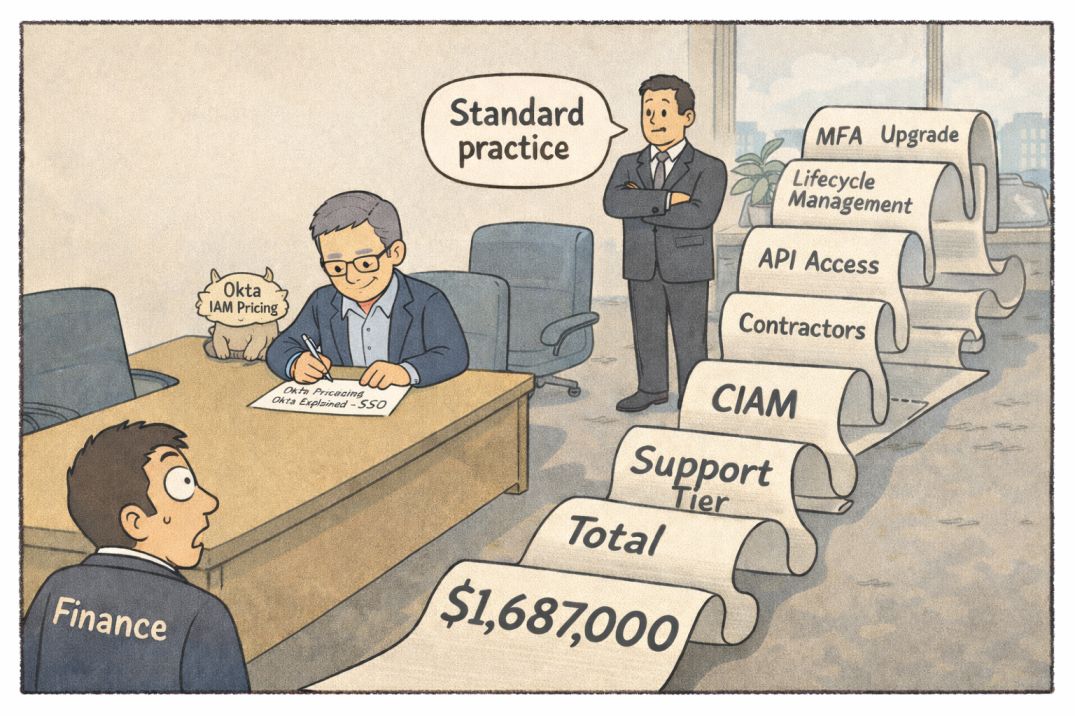
Okta pricing does not get confusing at the demo stage. It becomes confusing after that elusive approval. The CIO signs off on SSO consolidation. The CISO asks for stronger MFA. Finance builds a clean per-user model. Six months later, the IAM scope expands and the numbers no longer match the original estimate.
The base license is rarely the issue. The shift happens when lifecycle management becomes necessary, when API access needs to be secured, or when contractors, partners, and service accounts enter the identity perimeter. Each addition feels reasonable in isolation. Together, they change the IAM cost structure.
This analysis focuses on Okta IAM licensing, add-ons, and the points where costs escalate. The goal is simple: understand what you are really committing to before procurement turns it into a multi-year contract.
Okta IAM Pricing Decision Summary
Choose Okta if:
- You are standardizing IAM across 1,000+ employees.
- You need deep SaaS integration coverage out of the box.
- You can operationalize lifecycle automation, not just login consolidation.
- You are prepared for multi-module IAM expansion over time.
Delay or reconsider if:
- You only need basic SSO for under 300 users.
- Your joiner-mover-leaver process is still manual and fragmented.
- You do not have IAM governance maturity.
- You cannot absorb add-on licensing growth in years two and three.
Avoid both approval and rollout if:
- IAM ownership is unclear between security and IT.
- You are buying to satisfy audit optics rather than operational needs.
- Budget modeling assumes the base SSO license is the long-term cost.
Also read: Auth0 vs Okta for SaaS
What Okta IAM Pricing Actually Includes
Most of the cost confusions start because buyers think they are purchasing “Okta.” In reality, they are selecting from multiple IAM building blocks that are licensed separately and bundled differently.
Okta’s pricing structure is based on two aspects: workforce identity and customer identity. The core authentication feature is separate from lifecycle automation, API control and other access mechanisms available under the Okta umbrella.
The base tier solves login consolidation.
The higher tiers solve identity governance and risk reduction.
Below is a structural view of what is typically included versus what becomes an add-on.
| Component | Included in Base SSO Tier | Higher Tier or Add-On | Cost Driver | Operational Implication |
| Single Sign-On | Yes | N/A | Per user | Consolidates SaaS authentication |
| Adaptive MFA | Limited | Advanced MFA policies | Per user | Required when risk-based auth is mandated |
| Lifecycle Management | No | Add-on | Per user | Automates joiner-mover-leaver workflows |
| API Access Management | No | Add-on | Per API / user | Required for microservices and custom apps |
| Advanced Server Access | No | Add-on | Per server/user | SSH and infrastructure access control |
| Customer Identity (CIAM) | Separate SKU | Tiered | Per active user | External user authentication |
| Universal Directory | Basic | Advanced profile mastering | Per user | Identity data normalization |
| Support Plans | Standard | Premier / Enhanced | % of contract value | Faster SLA, priority response |
Structural Reality
The base SSO license addresses login friction. It does not solve identity lifecycle governance. Once automation, API security, and privileged access enter scope, you move into modular licensing.
Constraint: Okta IAM pricing scales with identity complexity, not just employee count.
Trade-off: Buying only SSO reduces upfront spend but increases manual operational overhead.
Cost driver: Each add-on is licensed per user or per active identity, compounding across the workforce, contractors and service accounts.
Decision implication: If your IAM roadmap includes automation and API protection within 12–24 months, model the full module stack now, not just SSO.
Okta IAM Pricing Tiers and Cost Variables
Okta IAM licensing looks linear on paper. In practice, cost behavior depends on how identities are counted, how modules are layered, and how quickly scope expands.
Two pricing mechanics matter:
- Workforce Identity is typically licensed per named user per month.
- Customer Identity is typically licensed per monthly active user.
The difference between named users and active users becomes material once scale increases or usage fluctuates.
| Pricing Dimension | Workforce IAM | Customer IAM (CIAM) | Cost Sensitivity | Escalation Trigger |
| Licensing Model | Per named user | Per monthly active user | High | Identity count growth |
| Core Tier | SSO | Basic authentication | Moderate | MFA enforcement |
| Mid Tier | SSO + MFA | Social login + MFA | High | Risk-based policies |
| Advanced Tier | SSO + MFA + Lifecycle | Advanced CIAM features | Very high | Automation dependency |
| API Access | Add-on | Add-on | High | Microservices adoption |
| Support | % of contract | % of contract | Medium | Uptime sensitivity |
Variables That Control Total IAM Spend
Okta IAM pricing increases the moment identity volume changes. If your workforce grows from 800 to 1,200 users, you are not just adding licenses. You are expanding MFA enforcement, provisioning workflows and audit exposure. In Okta’s model, every additional identity compounds licensing and operational dependency.
Okta pricing also shifts when security requirements tighten. Many organizations start with basic SSO and limited MFA. Once leadership mandates universal MFA, device-based policies, or stricter conditional access, the base tier is rarely sufficient.
That transition often requires moving into higher Okta bundles or adding separately licensed modules.
The largest escalation takes place when automation and external access come to the party! As soon as HR drives provisioning, Okta Lifecycle Management becomes necessary.
When partners, vendors, or customers require authentication, Okta Customer Identity licensing applies, which follows a different pricing structure.
Okta Pricing Explained: Where Costs Escalate in Real Deployments
Okta pricing rarely escalates because of one big decision. It escalates through a series of “reasonable” expansions that accumulate over 18 to 36 months.
The first expansion is almost always MFA standardization. A pilot may start with optional MFA for privileged users. Once audit or cyber insurance requirements mandate MFA for all employees, the licensing tier changes. In Okta IAM pricing, that typically means moving beyond entry-level SSO.
The second escalation point is Lifecycle Management. Many organizations begin with manual provisioning supported by helpdesk workflows. As employee count grows or compliance pressure increases, automated joiner-mover-leaver processes become mandatory. Okta Lifecycle Management is licensed separately, and it scales per user. At 1,500 users, that add-on is no longer minor.
The third cost driver appears when engineering pushes for API protection and service-to-service authentication. Okta API Access Management is not included in basic bundles. Microservices architectures, internal platforms, and custom apps create demand for it. This is where IAM spends moves from workforce IT into application architecture.
External identities introduce a different escalation curve. When partners, distributors, or customers need authentication, Okta Customer Identity pricing applies. This is often based on monthly active users, not named employees. A consumer-facing portal can quickly outgrow workforce IAM spend.
Also read Slack vs Microsoft Teams: Where Control, Compliance and Cost Collide
Year 2 IAM Cost Multiplier
Most Okta deployments look stable in year one. Escalation typically begins in year two when:
- MFA becomes mandatory across all users
- HR integration goes live
- External identities are onboarded
- Dev teams demand API security
Constraint: Okta pricing scales with identity surface area, not just employee count.
Trade-off: Containing IAM scope reduces cost but increases manual operational risk.
Decision implication: If your roadmap includes automation, API security, or external users, budget for the full Okta IAM stack upfront instead of approving it incrementally.
What Breaks First at Scale in Okta IAM
Okta Pricing Explained is not just about what you pay. It is about what starts hurting when usage grows.
The first thing that slips is access control. As more apps are added, more roles are created. Teams request quick fixes. Temporary access becomes permanent. Reviews take longer. Audits get harder. Okta works fine. The process around it does not.
Next comes identity count creep. Full-time employees are easy to track. Contractors, vendors, interns, and shared accounts are not. Each one is licensable in Okta. Headcount looks stable. Identity count keeps rising.
Then integration fatigue sets in. At 20 or 30 apps, SSO is manageable. Cross 100 apps, especially with internal tools, and IAM becomes an ongoing project work. Engineering time increases. API Access Management often enters the picture.
Finally, dependency builds quietly. Once HR onboarding, server access, and API security all run through Okta, replacing it is no longer simple. It touches too many systems.
If you do not control access requests and identity sprawl today, scaling Okta will expose the gaps and increase cost at the same time.
Procurement & Contract Reality in Okta IAM Pricing
Okta Pricing Explained is not just about feature tiers. Okta IAM pricing changes materially during negotiation and renewal. The first quote reflects list logic. The final contract reflects leverage, timing, scope clarity, and how disciplined your roadmap is. Most cost mistakes happen here, not in technical design.
Key commercial realities:
- Discounts are tied to user volume and term length. Three-year commitments improve unit pricing but reduce flexibility if identity count shrinks or architecture changes.
- Okta IAM pricing becomes harder to unwind once add-ons are bundled. Expanding from SSO into MFA, Lifecycle Management, and API Access Management increases total contract value quickly.
- Auto-renewal clauses can reset leverage. If renewal notice windows are missed, pricing often reverts closer to list or loses negotiated concessions.
- Support tiers scale as a percentage of contract value. As Okta becomes critical infrastructure, pressure builds to upgrade support. That compounds the total expense.
- License true-ups occur when identity counts exceed contracted thresholds. Contractors and external users often trigger these unexpectedly.
Negotiate Okta IAM pricing against your expected three-year identity expansion, not your current SSO footprint.
When NOT to Buy Okta IAM
Okta Pricing Explained is incomplete without disqualification. Okta is strong in enterprise IAM. It is not always the right first step.
Do not choose Okta if:
- You have under 100 employees and only need basic SSO. The cost and operational overhead will outweigh the benefit.
- Your joiner-mover-leaver process is still manual and undocumented. Buying advanced IAM before fixing process discipline creates confusion, not control.
- You do not have a clear identity owner. If security, IT, and HR are not aligned, Okta becomes a political system, not an operational one.
- Your application stack is still unstable. If you are frequently changing SaaS platforms or internal tools, heavy IAM integration may create rework.
- Budget tolerance is short-term. Okta IAM pricing is predictable but not minimal. It works best when viewed as infrastructure, not a tactical purchase.
Okta assumes governance maturity.
Buying early improves control but increases structural cost.
If you need lightweight login consolidation only, consider delaying full Okta IAM deployment until identity governance is ready.
Okta IAM Pricing FAQs
What is the simplest way to estimate Okta IAM pricing without vendor numbers?
Start with three variables: total named workforce users, expected add-ons (MFA, Lifecycle, API), and support tier. Your cost is not “SSO price × users.” It is “bundle + add-ons + support %” across the identities you cannot avoid licensing.
Is Okta IAM pricing per employee or per login?
Workforce Okta IAM pricing is typically per named user, not per login. CIAM is usually based on monthly active users. This distinction matters if you have large external populations or seasonal usage spikes.
Why do Okta IAM deals look cheap in year one and expensive later?
Year one is often scoped as SSO plus basic MFA. Later, lifecycle automation, stronger policies, API protection, and external identities enter scope. Okta pricing expands as IAM becomes part of HR workflows and application architecture.
Which add-on most commonly changes Okta IAM pricing?
Lifecycle Management and advanced MFA are common escalation points because they become operationally required. API Access Management becomes relevant when custom apps and microservices expand.
How does support affect Okta IAM pricing?
Support upgrades are typically priced as a percentage of total contract value. As you add modules, the support cost rises even if the support tier stays the same.
What identity types usually get missed in Okta IAM pricing models?
Contractors, vendors, interns, shared accounts, and service accounts. These are often the identities that inflate counts and trigger true-ups.
When does Okta CIAM become a separate budget problem?
When external monthly active users grow faster than the workforce headcount. CIAM growth can outpace workforce IAM spend quickly, especially in partner or customer portals.
Let’s find out what sits inside base licensing and what typically requires expansion.
| Capability | Included in Base Workforce Tier | Requires Higher Tier or Add-On | Cost Impact | When It Becomes Mandatory |
| Single Sign-On | Yes | No | Low | SaaS consolidation phase |
| Basic MFA | Often limited | Yes for advanced policies | Medium | Audit or insurance pressure |
| Adaptive / Risk-Based MFA | No | Yes | Medium to High | Zero trust adoption |
| Lifecycle Management | No | Yes | High | HR-driven provisioning |
| Universal Directory (Advanced) | Limited | Yes | Medium | Profile mastering needs |
| API Access Management | No | Yes | High | Microservices or custom apps |
| Advanced Server Access | No | Yes | High | SSH and infra access control |
| Customer Identity (CIAM) | Separate SKU | Tiered | Variable | Partner or customer portals |
| Support Upgrade | Standard only | Yes | % of total contract | Business-critical IAM |
Now, Let’s see how Okta IAM pricing behaves over time.
Okta IAM Pricing Mechanics & Escalation Triggers
| Pricing Dimension | Workforce IAM | Customer IAM | What Drives Increase | Escalation Risk |
| Licensing Model | Per named user | Per monthly active user | Identity growth | High |
| User Expansion | Headcount growth | Portal traffic growth | Hiring a contractor use | High |
| Security Expansion | MFA enforcement | Step-up auth | Audit mandates | Medium |
| Automation | Lifecycle add-on | Registration workflows | HR integration | High |
| Dev Integration | API add-on | OAuth expansion | Internal app growth | High |
| Support Tier | % of contract | % of contract | SLA sensitivity | Medium |
| Renewal | Negotiated | Negotiated | Term expiration | High |
Identity growth compounds cost even if the feature scope stays constant.
Bundling lowers per-user price but increases total contract value.
Okta IAM pricing should be modeled against identity growth and architecture expansion, not just current headcount.
Conclusion
Okta Pricing Explained is not about the base SSO rate. It is about how Okta IAM pricing expands as identity volume, security mandates, and automation requirements grow. If you treat IAM as infrastructure and model a three-year scope expansion upfront, Okta can be predictable and defensible. If you approve only the entry tier and expand later under pressure, cost and lock-in accelerate.